
【鸿蒙原生应用实战】第二篇:装备库页面——分类筛选与数据驱动UI
【鸿蒙原生应用实战】第二篇:装备库页面——分类筛选与数据驱动UI
前言
上一篇我们完成了项目搭建和首页开发。本篇将进入 App 的核心功能模块——装备库(GearPage)。
装备库是户外爱好者最常用的功能,它需要:
- 以列表形式展示所有装备
- 支持按类别筛选(穿着、露营、炊具、工具等)
- 展示各类别的重量统计
- 提供维护提醒和季节装备推荐
本文包含完整代码实现和 ArkTS 开发技巧,建议打开编辑器对照学习。
一、页面结构总览
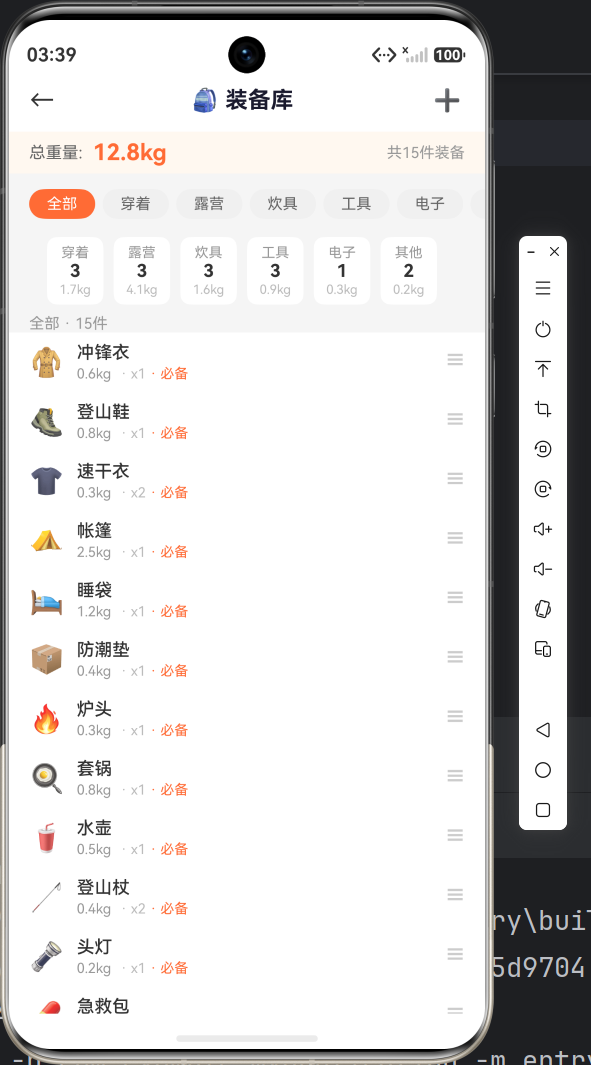
装备库页面是一个 纵向滚动 + 横向筛选 的复合布局:
┌──────────────────────────────────────┐
│  ←  🎒 装备库          ➕  (导航栏)   │
├──────────────────────────────────────┤
│  总重量: 12.8kg        共15件装备    │  ← 重量概览
├──────────────────────────────────────┤
│  [全部] [穿着] [露营] [炊具] ...     │  ← 类别筛选(横向滚动)
├──────────────────────────────────────┤
│  穿着 3件  露营 3件  炊具 3件 ...    │  ← 分类摘要(横向滚动)
├──────────────────────────────────────┤
│  全部 · 15件                         │
│  ┌──────────────────────────────────┐│
│  │ 🧥 冲锋衣   0.6kg · x1 · 必备 ☰ ││  ← 装备列表
│  │ 🥾 登山鞋   0.8kg · x1 · 必备 ☰ ││
│  │ ...                              ││
│  ├──────────────────────────────────┤│
│  │ 🔧 维护提醒                      ││  ← 维护提醒卡片
│  │ 🧥 冲锋衣 → 需做防水处理          ││
│  │ 🥾 登山鞋 → 鞋底磨损,建议更换    ││
│  ├──────────────────────────────────┤│
│  │ 🌤️ 季节装备推荐                  ││  ← 四季推荐
│  │ [❄️冬季] [🌸春季] [☀️夏季] [🍁秋季] ││
│  ├──────────────────────────────────┤│
│  │ 💡 出行前检查 → 生成打包清单      ││  ← 快捷入口
│  └──────────────────────────────────┘│
└──────────────────────────────────────┘
二、数据模型定义
2.1 Gear 接口
每条装备记录的数据结构:
interface Gear {
  id: number;          // 唯一标识
  name: string;        // 装备名称
  category: string;    // 分类:穿着/露营/炊具/工具/电子/其他
  weight: string;      // 重量,如 "0.6kg"
  quantity: number;    // 数量
  isEssential: boolean; // 是否必备
  icon: string;        // Emoji 图标
}
2.2 模拟数据
我们在 loadGears() 中初始化了 15 件装备数据,覆盖 6 个类别:
loadGears(): void {
  this.gears = [
    { id: 1,  name: '冲锋衣',   category: '穿着', weight: '0.6kg',  quantity: 1, isEssential: true,  icon: '🧥' },
    { id: 2,  name: '登山鞋',   category: '穿着', weight: '0.8kg',  quantity: 1, isEssential: true,  icon: '🥾' },
    { id: 3,  name: '速干衣',   category: '穿着', weight: '0.3kg',  quantity: 2, isEssential: true,  icon: '👕' },
    { id: 4,  name: '帐篷',     category: '露营', weight: '2.5kg',  quantity: 1, isEssential: true,  icon: '⛺' },
    { id: 5,  name: '睡袋',     category: '露营', weight: '1.2kg',  quantity: 1, isEssential: true,  icon: '🛌' },
    { id: 6,  name: '防潮垫',   category: '露营', weight: '0.4kg',  quantity: 1, isEssential: true,  icon: '📦' },
    { id: 7,  name: '炉头',     category: '炊具', weight: '0.3kg',  quantity: 1, isEssential: true,  icon: '🔥' },
    { id: 8,  name: '套锅',     category: '炊具', weight: '0.8kg',  quantity: 1, isEssential: true,  icon: '🍳' },
    { id: 9,  name: '水壶',     category: '炊具', weight: '0.5kg',  quantity: 1, isEssential: true,  icon: '🥤' },
    { id: 10, name: '登山杖',   category: '工具', weight: '0.4kg',  quantity: 2, isEssential: true,  icon: '🦯' },
    { id: 11, name: '头灯',     category: '工具', weight: '0.2kg',  quantity: 1, isEssential: true,  icon: '🔦' },
    { id: 12, name: '急救包',   category: '工具', weight: '0.3kg',  quantity: 1, isEssential: true,  icon: '💊' },
    { id: 13, name: '充电宝',   category: '电子', weight: '0.3kg',  quantity: 1, isEssential: false, icon: '🔋' },
    { id: 14, name: '防晒霜',   category: '其他', weight: '0.1kg',  quantity: 1, isEssential: false, icon: '🧴' },
    { id: 15, name: '垃圾袋',   category: '其他', weight: '0.05kg', quantity: 3, isEssential: false, icon: '🗑️' }
  ];
}
数据设计思路:
- 用
category字段做分类,而非分多个数组——便于扩展 isEssential标记必备装备,UI 上显式展示- 重量用字符串
"0.6kg"而非纯数字——更符合展示需求
三、核心状态管理
@Component
struct GearPage {
  @State gears: Gear[] = [];                 // 全量装备数据
  @State categories: string[] = ['全部', '穿着', '露营', '炊具', '工具', '电子', '其他'];
  @State selectedCategory: string = '全部';   // 当前选中的分类
  @State totalWeight: string = '12.8kg';      // 总重量
}
三个 @State 变量各自驱动不同区域的 UI:
gears→ 装备列表渲染selectedCategory→ 筛选器高亮 + 列表过滤totalWeight→ 顶部概览
当 selectedCategory 改变时:
- 筛选器按钮的高亮自动更新
getGearByCategory()的返回值自动变化- 装备列表自动重新渲染
—— 这就是数据驱动 UI 的核心:你只需要修改状态,框架负责更新界面。
四、分类筛选实现
4.1 分类筛选器(横向滚动)
@Builder buildCategoryFilter() {
  Scroll() {
    Row() {
      ForEach(this.categories, (cat: string) => {
        Column() {
          Text(cat)
            .fontSize(12)
            .fontColor(this.selectedCategory === cat ? '#FFFFFF' : '#666666')
            .padding({ left: 14, right: 14, top: 5, bottom: 5 })
            .backgroundColor(this.selectedCategory === cat ? '#FF6B35' : '#F0F0F0')
            .borderRadius(14)
        }
        .margin({ right: 6 })
        .onClick(() => { this.selectedCategory = cat; })  // ← 更新状态
      }, (cat: string) => cat)
    }
    .padding({ left: 16 })
  }
  .scrollable(ScrollDirection.Horizontal)
  .height(40).margin({ top: 4 })
}
关键细节:
- 外层
Scroll+scrollable(ScrollDirection.Horizontal)实现横向滚动 - 选中态通过三目运算符
this.selectedCategory === cat ? 'A' : 'B'实现 - 点击修改
selectedCategory即可触发全量 UI 更新
4.2 分类摘要(横向卡片)
在筛选器下方,展示每个分类的装备数量和重量:
@Builder buildCategorySummary() {
  Scroll() {
    Row() {
      ForEach(this.categories.filter(c => c !== '全部'), (cat: string) => {
        const count = this.gears.filter(g => g.category === cat).length;
        if (count > 0) {
          Column() {
            Text(cat).fontSize(11).fontColor('#999999')
            Text(count.toString()).fontSize(14).fontWeight(FontWeight.Bold).fontColor('#333333')
            Text(this.getCategoryWeight(cat)).fontSize(10).fontColor('#BBBBBB').margin({ top: 1 })
          }
          .padding({ left: 10, right: 10, top: 6, bottom: 6 })
          .backgroundColor('#FFFFFF').borderRadius(8).margin({ right: 8 })
        }
      }, (c: string) => c)
    }
    .padding({ left: 16, right: 16, top: 6 })
  }
  .scrollable(ScrollDirection.Horizontal)
  .height(60)
}
注:这里的 ForEach 在 ArkTS 严格模式下,需要确保要遍历的数组是一个定义了类型的变量。我们将 filter 结果直接放在 ForEach 中时,要确保类型可推断。
4.3 数据过滤方法
getGearByCategory(): Gear[] {
  if (this.selectedCategory === '全部') return this.gears;
  return this.gears.filter((g: Gear) => g.category === this.selectedCategory);
}

getCategoryWeight(cat: string): string {
  const filtered = cat === '全部'
    ? this.gears
    : this.gears.filter(g => g.category === cat);
  let total = 0;
  for (let i = 0; i < filtered.length; i++) {
    const w = filtered[i].weight;
    total += parseFloat(w.replace('kg', ''));
  }
  return total.toFixed(1) + 'kg';
}
注意:parseFloat('0.6kg'.replace('kg', '')) 的结果是 0.6。这里把重量字符串转成数字做累加,再转回带单位的字符串。
五、装备列表项
5.1 单行装备组件
@Builder buildGearItem(gear: Gear) {
  Row() {
    Text(gear.icon).fontSize(22)                         // Emoji 图标

    Column() {
      Text(gear.name)
        .fontSize(14).fontWeight(FontWeight.Medium).fontColor('#333333')
      Row() {
        Text(`${gear.weight}`).fontSize(11).fontColor('#999999')
        Text(` · x${gear.quantity}`)
          .fontSize(11).fontColor('#BBBBBB').margin({ left: 4 })
        if (gear.isEssential) {
          Text(' · 必备').fontSize(11).fontColor('#FF6B35')
        }
      }
      .width('100%').margin({ top: 2 })
    }
    .alignItems(HorizontalAlign.Start).margin({ left: 10 }).layoutWeight(1)

    Text('☰').fontSize(16).fontColor('#CCCCCC')         // 拖拽/更多暗示
  }
  .width('100%').padding({ left: 16, right: 16, top: 8, bottom: 8 })
  .backgroundColor('#FFFFFF')
}
布局分析:
[🧥]  [冲锋衣                  ] [☰]
      0.6kg · x1 · 必备
 ↑图标   ↑主标题+副标题            ↑更多
使用 layoutWeight(1) 让文字区域占据剩余空间,左右两端自动对齐。
5.2 列表渲染
Text(`${this.selectedCategory} · ${this.getGearByCategory().length}件`)
  .fontSize(12).fontColor('#999999').width('100%').padding({ left: 16, top: 8 })

ForEach(this.getGearByCategory(), (gear: Gear) => {
  this.buildGearItem(gear)
}, (gear: Gear) => gear.id.toString())
六、维护提醒模块
6.1 实现思路
维护提醒是一个四个格子的卡片,展示装备的保养状态:
@Builder buildMaintenanceReminder() {
  Column() {
    Text('🔧 维护提醒')
      .fontSize(15).fontWeight(FontWeight.Bold).fontColor('#1A1A2E').width('100%')

    Row() {
      // 第一排:冲锋衣 + 登山鞋
      Column() {
        Text('🧥 冲锋衣').fontSize(13).fontColor('#333333')
        Text('需做防水处理').fontSize(11).fontColor('#FF6B35').margin({ top: 2 })
        Text('已使用6个月').fontSize(10).fontColor('#BBBBBB').margin({ top: 1 })
      }
      .layoutWeight(1).alignItems(HorizontalAlign.Center)
      .padding(8).backgroundColor('#FFF8F0').borderRadius(8).margin({ right: 4 })

      Column() {
        Text('🥾 登山鞋').fontSize(13).fontColor('#333333')
        Text('鞋底磨损,建议更换').fontSize(11).fontColor('#E74C3C').margin({ top: 2 })
        Text('已使用18个月').fontSize(10).fontColor('#BBBBBB').margin({ top: 1 })
      }
      .layoutWeight(1).alignItems(HorizontalAlign.Center)
      .padding(8).backgroundColor('#FFF5F5').borderRadius(8).margin({ left: 4 })
    }
    .width('100%').margin({ top: 10 })

    Row() {
      // 第二排:帐篷 + 睡袋
      // ... 类似结构,背景色分别为 F0FFF0 和 FFF8F0
    }
    .width('100%').margin({ top: 6 })
  }
  .width('100%').padding(16)
  .backgroundColor('#FFFFFF').borderRadius(10)
  .margin({ top: 8, left: 16, right: 16 })
  .alignItems(HorizontalAlign.Start)
}
配色语义:
| 背景色 | 含义 | 示例 |
|---|---|---|
#FFF8F0 (浅橙) |
需要注意 | 需做防水处理 |
#FFF5F5 (浅红) |
紧急 | 鞋底磨损,建议更换 |
#F0FFF0 (浅绿) |
良好 | 状态良好 |
#FFF8F0 (浅橙) |
建议 | 建议晾晒 |
七、季节装备推荐
7.1 横向卡片
@Builder buildSeasonalGear() {
  Column() {
    Text('🌤️ 季节装备推荐')
      .fontSize(15).fontWeight(FontWeight.Bold).fontColor('#1A1A2E').width('100%')

    Scroll() {
      Row() {
        const seasonal: string[][] = [
          ['❄️ 冬季', '冲锋衣', '保暖层', '手套'],
          ['🌸 春季', '冲锋衣', '速干衣', '遮阳帽'],
          ['☀️ 夏季', '速干衣', '防晒霜', '驱虫剂'],
          ['🍁 秋季', '冲锋衣', '保暖层', '雨衣']
        ];

        ForEach(seasonal, (s: string[]) => {
          Column() {
            Text(s[0]).fontSize(12).fontWeight(FontWeight.Bold).fontColor('#333333')
            Text(s[1]).fontSize(11).fontColor('#666666').margin({ top: 4 })
            Text(s[2]).fontSize(11).fontColor('#666666').margin({ top: 2 })
            Text(s[3]).fontSize(11).fontColor('#666666').margin({ top: 2 })
          }
          .padding(10).backgroundColor('#FFFFFF').borderRadius(8).margin({ right: 8 })
        }, (s: string[]) => s[0])
      }
      .padding({ left: 4 })
    }
    .scrollable(ScrollDirection.Horizontal)
    .height(100).margin({ top: 8 })
  }
  .width('100%').padding(16)
  .backgroundColor('#FFFFFF').borderRadius(10)
  .margin({ top: 8, left: 16, right: 16 })
  .alignItems(HorizontalAlign.Start)
}
这里用了一个二维字符串数组来组织数据,每个子数组包含季节标题和三个推荐装备。配合横向 Scroll,用户可以左右滑动查看四季推荐。
八、组装 build 方法
build(): void {
  Column() {
    this.buildHeader()             // ← 顶部导航栏
    this.buildWeightSummary()      // ← 重量概览
    this.buildCategoryFilter()     // ← 分类筛选器
    this.buildCategorySummary()    // ← 分类摘要

    Scroll() {
      Column() {
        Text(`${this.selectedCategory} · ${this.getGearByCategory().length}件`)
          .fontSize(12).fontColor('#999999').width('100%').padding({ left: 16, top: 8 })

        ForEach(this.getGearByCategory(), (gear: Gear) => {
          this.buildGearItem(gear)
        }, (gear: Gear) => gear.id.toString())

        this.buildMaintenanceReminder()  // ← 维护提醒
        this.buildSeasonalGear()         // ← 季节推荐
        this.buildChecklistTip()         // ← 打包清单入口
      }
      .width('100%').padding({ bottom: 30 })
    }
    .scrollable(ScrollDirection.Vertical)
    .layoutWeight(1).width('100%')
  }
  .width('100%').height('100%').backgroundColor('#F5F5F5')
}
结构特点:
- 顶部有四个不可滚动区域(Header + 重量 + 筛选器 + 摘要)
- 下方是一个纵向 Scroll,内部包含装备列表 + 三个卡片模块
- 这种 “固定头部 + 滚动内容” 是移动端最常用的页面布局
九、开发要点总结
9.1 横向 Scroll 的坑
鸿蒙的横向 Scroll 需要同时设置:
Scroll() {
  Row() {
    // 子元素
  }
}
.scrollable(ScrollDirection.Horizontal)  // 指定方向
.height(xx)                               // 必须固定高度,不能用 layoutWeight
注意:横向 Scroll 必须指定高度,否则内容不会显示。
9.2 数据驱动的过滤逻辑
当我们点击分类时,发生了什么:
用户点击 "露营"
  → this.selectedCategory = '露营'
  → getGearByCategory() 返回新数组(已过滤)
  → ForEach 重新执行,渲染露营装备列表
  → 筛选器按钮颜色自动更新(三目运算)
  → 列表标题从 "全部 · 15件" 变为 "露营 · 3件"
这一切都是自动的,不需要手动操作 DOM 或调用刷新方法。
9.3 @Builder 参数传递
@Builder 可以携带参数(这点和 Flutter 的 Widget 函数类似):
@Builder buildGearItem(gear: Gear) {
  // 这里使用 gear 参数
}
调用时传递参数:
ForEach(this.gears, (gear: Gear) => {
  this.buildGearItem(gear)
}, ...)
十、问题与优化思考
10.1 当前设计的局限
- 数据硬编码:目前装备数据是写死在代码中的,实际应该从本地存储或远程 API 获取
- 无增删改功能:装备列表只能查看,不能添加、编辑或删除装备
- 无持久化:维护提醒的状态不是动态计算的,而是静态文案
10.2 后续可扩展方向
- 接入
@ohos.data.preferences实现本地存储 - 添加装备录入页面
- 实现拖拽排序(
onDrag/onDrop) - 接入云同步功能
总结
本篇我们完成了装备库页面的开发,涉及:
- ✅ 分类筛选器的实现与交互
- ✅ 横向滚动 Scroll 的正确用法
- ✅ 装备列表的数据驱动渲染
- ✅ 维护提醒和季节推荐卡片
下一篇我们将开发 装备详情页,学习路由传参、条件渲染和更复杂的 UI 布局!
项目信息:API 23 (compatible) / API 24 (target) | Stage 模型 | ArkTS
(完)

作为“人工智能6S店”的官方数字引擎,为AI开发者与企业提供一个覆盖软硬件全栈、一站式门户。
更多推荐

 0
0 0
0- 0


 已为社区贡献23条内容

所有评论(0)