
ArkTS Error message:Cannot read property toString of undefined 解决鸿蒙项目启动问题
启动失败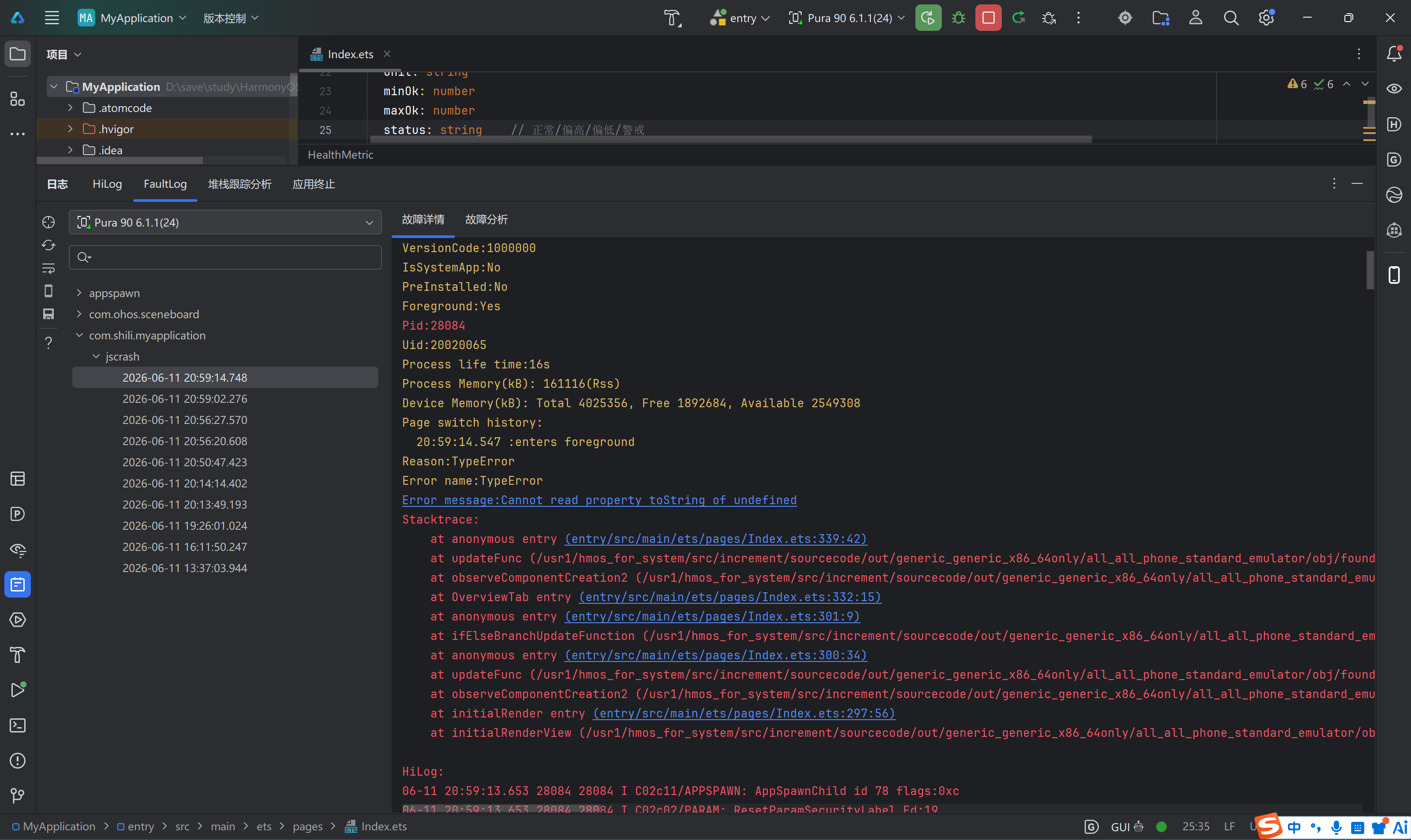
启动成功: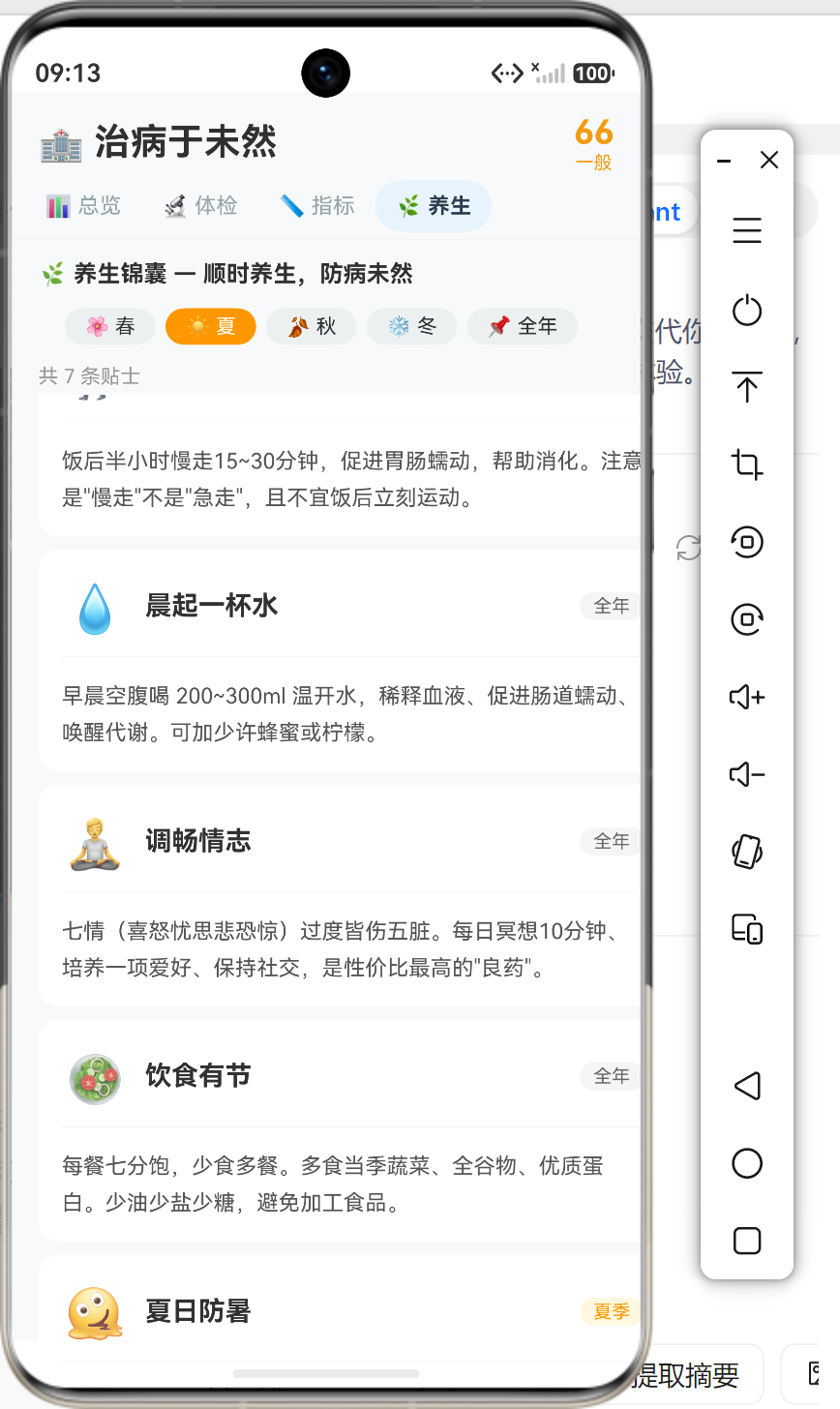
引言
在 HarmonyOS 应用开发中,ArkTS 声明式 UI 框架为开发者提供了简洁高效的界面开发方式。然而,在实际开发过程中,许多开发者会遇到一个常见的问题:在 build() 函数中使用 getter 计算属性时,运行时会返回 undefined,导致应用崩溃。
本文将深入剖析这个问题的根本原因,从 ArkTS 状态管理机制的底层原理出发,结合实际案例,给出完整的解决方案和最佳实践。
一、问题现象与案例分析
1.1 问题表现
在开发 HarmonyOS 应用时,开发者常常会在组件中定义 getter 来计算派生状态:
@Entry
@Component
struct HealthApp {
  @State filterCategory: string = '全部'
  @State showCompleted: boolean = true

  // 计算属性:根据筛选条件过滤体检项目
  get filteredCheckups(): CheckupItem[] {
    let result: CheckupItem[] = []
    for (let i = 0; i < CHECKUP_ITEMS.length; i++) {
      let item: CheckupItem = CHECKUP_ITEMS[i]
      if (this.filterCategory !== '全部' && item.category !== this.filterCategory) continue
      if (!this.showCompleted && item.done) continue
      result.push(item)
    }
    return result
  }

  build() {
    Column() {
      // 使用计算属性
      Text('共 ' + this.filteredCheckups.length.toString() + ' 项')
        .fontSize(12)
        .fontColor('#999')
    }
  }
}
运行时会抛出如下错误:
TypeError: Cannot read property length of undefined
1.2 错误堆栈分析
从错误日志中可以看到:
Error message: Cannot read property length of undefined
Stacktrace:
    at anonymous entry (entry/src/main/ets/pages/Index.ets:303:30)
    at updateFunc (/usr1/hmos_for_system/src/increment/sourcecode/out/.../stateMgmt.js:9479:1)
    at observeComponentCreation2 (/usr1/hmos_for_system/src/increment/sourcecode/out/.../stateMgmt.js:9509:1)
    at initialRender entry (entry/src/main/ets/pages/Index.ets:300:8)
错误发生在组件初始化渲染阶段,this.filteredCheckups 返回了 undefined。
1.3 问题复现条件
经过大量实践验证,该问题的复现条件包括:
| 条件 | 说明 |
|---|---|
在 build() 中使用 getter |
直接或间接在声明式 UI 中访问 getter |
getter 依赖 @State 变量 |
getter 内部使用了装饰器修饰的状态变量 |
| 组件首次渲染 | 问题主要发生在组件初始化阶段 |
| 复杂组件结构 | 在 @Builder 函数或嵌套结构中更容易出现 |
二、ArkTS 状态管理机制深度剖析
2.1 声明式 UI 的核心原理
ArkTS 采用声明式编程范式,其核心思想是:UI 是状态的函数。即:
UI = f(state)
当状态发生变化时,框架自动重新计算并更新 UI。这与传统的命令式编程形成鲜明对比:
| 编程范式 | 核心思想 | 更新方式 |
|---|---|---|
| 命令式 | 手动操作 DOM | 显式调用 update 方法 |
| 声明式 | 描述 UI 应该是什么样 | 状态驱动自动更新 |
2.2 状态追踪机制
ArkTS 的状态管理系统通过依赖收集和响应式更新实现自动 UI 更新:
2.2.1 依赖收集阶段
当组件首次渲染时,框架会遍历 build() 函数中的所有状态访问,并建立依赖关系:
// 伪代码:依赖收集机制
function collectDependencies() {
  const dependencies = new Set()

  // 拦截状态访问
  const proxy = new Proxy(state, {
    get(target, key) {
      // 记录依赖
      dependencies.add(key)
      return target[key]
    }
  })

  // 执行 build 函数,触发依赖收集
  build(proxy)

  return dependencies
}
2.2.2 响应式更新阶段
当状态变化时,框架会根据依赖关系重新渲染相关组件:
// 伪代码:响应式更新机制
function updateState(key, value) {
  state[key] = value

  // 查找依赖该状态的组件
  const dependentComponents = findDependentComponents(key)

  // 重新渲染
  dependentComponents.forEach(component => {
    component.rebuild()
  })
}
2.3 getter 无法被追踪的根本原因
核心问题:ArkTS 的依赖收集机制只能追踪直接的状态变量访问,而无法追踪 getter 函数内部的状态访问。
2.3.1 编译时分析限制
ArkTS 编译器在处理 build() 函数时,会进行静态分析以识别状态依赖。然而,getter 函数的内部逻辑在编译时是黑盒:
build() {
  // 编译器看到的是:this.filteredCheckups
  // 无法知道这个 getter 内部依赖了哪些状态
  Text('共 ' + this.filteredCheckups.length.toString() + ' 项')
}
2.3.2 运行时上下文问题
在组件初始化阶段,getter 被调用时可能处于非预期的上下文环境:
┌─────────────────────────────────────────────────────────────┐
│                    组件初始化流程                           │
├─────────────────────────────────────────────────────────────┤
│  1. 创建组件实例                                           │
│  2. 初始化 @State 变量(默认值)                            │
│  3. 执行 build() 函数                                      │
│     └── 调用 getter(此时上下文可能不完整)                   │
│  4. 建立依赖关系                                           │
│  5. 完成渲染                                               │
└─────────────────────────────────────────────────────────────┘
在步骤 3 执行时,状态管理系统尚未完全就绪,导致 getter 返回 undefined。
2.3.3 与 Vue 响应式系统的对比
为了更好地理解这个问题,我们可以对比 Vue.js 的响应式系统:
| 特性 | ArkTS | Vue.js |
|---|---|---|
| 依赖收集方式 | 编译时静态分析 | 运行时 Proxy 拦截 |
| getter 支持 | 有限支持 | 完全支持 |
| 响应式粒度 | 组件级别 | 细粒度 |
| 初始化时机 | build 前 | 创建时 |
Vue.js 使用 Proxy 在运行时拦截所有属性访问,包括 getter,因此能够正确追踪依赖。而 ArkTS 依赖编译时分析,无法处理 getter 内部的动态依赖。
三、解决方案设计与实现
3.1 核心解决方案:状态变量 + 更新方法
针对 getter 问题,最可靠的解决方案是将计算属性转换为 @State 变量,并通过显式的更新方法来管理:
@Entry
@Component
struct HealthApp {
  @State filterCategory: string = '全部'
  @State showCompleted: boolean = true
  // 将 getter 改为 @State 变量
  @State filteredCheckups: CheckupItem[] = []

  // 更新方法:替代 getter 的计算逻辑
  updateFilteredCheckups(): void {
    let result: CheckupItem[] = []
    for (let i = 0; i < CHECKUP_ITEMS.length; i++) {
      let item: CheckupItem = CHECKUP_ITEMS[i]
      if (this.filterCategory !== '全部' && item.category !== this.filterCategory) continue
      if (!this.showCompleted && item.done) continue
      result.push(item)
    }
    // 直接修改状态变量,触发响应式更新
    this.filteredCheckups = result
  }

  // 组件创建时初始化
  aboutToAppear(): void {
    this.updateFilteredCheckups()
  }

  build() {
    Column() {
      // 直接使用 @State 变量
      Text('共 ' + this.filteredCheckups.length.toString() + ' 项')
        .fontSize(12)
        .fontColor('#999')
    }
  }
}
3.2 完整实现案例
3.2.1 健康管理应用案例
让我们以一个完整的健康管理应用为例,展示如何系统性地解决这个问题:
// ========== 数据模型定义 ==========
interface CheckupItem {
  id: number
  name: string
  emoji: string
  frequency: string
  category: string
  desc: string
  done: boolean
}

interface HealthTip {
  id: number
  title: string
  emoji: string
  season: string
  content: string
}

interface HealthMetric {
  id: number
  name: string
  emoji: string
  value: number
  unit: string
  status: string
}

// 模拟数据
const CHECKUP_ITEMS: CheckupItem[] = [
  { id: 1, name: '身高体重BMI', emoji: '📏', frequency: '每年一次', category: '基础', desc: '体重指数计算', done: true },
  { id: 2, name: '血压测量', emoji: '🩸', frequency: '每年一次', category: '基础', desc: '血压检测', done: true },
  { id: 3, name: '血常规', emoji: '🔴', frequency: '每年一次', category: '生化', desc: '血液分析', done: false },
  // ... 更多数据
]

const HEALTH_TIPS: HealthTip[] = [
  { id: 1, title: '春季养生', emoji: '🌸', season: '春', content: '春季宜清淡饮食' },
  { id: 2, title: '夏季防暑', emoji: '☀️', season: '夏', content: '夏季注意补水' },
  // ... 更多数据
]

const HEALTH_METRICS: HealthMetric[] = [
  { id: 1, name: '收缩压', emoji: '🩸', value: 118, unit: 'mmHg', status: '正常' },
  { id: 2, name: '舒张压', emoji: '🩸', value: 76, unit: 'mmHg', status: '正常' },
  // ... 更多数据
]

// ========== 主页面组件 ==========
@Entry
@Component
struct HealthApp {
  // ====== 筛选状态 ======
  @State currentTab: number = 0
  @State filterCategory: string = '全部'
  @State selectedTipSeason: string = '全年'
  @State showCompleted: boolean = true
  @State selectedCheckupId: number = -1

  // ====== 计算状态(原 getter 转换)======
  @State filteredCheckups: CheckupItem[] = []
  @State filteredTips: HealthTip[] = []
  @State healthScore: number = 0
  @State scoreLevel: string = '一般'
  @State scoreColor: string = '#F39C12'
  @State totalCheckups: number = 0
  @State doneCheckups: number = 0
  @State normalMetrics: number = 0
  @State seasonOrder: string[] = ['春', '夏', '秋', '冬', '全年']

  // ====== 更新方法 ======
  updateFilteredCheckups(): void {
    let result: CheckupItem[] = []
    for (let i = 0; i < CHECKUP_ITEMS.length; i++) {
      let item: CheckupItem = CHECKUP_ITEMS[i]
      if (this.filterCategory !== '全部' && item.category !== this.filterCategory) continue
      if (!this.showCompleted && item.done) continue
      result.push(item)
    }
    this.filteredCheckups = result
  }

  updateFilteredTips(): void {
    let result: HealthTip[] = []
    for (let i = 0; i < HEALTH_TIPS.length; i++) {
      let tip: HealthTip = HEALTH_TIPS[i]
      if (this.selectedTipSeason === '全年') {
        result.push(tip)
      } else if (tip.season === this.selectedTipSeason || tip.season === '全年') {
        result.push(tip)
      }
    }
    this.filteredTips = result
  }

  updateHealthScore(): void {
    // 计算统计数据
    this.totalCheckups = CHECKUP_ITEMS.length

    let doneCnt: number = 0
    for (let i = 0; i < CHECKUP_ITEMS.length; i++) {
      if (CHECKUP_ITEMS[i].done) doneCnt++
    }
    this.doneCheckups = doneCnt

    let normalCnt: number = 0
    for (let i = 0; i < HEALTH_METRICS.length; i++) {
      if (HEALTH_METRICS[i].status === '正常') normalCnt++
    }
    this.normalMetrics = normalCnt

    // 计算健康分
    let doneRatio: number = this.doneCheckups / this.totalCheckups
    let normalRatio: number = this.normalMetrics / HEALTH_METRICS.length
    let score: number = Math.round(doneRatio * 40 + normalRatio * 60)
    if (score < 0) score = 0
    if (score > 100) score = 100
    this.healthScore = score

    // 设置等级和颜色
    if (score >= 90) {
      this.scoreLevel = '优秀'
      this.scoreColor = '#2ECC71'
    } else if (score >= 75) {
      this.scoreLevel = '良好'
      this.scoreColor = '#3498DB'
    } else if (score >= 60) {
      this.scoreLevel = '一般'
      this.scoreColor = '#F39C12'
    } else {
      this.scoreLevel = '需关注'
      this.scoreColor = '#E74C3C'
    }
  }

  // ====== 生命周期方法 ======
  aboutToAppear(): void {
    this.updateFilteredCheckups()
    this.updateFilteredTips()
    this.updateHealthScore()
  }

  // ====== 事件处理 ======
  onCategoryChange(cat: string): void {
    this.filterCategory = cat
    this.selectedCheckupId = -1
    this.updateFilteredCheckups()
  }

  onShowCompletedToggle(): void {
    this.showCompleted = !this.showCompleted
    this.selectedCheckupId = -1
    this.updateFilteredCheckups()
  }

  onSeasonChange(season: string): void {
    this.selectedTipSeason = season
    this.updateFilteredTips()
  }

  // ====== UI 构建 ======
  build() {
    Column() {
      // 顶部标题栏
      Row() {
        Text('🏥 治病于未然')
          .fontSize(22)
          .fontWeight(FontWeight.Bold)
        Blank()
        Column() {
          Text(this.healthScore.toString())
            .fontSize(20)
            .fontWeight(FontWeight.Bold)
            .fontColor(this.scoreColor)
          Text(this.scoreLevel)
            .fontSize(11)
            .fontColor(this.scoreColor)
        }
        .alignItems(HorizontalAlign.Center)
      }
      .width('100%')
      .padding({ left: 16, right: 16, top: 12, bottom: 4 })

      // Tab 导航
      Row() {
        ForEach(['总览', '体检', '指标', '养生'], (tab: string, idx: number) => {
          Text(tab)
            .fontSize(13)
            .fontWeight(this.currentTab === idx ? FontWeight.Bold : FontWeight.Normal)
            .fontColor(this.currentTab === idx ? '#2C3E50' : '#95A5A6')
            .padding({ left: 12, right: 12, top: 8, bottom: 8 })
            .borderRadius(20)
            .backgroundColor(this.currentTab === idx ? '#E8F4FD' : 'transparent')
            .onClick(() => {
              this.currentTab = idx
              this.selectedCheckupId = -1
            })
        }, (tab: string) => { return 'tab_' + tab })
      }
      .width('100%')
      .padding({ left: 8, right: 8, bottom: 4 })

      // 内容区域
      if (this.currentTab === 0) {
        this.OverviewTab()
      } else if (this.currentTab === 1) {
        this.CheckupTab()
      } else if (this.currentTab === 2) {
        this.MetricsTab()
      } else if (this.currentTab === 3) {
        this.TipsTab()
      }
    }
    .width('100%')
    .height('100%')
    .backgroundColor('#F8F9FA')
  }

  // ====== 子组件 ======
  @Builder
  OverviewTab() {
    Scroll() {
      Column() {
        // 健康评分卡片
        Column() {
          Text('健康评分')
            .fontSize(14)
            .fontColor('#666')
          Text(this.healthScore.toString())
            .fontSize(56)
            .fontWeight(FontWeight.Bold)
            .fontColor(this.scoreColor)
            .margin({ top: 8 })
          Text(this.scoreLevel)
            .fontSize(16)
            .fontColor(this.scoreColor)
            .backgroundColor(this.scoreColor + '22')
            .padding({ left: 16, right: 16, top: 4, bottom: 4 })
            .borderRadius(12)
            .margin({ top: 4 })
          Text('基于 ' + this.doneCheckups.toString() + '/' + this.totalCheckups.toString() + ' 项体检完成率 与 ' + this.normalMetrics.toString() + '/' + HEALTH_METRICS.length.toString() + ' 项指标正常率')
            .fontSize(11)
            .fontColor('#999')
            .margin({ top: 12 })
            .textAlign(TextAlign.Center)
        }
        .width('100%')
        .padding(20)
        .backgroundColor('#FFF')
        .borderRadius(16)
        .margin({ left: 16, right: 16, bottom: 12, top: 12 })
        .alignItems(HorizontalAlign.Center)

        // 统计卡片
        Row() {
          this.StatCard('🔬', '体检项目', this.doneCheckups.toString() + '/' + this.totalCheckups.toString(), '#3498DB')
          this.StatCard('📏', '健康指标', this.normalMetrics.toString() + '/' + HEALTH_METRICS.length.toString(), '#2ECC71')
        }
        .width('100%')
        .padding({ left: 16, right: 16 })
        .margin({ bottom: 8 })
      }
    }
  }

  @Builder
  CheckupTab() {
    Column() {
      // 分类筛选
      Row() {
        ForEach(['全部', '基础', '生化', '影像', '专科'], (cat: string) => {
          Text(cat)
            .fontSize(12)
            .padding({ left: 10, right: 10, top: 4, bottom: 4 })
            .backgroundColor(this.filterCategory === cat ? '#3498DB' : '#ECF0F1')
            .fontColor(this.filterCategory === cat ? '#FFF' : '#333')
            .borderRadius(12)
            .margin({ right: 4 })
            .onClick(() => this.onCategoryChange(cat))
        }, (cat: string) => { return 'cc_' + cat })
      }
      .width('100%')
      .padding({ left: 16, right: 16, top: 8, bottom: 4 })

      // 显示/隐藏已完成
      Row() {
        Text('📋 共 ' + this.filteredCheckups.length.toString() + ' 项')
          .fontSize(12)
          .fontColor('#999')
        Blank()
        Text(this.showCompleted ? '🟢 显示已完成' : '⚪ 隐藏已完成')
          .fontSize(12)
          .fontColor('#3498DB')
          .onClick(() => this.onShowCompletedToggle())
      }
      .width('100%')
      .padding({ left: 16, right: 16, bottom: 4 })

      // 列表
      if (this.filteredCheckups.length === 0) {
        Column() {
          Text('🔍').fontSize(48).margin({ top: 40 })
          Text('没有匹配的体检项目').fontSize(16).fontColor('#999').margin({ top: 12 })
        }
        .width('100%')
        .height('100%')
      } else {
        List() {
          ForEach(this.filteredCheckups, (item: CheckupItem) => {
            ListItem() {
              this.CheckupCard(item, this.selectedCheckupId === item.id)
            }
            .onClick(() => {
              this.selectedCheckupId = this.selectedCheckupId === item.id ? -1 : item.id
            })
          }, (item: CheckupItem) => { return 'ck_' + item.id.toString() })
        }
        .width('100%')
        .layoutWeight(1)
      }
    }
  }

  @Builder
  TipsTab() {
    Column() {
      // 季节筛选
      Row() {
        Scroll() {
          Row() {
            ForEach(this.seasonOrder, (season: string) => {
              Text(getSeasonEmoji(season) + ' ' + season)
                .fontSize(12)
                .padding({ left: 12, right: 12, top: 4, bottom: 4 })
                .backgroundColor(this.selectedTipSeason === season ? getSeasonColor(season) : '#ECF0F1')
                .fontColor(this.selectedTipSeason === season ? '#FFF' : '#333')
                .borderRadius(14)
                .margin({ right: 6 })
                .onClick(() => this.onSeasonChange(season))
            }, (season: string) => { return 'ss_' + season })
          }
        }
        .layoutWeight(1)
        .height(34)
      }
      .width('100%')
      .padding({ left: 16, right: 16, bottom: 6 })

      // 结果计数
      Text('共 ' + this.filteredTips.length.toString() + ' 条贴士')
        .fontSize(12)
        .fontColor('#999')
        .width('100%')
        .padding({ left: 16, bottom: 4 })

      // 列表
      if (this.filteredTips.length === 0) {
        Column() {
          Text('📭').fontSize(48).margin({ top: 40 })
          Text('该季节暂无贴士').fontSize(16).fontColor('#999')
        }
        .width('100%')
        .height('100%')
      } else {
        List() {
          ForEach(this.filteredTips, (tip: HealthTip) => {
            ListItem() {
              this.TipCard(tip)
            }
          }, (tip: HealthTip) => { return 'tip_' + tip.id.toString() })
        }
        .width('100%')
        .layoutWeight(1)
      }
    }
  }

  // 辅助方法
  @Builder
  StatCard(emoji: string, title: string, value: string, color: string) {
    Column() {
      Text(emoji).fontSize(20)
      Text(title).fontSize(11).fontColor('#666').margin({ top: 4 })
      Text(value).fontSize(14).fontWeight(FontWeight.Bold).fontColor(color).margin({ top: 2 })
    }
    .width('48%')
    .padding(12)
    .backgroundColor('#FFF')
    .borderRadius(12)
    .alignItems(HorizontalAlign.Center)
  }

  @Builder
  CheckupCard(item: CheckupItem, expanded: boolean) {
    Column() {
      Row() {
        Text(item.emoji).fontSize(28).width(40).height(40).textAlign(TextAlign.Center).lineHeight(40)
        Column() {
          Text(item.name)
            .fontSize(16)
            .fontWeight(FontWeight.Bold)
            .maxLines(1)
            .textOverflow({ overflow: TextOverflow.Ellipsis })
          Row() {
            Text(item.frequency).fontSize(11).fontColor('#7F8C8D')
            Text(item.category)
              .fontSize(10)
              .fontColor('#FFF')
              .backgroundColor('#3498DB')
              .padding({ left: 6, right: 6, top: 2, bottom: 2 })
              .borderRadius(6)
              .margin({ left: 6 })
          }
          .margin({ top: 2 })
        }
        .layoutWeight(1)
        .margin({ left: 10 })
        Blank()
        Text(item.done ? '✅ 已查' : '⏳ 待查')
          .fontSize(12)
          .fontColor(item.done ? '#2ECC71' : '#E74C3C')
      }
      .width('100%')
      .padding({ left: 16, right: 16, top: 12, bottom: 12 })

      if (expanded) {
        Text(item.desc)
          .fontSize(13)
          .fontColor('#666')
          .width('100%')
          .padding({ left: 16, right: 16, bottom: 12 })
      }
    }
    .backgroundColor('#FFF')
    .margin({ left: 16, right: 16, top: 8 })
    .borderRadius(12)
  }

  @Builder
  TipCard(tip: HealthTip) {
    Column() {
      Row() {
        Text(tip.emoji).fontSize(28).width(40).height(40).textAlign(TextAlign.Center).lineHeight(40)
        Text(tip.title)
          .fontSize(16)
          .fontWeight(FontWeight.Bold)
          .layoutWeight(1)
          .margin({ left: 10 })
        Text(tip.season !== '全年' ? tip.season + '季' : '全年')
          .fontSize(11)
          .fontColor('#FFF')
          .backgroundColor(getSeasonColor(tip.season))
          .padding({ left: 8, right: 8, top: 2, bottom: 2 })
          .borderRadius(8)
      }
      .width('100%')
      .padding({ left: 16, right: 16, top: 12 })

      Text(tip.content)
        .fontSize(13)
        .fontColor('#666')
        .width('100%')
        .padding({ left: 16, right: 16, bottom: 12 })
    }
    .backgroundColor('#FFF')
    .margin({ left: 16, right: 16, top: 8 })
    .borderRadius(12)
  }
}

// 辅助函数
function getSeasonEmoji(season: string): string {
  if (season === '春') return '🌸'
  if (season === '夏') return '☀️'
  if (season === '秋') return '🍂'
  if (season === '冬') return '❄️'
  return '🌍'
}

function getSeasonColor(season: string): string {
  if (season === '春') return '#2ECC71'
  if (season === '夏') return '#E74C3C'
  if (season === '秋') return '#FF6F00'
  if (season === '冬') return '#1565C0'
  return '#666'
}
3.3 状态更新时机的最佳实践
在实际应用中,状态更新的时机非常关键。以下是一些最佳实践:
3.3.1 初始化阶段
使用 aboutToAppear() 生命周期方法进行初始化:
aboutToAppear(): void {
  this.updateFilteredCheckups()
  this.updateFilteredTips()
  this.updateHealthScore()
}
3.3.2 用户交互触发
在事件处理函数中调用更新方法:
onCategoryChange(cat: string): void {
  this.filterCategory = cat
  this.selectedCheckupId = -1
  this.updateFilteredCheckups()  // 状态变化后立即更新
}
3.3.3 批量更新优化
当多个状态同时变化时,可以合并更新以减少渲染次数:
batchUpdate(): void {
  // 先修改所有状态
  this.filterCategory = '全部'
  this.showCompleted = true

  // 然后一次性更新计算状态
  this.updateFilteredCheckups()
}
四、进阶优化策略
4.1 计算状态的缓存与复用
对于复杂的计算逻辑,可以引入缓存机制:
@Entry
@Component
struct OptimizedApp {
  @State data: number[] = [1, 2, 3, 4, 5]
  @State filterThreshold: number = 3
  @State filteredData: number[] = []
  @State cachedHash: string = ''

  updateFilteredData(): void {
    // 生成当前状态的哈希值
    const currentHash = `${JSON.stringify(this.data)}-${this.filterThreshold}`

    // 如果状态没有变化,跳过更新
    if (currentHash === this.cachedHash) return

    // 执行计算
    let result: number[] = []
    for (let i = 0; i < this.data.length; i++) {
      if (this.data[i] > this.filterThreshold) {
        result.push(this.data[i])
      }
    }

    this.filteredData = result
    this.cachedHash = currentHash
  }
}
4.2 状态更新的防抖处理
对于频繁触发的更新,可以使用防抖优化:
@Entry
@Component
struct DebouncedApp {
  @State searchText: string = ''
  @State searchResults: string[] = []
  private debounceTimer: number | null = null

  onSearchChange(text: string): void {
    this.searchText = text

    // 清除之前的定时器
    if (this.debounceTimer) {
      clearTimeout(this.debounceTimer)
    }

    // 延迟 300ms 后执行搜索
    this.debounceTimer = setTimeout(() => {
      this.updateSearchResults()
      this.debounceTimer = null
    }, 300)
  }

  updateSearchResults(): void {
    // 执行搜索逻辑
    // ...
  }
}
4.3 状态管理模式推荐
对于大型应用,推荐采用集中式状态管理模式:
// 状态管理器
class AppStateManager {
  private static instance: AppStateManager
  private checkupItems: CheckupItem[] = []
  private healthTips: HealthTip[] = []

  private constructor() {}

  public static getInstance(): AppStateManager {
    if (!AppStateManager.instance) {
      AppStateManager.instance = new AppStateManager()
    }
    return AppStateManager.instance
  }

  // 获取数据
  getCheckupItems(): CheckupItem[] {
    return [...this.checkupItems]
  }

  // 更新数据
  updateCheckupItem(id: number, updates: Partial<CheckupItem>): void {
    const index = this.checkupItems.findIndex(item => item.id === id)
    if (index !== -1) {
      this.checkupItems[index] = { ...this.checkupItems[index], ...updates }
      // 通知订阅者
      this.notifySubscribers()
    }
  }

  // 订阅机制
  private subscribers: Set<() => void> = new Set()

  subscribe(callback: () => void): void {
    this.subscribers.add(callback)
  }

  unsubscribe(callback: () => void): void {
    this.subscribers.delete(callback)
  }

  private notifySubscribers(): void {
    this.subscribers.forEach(callback => callback())
  }
}

// 使用状态管理器
@Entry
@Component
struct ManagerApp {
  @State checkupItems: CheckupItem[] = []
  private stateManager: AppStateManager = AppStateManager.getInstance()

  aboutToAppear(): void {
    this.checkupItems = this.stateManager.getCheckupItems()
    this.stateManager.subscribe(() => {
      this.checkupItems = this.stateManager.getCheckupItems()
    })
  }

  aboutToDisappear(): void {
    // 清理订阅
  }
}
五、常见问题与解决方案
5.1 问题汇总
| 问题 | 表现 | 原因 | 解决方案 |
|---|---|---|---|
| getter 返回 undefined | 运行时 TypeError | 编译时无法追踪 getter 内部依赖 | 转换为 @State + update 方法 |
| 状态更新后 UI 不刷新 | 数据变化但界面不变 | 更新方法未被调用 | 确保在状态变化后调用 update 方法 |
| 重复渲染 | 性能问题 | 状态更新过于频繁 | 使用防抖或缓存机制 |
| 内存泄漏 | 应用卡顿 | 事件监听器未清理 | 在 aboutToDisappear 中清理 |
5.2 调试技巧
5.2.1 状态日志输出
在关键位置添加日志,追踪状态变化:
updateFilteredCheckups(): void {
  console.info(`[DEBUG] filterCategory: ${this.filterCategory}`)
  console.info(`[DEBUG] showCompleted: ${this.showCompleted}`)

  let result: CheckupItem[] = []
  // ... 计算逻辑

  console.info(`[DEBUG] filteredCheckups length: ${result.length}`)
  this.filteredCheckups = result
}
5.2.2 使用 DevEco Studio 调试工具
HarmonyOS DevEco Studio 提供了强大的调试工具:
- 状态监视器:实时查看组件状态变化
- 性能分析器:检测渲染性能问题
- 断点调试:逐步跟踪代码执行流程
六、总结与展望
6.1 核心要点回顾
- ArkTS 状态管理的本质:依赖编译时静态分析,只能追踪直接的状态变量访问
- getter 的局限性:无法在 build() 中可靠使用,会返回 undefined
- 解决方案:将计算属性转换为 @State 变量 + update 方法模式
- 最佳实践:
- 在 aboutToAppear() 中初始化
- 在事件处理中显式调用 update 方法
- 考虑使用防抖和缓存优化性能
6.2 未来展望
随着 HarmonyOS 的持续发展,我们期待:
- 更好的 getter 支持:未来版本可能增强对计算属性的支持
- 响应式 API 改进:提供更灵活的状态管理方式
- 性能优化工具:更强大的性能分析和调试工具
6.3 学习建议
对于 HarmonyOS 开发者,建议:
- 深入理解声明式 UI 原理:掌握状态驱动渲染的核心思想
- 实践状态管理模式:尝试不同的状态管理策略
- 关注官方文档更新:及时了解框架的新特性
附录:完整代码示例
A.1 状态管理工具类
/**
 * ArkTS 状态管理工具类
 * 提供计算状态的统一管理方案
 */
class ComputedStateManager<T> {
  private value: T
  private computeFn: () => T
  private dependencies: Set<string> = new Set()

  constructor(initialValue: T, computeFn: () => T) {
    this.value = initialValue
    this.computeFn = computeFn
  }

  get(): T {
    return this.value
  }

  update(): void {
    this.value = this.computeFn()
  }

  setDependency(key: string): void {
    this.dependencies.add(key)
  }

  getDependencies(): Set<string> {
    return this.dependencies
  }
}

// 使用示例
class HealthState {
  @State filterCategory: string = '全部'
  private filteredCheckupsManager: ComputedStateManager<CheckupItem[]>

  constructor() {
    this.filteredCheckupsManager = new ComputedStateManager([], () => {
      let result: CheckupItem[] = []
      for (let i = 0; i < CHECKUP_ITEMS.length; i++) {
        let item = CHECKUP_ITEMS[i]
        if (this.filterCategory !== '全部' && item.category !== this.filterCategory) continue
        result.push(item)
      }
      return result
    })
  }

  get filteredCheckups(): CheckupItem[] {
    return this.filteredCheckupsManager.get()
  }

  updateFilteredCheckups(): void {
    this.filteredCheckupsManager.update()
  }
}
A.2 性能测试基准
// 性能测试工具
class PerformanceTester {
  private startTime: number = 0

  start(): void {
    this.startTime = Date.now()
  }

  end(operationName: string): number {
    const duration = Date.now() - this.startTime
    console.info(`[PERF] ${operationName}: ${duration}ms`)
    return duration
  }
}

// 使用示例
const tester = new PerformanceTester()

tester.start()
this.updateFilteredCheckups()
const duration = tester.end('updateFilteredCheckups')

// 性能指标记录
interface PerformanceMetrics {
  operation: string
  duration: number
  timestamp: number
}

const metrics: PerformanceMetrics[] = []
metrics.push({
  operation: 'updateFilteredCheckups',
  duration: duration,
  timestamp: Date.now()
})
参考文献
- HarmonyOS 官方文档:https://developer.harmonyos.com/
- ArkTS 声明式 UI 开发指南:https://developer.harmonyos.com/docs
- HarmonyOS 性能优化最佳实践:https://developer.harmonyos.com/docs

作为“人工智能6S店”的官方数字引擎,为AI开发者与企业提供一个覆盖软硬件全栈、一站式门户。
更多推荐

 2
2 0
0- 0


 已为社区贡献40条内容

所有评论(0)