
鸿蒙原生应用实战(四):歌单管理 —— 创建歌单与歌曲编排
·
鸿蒙原生应用实战(四):歌单管理 —— 创建歌单与歌曲编排
前言
上一篇实现了发现页和专辑详情页。本篇将实现用户最常交互的页面——歌单管理页(PlaylistPage)。
歌单是音乐App的核心功能之一。在本篇中,你将学到:
- 歌单卡片的创建、展开/收起
- 从歌单中删除歌曲
- Modal弹窗实现新建歌单
- Stack叠加样式实现背景色歌单封面
一、页面功能分析
PlaylistPage
├── 顶部导航栏:返回 + 标题"我的歌单" + "+ 新建"按钮
├── 歌单列表(展开/收起)
│     ├── 歌单卡片:带背景色的封面 + 标题 + 歌曲数
│     └── 展开的曲目列表:歌曲名 + 歌手 + 删除按钮
├── 新建歌单Modal弹窗
└── 空状态:还没有歌单时展示引导
1.1 数据结构
interface PlaylistSong {
  id: number;
  title: string;
  artist: string;
  duration: string;
  addedDate: string;   // 添加日期
}

interface Playlist {
  id: number;
  title: string;       // 歌单名
  desc: string;        // 描述
  cover: string;       // 封面(预留)
  songCount: number;   // 歌曲数
  totalDuration: string; // 总时长
  songs: PlaylistSong[]; // 歌曲列表
  color: string;       // 背景色(每个歌单不同色)
}
color 字段的设计:每个歌单在创建时分配一个颜色,用作卡片背景色,让歌单在视觉上更易区分。
二、状态变量与数据初始化
2.1 状态声明
@Component
struct PlaylistPage {
  @State playlists: Playlist[] = [];         // 全部歌单
  @State expandedPlaylist: number = -1;      // 当前展开的歌单ID(-1表示无)
  @State showCreateModal: boolean = false;   // 新建弹窗显隐
  @State newPlaylistName: string = '';       // 新建歌单名称
  @State newPlaylistDesc: string = '';       // 新建歌单描述
}
expandedPlaylist 的设计:值为 -1 表示所有歌单都收起;值为某个歌单的 id 表示该歌单展开。每次只能展开一个歌单。
2.2 初始化数据
initPlaylists(): void {
  this.playlists = [
    {
      id: 1, title: '深夜循环', desc: '适合深夜静静聆听的歌单',
      cover: '', songCount: 4, totalDuration: '16分钟',
      color: '#1E1B4B',
      songs: [
        { id: 1, title: '借过一下', artist: '周深', duration: '04:32', addedDate: '2025-01-10' },
        { id: 2, title: '奇妙能力歌', artist: '陈粒', duration: '03:48', addedDate: '2025-01-10' },
        { id: 3, title: '山水之间', artist: '许嵩', duration: '04:05', addedDate: '2025-01-12' },
        { id: 4, title: '夜曲', artist: '周杰伦', duration: '04:16', addedDate: '2025-01-15' }
      ]
    },
    // ... 共4个歌单:深夜循环/运动燃脂/华语金曲/旅行路上
  ];
}
三、歌单卡片实现
3.1 卡片设计
@Builder buildPlaylistCard(playlist: Playlist) {
  Column() {
    Stack() {
      // 背景色块(140px高度)
      Column().width('100%').height(140)
        .backgroundColor(playlist.color).borderRadius(16)

      // 前景内容(居中)
      Column() {
        Text('🎵').fontSize(40)
        Text(playlist.title).fontSize(20).fontWeight(FontWeight.Bold)
          .fontColor(Color.White).margin({ top: 8 })
        Text(`${playlist.songCount}首 · ${playlist.totalDuration}`)
          .fontSize(12).fontColor('#C4B5FD').margin({ top: 4 })
      }
      .alignItems(HorizontalAlign.Center)
    }
    .width('100%').height(140)

    Text(playlist.desc).fontSize(12).fontColor('#6B7280')
      .width('100%').margin({ top: 6 })
  }
  .width('100%').margin({ top: 12 })
  .onClick(() => {
    if (this.expandedPlaylist === playlist.id) {
      this.expandedPlaylist = -1;     // 点击已展开的歌单 → 收起
    } else {
      this.expandedPlaylist = playlist.id;  // 点击其他歌单 → 展开它
    }
  })
}
Stack叠放实现背景色卡片:
- 底层:
Column填充背景色,borderRadius(16)圆角 - 上层:内容居中(Emoji + 标题 + 副信息)
- 每个歌单不同的
color值,视觉差异化
展开/收起逻辑:
点击已展开的歌单 → expandedPlaylist = -1 → 收起
点击其他歌单 → expandedPlaylist = 新ID → 旧收起,新展开
3.2 展开的曲目列表
@Builder buildSongList(playlist: Playlist) {
  Column() {
    ForEach(playlist.songs, (song: PlaylistSong) => {
      Row() {
        // 歌曲图标
        Stack() {
          Column().width(36).height(36)
            .backgroundColor('#EDE9FE').borderRadius(8)
          Text('🎵').fontSize(16)
        }

        // 歌曲信息
        Column() {
          Text(song.title).fontSize(13).fontColor('#1F1B2E')
          Text(`${song.artist} · ${song.duration}`)
            .fontSize(11).fontColor('#9CA3AF').margin({ top: 2 })
        }
        .layoutWeight(1).alignItems(HorizontalAlign.Start).margin({ left: 10 })

        // 删除按钮
        Text('🗑️').fontSize(16)
          .onClick(() => { this.deleteSong(playlist.id, song.id); })
      }
      .width('100%').padding({ left: 16, right: 16, top: 8, bottom: 8 })
      .backgroundColor('#FAFAFA').borderRadius(8).margin({ top: 4 })
    }, (song: PlaylistSong) => song.id.toString())
  }
  .width('100%').padding({ top: 8 })
}
每首歌曲显示:🎵 图标 + 歌曲名/歌手/时长 + 删除按钮。
从数组删除元素:
deleteSong(playlistId: number, songId: number): void {
  for (let i: number = 0; i < this.playlists.length; i++) {
    if (this.playlists[i].id === playlistId) {
      const pl: Playlist = this.playlists[i];
      const newSongs: PlaylistSong[] = [];
      for (let j: number = 0; j < pl.songs.length; j++) {
        if (pl.songs[j].id !== songId) {
          newSongs.push(pl.songs[j]);  // 跳过要删除的
        }
      }
      this.playlists[i].songs = newSongs;           // 更新歌曲列表
      this.playlists[i].songCount = newSongs.length; // 更新数量
      break;
    }
  }
}
为什么不用 splice 或 filter:ArkTS严格模式下,部分数组方法可能不兼容。使用传统的for循环 + 新数组构建是最安全的方式。重新赋值 this.playlists[i].songs 可以触发UI刷新。
四、新建歌单Modal弹窗
4.1 弹窗结构
@Builder buildCreateModal() {
  if (this.showCreateModal) {
    Stack() {
      // 半透明遮罩层
      Column().width('100%').height('100%')
        .backgroundColor('#00000033')
        .onClick(() => { this.showCreateModal = false; })

      // 弹窗卡片
      Column() {
        Text('新建歌单').fontSize(18).fontWeight(FontWeight.Bold)
          .fontColor('#1F1B2E').margin({ bottom: 20 })

        TextInput({ placeholder: '歌单名称' })
          .width('100%').height(44).backgroundColor('#F8F7FF')
          .borderRadius(10).padding({ left: 16 }).fontSize(14)
          .placeholderColor('#9CA3AF')
          .onChange((val: string) => { this.newPlaylistName = val; })

        TextInput({ placeholder: '歌单描述(选填)' })
          .width('100%').height(44).backgroundColor('#F8F7FF')
          .borderRadius(10).padding({ left: 16 }).fontSize(14)
          .placeholderColor('#9CA3AF').margin({ top: 12 })
          .onChange((val: string) => { this.newPlaylistDesc = val; })

        // 按钮组
        Row() {
          Text('取消').fontSize(14).fontColor('#6B7280')
            .padding({ left: 24, right: 24, top: 10, bottom: 10 })
            .backgroundColor('#F3F4F6').borderRadius(20)
            .onClick(() => { this.showCreateModal = false; })

          Text('创建').fontSize(14).fontColor(Color.White)
            .padding({ left: 24, right: 24, top: 10, bottom: 10 })
            .backgroundColor('#7C3AED').borderRadius(20).margin({ left: 12 })
            .onClick(() => { this.createPlaylist(); })
        }.margin({ top: 24 })
      }
      .width('90%').padding(24)
      .backgroundColor('#FFFFFF').borderRadius(20)
      .alignItems(HorizontalAlign.Start)
    }
    .width('100%').height('100%')
    .position({ top: 0, left: 0 })
  }
}
Modal弹窗的标准实现:
Stack (全屏)
  ├── 遮罩层 (透明黑色, 点击关闭)
  └── 卡片层 (白色背景, 圆角20, 90%宽度)
        ├── 标题
        ├── 输入框 × 2
        └── 取消/创建 按钮
4.2 创建逻辑
createPlaylist(): void {
  if (this.newPlaylistName.trim().length === 0) return;

  const colors: string[] = ['#1E1B4B', '#7C3AED', '#B91C1C', '#047857', '#B45309', '#1D4ED8'];
  const newId: number = this.playlists.length > 0
    ? this.playlists[this.playlists.length - 1].id + 1 : 1;

  this.playlists.push({
    id: newId,
    title: this.newPlaylistName.trim(),
    desc: this.newPlaylistDesc.trim() || '新建歌单',
    cover: '',
    songCount: 0,
    totalDuration: '0分钟',
    songs: [],
    color: colors[this.playlists.length % colors.length]  // 轮询分配颜色
  });

  this.newPlaylistName = '';
  this.newPlaylistDesc = '';
  this.showCreateModal = false;
}
细节设计:
- 名称不能为空(
trim().length === 0时直接return) - 描述可选(为空时默认为"新建歌单")
- ID自动递增
- 颜色轮询分配,每个新歌单有不同的背景色
- 创建后清空输入、关闭弹窗
五、空状态设计
@Builder buildEmptyState() {
  Column() {
    Text('📋').fontSize(48)
    Text('还没有歌单').fontSize(16).fontColor('#9CA3AF').margin({ top: 12 })
    Text('点击右上角"新建"创建你的第一个歌单')
      .fontSize(13).fontColor('#D1D5DB').margin({ top: 8 })
  }
  .width('100%').alignItems(HorizontalAlign.Center).padding({ top: 60 })
}
与之前项目的空状态不同——这里不提供跳转按钮,因为创建歌单的操作就在当前页面的右上角("+ 新建"按钮),操作路径更短。
六、主布局与弹窗叠放
build(): void {
  Stack() {
    // 主页面内容
    Column() {
      this.buildHeader()
      Scroll() {
        Column() {
          if (this.playlists.length === 0) {
            this.buildEmptyState()
          } else {
            Text(`共 ${this.playlists.length} 个歌单`)
              .fontSize(12).fontColor('#6B7280').width('100%')
              .padding({ left: 20, top: 12 })

            ForEach(this.playlists, (pl: Playlist) => {
              Column() {
                this.buildPlaylistCard(pl)
                if (this.expandedPlaylist === pl.id) {
                  this.buildSongList(pl)  // 展开的曲目列表
                }
              }
              .width('100%').padding({ left: 20, right: 20 })
            }, (pl: Playlist) => pl.id.toString())
          }
        }
        .width('100%').padding({ bottom: 20 })
      }
      .scrollable(ScrollDirection.Vertical)
      .layoutWeight(1).width('100%')
    }
    .width('100%').height('100%').backgroundColor('#F8F7FF')

    // Modal弹窗(叠放在页面之上)
    this.buildCreateModal()
  }
  .width('100%').height('100%')
}
Stack叠放的关键作用:
- 底层:页面主内容(导航栏 + 歌单列表)
- 上层:Modal弹窗(仅在
showCreateModal = true时渲染) position({ top: 0, left: 0 })让弹窗覆盖全屏
这种设计避免Modal被页面布局影响,始终叠放在最上层。
七、与之前项目(追剧日历)的对比
| 对比维度 | 追剧日历 MyListPage | 乐迷笔记 PlaylistPage |
|---|---|---|
| 核心操作 | 切换Tab(在看/想看/看完) | 展开/收起歌单 |
| 新增功能 | 无 | Modal弹窗创建新歌单 |
| 删除操作 | 无 | 从歌单中删除单曲 |
| 卡片样式 | 白色卡片 + 进度条 | 彩色背景 + Emoji封面 |
| 交互模式 | Tab切换 | 点击展开(手风琴式) |
| 背景色 | 统一白色 | 每个歌单不同色 |
八、性能优化
8.1 展开/收起状态管理
只使用一个 expandedPlaylist 变量控制展开状态,而不是为每个歌单维护独立的 isExpanded 字段。这种设计:
- 保证同时最多展开一个歌单(手风琴效果)
- 减少状态数量(4个歌单只需1个变量)
- 逻辑清晰:
=== id展开,= -1收起
8.2 删除操作的数组重建
// 避免直接修改原数组,而是重建新数组
const newSongs: PlaylistSong[] = [];
for (...) {
  if (filter condition) newSongs.push(songs[j]);
}
this.playlists[i].songs = newSongs;
重新赋值 songs 数组能确保 @State 深度监听检测到变化。
九、篇末总结
本篇完成了歌单管理页,核心内容包括:
- ✅ Stack叠放实现背景色歌单卡片
- ✅ 手风琴式展开/收起曲目列表
- ✅ Modal全屏弹窗实现新建歌单
- ✅ 从歌单中删除单曲(数组重建)
- ✅ 空状态引导设计
- ✅ 创建歌单的交互流程(输入 → 验证 → 创建 → 关闭)
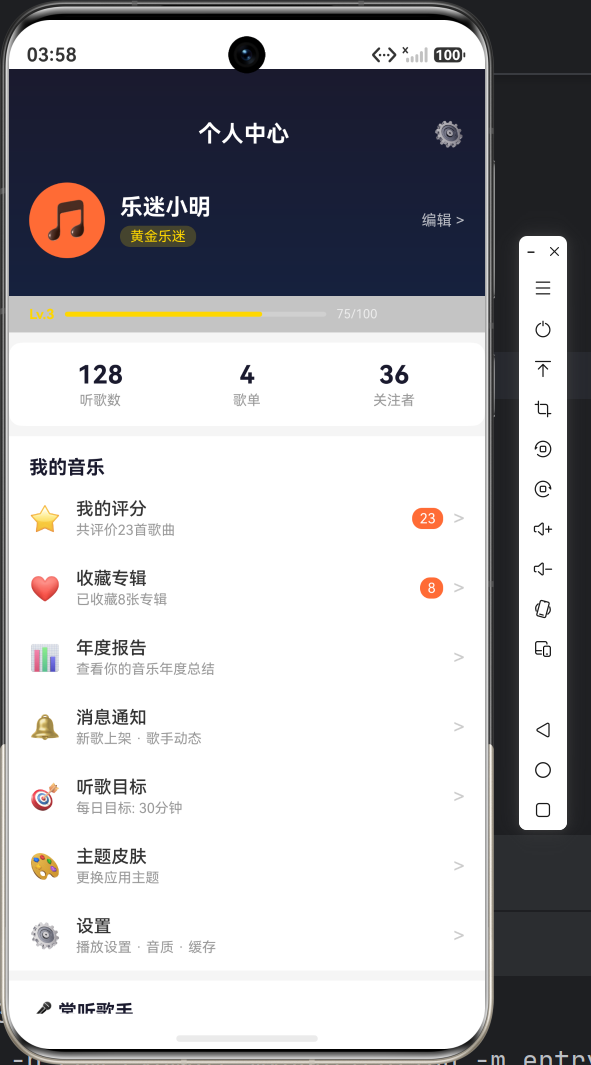
下一篇是本系列的完结篇,将实现个人中心页,包含:
- 统计数据卡片(歌曲数/歌单数/听歌时长/天数的Grid)
- 音乐口味水平条状图
- 成就徽章系统(已解锁/未解锁)
- 最近播放列表
- 功能菜单入口
文章索引:
- (一)项目初始化与Stage模型架构设计
- (二)首页开发 —— Grid分类网格与热歌排行榜
- (三)发现页与专辑详情 —— 多维筛选与曲目管理
- (四)歌单管理 —— 创建歌单与歌曲编排 ← 当前
- (五)个人中心与数据可视化 —— 统计图表与成就徽章

作为“人工智能6S店”的官方数字引擎,为AI开发者与企业提供一个覆盖软硬件全栈、一站式门户。
更多推荐

 0
0 0
0- 0


 已为社区贡献27条内容

所有评论(0)