
鸿蒙原生应用实战(二):首页与导航系统开发
鸿蒙原生应用实战(二):首页与导航系统开发
系列文章导航:
一、项目初始化与多页面架构设计
二、首页与导航系统开发 ← 本文
三、列表页与标签筛选功能
四、详情页与动态数据展示
五、收藏功能与个人中心
一、前言
上一篇我们完成了项目初始化和架构设计,这一篇我们来开发应用的首页——这是用户打开应用后看到的第一个界面,也是整个应用的导航中枢。
首页需要包含以下功能:
- 顶部:应用名称 + 当前日期
- 搜索框(交互占位)
- 6 个分类快捷入口(Grid 网格布局)
- "热门目的地"横向滚动卡片
- "精选推荐"纵向列表
二、ArkTS 组件基础
在开始之前,我们先了解一下 ArkTS 的核心语法。
2.1 @Component 与 @Entry
每个页面是一个自定义组件,通过 @Component 装饰,再用 @Entry 标记为入口页面:
@Entry
@Component
struct Index {
  build() {
    // 页面UI在这里构建
  }
}
2.2 @State 状态管理
@State 装饰的变量是响应式的,当其值改变时,UI 会自动重新渲染:
@State currentDate: string = '';

aboutToAppear(): void {
  this.currentDate = this.getCurrentDate();
}
aboutToAppear 是组件的生命周期方法,在组件即将显示时调用,类似于 onCreate。
2.3 常用布局组件
| 组件 | 说明 | 类似前端概念 |
|---|---|---|
Column |
垂直排列子组件 | flex-direction: column |
Row |
水平排列子组件 | flex-direction: row |
Stack |
层叠布局 | position: absolute |
RelativeContainer |
相对定位 | position: relative |
Grid |
网格布局 | display: grid |
List + ListItem |
列表 | ul > li |
Scroll |
可滚动容器 | overflow: scroll |
三、构建首页布局
3.1 整体结构
首页从上到下分为三个大区:
┌─────────────────────────────────────┐
│  🌍 发现目的地                       │  ← 顶部标题栏
│  🔍 搜索目的地...                    │  ← 搜索框
│  ┌──────┬──────┬──────┬──────┐      │
│  │🏖️海岛│🏔️自然│🏛️人文│🌃都市│      │  ← 分类入口
│  │度假  │风光  │历史  │探索  │      │     (Grid 2×3)
│  ├──────┼──────┼──────┼──────┤      │
│  │🍜美食│🎢亲子│                    │
│  │之旅  │乐园  │                    │
│  └──────┴──────┴──────┴──────┘      │
│  🔥 热门目的地         查看全部 →    │  ← 标题行
│  ┌─────┐┌─────┐┌─────┐            │
│  │🏝️   ││🗼   ││🗾   │ ←横向滚动→  │  ← List 横向
│  │巴厘岛││巴黎  ││东京  │            │
│  └─────┘└─────┘└─────┘            │
│  ⭐ 精选推荐                         │  ← 标题行
│  ┌─────────────────────────┐        │
│  │ 🏞️ 桂林 · ⭐4.7         │        │  ← 精选卡片列表
│  │    中国广西 · 自然       │        │
│  ├─────────────────────────┤        │
│  │ ⛩️ 京都 · ⭐4.8         │        │
│  │    日本 · 人文          │        │
│  └─────────────────────────┘        │
└─────────────────────────────────────┘
3.2 顶部标题栏
使用 Column 嵌套 Row 实现:
Column() {
  Row() {
    Text('🌍')
      .fontSize(28)
      .margin({ right: 8 });
    Text($r('app.string.home_title'))
      .fontSize($r('app.float.title_font_size'))
      .fontWeight(FontWeight.Bold)
      .fontColor($r('app.color.white'));
  }
  .margin({ top: 24, bottom: 8 });

  // 搜索框
  Row() {
    Text('🔍').fontSize(16).margin({ right: 8 });
    Text('搜索目的地、景点...')
      .fontSize($r('app.float.small_font_size'))
      .fontColor('rgba(255,255,255,0.7)');
  }
  .width('100%')
  .padding(12)
  .backgroundColor('rgba(255,255,255,0.2)')
  .borderRadius(22)
  .margin({ bottom: 20 });
}
.width('100%')
.padding({ left: 20, right: 20 })
.backgroundColor($r('app.color.primary'))
.borderRadius({ bottomLeft: 28, bottomRight: 28 });
关键设计点:
- 圆角底部:
.borderRadius({ bottomLeft: 28, bottomRight: 28 })实现底部圆角效果 - 半透明搜索框:
backgroundColor('rgba(255,255,255,0.2)')在白底上显示半透明效果 - 链式调用:ArkTS 极力推崇链式调用,每个属性方法返回组件本身
3.3 分类入口 Grid 网格
使用 Grid + GridItem 实现 2 行 3 列的分类网格:
// 数据定义
categories: CateItem[] = [
  { icon: '🏖️', name: '海岛度假' },
  { icon: '🏔️', name: '自然风光' },
  { icon: '🏛️', name: '历史人文' },
  { icon: '🌃', name: '城市探索' },
  { icon: '🍜', name: '美食之旅' },
  { icon: '🎢', name: '亲子乐园' },
];
Row() {
  ForEach(this.categories, (item: CateItem) => {
    Column() {
      Text(item.icon).fontSize(28)
        .width(52).height(52)
        .textAlign(TextAlign.Center)
        .backgroundColor($r('app.color.primary_light'))
        .borderRadius(26);

      Text(item.name)
        .fontSize($r('app.float.tiny_font_size'))
        .fontColor($r('app.color.text_primary'))
        .margin({ top: 6 });
    }
    .layoutWeight(1)
    .alignItems(HorizontalAlign.Center)
    .onClick(() => {
      router.pushUrl({ url: 'pages/DestPage' });
    });
  })
}
.width('100%')
.padding({ top: 20, bottom: 8 });
💡 设计思路:这里我用
Row+ForEach+layoutWeight(1)实现了等分布局,比 Grid 更简洁。6 个图标自动平分 Row 的宽度。
3.4 @Builder 自定义构建函数
@Builder 是 ArkTS 中复用 UI 代码的核心方式,类似于 React 的 render prop 或 Vue 的 slot:
@Builder
FeatureCard(params: {
  icon: string,
  title: string,
  desc: string,
  color: Resource,
  page: string
}) {
  Column() {
    Text(params.icon).fontSize(36).height(50)
      .textAlign(TextAlign.Center).width('100%');
    Text(params.title)
      .fontSize($r('app.float.body_font_size'))
      .fontWeight(FontWeight.Medium)
      .fontColor($r('app.color.text_primary'))
      .margin({ top: 8 });
    Text(params.desc)
      .fontSize(12)
      .fontColor($r('app.color.text_secondary'))
      .margin({ top: 4 });
  }
  .width('100%').height('100%').padding(16)
  .backgroundColor($r('app.color.white'))
  .borderRadius($r('app.float.card_radius'))
  .shadow({ radius: 8, offsetX: 0, offsetY: 2, color: $r('app.color.card_shadow') })
  .alignItems(HorizontalAlign.Center)
  .justifyContent(FlexAlign.Center)
  .onClick(() => {
    router.pushUrl({ url: params.page });
  });
}
⚠️ 注意:
@Builder函数的参数必须使用对象类型,不能使用多个独立参数。
3.5 热门目的地横向滚动
List 组件默认是纵向滚动的,通过 listDirection(Axis.Horizontal) 改为横向:
List({ space: 16 }) {
  ForEach(this.hotList, (item: Destination) => {
    ListItem() {
      this.DestCard(item);
    }
    .width(180)
  }, (item: Destination) => item.id.toString())
}
.listDirection(Axis.Horizontal)
.height(200)
.width('100%');
每个卡片是一个 Column:
@Builder
DestCard(item: Destination) {
  Column() {
    Text(item.image).fontSize(48).height(80)
      .textAlign(TextAlign.Center).width('100%')
      .margin({ top: 12 });
    Text(item.name)
      .fontSize($r('app.float.body_font_size'))
      .fontWeight(FontWeight.Bold);
    Text(item.location).fontSize($r('app.float.tiny_font_size'))
      .fontColor($r('app.color.text_secondary'));
    Row() {
      Text('⭐').fontSize(12);
      Text(item.rating.toString())
        .fontSize($r('app.float.tiny_font_size'))
        .fontColor($r('app.color.star_yellow'))
        .fontWeight(FontWeight.Bold);
    }.margin({ top: 6 });
  }
  .width(180).height(190)
  .backgroundColor($r('app.color.bg_card'))
  .borderRadius($r('app.float.card_radius'))
  .shadow({ radius: 6, offsetX: 0, offsetY: 2, color: $r('app.color.card_shadow') })
  .alignItems(HorizontalAlign.Center)
  .onClick(() => {
    router.pushUrl({ url: 'pages/DetailPage', params: { id: item.id } });
  });
}
3.6 精选推荐列表
精选推荐使用简单的 Column + Row 组合:
Column() {
  this.RecommendCard({ id: 6, name: '桂林', ... });
  this.DividerLine();
  this.RecommendCard({ id: 7, name: '京都', ... });
  this.DividerLine();
  this.RecommendCard({ id: 8, name: '冰岛', ... });
}
.width('100%')
.padding(12)
.backgroundColor($r('app.color.bg_card'))
.borderRadius($r('app.float.card_radius'));
精选卡片使用横向 Row 布局,左侧是图片,右侧是文字信息:
@Builder
RecommendCard(item: Destination) {
  Row() {
    Text(item.image).fontSize(42).width(64).height(64)
      .textAlign(TextAlign.Center)
      .backgroundColor($r('app.color.primary_light'))
      .borderRadius(32).margin({ right: 12 });

    Column() {
      Row() {
        Text(item.name).fontSize($r('app.float.body_font_size'))
          .fontWeight(FontWeight.Bold);
        Text('⭐ ' + item.rating).fontSize($r('app.float.tiny_font_size'))
          .fontColor($r('app.color.star_yellow')).margin({ left: 8 });
      }.width('100%');

      Text(item.location + ' · ' + item.tag)
        .fontSize($r('app.float.tiny_font_size'))
        .fontColor($r('app.color.text_secondary'))
        .width('100%').margin({ top: 2 });

      Text(item.desc).fontSize(12)
        .fontColor($r('app.color.text_secondary'))
        .width('100%').margin({ top: 2 })
        .maxLines(1).textOverflow({ overflow: TextOverflow.Ellipsis });
    }
    .layoutWeight(1).alignItems(HorizontalAlign.Start);
  }
  .width('100%').height(80)
  .alignItems(VerticalAlign.Center)
  .onClick(() => {
    router.pushUrl({ url: 'pages/DetailPage', params: { id: item.id } });
  });
}
四、完整的首页源码结构
4.1 数据接口定义
interface Destination {
  id: number;
  name: string;
  location: string;
  rating: number;
  image: string;
  tag: string;
  desc: string;
}

interface CateItem {
  icon: string;
  name: string;
}
4.2 页面入口结构
@Entry
@Component
struct Index {
  @State currentDate: string = '';
  @State hotList: Destination[] = [...];
  @State categories: CateItem[] = [...];

  aboutToAppear(): void { /* 初始化日期 */ }

  build() {
    Column() {
      // 1. 顶部标题栏(橙色背景)
      // 2. 分类入口(网格)
      // 3. 热门目的地(横向滚动)
      // 4. 精选推荐(列表)
    }
  }

  @Builder DestCard(item: Destination) { /* ... */ }
  @Builder RecommendCard(item: Destination) { /* ... */ }
  @Builder DividerLine() { /* ... */ }
}
4.3 颜色主题配置
首页使用了以下颜色:
| 用途 | 颜色值 | 资源名 |
|---|---|---|
| 顶部背景 | #FF6B35 活力橙 |
primary |
| 页面背景 | #F8F8F8 浅灰 |
bg_page |
| 卡片背景 | #FFFFFF 白色 |
bg_card |
| 图标背景 | #FFF0E8 浅橙 |
primary_light |
| 主文字 | #1A1A2E 深蓝黑 |
text_primary |
| 次要文字 | #8E8E93 灰色 |
text_secondary |
五、页面跳转导航
5.1 跳转到目的地列表
分类入口点击后跳转到 DestPage:
.onClick(() => {
  router.pushUrl({ url: 'pages/DestPage' });
})
5.2 跳转到详情页(带参数)
卡片点击后跳转到详情页,并传入目的地 ID:
.onClick(() => {
  router.pushUrl({
    url: 'pages/DetailPage',
    params: { id: item.id }
  });
})
5.3 返回上一页
在详情页或其他子页面中:
Text('←')
  .fontSize(24)
  .onClick(() => router.back());
5.4 导航栈管理
router.pushUrl 会将页面压入导航栈,router.back 弹出栈顶页面。鸿蒙的导航栈默认最大支持 32 层,超过会抛出异常。
六、运行效果
构建并运行到模拟器:
cd /d "D:\harmonyos\project\6.8.12345\3\MyApplication"
"D:\DevEco Studio\tools\node\node.exe" \
  "D:\DevEco Studio\tools\hvigor\bin\hvigorw.js" \
  --mode module -p module=entry@default \
  -p product=default -p requiredDeviceType=phone \
  assembleHap --analyze=normal --parallel --incremental --daemon
首页交互验证:
- 分类入口点击 → 跳转到目的地列表页 ✅
- 热门目的地横向滑动 → 可滑动查看全部 ✅
- 热门卡片点击 → 跳转到详情页 ✅
- 精选卡片点击 → 跳转到详情页 ✅
七、常见问题
Q1:Grid 网格不显示?
检查 columnsTemplate 和 rowsTemplate 是否设置。如果不设置模板,GridItem 会全部重叠在一起:
Grid()
  .columnsTemplate('1fr 1fr')  // 两列等宽
  .rowsTemplate('1fr 1fr')     // 两行等高
Q2:ForEach 需要 key 吗?
在 ArkTS 中,ForEach 的第三个参数是 key 生成器,用于优化列表更新性能:
ForEach(this.hotList, (item) => {
  ListItem() { ... }
}, (item) => item.id.toString())  // key
Q3:Shadow 阴影不显示?
检查阴影颜色是否设置了透明度:
.shadow({ radius: 8, offsetX: 0, offsetY: 2, color: $r('app.color.card_shadow') })
// card_shadow 需要带透明度: "#1A000000"
八、小结
本篇我们完成了:
- ✅ Native 页面整体布局(标题栏 → 网格分类 → 横向滚动 → 列表)
- ✅
Grid/List/Column/Row布局组合 - ✅
@Builder自定义构建函数封装可复用卡片 - ✅
router.pushUrl/back页面导航 - ✅ 带参数跳转实现详情页数据传递
下一篇我们将开发目的地列表页与标签筛选功能,实现按分类过滤目的地列表的高级交互。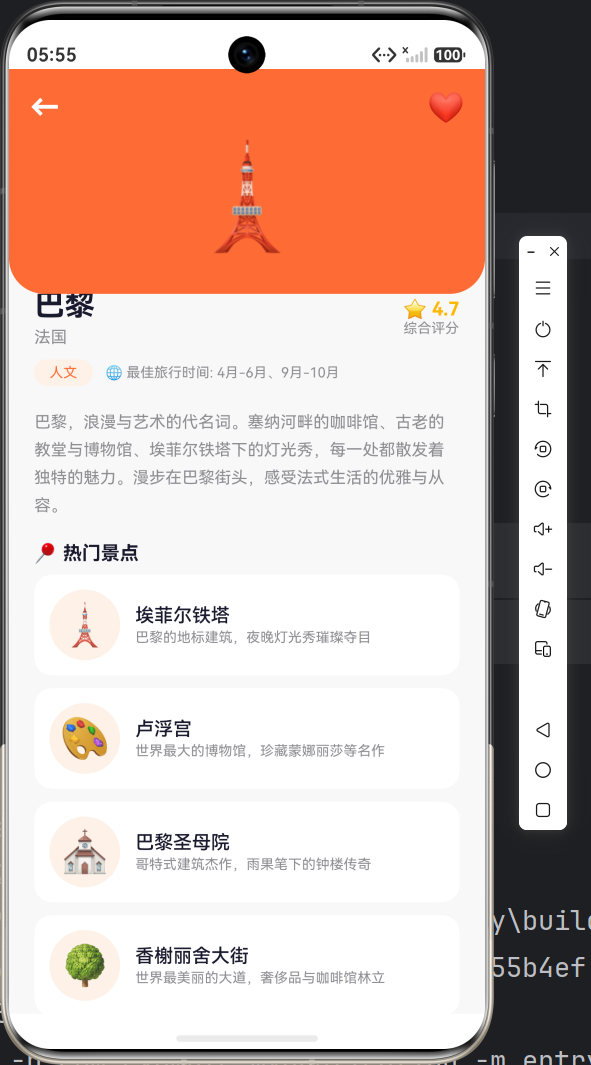

作为“人工智能6S店”的官方数字引擎,为AI开发者与企业提供一个覆盖软硬件全栈、一站式门户。
更多推荐

 1
1 0
0- 0


 已为社区贡献39条内容

所有评论(0)