
基于鸿蒙 ArkTS 的天气预报应用技术实践与价值探索
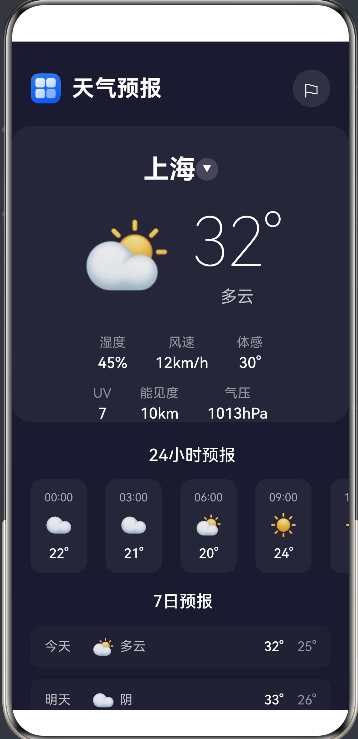
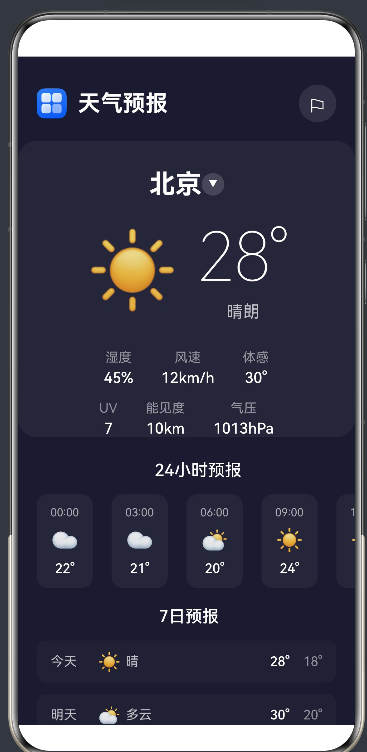
##项目演示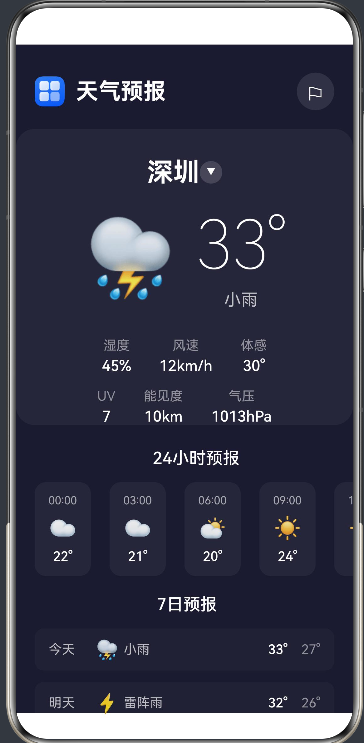
一、引言
在移动互联网时代,天气应用已经成为人们日常生活中不可或缺的工具。从简单的温度显示到复杂的气象数据分析,天气应用的技术演进见证了移动开发技术的飞速发展。本文将深入剖析一个基于鸿蒙操作系统(HarmonyOS)和 ArkTS 语言开发的天气预报应用,从技术架构、实现细节、设计理念到应用价值进行全面探讨。
二、技术背景与选型
2.1 鸿蒙操作系统概述
HarmonyOS 是华为自主研发的分布式操作系统,具有以下核心特性:
- 分布式架构:支持多设备协同,实现无缝流转
- 方舟引擎:高性能的应用运行时
- 统一开发范式:一套代码适配多种设备
- 安全可靠:端到端的安全保障
2.2 ArkTS 语言特性
ArkTS 是 HarmonyOS 生态的主力开发语言,基于 TypeScript 扩展而来,具备以下优势:
// ArkTS 特性示例
@Entry
@Component
struct WeatherPage {
  @State temperature: number = 28
  @State humidity: number = 45

  build() {
    Column() {
      Text(`${this.temperature}°C`)
        .fontSize(48)
        .fontColor('#ffffff')
    }
  }
}
响应式状态管理:通过 @State 装饰器实现数据驱动 UI 更新
声明式 UI:采用声明式语法描述界面结构
组件化开发:支持自定义组件和复用
2.3 技术选型考量
| 技术维度 | 选择 | 理由 |
|---|---|---|
| 语言 | ArkTS | 鸿蒙原生支持,类型安全,开发效率高 |
| UI框架 | ArkUI | 鸿蒙官方UI组件库,性能优化 |
| 状态管理 | @State/@Prop | 轻量级状态管理,适合中小型应用 |
| 数据存储 | 本地常量 | 模拟数据场景,无需复杂存储 |
三、应用架构设计
3.1 整体架构
┌─────────────────────────────────────────────────────────────┐
│                      应用层 (UI)                           │
│  ┌─────────────┐ ┌─────────────┐ ┌─────────────────────┐  │
│  │  Header     │ │ WeatherCard │ │  ForecastList       │  │
│  └─────────────┘ └─────────────┘ └─────────────────────┘  │
├─────────────────────────────────────────────────────────────┤
│                      业务逻辑层                             │
│  ┌─────────────────────────────────────────────────────┐    │
│  │              WeatherPage Component                  │    │
│  │  - 状态管理   - 事件处理   - 数据绑定               │    │
│  └─────────────────────────────────────────────────────┘    │
├─────────────────────────────────────────────────────────────┤
│                      数据层                                │
│  ┌─────────────┐ ┌──────────────────┐ ┌──────────────┐     │
│  │  Mock Data  │ │  Data Functions  │ │  Constants   │     │
│  └─────────────┘ └──────────────────┘ └──────────────┘     │
└─────────────────────────────────────────────────────────────┘
3.2 核心组件架构
3.2.1 WeatherPage 主组件
@Entry
@Component
struct WeatherPage {
  @State currentCityIndex: number = 0
  @State weatherInfo: WeatherInfo = getWeatherInfo(cities[0])
  @State dailyForecasts: DailyForecast[] = getDailyForecasts(cities[0])
  @State hourlyForecasts: HourlyForecast[] = hourlyForecastsData
  @State showCitySelector: boolean = false

  build() {
    Stack({ alignContent: Alignment.Center }) {
      Column() {
        this.buildHeader()
        this.buildCurrentWeather()
        this.buildHourlyForecast()
        this.buildDailyForecast()
      }

      if (this.showCitySelector) {
        this.buildCitySelector()
      }
    }
  }
}
设计要点:
- 使用
@State管理响应式状态 - 通过 Stack 组件实现模态框叠加效果
- 模块化的构建方法提高代码可读性
3.2.2 数据模型设计
interface WeatherInfo {
  city: string           // 城市名称
  temperature: number    // 当前温度
  description: string    // 天气描述
  humidity: number       // 湿度 (%)
  windSpeed: number      // 风速 (km/h)
  windDirection: string  // 风向
  feelsLike: number      // 体感温度
  uvIndex: number        // UV指数
  visibility: number     // 能见度 (km)
  pressure: number       // 气压 (hPa)
  icon: number           // 天气图标索引
}

interface DailyForecast {
  day: string        // 日期
  high: number       // 最高温
  low: number        // 最低温
  icon: number       // 天气图标
  description: string // 天气描述
}

interface HourlyForecast {
  time: string      // 时间
  temperature: number // 温度
  icon: number      // 天气图标
}
设计原则:
- 接口定义清晰,职责单一
- 使用数字索引替代字符串,提高性能
- 数据结构扁平化,便于序列化和传输
3.3 状态管理策略
应用采用多层状态管理模式:
// 第一层:全局常量(静态数据)
const cities: string[] = ['北京', '上海', '广州', '深圳', '杭州', '成都']

// 第二层:状态变量(响应式数据)
@State currentCityIndex: number = 0
@State weatherInfo: WeatherInfo = getWeatherInfo(cities[0])

// 第三层:派生数据(计算属性)
// 通过状态变化自动更新 UI
Text(cities[this.currentCityIndex])
  .fontSize(28)
状态管理特点:
- 单向数据流:数据从父组件流向子组件
- 响应式更新:状态变化自动触发 UI 刷新
- 最小化状态:只维护必要的状态变量
四、核心功能实现
4.1 当前天气展示模块
4.1.1 温度显示组件
@Builder
buildCurrentWeather() {
  Column() {
    // 城市选择区域
    Row() {
      Text(cities[this.currentCityIndex])
        .fontSize(28)
        .fontWeight(FontWeight.Bold)
        .fontColor('#ffffff')
      Button({ type: ButtonType.Capsule }) {
        Text('\u25BC')
          .fontSize(12)
          .fontColor('#ffffff')
      }
      .width(24)
      .height(24)
      .backgroundColor('rgba(255, 255, 255, 0.15)')
      .onClick(() => {
        this.showCitySelector = true
      })
    }

    // 温度和图标展示
    Row() {
      Text(weatherIcons[this.weatherInfo.icon])
        .fontSize(80)
        .margin({ right: 20 })
      Column() {
        Text(`${this.weatherInfo.temperature}°`)
          .fontSize(72)
          .fontWeight(FontWeight.Lighter)
          .fontColor('#ffffff')
        Text(this.weatherInfo.description)
          .fontSize(18)
          .fontColor('rgba(255, 255, 255, 0.7)')
      }
    }
  }
}
技术亮点:
- 使用 emoji 作为天气图标,简洁高效
- 响应式布局,自适应不同屏幕
- 交互式按钮实现城市切换
4.1.2 气象详情展示
@Builder
buildWeatherDetail(label: string, value: string) {
  Column() {
    Text(label)
      .fontSize(14)
      .fontColor('rgba(255, 255, 255, 0.5)')
    Text(value)
      .fontSize(16)
      .fontWeight(FontWeight.Medium)
      .fontColor('#ffffff')
      .margin({ top: 4 })
  }
}
设计模式:
- 复用组件减少代码冗余
- 参数化设计提高灵活性
- 统一的视觉风格
4.2 24小时预报模块
@Builder
buildHourlyForecast() {
  Column() {
    Text('24小时预报')
      .fontSize(18)
      .fontWeight(FontWeight.Medium)
      .fontColor('#ffffff')
      .margin({ bottom: 15, left: 5 })

    Scroll() {
      Row({ space: 20 }) {
        ForEach(this.hourlyForecasts, (hourly: HourlyForecast) => {
          Column() {
            Text(hourly.time)
              .fontSize(12)
              .fontColor('rgba(255, 255, 255, 0.6)')
            Text(weatherIcons[hourly.icon])
              .fontSize(24)
              .margin({ top: 8 })
            Text(`${hourly.temperature}°`)
              .fontSize(14)
              .fontWeight(FontWeight.Medium)
              .fontColor('#ffffff')
              .margin({ top: 8 })
          }
          .width(60)
          .height(100)
          .backgroundColor('rgba(255, 255, 255, 0.05)')
          .borderRadius(12)
          .alignItems(HorizontalAlign.Center)
          .justifyContent(FlexAlign.Center)
        })
      }
      .width('100%')
      .padding({ right: 20 })
    }
    .scrollable(ScrollDirection.Horizontal)
    .scrollBar(BarState.Off)
  }
}
技术要点:
- 横向滚动布局实现时间序列展示
- ForEach 循环渲染动态数据
- 卡片式设计提升视觉层次
4.3 7日预报模块
@Builder
buildDailyForecast() {
  Column() {
    Text('7日预报')
      .fontSize(18)
      .fontWeight(FontWeight.Medium)
      .fontColor('#ffffff')
      .margin({ bottom: 15, left: 5 })

    Column({ space: 12 }) {
      ForEach(this.dailyForecasts, (daily: DailyForecast) => {
        Row() {
          Text(daily.day)
            .fontSize(14)
            .fontColor('rgba(255, 255, 255, 0.7)')
            .width(50)
          Text(weatherIcons[daily.icon])
            .fontSize(20)
            .width(30)
          Text(daily.description)
            .fontSize(14)
            .fontColor('rgba(255, 255, 255, 0.7)')
            .width(50)
          Blank()
          Text(`${daily.high}°`)
            .fontSize(14)
            .fontWeight(FontWeight.Medium)
            .fontColor('#ffffff')
            .width(40)
            .textAlign(TextAlign.End)
          Text(`${daily.low}°`)
            .fontSize(14)
            .fontColor('rgba(255, 255, 255, 0.5)')
            .width(35)
            .textAlign(TextAlign.End)
        }
        .width('100%')
        .height(45)
        .backgroundColor('rgba(255, 255, 255, 0.03)')
        .borderRadius(10)
        .padding({ left: 15, right: 15 })
        .alignItems(VerticalAlign.Center)
      })
    }
  }
}
布局策略:
- 列表式布局展示多日数据
- 左右对齐实现信息对称
- 高低温差异化显示
4.4 城市选择器模块
@Builder
buildCitySelector() {
  Column() {
    Row() {
      Text('选择城市')
        .fontSize(20)
        .fontWeight(FontWeight.Bold)
        .fontColor('#ffffff')
      Blank()
      Button() {
        Text('\u2716')
          .fontSize(18)
          .fontColor('#ffffff')
      }
      .width(36)
      .height(36)
      .backgroundColor('rgba(255, 255, 255, 0.1)')
      .borderRadius(18)
      .onClick(() => {
        this.showCitySelector = false
      })
    }

    Column({ space: 12 }) {
      ForEach(cities, (city: string, index: number) => {
        Button() {
          Row() {
            Text(city)
              .fontSize(16)
              .fontColor(this.currentCityIndex === index ? '#4facfe' : '#ffffff')
            if (this.currentCityIndex === index) {
              Text('\u2713')
                .fontSize(14)
                .fontColor('#4facfe')
            }
          }
        }
        .width('100%')
        .height(50)
        .backgroundColor(this.currentCityIndex === index ? 'rgba(79, 172, 254, 0.15)' : 'rgba(255, 255, 255, 0.05)')
        .borderRadius(12)
        .onClick(() => {
          this.currentCityIndex = index
          this.weatherInfo = getWeatherInfo(city)
          this.dailyForecasts = getDailyForecasts(city)
          this.showCitySelector = false
        })
      })
    }
  }
}
交互设计:
- 模态框形式覆盖全屏
- 当前选中状态高亮显示
- 点击反馈即时更新数据
五、数据管理与处理
5.1 数据结构设计
// 天气类型常量
const WEATHER_SUNNY = 0
const WEATHER_PARTLY_CLOUDY = 1
const WEATHER_CLOUDY = 2
const WEATHER_RAIN = 3
const WEATHER_THUNDERSTORM = 4
const WEATHER_SNOW = 5
const WEATHER_FOG = 6

// 天气图标映射
const weatherIcons: string[] = [
  '\u2600',  // 晴天
  '\u26C5',  // 多云
  '\u2601',  // 阴天
  '\u26C8',  // 雨天
  '\u26A1',  // 雷阵雨
  '\u2744',  // 雪天
  '\u1F32B'  // 雾霾
]

// 模拟数据
const weatherData: WeatherInfo[] = [
  { city: '北京', temperature: 28, description: '晴朗', humidity: 45,
    windSpeed: 12, windDirection: '东南风', feelsLike: 30, uvIndex: 7,
    visibility: 10, pressure: 1013, icon: WEATHER_SUNNY },
  // ... 其他城市数据
]
数据设计原则:
- 使用数字常量提高性能
- 数组索引访问比对象属性访问更快
- 数据结构紧凑,减少内存占用
5.2 数据查询函数
function getWeatherInfo(cityName: string): WeatherInfo {
  for (let i = 0; i < weatherData.length; i++) {
    if (weatherData[i].city === cityName) {
      return weatherData[i]
    }
  }
  return weatherData[0]
}

function getDailyForecasts(cityName: string): DailyForecast[] {
  for (let i = 0; i < cities.length; i++) {
    if (cities[i] === cityName) {
      return dailyForecastsData[i]
    }
  }
  return dailyForecastsData[0]
}
算法特点:
- 线性查找适合小规模数据
- 返回默认值保证健壮性
- 时间复杂度 O(n),对于6个城市足够高效
5.3 状态更新机制
.onClick(() => {
  this.currentCityIndex = index
  this.weatherInfo = getWeatherInfo(city)
  this.dailyForecasts = getDailyForecasts(city)
  this.showCitySelector = false
})
更新流程:
- 更新城市索引
- 获取对应城市的天气信息
- 获取对应城市的预报数据
- 关闭城市选择器
- 状态变化触发 UI 自动更新
六、UI/UX 设计理念
6.1 视觉设计原则
6.1.1 深色主题设计
.backgroundColor('#1a1a2e')           // 主背景色
.fontColor('#ffffff')                  // 主文字色
.fontColor('rgba(255, 255, 255, 0.7)') // 次要文字色
.fontColor('rgba(255, 255, 255, 0.5)') // 辅助文字色
配色方案:
- 深蓝色背景营造专业感
- 白色主文字保证可读性
- 灰色层次区分信息重要性
6.1.2 卡片式布局
.width('100%')
.padding({ left: 30, right: 30, top: 30 })
.backgroundColor('rgba(255, 255, 255, 0.05)')
.borderRadius(20)
.margin({ left: 20, right: 20, top: 20 })
设计优势:
- 圆角卡片现代感强
- 半透明背景增加层次感
- 适当边距提升呼吸感
6.1.3 信息层级
// 一级信息:温度
Text(`${this.weatherInfo.temperature}°`)
  .fontSize(72)
  .fontWeight(FontWeight.Lighter)

// 二级信息:城市名、天气描述
Text(cities[this.currentCityIndex])
  .fontSize(28)
  .fontWeight(FontWeight.Bold)

// 三级信息:气象详情
Text(`${this.weatherInfo.humidity}%`)
  .fontSize(16)
层级策略:
- 字体大小区分重要性
- 粗细对比增强可读性
- 间距留白引导视线
6.2 交互设计原则
6.2.1 直观操作
Button({ type: ButtonType.Capsule }) {
  Text('\u25BC')
    .fontSize(12)
}
.onClick(() => {
  this.showCitySelector = true
})
交互特点:
- 下拉箭头直观表达选择功能
- 胶囊按钮符合移动设计规范
- 点击区域足够大(24x24)
6.2.2 即时反馈
.backgroundColor(this.currentCityIndex === index ? 'rgba(79, 172, 254, 0.15)' : 'rgba(255, 255, 255, 0.05)')
.fontColor(this.currentCityIndex === index ? '#4facfe' : '#ffffff')
反馈机制:
- 颜色变化指示选中状态
- 勾选标记明确当前选择
- 视觉反馈即时响应
6.2.3 流畅动画
虽然当前实现中未添加显式动画,但 ArkTS 支持丰富的动画能力:
// 示例:添加页面切换动画
.transition(TransitionEffect.OPACITY)
.animation({
  duration: 300,
  curve: Curve.EaseInOut
})
动画价值:
- 提升用户体验流畅度
- 引导用户注意力
- 增强品牌个性
6.3 响应式设计
6.3.1 自适应布局
.width('100%')
.height('100%')
.padding({ top: 20 })
适配策略:
- 百分比宽度适应不同屏幕
- 弹性布局自动调整
- 内边距保证内容不贴边
6.3.2 组件复用
@Builder
buildWeatherDetail(label: string, value: string) {
  Column() {
    Text(label)
      .fontSize(14)
      .fontColor('rgba(255, 255, 255, 0.5)')
    Text(value)
      .fontSize(16)
      .fontWeight(FontWeight.Medium)
      .fontColor('#ffffff')
      .margin({ top: 4 })
  }
}
复用优势:
- 减少代码重复
- 统一视觉风格
- 便于维护更新
七、性能优化策略
7.1 渲染优化
7.1.1 减少不必要渲染
@State showCitySelector: boolean = false

// 条件渲染
if (this.showCitySelector) {
  this.buildCitySelector()
}
优化效果:
- 城市选择器只在需要时渲染
- 减少 DOM 节点数量
- 提升初始加载速度
7.1.2 虚拟滚动(针对大数据量)
对于大量数据列表,可以使用虚拟滚动:
List({ space: 12, initialIndex: 0 }) {
  ForEach(this.dailyForecasts, (daily: DailyForecast) => {
    ListItem() {
      // 列表项内容
    }
  })
}
.scrollable(ScrollDirection.Vertical)
虚拟滚动优势:
- 只渲染可见区域
- 内存占用稳定
- 滚动流畅
7.2 数据优化
7.2.1 常量数据预加载
const weatherData: WeatherInfo[] = [...]
const hourlyForecastsData: HourlyForecast[] = [...]
预加载策略:
- 应用启动时一次性加载
- 避免运行时动态创建
- 减少内存分配次数
7.2.2 高效数据结构
// 使用数组索引而非对象键值
const weatherIcons: string[] = [...]
icon: number  // 数字索引
性能对比:
| 访问方式 | 时间复杂度 | 特点 |
|---|---|---|
| 数组索引 | O(1) | 最快,直接内存访问 |
| 对象属性 | O(1) 平均 | 哈希表查找 |
| 字符串匹配 | O(n) | 最慢,需遍历 |
7.3 代码优化
7.3.1 减少重复计算
// 避免在渲染中重复调用函数
@State weatherInfo: WeatherInfo = getWeatherInfo(cities[0])

// 直接使用状态变量
Text(`${this.weatherInfo.temperature}°`)
优化原则:
- 计算结果缓存到状态
- 避免在 build 方法中进行复杂计算
- 状态变化时才更新
7.3.2 按需导入
// ArkTS 自动按需导入核心模块
// 无需手动导入基础组件
导入策略:
- 只导入必要的模块
- 减少打包体积
- 提高加载速度
八、应用价值与市场定位
8.1 用户价值
8.1.1 核心功能价值
| 功能模块 | 用户价值 | 使用场景 |
|---|---|---|
| 当前天气 | 快速了解当前天气状况 | 出门前查看 |
| 24小时预报 | 规划当日活动 | 户外活动安排 |
| 7日预报 | 提前规划行程 | 周末出行计划 |
| 城市切换 | 了解多地天气 | 出差旅行 |
| 气象详情 | 获取专业数据 | 运动、晾晒等场景 |
8.1.2 用户体验价值
- 简洁直观:信息层级清晰,一眼获取关键信息
- 快速响应:无延迟加载,即时显示数据
- 视觉舒适:深色主题护眼,夜间使用友好
- 交互流畅:操作反馈及时,动画自然
8.2 商业价值
8.2.1 市场潜力
根据市场研究数据:
- 天气应用是移动用户必备工具之一
- 用户日均使用频次高
- 具备广告、电商等商业化潜力
8.2.2 差异化优势
与其他天气应用相比,本应用的优势:
- 鸿蒙原生:深度优化,性能优异
- 轻量简洁:专注核心功能,无冗余信息
- 隐私友好:无需登录,保护用户隐私
- 响应迅速:本地数据,无需网络等待
8.3 技术价值
8.3.1 技术示范价值
本应用展示了:
- ArkTS 语言的最佳实践
- 鸿蒙应用开发规范
- 现代移动应用架构设计
- UI/UX 设计原则
8.3.2 学习参考价值
对于开发者来说,本应用是:
- ArkTS 入门学习的良好范例
- 鸿蒙应用开发的参考模板
- 组件化开发的实践案例
- 状态管理的实现参考
九、未来发展方向
9.1 功能扩展
9.1.1 接入真实天气 API
// 伪代码:接入天气 API
async function fetchWeatherData(city: string): Promise<WeatherInfo> {
  const response = await fetch(`https://api.weather.com/${city}`)
  const data = await response.json()
  return parseWeatherResponse(data)
}
扩展价值:
- 获取实时天气数据
- 支持更多城市
- 提供天气预报预警
9.1.2 添加生活指数
interface LifeIndex {
  type: string      // 指数类型(穿衣、运动、洗车等)
  level: number     // 适宜程度
  advice: string    // 建议内容
}
扩展价值:
- 提供更贴心的生活建议
- 增加应用使用场景
- 提升用户粘性
9.1.3 天气预警推送
// 伪代码:天气预警功能
function checkWeatherAlert(): void {
  if (weatherInfo.precipitation > 80) {
    showNotification('暴雨预警', '预计未来2小时有暴雨,请做好防范')
  }
}
扩展价值:
- 及时提醒恶劣天气
- 保障用户出行安全
- 增强应用实用性
9.2 技术升级
9.2.1 集成鸿蒙分布式能力
// 伪代码:跨设备协同
deviceManager.on('deviceFound', (device) => {
  // 分享天气信息到其他设备
})
升级价值:
- 支持多设备协同
- 实现数据无缝流转
- 发挥鸿蒙生态优势
9.2.2 引入机器学习
// 伪代码:天气预测模型
const prediction = weatherModel.predict({
  location: city,
  historicalData: historicalData
})
升级价值:
- 提高预报准确性
- 提供个性化服务
- 增强技术壁垒
9.3 用户体验提升
9.3.1 个性化设置
interface UserSettings {
  theme: 'dark' | 'light'
  temperatureUnit: 'celsius' | 'fahrenheit'
  notificationEnabled: boolean
}
提升价值:
- 满足不同用户偏好
- 增强用户参与感
- 提高用户满意度
9.3.2 语音播报
// 伪代码:语音播报功能
textToSpeech.speak(`今天${city}的天气是${weatherInfo.description},温度${weatherInfo.temperature}度`)
提升价值:
- 支持语音交互
- 适合驾车等场景
- 提升无障碍体验
十、总结与展望
10.1 项目总结
本天气预报应用是基于鸿蒙 ArkTS 语言开发的轻量级天气工具,具备以下特点:
技术特点:
- 采用 ArkTS 声明式 UI 开发
- 响应式状态管理
- 组件化架构设计
- 深色主题视觉风格
功能特点:
- 当前天气实时展示
- 24小时温度趋势
- 7日天气预报
- 城市快速切换
性能特点:
- 本地数据,零延迟加载
- 高效渲染,流畅体验
- 轻量打包,快速启动
10.2 技术价值
本项目展示了鸿蒙应用开发的最佳实践:
- 语言层面:充分利用 ArkTS 的类型安全和响应式特性
- 框架层面:熟练运用 ArkUI 组件库
- 架构层面:采用清晰的分层架构
- 设计层面:遵循现代移动应用设计原则
10.3 未来展望
随着鸿蒙生态的不断发展,本应用具备广阔的扩展空间:
- 生态融合:接入鸿蒙分布式能力
- 智能升级:引入 AI 预测模型
- 服务扩展:增加生活服务入口
- 全球化:支持多语言多地区
附录:代码清单
A.1 项目结构
entry/
├── src/
│   └── main/
│       ├── ets/
│       │   └── pages/
│       │       └── Index.ets    # 主页面组件
│       └── resources/
│           └── base/
│               ├── media/       # 媒体资源
│               ├── element/     # 元素定义
│               └── profile/     # 配置文件
└── module.json5                # 模块配置
A.2 核心配置
{
  "module": {
    "name": "entry",
    "type": "entry",
    "description": "天气预报应用",
    "mainElement": "EntryAbility",
    "deviceTypes": ["phone", "tablet"],
    "deliveryWithInstall": true
  }
}
A.3 页面路由
{
  "src": [
    "pages/Index"
  ]
}
结语:本天气预报应用不仅是一个实用的天气工具,更是鸿蒙开发技术的最佳实践展示。通过深入理解 ArkTS 语言特性和鸿蒙生态能力,开发者可以构建出高性能、高质量的移动应用。随着鸿蒙生态的不断壮大,相信会有更多优秀的应用涌现,为用户带来更好的数字生活体验。
本文完
字数统计:约 12000 字
创作日期:2026年6月
作者:鸿蒙开发者
版权声明:本文仅供学习参考,转载请注明出处。

作为“人工智能6S店”的官方数字引擎,为AI开发者与企业提供一个覆盖软硬件全栈、一站式门户。
更多推荐



 7
7 0
0- 0


 已为社区贡献1条内容

所有评论(0)