
鸿蒙原生应用实战(二):数据层设计 — 周期性事件模型与跨年倒计时算法
·
鸿蒙原生应用实战(二):数据层设计 — 周期性事件模型与跨年倒计时算法
本文是系列第二篇,深入「纪念日管家」的数据层设计。纪念日采用 MM-DD 无年份日期格式,这带来了独特的倒计时计算挑战。本文将详细讲解跨年算法、分类系统、第N年标注等核心逻辑。
一、数据架构
1.1 单模型 + 分类系统
AppStorage
└── key: 'events' → value: AnniversaryEvent[]
         ↑
   每个 event 关联一个 categoryId
         ↓
   CATEGORIES(常量,7种预设分类)
为什么不像习惯打卡那样拆双模型?
纪念日和打卡记录有本质区别:
- 事件是离散的:每个纪念日独立,没有"打卡次数"的概念
- 分类是静态的:7 种分类固定不变,无需用户管理
- 查询是简单的:只需按分类筛选,无需复杂的关联查询
1.2 日期格式的哲学:为什么用 MM-DD?
| 格式 | 示例 | 适用场景 | 本应用 |
|---|---|---|---|
| YYYY-MM-DD | 2025-01-20 | 一次性事件 | ❌ |
| MM-DD | 01-20 | 周期性事件 | ✅ |
纪念日是每年重复的,用 MM-DD 格式最自然:
'01-29'→ 春节(每年1月29日)'03-15'→ 女朋友生日(每年3月15日)'12-20'→ 年终述职(每年12月20日)
年份信息通过 startYear 字段单独存储,用于计算"第N年"。
二、接口定义
2.1 AnniversaryEvent — 纪念日事件
export interface AnniversaryEvent {
  id: string;           // 唯一标识
  name: string;         // 事件名称 "春节"
  date: string;         // 日期 "01-29" (MM-DD)
  startYear: number;    // 起始年份,0=不指定
  categoryId: string;   // 分类ID "holiday"
  note: string;         // 备注 "阖家团圆"
  reminderDays: number; // 提前N天提醒
}
字段设计深度解析:
| 字段 | 为什么存在 | 使用场景 |
|---|---|---|
date (MM-DD) |
每年重复的事件,年份无关 | 倒计时计算、分类筛选 |
startYear |
用于计算"相识X周年" | 详情页第N年展示 |
categoryId |
事件分类 | 列表筛选、统计 |
note |
附加信息 | 详情页展示 |
reminderDays |
提前提醒天数 | 首页"即将到来"筛选 |
2.2 EventCategory — 事件分类
export interface EventCategory {
  id: string;
  name: string;   // 中文名 "生日"
  icon: string;   // Emoji "🎂"
  color: string;  // 主题色 "#FF6B6B"
}
2.3 CountdownResult — 倒计时结果
export interface CountdownResult {
  days: number;     // 剩余天数
  label: string;    // 标签 "还有" / "就是今天!"
  age: string;      // 第N年 "第3年"(可选)
}
三、7 种事件分类系统
const CATEGORIES: EventCategory[] = [
  { id: 'birthday', name: '生日', icon: '🎂', color: '#FF6B6B' },
  { id: 'wedding', name: '纪念日', icon: '💍', color: '#FF6B9D' },
  { id: 'holiday', name: '节日', icon: '🎉', color: '#FFD93D' },
  { id: 'travel', name: '旅行', icon: '✈️', color: '#4D96FF' },
  { id: 'work', name: '工作', icon: '💼', color: '#6C63FF' },
  { id: 'health', name: '健康', icon: '🏥', color: '#2ED573' },
  { id: 'other', name: '其他', icon: '📌', color: '#95A5A6' }
];
分类设计原则:
- 覆盖 90% 场景:生日、纪念日、节日、旅行、工作、健康 + 兜底的"其他"
- 颜色差异化:7 种颜色视觉上可区分
- 按场景而非日期:同一日期可能有不同分类的事件
查询函数:
export function getCategories(): EventCategory[] {
  let r: EventCategory[] = [];
  for (let i = 0; i < CATEGORIES.length; i++) r.push(CATEGORIES[i]);
  return r;
}

export function getCategoryById(id: string): EventCategory {
  for (let i = 0; i < CATEGORIES.length; i++) {
    if (CATEGORIES[i].id === id) return CATEGORIES[i];
  }
  return CATEGORIES[6]; // 默认返回"其他"
}
四、核心算法:跨年倒计时
这是本应用最重要的算法,没有之一。
4.1 需求分析
输入:
  date = "03-15"(3月15日)
  startYear = 2020(可选)

输出:
  如果还没到今年3月15日 → 剩余天数
  如果就是今天 → "就是今天!"
  如果今年已过 → 到明年3月15日的天数
  如果有起始年份 → "第X年"
4.2 完整实现
export function getCountdown(dateStr: string, startYear: number): CountdownResult {
  // 1. 解析月、日
  let parts: string[] = dateStr.split('-');
  let month = Number.parseInt(parts[0]);
  let day = Number.parseInt(parts[1]);
  let now = new Date();
  let thisYear = now.getFullYear();

  // 2. 计算今年的这个日期距离今天的天数
  let targetThisYear = new Date(thisYear, month - 1, day);
  let diff = Math.ceil((targetThisYear.getTime() - now.getTime()) / 86400000);

  let result: CountdownResult = { days: 0, label: '', age: '' };

  // 3. 判断:还没到 / 就是今天 / 已过
  if (diff > 0) {
    // 还没到:正数天数
    result.days = diff;
    result.label = '还有';
  } else if (diff === 0) {
    // 就是今天
    result.days = 0;
    result.label = '就是今天!';
  } else {
    // 已过:计算到明年的天数
    let targetNext = new Date(thisYear + 1, month - 1, day);
    let nextDiff = Math.ceil((targetNext.getTime() - now.getTime()) / 86400000);
    result.days = nextDiff;
    result.label = '还有';
  }

  // 4. 计算"第N年"
  if (startYear > 0) {
    let age = thisYear - startYear;
    if (diff > 0) age--;  // 还没到,减1年
    if (age >= 0) result.age = '第' + (age + 1) + '年';
  }

  return result;
}
4.3 算法图解
例:今天 = 2025-06-08

场景1:目标日期 2025-08-15(还没到)
  diff = 68天 → 还有68天
  第N年 = 2025-2020 = 5 → 第6年(还没到,diff>0所以减1)

场景2:目标日期 2025-06-08(就是今天)
  diff = 0 → 就是今天!
  第N年 = 2025-2020 = 5 → 第6年(diff=0不减)

场景3:目标日期 2025-03-15(已过)
  diff = -85 → 算到明年:365-85=280天
  第N年 = 2025-2020 = 5 → 第6年(diff<0不减)
4.4 关键细节
为什么用 Math.ceil 而不是 Math.round?
// ✅ 正确:向上取整,确保不会少算1天
let diff = Math.ceil((targetThisYear.getTime() - now.getTime()) / 86400000);

// ❌ 如果用的 Math.round,当天晚上23点可能被截断为0
// ❌ 如果用的 Math.floor,当天下午会变成-1
为什么 diff > 0 时 age 要减 1?
startYear = 2020, 目标 = 03-15
今年 = 2025, 今年还没到 03-15

原始计算:age = 2025 - 2020 = 5
但还没到第5年(因为今年生日还没过)
实际:第4年 → age = 5 - 1 = 4 → 第(4+1)=5年
五、工具函数
export function generateId(): string {
  return Date.now().toString() + Math.random().toString().slice(2, 8);
}

export function getToday(): string {
  let n = new Date();
  let m = (n.getMonth() + 1).toString().padStart(2, '0');
  let d = n.getDate().toString().padStart(2, '0');
  return `${m}-${d}`;  // 注意:MM-DD 格式
}
和之前项目的区别:
- 心情日记:
getToday()返回YYYY-MM-DD - 习惯打卡:
getToday()返回YYYY-MM-DD - 纪念日管家:
getToday()返回MM-DD
六、模拟数据
export function getSampleEvents(): AnniversaryEvent[] {
  return [
    { id: 'e1', name: '春节', date: '01-29', startYear: 0, categoryId: 'holiday', note: '阖家团圆', reminderDays: 3 },
    { id: 'e2', name: '女朋友生日', date: '03-15', startYear: 2020, categoryId: 'birthday', note: '别忘了买礼物!', reminderDays: 7 },
    { id: 'e3', name: '结婚纪念日', date: '05-20', startYear: 2022, categoryId: 'wedding', note: '三周年', reminderDays: 7 },
    { id: 'e4', name: '五一旅行', date: '05-01', startYear: 0, categoryId: 'travel', note: '计划去云南', reminderDays: 14 },
    { id: 'e5', name: '年终述职', date: '12-20', startYear: 0, categoryId: 'work', note: '准备PPT', reminderDays: 30 },
    { id: 'e6', name: '体检', date: '06-15', startYear: 0, categoryId: 'health', note: '年度体检', reminderDays: 7 },
    { id: 'e7', name: '中秋节', date: '10-06', startYear: 0, categoryId: 'holiday', note: '吃月饼', reminderDays: 3 },
    { id: 'e8', name: '老爸生日', date: '08-08', startYear: 1955, categoryId: 'birthday', note: '打电话', reminderDays: 3 }
  ];
}
模拟数据覆盖的测试场景:
| 事件 | 日期 | 特殊之处 |
|---|---|---|
| 春节 | 01-29 | 无起始年份(传统节日) |
| 女朋友生日 | 03-15 | 有起始年份→计算第N年 |
| 结婚纪念日 | 05-20 | 纪念日类型 |
| 年终述职 | 12-20 | 年底事件,跨年显示 |
| 老爸生日 | 08-08 | startYear=1955(高龄) |
七、数据加载逻辑
loadData(): void {
  let stored = AppStorage.get<AnniversaryEvent[]>('events');
  if (stored) {
    this.events = stored;
  } else {
    let samples = getSampleEvents();
    this.events = samples;
    AppStorage.set<AnniversaryEvent[]>('events', samples);
  }
  this.calcLists();  // 计算今日和即将到来
}
八、下篇预告
数据层设计完成!下一篇将进行 UI 构建实战,聚焦:
- 首页今日纪念日卡片(有/无状态的动态渲染)
- 即将到来列表(按日期排序 + 倒计时显示)
- 添加纪念日页面(月/日输入、分类网格选择器)
敬请期待!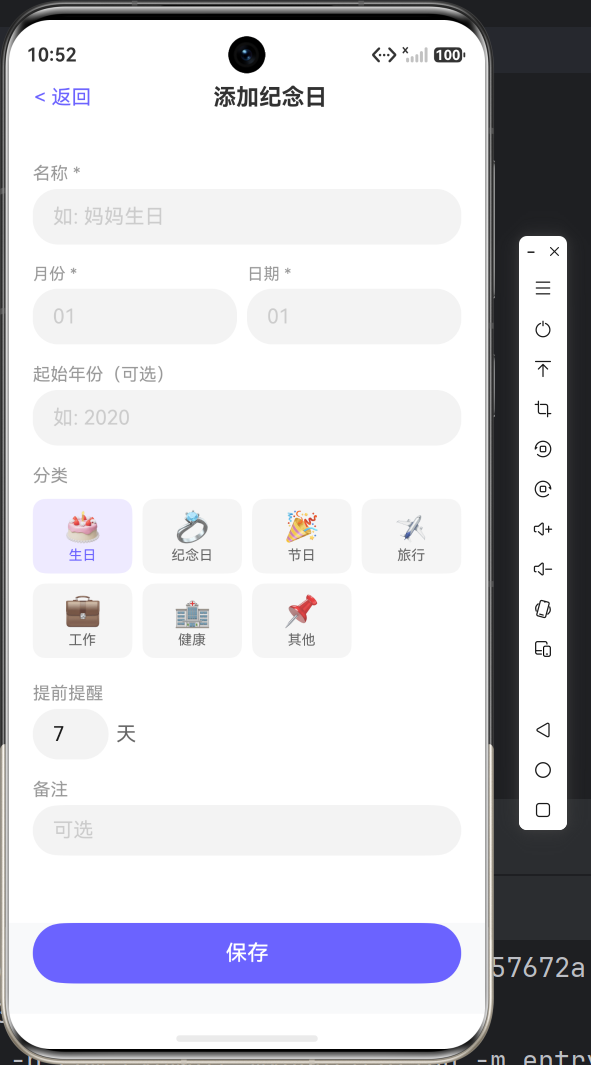
如果你对倒计时算法有更好的实现思路,欢迎留言讨论!

作为“人工智能6S店”的官方数字引擎,为AI开发者与企业提供一个覆盖软硬件全栈、一站式门户。
更多推荐
 0
0 0
0- 0


 已为社区贡献13条内容

所有评论(0)