
鸿蒙ArkUI实战:秒杀倒计时与进度条
秒杀是电商 App 的经典场景。本文用 ArkUI 构建一个完整的秒杀倒计时页面——HH:MM:SS 实时倒计时、Progress 库存进度条、商品卡片、抢购交互,以及倒计时归零后的状态切换。Progress 组件是本文的核心新知识,配合 setInterval 定时器驱动整个页面的动态状态。
一、我们要做什么
一个"限时秒杀"页面,包含四个核心功能:
- 实时倒计时 — 顶部红色横幅,六个数字方框显示 HH:MM:SS,每秒刷新。剩余时间 ≤ 30 分钟时进入紧张状态
- Progress 库存进度条 — 每个商品下方展示已售百分比,颜色从蓝→橙→红随售罄率动态变化
- 商品卡片 — 左侧彩色装饰条 + 名称描述 + 右侧秒杀价/原价(删除线),已售百分比 + 抢购按钮
- 抢购交互 — 点击"立即抢购"→ 弹窗确认 → 已售数 +5 → Progress 前进 → 售罄时按钮变灰"已售罄"
交互点:
- 倒计时实时刷新 — 每秒更新一次,数字变化有"跳动感"
- Progress 进度条 — 4 条独立进度条,不同售罄率不同颜色
- 抢购按钮 — 弹窗确认 → 库存减少 → Progress 推进 → 售罄状态切换
- 倒计时归零 — 全部商品变为"已结束",定时器自动清理
二、数据结构:商品模型 + 计算属性
class FlashProduct {
  name: string;          // 商品名称
  desc: string;          // 简短描述
  originalPrice: number; // 原价
  salePrice: number;     // 秒杀价
  sold: number;          // 已售数量
  total: number;         // 总库存
  color: string;         // 左侧装饰条颜色

  get soldPercent(): number {
    return Math.min(100, Math.round((this.sold / this.total) * 100));
  }

  get isSoldOut(): boolean {
    return this.sold >= this.total;
  }
}
FlashProduct 类封装了两个 getter:
soldPercent— 已售百分比,四舍五入取整,上限 100%。用于显示百分比文字,也用于判断进度条颜色阈值isSoldOut— 是否售罄。sold >= total即为售罄。之所以用>=而不是===,是因为抢购操作可能让sold略微超过total(例如本来剩 3 件,一次抢购 +5 件)
getter 的优势:每次访问时重新计算,不需要在更新 sold 后手动更新额外的 percent 或 status 字段。数据只有 sold 一个可变字段,其他都是派生值。
三、模拟数据:4 个商品,梯度售罄率
@State products: FlashProduct[] = [
  new FlashProduct('无线蓝牙耳机', '降噪长续航 佩戴舒适', 299, 99, 75, 100, '#4ECDC4'),
  new FlashProduct('智能手表',   '心率监测 运动追踪',   599, 199, 30, 50,  '#45B7D1'),
  new FlashProduct('机械键盘',   '青轴RGB背光 全键无冲', 399, 149, 147, 150, '#FF6B6B'),
  new FlashProduct('快充充电宝', '20000mAh 支持PD快充', 149, 49,  90, 200, '#96CEB4'),
];
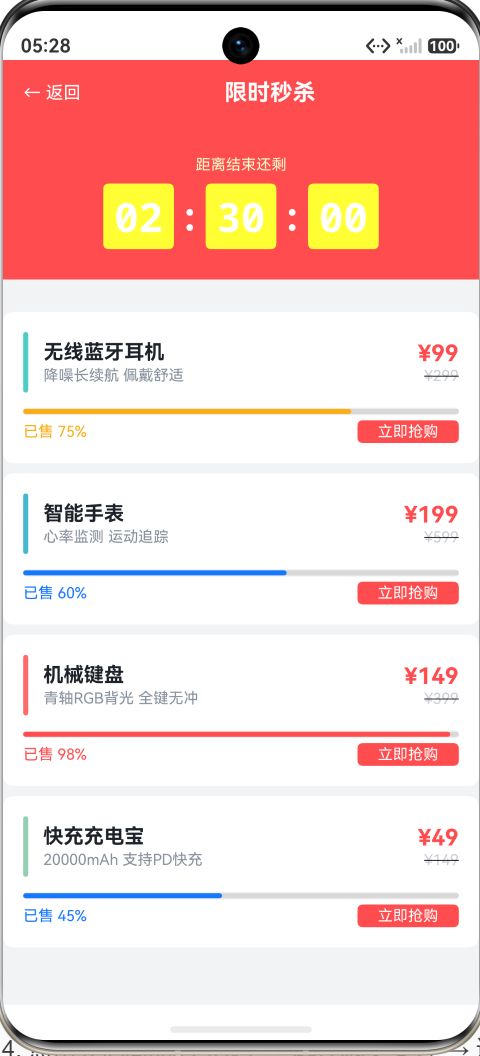
四个商品的售罄率分别为 75%、60%、98%、45%,覆盖了四种进度视觉状态:
- 75% → 橙色进度条(70%-90% 区间),即将售罄
- 60% → 蓝色进度条(< 70%),正常
- 98% → 红色进度条(≥ 90%),仅剩 3 件,紧张
- 45% → 蓝色进度条(< 70%),库存充足
这种数据设计让读者一次看到 Progress 的三种颜色状态,不需要逐个点击抢购才能观察到颜色变化。
四、交互点1:实时倒计时
计算目标时间
private endTime: number = 0;

aboutToAppear(): void {
  this.endTime = Date.now() + (2 * 3600 + 30 * 60) * 1000;
  this.updateTimer();
  this.timerId = setInterval(() => { this.updateTimer(); }, 1000);
}
endTime 是绝对时间戳(毫秒),在 aboutToAppear 中计算为当前时间 + 2 小时 30 分钟。用绝对时间而不是相对计数器的好处:即使页面重新渲染,倒计时也不会"重启"——Date.now() 是客观时间,不受组件生命周期影响。
每秒更新
private updateTimer(): void {
  const diff = Math.max(0, this.endTime - Date.now());
  if (diff <= 0) {
    this.hours = 0;
    this.minutes = 0;
    this.seconds = 0;
    this.isEnded = true;
    if (this.timerId !== -1) {
      clearInterval(this.timerId);
      this.timerId = -1;
    }
    return;
  }
  this.hours = Math.floor(diff / 3600000);
  this.minutes = Math.floor((diff % 3600000) / 60000);
  this.seconds = Math.floor((diff % 60000) / 1000);
}
倒计时归零时做了三件事:
- 清零所有时间显示(00:00:00)
- 设置
isEnded = true→ 触发 UI 切换到"活动已结束"状态 - 清理定时器 → 不再浪费 CPU 资源
数字方框显示
@Builder
timeBox(value: string) {
  Text(value)
    .fontSize(32)
    .fontColor(Color.White)
    .fontWeight(FontWeight.Bold)
    .width(56)
    .height(52)
    .borderRadius(BorderRadius.SM)
    .backgroundColor('#FFFFFF33')
    .textAlign(TextAlign.Center)
    .fontFamily('monospace')
}
每个数字方框是 56×52 的圆角矩形,半透明白色背景,等宽字体(monospace)保证数字宽度一致——"1"和"8"占据相同的宽度,不会在数字切换时产生水平抖动。
拼装 HH:MM:SS
Row() {
  this.timeBox(this.padZero(this.hours))
  Text(':').fontSize(32).fontColor(Color.White).fontWeight(FontWeight.Bold)
  this.timeBox(this.padZero(this.minutes))
  Text(':').fontSize(32).fontColor(Color.White).fontWeight(FontWeight.Bold)
  this.timeBox(this.padZero(this.seconds))
}
冒号在方框之间,与数字一样用白色粗体。padZero 确保个位数前面补零:
private padZero(n: number): string {
  return n < 10 ? `0${n}` : `${n}`;
}
五、交互点2:Progress 库存进度条
Progress({
  value: product.sold,
  total: product.total,
  type: ProgressType.Linear
})
  .width('100%')
  .height(6)
  .color(this.getProgressColor(product.sold, product.total))
Progress 组件 API
| 参数 | 说明 |
|---|---|
value |
当前值(已售数量) |
total |
总值(总库存) |
type |
ProgressType.Linear(条形)、Ring(环形)、Eclipse(月食)、ScaleRing(刻度环)、Capsule(胶囊) |
本 Demo 使用 Linear 条形——在秒杀场景中,条形进度比环形更直观,横向空间利用率更高。
进度条颜色动态切换
private getProgressColor(sold: number, total: number): string {
  const pct = sold / total;
  if (pct >= 0.9) return '#FF4D4F';  // ≥90% → 红色(即将售罄)
  if (pct >= 0.7) return '#FAAD14';  // ≥70% → 橙色(库存紧张)
  return AppColors.PRIMARY;           // < 70% → 蓝色(正常)
}
三个颜色阈值对应三种视觉信号:
- 蓝色(< 70%)— 库存充足,不慌
- 橙色(70%-90%)— 库存紧张,提醒用户快点
- 红色(≥ 90%)— 即将售罄,营造稀缺感和紧迫感
颜色切换通过 .color() 属性实现。Progress 的 .color() 设置填充色的部分,灰色背景轨道用外层 Row 的背景色模拟(见下文)。
背景轨道实现
Progress 组件本身可能不支持设置轨道(未填充部分)的颜色。这里用一个外层 Row 包裹 Progress,Row 的背景色作为轨道:
Row() {
  Progress({ value: product.sold, total: product.total, type: ProgressType.Linear })
    .width('100%')
    .height(6)
    .color(this.getProgressColor(product.sold, product.total))
}
.width('100%')
.height(6)
.borderRadius(3)
.backgroundColor('#F0F0F0')   // 浅灰色轨道背景
Row 的 .borderRadius(3) + .height(6) 给两端圆角,backgroundColor('#F0F0F0') 作为轨道。Progress 内部的填充色覆盖在轨道之上,形成了"灰色轨道 + 彩色进度"的视觉效果。
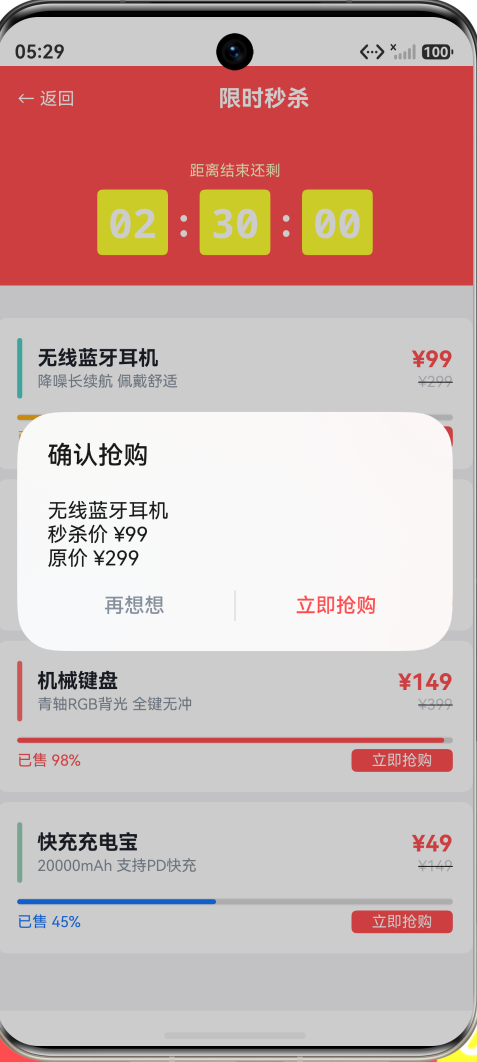
六、交互点3:抢购交互
private buyProduct(index: number): void {
  if (this.isEnded || this.products[index].isSoldOut) {
    return;
  }
  const product = this.products[index];
  promptAction.showDialog({
    title: '确认抢购',
    message: `${product.name}\n秒杀价 ¥${product.salePrice}\n原价 ¥${product.originalPrice}`,
    buttons: [
      { text: '再想想', color: AppColors.TEXT_TERTIARY },
      { text: '立即抢购', color: AppColors.ERROR }
    ]
  }).then((result) => {
    if (result.index === 1) {
      // 创建新的 FlashProduct 实例(已售 +5)
      const updated = new FlashProduct(
        product.name, product.desc, product.originalPrice, product.salePrice,
        Math.min(product.sold + 5, product.total), product.total, product.color
      );
      // 替换数组中的对应项(触发 @State 响应)
      const newProducts: FlashProduct[] = [];
      for (let i = 0; i < this.products.length; i++) {
        if (i === index) {
          newProducts.push(updated);
        } else {
          newProducts.push(this.products[i]);
        }
      }
      this.products = newProducts;
      // Toast 反馈
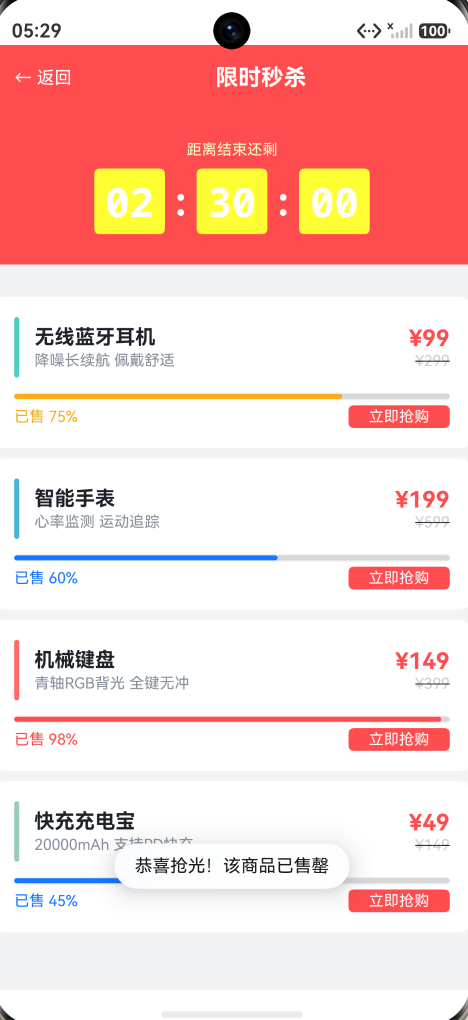
      if (updated.isSoldOut) {
        promptAction.showToast({ message: '恭喜抢光!该商品已售罄', duration: 1500 });
      } else {
        promptAction.showToast({ message: '抢购成功!库存减少', duration: 1500 });
      }
    }
  });
}
为什么要创建新的 FlashProduct 实例?
ArkUI 的 @State 响应式依赖于引用变化检测。直接修改 this.products[index].sold += 5 不会触发 UI 刷新,因为数组的引用没有变,元素的引用也没有变。
解决方案:创建新的 FlashProduct 实例 + 创建新的数组 → this.products = newProducts 触发 @State 变化检测 → UI 刷新。
售罄后的按钮状态
if (product.isSoldOut) {
  Text('已售罄')
    .fontSize(FontSize.CAPTION)
    .fontColor(Color.White)
    .backgroundColor('#CCCCCC')   // 灰色背景
    // 没有 .onClick() → 不可点击
} else if (this.isEnded) {
  Text('已结束')
    .fontSize(FontSize.CAPTION)
    .fontColor(Color.White)
    .backgroundColor('#CCCCCC')
} else {
  Text('立即抢购')
    .fontSize(FontSize.CAPTION)
    .fontColor(Color.White)
    .backgroundColor('#FF4D4F')   // 红色背景
    .onClick(() => { this.buyProduct(index); })
}
三种按钮状态通过 if/else 条件渲染:
- 正常 → 红色"立即抢购",可点击
- 售罄 → 灰色"已售罄",无
.onClick()(不可点击) - 活动结束 → 灰色"已结束",无
.onClick()
用 Text + .onClick() 而不是 Button 的原因是:条件渲染三个不同的 Text 比动态修改 Button 的 enabled 属性更直观,且灰色按钮的视觉样式需要自定义(ArkUI 的 Button.enabled(false) 样式不可定制)。
七、交互点4:倒计时归零
当 updateTimer() 检测到 diff <= 0 时:
- 设置
isEnded = true→ 触发 UI 变化:- 倒计时横幅文字从"距离结束还剩"变为"活动已结束"
- 所有商品按钮从"立即抢购"变为"已结束"
- 按钮不可点击(条件渲染中无
.onClick())
- 清理定时器 →
clearInterval(this.timerId)释放资源 - 所有时间清零 →
hours/minutes/seconds = 0
aboutToDisappear() 中也清理了定时器——用户离开页面时不会留下悬空的定时器在后台运行:
aboutToDisappear(): void {
  if (this.timerId !== -1) {
    clearInterval(this.timerId);
    this.timerId = -1;
  }
}
这是从 VerifyCodePage 延续下来的定时器生命周期管理模式:aboutToAppear 启动 → aboutToDisappear 清理 → 倒计时归零时自行清理。三重保障防止定时器泄漏。
八、商品卡片的视觉层次
┌──────────────────────────────────────────┐
│ ▌ 无线蓝牙耳机              ¥99         │
│ ▌ 降噪长续航 佩戴舒适       ¥299        │
│                                          │
│ ████████████████████░░░░░░ 75%          │
│ 已售 75%                    [立即抢购]   │
└──────────────────────────────────────────┘
每张商品卡片有三层信息:
- 第一行:名称 + 价格 — 左侧 4vp 彩色竖条(
.width(4).height(48).borderRadius(2))作为视觉锚点,右侧大号红色秒杀价 + 小号灰色删除线原价 - 第二行:描述 — 灰色小字,补充说明
- 第三行:进度条 + 统计 + 按钮 — Progress 在中间,左侧"已售 X%",右侧抢购按钮。
.justifyContent(FlexAlign.SpaceBetween)让它们两端对齐
原价使用删除线装饰:
Text(`¥${product.originalPrice}`)
  .fontSize(FontSize.CAPTION)
  .fontColor(AppColors.TEXT_DISABLED)
  .decoration({ type: TextDecorationType.LineThrough })
.decoration({ type: TextDecorationType.LineThrough }) 是 ArkUI 的文本装饰线 API,比手动画一条线更准确(线的粗细、位置、颜色自动匹配文本)。
九、页面结构总结
FlashSalePage (~230行)
├── 数据层
│   ├── class FlashProduct                — 商品模型(含 getter 计算属性)
│   └── @State products: FlashProduct[]   — 4 个商品
├── 状态层
│   ├── @State hours/minutes/seconds      — 倒计时数字
│   └── @State isEnded: boolean           — 活动是否结束
├── 定时器
│   ├── aboutToAppear() → setInterval     — 启动 1s 循环
│   ├── updateTimer()                     — 计算剩余时间
│   └── aboutToDisappear() → clearInterval — 清理
├── 业务方法
│   ├── buyProduct(index)                 — 抢购弹窗 + 库存更新
│   ├── getProgressColor(sold, total)     — 进度条颜色阈值
│   └── padZero(n)                        — 数字补零
└── UI 层
    ├── Header (红色顶栏 + 返回)
    ├── Countdown Banner (timeBox × 6 + 冒号 × 2)
    └── Scroll > Column
        └── Product Cards × 4
            ├── Row: 色条 + 名称描述 + 价格
            ├── Row: Progress (进度条背景)
            └── Row: 已售% + 按钮
十、完整代码
import { AppColors, BorderRadius, FontSize, Spacing } from '../common/Constants';
import { promptAction, router } from '@kit.ArkUI';

class FlashProduct {
  name: string;
  desc: string;
  originalPrice: number;
  salePrice: number;
  sold: number;
  total: number;
  color: string;

  constructor(name: string, desc: string, original: number, sale: number,
              sold: number, total: number, color: string) {
    this.name = name;
    this.desc = desc;
    this.originalPrice = original;
    this.salePrice = sale;
    this.sold = sold;
    this.total = total;
    this.color = color;
  }

  get soldPercent(): number {
    return Math.min(100, Math.round((this.sold / this.total) * 100));
  }

  get isSoldOut(): boolean {
    return this.sold >= this.total;
  }
}

@Entry
@Component
struct FlashSalePage {
  @State hours: number = 0;
  @State minutes: number = 0;
  @State seconds: number = 0;
  @State isEnded: boolean = false;
  @State products: FlashProduct[] = [
    new FlashProduct('无线蓝牙耳机', '降噪长续航 佩戴舒适', 299, 99, 75, 100, '#4ECDC4'),
    new FlashProduct('智能手表', '心率监测 运动追踪', 599, 199, 30, 50, '#45B7D1'),
    new FlashProduct('机械键盘', '青轴RGB背光 全键无冲', 399, 149, 147, 150, '#FF6B6B'),
    new FlashProduct('快充充电宝', '20000mAh 支持PD快充', 149, 49, 90, 200, '#96CEB4'),
  ];
  private endTime: number = 0;
  private timerId: number = -1;

  aboutToAppear(): void {
    this.endTime = Date.now() + (2 * 3600 + 30 * 60) * 1000;
    this.updateTimer();
    this.timerId = setInterval(() => { this.updateTimer(); }, 1000);
  }

  aboutToDisappear(): void {
    if (this.timerId !== -1) {
      clearInterval(this.timerId);
      this.timerId = -1;
    }
  }

  private updateTimer(): void {
    const diff = Math.max(0, this.endTime - Date.now());
    if (diff <= 0) {
      this.hours = 0;
      this.minutes = 0;
      this.seconds = 0;
      this.isEnded = true;
      if (this.timerId !== -1) {
        clearInterval(this.timerId);
        this.timerId = -1;
      }
      return;
    }
    this.hours = Math.floor(diff / 3600000);
    this.minutes = Math.floor((diff % 3600000) / 60000);
    this.seconds = Math.floor((diff % 60000) / 1000);
  }

  private padZero(n: number): string {
    return n < 10 ? `0${n}` : `${n}`;
  }

  private getProgressColor(sold: number, total: number): string {
    const pct = sold / total;
    if (pct >= 0.9) return '#FF4D4F';
    if (pct >= 0.7) return '#FAAD14';
    return AppColors.PRIMARY;
  }

  private buyProduct(index: number): void {
    if (this.isEnded || this.products[index].isSoldOut) {
      return;
    }
    const product = this.products[index];
    promptAction.showDialog({
      title: '确认抢购',
      message: `${product.name}\n秒杀价 ¥${product.salePrice}\n原价 ¥${product.originalPrice}`,
      buttons: [
        { text: '再想想', color: AppColors.TEXT_TERTIARY },
        { text: '立即抢购', color: AppColors.ERROR }
      ]
    }).then((result) => {
      if (result.index === 1) {
        const updated = new FlashProduct(
          product.name, product.desc, product.originalPrice, product.salePrice,
          Math.min(product.sold + 5, product.total), product.total, product.color
        );
        const newProducts: FlashProduct[] = [];
        for (let i = 0; i < this.products.length; i++) {
          if (i === index) {
            newProducts.push(updated);
          } else {
            newProducts.push(this.products[i]);
          }
        }
        this.products = newProducts;
        if (updated.isSoldOut) {
          promptAction.showToast({ message: '恭喜抢光!该商品已售罄', duration: 1500 });
        } else {
          promptAction.showToast({ message: '抢购成功!库存减少', duration: 1500 });
        }
      }
    });
  }

  build() {
    Column() {
      Row() {
        Text('← 返回')
          .fontSize(FontSize.BODY)
          .fontColor(Color.White)
          .onClick(() => { router.back(); })
        Text('限时秒杀')
          .fontSize(FontSize.TITLE)
          .fontWeight(FontWeight.Bold)
          .fontColor(Color.White)
          .layoutWeight(1)
          .textAlign(TextAlign.Center)
      }
      .width('100%')
      .height(52)
      .backgroundColor('#FF4D4F')
      .padding({ left: Spacing.LG, right: Spacing.LG })

      Column() {
        Text(this.isEnded ? '活动已结束' : '距离结束还剩')
          .fontSize(FontSize.CAPTION)
          .fontColor('#FFFFFFCC')
          .margin({ bottom: Spacing.SM })

        Row() {
          this.timeBox(this.padZero(this.hours))
          Text(':')
            .fontSize(32)
            .fontColor(Color.White)
            .fontWeight(FontWeight.Bold)
            .margin({ left: Spacing.SM, right: Spacing.SM })
          this.timeBox(this.padZero(this.minutes))
          Text(':')
            .fontSize(32)
            .fontColor(Color.White)
            .fontWeight(FontWeight.Bold)
            .margin({ left: Spacing.SM, right: Spacing.SM })
          this.timeBox(this.padZero(this.seconds))
        }
      }
      .width('100%')
      .padding({ top: Spacing.XXL, bottom: Spacing.XXL })
      .backgroundColor('#FF4D4F')
      .margin({ bottom: Spacing.SM })

      Scroll() {
        Column() {
          ForEach(this.products, (product: FlashProduct, index: number) => {
            Column() {
              Row() {
                Row()
                  .width(4).height(48)
                  .backgroundColor(product.color)
                  .borderRadius(2)
                  .margin({ right: Spacing.MD })

                Column() {
                  Text(product.name)
                    .fontSize(FontSize.MEDIUM)
                    .fontColor(AppColors.TEXT_PRIMARY)
                    .fontWeight(FontWeight.Bold)
                  Text(product.desc)
                    .fontSize(FontSize.CAPTION)
                    .fontColor(AppColors.TEXT_TERTIARY)
                    .margin({ top: 2 })
                }
                .alignItems(HorizontalAlign.Start)
                .layoutWeight(1)

                Column() {
                  Text(`¥${product.salePrice}`)
                    .fontSize(FontSize.TITLE)
                    .fontColor('#FF4D4F')
                    .fontWeight(FontWeight.Bold)
                  Text(`¥${product.originalPrice}`)
                    .fontSize(FontSize.CAPTION)
                    .fontColor(AppColors.TEXT_DISABLED)
                    .decoration({ type: TextDecorationType.LineThrough })
                }
                .alignItems(HorizontalAlign.End)
              }
              .width('100%')
              .margin({ bottom: Spacing.MD })

              Row() {
                Progress({
                  value: product.sold,
                  total: product.total,
                  type: ProgressType.Linear
                })
                  .width('100%')
                  .height(6)
                  .color(this.getProgressColor(product.sold, product.total))
              }
              .width('100%')
              .height(6)
              .borderRadius(3)
              .backgroundColor('#F0F0F0')
              .margin({ bottom: Spacing.XS })

              Row() {
                Text(`已售 ${product.soldPercent}%`)
                  .fontSize(FontSize.CAPTION)
                  .fontColor(this.getProgressColor(product.sold, product.total))

                if (product.isSoldOut) {
                  Text('已售罄')
                    .fontSize(FontSize.CAPTION)
                    .fontColor(Color.White)
                    .backgroundColor('#CCCCCC')
                    .borderRadius(BorderRadius.SM)
                    .padding({ left: Spacing.MD, right: Spacing.MD, top: 2, bottom: 2 })
                } else if (this.isEnded) {
                  Text('已结束')
                    .fontSize(FontSize.CAPTION)
                    .fontColor(Color.White)
                    .backgroundColor('#CCCCCC')
                    .borderRadius(BorderRadius.SM)
                    .padding({ left: Spacing.MD, right: Spacing.MD, top: 2, bottom: 2 })
                } else {
                  Text('立即抢购')
                    .fontSize(FontSize.CAPTION)
                    .fontColor(Color.White)
                    .backgroundColor('#FF4D4F')
                    .borderRadius(BorderRadius.SM)
                    .padding({ left: Spacing.LG, right: Spacing.LG, top: 2, bottom: 2 })
                    .onClick(() => { this.buyProduct(index); })
                }
              }
              .width('100%')
              .justifyContent(FlexAlign.SpaceBetween)
            }
            .width('100%')
            .padding({ left: Spacing.LG, right: Spacing.LG, top: Spacing.LG, bottom: Spacing.LG })
            .backgroundColor(Color.White)
            .borderRadius(BorderRadius.MD)
            .margin({ left: Spacing.LG, right: Spacing.LG, bottom: Spacing.SM })
          }, (product: FlashProduct) => product.name)
        }
        .width('100%')
        .padding({ top: Spacing.XS, bottom: Spacing.XXL })
      }
      .layoutWeight(1)
      .scrollBar(BarState.Off)
    }
    .width('100%')
    .height('100%')
    .backgroundColor(AppColors.BACKGROUND)
  }

  @Builder
  timeBox(value: string) {
    Text(value)
      .fontSize(32)
      .fontColor(Color.White)
      .fontWeight(FontWeight.Bold)
      .width(56).height(52)
      .borderRadius(BorderRadius.SM)
      .backgroundColor('#FFFFFF33')
      .textAlign(TextAlign.Center)
      .fontFamily('monospace')
  }
}
十一、常见面试题 / 踩坑点
11.1 Progress 的 total 可以不传吗?
可以。不传 total 时默认值为 100,此时 value 就是百分比(0-100)。但使用 total 显式传入总库存(如 total: 100)让代码更具可读性——value: 75, total: 100 比 value: 75 更直观地表达了"100 件中已售 75 件"。
11.2 为什么用绝对时间戳而不是相对计数器?
// 方法1:绝对时间戳(本 Demo)
this.endTime = Date.now() + 2.5 * 3600000;
const diff = this.endTime - Date.now();

// 方法2:相对计数器
let remaining = 2.5 * 3600;
setInterval(() => { remaining--; }, 1000);
方法 1 的优势:即使 setInterval 因为页面挂起(如用户切换到其他 App)而推迟执行,回来时仍能得到正确的时间。方法 2 会累积延迟。
11.3 Progress 的填充色和背景色是同一个属性吗?
不是。.color() 设置填充部分的颜色。背景轨道颜色需要通过外层容器(如 Row)的 backgroundColor 来实现。Progress 组件本身没有直接的轨道颜色属性。
11.4 @State products 更新时为什么要创建新数组?
// 错误:直接修改
this.products[index].sold += 5;

// 正确:创建新数组
this.products = [...newProducts];
@State 通过引用比较检测变化。直接修改数组元素的属性不会改变数组引用,UI 不会刷新。必须用新的数组引用赋值。
11.5 定时器在 aboutToDisappear 中清理是否必须?
是。setInterval 创建的定时器是全局资源,不会随组件销毁而自动释放。如果不清理,用户返回上一页后定时器仍然在运行,持续修改 @State 变量——此时组件已经销毁,修改 @State 会导致框架错误或内存泄漏。
三层保障:aboutToDisappear 清理 + 倒计时归零清理 + 离开页面时清理。
十二、扩展方向
- Progress 样式扩展 — 使用
ProgressType.Ring(环形进度)做环形库存指示器,适合在商品图片上叠加显示 - 真实倒计时到毫秒 — 加入毫秒级刷新(每 100ms),让最后几秒的动画效果更紧张
- WebSocket 实时同步 — 倒计时和库存数据从服务器推送,多个用户并发抢购时实时同步库存
- 限购逻辑 — 每个用户限购 1 件,已购买过的用户不能再买(需要用户 ID + 商品 ID 去重)
- 倒计时结束后自动跳转 — 活动结束后 3 秒自动跳转到"下一场秒杀预告"页面
- 音效反馈 — 抢购成功播放音效,售罄时播放不同的提示音
- 价格曲线 — 在商品卡片中加入"历史最低价"标签,展示价格走势
十三、运行方式
代码位于 dev/entry/src/main/ets/pages/FlashSalePage.ets。
用 DevEco Studio 打开 dev/ 项目,首页点击"秒杀倒计时 — 实时倒计时与进度条"即可体验:
- 进入页面 → 红色横幅实时显示 02:30:00 倒计时,每秒刷新
- 看到 4 个商品卡片,进度条颜色各不同(蓝/橙/红)
- 点击机械键盘的"立即抢购"→ 弹窗确认 → 已售 147→152,售罄 → 按钮变灰"已售罄"
- 点击其他商品的"抢购"→ 库存减少 5 件 → 进度条前进
- 等待倒计时归零 → 全部按钮变"已结束",横幅显示"活动已结束"

作为“人工智能6S店”的官方数字引擎,为AI开发者与企业提供一个覆盖软硬件全栈、一站式门户。
更多推荐


 1
1 0
0- 0


 已为社区贡献108条内容

所有评论(0)