
鸿蒙6.0应用开发——网络状态管理
鸿蒙6.0应用开发——网络状态管理
概述
Network Kit提供常用的网络信息查询与连接管理功能,包括获取网络类型、检查网络可用性、监听网络状态变化、查询Wi-Fi及蜂窝网络信息等。这些能力帮助开发者灵活应对复杂多变的网络环境,精准实现各类场景需求,显著提升用户的网络使用体验。
连接到指定网络场景
场景描述
在特定业务场景中(如企业或校园内网),应用必须通过指定的网络连接到专用服务器以获取关键数据。若连接指定网络失败,将直接导致网络配置中断、身份认证受阻或核心资源无法访问,从而中断业务流程。
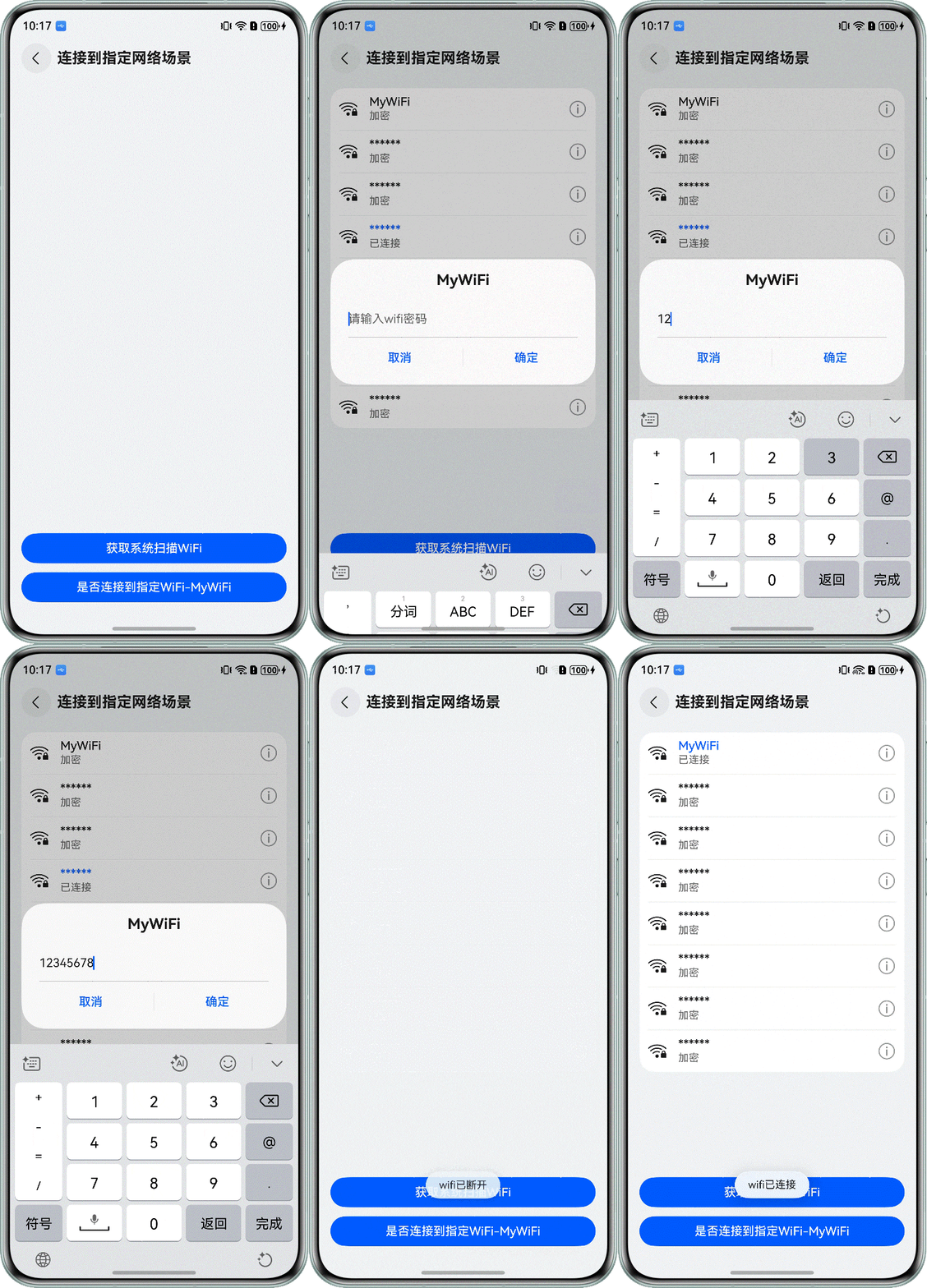
本章将通过以下示例,介绍如何连接到指定的Wi-Fi。该示例具备以下功能:
- 判断设备是否已连接到指定的Wi-Fi
- 获取系统扫描的Wi-Fi列表
- 通过点击Wi-Fi列表连接到相应的Wi-Fi
图1 连接到指定网络效果图
实现方案
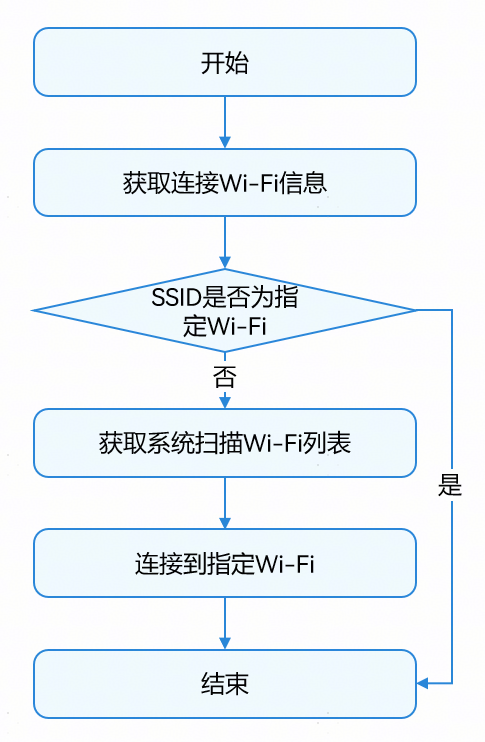
连接到指定Wi-Fi场景主要通过@ohos.wifiManager (WLAN)模块结合@ohos.net.connection (网络连接管理)模块相关API来实现。通过@ohos.wifiManager模块检查Wi-Fi是否启用,获取系统扫描的Wi-Fi列表,选中指定Wi-Fi后发起连接请求;通过@ohos.net.connection模块检测网络连通性,判断是否需要进行登录认证(如 Portal 认证)才能正常访问网络。流程图如下:
开发步骤
-
网络权限声明
在进行网络相关操作前,需在应用的module.json5配置文件中声明所需权限。涉及的权限包括:
-
ohos.permission.GET_NETWORK_INFO:用于获取网络信息,如默认网络、网络类型等。
-
ohos.permission.GET_WIFI_INFO:用于获取Wi-Fi相关信息,如Wi-Fi是否打开、Wi-Fi列表等。
-
ohos.permission.SET_WIFI_INFO:用于执行Wi-Fi连接操作。
-
ohos.permission.INTERNET:用于访问Internet网络。
{ "module": { // ... "requestPermissions": [ { "name": "ohos.permission.INTERNET", // ... }, { "name": "ohos.permission.GET_NETWORK_INFO", // ... }, { "name": "ohos.permission.SET_WIFI_INFO", // ... }, { "name": "ohos.permission.GET_WIFI_INFO", // ... }, // ... ] } } -
-
获取Wi-Fi信息,判断是否连接到指定Wi-Fi
先使用getDefaultNetSync()接口判断默认网络是否连接,并通过getNetCapabilitiesSync()方法获取默认连接网络类型。若网络类型为Wi-Fi,则使用getLinkedInfoSync()方法获取当前连接的Wi-Fi信息,该信息包含SSID等内容。将获取到的SSID与指定Wi-Fi的SSID进行比对,若一致则表示已连接到指定Wi-Fi。
checkNetwork(): void {
  try {
    // Use the synchronization method to obtain the default activated data network handle (default network)
    let netHandle = connection.getDefaultNetSync();
    if (netHandle.netId === 0) {
      // If there is no network connected, the netid of the obtained netHandler is 0
      showToast(this.uiContext, $r('app.string.no_network_tips'));
      return;
    }
    // Obtain the capability information of the network corresponding to the netHandle
    let netCapability = connection.getNetCapabilitiesSync(netHandle);
    let networkCap = netCapability.networkCap || [];
    let bearerTypes: connection.NetBearType[] = netCapability.bearerTypes;
    let isWifi = bearerTypes.includes(connection.NetBearType.BEARER_WIFI);
    if (!isWifi) {
      showToast(this.uiContext, $r('app.string.network_is_not_wifi'));
      return;
    }
    // The network type is WIFI to get network connection information
    let linkedInfo = wifiManager.getLinkedInfoSync();
    let ssid: string = linkedInfo.ssid;
    if (ssid === TARGET_WIFI_SSID) {
      // Connected to the target wifi
      // ...
    } else {
      showToast(this.uiContext, $r('app.string.not_connected_spec_wifi'));
    }
  } catch (err) {
    let error = err as BusinessError;
    Logger.error(TAG, `checkNetwork err, code: ${error.code}, message: ${error.message}`);
  }
}
代码逻辑走读:
- 获取默认网络句柄:
- 使用
connection.getDefaultNetSync()方法获取默认激活的数据网络句柄。 - 如果网络句柄的
netId为0,表示没有网络连接,显示无网络提示。
- 使用
- 获取网络能力信息:
- 使用
connection.getNetCapabilitiesSync(netHandle)方法获取网络对应的能力信息。 - 检查网络能力中是否包含Wi-Fi类型,如果不包含,显示非Wi-Fi网络提示。
- 使用
- 获取Wi-Fi连接信息:
- 如果网络类型是Wi-Fi,使用
wifiManager.getLinkedInfoSync()获取网络连接信息。 - 检查连接的SSID是否与目标SSID匹配,如果匹配,则表示已连接到指定Wi-Fi;否则,显示未连接到特定Wi-Fi的提示。
- 如果网络类型是Wi-Fi,使用
- 异常处理:
- 使用
try-catch块捕获可能的异常,并记录错误信息。
- 使用
通过getNetCapabilitiesSync()方法获取网络能力信息对象,其networkCap属性包含网络的具体能力。若networkCap中包含connection.NetCap.NET_CAPABILITY_VALIDATED,则表示网络具备访问互联网的能力(即网络可用);若networkCap中包含connection.NetCap.NET_CAPABILITY_PORTAL,则说明网络需要认证登录之后才能正常使用。
if (ssid === TARGET_WIFI_SSID) { // Connected to the target wifi if (networkCap.includes(connection.NetCap.NET_CAPABILITY_VALIDATED)) { showToast(this.uiContext, $r('app.string.connected_to_spec_wifi')); } else if (networkCap.includes(connection.NetCap.NET_CAPABILITY_PORTAL)) { // Login verification is required for the current network showToast(this.uiContext, $r('app.string.network_need_auth')); } else { showToast(this.uiContext, $r('app.string.result_network_unavailable')); } } else { showToast(this.uiContext, $r('app.string.not_connected_spec_wifi')); } - 获取默认网络句柄:
-
获取系统扫描Wi-Fi列表
在获取Wi-Fi列表之前,需要通过isWifiActive()方法判断Wi-Fi开关是否已打开。如果已打开,则通过调用getScanInfoList()方法获取系统扫描附近的Wi-Fi网络,并返回一个包含所有扫描到的Wi-Fi信息的数组。数组中的每个元素包含了Wi-Fi的SSID、加密类型、信号强度等详细信息。
getScanList(): void {
  try {
    let isWifiActive = wifiManager.isWifiActive();
    if (!isWifiActive) {
      showToast(this.uiContext, $r('app.string.turn_on_wlan_tips'));
      return;
    }
    this.getLinkedInfo();
    let temp = wifiManager.getScanInfoList();
    if (temp.length > 0) {
      // Remove duplicate WiFi data
      this.scanInfoList = this.uniqueBySsid(temp);
      Logger.info(TAG, `getScanList length: ${this.scanInfoList.length}`);
    }
  } catch (err) {
    let error = err as BusinessError;
    Logger.error(TAG, `getScanList err, code: ${error.code}, message: ${error.message}`);
  }
}
代码逻辑走读:
- 定义
getScanList方法,无参数,无返回值。 - 尝试执行以下操作:
- 调用
wifiManager.isWifiActive()检查当前WiFi是否激活,将结果存储在isWifiActive变量中。 - 如果
isWifiActive为false,调用showToast方法显示提示信息,并使用return语句终止方法执行。 - 如果WiFi已激活,调用
getLinkedInfo方法获取已链接的WiFi信息。 - 调用
wifiManager.getScanInfoList()获取扫描到的WiFi列表,将结果存储在temp变量中。 - 如果
temp的长度大于0,表示有扫描到的WiFi,调用uniqueBySsid方法去除重复项,并将结果存储在scanInfoList中。 - 使用
Logger.info记录scanInfoList的长度。
- 调用
- 如果尝试块中出现异常,捕获异常并将其转换为
BusinessError类型,使用Logger.error记录错误代码和错误信息。
- 定义
-
连接到指定Wi-Fi
首先,创建一个包含要连接的Wi-Fi的SSID、密码及安全类型(如WPA2_PSK)等信息的Wi-Fi配置对象,使用addCandidateConfig()方法,传入该配置对象以添加候选网络配置。然后,调用connectToCandidateConfig()方法发起连接请求。
connectWifi() {
  // Add a candidate network
  let config: wifiManager.WifiDeviceConfig = {
    ssid: this.ssid,
    preSharedKey: this.wifiPassword,
    securityType: this.securityType
  }

  try {
    wifiManager.addCandidateConfig(config).then(result => {
      Logger.info(TAG, `addCandidateConfig success, networkId: ${result}`);
      // Connect to a certain wifi
      wifiManager.connectToCandidateConfig(result);
    });
  } catch (err) {
    Logger.error(TAG, `connectWifi error: ${JSON.stringify(err)}`);
  }
}
网络状态感知场景
场景描述
本章以网络视频播放场景为例,围绕网络状态感知展开,介绍如何在监听到网络状态变化后,动态调整视频播放行为,以优化播放体验。本章实现的网络视频播放优化体验如下:
-
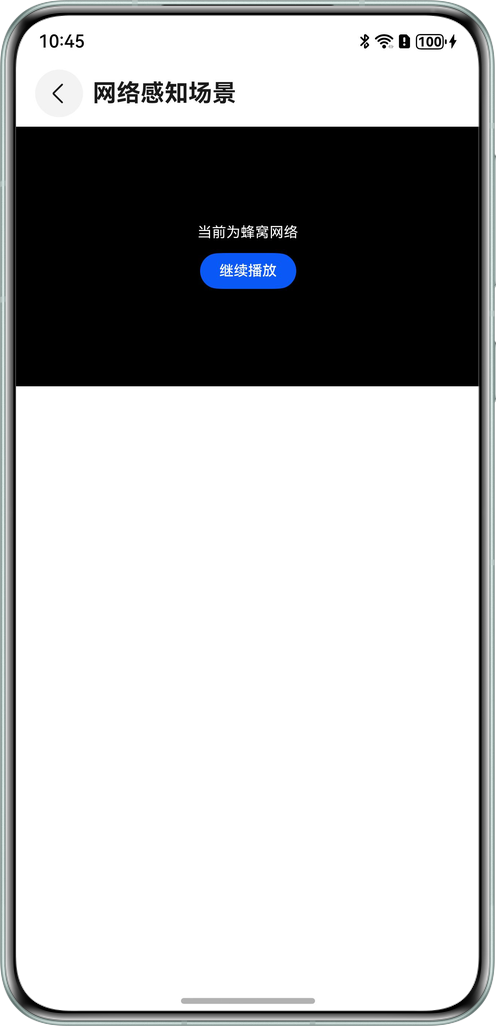
当网络从Wi-Fi切换到蜂窝网络,及时暂停播放,并提醒用户已切换到蜂窝网络,以避免产生流量费用。
-
当网络从蜂窝切换到的Wi-Fi时,自动播放之前暂停的视频,让用户无需手动操作即可继续观看。
-
当监听到弱网状态时,提示用户当前网络不佳。同时,系统可能会根据当前的网络质量情况切换网络。
-
当监听到网络中断时,提示用户检查网络连接,以避免视频突然中断带来的不良体验。
实现方案
网络状态感知的实现方案以实时监测网络状态变化并联动视频播放业务的调整为核心,主要依赖于@ohos.net.connection(网络连接管理)模块和netQuality(网络质量)模块来实现。本章重点介绍网络视频播放时对网络状态变化的感知,视频播放的具体实现可参考示例代码章节。为避免网络波动影响播放流畅性,建议开发者进行缓存处理。
网络状态的监听主要通过以下接口实现:
- on(‘netCapabilitiesChange’):订阅网络能力变化事件,当网络类型切换(如从Wi-Fi切换到蜂窝网络)、网络状态从无到有等,该事件将被触发。
- on(‘netLost’):订阅网络丢失事件,当网络严重中断或正常断开时触发该事件。
- on(‘netUnavailable’):订阅网络不可用事件,当网络不可用时触发该事件。
- on(‘netAvailable’):订阅网络可用事件,当网络可用时触发该事件。
- netQuality.on( ‘netSceneChange’):订阅网络场景信息,如从正常网络进入到弱网环境。
以视频播放场景为例,网络状态感知体验如下:
| 网络状态感知 | 网络类型变化 | 网络能力变化 | 网络能力变化 | 网络能力变化 | 网络能力变化 | 网络能力变化 |
|---|---|---|---|---|---|---|
| Wi-Fi切蜂窝 | 蜂窝切换Wi-Fi | 弱网场景 | 网络断开 | 网络不可用 | 网络可用 | |
| 应用处理 | 暂停播放,提示将使用流量播放 | 正常播放 | 弹窗提示网络不佳。(开发者可以提供切换视频清晰度播放的功能,在弱网场景下提示用户切换清晰度。) | 弹窗提示网络已断开,视频加载失败后展示错误页面 | 弹窗提示网络不可用,视频加载失败后展示错误页面 | 和网络类型变化规格一致 |
开发步骤
-
订阅网络可用/不可用事件
使用on(‘netAvailable’)订阅网络可用事件通知,接收到网络可用通知时,检测当前网络是否具备访问Internet的能力。若网络能正常访问Internet且此前因网络问题导致播放失败,则重置播放器并继续播放视频。
import { connection } from '@kit.NetworkKit';// Create a NetConnection object this.netCon = connection.createNetConnection(); // Subscribe to a network available event that triggers when the network is available this.netCon.on('netAvailable', (data: connection.NetHandle) => { Logger.info(TAG, `on netAvailable, Succeeded to get netAvailable: ${JSON.stringify(data)}`); this.isNetAvailable = NetworkUtil.isNetworkAvailable(); this.isCellular = NetworkUtil.isCellular(); if (this.isNetAvailable && this.isPlayError && !this.isCellular) { this.controller.reset(); } });public static isNetworkAvailable(): boolean { try { let netHandle = connection.getDefaultNetSync(); if (netHandle.netId === 0) { // If there is no network connected, the netid of the obtained netHandler is 0 return false; } let netCapability = connection.getNetCapabilitiesSync(netHandle); let networkCaps: connection.NetCap[] = netCapability.networkCap || []; return networkCaps.includes(connection.NetCap.NET_CAPABILITY_VALIDATED); } catch (err) { let error = err as BusinessError; Logger.error(TAG, `getNetworkType err, errCode: ${error.code}, error mesage: ${error.message}`); } return false; }使用on(‘netUnavailable’)订阅网络不可用事件通知,接收到网络不可用事件时,使用Toast弹窗提示用户网络不可用。
// Subscribe to a network unavailability event that triggers when the network is unavailable this.netCon.on('netUnavailable', () => { Logger.info(TAG, 'on netUnavailable, Succeeded to get unavailable net event'); this.isNetAvailable = false; showToast(this.uiContext, $r('app.string.result_network_unavailable')); }); -
订阅网络能力变化事件
通过on(‘netCapabilitiesChange’)方法可以订阅Wi-Fi和蜂窝网络切换的事件通知,当网络切换为蜂窝时暂停播放,否则继续播放视频。
// Subscribe to network capability change events that trigger when network capability changes,
// such as from no network to network with network, or when switching from WIFI to cellular
this.netCon.on('netCapabilitiesChange', (data: connection.NetCapabilityInfo) => {
  Logger.info(TAG, `on netCapabilitiesChange, Succeeded to get netCapabilitiesChange: ${JSON.stringify(data)}`);
  if (data.netCap.bearerTypes.includes(connection.NetBearType.BEARER_CELLULAR)) {
    // For cellular networks, pause playback
    this.isCellular = true;
    this.isShowController = false;
    this.controller.pause();
    showToast(this.getUIContext(), $r('app.string.current_cellular_tips'))
    this.isShowGoOn = true;
  } else {
    this.isCellular = false;
    this.isShowController = true;
    this.controller.start();
    this.isShowGoOn = false;
  }
});
从Wi-Fi切换为蜂窝网络效果图如下:
-
订阅网络丢失事件
通过on(‘netLost’)方法可以订阅网络丢失的事件通知,使用Toast提示用户网络已断开。
// Subscribe to a network loss event, triggered when the network is severely interrupted or normally disconnected,
// and the network interruption pauses playback
this.netCon.on('netLost', (data: connection.NetHandle) => {
  Logger.info(TAG, `on netLost, Succeeded to get netLost: ${JSON.stringify(data)}`);
  this.isNetAvailable = false;
  this.isCellular = false;
  showToast(this.uiContext, $r('app.string.network_disconnect_tips'));
});
网络断开时效果图:

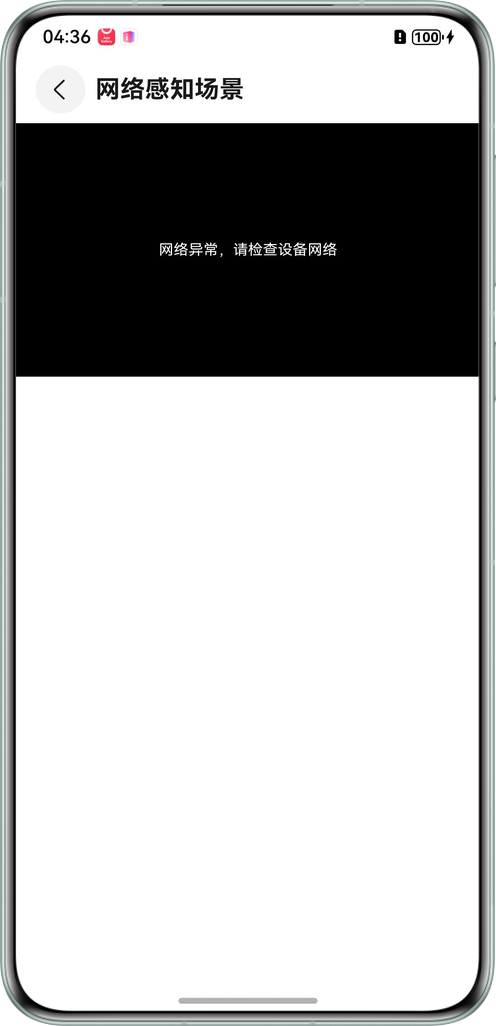
当网络断开时,将继续播放视频缓存;缓存播放完毕后,将触发Video组件的onError方法。若此时网络仍未连接,需提示用户检查网络。
Video({ src: this.videoUrl, controller: this.controller })
// ...
  .onError(() => {
    Logger.error(TAG, 'Video onError');
    this.lastTime = this.currentTime;
    this.isShowController = false;
    this.isPlayError = true;
    this.isPlaying = false;
    this.isNetAvailable = NetworkUtil.isNetworkAvailable();
  })
播放错误时效果图
-
订阅网络状态变化通知
接下来需要调用register()接口,用来订阅指定的网络状态变化通知,该接口需在on()方法调用之后使用。例如,若指定的网络可用,将触发on(‘netAvailable’)、on(‘netCapabilitiesChange’)回调;若超时时间内网络不可用,将触发on(‘netUnavailable’)回调。若断网,将触发on(‘netLost’)回调。
this.netCon.register((error: BusinessError) => { if (error) { Logger.error(TAG, `networkListen fail: ${JSON.stringify(error)}`); } }); -
订阅网络场景变化
使用netQuality.on(‘netSceneChange’)方法订阅网络场景变化通知,当网络为弱信号场景(weakSignal)或者拥塞场景(congestion)时,使用Toast弹窗提示用户当前网络不佳。建议开发者实现多种不同清晰度资源切换的功能,在此场景下,提示用户切换清晰度。
import { netQuality } from '@kit.NetworkBoostKit'; onNetSceneChange() { // Subscribe to network scene information try { netQuality.on('netSceneChange', (list: netQuality.NetworkScene[]) => { Logger.info(TAG, `on netSceneChange, Succeeded receive netSceneChange info: ${list.length}`); if (list.length > 0) { list.forEach((networkScene) => { if (networkScene.scene === 'weakSignal' || networkScene.scene === 'congestion') { this.promptAction.showToast({ message: $r('app.string.network_bad_tips') }); } }); } }); } catch (err) { Logger.error(TAG, `on netSceneChange err: ${JSON.stringify(err)}`); } } -
取消订阅网络变化/取消订阅场景变化通知
在退出页面时,通过调用unregister()取消订阅网络状态变化通知,使用netQuality.off(‘netSceneChange’)取消订阅场景变化。
aboutToDisappear(): void {
  // Unsubscribe from network status changes
  this.netCon?.unregister((err: BusinessError) => {
    if (err) {
      Logger.error(TAG, `unregister failed, err: ${JSON.stringify(err)}`);
    }
  });
  // Unsubscribe from network scenario information
  try {
    netQuality.off('netSceneChange');
  } catch (err) {
    Logger.error(TAG, `off netSceneChange err: ${JSON.stringify(err)}`);
  }
}

作为“人工智能6S店”的官方数字引擎,为AI开发者与企业提供一个覆盖软硬件全栈、一站式门户。
更多推荐



 62
62 0
0- 0


 已为社区贡献68条内容

所有评论(0)