
鸿蒙新特性:Navigation 导航框架深度解析
HarmonyOS NEXT 引入了全新的 Navigation 导航框架,用
NavPathStack替代已废弃的router.pushUrl/back。这是 ArkUI 最重要的架构级变更之一。本文将深入对比新旧方案,并用一个"城市指南"多级导航 Demo 展示栈式导航的核心 API。
一、旧时代的告别:router 为什么被废弃?
在 HarmonyOS NEXT 之前,所有页面跳转都通过 router 模块完成:
// 旧方案(已废弃)— 当前 20 个 Demo 仍在使用
import { router } from '@kit.ArkUI';

router.pushUrl({ url: 'pages/DetailPage' });  // 跳转
router.back();                                  // 返回
这套 API 简单直接,但有几个在大型应用中暴露出来的问题:
- URL 字符串路由 —
'pages/DetailPage'是字符串,编译期不检查,打错一个字(如'pages/DetialPage')要到运行时才能发现 - 参数传递弱类型 —
router.pushUrl({ url: xxx, params: { id: 1 } })的 params 是object类型,接收方router.getParams()也是object,需要手动类型断言 - 栈管理能力弱 — 没有"返回到首页"(clear)、“替换当前页”(replace)等栈操作,需要手动模拟
- 无法拦截返回 — 无法在用户点击返回时做"是否保存草稿"的拦截提示
- 不支持共享元素过渡 — 页面切换动画只能全局设置,无法做跨页面的共享元素动画
Navigation 新方案一览
import { NavPathStack } from '@kit.ArkUI';

// 创建导航栈
private navPathStack: NavPathStack = new NavPathStack();

// 跳转到详情页
this.navPathStack.pushPath({ name: 'DetailPage', param: { id: 1 } });

// 跳转(按名称)
this.navPathStack.pushPathByName('DetailPage', { id: 1 });

// 返回上一页
this.navPathStack.pop();

// 替换当前页(不增加栈深度)
this.navPathStack.replacePath({ name: 'NewPage' });

// 清空栈回到首页
this.navPathStack.clear();

// 获取栈深度
const depth = this.navPathStack.size();
NavPathStack 是一个面向对象的导航栈管理器。它把"页面跳转"抽象为"栈操作"——push(压入)、pop(弹出)、replace(替换)、clear(清空)。这种抽象比 URL 字符串更接近导航的底层模型。
二、Navigation 组件的结构
Navigation 是整个导航框架的容器组件,包裹应用的根内容,并注册页面路由表:
Navigation(this.navPathStack) {
  // 根页面内容(首页)
  Column() {
    Button('去详情页')
      .onClick(() => {
        this.navPathStack.pushPath({ name: 'Detail' });
      })
  }
}
.navDestination(this.pageBuilder)   // 路由表:name → 页面
.mode(NavigationMode.Stack)         // 栈式导航模式
.hideTitleBar(true)                 // 隐藏默认标题栏
.onNavPathUpdate((info) => {        // 栈变化回调
  this.stackDepth = this.navPathStack.size();
})
路由表:navDestination
@Builder
pageBuilder(name: string, param: ESObject) {
  if (name === 'Detail') {
    DetailPage({ data: param as DetailData })
  } else if (name === 'Settings') {
    SettingsPage()
  }
}
navDestination 接收一个 Builder 函数,参数是页面名称和参数对象。当 pushPath({ name: 'Detail', param: {...} }) 被调用时,Navigation 框架会自动调用 pageBuilder('Detail', {...}) 渲染对应的页面。
这和前端框架(React Router、Vue Router)的路由注册模式类似——声明式的路由表(路径 → 组件映射)+ 命令式的跳转方法(push/replace)。
NavigationMode
NavigationMode.Stack— 栈式导航,页面从右滑入(手机 App 默认模式)NavigationMode.Split— 分栏导航,左侧永久显示导航栏,右侧显示内容(平板常用)
三、一个完整的导航 Demo:城市指南
本 Demo 模拟 NavPathStack 的核心行为——手动管理页面栈,展示三级导航:
首页(城市列表)
  └── pushPath → 城市详情(景点列表)
        └── pushPath → 景点详情(具体信息)
             ├── pop() → 返回城市详情
             └── clear() → 回到首页
Demo 的栈管理实现
@State currentPage: string = 'home';
@State stackDepth: number = 0;
private pageStack: string[] = [];

// 压入新页面
private pushPage(page: string, city?: string): void {
  this.pageStack.push(this.currentPage);  // 当前页入栈
  this.currentPage = page;                // 切换到新页面
  this.stackDepth = this.pageStack.length;
}

// 弹出当前页面
private popPage(): void {
  if (this.pageStack.length > 0) {
    this.currentPage = this.pageStack.pop()!;  // 恢复上一页
    this.stackDepth = this.pageStack.length;
  }
}

// 清空栈回到首页
private clearToHome(): void {
  this.pageStack = [];
  this.currentPage = 'home';
  this.stackDepth = 0;
}
这和 NavPathStack 的 API 一一对应。每个操作都有明确的栈行为:
| 操作 | 等价 API | 栈变化 | 栈深度 |
|---|---|---|---|
| 点击城市卡片 | pushPath('cityDetail') |
压入 | +1 |
| 点击景点 | pushPath('attraction') |
压入 | +1 |
| 点击 ← 返回 | pop() |
弹出 | -1 |
| 点击 🏠 首页 | clear() |
清空 | =0 |
页面渲染:条件切换
if (this.currentPage === 'home') {
  this.homePage()
} else if (this.currentPage === 'city') {
  this.cityDetailPage()
} else if (this.currentPage === 'attraction') {
  this.attractionDetailPage()
}
在真正的 Navigation 框架中,这部分由 navDestination builder 自动处理——框架根据 pushPath 传入的 name 参数映射到对应的 Builder。
栈深度指示器
顶部蓝色信息条实时显示当前的栈深度和页面名称:
Row() {
  Text(`导航栈深度: ${this.stackDepth}`)
    .fontSize(FontSize.CAPTION)
    .fontColor(Color.White)
  Text(`页面: ${this.currentPage}`)
    .fontSize(FontSize.CAPTION)
    .fontColor('#FFFFFFAA')
}
.width('100%')
.padding({ left: Spacing.LG, top: Spacing.XS, bottom: Spacing.XS })
.backgroundColor('#1677FFBB')
.justifyContent(FlexAlign.SpaceBetween)
这相当于 Navigation 的 onNavPathUpdate 回调——每次栈变化时更新 UI。
四、城市指南 Demo 页面结构
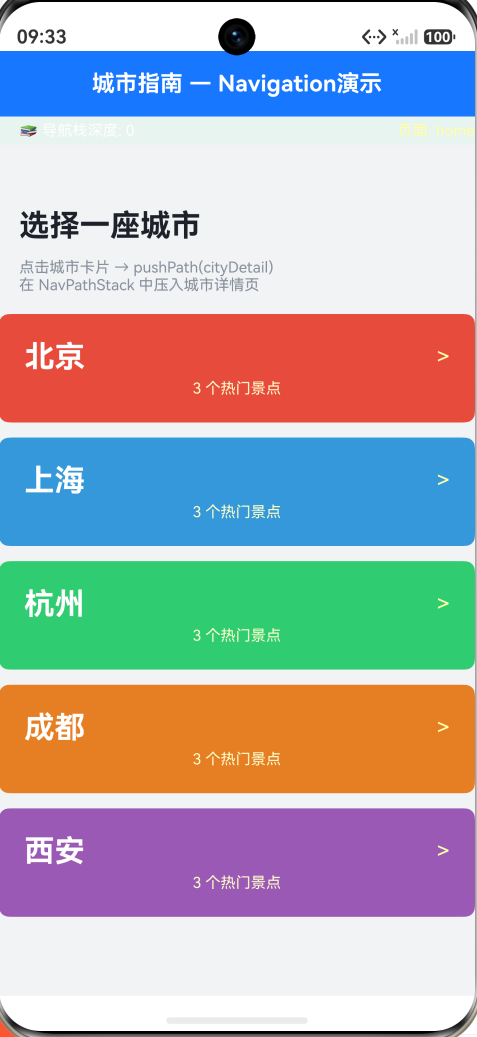
首页:5 座城市的卡片列表
5 张彩色卡片(北京红、上海蓝、杭州绿、成都橙、西安紫),每张显示城市名 + 景点数量。点击卡片 → pushPage('city', cityName) 进入城市详情。
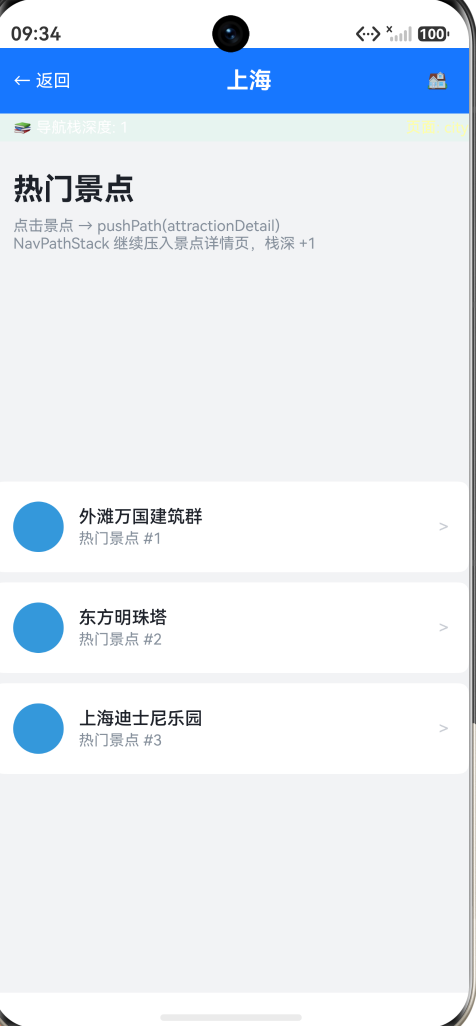
城市详情页:景点列表
显示该城市的热门景点(从 CITIES 数组匹配),每个景点带有彩色圆形编号 + 名称 + 箭头。点击景点 → pushPage('attraction', undefined, attractionName) 进入景点详情。
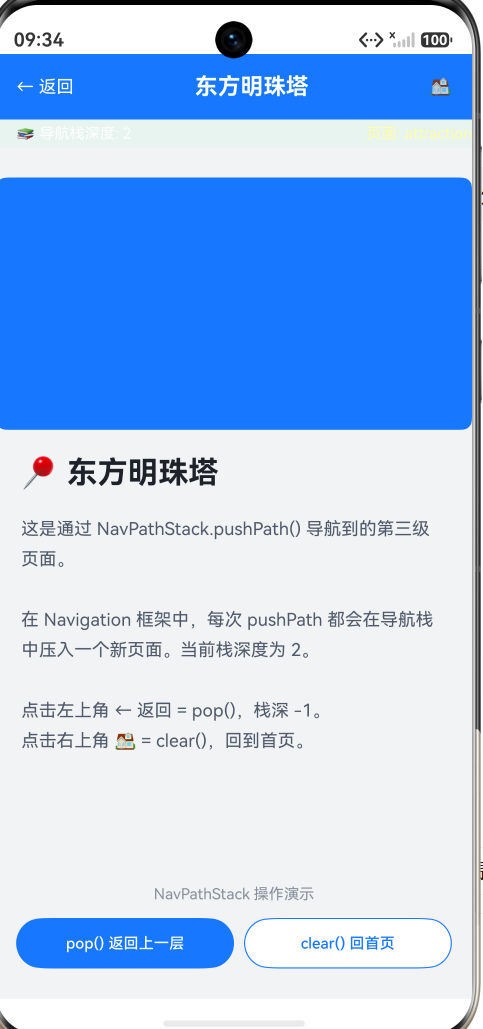
景点详情页
展示景点信息 + 区域占位图(蓝色方块模拟图片)+ 两个操作按钮:
- pop() 返回上一层 — 弹出当前页,回到城市详情
- clear() 回首页 — 清空所有栈,回到首页
这一层级的两个按钮是 Navigation 框架中最重要的栈操作——pop 和 clear 分别对应"回上一页"和"回首页"两种返回语义。
五、Navigation 对比 router 核心理念变化
从 URL 路由到页面栈
旧方案的思维模型是"URL 跳转"——每个页面有一个 URL 字符串,跳转就是 URL 替换。这和 Web 的 window.location.href = '/pageB' 一样。
新方案的思维模型是"栈操作"——页面被组织在一个栈结构中,导航就是对栈的 push/pop/replace/clear。这和原生开发(iOS UINavigationController、Android FragmentManager)的模型一致。
导航拦截
新方案支持对返回操作进行拦截,在用户点返回时可以做"是否保存草稿"的判断:
// 在 navDestination 中注册返回拦截
.onBackPressed(() => {
  if (hasUnsavedChanges) {
    // 弹窗询问 → 用户确认 → 返回 true 允许返回
    return true;  // 拦截返回
  }
  return false;  // 允许返回
})
旧方案的 router.back() 没有拦截能力——一旦调用就返回了,无法撤销。
栈可视化与调试
NavPathStack.getAllPathName() 返回当前栈中所有页面的名称数组。这在开发和调试时非常有用:
console.log(JSON.stringify(this.navPathStack.getAllPathName()));
// ["home", "cityDetail", "attractionDetail"]
旧方案没有公开的路由栈查询 API。
六、完整 Demo 代码
import { AppColors, BorderRadius, FontSize, Spacing } from '../common/Constants';

class City {
  name: string;
  color: string;
  attractions: string[];

  constructor(name: string, color: string, attractions: string[]) {
    this.name = name;
    this.color = color;
    this.attractions = attractions;
  }
}

const CITIES: City[] = [
  new City('北京', '#E74C3C', ['天安门广场', '故宫博物院', '八达岭长城']),
  new City('上海', '#3498DB', ['外滩万国建筑群', '东方明珠塔', '上海迪士尼乐园']),
  new City('杭州', '#2ECC71', ['西湖风景区', '灵隐寺', '千岛湖']),
  new City('成都', '#E67E22', ['宽窄巷子', '大熊猫繁育基地', '都江堰']),
  new City('西安', '#9B59B6', ['秦始皇兵马俑', '大雁塔', '西安钟楼']),
];

@Entry
@Component
struct NavigationPage {
  @State currentPage: string = 'home';
  @State cityName: string = '';
  @State attractionName: string = '';
  @State stackDepth: number = 0;
  private pageStack: string[] = [];

  private pushPage(page: string, city?: string, attraction?: string): void {
    this.pageStack.push(this.currentPage);
    this.currentPage = page;
    if (city) this.cityName = city;
    if (attraction) this.attractionName = attraction;
    this.stackDepth = this.pageStack.length;
  }

  private popPage(): void {
    if (this.pageStack.length > 0) {
      this.currentPage = this.pageStack.pop()!;
      this.stackDepth = this.pageStack.length;
    }
  }

  private clearToHome(): void {
    this.pageStack = [];
    this.currentPage = 'home';
    this.cityName = '';
    this.attractionName = '';
    this.stackDepth = 0;
  }

  build() {
    Column() {
      Row() {
        if (this.currentPage !== 'home') {
          Text('← 返回')
            .fontSize(FontSize.BODY)
            .fontColor(Color.White)
            .onClick(() => { this.popPage(); })
        }
        Text(this.currentPage === 'home' ? '城市指南' :
          (this.currentPage === 'city' ? this.cityName : this.attractionName))
          .fontSize(FontSize.TITLE)
          .fontWeight(FontWeight.Bold)
          .fontColor(Color.White)
          .layoutWeight(1)
          .textAlign(TextAlign.Center)
        if (this.currentPage !== 'home') {
          Text('🏠')
            .fontSize(FontSize.BODY)
            .onClick(() => { this.clearToHome(); })
        }
      }
      .width('100%').height(52)
      .backgroundColor(AppColors.PRIMARY)
      .padding({ left: Spacing.LG, right: Spacing.LG })

      Row() {
        Text(`导航栈深度: ${this.stackDepth}`)
          .fontSize(FontSize.CAPTION).fontColor(Color.White)
        Text(`页面: ${this.currentPage}`)
          .fontSize(FontSize.CAPTION).fontColor('#FFFFFFAA')
      }
      .width('100%')
      .padding({ left: Spacing.LG, top: Spacing.XS, bottom: Spacing.XS })
      .backgroundColor('#1677FFBB')
      .justifyContent(FlexAlign.SpaceBetween)

      if (this.currentPage === 'home') {
        this.homePage()
      } else if (this.currentPage === 'city') {
        this.cityDetailPage()
      } else if (this.currentPage === 'attraction') {
        this.attractionDetailPage()
      }
    }
    .width('100%').height('100%')
    .backgroundColor(AppColors.BACKGROUND)
  }

  @Builder homePage() {
    Scroll() {
      Column() {
        Text('选择一座城市')
          .fontSize(FontSize.HEADLINE).fontWeight(FontWeight.Bold)
          .fontColor(AppColors.TEXT_PRIMARY)
          .width('100%')
          .padding({ left: Spacing.LG, top: Spacing.XXL, bottom: Spacing.MD })
        ForEach(CITIES, (city: City) => {
          Column() {
            Row() {
              Text(city.name)
                .fontSize(FontSize.HEADLINE).fontColor(Color.White)
                .fontWeight(FontWeight.Bold).layoutWeight(1)
              Text('>').fontSize(FontSize.TITLE).fontColor('#FFFFFFAA')
            }.width('100%')
            Text(`${city.attractions.length} 个热门景点`)
              .fontSize(FontSize.CAPTION).fontColor('#FFFFFFCC')
              .margin({ top: Spacing.XS })
          }
          .width('100%')
          .padding({ left: Spacing.XL, right: Spacing.XL, top: Spacing.XL, bottom: Spacing.XL })
          .borderRadius(BorderRadius.MD)
          .backgroundColor(city.color)
          .margin({ left: Spacing.LG, right: Spacing.LG, bottom: Spacing.MD })
          .onClick(() => { this.pushPage('city', city.name); })
        })
        Column().height(Spacing.XXL)
      }.width('100%')
    }
    .layoutWeight(1).scrollBar(BarState.Off)
  }

  @Builder cityDetailPage() {
    Column() {
      Scroll() {
        Column() {
          ForEach(CITIES, (city: City) => {
            if (city.name === this.cityName) {
              ForEach(city.attractions, (attraction: string, index: number) => {
                Row() {
                  Row()
                    .width(40).height(40).borderRadius(20)
                    .backgroundColor(city.color)
                    .justifyContent(FlexAlign.Center)
                    .margin({ right: Spacing.MD })
                  Column() {
                    Text(attraction)
                      .fontSize(FontSize.BODY)
                      .fontColor(AppColors.TEXT_PRIMARY)
                      .fontWeight(FontWeight.Medium)
                    Text(`热门景点 #${index + 1}`)
                      .fontSize(FontSize.CAPTION)
                      .fontColor(AppColors.TEXT_TERTIARY)
                      .margin({ top: 2 })
                  }
                  .alignItems(HorizontalAlign.Start).layoutWeight(1)
                  Text('>').fontSize(FontSize.BODY)
                    .fontColor(AppColors.TEXT_DISABLED)
                }
                .width('100%')
                .padding({ left: Spacing.LG, right: Spacing.LG, top: Spacing.LG, bottom: Spacing.LG })
                .backgroundColor(Color.White)
                .borderRadius(BorderRadius.MD)
                .margin({ left: Spacing.LG, right: Spacing.LG, bottom: Spacing.SM })
                .onClick(() => { this.pushPage('attraction', undefined, attraction); })
              })
            }
          })
        }.width('100%')
      }
      .layoutWeight(1).scrollBar(BarState.Off)
    }
    .width('100%').layoutWeight(1)
  }

  @Builder attractionDetailPage() {
    Column() {
      Column() {
        Text(`📍 ${this.attractionName}`)
          .fontSize(FontSize.HEADLINE).fontWeight(FontWeight.Bold)
          .fontColor(AppColors.TEXT_PRIMARY).width('100%')
        Text('这是通过 NavPathStack.pushPath() 导航到的第三级页面。\n\n栈深度为 ' +
          this.stackDepth + '。\n点击 ← 返回 = pop()\n点击 🏠 = clear()')
          .fontSize(FontSize.BODY).fontColor(AppColors.TEXT_SECONDARY)
          .width('100%').margin({ top: Spacing.LG }).lineHeight(24)
      }
      .width('100%').padding({ left: Spacing.XL, right: Spacing.XL, top: Spacing.XXL })
      Blank()
      Column() {
        Row() {
          Button('pop() 返回')
            .fontSize(FontSize.CAPTION).fontColor(Color.White)
            .backgroundColor(AppColors.PRIMARY).borderRadius(9999)
            .layoutWeight(1)
            .onClick(() => { this.popPage(); })
          Button('clear() 首页')
            .fontSize(FontSize.CAPTION).fontColor(AppColors.PRIMARY)
            .border({ width: 1, color: AppColors.PRIMARY })
            .backgroundColor(Color.White)
            .borderRadius(9999).layoutWeight(1)
            .margin({ left: Spacing.SM })
            .onClick(() => { this.clearToHome(); })
        }.width('100%')
      }
      .width('100%')
      .padding({ left: Spacing.LG, right: Spacing.LG, bottom: Spacing.XXL })
    }
    .width('100%').layoutWeight(1)
  }
}
七、常见面试题 / 踩坑点
7.1 Navigation 和 Router 可以混用吗?
不建议。虽然技术上可以在某些场景下混用(比如用 Router 打开外部页面,用 Navigation 管理内部页面),但这会导致两套不互通的导航栈——从 Navigation 管理的页面通过 Router 跳走后,点返回不会回到 Navigation 栈。
HarmonyOS NEXT 推荐全量迁移到 Navigation。
7.2 NavPathStack 的 pushPath 和 pushPathByName 有什么区别?
pushPath(info: NavPathInfo)— 传入完整的 NavPathInfo 对象(包含 name、param、onPop 等)pushPathByName(name: string, param?: Object)— 仅传页面名称和参数
两者效果相同,pushPathByName 是简化版。当需要传递 onPop 回调(页面被 pop 时触发)时,用 pushPath。
7.3 如何监听栈变化?
Navigation(this.navPathStack) { ... }
  .onNavPathUpdate((info) => {
    // info 包含当前栈的状态
    console.log('Stack depth:', this.navPathStack.size());
  })
7.4 旧项目的 Router 何时完全移除?
在 HarmonyOS NEXT (API 24) 中,router.pushUrl 和 router.back 已被标记为 deprecated(废弃),但仍可使用。预计在未来的 API 版本中会完全移除。新项目应优先使用 Navigation。
八、扩展方向
- NavigationMode.Split 分栏模式 — 在平板设备上启用分栏导航,左侧固定菜单 + 右侧内容区域
- 共享元素过渡动画 — 配合
.sharedTransition()实现跨页面的共享元素平滑过渡 - Deep Link 支持 — 通过 Navigation 的
pushPathByName+ DeepLink 参数实现外部跳转 - 返回拦截 — 利用 NavDestination 的
.onBackPressed()在用户离开前做"是否保存"的确认 - 页面预加载 — 在 NavPathStack 中预创建页面实例,减少 pushPath 时的渲染延迟

作为“人工智能6S店”的官方数字引擎,为AI开发者与企业提供一个覆盖软硬件全栈、一站式门户。
更多推荐



 6
6 0
0- 0


 已为社区贡献274条内容

所有评论(0)