
数独算法与求解器鸿蒙PC Electron框架完成深度解析
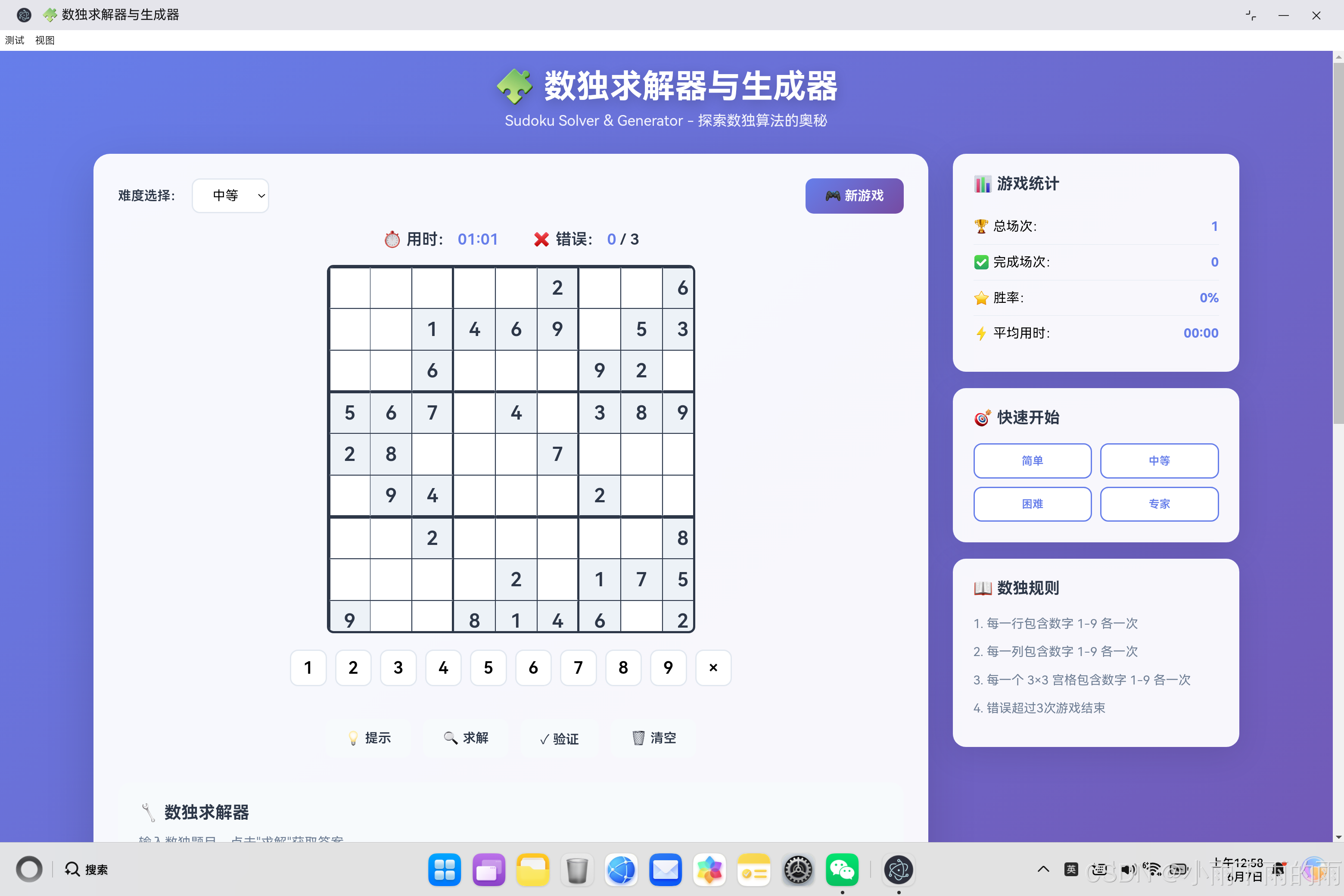
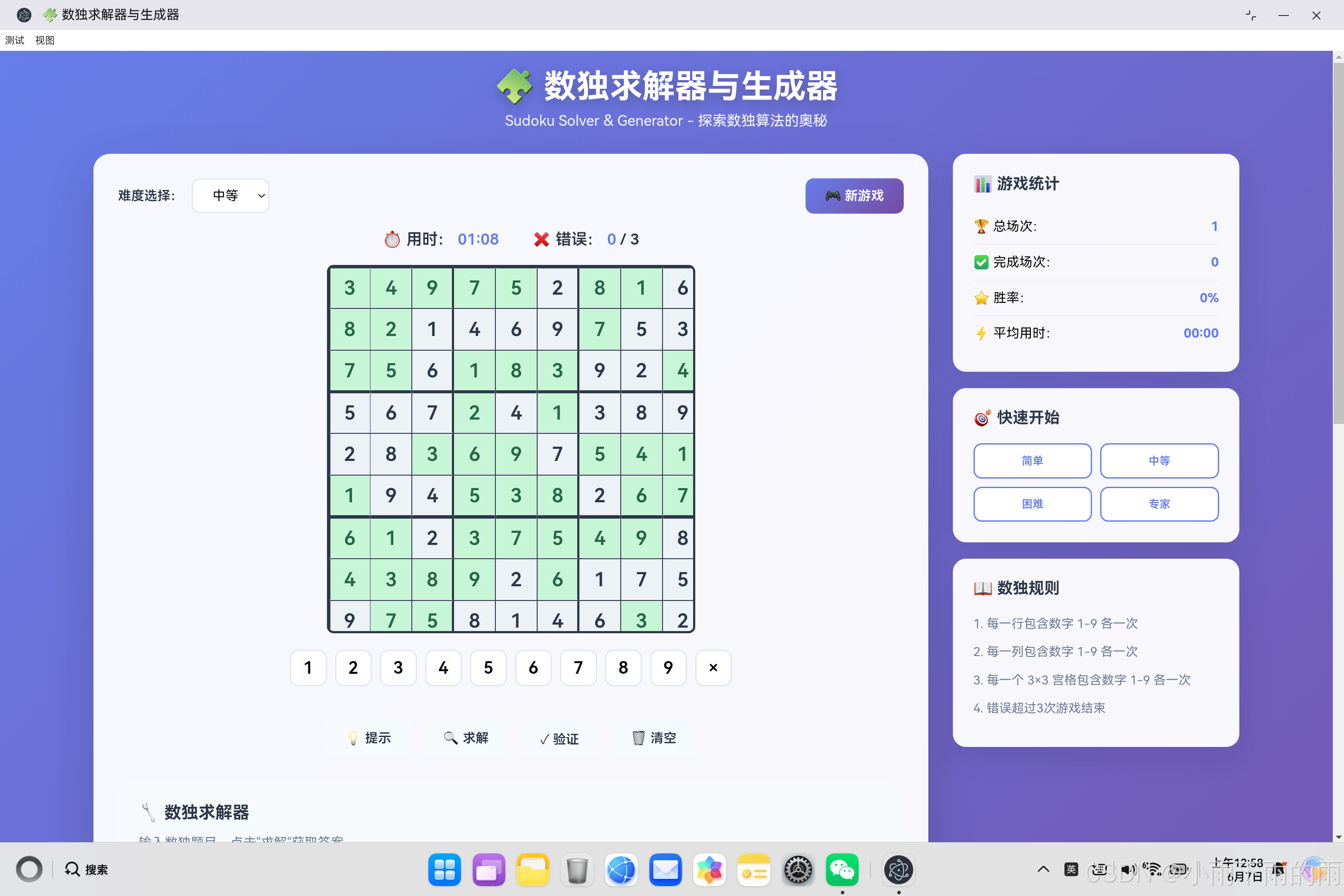
开源鸿蒙PC数独游戏项目摘要 本项目基于HTML5、CSS3和JavaScript实现了一个完整的数独游戏与求解器。核心功能包括: 数独求解 - 采用回溯算法实现高效求解 题目生成 - 支持不同难度级别的数独生成 规则验证 - 三重约束检查(行、列、宫格) 用户交互 - 可视化界面与游戏统计功能 数据持久化 - 使用LocalStorage保存游戏进度 技术亮点: 纯前端实现,无后端依赖 面向对象
·
欢迎加入开源鸿蒙PC社区:
https://harmonypc.csdn.net/
atomgit仓库地址: https://atomgit.com/m0_66062719/tuoweitexiao
一、项目概述
数独(Sudoku)是一种源自18世纪瑞士的数学游戏,后在日本发扬光大,如今已成为全球最流行的逻辑推理游戏之一。本文将详细介绍如何用HTML5、CSS3和JavaScript实现一个功能完整的数独求解器与游戏应用,涵盖数独生成算法、回溯求解算法、有效性验证等核心内容。
1.1 项目目标
- 实现一个可玩的数独游戏
- 实现数独求解器(任意数独题目求解)
- 实现数独生成器(生成不同难度的题目)
- 提供完整的用户交互界面
- 记录游戏统计信息
1.2 技术选型
| 技术 | 用途 | 优势 |
|---|---|---|
| HTML5 | 页面结构 | 语义化、跨平台 |
| CSS3 | 样式设计 | 精美界面、动画效果 |
| JavaScript ES6+ | 核心逻辑 | 面向对象、异步处理 |
| LocalStorage | 数据持久化 | 本地存储、简单高效 |
二、数独规则与数据结构
2.1 数独基本规则
- 行约束:每一行包含数字1-9各一次
- 列约束:每一列包含数字1-9各一次
- 宫约束:每一个3×3宫格包含数字1-9各一次
- 唯一性:数独有唯一解
2.2 数据结构设计
// 数独棋盘:9x9 二维数组
// 0 表示空格,1-9 表示填入的数字
[
    [5, 3, 0, 0, 7, 0, 0, 0, 0],
    [6, 0, 0, 1, 9, 5, 0, 0, 0],
    [0, 9, 8, 0, 0, 0, 0, 6, 0],
    [8, 0, 0, 0, 6, 0, 0, 0, 3],
    [4, 0, 0, 8, 0, 3, 0, 0, 1],
    [7, 0, 0, 0, 2, 0, 0, 0, 6],
    [0, 6, 0, 0, 0, 0, 2, 8, 0],
    [0, 0, 0, 4, 1, 9, 0, 0, 5],
    [0, 0, 0, 0, 8, 0, 0, 7, 9]
]
2.3 应用类设计
class SudokuApp {
    board = [];           // 当前棋盘状态
    solution = [];         // 完整解
    initialBoard = [];    // 初始题目
    selectedCell = null;   // 选中的格子
    timer = 0;            // 用时
    mistakes = 0;         // 错误次数
    isGameActive = false; // 游戏是否进行中

    // 核心方法
    generateSudoku()       // 生成数独
    solveSudoku()          // 求解数独
    isValidPlacement()     // 验证放置
    // ...其他方法
}
三、回溯算法详解
3.1 回溯算法原理
回溯算法(Backtracking)是解决数独问题的经典算法。其核心思想是:
- 选择一个空格
- 尝试填入一个数字
- 检查是否符合规则
- 如果符合,继续填下一个空格
- 如果不符合或无解,回溯并尝试其他数字
3.2 回溯算法流程图
开始
  ↓
寻找空格
  ↓
┌─────────────┐
│ 是否找到空格│
└─────────────┘
    ↓是           ↓否
┌──────┐      完成!
│尝试  │
│数字  │
└──────┘
    ↓
检查有效性
    ↓
┌─────────────┐
│ 是否有效   │
└─────────────┘
    ↓是        ↓否
┌──────┐    尝试
│递归  │    下一个
│求解  │    数字
└──────┘
    ↓是        ↓否
┌──────┐    回溯
│成功  │    复原
└──────┘
3.3 完整代码实现
solveSudoku(board) {
    // 复制棋盘,避免修改原数据
    const boardCopy = board.map(row => [...row]);

    // 执行回溯求解
    if (this.solve(boardCopy)) {
        return boardCopy;
    }

    return null;  // 无解
}

solve(board) {
    // 1. 找到第一个空格
    const emptyCell = this.findEmpty(board);

    // 2. 如果没有空格,数独已填满,求解成功
    if (!emptyCell) {
        return true;
    }

    // 3. 获取空格的行列索引
    const [row, col] = emptyCell;

    // 4. 尝试填入数字1-9
    for (let num = 1; num <= 9; num++) {
        // 检查数字是否可以放在这里
        if (this.isValidPlacement(board, row, col, num)) {
            // 放置数字
            board[row][col] = num;

            // 递归求解下一个空格
            if (this.solve(board)) {
                return true;  // 找到解
            }

            // 如果递归失败,回溯
            board[row][col] = 0;
        }
    }

    // 5. 所有数字都尝试过,无法求解
    return false;
}
3.4 寻找空格函数
findEmpty(board) {
    // 遍历整个棋盘
    for (let i = 0; i < 9; i++) {
        for (let j = 0; j < 9; j++) {
            // 返回第一个空格的位置
            if (board[i][j] === 0) {
                return [i, j];  // [行, 列]
            }
        }
    }

    // 没有找到空格
    return null;
}
四、有效性验证算法
4.1 三重约束检查
放置数字时需要同时满足三个约束条件:
isValidPlacement(board, row, col, num) {
    // 1. 检查行约束
    for (let i = 0; i < 9; i++) {
        if (board[row][i] === num) {
            return false;  // 行中有重复数字
        }
    }

    // 2. 检查列约束
    for (let i = 0; i < 9; i++) {
        if (board[i][col] === num) {
            return false;  // 列中有重复数字
        }
    }

    // 3. 检查3x3宫格约束
    const boxRow = Math.floor(row / 3) * 3;  // 宫格起始行
    const boxCol = Math.floor(col / 3) * 3;  // 宫格起始列

    for (let i = 0; i < 3; i++) {
        for (let j = 0; j < 3; j++) {
            if (board[boxRow + i][boxCol + j] === num) {
                return false;  // 宫格中有重复数字
            }
        }
    }

    // 通过所有检查,数字可以放置
    return true;
}
4.2 约束检查可视化
┌─────────────────────────────────────────┐
│            9x9 数独棋盘                  │
├─────────┬─────────┬─────────┤
│ 3x3     │ 3x3     │ 3x3     │
│ 宫格1   │ 宫格2   │ 宫格3   │
│         │         │         │
│ 行0-2   │ 行0-2   │ 行0-2   │
├─────────┼─────────┼─────────┤
│ 3x3     │ 3x3     │ 3x3     │
│ 宫格4   │ 宫格5   │ 宫格6   │
│         │ ← 当前位置              │
│ 行3-5   │ 行3-5   │ 行3-5   │
├─────────┼─────────┼─────────┤
│ 3x3     │ 3x3     │ 3x3     │
│ 宫格7   │ 宫格8   │ 宫格9   │
│         │         │         │
│ 行6-8   │ 行6-8   │ 行6-8   │
└─────────┴─────────┴─────────┘

检查约束:
- 行约束:检查 row 行所有列
- 列约束:检查 col 列所有行
- 宫格约束:检查 3x3 宫格区域
五、数独生成算法
5.1 生成算法步骤
- 生成一个完整的数独解
- 随机移除一定数量的数字
- 确保移除后数独仍有唯一解
5.2 完整代码实现
generateSudoku(difficulty) {
    // 1. 首先生成一个完整的数独解
    this.solution = this.createFullBoard();

    // 2. 复制解作为工作棋盘
    this.board = this.solution.map(row => [...row]);
    this.initialBoard = this.solution.map(row => [...row]);

    // 3. 根据难度决定移除的数量
    const cellsToRemove = {
        easy: 35,      // 简单:36个空格
        medium: 45,    // 中等:45个空格
        hard: 52,      // 困难:52个空格
        expert: 57     // 专家:57个空格
    }[difficulty];

    // 4. 生成随机移除序列
    const positions = [];
    for (let i = 0; i < 81; i++) {
        positions.push(i);
    }

    // Fisher-Yates 洗牌算法
    for (let i = positions.length - 1; i > 0; i--) {
        const j = Math.floor(Math.random() * (i + 1));
        [positions[i], positions[j]] = [positions[j], positions[i]];
    }

    // 5. 移除数字
    for (let i = 0; i < cellsToRemove; i++) {
        const pos = positions[i];
        const row = Math.floor(pos / 9);
        const col = pos % 9;

        this.board[row][col] = 0;
        this.initialBoard[row][col] = 0;
    }
}
5.3 生成完整数独
createFullBoard() {
    // 创建空棋盘
    const board = Array(9).fill(null).map(() => Array(9).fill(0));

    // 使用回溯算法填充
    this.fillBoard(board);

    return board;
}

fillBoard(board) {
    // 找到第一个空格
    const emptyCell = this.findEmpty(board);

    // 没有空格,填充完成
    if (!emptyCell) {
        return true;
    }

    const [row, col] = emptyCell;

    // 随机顺序尝试数字
    const numbers = this.shuffleArray([1, 2, 3, 4, 5, 6, 7, 8, 9]);

    for (const num of numbers) {
        // 检查是否可以放置
        if (this.isValidPlacement(board, row, col, num)) {
            board[row][col] = num;

            // 递归填充下一个
            if (this.fillBoard(board)) {
                return true;
            }

            // 回溯
            board[row][col] = 0;
        }
    }

    return false;
}
5.4 Fisher-Yates 洗牌算法
shuffleArray(array) {
    const arr = [...array];  // 复制数组

    for (let i = arr.length - 1; i > 0; i--) {
        const j = Math.floor(Math.random() * (i + 1));
        [arr[i], arr[j]] = [arr[j], arr[i]];
    }

    return arr;
}
六、用户交互实现
6.1 格子选择
selectCell(index) {
    if (!this.isGameActive) return;

    // 清除所有选中状态
    document.querySelectorAll('.cell').forEach(cell => {
        cell.classList.remove('selected');
    });

    // 设置当前格子为选中
    const cell = document.querySelectorAll('.cell')[index];
    cell.classList.add('selected');

    this.selectedCell = index;
}
6.2 数字放置
placeNumber(num) {
    if (this.selectedCell === null || !this.isGameActive) return;

    const row = Math.floor(this.selectedCell / 9);
    const col = this.selectedCell % 9;

    // 检查是否为固定数字
    if (this.initialBoard[row][col] !== 0) return;

    // 放置数字
    this.board[row][col] = num;
    this.updateBoardDisplay();

    // 检查是否正确
    if (num !== 0 && num !== this.solution[row][col]) {
        this.mistakes++;
        document.getElementById('mistakes').textContent = this.mistakes;

        // 显示错误动画
        const cell = document.querySelectorAll('.cell')[this.selectedCell];
        cell.classList.add('error');
        setTimeout(() => cell.classList.remove('error'), 500);

        // 错误超过3次,游戏结束
        if (this.mistakes >= 3) {
            this.gameOver();
        }
    } else if (num !== 0) {
        const cell = document.querySelectorAll('.cell')[this.selectedCell];
        cell.classList.add('correct');
    }

    // 检查是否完成
    if (this.isBoardComplete()) {
        this.gameWin();
    }
}
6.3 键盘导航
navigateCell(key) {
    if (this.selectedCell === null) return;

    let row = Math.floor(this.selectedCell / 9);
    let col = this.selectedCell % 9;

    switch(key) {
        case 'ArrowUp':
            row = Math.max(0, row - 1);
            break;
        case 'ArrowDown':
            row = Math.min(8, row + 1);
            break;
        case 'ArrowLeft':
            col = Math.max(0, col - 1);
            break;
        case 'ArrowRight':
            col = Math.min(8, col + 1);
            break;
    }

    this.selectCell(row * 9 + col);
}
七、辅助功能实现
7.1 提示功能
showHint() {
    if (!this.isGameActive) return;

    // 找出所有空格
    const emptyCells = [];

    for (let i = 0; i < 9; i++) {
        for (let j = 0; j < 9; j++) {
            if (this.board[i][j] === 0) {
                emptyCells.push({ row: i, col: j });
            }
        }
    }

    if (emptyCells.length === 0) return;

    // 随机选择一个空格
    const randomCell = emptyCells[
        Math.floor(Math.random() * emptyCells.length)
    ];

    // 填入正确答案
    this.board[randomCell.row][randomCell.col] =
        this.solution[randomCell.row][randomCell.col];

    this.updateBoardDisplay();

    // 显示提示动画
    const index = randomCell.row * 9 + randomCell.col;
    const cell = document.querySelectorAll('.cell')[index];
    cell.classList.add('hint');
    setTimeout(() => cell.classList.remove('hint'), 2000);

    if (this.isBoardComplete()) {
        this.gameWin();
    }
}
7.2 自动求解
solveCurrentPuzzle() {
    if (!this.isGameActive) return;

    // 直接复制完整解
    this.board = this.solution.map(row => [...row]);
    this.updateBoardDisplay();

    // 标记用户填入的数字
    for (let i = 0; i < 81; i++) {
        const row = Math.floor(i / 9);
        const col = i % 9;

        if (this.initialBoard[row][col] === 0) {
            const cell = document.querySelectorAll('.cell')[i];
            cell.classList.add('correct');
        }
    }

    this.isGameActive = false;
    this.stopTimer();
}
7.3 验证功能
validatePuzzle() {
    let hasError = false;
    const cells = document.querySelectorAll('.cell');

    for (let i = 0; i < 81; i++) {
        const row = Math.floor(i / 9);
        const col = i % 9;

        // 只检查用户填入的数字
        if (this.initialBoard[row][col] === 0 &&
            this.board[row][col] !== 0) {

            if (this.board[row][col] !== this.solution[row][col]) {
                hasError = true;
                cells[i].classList.add('error');
            }
        }
    }

    if (!hasError) {
        alert('当前填写正确!');
    } else {
        setTimeout(() => {
            cells.forEach(cell => cell.classList.remove('error'));
        }, 1000);
    }
}
八、统计系统实现
8.1 LocalStorage 存储
loadStats() {
    try {
        const saved = localStorage.getItem('sudokuStats');
        if (saved) {
            this.stats = JSON.parse(saved);
        }
    } catch (e) {
        console.warn('加载统计失败');
    }
    this.updateStatsDisplay();
}

saveStats() {
    try {
        localStorage.setItem('sudokuStats',
            JSON.stringify(this.stats));
    } catch (e) {
        console.warn('保存统计失败');
    }
}
8.2 统计数据结构
stats = {
    totalGames: 0,        // 总游戏次数
    completedGames: 0,     // 完成的游戏次数
    totalTime: 0          // 总用时(秒)
};

// 计算胜率
const winRate = totalGames > 0
    ? Math.round((completedGames / totalGames) * 100)
    : 0;

// 计算平均用时
const avgTime = completedGames > 0
    ? Math.round(totalTime / completedGames)
    : 0;
九、CSS 样式设计
9.1 棋盘样式
.sudoku-board {
    display: grid;
    grid-template-columns: repeat(9, 1fr);
    gap: 1px;
    background: #2d3748;
    border: 3px solid #2d3748;
    border-radius: 8px;
    width: 450px;
    height: 450px;
}

.cell {
    width: 50px;
    height: 50px;
    display: flex;
    align-items: center;
    justify-content: center;
    font-size: 1.5rem;
    font-weight: 600;
    background: white;
    cursor: pointer;
}

/* 3x3 宫格分隔线 */
.cell:nth-child(3n) {
    border-right: 2px solid #2d3748;
}

.cell:nth-child(n+19):nth-child(-n+27),
.cell:nth-child(n+46):nth-child(-n+54),
.cell:nth-child(n+73):nth-child(-n+81) {
    border-bottom: 2px solid #2d3748;
}
9.2 动画效果
.cell.error {
    background: #fed7d7;
    color: #e53e3e;
    animation: shake 0.5s ease;
}

@keyframes shake {
    0%, 100% { transform: translateX(0); }
    25% { transform: translateX(-5px); }
    75% { transform: translateX(5px); }
}

.cell.hint {
    background: #fef3c7;
    animation: pulse 1s ease-in-out;
}

@keyframes pulse {
    0%, 100% { transform: scale(1); }
    50% { transform: scale(1.05); }
}
十、性能优化
10.1 避免重复计算
// 在生成时缓存完整解
this.solution = this.createFullBoard();

// 求解时直接使用缓存
solveCurrentPuzzle() {
    this.board = this.solution.map(row => [...row]);
    // ...
}
10.2 减少DOM操作
updateBoardDisplay() {
    const cells = document.querySelectorAll('.cell');

    for (let i = 0; i < 81; i++) {
        const row = Math.floor(i / 9);
        const col = i % 9;
        const value = this.board[row][col];

        cells[i].textContent = value || '';
        // 批量更新class
        cells[i].classList.remove('fixed', 'user-input', 'correct');

        if (this.initialBoard[row][col] !== 0) {
            cells[i].classList.add('fixed');
        } else if (value !== 0) {
            cells[i].classList.add('user-input');
        }
    }
}
十一、扩展功能建议
11.1 可能的增强功能
| 功能 | 优先级 | 难度 | 说明 |
|---|---|---|---|
| 笔记模式 | 高 | ⭐⭐ | 记录可能的数字 |
| 撤销/重做 | 高 | ⭐⭐ | 操作历史记录 |
| 着色标记 | 中 | ⭐⭐ | 高亮相同数字 |
| 候选数显示 | 中 | ⭐⭐⭐ | 显示可能填入的数字 |
| 多人对战 | 低 | ⭐⭐⭐⭐ | 联机对战模式 |
| AI对战 | 低 | ⭐⭐⭐⭐ | 与AI比赛速度 |
11.2 算法优化
| 优化方法 | 效果 |
|---|---|
| 舞蹈链接(Dancing Links) | 提升求解速度10-100倍 |
| 约束传播 | 减少回溯次数 |
| 唯一性检测 | 快速识别无解局面 |
| 并行计算 | 利用多核CPU加速 |
十二、总结
12.1 核心技术要点
本文详细介绍了数独应用开发的完整技术方案:
- 回溯算法:解决数独求解的核心算法
- 三重约束检查:行、列、宫格有效性验证
- Fisher-Yates 洗牌:生成随机数独
- 面向对象设计:SudokuApp 类封装所有逻辑
- LocalStorage:持久化存储统计数据
- CSS动画:提升用户体验
12.2 学习收获
通过这个项目,深入学习了:
- 回溯算法:理解递归与回溯的思想
- 约束满足问题:CSP问题的解决方法
- 算法复杂度:时间复杂度 O(9^m),m为空格数
- 面向对象设计:类的封装与组织
- 前端交互:事件处理、动画效果
- 数据持久化:LocalStorage使用
标签:#数独 #回溯算法 #算法实现 #游戏开发 #JavaScript #前端开发 #HarmonyOS #Electron

作为“人工智能6S店”的官方数字引擎,为AI开发者与企业提供一个覆盖软硬件全栈、一站式门户。
更多推荐

 0
0 0
0- 0


 已为社区贡献32条内容

所有评论(0)