
五子棋AI在鸿蒙PC Electron上的实现的原理与实践
本应用采用评估函数算法(Evaluation Function Algorithm)实现AI决策。评估每个位置的价值:对棋盘上每个空位进行评分选择最优位置:选择得分最高的位置落子攻防兼备:同时考虑进攻(己方获利)和防守(阻止对手)// 最后落子高亮显示模块技术要点实现难度棋盘管理二维数组、DOM渲染⭐落子逻辑合法性验证、状态更新⭐⭐胜负判断四方向遍历、边界检查⭐⭐AI决策评估函数、候选位置优化⭐⭐
欢迎加入开源鸿蒙PC社区:
https://harmonypc.csdn.net/
atomgit仓库地址: https://atomgit.com/m0_66062719/aiwuziqi
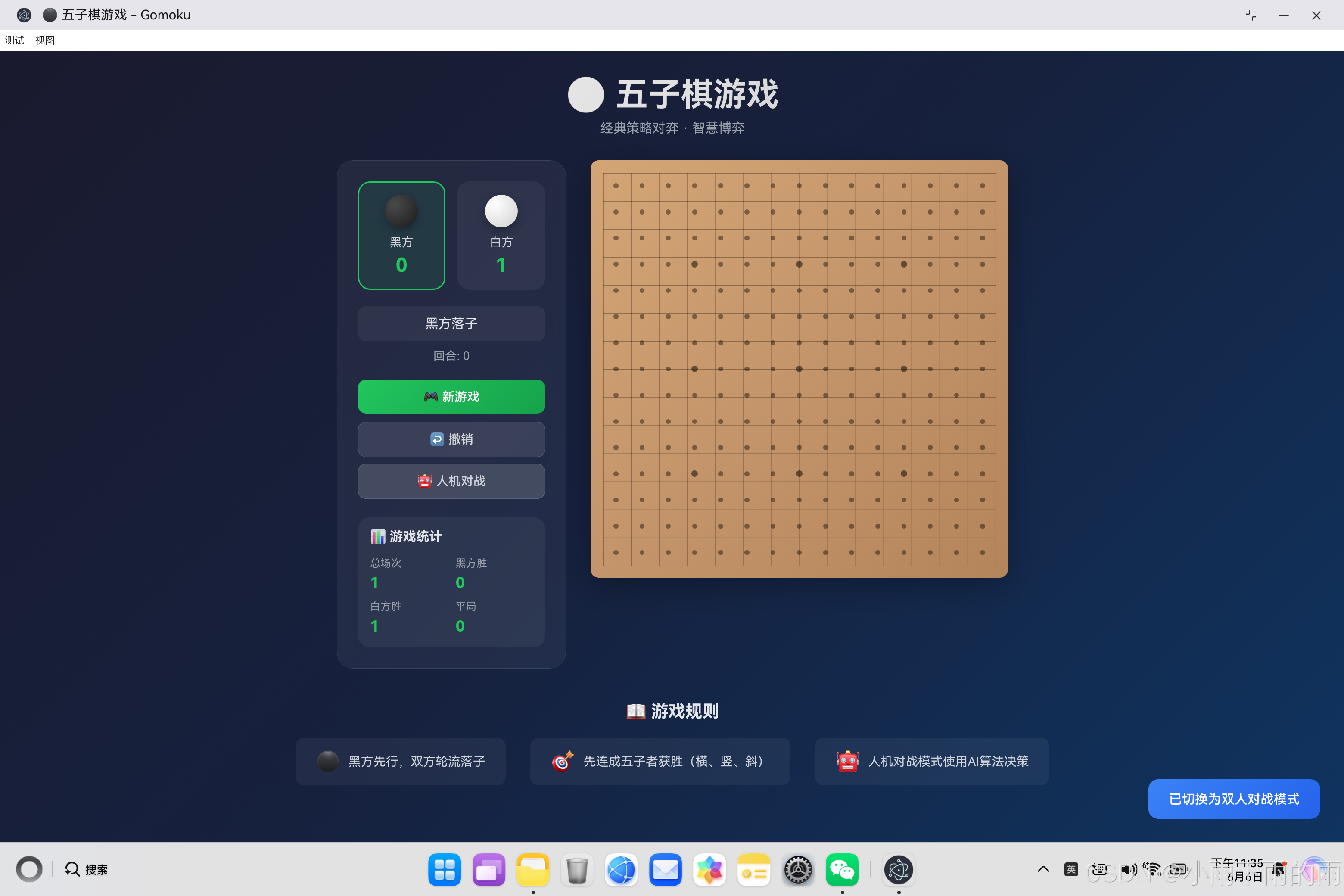
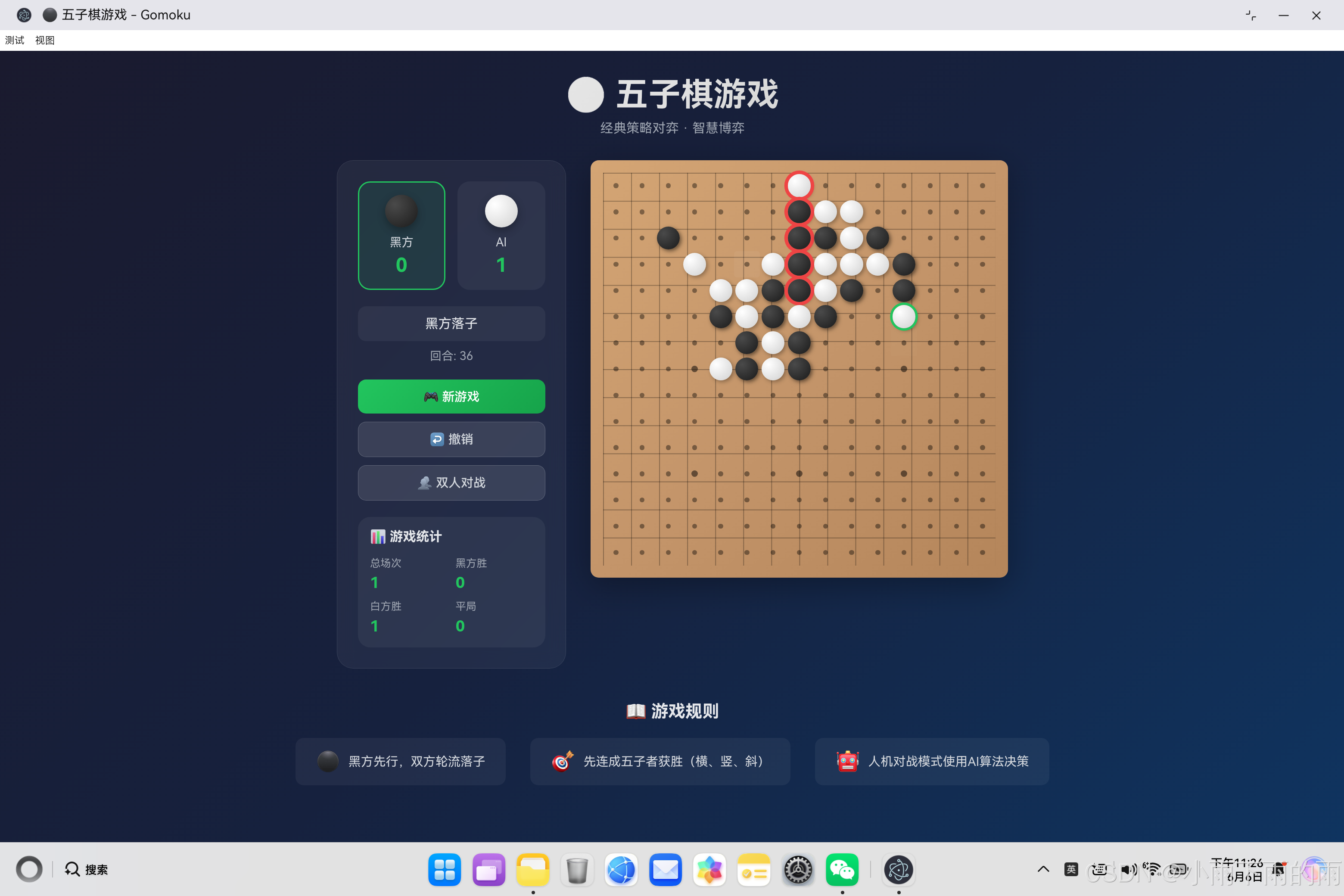
一、引言
五子棋(Gomoku)是一款经典的策略对弈游戏,其规则简单但蕴含着丰富的策略深度。如何让计算机能够像人类一样思考并做出合理的决策,是人工智能领域的经典问题。
本文将详细介绍如何基于HarmonyOS 6.1.0 + Electron混合架构实现一个具有人工智能的五子棋游戏。重点讲解AI算法的设计与实现,以及如何利用跨平台框架确保应用能够在不同操作系统上运行。
1.1 为什么选择五子棋
五子棋是一个理想的AI学习案例,原因如下:
| 特点 | 说明 |
|---|---|
| 规则简单 | 15×15棋盘,五子连珠即获胜 |
| 状态空间适中 | 约10^105种状态,适合学习和演示 |
| 策略丰富 | 攻防转换、布局规划等策略 |
| 可视化强 | 棋盘直观,便于调试和演示 |
1.2 技术选型理由
选择HarmonyOS 6.1.0 + Electron混合架构的原因:
- 一次开发,多端运行:同一套代码可在鸿蒙PC、Windows、macOS、Linux上运行
- Web技术栈:HTML5 + CSS3 + JavaScript,前端开发者友好
- 性能优异:Electron基于Chromium,渲染性能出色
- 生态完善:丰富的第三方库和工具支持
二、系统架构设计
2.1 整体架构
┌──────────────────────────────────────────────────────────────────┐
│                        应用层 (Application)                      │
│  ┌─────────────────┐  ┌─────────────────┐  ┌─────────────────┐ │
│  │   五子棋游戏     │  │    AI引擎       │  │   统计系统      │ │
│  │   (UI渲染)      │  │   (决策算法)    │  │   (数据持久化)  │ │
│  └─────────────────┘  └─────────────────┘  └─────────────────┘ │
├──────────────────────────────────────────────────────────────────┤
│                        框架层 (Framework)                        │
│  ┌─────────────────┐  ┌─────────────────┐  ┌─────────────────┐ │
│  │  HarmonyOS       │  │     Electron    │  │   Web标准API    │ │
│  │  WebEngine      │  │   (Chromium)    │  │   (ES6+/DOM)    │ │
│  └─────────────────┘  └─────────────────┘  └─────────────────┘ │
├──────────────────────────────────────────────────────────────────┤
│                        运行时 (Runtime)                          │
│  ┌─────────────────┐  ┌─────────────────┐                      │
│  │  HarmonyOS 6.1.0│  │  Node.js 18+    │                      │
│  │  (鸿蒙PC)       │  │  (桌面端)        │                      │
│  └─────────────────┘  └─────────────────┘                      │
└──────────────────────────────────────────────────────────────────┘
2.2 文件结构
ohos_hap/
└── web_engine/
    └── src/main/resources/resfile/resources/app/
        ├── index.html      // 游戏主页面
        ├── style.css       // 样式文件
        └── app.js          // 游戏逻辑和AI引擎
2.3 核心类设计
整个应用的核心是Gomoku类,它封装了游戏的所有逻辑:
class Gomoku {
    constructor() {
        this.boardSize = 15;              // 棋盘大小
        this.board = [];                  // 棋盘数据(二维数组)
        this.currentPlayer = 'black';     // 当前玩家
        this.gameActive = true;           // 游戏状态
        this.isVsAI = false;              // 是否人机对战
        this.aiPlayer = 'white';          // AI执白棋
        this.humanPlayer = 'black';       // 人类执黑棋
        this.moveHistory = [];             // 落子历史(用于撤销)
        this.lastMove = null;              // 最后一步棋
        this.winningCells = [];            // 获胜的棋子位置
    }
}
三、棋盘数据管理
3.1 棋盘初始化
棋盘是15×15的二维数组,每个位置可以为空(null)、黑棋(‘black’)或白棋(‘white’)。
createBoard() {
    const boardElement = document.getElementById('board');
    boardElement.innerHTML = '';

    this.board = [];

    for (let row = 0; row < this.boardSize; row++) {
        this.board[row] = [];
        for (let col = 0; col < this.boardSize; col++) {
            this.board[row][col] = null;

            const cell = document.createElement('div');
            cell.className = 'cell';
            cell.dataset.row = row;
            cell.dataset.col = col;

            // 添加星位标记(天元和四个角星)
            if (this.isStarPosition(row, col)) {
                cell.classList.add('star');
            }

            boardElement.appendChild(cell);
        }
    }
}
星位设计:在标准五子棋中,有9个星位用于视觉定位:
- 天元:棋盘正中心 (7, 7)
- 四个角星:(3, 3)、(3, 11)、(11, 3)、(11, 11)
- 四个边星:(3, 7)、(7, 3)、(7, 11)、(11, 7)
3.2 棋盘数据结构
// 棋盘示例:3×3简化版
this.board = [
    ['black', 'white', null],    // 第0行
    [null, 'black', null],       // 第1行
    [null, null, 'white']        // 第2行
];

// 访问方式
this.board[row][col]  // 返回 'black', 'white', 或 null
这种数据结构的优势:
- 访问速度快:
O(1)时间复杂度 - 内存占用低:只需要225个元素的数组
- 实现简单:易于遍历和检查
四、落子与胜负判断
4.1 落子逻辑
落子是五子棋的核心操作,需要验证合法性并更新棋盘状态:
makeMove(row, col) {
    // 验证落子是否合法
    if (!this.gameActive || this.board[row][col] !== null) {
        return false;
    }

    // 人机模式下,人类回合才能落子
    if (this.isVsAI && this.currentPlayer === this.aiPlayer) {
        return false;
    }

    // 执行落子
    this.placeStone(row, col, this.currentPlayer);

    // 检查胜负
    if (this.checkWin(row, col)) {
        this.handleWin();
        return true;
    }

    // 检查平局
    if (this.checkDraw()) {
        this.handleDraw();
        return true;
    }

    // 切换玩家
    this.switchPlayer();

    // AI回合
    if (this.isVsAI && this.currentPlayer === this.aiPlayer && this.gameActive) {
        setTimeout(() => this.aiMove(), 300);
    }

    return true;
}
4.2 胜负判断算法
五子棋的胜负判断需要检查四个方向:横向、纵向、主对角线、副对角线。
checkWin(row, col) {
    const player = this.board[row][col];
    const directions = [
        [[0, 1], [0, -1]],   // 横向:左右
        [[1, 0], [-1, 0]],   // 纵向:上下
        [[1, 1], [-1, -1]], // 主对角线:左上-右下
        [[1, -1], [-1, 1]]  // 副对角线:右上-左下
    ];

    for (const [dir1, dir2] of directions) {
        let count = 1;
        const cells = [[row, col]];

        // 沿第一个方向搜索
        let r = row + dir1[0];
        let c = col + dir1[1];
        while (this.isInBoard(r, c) && this.board[r][c] === player) {
            count++;
            cells.push([r, c]);
            r += dir1[0];
            c += dir1[1];
        }

        // 沿第二个方向搜索
        r = row + dir2[0];
        c = col + dir2[1];
        while (this.isInBoard(r, c) && this.board[r][c] === player) {
            count++;
            cells.push([r, c]);
            r += dir2[0];
            c += dir2[1];
        }

        // 五子连珠即获胜
        if (count >= 5) {
            this.winningCells = cells;
            return true;
        }
    }

    return false;
}

// 边界检查辅助方法
isInBoard(row, col) {
    return row >= 0 && row < this.boardSize && col >= 0 && col < this.boardSize;
}
判断逻辑图解:
假设在位置(7,7)落子,检查四个方向:

方向1 - 横向:     方向2 - 纵向:
. . . . . . .     . . . . . . .
. . . . . . .     . . . . . . .
. . . . . . .     . . . . . . .
. . . . . . .     . . . . . . .
. . . X X X . .   . . . . X . .
. . . . . . . .   . . . . X . .
. . . . . . . .   . . . . X . .
. . . . . . . .   . . . . . . .
五、AI算法设计与实现
5.1 AI算法概述
本应用采用评估函数算法(Evaluation Function Algorithm)实现AI决策。这种算法的核心思想是:
- 评估每个位置的价值:对棋盘上每个空位进行评分
- 选择最优位置:选择得分最高的位置落子
- 攻防兼备:同时考虑进攻(己方获利)和防守(阻止对手)
5.2 AI决策流程
// AI主函数:寻找最佳落子位置
aiMove() {
    if (!this.gameActive) return;

    const bestMove = this.findBestMove();

    if (bestMove) {
        this.placeStone(bestMove.row, bestMove.col, this.aiPlayer);

        if (this.checkWin(bestMove.row, bestMove.col)) {
            this.handleWin();
        } else if (this.checkDraw()) {
            this.handleDraw();
        } else {
            this.switchPlayer();
        }
    }
}

// 寻找最佳位置
findBestMove() {
    // 第一优先级:检查自己是否能赢
    const winMove = this.findWinningMove(this.aiPlayer);
    if (winMove) return winMove;

    // 第二优先级:阻止对手获胜
    const blockMove = this.findWinningMove(this.humanPlayer);
    if (blockMove) return blockMove;

    // 第三优先级:使用评估函数选择最优位置
    let bestScore = -Infinity;
    let bestMove = null;

    // 只评估候选位置(周围有棋子的空位)
    const candidates = this.getCandidateMoves();

    for (const { row, col } of candidates) {
        const score = this.evaluatePosition(row, col);

        if (score > bestScore) {
            bestScore = score;
            bestMove = { row, col };
        }
    }

    return bestMove || this.getRandomMove();
}
5.3 必胜位置检测
必胜检测是AI最基本的策略:如果某位置落子能直接获胜,就直接落子获胜。
findWinningMove(player) {
    for (let row = 0; row < this.boardSize; row++) {
        for (let col = 0; col < this.boardSize; col++) {
            if (this.board[row][col] === null) {
                // 模拟落子
                this.board[row][col] = player;
                const wins = this.checkWin(row, col);
                // 撤销模拟
                this.board[row][col] = null;

                if (wins) {
                    return { row, col };
                }
            }
        }
    }
    return null;
}
5.4 候选位置优化
五子棋的棋盘有225个位置,逐一评估效率低下。实际上,大多数位置都是无效的。
getCandidateMoves() {
    const candidates = [];
    const range = 2;  // 只考虑周围2格内有棋子的位置

    for (let row = 0; row < this.boardSize; row++) {
        for (let col = 0; col < this.boardSize; col++) {
            if (this.board[row][col] === null) {
                // 检查周围是否有棋子
                let hasNeighbor = false;
                for (let dr = -range; dr <= range && !hasNeighbor; dr++) {
                    for (let dc = -range; dc <= range && !hasNeighbor; dc++) {
                        const nr = row + dr;
                        const nc = col + dc;
                        if (nr >= 0 && nr < this.boardSize &&
                            nc >= 0 && nc < this.boardSize) {
                            if (this.board[nr][nc] !== null) {
                                hasNeighbor = true;
                            }
                        }
                    }
                }

                if (hasNeighbor || this.moveHistory.length === 0) {
                    candidates.push({ row, col });
                }
            }
        }
    }

    return candidates.length > 0 ? candidates : this.getAllEmptyMoves();
}
优化效果:
- 初期:候选位置约20-30个
- 中期:候选位置约50-100个
- 末期:候选位置接近225个
5.5 位置评估函数
评估函数是AI的核心,它综合考虑多个因素计算每个位置的价值。
evaluatePosition(row, col) {
    let score = 0;

    // 1. 位置权重:中心位置更有价值
    const centerRow = this.boardSize / 2;
    const centerCol = this.boardSize / 2;
    const distanceFromCenter = Math.abs(row - centerRow) + Math.abs(col - centerCol);
    score += (this.boardSize - distanceFromCenter) * 2;

    // 2. 评估四个方向的连子情况
    const directions = [
        [0, 1],   // 横向
        [1, 0],   // 纵向
        [1, 1],   // 主对角线
        [1, -1]   // 副对角线
    ];

    for (const [dr, dc] of directions) {
        // AI自己的连子得分(进攻)
        score += this.evaluateDirection(row, col, dr, dc, this.aiPlayer) * 10;
        // 对手的连子得分(防守)
        score += this.evaluateDirection(row, col, dr, dc, this.humanPlayer) * 8;
    }

    return score;
}
5.6 方向评估详解
每个方向的评估需要考虑:连续棋子数、两端是否被堵。
evaluateDirection(row, col, dr, dc, player) {
    let count = 0;    // 连续棋子数
    let blocked = 0;  // 被堵住的方向数

    // 正方向检查(向前4格)
    for (let i = 1; i <= 4; i++) {
        const r = row + dr * i;
        const c = col + dc * i;

        if (!this.isInBoard(r, c)) {
            blocked++;
            break;
        }

        if (this.board[r][c] === player) {
            count++;
        } else if (this.board[r][c] === null) {
            break;  // 遇到空位,正常扩展
        } else {
            blocked++;  // 遇到对手棋子,被堵
            break;
        }
    }

    // 反方向检查(向后4格)
    for (let i = 1; i <= 4; i++) {
        const r = row - dr * i;
        const c = col - dc * i;

        if (!this.isInBoard(r, c)) {
            blocked++;
            break;
        }

        if (this.board[r][c] === player) {
            count++;
        } else if (this.board[r][c] === null) {
            break;
        } else {
            blocked++;
            break;
        }
    }

    // 根据情况评分
    if (count >= 4) return 10000;      // 四连,必胜
    if (count === 3 && blocked === 0) return 1000;   // 活三,极具威胁
    if (count === 3 && blocked === 1) return 100;    // 眠三,有威胁
    if (count === 2 && blocked === 0) return 50;     // 活二,有潜力
    if (count === 2 && blocked === 1) return 10;     // 眠二,潜力有限
    if (count === 1 && blocked === 0) return 5;     // 活一,基础分

    return 0;
}
5.7 评分规则详解
| 情况 | 连续数 | 两端状态 | 分数 | 说明 |
|---|---|---|---|---|
| 四连 | 4 | 任意 | 10000 | 落子即胜,AI必选 |
| 活三 | 3 | 两端开放 | 1000 | 极具威胁,对手必须应对 |
| 眠三 | 3 | 一端被堵 | 100 | 有一定威胁 |
| 活二 | 2 | 两端开放 | 50 | 有发展潜力 |
| 眠二 | 2 | 一端被堵 | 10 | 有限潜力 |
| 活一 | 1 | 两端开放 | 5 | 基础发展分 |
为什么分数相差这么大?
这是一个指数级的关系:
- 四连(10000)vs 活三(1000):10倍差距,表示必胜优先
- 活三(1000)vs 眠三(100):10倍差距,表示活棋价值更高
- AI进攻(×10)vs 防守(×8):进攻权重略高,符合"进攻是最好的防守"
六、跨平台实现细节
6.1 鸿蒙PC环境运行
鸿蒙PC使用WebEngine组件来运行Web应用:
<!-- index.html 可直接在鸿蒙PC运行 -->
<!DOCTYPE html>
<html lang="zh-CN">
<head>
    <meta charset="UTF-8">
    <meta name="viewport" content="width=device-width, initial-scale=1.0">
    <title>五子棋游戏</title>
    <link rel="stylesheet" href="style.css">
</head>
<body>
    <div id="board"></div>
    <script src="app.js"></script>
</body>
</html>
6.2 Electron桌面端运行
Electron可以通过加载本地HTML文件来运行应用:
// main.js - Electron主进程
const { app, BrowserWindow } = require('electron');
const path = require('path');

function createWindow() {
    const win = new BrowserWindow({
        width: 1200,
        height: 800,
        webPreferences: {
            nodeIntegration: false,
            contextIsolation: true
        }
    });

    // 加载游戏HTML文件
    const htmlPath = path.join(__dirname, 'ohos_hap/web_engine/src/main/resources/resfile/resources/app/index.html');
    win.loadFile(htmlPath);
}

app.whenReady().then(createWindow);
6.3 统一代码库的优势
一份代码,多端运行:
| 平台 | 运行方式 | 特点 |
|---|---|---|
| 鸿蒙PC | WebEngine直接运行 | 原生支持,性能最优 |
| Windows | Electron加载HTML | 完整Chromium支持 |
| macOS | Electron加载HTML | 完整Chromium支持 |
| Linux | Electron加载HTML | 完整Chromium支持 |
6.4 响应式设计
为适应不同屏幕尺寸,采用响应式设计:
/* 桌面端 */
.cell {
    width: 32px;
    height: 32px;
}

/* 平板端 */
@media (max-width: 900px) {
    .cell {
        width: 24px;
        height: 24px;
    }
}

/* 移动端 */
@media (max-width: 500px) {
    .cell {
        width: 20px;
        height: 20px;
    }
}
七、性能优化策略
7.1 减少DOM操作
频繁的DOM操作会影响性能,使用批量更新:
updateBoardUI() {
    const cells = document.querySelectorAll('.cell');

    cells.forEach(cell => {
        const row = parseInt(cell.dataset.row);
        const col = parseInt(cell.dataset.col);

        // 只移除旧棋子,不重建整个DOM
        const existingStone = cell.querySelector('.stone');
        if (existingStone) {
            existingStone.remove();
        }

        // 添加新棋子
        if (this.board[row][col]) {
            const stone = document.createElement('div');
            stone.className = `stone ${this.board[row][col]}`;
            cell.appendChild(stone);
        }
    });
}
7.2 异步执行AI
AI计算是CPU密集型任务,使用setTimeout避免阻塞UI:
// AI回合使用异步执行
if (this.isVsAI && this.currentPlayer === this.aiPlayer && this.gameActive) {
    setTimeout(() => this.aiMove(), 300);  // 延迟300ms,体验更自然
}
7.3 缓存计算结果
对于相同的棋盘状态,可以缓存评估结果:
// 简单的缓存机制
const evaluationCache = new Map();

function getCachedEvaluation(boardState) {
    const key = JSON.stringify(boardState);
    if (evaluationCache.has(key)) {
        return evaluationCache.get(key);
    }
    const result = evaluatePosition(boardState);
    evaluationCache.set(key, result);
    return result;
}
八、数据持久化
8.1 LocalStorage存储
游戏统计和设置使用LocalStorage持久化:
loadStats() {
    const saved = localStorage.getItem('gomokuStats');
    if (saved) {
        const data = JSON.parse(saved);
        this.scores = data.scores || this.scores;
        this.stats = data.stats || this.stats;
    }
}

saveStats() {
    const data = {
        scores: this.scores,
        stats: this.stats
    };
    localStorage.setItem('gomokuStats', JSON.stringify(data));
}
8.2 存储数据结构
// 游戏统计数据结构
{
    scores: {
        black: 5,    // 黑方总分
        white: 3     // 白方总分
    },
    stats: {
        totalGames: 10,     // 总场次
        blackWins: 5,       // 黑方胜场
        whiteWins: 3,       // 白方胜场
        drawGames: 2        // 平局场次
    }
}
九、用户体验优化
9.1 动画反馈
落子和获胜都有动画效果:
/* 落子动画 */
.stone {
    animation: placeStone 0.2s ease-out;
}

@keyframes placeStone {
    0% {
        transform: scale(0);
        opacity: 0;
    }
    50% {
        transform: scale(1.1);
    }
    100% {
        transform: scale(1);
        opacity: 1;
    }
}

/* 获胜脉冲动画 */
.stone.win-stone {
    animation: winPulse 0.5s ease-in-out infinite;
}

@keyframes winPulse {
    0%, 100% {
        box-shadow: 0 0 0 3px #ef4444;
    }
    50% {
        box-shadow: 0 0 0 6px #ef4444;
    }
}
9.2 最后落子标记
帮助玩家快速定位最后一步:
// 最后落子高亮显示
if (this.lastMove && this.lastMove.row === row && this.lastMove.col === col) {
    stone.classList.add('last-move');
}
.stone.last-move {
    box-shadow: 0 0 0 3px #22c55e, 2px 2px 5px rgba(0, 0, 0, 0.5);
}
9.3 撤销功能
人机模式下需要撤销两步(人类和AI各一步):
undoMove() {
    if (this.moveHistory.length === 0 || !this.gameActive) {
        return;
    }

    // 人机模式撤销两步
    const undoCount = this.isVsAI ? 2 : 1;

    for (let i = 0; i < undoCount && this.moveHistory.length > 0; i++) {
        const lastMove = this.moveHistory.pop();
        this.board[lastMove.row][lastMove.col] = null;
    }

    this.updateBoardUI();
}
十、总结
10.1 技术实现总结
本文详细介绍了五子棋AI在鸿蒙PC Electron框架上的实现:
| 模块 | 技术要点 | 实现难度 |
|---|---|---|
| 棋盘管理 | 二维数组、DOM渲染 | ⭐ |
| 落子逻辑 | 合法性验证、状态更新 | ⭐⭐ |
| 胜负判断 | 四方向遍历、边界检查 | ⭐⭐ |
| AI决策 | 评估函数、候选位置优化 | ⭐⭐⭐⭐ |
| 跨平台 | Web标准、响应式设计 | ⭐⭐ |
| 性能优化 | 缓存、异步执行 | ⭐⭐⭐ |
10.2 核心代码模块
本应用包含四个核心代码模块:
- 棋盘数据管理:
createBoard()、makeMove()、placeStone() - 胜负判断逻辑:
checkWin()、checkDraw()、isInBoard() - AI决策引擎:
findBestMove()、evaluatePosition()、evaluateDirection() - 跨平台适配:HTML结构、CSS响应式、LocalStorage持久化
10.3 AI算法特点
本应用的AI算法具有以下特点:
- 实时响应:异步执行,不阻塞UI
- 智能决策:攻防兼备,评估全面
- 性能优化:候选位置,减少搜索量
- 可扩展性:易于升级为Minimax算法
10.4 未来改进方向
后续可以优化的方向:
- 升级为Minimax + Alpha-Beta剪枝
- 添加难度级别选择
- 实现游戏回放功能
- 添加禁手规则(职业规则)
- 实现在线对战功能
标签:#五子棋 #AI算法 #HarmonyOS #Electron #跨平台开发

作为“人工智能6S店”的官方数字引擎,为AI开发者与企业提供一个覆盖软硬件全栈、一站式门户。
更多推荐

 5
5 0
0- 0


 已为社区贡献32条内容

所有评论(0)