
AtomGit Flutter鸿蒙客户端:文件树与代码浏览
本文介绍了代码浏览功能的实现路径和核心组件。代码浏览采用三级导航:仓库详情页 → 文件树页面 → 代码查看页面,通过参数传递仓库信息。核心组件CodeProvider负责加载文件树和文件内容,支持路径编码处理。文件节点模型区分目录和文件类型,文件树页面支持原地目录导航并显示不同图标。代码查看页面采用带行号的双行AppBar设计,支持代码高亮显示和文件大小格式化展示。整个功能模块通过状态管理和API
·
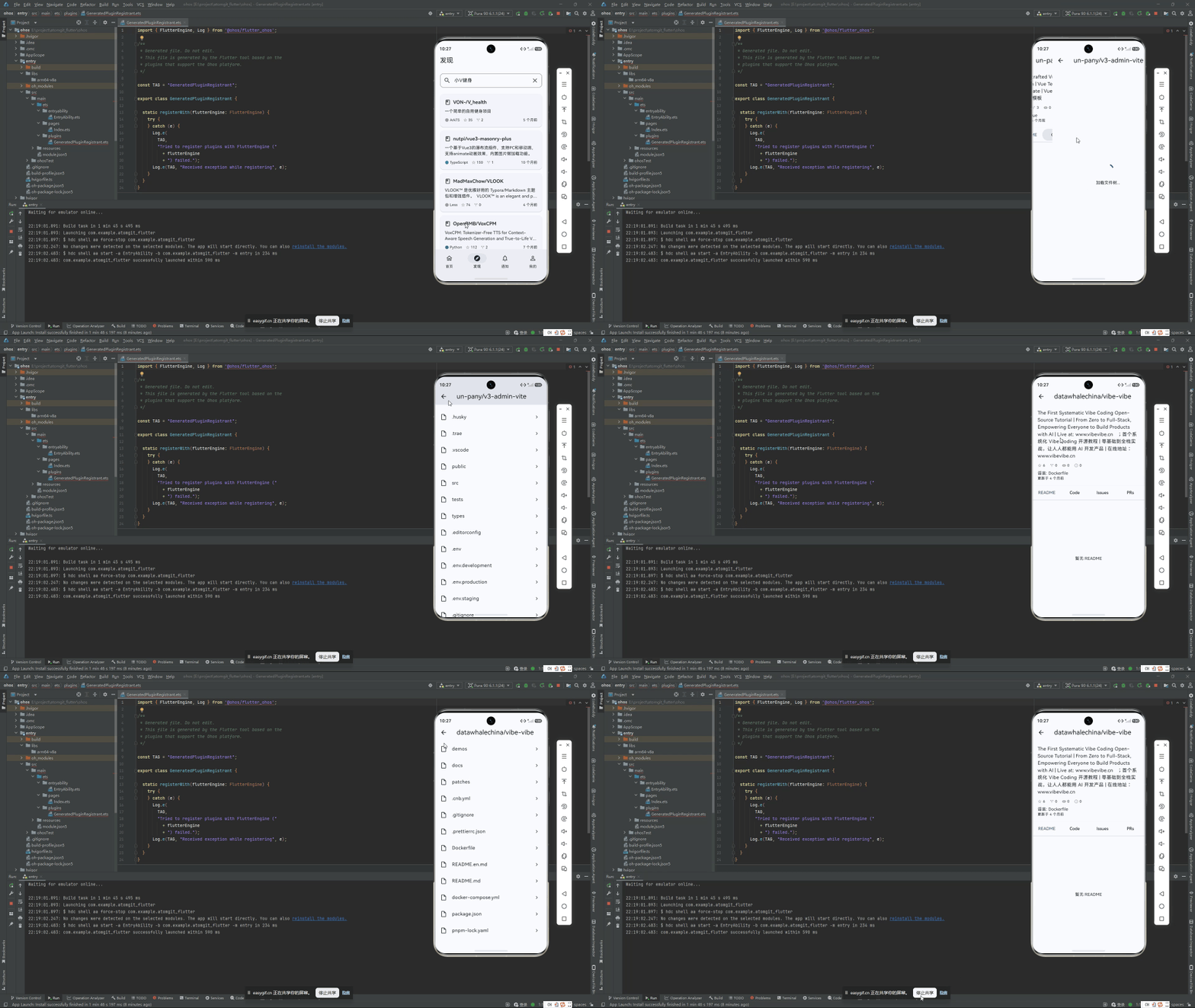
代码浏览的导航路径
从仓库详情页点击"代码"Tab 进入文件树页面:
RepoDetailScreen → FileTreeScreen → CodeViewScreen
    /repo            /repo/code       /repo/blob
参数传递链:
// 从详情页跳转文件树
Navigator.pushNamed(context, '/repo/code', arguments: {
  'owner': owner,
  'name': name,
  'branch': repository.defaultBranch ?? 'main',
});

// 从文件树跳转代码查看
Navigator.pushNamed(context, '/repo/blob', arguments: {
  'owner': owner,
  'name': name,
  'branch': branch,
  'path': node.path,
});
CodeProvider
负责文件树和文件内容的加载,是代码浏览的数据核心:
class CodeProvider extends ChangeNotifier {
  final AtomGitApiClient _apiClient;
  List<FileNode> _tree = [];
  String? _fileContent;
  bool _isLoading = false;
  String? _error;

  Future<void> loadFileTree(String owner, String repo, String branch,
      [String path = '']) async {
    _isLoading = true;
    _error = null;
    notifyListeners();

    try {
      final encodedOwner = Uri.encodeComponent(owner);
      final encodedRepo = Uri.encodeComponent(repo);

      String apiPath;
      if (path.isEmpty) {
        apiPath = '/repos/$encodedOwner/$encodedRepo/contents';
      } else {
        apiPath = '/repos/$encodedOwner/$encodedRepo/contents/$path';
      }

      final response = await _apiClient.get(apiPath,
          queryParams: {'ref': branch});

      final items = parseList<dynamic>(response.data) ?? [];
      _tree = items
          .whereType<Map<String, dynamic>>()
          .map(FileNode.fromJson)
          .toList();
    } on ApiException catch (e) {
      _error = e.message;
    } finally {
      _isLoading = false;
      notifyListeners();
    }
  }
}
路径为空时加载根目录内容,非空时加载子目录内容,复用同一个方法。
文件内容加载
Future<void> loadFileContent(
    String owner, String repo, String path) async {
  _isLoading = true;
  _error = null;
  notifyListeners();

  try {
    final encodedOwner = Uri.encodeComponent(owner);
    final encodedRepo = Uri.encodeComponent(repo);

    final segments = path.split('/');
    final encodedPath = segments
        .map((s) => Uri.encodeComponent(s))
        .join('/');

    final response = await _apiClient.get(
      '/repos/$encodedOwner/$encodedRepo/contents/$encodedPath',
    );

    final data = parseMap(response.data);
    if (data != null && data['content'] is String) {
      final content = data['content'] as String;
      _fileContent = utf8.decode(base64.decode(content));
    }
  } on ApiException catch (e) {
    _error = e.message;
  } finally {
    _isLoading = false;
    notifyListeners();
  }
}
路径中的每个 / 分段单独编码再拼接,保证特殊字符的路径能正确处理。
FileNode 模型
class FileNode {
  final String name;
  final String path;
  final String? sha;
  final int? size;
  final String type;       // 'blob' 或 'tree'
  final List<FileNode>? children;

  bool get isDirectory => type == 'tree';
}
目录(type=‘tree’)可能有嵌套的 children,文件(type=‘blob’)则是叶子节点。
FileTreeScreen — 原地目录导航
核心交互:点击目录不是推入新页面,而是在当前页原地刷新内容:
class FileTreeScreen extends StatelessWidget {
Widget build(BuildContext context) {
final args =
ModalRoute.of(context)!.settings.arguments as Map<String, dynamic>;
final owner = args['owner'] as String;
final name = args['name'] as String;
final branch = args['branch'] as String? ?? 'main';
return ChangeNotifierProvider(
create: (_) =>
CodeProvider(context.read<AtomGitApiClient>())
..loadFileTree(owner, name, branch),
child: _FileTreeBody(owner: owner, name: name, branch: branch),
);
}
}
FileTile 组件根据类型展示不同图标:
Widget _FileTile(BuildContext context, FileNode node,
    String owner, String name, String branch) {
  final isDir = node.isDirectory;

  return ListTile(
    leading: Icon(
      isDir ? Icons.folder : Icons.insert_drive_file_outlined,
      color: isDir ? Theme.of(context).colorScheme.primary : null,
    ),
    title: Text(node.name),
    trailing: isDir
        ? const Icon(Icons.chevron_right)
        : Text(_formatSize(node.size ?? 0)),
    onTap: () {
      final provider = context.read<CodeProvider>();
      if (isDir) {
        provider.loadFileTree(owner, name, branch, node.path);
      } else {
        Navigator.pushNamed(context, '/repo/blob', arguments: {
          'owner': owner,
          'name': name,
          'branch': branch,
          'path': node.path,
        });
      }
    },
  );
}
文件大小格式化
String _formatSize(int bytes) {
  if (bytes < 1024) return '$bytes B';
  if (bytes < 1024 * 1024) return '${(bytes / 1024).toStringAsFixed(1)} KB';
  return '${(bytes / (1024 * 1024)).toStringAsFixed(1)} MB';
}
CodeViewScreen — 带行号的代码展示
双行 AppBar
AppBar(
  title: Text(fileName),
  bottom: PreferredSize(
    preferredSize: const Size.fromHeight(24),
    child: Padding(
      padding: const EdgeInsets.only(left: 16, bottom: 8),
      child: Align(
        alignment: Alignment.centerLeft,
        child: Text(fullPath,
            style: Theme.of(context).textTheme.bodySmall),
      ),
    ),
  ),
)
标题显示文件名,底部显示完整路径。
带行号渲染
Widget _buildCodeView(String content) {
  final lines = content.split('\n');

  return SingleChildScrollView(
    scrollDirection: Axis.horizontal,
    child: SingleChildScrollView(
      child: Column(
        crossAxisAlignment: CrossAxisAlignment.start,
        children: List.generate(lines.length, (index) {
          return _CodeLine(
            lineNumber: index + 1,
            content: lines[index],
          );
        }),
      ),
    ),
  );
}
每行代码由行号和内容组成:
class _CodeLine extends StatelessWidget {
  final int lineNumber;
  final String content;

  Widget build(BuildContext context) {
    final isDark = Theme.of(context).brightness == Brightness.dark;

    return Row(
      crossAxisAlignment: CrossAxisAlignment.start,
      children: [
        Container(
          width: 48,
          padding: const EdgeInsets.only(right: 8),
          alignment: Alignment.centerRight,
          color: isDark ? Colors.grey[900] : Colors.grey[200],
          child: Text('$lineNumber',
              style: TextStyle(
                color: Colors.grey,
                fontSize: 12,
                fontFamily: 'monospace',
              )),
        ),
        const SizedBox(width: 8),
        Text(content,
            style: const TextStyle(
              fontFamily: 'monospace',
              fontSize: 13,
            )),
      ],
    );
  }
}
行号固定 48px 宽度右对齐,深色模式下自动切换背景色。代码使用等宽字体渲染。
API 内容接口
两个核心 API:
| 接口 | 用途 |
|---|---|
GET /repos/{owner}/{repo}/contents |
获取根目录文件列表 |
GET /repos/{owner}/{repo}/contents/{path} |
获取子目录或文件内容 |
两个接口都支持 ?ref={branch} 参数指定分支。文件内容的 content 字段为 Base64 编码。

作为“人工智能6S店”的官方数字引擎,为AI开发者与企业提供一个覆盖软硬件全栈、一站式门户。
更多推荐

 1
1 0
0- 0


 已为社区贡献60条内容

所有评论(0)