
AtomGit Flutter鸿蒙客户端:仓库详情页
本文介绍了Flutter实现的仓库详情页设计与实现要点: 路由参数:通过命名路由传递owner和name参数,使用ModalRoute提取参数 数据加载: RepoDetailProvider在创建时自动加载数据 对owner和name进行URI编码处理特殊字符 README采用静默加载策略,Base64解码后渲染 页面结构: 使用ChangeNotifierProvider管理状态 Statel
·
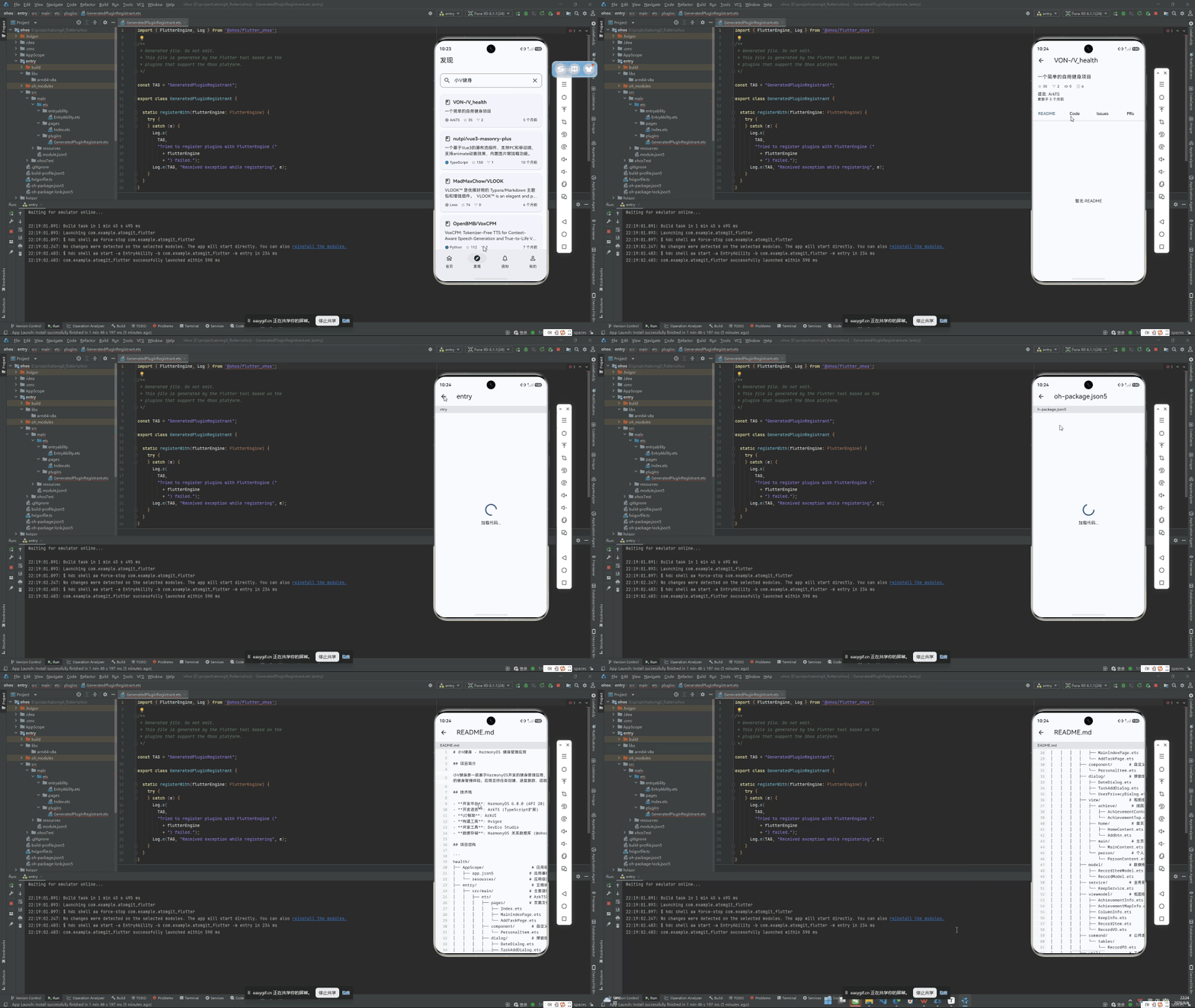
路由参数
仓库详情页通过命名路由 /repo 进入,接收 owner 和 name 参数:
// 导航到详情页
Navigator.pushNamed(context, '/repo',
    arguments: {'owner': 'atomgit', 'name': 'flutter-ohos'});

// 详情页提取参数
final args =
    ModalRoute.of(context)!.settings.arguments as Map<String, dynamic>;
final owner = args['owner'] as String;
final name = args['name'] as String;
RepoDetailProvider
Provider 在创建时即开始加载数据:
class RepoDetailProvider extends ChangeNotifier {
  final AtomGitApiClient _apiClient;
  Repository? _repository;
  String? _readme;
  bool _isLoading = false;
  String? _error;

  Future<void> load(String owner, String name) async {
    _isLoading = true;
    _error = null;
    notifyListeners();

    try {
      final encodedOwner = Uri.encodeComponent(owner);
      final encodedName = Uri.encodeComponent(name);

      final response = await _apiClient.get(
        '/repos/$encodedOwner/$encodedName',
      );

      final data = parseMap(response.data);
      if (data != null) {
        _repository = Repository.fromJson(data);
      }

      _readme = await _loadReadme(encodedOwner, encodedName,
          _repository?.defaultBranch ?? 'main');
    } on ApiException catch (e) {
      _error = e.message;
    } catch (e) {
      _error = '加载失败: $e';
    } finally {
      _isLoading = false;
      notifyListeners();
    }
  }
}
关键细节:owner 和 name 都经过 Uri.encodeComponent 编码,处理含特殊字符的仓库路径。
README 加载
README 加载采用静默失败策略 —— 没有 README 不报错,只是不展示:
Future<String?> _loadReadme(
    String owner, String repo, String branch) async {
  try {
    final response = await _apiClient.get(
      '/repos/$owner/$repo/readme',
      queryParams: {'ref': branch},
    );
    final data = parseMap(response.data);
    if (data != null && data['content'] is String) {
      final content = data['content'] as String;
      return utf8.decode(base64.decode(content));
    }
  } on ApiException {
    // README 不存在是正常的,不报错
  } catch (_) {}
  return null;
}
API 返回的 README 内容是 Base64 编码的,解码后用 MarkdownViewer 渲染。
页面结构
RepoDetailScreen 是 StatelessWidget,通过 ChangeNotifierProvider 注入 Provider:
class RepoDetailScreen extends StatelessWidget {
Widget build(BuildContext context) {
final args =
ModalRoute.of(context)!.settings.arguments as Map<String, dynamic>;
final owner = args['owner'] as String;
final name = args['name'] as String;
return ChangeNotifierProvider(
create: (_) => RepoDetailProvider(context.read<AtomGitApiClient>())
..load(owner, name),
child: _RepoDetailBody(owner: owner, name: name),
);
}
}
自定义 Tab 栏
不使用 Flutter 的 TabBar/TabBarView,而是自定义 Row 按钮实现四个标签切换:
enum _DetailTab { code, issues, pulls, readme }

class _RepoDetailBodyState extends State<_RepoDetailBody> {
  _DetailTab _currentTab = _DetailTab.readme;

  Widget _buildTabBar() {
    return Material(
      elevation: 1,
      child: Padding(
        padding: const EdgeInsets.symmetric(horizontal: 16, vertical: 8),
        child: Row(
          children: [
            _TabButton(
              label: '代码',
              isSelected: _currentTab == _DetailTab.code,
              onTap: () {
                Navigator.pushNamed(context, '/repo/code', arguments: {
                  'owner': widget.owner,
                  'name': widget.name,
                  'branch': provider.repository?.defaultBranch ?? 'main',
                });
              },
            ),
            _TabButton(
              label: 'Issues',
              isSelected: _currentTab == _DetailTab.issues,
              onTap: () {
                Navigator.pushNamed(context, '/repo/issues', arguments: {
                  'owner': widget.owner,
                  'name': widget.name,
                  'type': 'issue',
                });
              },
            ),
            _TabButton(
              label: 'PRs',
              isSelected: _currentTab == _DetailTab.pulls,
              onTap: () {
                Navigator.pushNamed(context, '/repo/pulls', arguments: {
                  'owner': widget.owner,
                  'name': widget.name,
                  'type': 'pr',
                });
              },
            ),
            _TabButton(
              label: 'README',
              isSelected: _currentTab == _DetailTab.readme,
              onTap: () => setState(() => _currentTab = _DetailTab.readme),
            ),
          ],
        ),
      ),
    );
  }
}
每个按钮的选中态通过底部蓝色指示条实现:
class _TabButton extends StatelessWidget {
  final String label;
  final bool isSelected;
  final VoidCallback onTap;

  Widget build(BuildContext context) {
    return Expanded(
      child: GestureDetector(
        onTap: onTap,
        child: Column(
          children: [
            Text(label, style: TextStyle(
              color: isSelected
                  ? Theme.of(context).colorScheme.primary
                  : null,
              fontWeight: isSelected ? FontWeight.w600 : null,
            )),
            if (isSelected)
              Container(
                height: 2,
                margin: const EdgeInsets.only(top: 4),
                color: Theme.of(context).colorScheme.primary,
              ),
          ],
        ),
      ),
    );
  }
}
头部信息区
仓库名、描述、统计数据以卡片形式展示:
Widget _buildRepoHeader(Repository repo) {
  return Card(
    margin: const EdgeInsets.all(16),
    child: Padding(
      padding: const EdgeInsets.all(16),
      child: Column(
        crossAxisAlignment: CrossAxisAlignment.start,
        children: [
          Row(children: [
            Icon(repo.isPrivate ? Icons.lock_outline : Icons.book_outlined,
                size: 20),
            const SizedBox(width: 8),
            Expanded(child: Text(repo.fullName,
                style: Theme.of(context).textTheme.titleMedium)),
          ]),
          if (repo.description != null) ...[
            const SizedBox(height: 8),
            Text(repo.description!),
          ],
          const SizedBox(height: 12),
          Row(children: [
            _StatItem(Icons.star_border, '${repo.stargazersCount}'),
            _StatItem(Icons.call_split, '${repo.forksCount}'),
            _StatItem(Icons.remove_red_eye_outlined, '${repo.watchersCount}'),
            _StatItem(Icons.error_outline, '${repo.openIssuesCount}'),
          ]),
        ],
      ),
    ),
  );
}
README 渲染
Widget _buildReadme(RepoDetailProvider provider) {
  if (provider.readme == null || provider.readme!.isEmpty) {
    return const Center(child: Text('暂无 README'));
  }
  return SingleChildScrollView(
    padding: const EdgeInsets.all(16),
    child: MarkdownViewer(markdown: provider.readme!),
  );
}
状态处理
三种状态的完整处理:
Widget _buildBody(RepoDetailProvider provider) {
  if (provider.error != null && provider.repository == null) {
    return ErrorRetryWidget(
      message: provider.error!,
      onRetry: () => provider.load(widget.owner, widget.name),
    );
  }
  if (provider.repository == null) {
    return const LoadingIndicator(message: '加载仓库信息...');
  }
  return Column(children: [
    _buildTabBar(),
    Expanded(child: _buildReadme(provider)),
  ]);
}
错误时展示可重试的错误页面,加载中展示 LoadingIndicator,成功后展示完整内容。

作为“人工智能6S店”的官方数字引擎,为AI开发者与企业提供一个覆盖软硬件全栈、一站式门户。
更多推荐

 0
0 0
0- 0


 已为社区贡献60条内容

所有评论(0)