
逛三园游戏——基于鸿蒙PC Electron框架实现
玩家轮次管理: nextPlayer() { this.currentPlayerIndex = (this.currentPlayerIndex + 1) % this.players.length; document.getElementById('current-player').textContent = this.players[this.currentPlayerIndex]; if
·
欢迎加入开源鸿蒙PC社区:
https://harmonypc.csdn.net/
atomgit仓库地址: https://atomgit.com/tizibanfan/guangsanyuan
一、概述
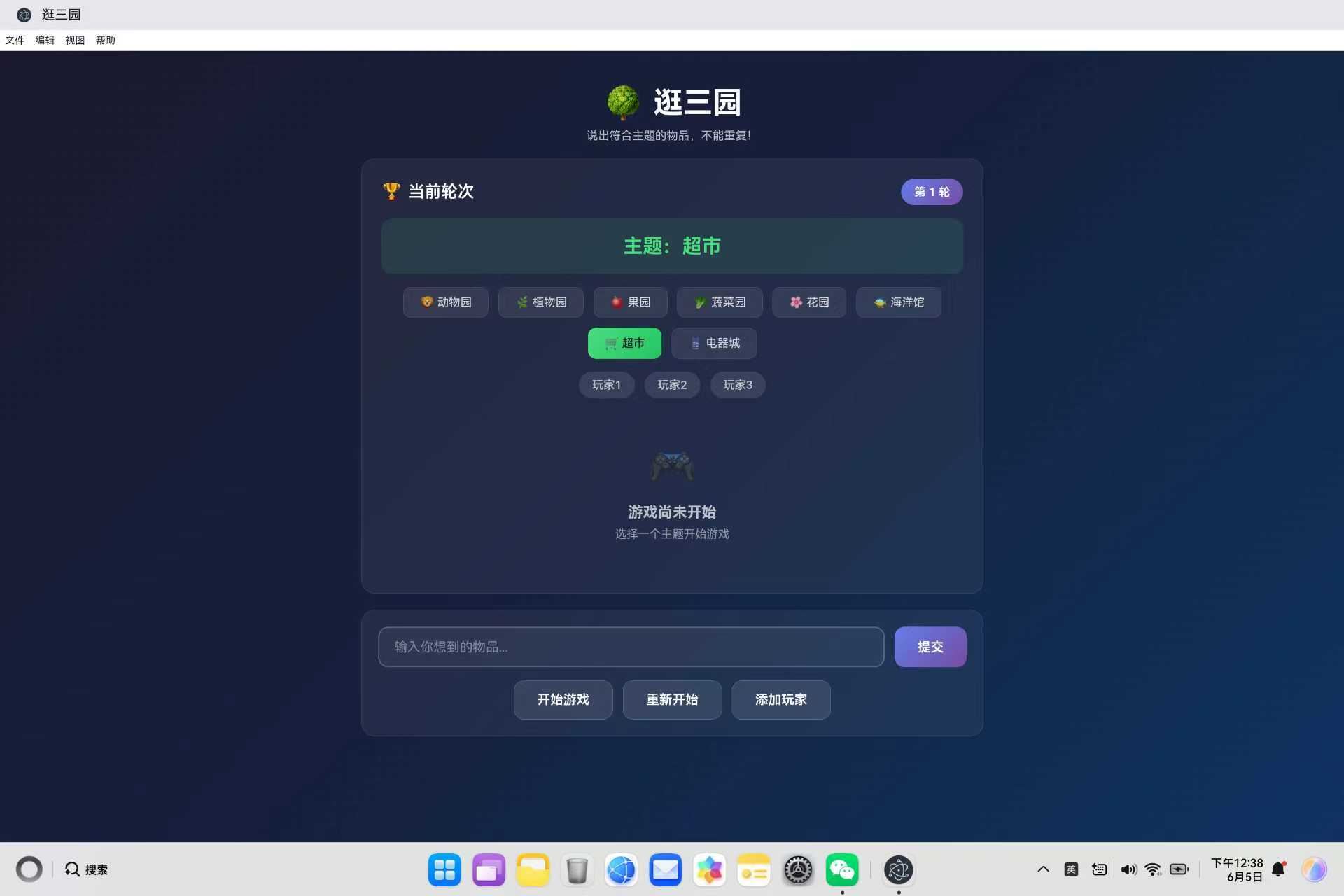
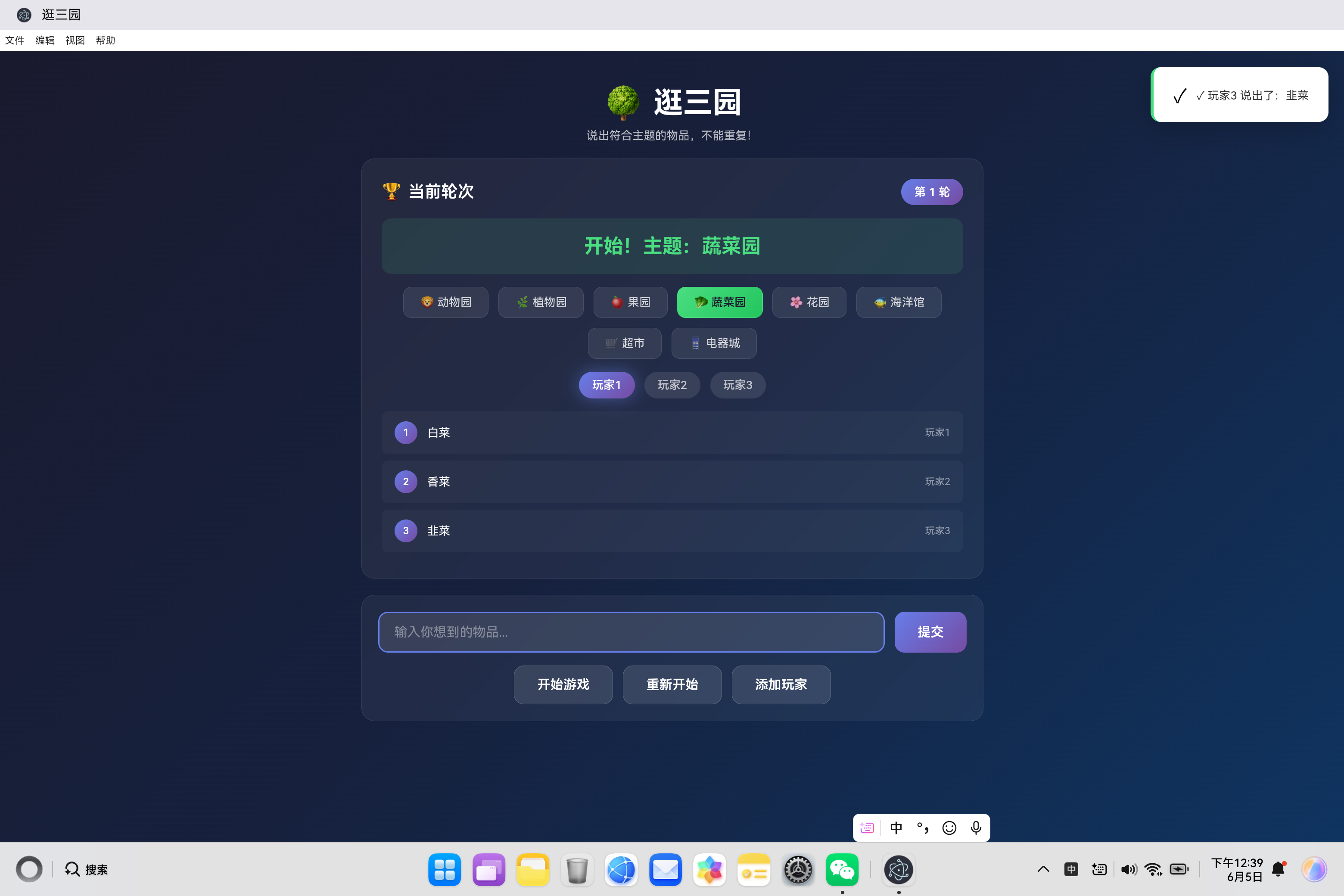
逛三园是一款经典的聚会小游戏,玩家轮流说出符合主题的物品名称,不能重复。本文详细介绍该游戏的技术架构、核心功能实现、词汇验证机制和用户体验优化。
二、游戏规则与设计理念
2.1 游戏规则
| 步骤 | 说明 |
|---|---|
| 1 | 选择一个主题(如动物园、植物园等) |
| 2 | 玩家按顺序轮流说出符合主题的物品 |
| 3 | 不能重复之前说过的物品 |
| 4 | 说错或重复则本轮结束 |
2.2 设计理念
- 简单易上手:规则简单,无需学习成本
- 多人互动:支持3-6名玩家同时参与
- 即时反馈:自动验证,实时提示
- 趣味性强:主题丰富,词汇量大
三、技术架构设计
3.1 整体架构
┌─────────────────────────────────────────┐
│            表现层 (UI Layer)           │
│     HTML结构 + CSS样式 + 响应式设计     │
├─────────────────────────────────────────┤
│           游戏逻辑层 (GameLogic)       │
│   ThreeGardenGame 类 - 游戏控制器      │
├─────────────────────────────────────────┤
│            数据层 (Data)              │
│     词汇数据库 + 玩家状态管理           │
└─────────────────────────────────────────┘
3.2 核心模块
| 模块 | 职责 | 关键技术 |
|---|---|---|
| 主题管理 | 8种主题选择与切换 | 数据映射、UI更新 |
| 玩家管理 | 玩家添加、轮次控制 | 数组管理、索引循环 |
| 词汇验证 | 有效性和重复性检查 | 字符串匹配、数组查找 |
| 界面渲染 | 玩家状态、词汇列表 | DOM操作、动态渲染 |
| 通知系统 | 成功/失败提示 | 动画效果、自动消失 |
四、核心类设计
4.1 ThreeGardenGame 类结构
class ThreeGardenGame {
    constructor() {
        this.players = ['玩家1', '玩家2', '玩家3'];
        this.currentPlayerIndex = 0;
        this.currentTopic = '动物园';
        this.currentRound = 1;
        this.words = [];
        this.gameStarted = false;
        this.lastWord = '';

        this.topicWordList = { /* 词汇数据库 */ };

        this.setupEventListeners();
        this.renderPlayers();
    }
}
类成员变量说明:
| 变量 | 类型 | 说明 |
|---|---|---|
| players | Array | 玩家列表 |
| currentPlayerIndex | Number | 当前玩家索引 |
| currentTopic | String | 当前主题 |
| currentRound | Number | 当前轮次 |
| words | Array | 已说词汇列表 |
| gameStarted | Boolean | 游戏是否开始 |
| lastWord | String | 最后说的词汇 |
| topicWordList | Object | 主题词汇数据库 |
4.2 词汇数据结构
this.topicWordList = {
    '动物园': ['狮子', '老虎', '大象', '熊猫', '长颈鹿', ...],
    '植物园': ['玫瑰', '菊花', '牡丹', '向日葵', ...],
    '果园': ['苹果', '香蕉', '橙子', '葡萄', ...],
    '蔬菜园': ['西红柿', '黄瓜', '茄子', '辣椒', ...],
    '花园': ['玫瑰', '月季', '牡丹', '芍药', ...],
    '海洋馆': ['海豚', '鲨鱼', '鲸鱼', '章鱼', ...],
    '超市': ['牛奶', '面包', '鸡蛋', '大米', ...],
    '电器城': ['电视', '冰箱', '洗衣机', '空调', ...]
};
词汇数据库设计原则:
- 完整性:每个主题包含约30个常见词汇
- 准确性:词汇必须符合主题分类
- 易记性:选择大家熟知的物品名称
- 扩展性:支持动态添加新词汇
五、游戏核心逻辑
5.1 游戏启动
startGame() {
    this.gameStarted = true;
    this.words = [];
    this.currentPlayerIndex = 0;
    this.currentRound = 1;

    document.getElementById('current-round').textContent = this.currentRound;
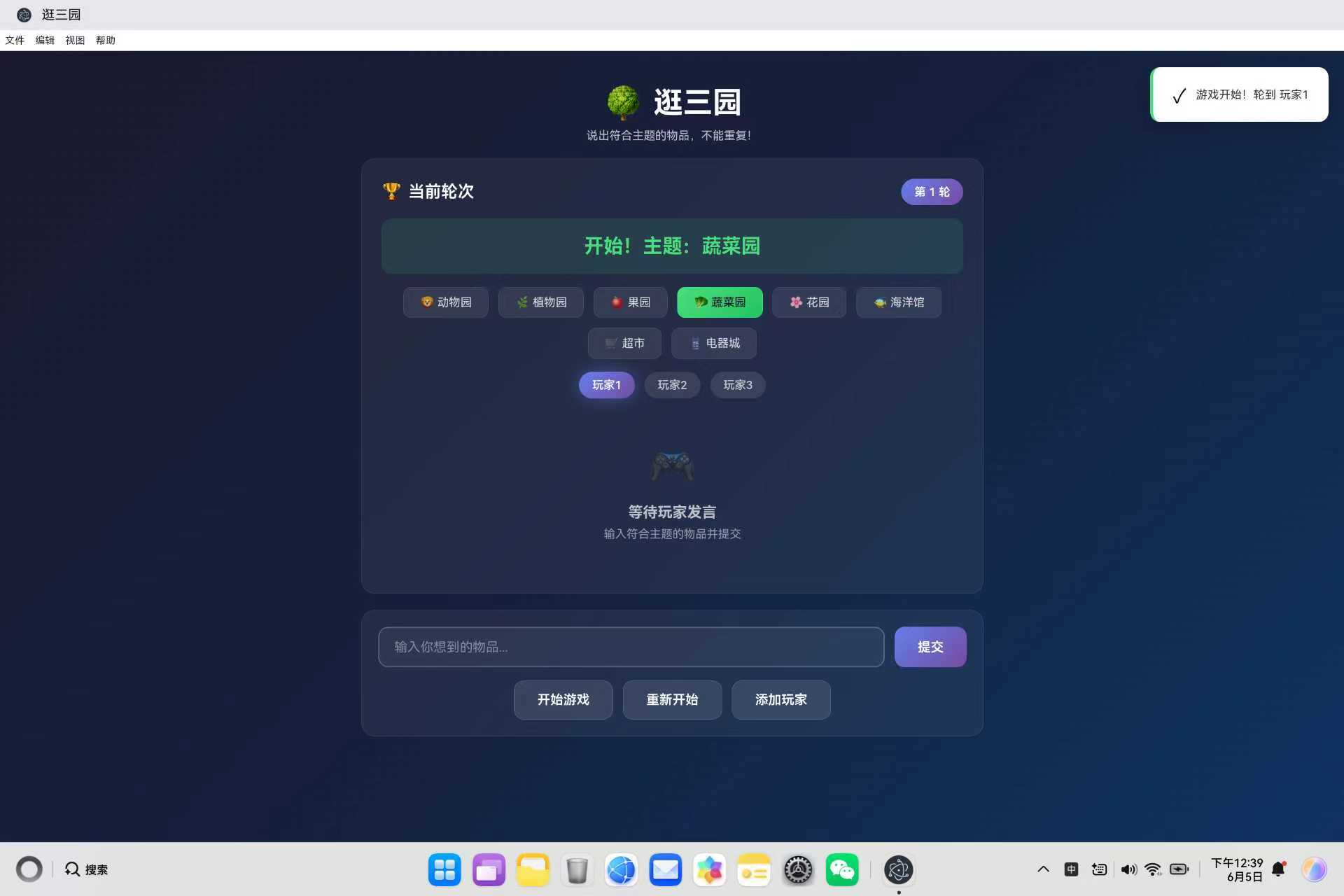
    document.getElementById('current-word').textContent = `开始!主题:${this.currentTopic}`;

    this.renderWordList();
    this.renderPlayers();
    this.showNotification('游戏开始!轮到 ' + this.players[this.currentPlayerIndex], 'success');
}
启动流程:
- 初始化游戏状态
- 重置词汇列表和玩家索引
- 更新UI显示
- 渲染玩家状态
- 显示启动通知
5.2 词汇提交与验证
submitWord() {
    if (!this.gameStarted) {
        this.showNotification('请先点击"开始游戏"', 'warning');
        return;
    }

    const input = document.getElementById('word-input');
    const word = input.value.trim();

    if (!word) {
        this.showNotification('请输入物品名称', 'warning');
        input.focus();
        return;
    }

    if (this.isWordUsed(word)) {
        this.showNotification(`"${word}" 已经被说过了!`, 'error');
        input.focus();
        return;
    }

    if (!this.isWordValid(word)) {
        this.showNotification(`"${word}" 不属于${this.currentTopic}!`, 'error');
        input.focus();
        return;
    }

    this.words.push({
        word: word,
        player: this.players[this.currentPlayerIndex]
    });

    this.lastWord = word;
    this.renderWordList();

    input.value = '';
    input.focus();

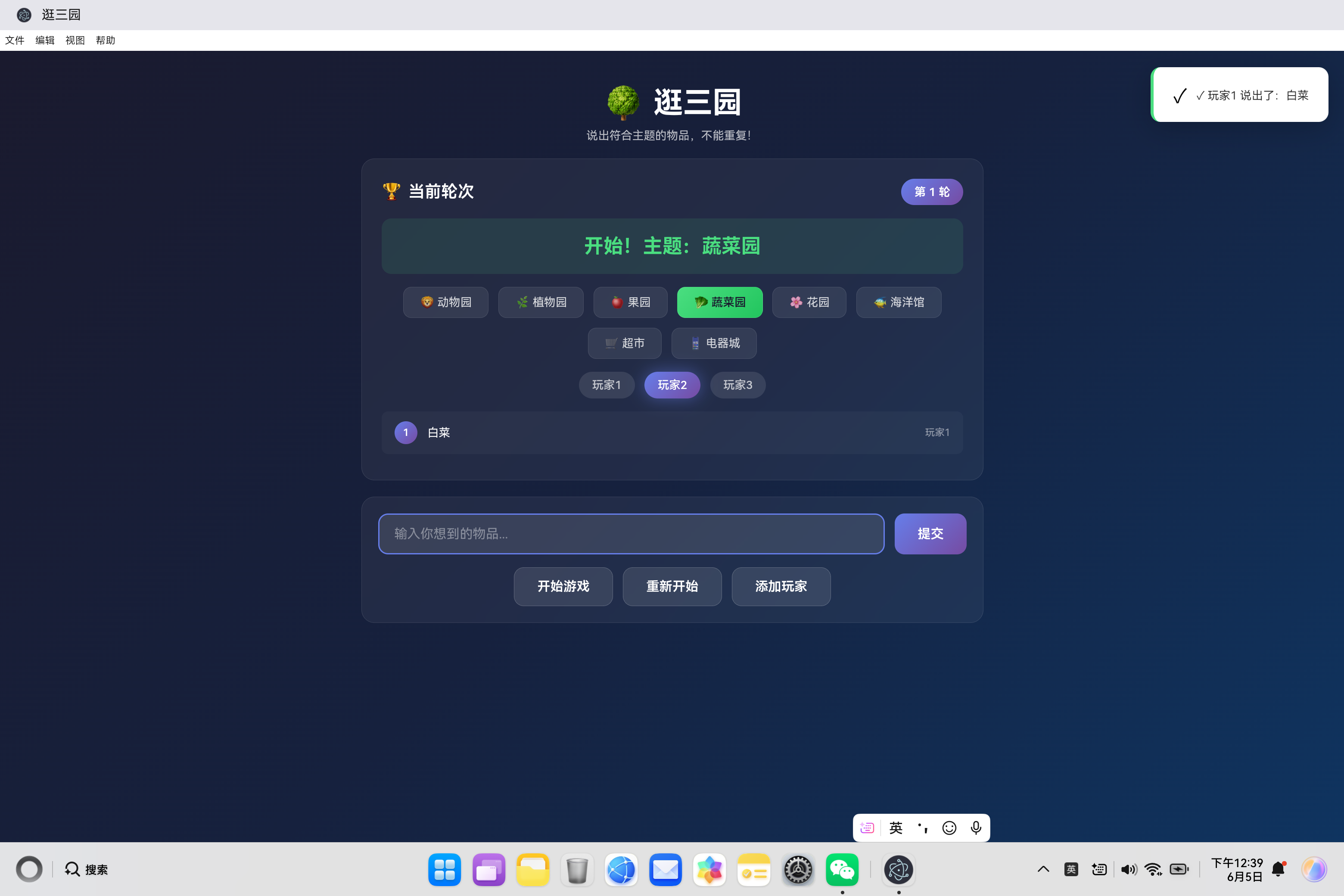
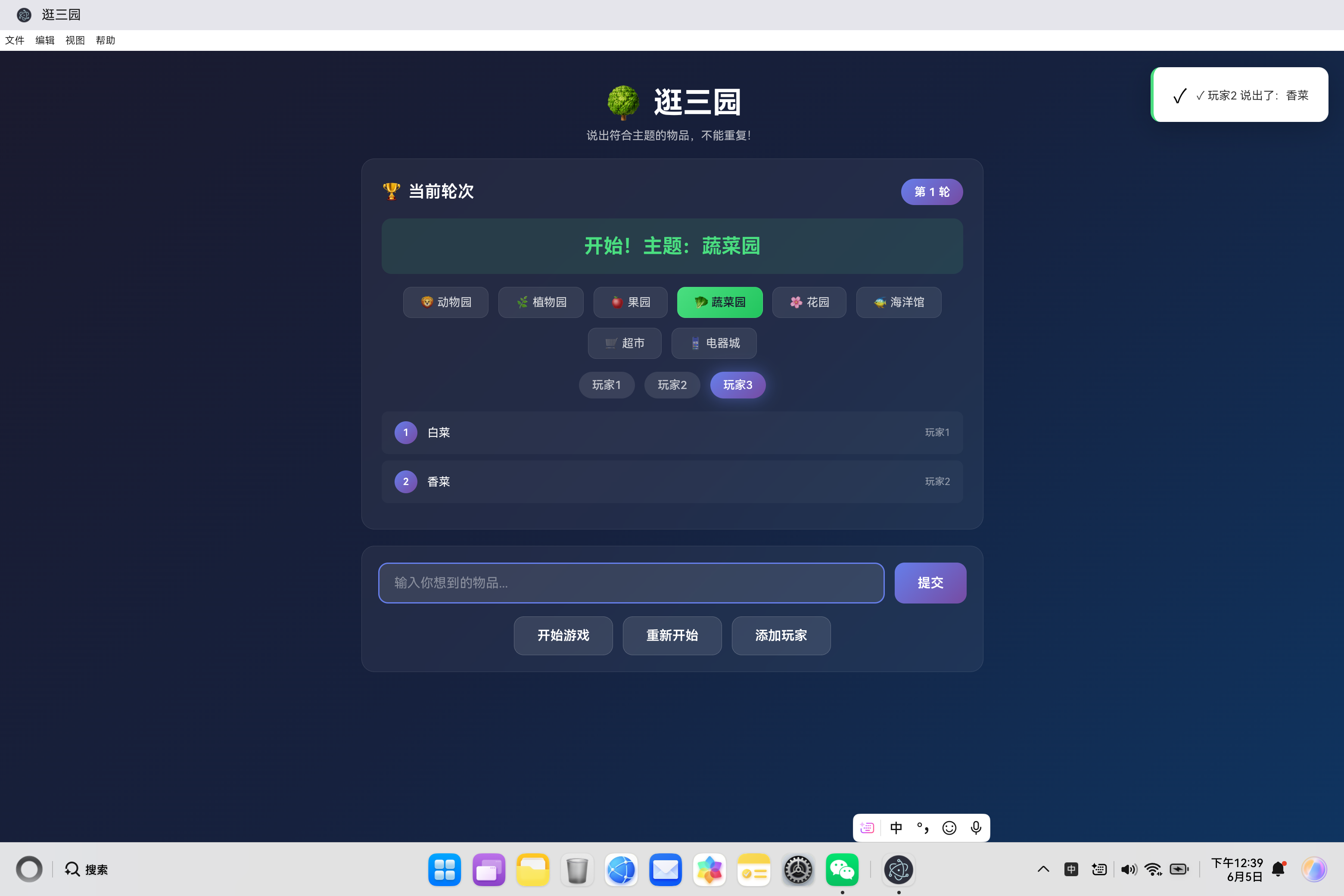
    this.showNotification(`✓ ${this.players[this.currentPlayerIndex]} 说出了:${word}`, 'success');

    this.nextPlayer();
}
验证流程:
用户输入 → 非空检查 → 重复检查 → 有效性检查 → 添加词汇 → 切换玩家
5.3 词汇重复检查
isWordUsed(word) {
    return this.words.some(w => w.word.toLowerCase() === word.toLowerCase());
}
检查逻辑:
- 使用
toLowerCase()进行大小写不敏感比较 - 使用
Array.some()方法遍历已说词汇 - 返回布尔值表示是否重复
5.4 词汇有效性验证
isWordValid(word) {
    const validWords = this.topicWordList[this.currentTopic] || [];
    return validWords.some(w => w === word);
}
验证逻辑:
- 根据当前主题获取有效词汇列表
- 检查输入词汇是否在有效列表中
- 精确匹配(区分大小写)
5.5 玩家轮次管理
nextPlayer() {
    this.currentPlayerIndex = (this.currentPlayerIndex + 1) % this.players.length;
    this.renderPlayers();
}
轮次计算:
使用取模运算实现循环:
玩家0 → 玩家1 → 玩家2 → 玩家0 → ...
六、界面渲染系统
6.1 玩家状态渲染
renderPlayers() {
    const section = document.getElementById('player-section');
    section.innerHTML = this.players.map((player, index) =>
        `<div class="player-tag ${index === this.currentPlayerIndex && this.gameStarted ? 'active' : 'inactive'}">${player}</div>`
    ).join('');
}
渲染逻辑:
| 状态 | 样式类 | 视觉效果 |
|---|---|---|
| 当前玩家 | active | 渐变背景 + 发光效果 |
| 其他玩家 | inactive | 灰色背景 |
6.2 词汇列表渲染
renderWordList() {
    const list = document.getElementById('word-list');

    if (this.words.length === 0) {
        list.innerHTML = `
            <div class="empty-state">
                <div class="icon">🎮</div>
                <h3>${this.gameStarted ? '等待玩家发言' : '游戏尚未开始'}</h3>
                <p>${this.gameStarted ? '输入符合主题的物品并提交' : '选择主题后点击开始游戏'}</p>
            </div>
        `;
        return;
    }

    list.innerHTML = this.words.map((item, index) => `
        <div class="word-item">
            <div class="word-number">${index + 1}</div>
            <div class="word-text">${item.word}</div>
            <div class="word-player">${item.player}</div>
        </div>
    `).join('');

    list.scrollTop = list.scrollHeight;
}
渲染特点:
- 空状态处理:显示友好提示
- 序号显示:每条词汇带有序号
- 归属标记:显示谁说的词汇
- 自动滚动:列表自动滚动到底部
6.3 主题选择渲染
document.querySelectorAll('.topic-tag').forEach(tag => {
    tag.addEventListener('click', (e) => {
        document.querySelectorAll('.topic-tag').forEach(t => t.classList.remove('active'));
        e.target.classList.add('active');
        this.currentTopic = e.target.dataset.topic;
        if (!this.gameStarted) {
            document.getElementById('current-word').textContent = `主题:${this.currentTopic}`;
        }
    });
});
交互逻辑:
- 点击主题标签
- 移除其他标签的激活状态
- 添加当前标签的激活状态
- 更新当前主题
- 如果游戏未开始,更新显示
七、玩家管理
7.1 添加玩家
addPlayer() {
    if (this.players.length >= 6) {
        this.showNotification('最多支持6名玩家', 'warning');
        return;
    }

    const newPlayer = `玩家${this.players.length + 1}`;
    this.players.push(newPlayer);
    this.renderPlayers();
    this.showNotification(`已添加 ${newPlayer}`, 'success');
}
限制条件:
- 最多支持6名玩家
- 玩家名称自动生成(玩家1、玩家2、…)
- 添加后立即更新显示
7.2 玩家数据结构
players = ['玩家1', '玩家2', '玩家3']
设计考虑:
- 使用简单数组存储玩家名称
- 索引对应玩家顺序
- 支持动态添加
八、通知系统
8.1 通知显示
showNotification(message, type = 'success') {
    const notification = document.getElementById('notification');
    const icon = document.getElementById('notification-icon');
    const msg = document.getElementById('notification-message');

    notification.className = `notification ${type}`;

    switch(type) {
        case 'success':
            icon.textContent = '✓';
            break;
        case 'error':
            icon.textContent = '✕';
            break;
        case 'warning':
            icon.textContent = '⚠';
            break;
    }

    msg.textContent = message;
    notification.classList.add('show');

    setTimeout(() => {
        notification.classList.remove('show');
    }, 3000);
}
通知类型:
| 类型 | 图标 | 颜色 | 用途 |
|---|---|---|---|
| success | ✓ | 绿色 | 操作成功 |
| error | ✕ | 红色 | 操作失败 |
| warning | ⚠ | 黄色 | 警告提示 |
九、游戏控制
9.1 重置游戏
resetGame() {
    this.gameStarted = false;
    this.words = [];
    this.currentPlayerIndex = 0;
    this.currentRound = 1;

    document.getElementById('current-round').textContent = 1;
    document.getElementById('current-word').textContent = '请选择主题开始游戏';
    document.getElementById('word-input').value = '';

    this.renderWordList();
    this.renderPlayers();

    document.querySelectorAll('.topic-tag').forEach(tag => tag.classList.remove('active'));
    document.querySelector('.topic-tag[data-topic="动物园"]').classList.add('active');
    this.currentTopic = '动物园';

    this.showNotification('游戏已重置', 'success');
}
重置内容:
- 游戏状态重置
- 词汇列表清空
- 玩家索引重置
- UI显示重置
- 默认主题恢复
9.2 再来一局
restartGame() {
    document.getElementById('game-over-modal').classList.remove('show');
    this.startGame();
}
流程:
- 关闭游戏结束弹窗
- 重新启动游戏
十、主题词汇数据库
10.1 动物园主题
'动物园': ['狮子', '老虎', '大象', '熊猫', '长颈鹿', '猴子', '斑马', '企鹅',
          '海豚', '鳄鱼', '孔雀', '鹦鹉', '考拉', '袋鼠', '北极熊', '狼',
          '狐狸', '熊', '蛇', '青蛙', '兔子', '猫', '狗', '马', '牛',
          '羊', '猪', '鸡', '鸭', '鹅', '鸟']
10.2 植物园主题
'植物园': ['玫瑰', '菊花', '牡丹', '向日葵', '郁金香', '樱花', '荷花', '兰花',
          '茉莉', '桂花', '梅花', '杜鹃', '百合', '康乃馨', '紫罗兰', '薰衣草',
          '仙人掌', '绿萝', '吊兰', '多肉', '松树', '柳树', '杨树', '枫树',
          '竹子', '银杏', '梧桐', '榕树', '椰子树', '棕榈树']
10.3 果园主题
'果园': ['苹果', '香蕉', '橙子', '葡萄', '西瓜', '草莓', '蓝莓', '樱桃',
        '桃子', '李子', '梨子', '柿子', '石榴', '芒果', '榴莲', '菠萝',
        '柚子', '柠檬', '猕猴桃', '火龙果', '荔枝', '龙眼', '木瓜', '哈密瓜',
        '甜瓜', '山楂', '枣', '核桃', '栗子', '杏仁']
10.4 蔬菜园主题
'蔬菜园': ['西红柿', '黄瓜', '茄子', '辣椒', '胡萝卜', '土豆', '白菜', '菠菜',
          '芹菜', '生菜', '西兰花', '菜花', '豆角', '豌豆', '玉米', '南瓜',
          '冬瓜', '苦瓜', '丝瓜', '番茄', '洋葱', '大蒜', '生姜', '大葱',
          '韭菜', '香菜', '蘑菇', '木耳', '海带', '紫菜']
10.5 花园主题
'花园': ['玫瑰', '月季', '牡丹', '芍药', '茉莉', '桂花', '荷花', '睡莲',
        '郁金香', '风信子', '紫罗兰', '薰衣草', '向日葵', '雏菊', '康乃馨',
        '百合', '兰花', '樱花', '梅花', '杜鹃', '海棠', '玉兰', '丁香',
        '紫荆', '木槿', '芙蓉', '山茶', '栀子', '绣球', '鸢尾']
10.6 海洋馆主题
'海洋馆': ['海豚', '鲨鱼', '鲸鱼', '章鱼', '乌贼', '水母', '海龟', '海星',
          '珊瑚', '海葵', '海马', '龙虾', '螃蟹', '贝类', '小丑鱼', '金鱼',
          '鲤鱼', '三文鱼', '鳕鱼', '带鱼', '鳗鱼', '鱿鱼', '虾', '海蜇',
          '海参', '鲍鱼', '扇贝', '牡蛎', '海螺', '海藻']
10.7 超市主题
'超市': ['牛奶', '面包', '鸡蛋', '大米', '面条', '食用油', '盐', '糖',
        '酱油', '醋', '饮料', '零食', '水果', '蔬菜', '肉类', '海鲜',
        '罐头', '方便面', '饼干', '巧克力', '薯片', '糖果', '坚果', '速冻食品',
        '调味品', '日用品', '化妆品', '纸巾', '洗发水', '牙膏']
10.8 电器城主题
'电器城': ['电视', '冰箱', '洗衣机', '空调', '电脑', '手机', '平板', '耳机',
          '音响', '微波炉', '烤箱', '电饭煲', '电磁炉', '电水壶', '豆浆机',
          '榨汁机', '吸尘器', '电风扇', '加湿器', '空气净化器', '路由器',
          '充电宝', '数据线', '充电器', '台灯', '手电筒', '游戏机', '相机',
          '打印机', '扫描仪']
十一、响应式设计
11.1 媒体查询
@media (max-width: 600px) {
    .input-row {
        flex-direction: column;
    }

    .header h1 {
        font-size: 28px;
    }

    .btn-group {
        flex-wrap: wrap;
    }

    .btn-group .btn {
        flex: 1;
        min-width: calc(50% - 6px);
    }
}
适配策略:
| 屏幕宽度 | 调整内容 |
|---|---|
| < 600px | 输入框和按钮垂直排列 |
| < 600px | 标题字体缩小 |
| < 600px | 按钮组换行显示 |
11.2 布局特点
- 弹性布局:使用 flexbox 实现响应式布局
- 卡片设计:毛玻璃效果卡片
- 渐变背景:深色渐变主题
- 发光效果:当前玩家高亮
十二、性能优化
12.1 渲染优化
renderWordList() {
    const list = document.getElementById('word-list');

    if (this.words.length === 0) {
        list.innerHTML = `<div class="empty-state">...</div>`;
        return;
    }

    list.innerHTML = this.words.map(item => `...`).join('');
    list.scrollTop = list.scrollHeight;
}
优化措施:
- 一次性渲染:使用 innerHTML 批量更新
- 条件渲染:空状态提前返回
- 自动滚动:列表底部对齐
12.2 事件优化
setupEventListeners() {
    document.getElementById('word-input').addEventListener('keypress', (e) => {
        if (e.key === 'Enter') {
            this.submitWord();
        }
    });
}
优化策略:
- 键盘支持:Enter 键快捷提交
- 事件委托:减少事件监听器数量
十三、错误处理
13.1 输入验证
submitWord() {
    const word = input.value.trim();

    if (!word) {
        this.showNotification('请输入物品名称', 'warning');
        input.focus();
        return;
    }

    if (this.isWordUsed(word)) {
        this.showNotification(`"${word}" 已经被说过了!`, 'error');
        input.focus();
        return;
    }

    if (!this.isWordValid(word)) {
        this.showNotification(`"${word}" 不属于${this.currentTopic}!`, 'error');
        input.focus();
        return;
    }
}
验证层次:
- 非空验证:检查输入是否为空
- 重复验证:检查是否已说过
- 有效性验证:检查是否符合主题
13.2 边界处理
addPlayer() {
    if (this.players.length >= 6) {
        this.showNotification('最多支持6名玩家', 'warning');
        return;
    }
}
边界条件:
- 玩家数量上限检查
- 游戏状态检查(未开始时不能提交)
十四、扩展功能设计
14.1 自定义主题
addCustomTopic(name, words) {
    if (!this.topicWordList[name]) {
        this.topicWordList[name] = words;
        // 更新UI添加新主题标签
    }
}
14.2 计分系统
// 为每个玩家添加分数
playerScores = {
    '玩家1': 0,
    '玩家2': 0,
    '玩家3': 0
};

// 正确回答加分
addScore(player) {
    this.playerScores[player]++;
}
14.3 时间限制
// 设置回答时间限制
setTimeout(() => {
    if (this.gameStarted) {
        this.showNotification(`${this.players[this.currentPlayerIndex]} 超时!`, 'warning');
        this.nextPlayer();
    }
}, 10000); // 10秒超时
十五、总结
逛三园游戏通过以下技术实现:
- 游戏状态管理:玩家轮次、词汇列表、主题选择
- 词汇验证系统:重复检查、有效性验证
- 界面渲染:实时更新玩家状态和词汇列表
- 通知系统:操作反馈和游戏提示
- 响应式设计:适配多种设备
- 性能优化:批量渲染、事件优化
该游戏展示了如何用简单的前端技术创建有趣的互动应用,适合聚会娱乐和团队活动使用。

作为“人工智能6S店”的官方数字引擎,为AI开发者与企业提供一个覆盖软硬件全栈、一站式门户。
更多推荐


 0
0 0
0- 0


 已为社区贡献5条内容

所有评论(0)