
基于鸿蒙PC Electron框架实现的快捷记事本应用
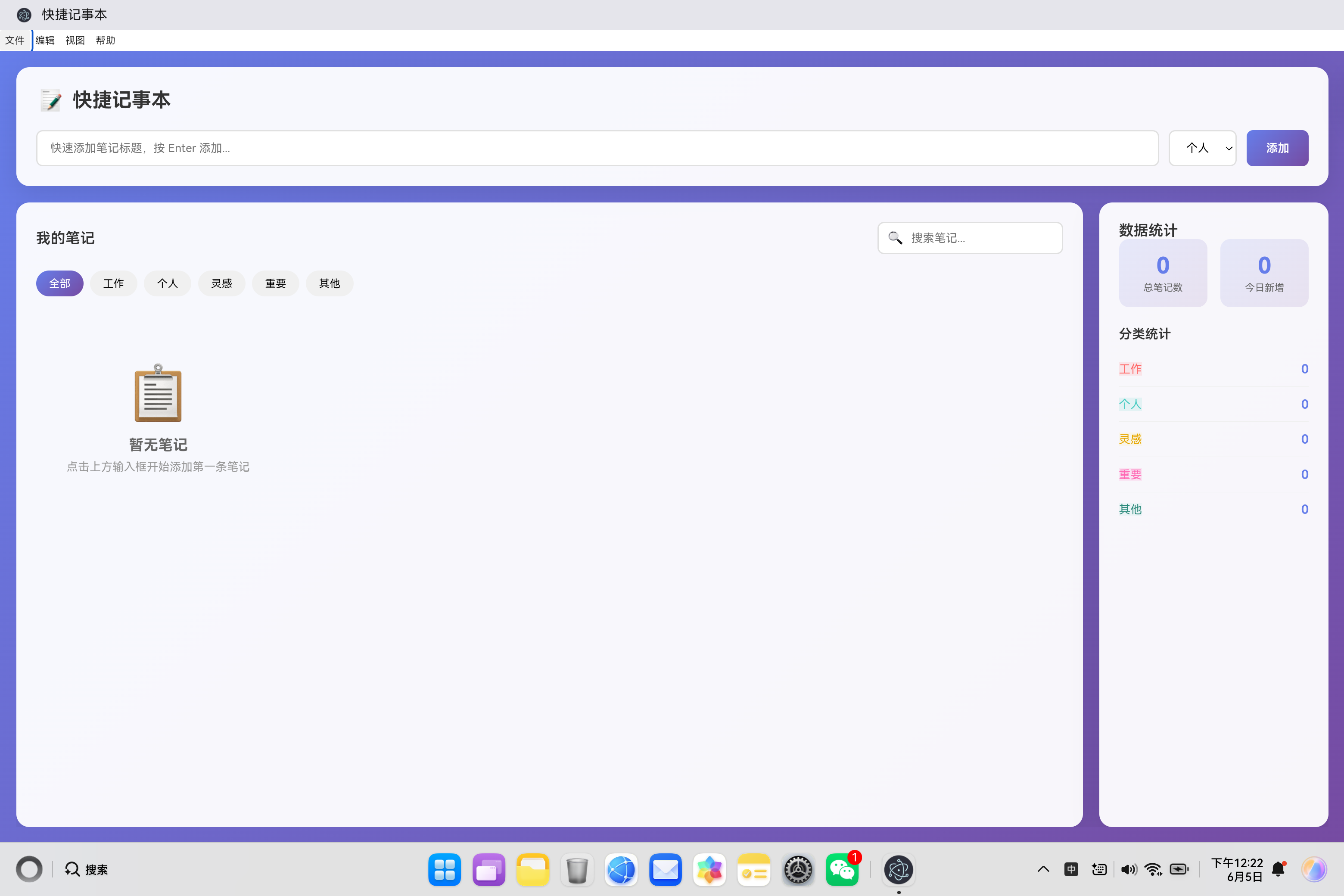
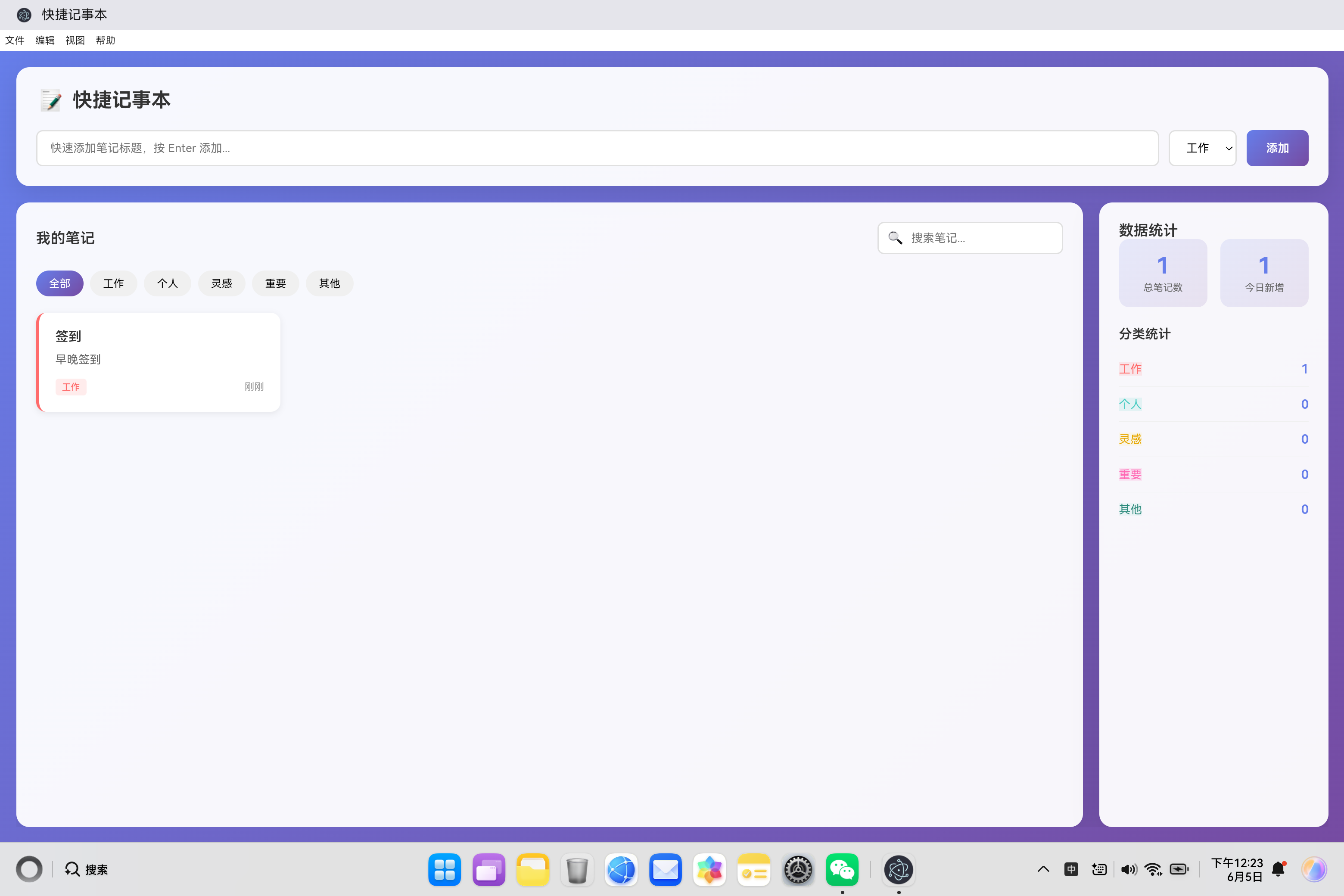
开源鸿蒙PC社区快捷记事本技术解析 本文介绍了一款基于开源鸿蒙PC社区的轻量级笔记应用,采用纯前端技术实现。应用架构分为表现层、业务逻辑层和数据层,核心功能包括笔记管理、分类系统、搜索功能和本地数据持久化。技术亮点包括: 模块化设计:通过QuickNotes类封装所有核心功能 高效数据管理:使用localStorage实现数据持久化,JSON格式存储笔记 响应式交互:实时渲染和统计更新机制 便捷操
·
欢迎加入开源鸿蒙PC社区:
https://harmonypc.csdn.net/
atomgit仓库地址: https://atomgit.com/tizibanfan/kuaijiejishiben
一、概述
快捷记事本是一款轻量级的笔记管理应用,采用现代化的前端技术栈实现,无需后端即可运行。本文详细介绍该应用的技术架构、核心功能实现、数据管理策略和性能优化方法。
二、技术架构设计
2.1 整体架构
┌─────────────────────────────────────────┐
│            表现层(UI Layer)           │
│     HTML结构 + CSS样式 + 响应式设计     │
├─────────────────────────────────────────┤
│           业务逻辑层(Logic)            │
│   JavaScript类 - QuickNotes Controller  │
├─────────────────────────────────────────┤
│            数据层(Data)              │
│     LocalStorage + JSON序列化           │
└─────────────────────────────────────────┘
2.2 核心功能模块
| 模块 | 职责 | 关键技术 |
|---|---|---|
| 笔记管理 | 添加、编辑、删除笔记 | DOM操作、事件处理 |
| 分类系统 | 5种笔记分类 | 颜色编码、过滤显示 |
| 搜索功能 | 实时搜索笔记 | 字符串匹配、过滤算法 |
| 数据持久化 | 本地存储 | localStorage API |
| 统计面板 | 实时统计数据 | 数据聚合计算 |
| 导入导出 | JSON格式数据交换 | File API、Blob |
三、核心类设计
3.1 QuickNotes 类结构
class QuickNotes {
    constructor() {
        this.notes = [];
        this.currentFilter = 'all';
        this.searchQuery = '';
        this.editingNoteId = null;

        this.loadFromStorage();
        this.setupEventListeners();
        this.render();
        this.updateStatistics();
    }
}
类成员变量说明:
| 变量 | 类型 | 说明 |
|---|---|---|
| notes | Array | 笔记数据数组 |
| currentFilter | String | 当前分类过滤条件 |
| searchQuery | String | 搜索关键词 |
| editingNoteId | Number | 当前编辑的笔记ID |
3.2 笔记数据结构
{
    id: 1717564800000,        // 唯一标识符(时间戳)
    title: "会议纪要",         // 笔记标题
    content: "讨论项目进度...",  // 笔记内容
    category: "work",         // 分类标识
    createdAt: "2024-06-05T10:00:00.000Z",  // 创建时间
    updatedAt: "2024-06-05T12:30:00.000Z"    // 更新时间
}
数据结构设计原则:
- 唯一性:使用时间戳作为ID,确保全局唯一
- 时间戳:记录创建和更新时间,便于排序和显示
- 可扩展性:JSON格式便于扩展新字段
四、数据持久化实现
4.1 LocalStorage 存储机制
loadFromStorage() {
    try {
        const stored = localStorage.getItem('quickNotes');
        if (stored) {
            this.notes = JSON.parse(stored);
        }
    } catch (error) {
        console.error('Failed to load notes:', error);
        this.notes = [];
    }
}

saveToStorage() {
    try {
        localStorage.setItem('quickNotes', JSON.stringify(this.notes));
    } catch (error) {
        console.error('Failed to save notes:', error);
        this.showNotification('保存失败', 'error');
    }
}
存储策略:
- 错误处理:try-catch 捕获存储异常
- 数据校验:JSON.parse 异常处理
- 自动保存:每次修改后自动保存
4.2 数据同步机制
addNote() {
    const note = {
        id: Date.now(),
        title: title,
        content: '',
        category: category,
        createdAt: new Date().toISOString(),
        updatedAt: new Date().toISOString()
    };

    this.notes.unshift(note);  // 添加到数组开头
    this.saveToStorage();       // 自动保存
    this.render();
    this.updateStatistics();
}
同步流程:
用户操作 → 更新内存数据 → 保存到Storage → 重新渲染UI → 更新统计
五、笔记管理功能实现
5.1 添加笔记功能
addNote() {
    const titleInput = document.getElementById('quick-add');
    const categorySelect = document.getElementById('quick-category');

    const title = titleInput.value.trim();
    const category = categorySelect.value;

    if (!title) {
        this.showNotification('请输入笔记标题', 'error');
        titleInput.focus();
        return;
    }

    const note = {
        id: Date.now(),
        title: title,
        content: '',
        category: category,
        createdAt: new Date().toISOString(),
        updatedAt: new Date().toISOString()
    };

    this.notes.unshift(note);
    this.saveToStorage();
    this.render();
    this.updateStatistics();

    titleInput.value = '';
    this.showNotification('笔记添加成功', 'success');

    this.openEditModal(note.id);
}
快速添加流程:
- 获取输入值并验证
- 创建笔记对象
- 添加到数据数组(unshift添加到开头)
- 保存到本地存储
- 重新渲染界面
- 更新统计数据
- 清空输入框
- 自动打开编辑弹窗
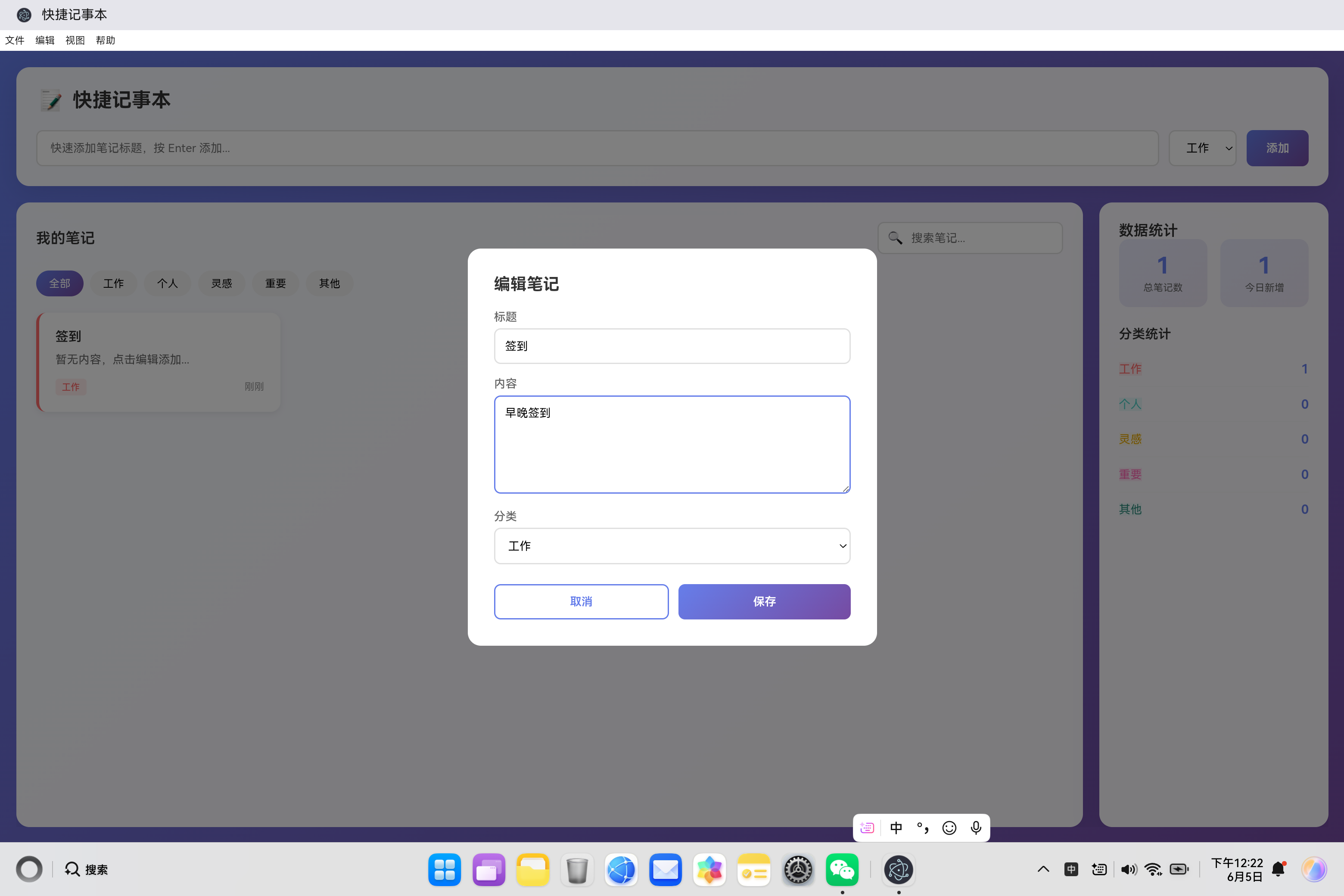
5.2 编辑笔记功能
editNote(id) {
    this.openEditModal(id);
}

openEditModal(id) {
    const note = this.notes.find(n => n.id === id);
    if (!note) return;

    this.editingNoteId = id;

    document.getElementById('modal-title').textContent = '编辑笔记';
    document.getElementById('edit-title').value = note.title;
    document.getElementById('edit-content').value = note.content || '';
    document.getElementById('edit-category').value = note.category;

    document.getElementById('edit-modal').classList.add('active');
    document.getElementById('edit-title').focus();
}

saveEdit() {
    const title = document.getElementById('edit-title').value.trim();
    const content = document.getElementById('edit-content').value.trim();
    const category = document.getElementById('edit-category').value;

    if (!title) {
        this.showNotification('标题不能为空', 'error');
        document.getElementById('edit-title').focus();
        return;
    }

    const noteIndex = this.notes.findIndex(n => n.id === this.editingNoteId);
    if (noteIndex === -1) return;

    this.notes[noteIndex] = {
        ...this.notes[noteIndex],
        title: title,
        content: content,
        category: category,
        updatedAt: new Date().toISOString()
    };

    this.saveToStorage();
    this.render();
    this.updateStatistics();
    this.closeModal();
    this.showNotification('笔记保存成功', 'success');
}
编辑流程:
- 打开编辑弹窗,填充当前数据
- 用户修改内容
- 点击保存按钮
- 验证数据有效性
- 查找并更新笔记
- 更新时间戳
- 保存并重新渲染
5.3 删除笔记功能
deleteNote(id) {
    if (!confirm('确定要删除这条笔记吗?')) {
        return;
    }

    this.notes = this.notes.filter(n => n.id !== id);
    this.saveToStorage();
    this.render();
    this.updateStatistics();
    this.showNotification('笔记已删除', 'success');
}
删除流程:
- 显示确认对话框
- 用户确认后,使用 filter 过滤掉目标笔记
- 保存并重新渲染
六、分类系统实现
6.1 分类配置
getCategoryLabel(category) {
    const labels = {
        work: '工作',
        personal: '个人',
        idea: '灵感',
        important: '重要',
        other: '其他'
    };
    return labels[category] || '其他';
}

getCategoryColor(category) {
    const colors = {
        work: '#ff6b6b',
        personal: '#4ecdc4',
        idea: '#ffe66d',
        important: '#ff69b4',
        other: '#95e1d3'
    };
    return colors[category] || '#95e1d3';
}
分类配置表:
| 分类 | 标识 | 颜色 | CSS类 |
|---|---|---|---|
| 工作 | work | #ff6b6b | category-work |
| 个人 | personal | #4ecdc4 | category-personal |
| 灵感 | idea | #ffe66d | category-idea |
| 重要 | important | #ff69b4 | category-important |
| 其他 | other | #95e1d3 | category-other |
6.2 分类过滤实现
setupEventListeners() {
    document.querySelectorAll('.filter-tab').forEach(tab => {
        tab.addEventListener('click', (e) => {
            document.querySelectorAll('.filter-tab').forEach(t => t.classList.remove('active'));
            e.target.classList.add('active');
            this.currentFilter = e.target.dataset.filter;
            this.render();
        });
    });
}

getFilteredNotes() {
    let filtered = [...this.notes];

    if (this.currentFilter !== 'all') {
        filtered = filtered.filter(note => note.category === this.currentFilter);
    }

    if (this.searchQuery) {
        filtered = filtered.filter(note =>
            note.title.toLowerCase().includes(this.searchQuery) ||
            note.content.toLowerCase().includes(this.searchQuery)
        );
    }

    return filtered;
}
过滤算法:
原始数据 → 分类过滤 → 搜索过滤 → 最终结果
七、搜索功能实现
7.1 搜索输入监听
setupEventListeners() {
    document.getElementById('search-input').addEventListener('input', (e) => {
        this.searchQuery = e.target.value.toLowerCase();
        this.render();
    });
}
7.2 搜索匹配逻辑
if (this.searchQuery) {
    filtered = filtered.filter(note =>
        note.title.toLowerCase().includes(this.searchQuery) ||
        note.content.toLowerCase().includes(this.searchQuery)
    );
}
搜索特点:
- 大小写不敏感:转换为小写进行比较
- 多字段匹配:同时搜索标题和内容
- 实时响应:每次输入立即更新结果
八、渲染系统实现
8.1 笔记卡片渲染
render() {
    const grid = document.getElementById('notes-grid');
    const filteredNotes = this.getFilteredNotes();

    if (filteredNotes.length === 0) {
        grid.innerHTML = `
            <div class="empty-state" id="empty-state">
                <div class="icon">📋</div>
                <h3>${this.currentFilter === 'all' && !this.searchQuery ? '暂无笔记' : '没有找到笔记'}</h3>
                <p>${this.searchQuery ? '尝试其他关键词' : '点击上方输入框开始添加第一条笔记'}</p>
            </div>
        `;
        return;
    }

    grid.innerHTML = filteredNotes.map(note => `
        <div class="note-card" data-id="${note.id}" style="border-left-color: ${this.getCategoryColor(note.category)};">
            <div class="note-actions">
                <button class="note-action-btn edit" onclick="quickNotes.editNote(${note.id})" title="编辑">✏️</button>
                <button class="note-action-btn delete" onclick="quickNotes.deleteNote(${note.id})" title="删除">🗑️</button>
            </div>
            <div class="note-title">${this.escapeHtml(note.title)}</div>
            <div class="note-content">${this.escapeHtml(note.content || '暂无内容,点击编辑添加...')}</div>
            <div class="note-meta">
                <span class="note-category category-${note.category}">${this.getCategoryLabel(note.category)}</span>
                <span>${this.formatDate(note.updatedAt)}</span>
            </div>
        </div>
    `).join('');
}
渲染优化:
- 空状态处理:无笔记时显示友好提示
- 模板字符串:使用ES6模板字符串简化HTML生成
- XSS防护:使用 escapeHtml 转义用户输入
8.2 XSS 防护实现
escapeHtml(text) {
    const div = document.createElement('div');
    div.textContent = text;
    return div.innerHTML;
}
防护原理:
- 创建临时DOM元素
- 使用 textContent 设置内容(自动转义)
- 读取 innerHTML 获取安全字符串
九、日期格式化实现
9.1 智能时间显示
formatDate(dateString) {
    const date = new Date(dateString);
    const now = new Date();
    const diff = now - date;

    if (diff < 60000) {
        return '刚刚';
    } else if (diff < 3600000) {
        const minutes = Math.floor(diff / 60000);
        return `${minutes}分钟前`;
    } else if (diff < 86400000) {
        const hours = Math.floor(diff / 3600000);
        return `${hours}小时前`;
    } else if (diff < 172800000) {
        return '昨天';
    } else {
        return date.toLocaleDateString('zh-CN', {
            month: 'short',
            day: 'numeric'
        });
    }
}
时间显示规则:
| 时间范围 | 显示格式 | 示例 |
|---|---|---|
| < 1分钟 | 刚刚 | 刚刚 |
| < 1小时 | N分钟前 | 5分钟前 |
| < 24小时 | N小时前 | 3小时前 |
| < 48小时 | 昨天 | 昨天 |
| ≥ 48小时 | 月-日 | 6月5日 |
十、统计系统实现
10.1 实时统计计算
updateStatistics() {
    document.getElementById('total-notes').textContent = this.notes.length;

    const today = new Date().toDateString();
    const todayCount = this.notes.filter(note =>
        new Date(note.createdAt).toDateString() === today
    ).length;
    document.getElementById('today-notes').textContent = todayCount;

    const categories = ['work', 'personal', 'idea', 'important', 'other'];
    categories.forEach(cat => {
        const count = this.notes.filter(note => note.category === cat).length;
        document.getElementById(`${cat}-count`).textContent = count;
    });
}
统计数据项:
- 总笔记数:所有笔记的总数
- 今日新增:今天创建的笔记数
- 分类统计:各分类的笔记数量
十一、通知系统实现
11.1 通知提示组件
showNotification(message, type = 'success') {
    const notification = document.getElementById('notification');
    const icon = document.getElementById('notification-icon');
    const msg = document.getElementById('notification-message');

    notification.className = `notification ${type}`;
    icon.textContent = type === 'success' ? '✓' : '✕';
    msg.textContent = message;

    notification.classList.add('show');

    setTimeout(() => {
        notification.classList.remove('show');
    }, 3000);
}
通知特性:
- 自动消失:3秒后自动隐藏
- 类型区分:成功和错误使用不同颜色
- 动画效果:滑入滑出动画
十二、导入导出功能
12.1 导出笔记
exportNotes() {
    const dataStr = JSON.stringify(this.notes, null, 2);
    const blob = new Blob([dataStr], { type: 'application/json' });
    const url = URL.createObjectURL(blob);

    const a = document.createElement('a');
    a.href = url;
    a.download = `notes-${new Date().toISOString().split('T')[0]}.json`;
    document.body.appendChild(a);
    a.click();
    document.body.removeChild(a);
    URL.revokeObjectURL(url);

    this.showNotification('笔记导出成功', 'success');
}
导出流程:
- JSON序列化数据
- 创建Blob对象
- 生成下载链接
- 触发下载
- 清理资源
12.2 导入笔记
importNotes(file) {
    const reader = new FileReader();
    reader.onload = (e) => {
        try {
            const imported = JSON.parse(e.target.result);
            if (Array.isArray(imported)) {
                this.notes = [...imported, ...this.notes];
                this.saveToStorage();
                this.render();
                this.updateStatistics();
                this.showNotification(`成功导入 ${imported.length} 条笔记`, 'success');
            } else {
                throw new Error('Invalid format');
            }
        } catch (error) {
            this.showNotification('导入失败,文件格式错误', 'error');
        }
    };
    reader.readAsText(file);
}
导入流程:
- 读取文件内容
- JSON解析
- 数据验证
- 合并到现有数据
- 保存并更新界面
十三、响应式设计实现
13.1 媒体查询适配
@media (max-width: 768px) {
    .main-content {
        flex-direction: column;
    }

    .stats-section {
        width: 100%;
    }

    .notes-grid {
        grid-template-columns: 1fr;
    }

    .input-section {
        flex-direction: column;
    }
}
移动端适配策略:
- 布局切换:flex-direction: column
- 宽度调整:100%宽度
- 网格简化:单列显示
- 表单堆叠:垂直排列
13.2 栅格布局
.notes-grid {
    display: grid;
    grid-template-columns: repeat(auto-fill, minmax(250px, 1fr));
    gap: 20px;
}
自适应网格:
- 自动填充可用空间
- 最小卡片宽度250px
- 间距20px
- 根据屏幕宽度自动调整列数
十四、事件处理优化
14.1 事件委托
setupEventListeners() {
    document.getElementById('add-btn').addEventListener('click', () => this.addNote());

    document.getElementById('quick-add').addEventListener('keypress', (e) => {
        if (e.key === 'Enter') {
            this.addNote();
        }
    });

    document.querySelectorAll('.filter-tab').forEach(tab => {
        tab.addEventListener('click', (e) => {
            // 处理过滤
        });
    });
}
14.2 键盘快捷键
document.addEventListener('keydown', (e) => {
    if (e.key === 'Escape') {
        this.closeModal();
    }
});
支持的快捷键:
| 快捷键 | 功能 |
|---|---|
| Enter | 快速添加笔记 |
| Escape | 关闭编辑弹窗 |
十五、性能优化策略
15.1 渲染优化
render() {
    const grid = document.getElementById('notes-grid');
    const filteredNotes = this.getFilteredNotes();

    if (filteredNotes.length === 0) {
        grid.innerHTML = this.getEmptyStateHTML();
        return;
    }

    grid.innerHTML = filteredNotes.map(note => this.getNoteCardHTML(note)).join('');
}
优化措施:
- 减少DOM操作:一次性更新
- 批量渲染:使用 map + join
- 条件渲染:空状态提前返回
15.2 数据结构优化
getFilteredNotes() {
    let filtered = [...this.notes];  // 复制数组,避免修改原数据

    if (this.currentFilter !== 'all') {
        filtered = filtered.filter(note => note.category === this.currentFilter);
    }

    if (this.searchQuery) {
        filtered = filtered.filter(note =>
            note.title.toLowerCase().includes(this.searchQuery) ||
            note.content.toLowerCase().includes(this.searchQuery)
        );
    }

    return filtered;
}
优化策略:
- 数组复制:避免修改原始数据
- 链式过滤:减少中间变量
- 短路运算:提前退出
十六、错误处理机制
16.1 存储异常处理
loadFromStorage() {
    try {
        const stored = localStorage.getItem('quickNotes');
        if (stored) {
            this.notes = JSON.parse(stored);
        }
    } catch (error) {
        console.error('Failed to load notes:', error);
        this.notes = [];
    }
}
16.2 用户输入验证
addNote() {
    const title = titleInput.value.trim();

    if (!title) {
        this.showNotification('请输入笔记标题', 'error');
        titleInput.focus();
        return;
    }
    // 继续添加逻辑
}
验证规则:
- 标题必填:不能为空字符串
- 长度限制:使用trim()去除首尾空格
- 即时反馈:验证失败显示错误提示
十七、安全性考虑
17.1 XSS 防护
escapeHtml(text) {
    const div = document.createElement('div');
    div.textContent = text;
    return div.innerHTML;
}
防护效果:
- 转义 HTML 特殊字符
- 防止脚本注入
- 保护用户数据安全
17.2 数据隔离
使用 localStorage 存储数据,每个域名的存储空间是隔离的,确保数据安全性。
十八、用户体验优化
18.1 加载体验
constructor() {
    this.loadFromStorage();
    this.setupEventListeners();
    this.render();
    this.updateStatistics();
}
初始化流程:
- 加载本地数据
- 绑定事件监听
- 渲染初始界面
- 显示统计数据
18.2 交互反馈
showNotification('笔记添加成功', 'success');
反馈机制:
- 成功提示:绿色标识
- 错误提示:红色标识
- 自动消失:3秒后隐藏
十九、扩展功能设计
19.1 笔记排序
getFilteredNotes() {
    // ... 过滤逻辑

    return filtered.sort((a, b) => {
        return new Date(b.updatedAt) - new Date(a.updatedAt);
    });
}
19.2 笔记标签
{
    id: 1,
    title: "项目计划",
    content: "...",
    tags: ["重要", "紧急", "工作"],
    // ...
}
二十、总结
快捷记事本通过以下核心技术实现:
- 单页应用架构:纯前端实现,无需后端
- 本地数据持久化:LocalStorage 实现数据保存
- 响应式设计:适配多种屏幕尺寸
- 实时搜索和过滤:快速定位笔记
- 分类管理系统:5种分类,颜色编码
- 数据导入导出:JSON格式数据交换
- XSS防护:保护用户数据安全
- 性能优化:减少DOM操作,提高渲染效率
该应用展示了现代前端开发的最佳实践,适合作为学习参考或快速原型开发的基础。

作为“人工智能6S店”的官方数字引擎,为AI开发者与企业提供一个覆盖软硬件全栈、一站式门户。
更多推荐


 0
0 0
0- 0


 已为社区贡献5条内容

所有评论(0)