
鸿蒙PC用Electron框架 实现 房产交易系统核心算法深度解析
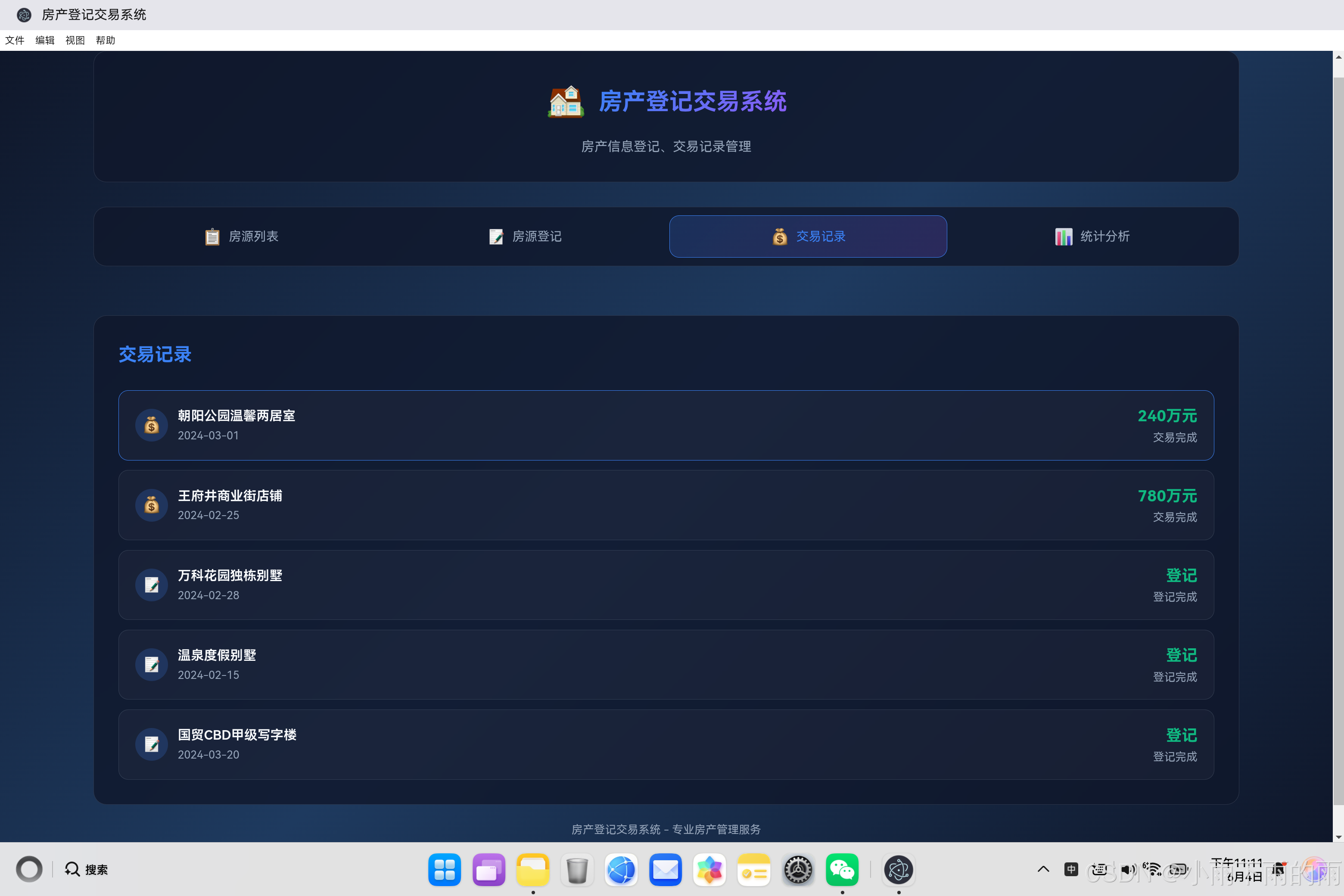
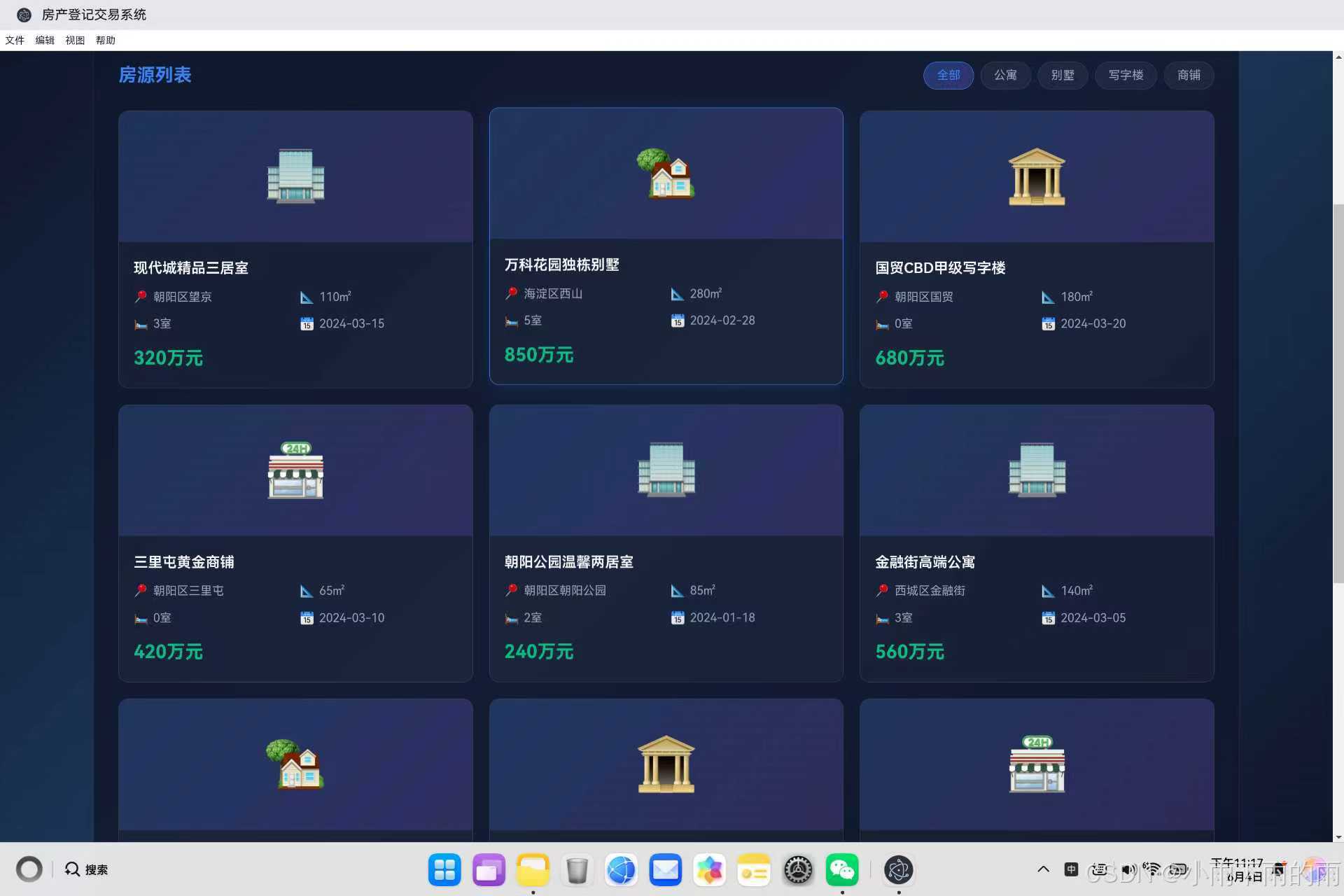
摘要: 开源鸿蒙PC社区推出房产交易系统,作为核心模块管理房源登记、交易流程及数据分析。系统采用分层架构(交易记录、统计分析、数据管理、本地存储),设计结构化交易数据(包含ID、类型、价格等字段),并实现自动登记算法与交易渲染功能。通过表单提交自动生成交易记录,支持状态追踪与时间排序展示,为房产交易提供全流程数字化管理方案。项目代码及详情见CSDN社区与AtomGit仓库。 (字数:149)
·
欢迎加入开源鸿蒙PC社区:
https://harmonypc.csdn.net/
atomgit仓库地址: https://atomgit.com/m0_66062719/fangchandengji
一、交易系统概述
1.1 为什么交易系统是核心
房产交易系统是整个房产登记交易应用的核心模块,承担着以下重要职责:
┌─────────────────────────────────────────────────────┐
│  交易系统的核心职责                                  │
│  ├─ 记录房源登记事件                                │
│  ├─ 追踪房产交易过程                                │
│  ├─ 计算统计分析数据                                │
│  ├─ 管理交易状态流转                                │
│  └─ 提供数据查询接口                                │
└─────────────────────────────────────────────────────┘
1.2 交易系统架构
┌─────────────────────────────────────────────────────┐
│                   交易系统架构                       │
│                                                     │
│  ┌─────────────┐    ┌─────────────┐                │
│  │  交易记录   │    │  统计分析   │                │
│  │   模块      │    │    模块     │                │
│  └──────┬──────┘    └──────┬──────┘                │
│         │                   │                        │
│         ▼                   ▼                        │
│  ┌─────────────────────────────────────┐            │
│  │         数据管理层                    │            │
│  │  (properties + transactions)         │            │
│  └─────────────────────────────────────┘            │
│                     │                                │
│                     ▼                                │
│  ┌─────────────────────────────────────┐            │
│  │         本地存储层                    │            │
│  │         (LocalStorage)               │            │
│  └─────────────────────────────────────┘            │
└─────────────────────────────────────────────────────┘
二、交易数据结构设计
2.1 交易记录数据结构
// 交易记录数据结构
const transactions = [
    {
        id: 1,
        propertyId: 5,
        title: '朝阳公园温馨两居室',
        type: 'sell',
        price: 240,
        date: '2024-03-01',
        buyer: '张先生',
        seller: '李女士',
        status: 'completed'
    },
    {
        id: 2,
        propertyId: 9,
        title: '王府井商业街店铺',
        type: 'sell',
        price: 780,
        date: '2024-02-25',
        buyer: '王总',
        seller: '赵先生',
        status: 'completed'
    },
    {
        id: 3,
        propertyId: 2,
        title: '万科花园独栋别墅',
        type: 'register',
        price: 0,
        date: '2024-02-28',
        buyer: '',
        seller: '',
        status: 'completed'
    }
];
2.2 数据结构字段说明
| 字段 | 类型 | 说明 |
|---|---|---|
| id | number | 交易记录唯一标识 |
| propertyId | number | 关联的房源ID |
| title | string | 房源标题 |
| type | string | 交易类型(sell/register) |
| price | number | 交易价格(登记为0) |
| date | string | 交易日期 |
| buyer | string | 买家(仅sell类型) |
| seller | string | 卖家(仅sell类型) |
| status | string | 状态(completed/pending/cancelled) |
2.3 交易类型定义
// 交易类型枚举
const TransactionType = {
    SELL: 'sell',       // 房产出售
    REGISTER: 'register', // 房源登记
    RENT: 'rent',       // 出租(预留)
    MORTGAGE: 'mortgage' // 抵押(预留)
};

// 交易状态枚举
const TransactionStatus = {
    PENDING: 'pending',     // 进行中
    COMPLETED: 'completed', // 已完成
    CANCELLED: 'cancelled'  // 已取消
};
三、核心算法实现
3.1 交易记录添加算法
自动记录房源登记事件:
// 处理表单提交
function handleFormSubmit(event) {
    event.preventDefault();

    const formData = {
        id: Date.now(),
        title: document.getElementById('title').value,
        type: document.getElementById('type').value,
        price: parseFloat(document.getElementById('price').value),
        area: parseFloat(document.getElementById('area').value),
        rooms: parseInt(document.getElementById('rooms').value),
        location: document.getElementById('location').value,
        description: document.getElementById('description').value,
        status: 'available',
        date: new Date().toISOString().split('T')[0]
    };

    // 添加新房源到列表
    properties.unshift(formData);

    // 自动创建登记交易记录
    const transaction = {
        id: Date.now() + 1,
        propertyId: formData.id,
        title: formData.title,
        type: 'register',
        price: 0,  // 登记无价格
        date: formData.date,
        buyer: '',
        seller: '',
        status: 'completed'
    };

    transactions.unshift(transaction);

    // 保存数据
    saveToStorage();

    // 更新界面
    renderProperties();
    renderTransactions();
    updateStatistics();

    alert('房源登记成功!');
    switchTab('list');
}
3.2 交易渲染算法
遍历并渲染交易记录列表:
// 渲染交易记录
function renderTransactions() {
    const list = document.getElementById('transactionList');
    list.innerHTML = '';

    // 按时间降序排列
    const sortedTransactions = [...transactions].sort((a, b) => {
        return new Date(b.date) - new Date(a.date);
    });

    sortedTransactions.forEach(transaction => {
        const item = document.createElement('div');
        item.className = 'transaction-item';

        // 根据交易类型显示不同图标
        const icon = transaction.type === 'sell' ? '💰' : '📝';

        // 根据交易类型显示不同内容
        const amountClass = transaction.type === 'sell' ? 'sale' : 'register';
        const amountText = transaction.type === 'sell'
            ? `${transaction.price}万元`
            : '登记';
        const statusText = transaction.type === 'sell'
            ? '交易完成'
            : '登记完成';

        item.innerHTML = `
            <div class="transaction-left">
                <div class="transaction-icon">${icon}</div>
                <div class="transaction-info">
                    <div class="transaction-title">${transaction.title}</div>
                    <div class="transaction-date">${transaction.date}</div>
                </div>
            </div>
            <div class="transaction-right">
                <div class="transaction-amount ${amountClass}">${amountText}</div>
                <div class="transaction-status">${statusText}</div>
            </div>
        `;

        list.appendChild(item);
    });
}
3.3 统计分析核心算法
// 更新统计信息
function updateStatistics() {
    // 1. 总房源数统计
    const totalProperties = properties.length;
    document.getElementById('totalProperties').textContent = totalProperties;

    // 2. 总价值计算(累加所有房源价格)
    const totalValue = properties.reduce((sum, property) => {
        return sum + property.price;
    }, 0);
    document.getElementById('totalValue').textContent = totalValue.toLocaleString();

    // 3. 平均价格计算
    const avgPrice = totalProperties > 0
        ? Math.round(totalValue / totalProperties)
        : 0;
    document.getElementById('avgPrice').textContent = avgPrice;

    // 4. 交易次数统计
    const transactionCount = transactions.filter(t => t.type === 'sell').length;
    document.getElementById('transactionCount').textContent = transactionCount;
}
四、算法复杂度分析
4.1 时间复杂度分析
┌─────────────────────────────────────────────────────┐
│  各算法时间复杂度                                    │
│                                                     │
│  算法              │ 时间复杂度  │ 说明            │
│  ─────────────────┼────────────┼────────────────  │
│  添加交易记录      │ O(1)       │ unshift O(1)    │
│  渲染交易列表      │ O(n log n) │ 排序 O(n log n) │
│  统计总房源数      │ O(1)       │ 数组长度         │
│  统计总价值        │ O(n)       │ reduce遍历      │
│  统计平均价格      │ O(n)       │ reduce + 除法    │
│  统计交易次数      │ O(n)       │ filter遍历      │
│                                                     │
└─────────────────────────────────────────────────────┘
4.2 空间复杂度分析
┌─────────────────────────────────────────────────────┐
│  各操作空间复杂度                                    │
│                                                     │
│  操作              │ 空间复杂度  │ 说明            │
│  ─────────────────┼────────────┼────────────────  │
│  添加交易记录      │ O(1)       │ 新增固定大小对象 │
│  渲染交易列表      │ O(n)       │ 创建n个DOM元素   │
│  排序交易列表      │ O(n)       │ 展开操作符复制   │
│  统计计算          │ O(1)       │ 使用累加器变量   │
│                                                     │
└─────────────────────────────────────────────────────┘
五、性能优化策略
5.1 批量DOM操作优化
// 优化前:逐个添加DOM元素
function renderTransactionsBad(transactions) {
    const list = document.getElementById('transactionList');
    transactions.forEach(transaction => {
        const item = createTransactionItem(transaction);
        list.appendChild(item); // 每次添加都触发重排
    });
}

// 优化后:使用DocumentFragment批量添加
function renderTransactionsOptimized(transactions) {
    const list = document.getElementById('transactionList');
    const fragment = document.createDocumentFragment();

    transactions.forEach(transaction => {
        const item = createTransactionItem(transaction);
        fragment.appendChild(item);
    });

    list.appendChild(fragment); // 只触发一次重排
}
5.2 统计计算缓存优化
// 优化前:每次调用都重新计算
function updateStatistics() {
    const totalValue = properties.reduce((sum, p) => sum + p.price, 0);
    // ...每次重新计算
}

// 优化后:缓存计算结果
const statisticsCache = {
    totalValue: 0,
    avgPrice: 0,
    lastUpdate: 0
};

function updateStatisticsCached() {
    const now = Date.now();

    // 如果1秒内已更新,直接使用缓存
    if (now - statisticsCache.lastUpdate < 1000) {
        return;
    }

    statisticsCache.totalValue = properties.reduce((sum, p) => sum + p.price, 0);
    statisticsCache.avgPrice = Math.round(statisticsCache.totalValue / properties.length);
    statisticsCache.lastUpdate = now;

    // 更新UI
    document.getElementById('totalValue').textContent = statisticsCache.totalValue;
    document.getElementById('avgPrice').textContent = statisticsCache.avgPrice;
}
5.3 防抖优化
// 防抖函数
function debounce(func, wait) {
    let timeout;
    return function executedFunction(...args) {
        const later = () => {
            clearTimeout(timeout);
            func(...args);
        };
        clearTimeout(timeout);
        timeout = setTimeout(later, wait);
    };
}

// 使用防抖优化统计更新
const debouncedUpdateStatistics = debounce(updateStatistics, 300);
六、高级统计功能
6.1 按类型统计
// 按交易类型统计
function getTransactionStatsByType() {
    const stats = {
        sell: {
            count: 0,
            totalAmount: 0
        },
        register: {
            count: 0,
            totalAmount: 0
        }
    };

    transactions.forEach(t => {
        if (t.type === 'sell') {
            stats.sell.count++;
            stats.sell.totalAmount += t.price;
        } else if (t.type === 'register') {
            stats.register.count++;
        }
    });

    return stats;
}
6.2 按月份统计
// 按月份分组统计
function getTransactionStatsByMonth() {
    const monthlyStats = {};

    transactions.forEach(t => {
        const month = t.date.substring(0, 7); // 提取 YYYY-MM

        if (!monthlyStats[month]) {
            monthlyStats[month] = {
                count: 0,
                amount: 0
            };
        }

        monthlyStats[month].count++;
        if (t.type === 'sell') {
            monthlyStats[month].amount += t.price;
        }
    });

    return monthlyStats;
}
6.3 房源类型分布统计
// 按房源类型统计
function getPropertyTypeDistribution() {
    const distribution = {};

    properties.forEach(p => {
        if (!distribution[p.type]) {
            distribution[p.type] = {
                count: 0,
                totalValue: 0
            };
        }

        distribution[p.type].count++;
        distribution[p.type].totalValue += p.price;
    });

    return distribution;
}
七、完整代码示例
7.1 交易管理类封装
class TransactionManager {
    constructor() {
        this.transactions = [];
        this.listeners = [];
    }

    // 添加交易记录
    add(transaction) {
        const newTransaction = {
            id: Date.now(),
            ...transaction,
            date: new Date().toISOString().split('T')[0],
            status: 'completed'
        };

        this.transactions.unshift(newTransaction);
        this.notifyListeners();
        return newTransaction;
    }

    // 获取所有交易
    getAll() {
        return [...this.transactions];
    }

    // 按类型筛选
    filterByType(type) {
        return this.transactions.filter(t => t.type === type);
    }

    // 按日期范围筛选
    filterByDateRange(startDate, endDate) {
        return this.transactions.filter(t => {
            const date = new Date(t.date);
            return date >= new Date(startDate) && date <= new Date(endDate);
        });
    }

    // 计算统计数据
    calculateStats() {
        const properties = window.properties || [];

        return {
            totalProperties: properties.length,
            totalValue: properties.reduce((sum, p) => sum + p.price, 0),
            avgPrice: properties.length > 0
                ? Math.round(properties.reduce((sum, p) => sum + p.price, 0) / properties.length)
                : 0,
            transactionCount: this.transactions.filter(t => t.type === 'sell').length
        };
    }

    // 订阅更新
    subscribe(listener) {
        this.listeners.push(listener);
    }

    // 通知订阅者
    notifyListeners() {
        this.listeners.forEach(listener => listener(this.transactions));
    }
}

// 使用示例
const manager = new TransactionManager();
manager.subscribe((transactions) => {
    console.log('交易记录已更新:', transactions);
});
7.2 统计计算工具函数
// 统计计算工具
const StatisticsUtils = {
    // 总和计算
    sum(array, key) {
        return array.reduce((sum, item) => sum + (item[key] || 0), 0);
    },

    // 平均值计算
    average(array, key) {
        return array.length > 0
            ? Math.round(this.sum(array, key) / array.length)
            : 0;
    },

    // 最大值计算
    max(array, key) {
        return Math.max(...array.map(item => item[key] || 0));
    },

    // 最小值计算
    min(array, key) {
        return Math.min(...array.map(item => item[key] || 0));
    },

    // 分组统计
    groupBy(array, key) {
        return array.reduce((groups, item) => {
            const group = item[key];
            groups[group] = groups[group] || [];
            groups[group].push(item);
            return groups;
        }, {});
    }
};
八、算法应用场景
8.1 交易系统算法应用
┌─────────────────────────────────────────────────────┐
│  房产交易系统的算法应用场景                           │
│                                                     │
│  场景1: 新房源登记                                   │
│  ├─ 自动创建登记记录                                 │
│  ├─ 更新统计数据                                    │
│  └─ 触发UI刷新                                     │
│                                                     │
│  场景2: 房产交易完成                                 │
│  ├─ 创建出售记录                                    │
│  ├─ 更新房源状态                                    │
│  ├─ 记录买卖双方                                    │
│  └─ 更新交易统计数据                                │
│                                                     │
│  场景3: 统计分析展示                                 │
│  ├─ 计算总房源数                                    │
│  ├─ 计算总价值                                      │
│  ├─ 计算平均价格                                    │
│  └─ 渲染统计图表                                    │
│                                                     │
└─────────────────────────────────────────────────────┘
8.2 算法扩展方向
┌─────────────────────────────────────────────────────┐
│  算法扩展方向                                        │
│                                                     │
│  1. 图表可视化                                      │
│  ├─ 交易趋势图                                      │
│  ├─ 价格分布饼图                                    │
│  └─ 区域热力图                                      │
│                                                     │
│  2. 数据预测                                        │
│  ├─ 价格走势预测                                    │
│  ├─ 交易量预测                                      │
│  └─ 市场分析                                        │
│                                                     │
│  3. 智能推荐                                        │
│  ├─相似房源推荐                                     │
│  ├─ 价格区间建议                                    │
│  └─ 投资回报分析                                    │
│                                                     │
└─────────────────────────────────────────────────────┘
九、总结
9.1 核心算法回顾
| 算法 | 时间复杂度 | 空间复杂度 | 适用场景 |
|---|---|---|---|
| 交易记录添加 | O(1) | O(1) | 新登记/交易 |
| 交易列表渲染 | O(n log n) | O(n) | 列表展示 |
| 统计求和计算 | O(n) | O(1) | 数据统计 |
| 类型筛选 | O(n) | O(n) | 数据过滤 |
9.2 优化策略总结
┌─────────────────────────────────────────────────────┐
│  性能优化策略                                        │
│                                                     │
│  1. DOM操作优化                                      │
│  └─ 使用DocumentFragment批量添加                     │
│                                                     │
│  2. 计算缓存                                        │
│  └─ 避免重复计算相同数据                             │
│                                                     │
│  3. 防抖节流                                        │
│  └─ 减少频繁更新                                    │
│                                                     │
│  4. 算法选择                                        │
│  └─ 根据场景选择最优算法                            │
│                                                     │
└─────────────────────────────────────────────────────┘
9.3 技术价值
房产交易系统的核心算法为开发者提供了宝贵的参考经验:
- 数据结构设计:如何设计清晰、高效的数据结构
- 算法实现:如何用简洁的代码实现复杂逻辑
- 性能优化:如何识别和解决性能瓶颈
- 扩展性:如何设计可扩展的系统架构
通过掌握这些核心算法,开发者可以构建更加高效、稳定的房产管理系统,为用户提供更好的使用体验。

作为“人工智能6S店”的官方数字引擎,为AI开发者与企业提供一个覆盖软硬件全栈、一站式门户。
更多推荐

 0
0 0
0- 0


 已为社区贡献12条内容

所有评论(0)