
OHOS (OpenHarmony) 鸿蒙的Rust 交叉编译环境搭建指南
本文介绍了在Linux宿主机上搭建Rust交叉编译环境以开发OpenHarmony应用程序的方法。主要内容包括:1) 使用国内镜像安装Rust工具链;2) 添加aarch64/armv7/x86_64三种OHOS目标平台;3) 配置鸿蒙NDK工具链路径;4) 创建Rust项目并配置Cargo交叉编译参数;5) 编写示例程序并完成多平台交叉编译。该方案可在没有鸿蒙设备的情况下,实现在Linux主机上
适用于没有鸿蒙PC或其他OpenHarmony设备,在宿主机Linux上搭建鸿蒙的Rust 交叉编译环境,开发调试可以运行在鸿蒙PC上的Rust应用程序或三方库。
文章目录
OpenHarmony作为国产操作系统的重要一员,正在越来越多的嵌入式设备、开发板和智能终端上得到应用。Rust 语言凭借其内存安全、零成本抽象和出色的跨平台能力,天然适合在 OHOS 环境下开发系统级与边缘计算程序。
本文以 Ubuntu 24.04 为构建主机,从零开始,手把手带你走通 Rust → OHOS 交叉编译的完整链路。适合没有鸿蒙PC或其他OpenHarmony设备,也可以在宿主机Linux上搭建鸿蒙的Rust 交叉编译环境。
1. 安装 Rust 工具链
宿主机环境:Ubuntu 24.04.3 LTS (Noble Numbat) · x86_64
1.1 安装 rustup(使用国内镜像加速)
curl --proto '=https' --tlsv1.2 -sSf https://rsproxy.cn/rustup-init.sh \
  | RUSTUP_DIST_SERVER=https://rsproxy.cn \
    RUSTUP_UPDATE_ROOT=https://rsproxy.cn/rustup \
    sh -s -- -y
为什么用 rsproxy.cn? 直接使用
sh.rustup.rs在国外 CDN 上,国内网络超时。rsproxy.cn 是中科大同步镜像,速度快且稳定。
Rust 对鸿蒙 PC(基于 OpenHarmony / HarmonyOS 架构的 PC 系统)的支持已经达到了标准库层级的原生交叉编译支持(Tier 2 (第二层级))。Rust官方对鸿蒙的支持还是很给力的。什么是Tier 2 层级?
在 Rust 官方的「平台支持策略」(Platform Support Policy)中,“Tier 2 with Host Tools” 是一个具有里程碑意义的级别。
什么是 with Host Tools?(构建工具链保证)这是最关键的升级。普通的 Tier 2 只能作为交叉编译的目标(Target)。而 with Host Tools 意味着 Rust 官方不仅为你编译了标准库,还为你编译了运行在鸿蒙系统本地的开发工具(即 rustc 编译器、cargo 包管理器、clippy、rustfmt 等)。这意味着可以在鸿蒙 PC 本机上直接写代码、编译代码。支持 Tier 2 with Host Tools 意味着基础设施已经彻底铺平。让鸿蒙从一个只能接受别人投喂编译产物的“运行端”(Target),变成了一个可以自产自销的“开发端”(Host)。
Rust 官方 rustup 工具链已经内置了鸿蒙的目标平台。开发者可以直接执行 rustup target add <ohos_target> 来下载预编译的 Rust 标准库(std)。这意味着 Rust 的核心语法、内存安全特性、所有权机制以及核心标准库(如 std::fs, std::net, std::thread)都能直接在鸿蒙 PC 底层运行。
1.2 加载 Rust 环境变量
. "$HOME/.cargo/env"
1.3 验证安装
rustc --version   # rustc 1.96.0 (ac68faa20 2026-05-25)
cargo --version   # cargo 1.96.0 (30a34c682 2026-05-25)
2. 添加 OHOS 目标 triple
鸿蒙 OpenHarmony 使用 musl libc,Rust 官方支持三个 OHOS 目标:
| 目标 triple | 架构 | 说明 |
|---|---|---|
aarch64-unknown-linux-ohos |
ARM64 | 主流手机/平板/开发板 |
armv7-unknown-linux-ohos |
ARM32 | 老旧设备/低配开发板 |
x86_64-unknown-linux-ohos |
x86_64 | 模拟器/PC 设备 |
注意,鸿蒙 OpenHarmony 的ARM64系统平台使用的目标triple是aarch64-unknown-linux-ohos,而不是aarch64-unknown-linux-musl。
二者的区别如下: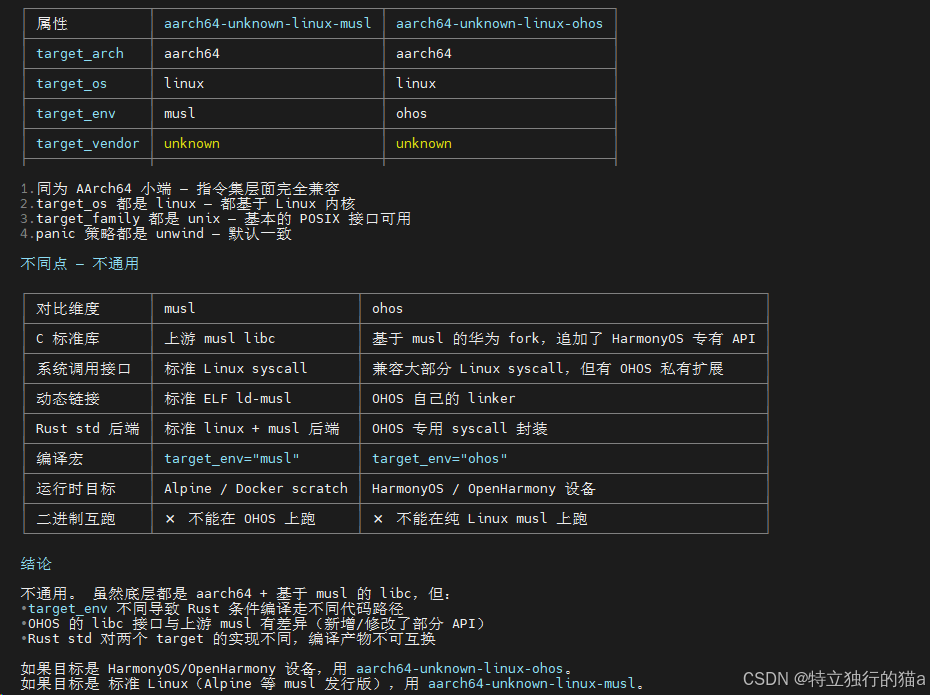
2.1 添加目标
# 设置国内镜像加速下载
export RUSTUP_DIST_SERVER=https://rsproxy.cn

# 添加三个 OHOS 目标
rustup target add aarch64-unknown-linux-ohos
rustup target add armv7-unknown-linux-ohos
rustup target add x86_64-unknown-linux-ohos
每个目标会下载对应的
rust-std组件(约 20-50MB),包含针对 musl libc 预编译的core、alloc、std等标准库。
2.2 验证目标
rustup target list --installed | grep ohos
# 输出:
# aarch64-unknown-linux-ohos
# armv7-unknown-linux-ohos
# x86_64-unknown-linux-ohos
3. 确认鸿蒙 NDK 工具链
鸿蒙 OHOS SDK 提供了基于 LLVM/Clang 的交叉编译工具链,这是 Rust 交叉编译时必需的链接器。
3.1 SDK 目录结构(已存在)
~/ohos-sdk/
├── linux/
│   └── native/
│       ├── llvm/bin/           # 交叉编译工具链
│       │   ├── clang
│       │   ├── aarch64-unknown-linux-ohos-clang    # ARM64 链接器
│       │   ├── armv7-unknown-linux-ohos-clang      # ARM32 链接器
│       │   └── x86_64-unknown-linux-ohos-clang     # x86_64 链接器
│       ├── sysroot/            # 系统头文件与库
│       │   └── usr/
│       │       ├── include/    # OHOS API 头文件
│       │       └── lib/        # 运行时库 (musl)
│       └── build-tools/        # cmake 等构建工具
└── windows/
3.2 关键路径速查
| 组件 | 路径 |
|---|---|
| ARM64 链接器 | ~/ohos-sdk/linux/native/llvm/bin/aarch64-unknown-linux-ohos-clang |
| ARM32 链接器 | ~/ohos-sdk/linux/native/llvm/bin/armv7-unknown-linux-ohos-clang |
| x86_64 链接器 | ~/ohos-sdk/linux/native/llvm/bin/x86_64-unknown-linux-ohos-clang |
| 系统 sysroot | ~/ohos-sdk/linux/native/sysroot |
4. 创建 Rust 项目
cd /root/test/rust
cargo new ohos-demo --name ohos_demo
--name ohos_demo指定包名;目录名为ohos-demo(Cargo 默认的 kebab-case 风格)。
生成结构:
ohos-demo/
├── Cargo.toml
├── src/
│   └── main.rs
5. 配置 Cargo 交叉编译
创建 .cargo/config.toml,告诉 Cargo 每个 OHOS 目标使用哪个链接器及 sysroot:
# ohos-demo/.cargo/config.toml

[target.aarch64-unknown-linux-ohos]
linker = "/root/ohos-sdk/linux/native/llvm/bin/aarch64-unknown-linux-ohos-clang"
rustflags = [
    "-C", "link-arg=--sysroot=/root/ohos-sdk/linux/native/sysroot",
]

[target.armv7-unknown-linux-ohos]
linker = "/root/ohos-sdk/linux/native/llvm/bin/armv7-unknown-linux-ohos-clang"
rustflags = [
    "-C", "link-arg=--sysroot=/root/ohos-sdk/linux/native/sysroot",
]

[target.x86_64-unknown-linux-ohos]
linker = "/root/ohos-sdk/linux/native/llvm/bin/x86_64-unknown-linux-ohos-clang"
rustflags = [
    "-C", "link-arg=--sysroot=/root/ohos-sdk/linux/native/sysroot",
]
配置项说明
| 配置项 | 作用 |
|---|---|
linker |
Rust 用 Clang 作为链接器,而非系统默认的 ld。Clang 自动处理 sysroot 搜索路径、musl crt 启动文件等。 |
-C link-arg=--sysroot=... |
覆盖默认 sysroot 为鸿蒙 SDK 提供的 sysroot,确保链接到 OHOS 的 musl libc 而非 glibc。 |
6. 编写 Demo 程序
src/main.rs 内容:
fn main() {
    println!("===================================");
    println!("  OHOS (OpenHarmony) Rust Demo");
    println!("===================================");
    println!("Target: {}", std::env::consts::ARCH);
    println!("OS:     {}", std::env::consts::OS);
    println!("Family: {}", std::env::consts::FAMILY);
    println!();
    println!("Hello from OpenHarmony! 🚀");
    println!();

    // 打印一些系统信息
    if let Some(host) = std::env::var("HOSTNAME").ok() {
        println!("Hostname: {host}");
    }
    if let Some(home) = std::env::var("HOME").ok() {
        println!("Home: {home}");
    }

    println!("===================================");
}
关键 API:
std::env::consts::ARCH/OS/FAMILY— 编译期常量,由目标 triple 决定,交叉编译时反映的是目标平台而非构建主机。std::env::var("...")— 运行时环境变量,需要在 OHOS 设备上实际运行时才有值。
7. 执行交叉编译
7.1 编译全部三个目标
. "$HOME/.cargo/env"

cargo build --release --target aarch64-unknown-linux-ohos
cargo build --release --target armv7-unknown-linux-ohos
cargo build --release --target x86_64-unknown-linux-ohos
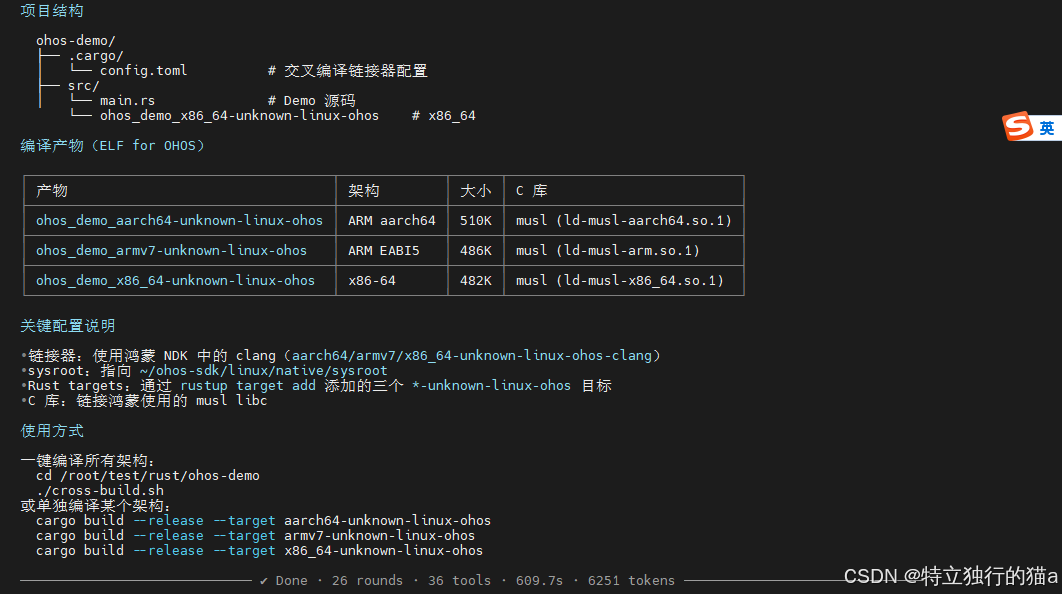
7.2 编译流程说明
Rust 交叉编译的完整流程:
源码 (.rs)
  │
  ├─ rustc 前端解析 → HIR → MIR → LLVM IR
  │
  ├─ LLVM 后端 (codegen)
  │     ↓ 目标 triple 决定
  │  生成目标架构的 .o 文件 (ARM64 / ARM32 / x86_64)
  │
  └─ Clang (linker)
        ↓
      链接 musl crt (crt1.o, crti.o, crtn.o)
      链接 Rust std (预编译的 musl 版本)
      链接 sysroot 中的 libc.so / libm.so
        ↓
      ELF 可执行文件
8. 验证产物
8.1 产物信息
$ file target/ohos/ohos_demo_*

# ARM64:
ELF 64-bit LSB pie executable, ARM aarch64, version 1 (SYSV),
dynamically linked, interpreter /lib/ld-musl-aarch64.so.1, not stripped

# ARM32:
ELF 32-bit LSB pie executable, ARM, EABI5 version 1 (SYSV),
dynamically linked, interpreter /lib/ld-musl-arm.so.1, not stripped

# x86_64:
ELF 64-bit LSB pie executable, x86-64, version 1 (SYSV),
dynamically linked, interpreter /lib/ld-musl-x86_64.so.1, not stripped
8.2 关键特征
| 特征 | 值 | 说明 |
|---|---|---|
| 格式 | ELF | 标准可执行文件格式 |
| 类型 | PIE (Position Independent Executable) | 支持 ASLR 安全机制 |
| C 库 | musl | 鸿蒙使用的轻量级 libc 实现 |
| 解释器 | /lib/ld-musl-*.so.1 |
musl 动态链接器路径 |
| 大小 | ~480-510KB | Release 模式,含 Rust std 静态链接部分 |
8.3 与主机原生编译的对比
# 主机原生(x86_64-unknown-linux-gnu)
$ file target/release/ohos_demo
ELF 64-bit LSB pie executable, x86-64, version 1 (SYSV),
dynamically linked, interpreter /lib64/ld-linux-x86-64.so.2

# 交叉编译到 OHOS x86_64
$ file target/x86_64-unknown-linux-ohos/release/ohos_demo
ELF 64-bit LSB pie executable, x86-64, version 1 (SYSV),
dynamically linked, interpreter /lib/ld-musl-x86_64.so.1
同一架构(x86_64)下,区别在于 C 库:主机用 glibc(ld-linux-x86-64.so.2),OHOS 用 musl(ld-musl-x86_64.so.1)。
9. 一键编译脚本
cross-build.sh 提供一键编译所有架构的功能:
#!/bin/bash
# OHOS (OpenHarmony) 交叉编译脚本

set -e
. "$HOME/.cargo/env"

PROJECT_DIR="$(cd "$(dirname "$0")" && pwd)"
OUTPUT_DIR="$PROJECT_DIR/target/ohos"
mkdir -p "$OUTPUT_DIR"

TARGETS=(
    "aarch64-unknown-linux-ohos"
    "armv7-unknown-linux-ohos"
    "x86_64-unknown-linux-ohos"
)

NAMES=(
    "ARM64 (aarch64)"
    "ARM32 (armv7)"
    "x86_64"
)

for i in "${!TARGETS[@]}"; do
    TARGET="${TARGETS[$i]}"
    NAME="${NAMES[$i]}"
    echo "--- 编译: $NAME ($TARGET) ---"

    cargo build --release --target "$TARGET"

    BINARY="$PROJECT_DIR/target/$TARGET/release/ohos_demo"
    if [ -f "$BINARY" ]; then
        cp "$BINARY" "$OUTPUT_DIR/ohos_demo_${TARGET}"
        echo "✅ $NAME -> $OUTPUT_DIR/ohos_demo_${TARGET}"
    fi
done

echo "所有目标编译完成!产物目录: $OUTPUT_DIR"
ls -lh "$OUTPUT_DIR"/
使用方式:
chmod +x cross-build.sh
./cross-build.sh
总结
至此,你已经完成了 Rust → OpenHarmony 交叉编译环境的完整搭建,并成功编译出适用于 ARM64、ARM32 和 x86_64 三个架构的可执行文件。
回顾整个过程,核心要点有三:
- 目标 triple 必须正确 — Rust 的
aarch64-unknown-linux-ohos等 triple 对应着 OHOS 的 musl libc ABI,与标准 Linux glibc 不兼容,选错会导致运行时崩溃。 - 链接器与 sysroot 缺一不可 — 使用 OHOS NDK 提供的 Clang 作为链接器,并通过
--sysroot指向 SDK 自带的 sysroot,确保链接到正确的 musl crt 和运行时库。 - 产物验证不可跳过 — 通过
file命令确认二进制是 ELF + musl 解释器,从源头杜绝"编译成功但跑不起来"的问题。
这套流程不仅适用于本文的 Demo 项目,也可以直接复用到你自己的 Rust 项目中——只需将 .cargo/config.toml 和 cross-build.sh 复制过去,稍作调整即可。
附录
A. 网络镜像配置
如果使用 rustup 或 cargo 下载慢,可在 ~/.bashrc 中持久化配置:
export RUSTUP_DIST_SERVER=https://rsproxy.cn
export RUSTUP_UPDATE_ROOT=https://rsproxy.cn/rustup
Cargo crate 下载加速(~/.cargo/config.toml):
[source.crates-io]
replace-with = "rsproxy"

[source.rsproxy]
registry = "https://rsproxy.cn/crates.io-index"
B. 可能遇到的问题
| 问题 | 原因 | 解决 |
|---|---|---|
rust-std 下载超时 |
网络无法访问 rust-lang.org | 设置 RUSTUP_DIST_SERVER 为国内镜像 |
| 磁盘空间不足 | / 分区满 |
清理 /root 下的大文件(如 go/, vcpkg/, firefox*) |
linker 'clang' not found |
OHOS NDK 未安装或路径不对 | 检查 ~/ohos-sdk 是否存在,config.toml 路径是否正确 |
cannot find -lgcc_s |
sysroot 缺少 gcc 依赖 | 鸿蒙 NDK 自带的 sysroot 已包含必要文件,检查 sysroot 路径 |
C. 产物部署
编译出的二进制文件可通过以下方式部署到 OHOS 设备:
# 通过 hdc (鸿蒙设备连接器) 推送
hdc file send target/ohos/ohos_demo_aarch64-unknown-linux-ohos /data/local/tmp/

# 通过 ADB (部分设备兼容)
adb push target/ohos/ohos_demo_aarch64-unknown-linux-ohos /data/local/tmp/

# 在设备上运行
hdc shell
# 进入推送目录
cd /data/local/tmp
chmod +x ohos_demo_aarch64-unknown-linux-ohos
./ohos_demo_aarch64-unknown-linux-ohos
更多交流学习,欢迎加入开源鸿蒙PC社区:https://harmonypc.csdn.net/

作为“人工智能6S店”的官方数字引擎,为AI开发者与企业提供一个覆盖软硬件全栈、一站式门户。
更多推荐

 1
1 0
0- 0


 已为社区贡献25条内容

所有评论(0)