
鸿蒙Flutter实战:置顶功能的数据库与UI实现
备忘录列表的第 0 条和第 1 条拥有最高的视觉优先级——用户打开应用第一眼看到的就是它们。如果用户有一条"本周待办汇总"的备忘录,每次都滚动到底部去找,体验是很糟糕的。
前言
备忘录列表的第 0 条和第 1 条拥有最高的视觉优先级——用户打开应用第一眼看到的就是它们。如果用户有一条"本周待办汇总"的备忘录,每次都滚动到底部去找,体验是很糟糕的。
置顶功能正是解决这个问题的——把某条备忘录钉在列表最上方,无论列表怎么排序,它始终排在第一。微信聊天、邮件客户端、备忘录应用都有这个功能。
本文拆解鸿蒙 Flutter 备忘录中置顶功能的完整实现:从模型层的布尔字段,到数据库的排序逻辑,到 UI 的视觉区分和交互触发。
项目仓库:todo_flutter_harmony
模型层:isPinned 字段
class Memo {
  final int? id;
  final String title;
  final String content;
  final int? categoryId;
  final bool isPinned;      // ← 核心字段
  final DateTime createdAt;
  final DateTime? updatedAt;

  const Memo({
    this.id,
    required this.title,
    this.content = '',
    this.categoryId,
    this.isPinned = false,
    required this.createdAt,
    this.updatedAt,
  });

  Memo copyWith({
    int? id,
    String? title,
    String? content,
    int? categoryId,
    bool? isPinned,
    DateTime? createdAt,
    DateTime? updatedAt,
  }) {
    return Memo(
      id: id ?? this.id,
      title: title ?? this.title,
      content: content ?? this.content,
      categoryId: categoryId ?? this.categoryId,
      isPinned: isPinned ?? this.isPinned,
      createdAt: createdAt ?? this.createdAt,
      updatedAt: updatedAt ?? this.updatedAt,
    );
  }

  Map<String, dynamic> toMap() => {
    'id': id,
    'title': title,
    'content': content,
    'categoryId': categoryId,
    'isPinned': isPinned ? 1 : 0,  // JSON 中存 0/1
    'createdAt': createdAt.millisecondsSinceEpoch,
    'updatedAt': updatedAt?.millisecondsSinceEpoch,
  };

  factory Memo.fromMap(Map<String, dynamic> map) => Memo(
    id: map['id'],
    title: map['title'] ?? '',
    content: map['content'] ?? '',
    categoryId: map['categoryId'],
    isPinned: (map['isPinned'] ?? 0) == 1,
    createdAt: DateTime.fromMillisecondsSinceEpoch(map['createdAt']),
    updatedAt: map['updatedAt'] != null
        ? DateTime.fromMillisecondsSinceEpoch(map['updatedAt'])
        : null,
  );
}
Provider 中的排序逻辑
排序规则很简单:先按 isPinned 降序(true 在前),再按 createdAt 降序(新的在前)。
class MemoProvider extends ChangeNotifier {
  List<Memo> _allMemos = [];

  List<Memo> get filteredMemos {
    var result = List<Memo>.from(_allMemos);

    // 分类过滤
    if (_categoryFilter != null) {
      result = result.where((m) => m.categoryId == _categoryFilter).toList();
    }

    // 搜索过滤
    if (_searchQuery.isNotEmpty) {
      result = result.where((m) =>
        m.title.toLowerCase().contains(_searchQuery.toLowerCase()) ||
        m.content.toLowerCase().contains(_searchQuery.toLowerCase())
      ).toList();
    }

    // 排序:置顶优先 + 时间倒序
    result.sort((a, b) {
      if (a.isPinned != b.isPinned) {
        return a.isPinned ? -1 : 1;  // true < false → true 排前面
      }
      return b.createdAt.compareTo(a.createdAt);  // 新的排前面
    });

    return result;
  }

  Future<void> togglePin(int id) async {
    final memo = _allMemos.firstWhere((m) => m.id == id);
    final updated = memo.copyWith(
      isPinned: !memo.isPinned,
      updatedAt: DateTime.now(),
    );
    await DatabaseHelper.instance.updateMemo(updated);
    await loadMemos();
  }

  Future<void> loadMemos() async {
    _allMemos = await DatabaseHelper.instance.getAllMemos();
    notifyListeners();
  }
}
关键细节:togglePin 调用 copyWith 创建一个新对象(不可变模式),然后通过 DatabaseHelper 持久化,最后重新加载数据。这种方式保证数据一致性——UI 总是反映存储层的真实状态。
UI 中的置顶视觉区分
置顶的备忘录需要在视觉上与普通备忘录有所区别,但又不应该过于突兀:
class MemoCard extends StatelessWidget {
final Memo memo;
const MemoCard({super.key, required this.memo});
Widget build(BuildContext context) {
return AnimatedContainer(
duration: const Duration(milliseconds: 300),
decoration: BoxDecoration(
borderRadius: BorderRadius.circular(12),
border: memo.isPinned
? Border.all(color: const Color(0xFF4DB6AC).withOpacity(0.4), width: 1)
: null,
boxShadow: memo.isPinned
? [
BoxShadow(
color: const Color(0xFF4DB6AC).withOpacity(0.08),
blurRadius: 8,
offset: const Offset(0, 2),
),
]
: null,
),
child: Card(
elevation: memo.isPinned ? 2 : 1,
shape: RoundedRectangleBorder(borderRadius: BorderRadius.circular(12)),
child: Padding(
padding: const EdgeInsets.all(14),
child: Row(
crossAxisAlignment: CrossAxisAlignment.start,
children: [
// 置顶图钉图标
if (memo.isPinned)
Padding(
padding: const EdgeInsets.only(right: 8, top: 2),
child: Icon(
Icons.push_pin,
size: 16,
color: const Color(0xFF4DB6AC).withOpacity(0.7),
),
),
// 内容区
Expanded(
child: Column(
crossAxisAlignment: CrossAxisAlignment.start,
children: [
Text(
memo.title,
style: const TextStyle(
fontSize: 16,
fontWeight: FontWeight.w600,
),
),
if (memo.content.isNotEmpty) ...[
const SizedBox(height: 4),
Text(
memo.content,
maxLines: 2,
overflow: TextOverflow.ellipsis,
style: TextStyle(
fontSize: 14,
color: Colors.grey.shade600,
),
),
],
],
),
),
],
),
),
),
);
}
}
视觉设计要点:
- 图钉图标:仅置顶项显示,淡化颜色(70% 透明度),避免抢眼
- 边框:40% 透明度的主题色边框,暗示这是个"特殊"卡片
- 阴影:8% 透明度的主题色光晕,微微提亮
- elevation:从 1 升到 2,轻微的抬起感
触发置顶/取消置顶的交互
在滑动操作组件中置顶按钮:
SlideActionTile(
  leftActions: [
    SlideAction(
      label: memo.isPinned ? '取消置顶' : '置顶',
      icon: memo.isPinned ? Icons.push_pin_outlined : Icons.push_pin,
      color: Colors.orange,
      onTap: () => context.read<MemoProvider>().togglePin(memo.id!),
    ),
  ],
  // ...
)
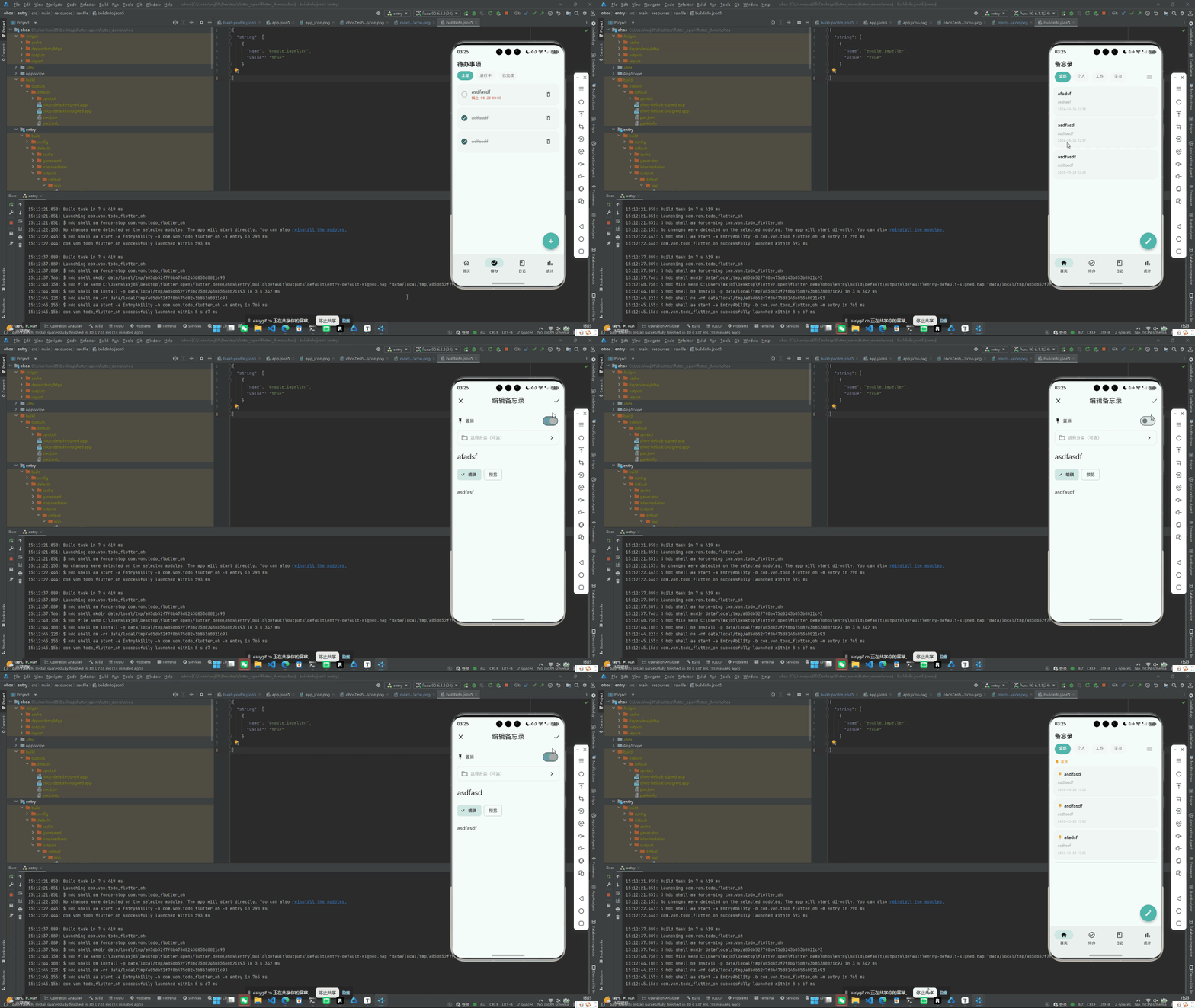
点击后,Provider 的 togglePin 切换 isPinned 状态 → loadMemos() 重新加载并排序 → notifyListeners() 重建列表。置顶的卡片瞬间移动到列表最上方,视觉上同时展示图钉图标、边框和阴影效果。
置顶数量的限制?
要不要限制置顶数量?有些应用限制最多 3 条置顶,防止置顶滥用。是否加这个限制取决于产品需求:
Future<void> togglePin(int id) async {
  final memo = _allMemos.firstWhere((m) => m.id == id);

  // 如果要置顶,检查当前置顶数量
  if (!memo.isPinned) {
    final pinnedCount = _allMemos.where((m) => m.isPinned).length;
    if (pinnedCount >= 5) {
      // 超出了,可以弹窗提醒或直接拒绝
      return;
    }
  }

  // 正常切换...
}
鸿蒙 Flutter 备忘录应用目前没有加这个限制(用户数据量本就不大),但如果用户量增长,这是一个值得考虑的防御性设计。
DatabaseHelper 中的更新操作
class DatabaseHelper {
  Future<void> updateMemo(Memo memo) async {
    final index = _cache['memos']!.indexWhere((m) => m['id'] == memo.id);
    if (index != -1) {
      _cache['memos']![index] = memo.toMap();
      await _persistToFile();
    }
  }

  Future<void> _persistToFile() async {
    final dir = await StoragePath.getAppDir();
    final file = File('$dir/.memo_app/data.json');
    await file.writeAsString(jsonEncode(_cache));
  }
}
由于使用的是纯 JSON 文件存储,更新操作就是:找到缓存中的对应项 → 替换 → 全量写入文件。对于个人备忘录这种数据量(通常几十到几百条),这个性能开销完全可以接受。
鸿蒙兼容性
置顶功能完全是数据层的逻辑——一个布尔字段的切换和排序规则的变化。不涉及任何平台 API,在 Android、iOS、鸿蒙 OHOS 上行为一致。
总结
置顶功能的实现可以分解为三层:
- 数据层:
isPinned: bool,JSON 中存 0/1 - 逻辑层:排序规则
isPinned DESC, createdAt DESC - UI 层:图钉图标 + 边框 + 阴影三重视觉区分,滑动操作触发
togglePin
整个功能的核心代码不超过 20 行,但对用户体验的提升是显著的。
完整项目代码见:todo_flutter_harmony

作为“人工智能6S店”的官方数字引擎,为AI开发者与企业提供一个覆盖软硬件全栈、一站式门户。
更多推荐

 0
0 0
0- 0


 已为社区贡献45条内容

所有评论(0)