
harmonyos-todo-development-v3
鸿蒙Todo开发实战速查手册 本文提供鸿蒙应用开发的快速入门指南,包含三个核心部分: 环境配置:明确SDK版本与API Level对应关系,解决兼容性问题的方法 项目结构:展示标准目录布局,包括入口文件、页面组件、数据模型等 核心实现:提供可复用的代码片段: 使用@Observed装饰的数据模型 包含增删改查功能的主页面实现 基于preferences的数据持久化方案 重点提示:修改数组必须返回新
·
鸿蒙 Todo 开发:实战速查手册
无废话、可复制、直接跑。适合有前端基础、想快速上手的开发者。
环境配置(5 分钟)
版本对应表(必看)
| SDK 版本 | API Level | 模拟器版本 |
|---|---|---|
| 5.0.0 | 12 | HarmonyOS NEXT |
| 6.0.0 | 20 | - |
| 6.1.0 | 23 | 部分模拟器 |
| 6.1.1 | 24 | 最新模拟器 |
坑:compatibleSdkVersion 和模拟器 API 不匹配会直接报错。
解决:修改 build-profile.json5
{
  "app": {
    "products": [
      {
        "name": "default",
        "compatibleSdkVersion": "6.1.0(23)",  // ← 改成你的模拟器 API
        "targetSdkVersion": "6.1.0(23)"
      }
    ]
  }
}
项目结构(速查)
entry/
├── src/main/ets/
│   ├── entryability/
│   │   └── EntryAbility.ets      # 应用入口
│   ├── pages/
│   │   └── Index.ets             # 主页面
│   ├── model/
│   │   └── TodoItem.ets          # 数据模型
│   └── utils/
│       └── TodoStore.ets         # 数据持久化
└── resources/
    └── base/
        ├── element/               # 字符串、颜色
        └── media/                 # 图片资源
核心代码(复制即用)
1. 数据模型 (model/TodoItem.ets)
@Observed
export class TodoItem {
  id: string
  title: string
  completed: boolean
  createdAt: number

  constructor(title: string) {
    this.id = Date.now().toString()
    this.title = title
    this.completed = false
    this.createdAt = Date.now()
  }
}
关键点:
- ✅ 用
@Observed装饰类(否则 UI 不更新) - ✅
id用时间戳(简单场景够用)
2. 主页面 (pages/Index.ets)
import { TodoItem } from '../model/TodoItem'
import { TodoStore } from '../utils/TodoStore'

@Entry
@Component
struct Index {
  @State todoList: TodoItem[] = []
  @State newTodo: string = ''

  private todoStore: TodoStore = new TodoStore()

  // 页面显示时加载数据
  async aboutToAppear() {
    this.todoList = await this.todoStore.loadTodos()
  }

  build() {
    Column() {
      // 输入框
      TextInput({ placeholder: '输入任务...', text: this.newTodo })
        .width('80%')
        .margin(10)
        .onChange((value: string) => {
          this.newTodo = value
        })

      // 添加按钮
      Button('添加')
        .onClick(() => {
          this.addTodo()
        })
        .margin(10)

      // 列表
      List() {
        ForEach(this.todoList, (todo: TodoItem) => {
          ListItem() {
            this.TodoItemRow(todo)
          }
        }, (todo: TodoItem) => todo.id)
      }
      .layoutWeight(1)
    }
    .width('100%')
    .height('100%')
  }

  // Todo 列表项组件
  @Builder
  TodoItemRow(todo: TodoItem) {
    Row() {
      Checkbox({ name: todo.id })
        .select(todo.completed)
        .onChange(() => {
          this.toggleTodo(todo.id)
        })

      Text(todo.title)
        .fontSize(18)
        .decoration({
          type: todo.completed ? TextDecorationType.LineThrough : TextDecorationType.None
        })
        .layoutWeight(1)
        .margin({ left: 10 })

      Button('删除')
        .type(ButtonType.Circle)
        .width(30)
        .height(30)
        .backgroundColor('#ff0000')
        .onClick(() => {
          this.deleteTodo(todo.id)
        })
    }
    .padding(10)
    .margin(5)
  }

  // 添加
  private addTodo() {
    if (this.newTodo.trim() === '') return

    const todo = new TodoItem(this.newTodo)
    this.todoList = [todo, ...this.todoList]  // ← 必须重新赋值
    this.newTodo = ''
    this.saveTodos()
  }

  // 切换完成状态
  private toggleTodo(id: string) {
    this.todoList = this.todoList.map(todo => {
      if (todo.id === id) {
        return { ...todo, completed: !todo.completed }
      }
      return todo
    })
    this.saveTodos()
  }

  // 删除
  private deleteTodo(id: string) {
    this.todoList = this.todoList.filter(todo => todo.id !== id)
    this.saveTodos()
  }

  // 保存
  private async saveTodos() {
    await this.todoStore.saveTodos(this.todoList)
  }
}
关键点:
- ✅ 修改数组必须用
map/filter返回新数组(直接push不生效) - ✅
@Builder装饰器用于抽取组件片段 - ✅
...todo展开运算符创建新对象(触发 UI 更新)
3. 数据持久化 (utils/TodoStore.ets)
import { TodoItem } from '../model/TodoItem'
import preferences from '@ohos.data.preferences'

const PREF_NAME = 'harmony_todo'
const KEY_TODOS = 'todos'

export class TodoStore {
  private pref: preferences.Preferences | null = null

  // 初始化
  private async init(): Promise<preferences.Preferences> {
    if (this.pref) return this.pref
    this.pref = await preferences.getPreferences(getContext(this), PREF_NAME)
    return this.pref
  }

  // 保存
  async saveTodos(todos: TodoItem[]): Promise<void> {
    try {
      const pref = await this.init()
      await pref.put(KEY_TODOS, JSON.stringify(todos))
      await pref.flush()  // ← 立即写入磁盘
    } catch (e) {
      console.error('Save failed:', e)
    }
  }

  // 读取
  async loadTodos(): Promise<TodoItem[]> {
    try {
      const pref = await this.init()
      const data = await pref.get(KEY_TODOS, '')
      return data ? JSON.parse(data as string) : []
    } catch (e) {
      console.error('Load failed:', e)
      return []
    }
  }
}
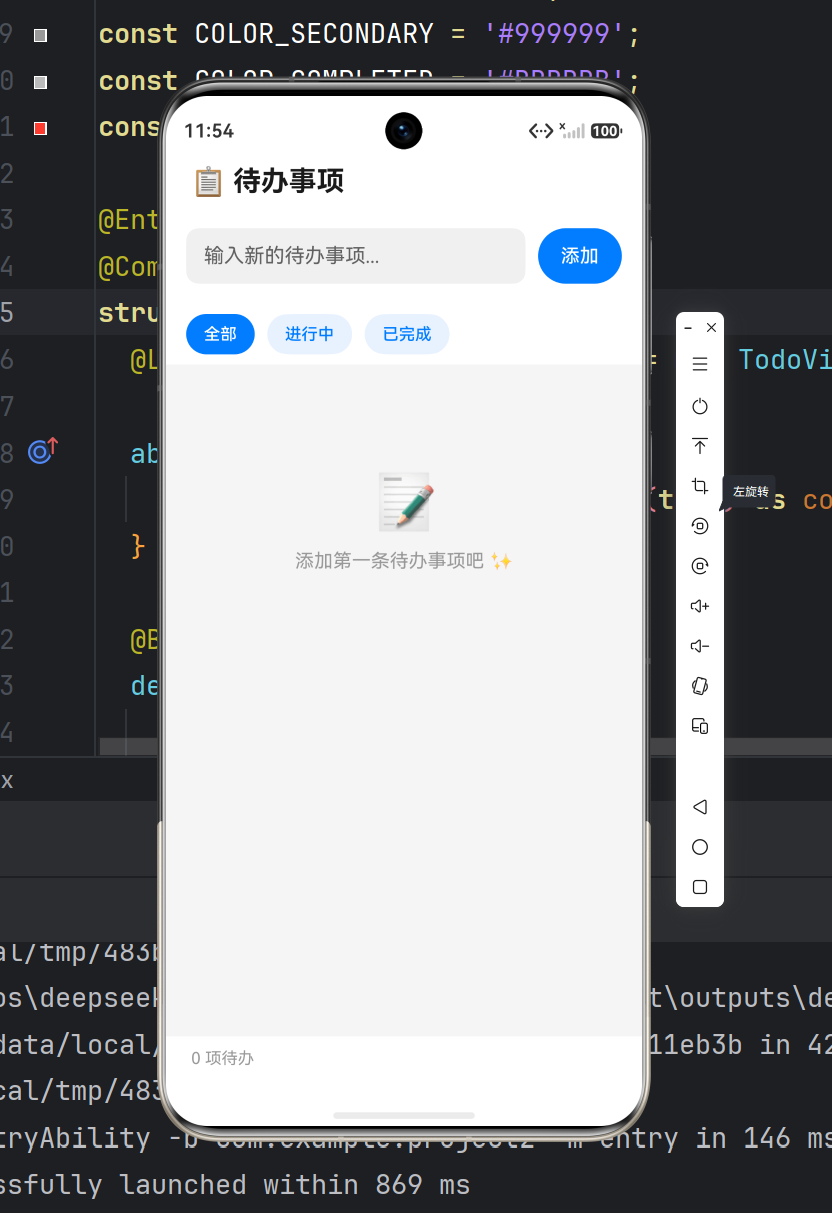
关键点:
- ✅
getContext(this)获取上下文(必须在组件内调用) - ✅
flush()立即写入(否则可能丢失数据) - ✅ 用
try-catch包裹异步操作
踩坑清单(必看)
❌ 坑 1:SDK 版本不匹配
现象:
Error: compatibleSdkVersion and releaseType do not match device
解决:
- 查看模拟器 API Level(Device Manager)
- 修改
build-profile.json5中的compatibleSdkVersion - Clean Project → Rebuild
❌ 坑 2:@State 不更新
错误代码:
this.todoList.push(todo) // ← 直接修改,UI 不更新
正确代码:
this.todoList = [...this.todoList, todo] // ← 返回新数组
原理:ArkTS 的 @State 基于引用检测,必须返回新对象/数组。
❌ 坑 3:模拟器启动慢
现象:点击 Run,模拟器转圈 5 分钟+
解决方案:
- 用真机调试(推荐)
- 或降低模拟器分辨率(Device Manager → Edit)
- 或升级电脑内存(≥16GB)
❌ 坑 4:Preferences 读取失败
现象:loadTodos() 返回空数组
原因:
getContext(this)在组件外调用(必须在@Entry组件内)- 或未调用
aboutToAppear()初始化
解决:
async aboutToAppear() {
  this.todoList = await this.todoStore.loadTodos()
}
❌ 坑 5:列表卡顿
现象:Todo 超过 100 条,滑动卡顿
解决:用 LazyForEach 替代 ForEach
// 卡顿
ForEach(this.todoList, (todo) => { ... })

// 流畅
LazyForEach(this.todoList, (todo) => { ... })
性能优化清单
| 优化项 | 做法 | 效果 |
|---|---|---|
| 列表渲染 | LazyForEach 替代 ForEach |
大数据量不卡顿 |
| 图片资源 | 用 SVG 替代 PNG | 减小包体积 |
| 异步操作 | 用 TaskPool 处理耗时任务 |
不阻塞 UI |
| 包体积 | build-profile.json5 启用 minify: true |
减小 30% |
| 启动速度 | 延迟加载非关键模块 | 提升 20% |
上架流程(快速版)
1. 签名配置
路径:Build → Generate Key and CSR
输出:
.p12证书文件.csr证书请求文件
2. 上传华为应用市场
所需材料:
- ✅ 应用截图(1080x2160,至少 3 张)
- ✅ 隐私政策(
AppScope/resources/base/profile/privacy_policy.txt) - ✅ 应用介绍(≤500 字)
3. 审核周期
- 首次提交:3-5 个工作日
- 更新版本:1-2 个工作日
常用代码片段
动画效果
@State scale: number = 1

private deleteWithAnimation() {
  animateTo({
    duration: 300,
    curve: Curve.EaseInOut,
    onFinish: () => {
      // 动画结束后删除
      this.deleteTodo()
    }
  }, () => {
    this.scale = 0  // ← 缩放到 0
  })
}
弹窗提示
import promptAction from '@ohos.promptAction'

private showToast(message: string) {
  promptAction.showToast({
    message: message,
    duration: 2000
  })
}
路由跳转
import router from '@ohos.router'

// 跳转到详情页
router.pushUrl({
  url: 'pages/Detail',
  params: { todoId: this.todo.id }
})

// 接收参数
aboutToAppear() {
  const params = router.getParams()
  const todoId = params?.todoId
}
调试技巧
1. 查看日志
DevEco Studio → Log 窗口 → 搜索包名 com.example.harmonytodo
2. 断点调试
在代码行号左侧点击,出现红点 → Run → Debug ‘default’
3. 真机调试
要求:
- 华为手机(HarmonyOS 2.0+)
- 开启开发者模式(设置 → 关于 → 连续点击版本号 7 次)
- USB 调试授权
完整项目模板
GitHub:(待上传)
包含功能:
- ✅ 添加/删除/完成 Todo
- ✅ 本地持久化
- ✅ 优先级标签
- ✅ 截止日期
- ✅ 动画效果
总结
| 学习成本 | ⭐⭐⭐ (3/5) | ArkTS 类似 TypeScript |
|---|---|---|
| 开发效率 | ⭐⭐⭐⭐ (4/5) | ArkUI 声明式,上手快 |
| 性能 | ⭐⭐⭐⭐⭐ (5/5) | 原生渲染,流畅 |
| 生态 | ⭐⭐ (2/5) | 第三方库少,需自己造轮子 |
| 就业前景 | ⭐⭐⭐⭐⭐ (5/5) | 鸿蒙原生开发者稀缺 |

作为“人工智能6S店”的官方数字引擎,为AI开发者与企业提供一个覆盖软硬件全栈、一站式门户。
更多推荐

 0
0 0
0- 0


 已为社区贡献2条内容

所有评论(0)