
鸿蒙PC Electron框架实战:通假字学习系统技术实现详解
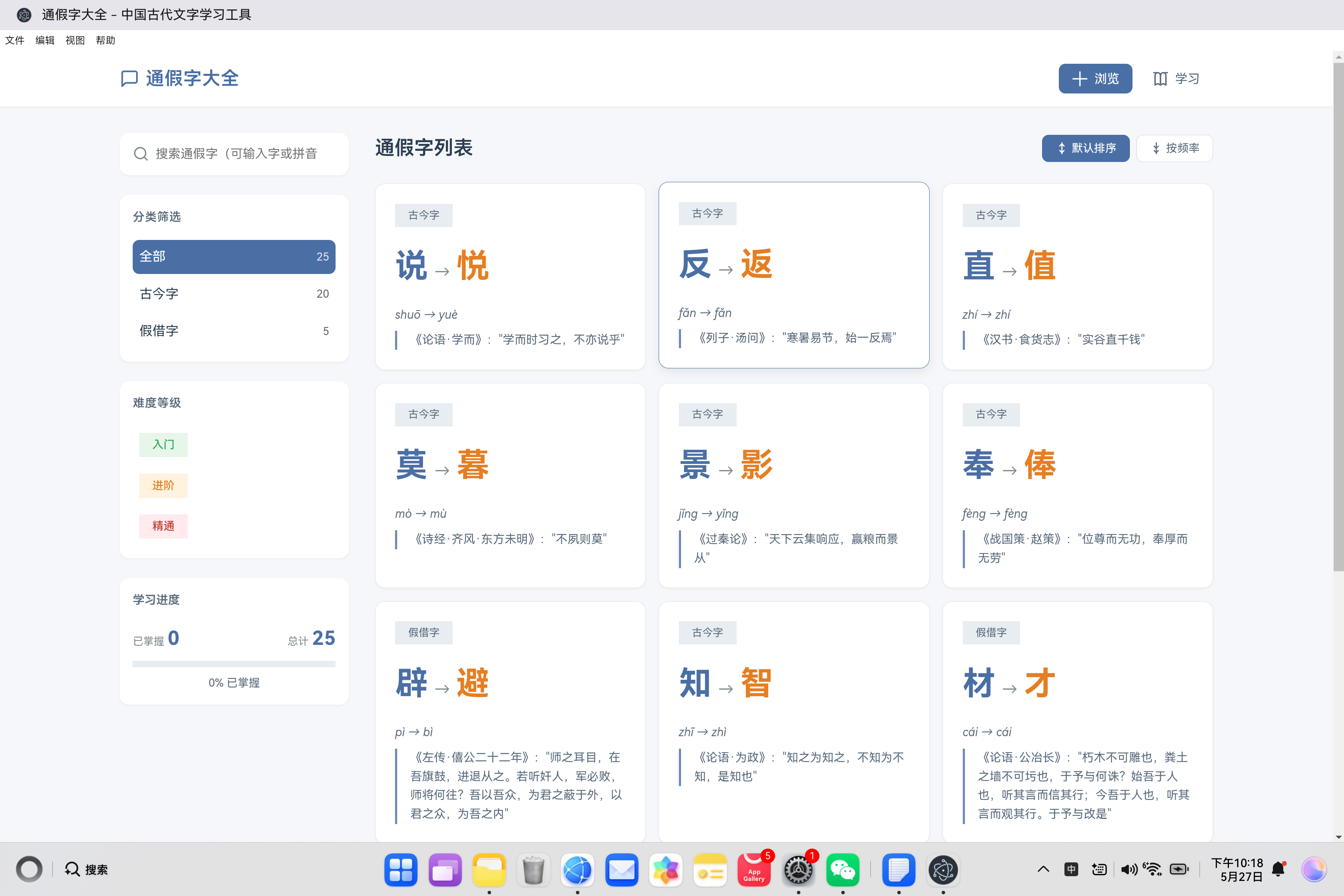
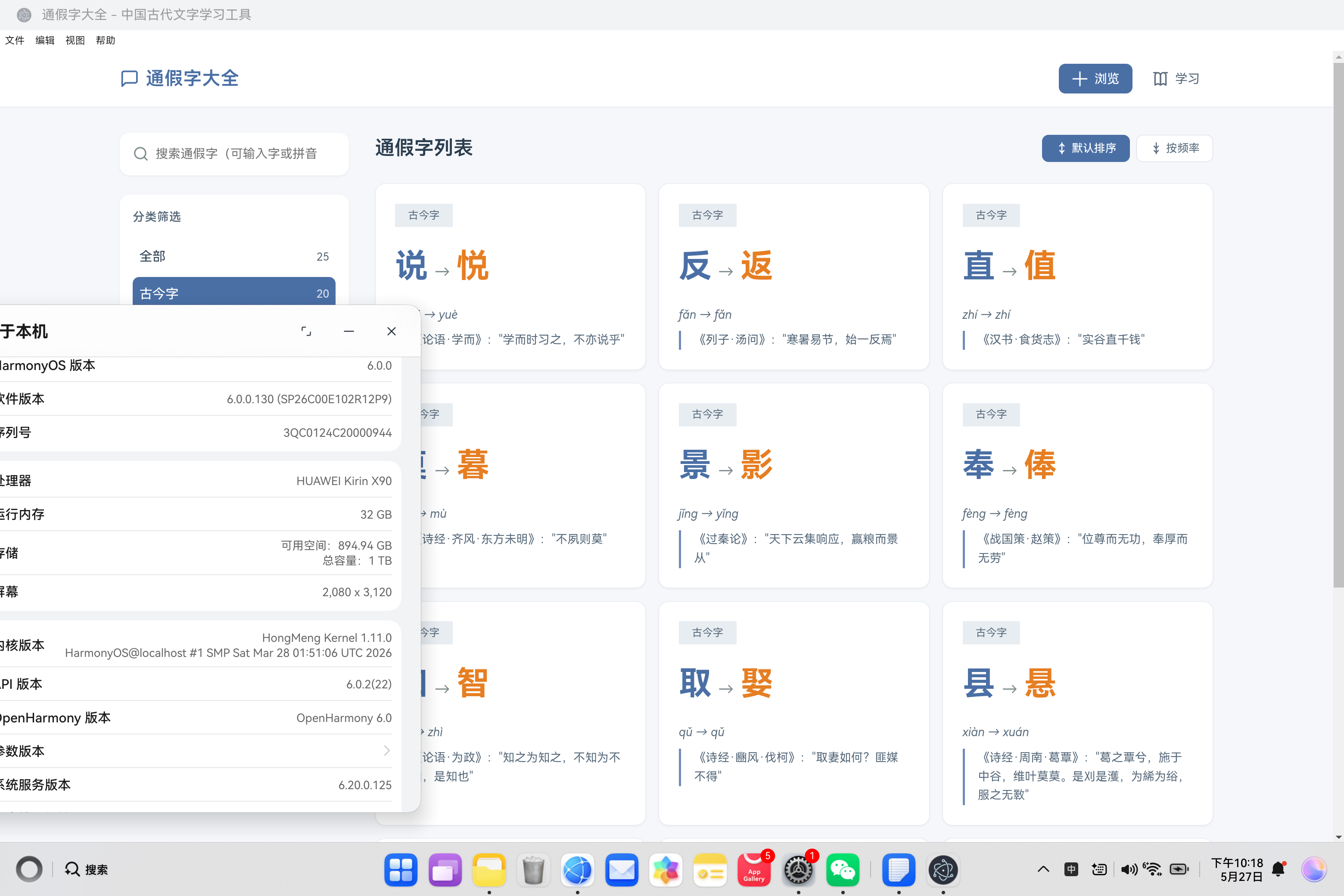
通假字大全项目摘要 通假字大全是一款基于鸿蒙PC Electron框架开发的古代汉语学习工具,专注于系统整理和展示中国古代文献中的通假字现象。项目采用现代Web技术栈(HTML5/CSS3/JavaScript),包含三大核心功能模块:通假字浏览系统(支持分类筛选和智能搜索)、交互式学习系统(含进度跟踪功能)以及详细释义展示系统(包含用例、例句和出处)。技术架构采用分层设计,前端通过Electro
欢迎加入开源鸿蒙PC社区:
https://harmonypc.csdn.net/
atomgit仓库地址:https://atomgit.com/feng8403000/tongjiazi

一、项目概述
通假字大全是一个学术严谨的中国古代文字学习工具,致力于帮助用户系统学习和掌握古代汉语中的通假字现象。本项目采用现代Web技术构建,基于鸿蒙PC Electron框架开发,具有良好的用户体验设计,适合各个年龄段的中文学习者和爱好者使用。
1.1 项目背景
通假字是中国古代汉语中一种特殊的文字现象,指的是古人在书写时用音同或音近的字来代替本字。这种现象在先秦两汉的文献中尤为常见,对于阅读古代典籍的人来说是必须掌握的知识。
1.2 功能特性
| 功能模块 | 说明 |
|---|---|
| 浏览功能 | 通览所有收录的通假字,支持分类筛选、难度分级、智能搜索 |
| 学习功能 | 逐个学习通假字,标记掌握状态,记录学习进度 |
| 详情展示 | 显示通假字的完整说明、用例、例句和出处 |
| 统计进度 | 可视化展示学习进度,数据本地持久化 |
1.3 技术栈
- 前端: HTML5 + CSS3 + JavaScript (ES6+)
- 图标: Lucide Icons
- 运行时: Electron (HarmonyOS 定制版)
- 原生层: ArkTS + libadapter.so
- 数据存储: localStorage
二、技术架构设计
2.1 整体架构
┌─────────────────────────────────────────────────────────────┐
│                    前端应用层                              │
│         (HTML/CSS/JavaScript + 通假字学习系统)             │
├─────────────────────────────────────────────────────────────┤
│              Electron + Preload 层                        │
│              (IPC 通信、API 暴露)                        │
├─────────────────────────────────────────────────────────────┤
│               HarmonyOS 原生层                             │
│         (libadapter.so + ETS Adapters)                    │
└─────────────────────────────────────────────────────────────┘
2.2 模块划分
| 模块 | 职责 | 文件位置 |
|---|---|---|
| 数据层 | 通假字数据定义和管理 | js/data.js |
| 业务层 | 应用逻辑和状态管理 | js/app.js |
| 视图层 | 用户界面展示 | index.html |
| 样式层 | 视觉样式定义 | style.css |
三、核心功能实现详解
3.1 数据层设计
数据层采用单一数据源模式,将所有通假字数据集中管理。数据结构设计如下:
const TongJiaZiData = {
    characters: [
        {
            id: 1,
            original: '说',
            originalPinyin: 'shuō',
            originalMeaning: '说话',
            substitute: '悦',
            substitutePinyin: 'yuè',
            substituteMeaning: '愉快',
            category: '古今字',
            usage: '《论语·学而》:"学而时习之,不亦说乎"',
            explanation: '古"说"字假借为"悦",表示愉悦、高兴的意思。后人为区别,造"悦"字表示此义。',
            examples: ['不亦说乎', '说怿女美', '民说之'],
            sources: [
                { book: '论语', chapter: '学而', sentence: '学而时习之,不亦说乎' },
                { book: '诗经', chapter: '静女', sentence: '说怿女美' },
                { book: '韩非子', chapter: '五蠹', sentence: '民说之' }
            ],
            difficulty: 1,
            frequency: '高频'
        }
        // ... 更多通假字数据
    ],
    categories: [...],
    difficultyLevels: [...],
    statistics: {...}
};
数据字段说明:
| 字段 | 类型 | 说明 |
|---|---|---|
| id | number | 唯一标识 |
| original | string | 原字 |
| originalPinyin | string | 原字拼音 |
| originalMeaning | string | 原字含义 |
| substitute | string | 通假字 |
| substitutePinyin | string | 通假字拼音 |
| substituteMeaning | string | 通假字含义 |
| category | string | 分类(古今字/假借字) |
| usage | string | 经典用例 |
| explanation | string | 详细解释 |
| examples | array | 例句列表 |
| sources | array | 出处列表 |
| difficulty | number | 难度等级(1-3) |
| frequency | string | 出现频率 |
设计亮点:
- 数据完整性:每个通假字包含拼音、含义、用法、解释、例句、出处等完整信息
- 分级体系:支持按难度和频率进行筛选和排序
- 结构化存储:出处信息包含书名、章节、句子三级结构
3.2 状态管理系统
应用采用集中式状态管理模式,所有状态统一管理:
const AppState = {
    currentView: 'browse',      // 当前视图:browse/study/detail
    currentFilter: 'all',       // 当前分类筛选
    currentSort: 'id',          // 当前排序方式
    currentDifficulty: null,    // 当前难度筛选
    searchQuery: '',            // 搜索关键词
    characters: [],             // 通假字数据
    masteredCharacters: new Set(), // 已掌握的通假字ID集合
    currentCharacter: null,     // 当前学习的通假字
    studyIndex: 0,              // 学习进度索引
    displayCount: 12            // 每页显示数量
};
状态管理流程:
┌──────────────┐    ┌──────────────┐    ┌──────────────┐
│  用户操作    │ -> │  状态更新    │ -> │  视图刷新    │
└──────────────┘    └──────────────┘    └──────────────┘
关键实现细节:
- 学习进度持久化:使用localStorage保存已掌握的通假字ID
function loadProgress() {
    const saved = localStorage.getItem('masteredCharacters');
    if (saved) {
        AppState.masteredCharacters = new Set(JSON.parse(saved));
    }
}

function saveProgress() {
    localStorage.setItem('masteredCharacters', JSON.stringify([...AppState.masteredCharacters]));
}
- 状态初始化流程:
function initializeApp() {
    loadCharacters();      // 加载通假字数据
    loadProgress();        // 加载学习进度
    renderCharacters();    // 渲染字符列表
    updateStats();         // 更新统计信息
    setupEventListeners(); // 设置事件监听
}
3.3 视图切换机制
应用采用单页应用模式,通过CSS控制视图切换:
<!-- 浏览视图 -->
<div id="browse-view" class="view active">
    <!-- 通假字网格列表 -->
</div>

<!-- 学习视图 -->
<div id="study-view" class="view">
    <!-- 学习卡片 -->
</div>

<!-- 详情视图 -->
<div id="detail-view" class="view">
    <!-- 详情卡片 -->
</div>
切换逻辑实现:
function switchView(view) {
    AppState.currentView = view;

    // 更新导航按钮状态
    document.querySelectorAll('.nav-btn').forEach(btn => {
        btn.classList.toggle('active', btn.dataset.view === view);
    });

    // 切换视图显示
    document.querySelectorAll('.view').forEach(v => {
        v.classList.toggle('active', v.id === `${view}-view`);
    });

    // 如果是学习视图,初始化学习流程
    if (view === 'study') {
        initializeStudy();
    }
}
CSS样式控制:
.view {
    display: none;
}

.view.active {
    display: block;
}
3.4 筛选与搜索系统
系统支持多种筛选方式的组合使用:
1. 分类筛选
function handleFilter(filter, element) {
    AppState.currentFilter = filter;
    AppState.displayCount = 12;

    // 更新UI状态
    document.querySelectorAll('.filter-option[data-filter]').forEach(opt => {
        opt.classList.remove('active');
    });
    element.classList.add('active');

    // 重新渲染列表
    renderCharacters();
}
2. 难度筛选
function handleDifficulty(difficulty, element) {
    if (AppState.currentDifficulty === difficulty) {
        // 取消筛选
        AppState.currentDifficulty = null;
        element.classList.remove('active');
    } else {
        // 设置筛选条件
        document.querySelectorAll('.filter-option[data-difficulty]').forEach(opt => {
            opt.classList.remove('active');
        });
        AppState.currentDifficulty = difficulty;
        element.classList.add('active');
    }

    AppState.displayCount = 12;
    renderCharacters();
}
3. 智能搜索
function handleSearch(e) {
    AppState.searchQuery = e.target.value.toLowerCase();
    AppState.displayCount = 12;
    renderCharacters();
}
4. 综合筛选逻辑
function getFilteredCharacters() {
    let filtered = [...AppState.characters];

    // 分类筛选
    if (AppState.currentFilter !== 'all') {
        filtered = filtered.filter(char => char.category === AppState.currentFilter);
    }

    // 难度筛选
    if (AppState.currentDifficulty) {
        filtered = filtered.filter(char => char.difficulty === AppState.currentDifficulty);
    }

    // 搜索筛选
    if (AppState.searchQuery) {
        filtered = filtered.filter(char => {
            const searchStr = `${char.original}${char.substitute}${char.originalPinyin}${char.substitutePinyin}${char.usage}${char.explanation}`.toLowerCase();
            return searchStr.includes(AppState.searchQuery);
        });
    }

    // 排序
    switch (AppState.currentSort) {
        case 'frequency':
            const freqOrder = { '高频': 0, '中频': 1, '低频': 2 };
            filtered.sort((a, b) => freqOrder[a.frequency] - freqOrder[b.frequency]);
            break;
        case 'id':
        default:
            filtered.sort((a, b) => a.id - b.id);
            break;
    }

    return filtered;
}
搜索字段覆盖:
| 搜索字段 | 说明 |
|---|---|
| original | 原字 |
| substitute | 通假字 |
| originalPinyin | 原字拼音 |
| substitutePinyin | 通假字拼音 |
| usage | 用例 |
| explanation | 解释 |
3.5 学习模式实现
学习模式是本应用的核心功能,支持用户逐个学习通假字并标记掌握状态:
学习初始化:
function initializeStudy() {
    if (AppState.characters.length === 0) return;

    // 筛选未掌握的通假字
    const unmastered = AppState.characters.filter(char => !AppState.masteredCharacters.has(char.id));

    // 如果全部掌握,给出提示
    if (unmastered.length === 0) {
        alert('恭喜您!所有通假字都已掌握!');
        switchView('browse');
        return;
    }

    AppState.studyIndex = 0;
    updateStudyCard(unmastered[0]);

    // 更新学习统计
    document.getElementById('study-progress').textContent = AppState.masteredCharacters.size;
    document.getElementById('study-total').textContent = AppState.characters.length;
}
学习卡片更新:
function updateStudyCard(char) {
    const totalToStudy = AppState.characters.filter(c => !AppState.masteredCharacters.has(c.id)).length;

    // 更新进度显示
    document.querySelector('.study-number').textContent = AppState.studyIndex + 1;
    document.querySelector('.study-total').textContent = totalToStudy;

    // 更新通假字信息
    document.getElementById('char-original').textContent = char.original;
    document.getElementById('char-substitute').textContent = char.substitute;
    document.getElementById('char-pinyin').textContent = `${char.originalPinyin} → ${char.substitutePinyin}`;
    document.getElementById('study-meaning').textContent = char.substituteMeaning;
    document.getElementById('study-usage').textContent = char.usage;
    document.getElementById('study-explanation').textContent = char.explanation;

    // 更新例句列表
    const examplesContainer = document.getElementById('study-examples');
    examplesContainer.innerHTML = char.examples.map(ex => `<div class="example-item">${ex}</div>`).join('');

    AppState.currentCharacter = char;
}
掌握标记机制:
function markAsMastered(mastered) {
    if (!AppState.currentCharacter) return;

    if (mastered) {
        // 添加到已掌握集合
        AppState.masteredCharacters.add(AppState.currentCharacter.id);
        saveProgress();    // 持久化
        updateStats();     // 更新统计
    }

    // 获取未掌握列表
    const unmastered = AppState.characters.filter(char => !AppState.masteredCharacters.has(char.id));

    // 检查是否全部掌握
    if (unmastered.length === 0) {
        alert('恭喜您!所有通假字都已掌握!');
        switchView('browse');
        return;
    }

    // 学习下一个
    AppState.studyIndex = (AppState.studyIndex + 1) % unmastered.length;
    updateStudyCard(unmastered[AppState.studyIndex]);
}
四、前端实现细节
4.1 样式设计
应用采用学术风格设计,配色方案如下:
:root {
    /* 主色调 */
    --primary-color: #4a6fa5;
    --primary-light: #708bb8;
    --primary-dark: #3a5a8a;

    /* 辅助色 */
    --accent-orange: #e67e22;
    --accent-red: #c0392b;
    --accent-green: #27ae60;

    /* 中性色 */
    --bg-primary: #f5f7fa;
    --bg-secondary: #ffffff;
    --bg-tertiary: #e8edf2;
    --border-color: #d0d7e0;

    /* 文字色 */
    --text-primary: #2c3e50;
    --text-secondary: #5a6c7d;
    --text-tertiary: #7f8c8d;
}
4.2 卡片组件设计
通假字卡片采用网格布局,悬停时有动画效果:
.characters-grid {
    display: grid;
    grid-template-columns: repeat(auto-fill, minmax(300px, 1fr));
    gap: var(--spacing-md);
}

.character-card {
    background: var(--bg-secondary);
    border-radius: var(--radius-lg);
    padding: var(--spacing-lg);
    box-shadow: var(--shadow-sm);
    cursor: pointer;
    transition: all var(--transition-normal);
    border: 1px solid var(--border-light);
}

.character-card:hover {
    transform: translateY(-2px);
    box-shadow: var(--shadow-md);
    border-color: var(--primary-color);
}
4.3 响应式布局
应用支持多种屏幕尺寸:
@media (max-width: 1024px) {
    .main-container {
        grid-template-columns: 1fr;
    }

    .characters-grid {
        grid-template-columns: repeat(auto-fill, minmax(280px, 1fr));
    }
}

@media (max-width: 640px) {
    .header-content {
        padding: var(--spacing-sm) var(--spacing-md);
    }

    .logo h1 {
        font-size: 1.1rem;
    }

    .characters-grid {
        grid-template-columns: 1fr;
    }
}
五、数据统计与可视化
5.1 学习进度统计
function updateStats() {
    const total = AppState.characters.length;
    const mastered = AppState.masteredCharacters.size;
    const percentage = Math.round((mastered / total) * 100);

    // 更新UI
    document.getElementById('mastered-count').textContent = mastered;
    document.getElementById('total-count').textContent = total;
    document.getElementById('progress-percentage').textContent = percentage + '%';
    document.getElementById('progress-fill').style.width = percentage + '%';
}
5.2 分类计数
function updateCategoryCounts() {
    const counts = {
        'all': AppState.characters.length
    };

    AppState.characters.forEach(char => {
        counts[char.category] = (counts[char.category] || 0) + 1;
    });

    Object.keys(counts).forEach(category => {
        const el = document.getElementById(`count-${category}`);
        if (el) {
            el.textContent = counts[category];
        }
    });
}
六、性能优化策略
6.1 防抖搜索
搜索输入采用防抖技术,避免频繁触发搜索:
function debounce(func, wait) {
    let timeout;
    return function executedFunction(...args) {
        const later = () => {
            clearTimeout(timeout);
            func(...args);
        };
        clearTimeout(timeout);
        timeout = setTimeout(later, wait);
    };
}

// 使用方式
searchInput.addEventListener('input', debounce(handleSearch, 300));
6.2 虚拟滚动
通过"加载更多"机制实现分页加载:
function loadMore() {
    AppState.displayCount += 12;
    renderCharacters();
}

// 渲染时只渲染部分数据
function renderCharacters() {
    const container = document.getElementById('characters-grid');
    const filtered = getFilteredCharacters();
    const toDisplay = filtered.slice(0, AppState.displayCount);

    container.innerHTML = toDisplay.map(char => createCharacterCard(char)).join('');

    // 显示/隐藏加载更多按钮
    const loadMoreContainer = document.getElementById('load-more');
    if (loadMoreContainer) {
        loadMoreContainer.style.display = filtered.length > AppState.displayCount ? 'block' : 'none';
    }
}
七、代码优化建议
7.1 潜在改进点
| 改进项 | 现状 | 建议 |
|---|---|---|
| 数据结构 | 静态JSON | 可考虑引入IndexedDB存储 |
| 状态管理 | 全局对象 | 可考虑使用Vue/React等框架 |
| 错误处理 | 基本缺失 | 增加try-catch和错误提示 |
| 单元测试 | 无 | 添加Jest测试用例 |
| 国际化 | 仅中文 | 支持多语言切换 |
7.2 代码优化示例
错误处理优化:
// 优化前
function loadCharacters() {
    if (typeof TongJiaZiData !== 'undefined') {
        AppState.characters = TongJiaZiData.characters;
        updateCategoryCounts();
    }
}

// 优化后
function loadCharacters() {
    try {
        if (typeof TongJiaZiData !== 'undefined') {
            AppState.characters = [...TongJiaZiData.characters];
            updateCategoryCounts();
        } else {
            console.error('通假字数据未加载');
            showError('数据加载失败,请刷新页面');
        }
    } catch (error) {
        console.error('加载通假字数据时发生错误:', error);
        showError('数据加载失败: ' + error.message);
    }
}
性能优化:
// 使用DocumentFragment减少DOM操作
function renderCharacters() {
    const container = document.getElementById('characters-grid');
    const filtered = getFilteredCharacters();
    const toDisplay = filtered.slice(0, AppState.displayCount);

    const fragment = document.createDocumentFragment();

    toDisplay.forEach((char, index) => {
        const card = document.createElement('div');
        card.className = 'character-card';
        card.innerHTML = createCharacterCard(char);
        card.addEventListener('click', () => showCharacterDetail(filtered[index]));
        fragment.appendChild(card);
    });

    container.innerHTML = '';
    container.appendChild(fragment);

    const loadMoreContainer = document.getElementById('load-more');
    if (loadMoreContainer) {
        loadMoreContainer.style.display = filtered.length > AppState.displayCount ? 'block' : 'none';
    }
}
八、总结与展望
8.1 项目成果
通假字大全项目已成功实现以下功能:
- 浏览功能:支持分类筛选、难度分级、智能搜索、排序等功能
- 学习功能:逐个学习模式,支持标记掌握状态
- 详情展示:完整的通假字信息展示
- 进度统计:可视化学习进度
- 数据持久化:使用localStorage保存学习进度
8.2 未来规划
| 优先级 | 功能 | 说明 |
|---|---|---|
| 高 | 复习模式 | 根据记忆曲线自动安排复习 |
| 高 | 测试功能 | 随机出题测试掌握程度 |
| 中 | 收藏功能 | 收藏重点通假字 |
| 中 | 导出功能 | 导出学习记录 |
| 低 | 社交分享 | 分享学习成果 |
8.3 技术展望
未来可以考虑引入以下技术:
- Vue.js/React:使用现代前端框架重构
- Pinia/Vuex:状态管理
- Tailwind CSS:样式框架
- IndexedDB:更高效的数据存储
- TypeScript:类型安全
附录:项目文件结构
ohos_hap/
├── electron/                    # HAP 入口模块
├── web_engine/                  # 核心引擎模块
│   └── src/main/
│       ├── ets/
│       │   ├── adapter/         # 鸿蒙原生适配器
│       │   └── jsbindings/      # JS 绑定层
│       └── resources/resfile/resources/app/
│           ├── index.html       # 通假字主页面
│           ├── style.css        # 学术风格样式
│           └── js/
│               ├── app.js        # 应用主逻辑
│               └── data.js       # 通假字数据
└── docs/                        # 文档资料
参考资料:
- 《古代汉语通假字字典》
- 《说文解字》
- 《康熙字典》
- Electron官方文档
- HarmonyOS官方文档

作为“人工智能6S店”的官方数字引擎,为AI开发者与企业提供一个覆盖软硬件全栈、一站式门户。
更多推荐

 0
0 0
0- 0


 已为社区贡献71条内容

所有评论(0)