
鸿蒙Flutter实战:Emoji心情选择器组件
日记应用的核心功能是记录,而心情是记录中最富情感色彩的维度。相比文字描述"我今天很高兴",一个笑脸表情符号更直觉、更有感染力。
前言
日记应用的核心功能是记录,而心情是记录中最富情感色彩的维度。相比文字描述"我今天很高兴",一个笑脸表情符号更直觉、更有感染力。
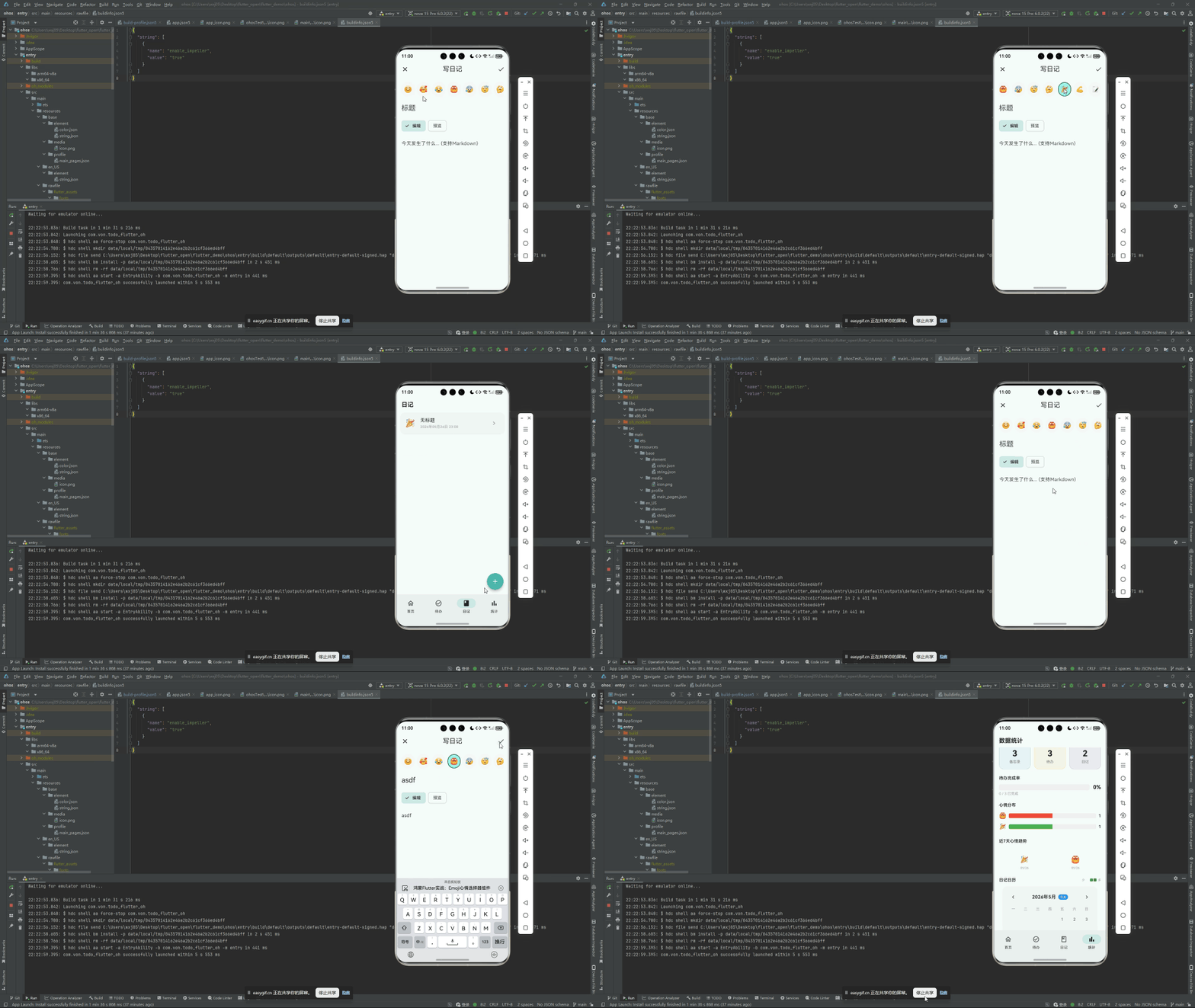
鸿蒙 Flutter 备忘录的日记编辑页提供了一个 10 种表情的心情选择器:开心、喜欢、伤心、生气、焦虑、犯困、思考、庆祝、激励、平静。用户只需轻点一个 Emoji,即可标记当天的心情。
本文将从零实现这个 Emoji 心情选择器组件,涵盖数据结构设计、UI 交互和状态管理。
项目仓库:todo_flutter_harmony
数据结构设计
日记模型中的心情字段非常简单——用一个枚举值表示:
enum Mood {
  happy,      // 😊 开心
  loved,      // 🥰 喜欢
  sad,        // 😢 伤心
  angry,      // 😠 生气
  anxious,    // 😰 焦虑
  sleepy,     // 😴 犯困
  thinking,   // 🤔 思考
  celebrating,// 🎉 庆祝
  motivated,  // 💪 激励
  neutral,    // 😐 平静
}
每种心情需要三个属性:枚举标识、Emoji 字符、中文名称。用一个静态映射表管理:
class MoodHelper {
  static const Map<Mood, _MoodMeta> _meta = {
    Mood.happy:       _MoodMeta('😊', '开心'),
    Mood.loved:       _MoodMeta('🥰', '喜欢'),
    Mood.sad:         _MoodMeta('😢', '伤心'),
    Mood.angry:       _MoodMeta('😠', '生气'),
    Mood.anxious:     _MoodMeta('😰', '焦虑'),
    Mood.sleepy:      _MoodMeta('😴', '犯困'),
    Mood.thinking:    _MoodMeta('🤔', '思考'),
    Mood.celebrating: _MoodMeta('🎉', '庆祝'),
    Mood.motivated:   _MoodMeta('💪', '激励'),
    Mood.neutral:     _MoodMeta('😐', '平静'),
  };

  static String emoji(Mood mood) => _meta[mood]!.emoji;
  static String label(Mood mood) => _meta[mood]!.label;
  static List<Mood> get all => Mood.values.toList();
}

class _MoodMeta {
  final String emoji;
  final String label;
  const _MoodMeta(this.emoji, this.label);
}
这种设计的优势是数据与 UI 完全分离——MoodHelper 可以同时被选择器组件、日记卡片、统计图表复用,而无需在每个地方重复维护 Emoji 映射。
组件接口定义
class MoodPicker extends StatelessWidget {
  final Mood? selectedMood;
  final ValueChanged<Mood> onMoodSelected;

  const MoodPicker({
    super.key,
    required this.selectedMood,
    required this.onMoodSelected,
  });
selectedMood:当前选中的心情(可为 null,表示未选择)onMoodSelected:用户点击某个心情后的回调
UI 布局
采用水平滚动布局,10 个心情按顺序排成一行:
Widget build(BuildContext context) {
return SizedBox(
height: 90,
child: ListView.builder(
scrollDirection: Axis.horizontal,
itemCount: Mood.values.length,
padding: const EdgeInsets.symmetric(horizontal: 12),
itemBuilder: (context, index) {
final mood = Mood.values[index];
final isSelected = mood == selectedMood;
return _MoodItem(
mood: mood,
isSelected: isSelected,
onTap: () => onMoodSelected(mood),
);
},
),
);
}
}
单个心情项
每个心情项是一个垂直排列的 Emoji + 文字标签:
class _MoodItem extends StatelessWidget {
final Mood mood;
final bool isSelected;
final VoidCallback onTap;
const _MoodItem({
required this.mood,
required this.isSelected,
required this.onTap,
});
Widget build(BuildContext context) {
return GestureDetector(
onTap: onTap,
child: AnimatedContainer(
duration: const Duration(milliseconds: 200),
margin: const EdgeInsets.symmetric(horizontal: 4, vertical: 4),
padding: const EdgeInsets.symmetric(horizontal: 12, vertical: 8),
decoration: BoxDecoration(
color: isSelected
? const Color(0xFF4DB6AC).withOpacity(0.15)
: Colors.grey.shade50,
borderRadius: BorderRadius.circular(12),
border: Border.all(
color: isSelected
? const Color(0xFF4DB6AC)
: Colors.grey.shade200,
width: isSelected ? 2 : 1,
),
),
child: Column(
mainAxisAlignment: MainAxisAlignment.center,
children: [
Text(
MoodHelper.emoji(mood),
style: TextStyle(fontSize: isSelected ? 30 : 26),
),
const SizedBox(height: 4),
Text(
MoodHelper.label(mood),
style: TextStyle(
fontSize: 11,
color: isSelected
? const Color(0xFF4DB6AC)
: Colors.grey.shade600,
fontWeight: isSelected ? FontWeight.w600 : FontWeight.normal,
),
),
],
),
),
);
}
}
设计细节:
AnimatedContainer:选中态过渡 200ms,颜色和边框平滑切换- 选中态 Emoji 放大:30px vs 26px,轻微放大让选中项更突出
- 选中态文字加粗 + 变色:与主题色 #4DB6AC 一致
- 选中态背景色:15% 透明度的主题色,不过于抢眼
在日记编辑页中使用
class DiaryEditPage extends StatefulWidget {
// ...
}
class _DiaryEditPageState extends State<DiaryEditPage> {
Mood? _selectedMood;
Widget build(BuildContext context) {
return Scaffold(
appBar: AppBar(
title: const Text('写日记'),
actions: [
IconButton(
icon: const Icon(Icons.check),
onPressed: _saveDiary,
),
],
),
body: SingleChildScrollView(
padding: const EdgeInsets.all(16),
child: Column(
crossAxisAlignment: CrossAxisAlignment.start,
children: [
// 心情选择器
const Text('今日心情', style: TextStyle(
fontSize: 16,
fontWeight: FontWeight.w600,
)),
const SizedBox(height: 8),
MoodPicker(
selectedMood: _selectedMood,
onMoodSelected: (mood) {
setState(() => _selectedMood = mood);
},
),
const SizedBox(height: 24),
// 日记内容输入区
TextField(
decoration: const InputDecoration(
hintText: '写下今天的故事...',
border: OutlineInputBorder(),
),
maxLines: 10,
onChanged: (value) => _content = value,
),
],
),
),
);
}
void _saveDiary() {
final diary = Diary(
mood: _selectedMood,
content: _content,
createdAt: DateTime.now(),
);
context.read<DiaryProvider>().addDiary(diary);
Navigator.pop(context);
}
}
数据持久化
Diary 模型中的 mood 字段存储为枚举索引,序列化时写入 JSON:
class Diary {
  final int? id;
  final Mood? mood;
  final String content;
  final DateTime createdAt;

  // JSON 序列化
  Map<String, dynamic> toMap() {
    return {
      'id': id,
      'mood': mood?.index,     // 枚举 → int
      'content': content,
      'createdAt': createdAt.millisecondsSinceEpoch,
    };
  }

  factory Diary.fromMap(Map<String, dynamic> map) {
    return Diary(
      id: map['id'],
      mood: map['mood'] != null ? Mood.values[map['mood']] : null,  // int → 枚举
      content: map['content'] ?? '',
      createdAt: DateTime.fromMillisecondsSinceEpoch(map['createdAt']),
    );
  }
}
mood?.index 将枚举序列化为整数(0-9),Mood.values[map['mood']] 反序列化时用整数索引找回枚举。这种方案简单高效,JSON 中只存一个数字。
统计页的心情可视化
有了结构化的心情数据,统计看板就可以展示心情分布。例如用简单的柱状图:
Widget _buildMoodBarChart(DiaryProvider diaryProvider) {
  final moodCounts = <Mood, int>{};
  for (final diary in diaryProvider.diaries) {
    if (diary.mood != null) {
      moodCounts[diary.mood!] = (moodCounts[diary.mood!] ?? 0) + 1;
    }
  }

  final maxCount = moodCounts.values.isEmpty
      ? 1
      : moodCounts.values.reduce((a, b) => a > b ? a : b);

  return Card(
    elevation: 1,
    shape: RoundedRectangleBorder(borderRadius: BorderRadius.circular(16)),
    child: Padding(
      padding: const EdgeInsets.all(16),
      child: Column(
        crossAxisAlignment: CrossAxisAlignment.start,
        children: [
          const Text('心情分布', style: TextStyle(
            fontSize: 16, fontWeight: FontWeight.w600,
          )),
          const SizedBox(height: 16),
          ...Mood.values.map((mood) {
            final count = moodCounts[mood] ?? 0;
            final ratio = maxCount > 0 ? count / maxCount : 0.0;
            return Padding(
              padding: const EdgeInsets.only(bottom: 8),
              child: Row(
                children: [
                  SizedBox(
                    width: 28,
                    child: Text(MoodHelper.emoji(mood),
                        style: const TextStyle(fontSize: 18)),
                  ),
                  const SizedBox(width: 8),
                  SizedBox(
                    width: 24,
                    child: Text('$count', style: const TextStyle(
                      fontSize: 13, fontWeight: FontWeight.w600,
                    )),
                  ),
                  const SizedBox(width: 8),
                  Expanded(
                    child: ClipRRect(
                      borderRadius: BorderRadius.circular(3),
                      child: LinearProgressIndicator(
                        value: ratio,
                        minHeight: 14,
                        backgroundColor: Colors.grey.shade100,
                        valueColor: AlwaysStoppedAnimation<Color>(
                          const Color(0xFF4DB6AC).withOpacity(0.6),
                        ),
                      ),
                    ),
                  ),
                ],
              ),
            );
          }),
        ],
      ),
    ),
  );
}
鸿蒙兼容性
心情选择器完全基于 Flutter 内置组件:
ListView.builder(横向滚动)+GestureDetector(点击)AnimatedContainer(选中态过渡动画)Textwidget 直接渲染 Emoji(Emoji 是 Unicode 字符,Flutter 原生支持)
Emoji 渲染在 Flutter 中走的是字体渲染管线,不同平台的默认 Emoji 字体可能不同,导致同一个 Emoji 在 Android/iOS/鸿蒙上样式略有差异。如果追求完全一致的视觉效果,可以用自定义 Emoji 图片资源替代 Unicode Emoji。
总结
Emoji 心情选择器的实现涉及三个层面:
- 数据层:
Mood枚举 +MoodHelper静态映射,提供 Emoji 和中文标签 - UI 层:水平
ListView+AnimatedContainer,选中态有颜色/大小/字重的三重变化 - 持久化:枚举索引 ↔ 整数的 JSON 序列化方案
整个组件轻量独立,可直接复用到任何需要心情选择的场景。
完整项目代码见:todo_flutter_harmony

作为“人工智能6S店”的官方数字引擎,为AI开发者与企业提供一个覆盖软硬件全栈、一站式门户。
更多推荐

 0
0 0
0- 0


 已为社区贡献29条内容

所有评论(0)