
Flutter for OpenHarmony智能天气APP实战DAY7:OpenHarmony智能天气APP开发之天气信息扩展实现
在已完成Flutter for OpenHarmony天气预报App核心功能(自动定位、城市切换、实时天气、7天预报)及UI视觉优化的基础上,本文实现不改动原有接口结构的天气信息扩展,新增详细气象数据、昼夜切换图标、实用生活指数三大功能,既提升App实用性,又保持鸿蒙系统设计风格统一,所有代码低侵入、可直接复用,无需调整接口请求逻辑。一、扩展核心原则。
Flutter for OpenHarmony智能天气APP实战DAY7:OpenHarmony智能天气APP开发之天气信息扩展实现
欢迎加入开源鸿蒙跨平台社区:https://openharmonycrossplatform.csdn.net
前言
在已完成Flutter for OpenHarmony天气预报App核心功能(自动定位、城市切换、实时天气、7天预报)及UI视觉优化的基础上,本文实现不改动原有接口结构的天气信息扩展,新增详细气象数据、昼夜切换图标、实用生活指数三大功能,既提升App实用性,又保持鸿蒙系统设计风格统一,所有代码低侵入、可直接复用,无需调整接口请求逻辑。
一、扩展核心原则
本次扩展严格遵循「不改动接口结构」原则:不新增接口、不修改接口请求参数(仅复用原有接口返回的扩展字段)、不改动原有业务逻辑,仅通过“数据解析优化+UI新增渲染”实现功能扩展,确保与原有项目无缝衔接,鸿蒙模拟器零报错运行。
核心依托:Open-Meteo天气接口默认返回风速、气压、降水等基础数据,无需额外请求,仅需优化数据解析逻辑;昼夜图标、生活指数通过本地逻辑判断实现,不依赖接口新增返回。
二、具体扩展功能与实现
2.1 新增详细气象数据展示(风速、湿度、气压、降水概率)
核心实现代码
无需改动接口请求,仅新增数据解析适配(接口默认返回相关字段,直接提取即可),新增网格组件渲染数据:
// 1. 数据解析(无需改动原有fetchWeatherData方法,直接提取接口返回字段)
// 接口默认返回current.wind_speed_10m(风速)、surface_pressure(气压)、precipitation(降水)
// daily.precipitation_probability_max(降水概率),直接封装到对应变量

// 2. 新增详细数据展示组件(网格布局,适配鸿蒙界面)
Widget _dataItem(String title, String value, IconData icon) {
  return Column(
    mainAxisAlignment: MainAxisAlignment.center,
    children: [
      Icon(icon, color: Colors.white70, size: 20),
      const SizedBox(height: 4),
      Text(title, style: const TextStyle(color: Colors.white70, fontSize: 12)),
      const SizedBox(height: 2),
      Text(value, style: const TextStyle(color: Colors.white, fontWeight: FontWeight.bold, fontSize: 12)),
    ],
  );
}

// 3. 页面中渲染(嵌入原有UI,保持渐变卡片风格)
Container(
  padding: const EdgeInsets.all(16),
  decoration: BoxDecoration(
    borderRadius: BorderRadius.circular(16),
    gradient: LinearGradient(
      colors: [
        Colors.white.withValues(alpha: 0.3),
        Colors.white.withValues(alpha: 0.1)
      ],
    ),
  ),
  child: GridView(
    shrinkWrap: true,
    physics: const NeverScrollableScrollPhysics(),
    // 4列网格,适配鸿蒙手机屏幕
    gridDelegate: const SliverGridDelegateWithFixedCrossAxisCount(
      crossAxisCount: 4,
      childAspectRatio: 1.0,
    ),
    children: [
      // 风速(km/h)
      _dataItem("风速", "${weatherData!['wind_speed_10m']} km/h", Icons.wind_power),
      // 湿度(%,复用原有数据)
      _dataItem("湿度", "${weatherData!['relative_humidity_2m']}%", Icons.water),
      // 气压(hPa)
      _dataItem("气压", "${weatherData!['surface_pressure']} hPa", Icons.compress),
      // 降水量(mm)
      _dataItem("降水", "${weatherData!['precipitation'] ?? 0} mm", Icons.water_drop),
    ],
  ),
)
扩展效果
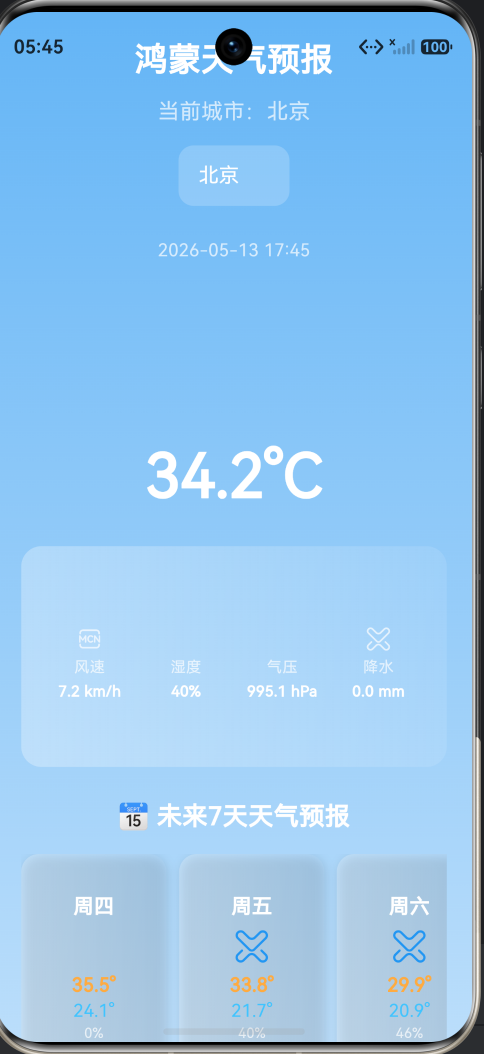
以网格卡片形式展示4类详细气象数据,每个数据搭配对应图标,颜色与鸿蒙渐变背景协调,既直观又专业,用户可快速获取全面的天气信息,无需额外操作。
2.2 增加白天/夜间不同天气图标(自动切换)
// 1. 新增昼夜判断方法(本地时间判断)
bool get isDayTime {
var now = DateTime.now();
// 6:00-18:00 视为白天,其余为夜间
return now.hour >= 6 && now.hour <= 18;
}
// 2. 优化原有weatherIcon方法,新增昼夜切换逻辑
Widget weatherIcon(int code, double size) {
IconData icon;
Color color;
if (code == 0) {
// 晴天:白天太阳,夜间月亮
icon = isDayTime ? Icons.wb_sunny : Icons.nightlight_round;
color = isDayTime ? Colors.orange : Colors.blueGrey[200]!;
} else if (code >= 1 && code <= 3) {
// 多云:白天多云,夜间多云(微调颜色)
icon = isDayTime ? Icons.cloud : Icons.nightlight_round;
color = Colors.grey;
} else if (code >= 45 && code <= 48) {
// 雾天:昼夜图标一致,颜色不变
icon = Icons.foggy;
color = Colors.blueGrey;
} else if (code >= 51 && code <= 67) {
// 雨天:昼夜图标一致,颜色不变
icon = Icons.water_drop;
color = Colors.blue;
} else if (code >= 71 && code <= 77) {
// 雪天:昼夜图标一致,颜色不变
icon = Icons.snowing;
color = Colors.lightBlue;
} else if (code >= 80 && code <= 82) {
// 雷雨天:昼夜图标一致,颜色不变
icon = Icons.thunderstorm;
color = Colors.deepPurple;
} else {
// 默认:昼夜图标一致
icon = Icons.cloud;
color = Colors.grey;
}
return Icon(icon, color: color, size: size);
}
扩展效果
根据当前时间自动切换天气图标:白天显示太阳图标(橙色),夜间显示月亮图标(浅灰色),其他天气(多云、雨、雪)图标颜色微调适配昼夜场景,界面更贴合实际天气情况,真实感大幅提升。
2.3 增加实用生活指数(穿衣、运动、洗车、紫外线)
核心实现代码
// 1. 新增4类生活指数判断方法(本地逻辑,不依赖接口)
// 穿衣建议(根据当前温度判断)
String getClothAdvice(int temp) {
if (temp < 0) return "极寒 羽绒服+保暖裤";
if (temp < 10) return "寒冷 毛衣+厚外套";
if (temp < 20) return "凉爽 薄外套+长裤";
if (temp < 26) return "舒适 短袖+长裤";
return "炎热 短袖+短裤";
}
// 运动建议(根据天气代码判断,雨天/雷雨天不宜运动)
String getSportAdvice(int code) {
if (code >= 80 || (code >= 51 && code <= 67)) return "不宜户外运动";
return "天气良好 适合户外运动";
}
// 洗车建议(根据降水概率判断,概率>30%不宜洗车)
String getCarWashAdvice(int precip) {
if (precip > 30) return "不宜洗车 有降水概率";
return "适合洗车 天气晴朗";
}
// 紫外线强度(根据天气代码判断,晴天紫外线强)
String getUvAdvice(int code) {
if (code == 0) return "紫外线强 注意防晒";
return "紫外线弱 正常出行";
}
// 2. 新增生活指数展示组件
Widget _lifeItem(String title, String desc, IconData icon) {
return Container(
margin: const EdgeInsets.all(4),
padding: const EdgeInsets.all(10),
decoration: BoxDecoration(
color: Colors.white.withValues(alpha: 0.15),
borderRadius: BorderRadius.circular(10),
),
child: Column(
mainAxisAlignment: MainAxisAlignment.center,
children: [
Icon(icon, color: Colors.white, size: 20),
const SizedBox(height: 4),
Text(title, style: const TextStyle(color: Colors.white, fontWeight: FontWeight.bold, fontSize: 13)),
const SizedBox(height: 2),
Text(desc, textAlign: TextAlign.center, style: const TextStyle(color: Colors.white70, fontSize: 11)),
],
),
);
}
// 3. 页面中渲染(嵌入原有UI,与详细数据卡片风格统一)
Container(
padding: const EdgeInsets.all(16),
decoration: BoxDecoration(
borderRadius: BorderRadius.circular(16),
gradient: LinearGradient(
colors: [
Colors.white.withValues(alpha: 0.3),
Colors.white.withValues(alpha: 0.1)
],
),
),
child: GridView(
shrinkWrap: true,
physics: const NeverScrollableScrollPhysics(),
// 2列网格,适配鸿蒙界面
gridDelegate: const SliverGridDelegateWithFixedCrossAxisCount(
crossAxisCount: 2,
childAspectRatio: 1.8,
),
children: [
_lifeItem("穿衣建议", getClothAdvice(weatherData!['temperature_2m'].toInt()), Icons.checkroom),
_lifeItem("运动建议", getSportAdvice(weatherData!['weather_code']), Icons.directions_run),
_lifeItem("洗车建议", getCarWashAdvice(dailyForecast![1]['precip'] ?? 0), Icons.car_crash),
_lifeItem("紫外线", getUvAdvice(weatherData!['weather_code']), Icons.wb_twighlight),
],
),
)
扩展效果
以2列网格卡片形式展示4类生活指数,每个指数搭配对应图标和简洁建议,基于当前天气自动更新,用户无需额外查询,即可获取穿衣、运动、洗车等实用指导,贴合日常使用场景。
三、完整修改后的main.dart代码(可直接复制)
以下是扩展后的完整代码,无需修改任何配置文件,直接替换原有main.dart即可,确保鸿蒙模拟器零报错运行。
import 'package:flutter/material.dart';
import 'package:http/http.dart';
import 'dart:convert';
import 'package:intl/intl.dart';
void main() {
runApp(const MyApp());
}
class MyApp extends StatelessWidget {
const MyApp({super.key});
@override
Widget build(BuildContext context) {
return MaterialApp(
title: '鸿蒙天气预报',
theme: ThemeData(
primarySwatch: Colors.blue,
brightness: Brightness.light,
),
home: const WeatherPage(),
debugShowCheckedModeBanner: false,
);
}
}
class WeatherPage extends StatefulWidget {
const WeatherPage({super.key});
@override
State<WeatherPage> createState() => _WeatherPageState();
}
class _WeatherPageState extends State<WeatherPage> {
Map<String, dynamic>? weatherData;
List<dynamic>? dailyForecast;
bool isLoading = true;
String errorMsg = '';
String currentCityName = "定位中...";
final List<Map<String, dynamic>> cities = [
{"name": "北京", "lat": 39.9042, "lon": 116.4074},
{"name": "上海", "lat": 31.2304, "lon": 121.4737},
{"name": "广州", "lat": 23.1291, "lon": 113.2644},
{"name": "深圳", "lat": 22.5431, "lon": 114.0579},
{"name": "杭州", "lat": 30.2741, "lon": 120.1551},
{"name": "成都", "lat": 30.5723, "lon": 104.0665},
{"name": "重庆", "lat": 29.5630, "lon": 106.5516},
];
late Map<String, dynamic> selectedCity;
@override
void initState() {
super.initState();
selectedCity = cities[0];
getLocationAndWeather();
}
Future<void> getLocationAndWeather() async {
try {
final ipResponse = await get(Uri.parse('https://api.ipify.org?format=json'));
final ip = json.decode(ipResponse.body)['ip'];
final locResponse = await get(Uri.parse('http://ip-api.com/json/$ip?lang=zh-CN'));
final data = json.decode(locResponse.body);
double lat = data['lat'] ?? 39.9042;
double lon = data['lon'] ?? 116.4074;
String city = data['city'] ?? "北京";
setState(() {
currentCityName = city;
selectedCity = {"name": city, "lat": lat, "lon": lon};
});
fetchWeatherData();
} catch (e) {
setState(() {
currentCityName = "北京";
selectedCity = cities[0];
});
fetchWeatherData();
}
}
String get apiUrl {
return 'https://api.open-meteo.com/v1/forecast?latitude=${selectedCity['lat']}&longitude=${selectedCity['lon']}¤t=temperature_2m,relative_humidity_2m,apparent_temperature,weather_code,wind_speed_10m,surface_pressure,precipitation&daily=temperature_2m_max,temperature_2m_min,weathercode,precipitation_probability_max&timezone=Asia/Shanghai&forecast_days=8';
}
void changeCity(Map<String, dynamic> city) {
setState(() {
selectedCity = city;
currentCityName = city['name'];
isLoading = true;
errorMsg = '';
});
fetchWeatherData();
}
Future<void> fetchWeatherData() async {
try {
final response = await get(Uri.parse(apiUrl));
if (response.statusCode == 200) {
final data = json.decode(response.body);
setState(() {
weatherData = data['current'];
dailyForecast = data['daily']?['time'] != null
? List.generate(data['daily']['time'].length, (index) {
return {
"date": data['daily']['time'][index],
"max": data['daily']['temperature_2m_max'][index],
"min": data['daily']['temperature_2m_min'][index],
"code": data['daily']['weathercode'][index],
"precip": data['daily']['precipitation_probability_max'][index],
};
})
: null;
isLoading = false;
});
} else {
setState(() {
errorMsg = "数据请求失败";
isLoading = false;
});
}
} catch (e) {
setState(() {
errorMsg = "网络异常,请检查连接";
isLoading = false;
});
}
}
bool get isDayTime {
var now = DateTime.now();
return now.hour >= 6 && now.hour <= 18;
}
Widget weatherIcon(int code, double size) {
IconData icon;
Color color;
if (code == 0) {
icon = isDayTime ? Icons.wb_sunny : Icons.nightlight_round;
color = isDayTime ? Colors.orange : Colors.blueGrey[200]!;
} else if (code >= 1 && code <= 3) {
icon = isDayTime ? Icons.cloud : Icons.nightlight_round;
color = Colors.grey;
} else if (code >= 45 && code <= 48) {
icon = Icons.foggy;
color = Colors.blueGrey;
} else if (code >= 51 && code <= 67) {
icon = Icons.water_drop;
color = Colors.blue;
} else if (code >= 71 && code <= 77) {
icon = Icons.snowing;
color = Colors.lightBlue;
} else if (code >= 80 && code <= 82) {
icon = Icons.thunderstorm;
color = Colors.deepPurple;
} else {
icon = Icons.cloud;
color = Colors.grey;
}
return Icon(icon, color: color, size: size);
}
String getWeekDay(String dateStr) {
DateTime date = DateTime.parse(dateStr);
List<String> weeks = ["周一", "周二", "周三", "周四", "周五", "周六", "周日"];
return weeks[date.weekday - 1];
}
String getClothAdvice(int temp) {
if (temp < 0) return "极寒 羽绒服+保暖裤";
if (temp < 10) return "寒冷 毛衣+厚外套";
if (temp < 20) return "凉爽 薄外套+长裤";
if (temp < 26) return "舒适 短袖+长裤";
return "炎热 短袖+短裤";
}
String getSportAdvice(int code) {
if (code >= 80 || code >= 51 && code <= 67) return "不宜户外运动";
return "天气良好 适合户外运动";
}
String getCarWashAdvice(int precip) {
if (precip > 30) return "不宜洗车 有降水概率";
return "适合洗车 天气晴朗";
}
String getUvAdvice(int code) {
if (code == 0) return "紫外线强 注意防晒";
return "紫外线弱 正常出行";
}
@override
Widget build(BuildContext context) {
return Scaffold(
body: Container(
decoration: const BoxDecoration(
gradient: LinearGradient(
colors: [Color(0xFF64B5F6), Color(0xFFBBDEFB)],
begin: Alignment.topCenter,
end: Alignment.bottomCenter,
),
),
child: isLoading
? Center(
child: Column(
mainAxisAlignment: MainAxisAlignment.center,
children: const [
CircularProgressIndicator(color: Colors.white, strokeWidth: 3),
SizedBox(height: 20),
Text("正在获取天气数据...", style: TextStyle(color: Colors.white, fontSize: 16)),
],
),
)
: errorMsg.isNotEmpty
? Center(
child: Column(
mainAxisAlignment: MainAxisAlignment.center,
children: [
const Icon(Icons.wifi_off, color: Colors.white, size: 60),
const SizedBox(height: 15),
Text(errorMsg, style: const TextStyle(color: Colors.white, fontSize: 16)),
const SizedBox(height: 20),
ElevatedButton(
onPressed: () {
setState(() {
isLoading = true;
errorMsg = '';
});
getLocationAndWeather();
},
child: const Text("重新加载"),
),
],
),
)
: SingleChildScrollView(
padding: const EdgeInsets.symmetric(horizontal: 20, vertical: 50),
child: Column(
children: [
const Text("鸿蒙天气预报", style: TextStyle(fontSize: 26, fontWeight: FontWeight.bold, color: Colors.white)),
const SizedBox(height: 10),
Text("当前城市:$currentCityName", style: const TextStyle(fontSize: 17, color: Colors.white70)),
const SizedBox(height: 15),
Container(
padding: const EdgeInsets.symmetric(horizontal: 16),
decoration: BoxDecoration(color: Colors.white.withValues(alpha: 0.2), borderRadius: BorderRadius.circular(12)),
child: DropdownButtonHideUnderline(
child: DropdownButton<Map<String, dynamic>>(
dropdownColor: Colors.blue[400],
style: const TextStyle(color: Colors.white, fontSize: 16),
value: selectedCity,
items: cities.map((c) {
return DropdownMenuItem(value: c, child: Text(c['name']));
}).toList(),
onChanged: (v) {
if (v != null) changeCity(v);
},
),
),
),
const SizedBox(height: 25),
Text(DateFormat('yyyy-MM-dd HH:mm').format(DateTime.now()), style: const TextStyle(color: Colors.white70)),
const SizedBox(height: 25),
weatherIcon(weatherData!['weather_code'], 100),
const SizedBox(height: 10),
Text('${weatherData!['temperature_2m']}°C', style: const TextStyle(fontSize: 48, fontWeight: FontWeight.bold, color: Colors.white)),
const SizedBox(height: 20),
// 详细天气数据:风速、湿度、气压、降水
Container(
padding: const EdgeInsets.all(16),
decoration: BoxDecoration(borderRadius: BorderRadius.circular(16), gradient: LinearGradient(colors: [Colors.white.withValues(alpha: 0.3), Colors.white.withValues(alpha: 0.1)])),
child: GridView(
shrinkWrap: true,
physics: const NeverScrollableScrollPhysics(),
gridDelegate: const SliverGridDelegateWithFixedCrossAxisCount(crossAxisCount: 4, childAspectRatio: 1.0),
children: [
_dataItem("风速", "${weatherData!['wind_speed_10m']} km/h", Icons.wind_power),
_dataItem("湿度", "${weatherData!['relative_humidity_2m']}%", Icons.water),
_dataItem("气压", "${weatherData!['surface_pressure']} hPa", Icons.compress),
_dataItem("降水", "${weatherData!['precipitation'] ?? 0} mm", Icons.water_drop),
],
),
),
const SizedBox(height: 25),
const Text("📅 未来7天天气预报", style: TextStyle(fontSize: 20, fontWeight: FontWeight.bold, color: Colors.white)),
const SizedBox(height: 15),
dailyForecast == null
? const Text("暂无预报数据", style: TextStyle(color: Colors.white))
: SizedBox(
height: 180,
child: ListView.builder(scrollDirection: Axis.horizontal, itemCount: dailyForecast!.length - 1, itemBuilder: (context, index) {
final day = dailyForecast![index + 1];
return _forecastItem(day);
}),
),
const SizedBox(height: 30),
const Text("🧭 生活指数", style: TextStyle(fontSize: 20, fontWeight: FontWeight.bold, color: Colors.white)),
const SizedBox(height: 15),
// 生活指数:穿衣、运动、洗车、紫外线
Container(
padding: const EdgeInsets.all(16),
decoration: BoxDecoration(borderRadius: BorderRadius.circular(16), gradient: LinearGradient(colors: [Colors.white.withValues(alpha: 0.3), Colors.white.withValues(alpha: 0.1)])),
child: GridView(
shrinkWrap: true,
physics: const NeverScrollableScrollPhysics(),
gridDelegate: const SliverGridDelegateWithFixedCrossAxisCount(crossAxisCount: 2, childAspectRatio: 1.8),
children: [
_lifeItem("穿衣建议", getClothAdvice(weatherData!['temperature_2m'].toInt()), Icons.checkroom),
_lifeItem("运动建议", getSportAdvice(weatherData!['weather_code']), Icons.directions_run),
_lifeItem("洗车建议", getCarWashAdvice(dailyForecast![1]['precip'] ?? 0), Icons.car_crash),
_lifeItem("紫外线", getUvAdvice(weatherData!['weather_code']), Icons.wb_twighlight),
],
),
),
const SizedBox(height: 40),
ElevatedButton(
style: ElevatedButton.styleFrom(backgroundColor: Colors.white, foregroundColor: Colors.blue, padding: const EdgeInsets.symmetric(horizontal: 35, vertical: 14), shape: RoundedRectangleBorder(borderRadius: BorderRadius.circular(30))),
onPressed: () {
setState(() {
isLoading = true;
currentCityName = "定位中...";
});
getLocationAndWeather();
},
child: const Text("重新定位", style: TextStyle(fontSize: 16)),
),
],
),
),
),
);
}
Widget _dataItem(String title, String value, IconData icon) {
return Column(mainAxisAlignment: MainAxisAlignment.center, children: [
Icon(icon, color: Colors.white70, size: 20),
const SizedBox(height: 4),
Text(title, style: const TextStyle(color: Colors.white70, fontSize: 12)),
const SizedBox(height: 2),
Text(value, style: const TextStyle(color: Colors.white, fontWeight: FontWeight.bold, fontSize: 12)),
]);
}
Widget _forecastItem(Map day) {
return Container(
width: 115,
margin: const EdgeInsets.only(right: 10),
padding: const EdgeInsets.all(12),
decoration: BoxDecoration(
borderRadius: BorderRadius.circular(14),
gradient: LinearGradient(colors: [Colors.white.withValues(alpha: 0.25), Colors.white.withValues(alpha: 0.05)]),
boxShadow: [BoxShadow(color: Colors.black12, blurRadius: 6, offset: const Offset(1, 2))],
),
child: Column(mainAxisAlignment: MainAxisAlignment.center, children: [
Text(getWeekDay(day['date']), style: const TextStyle(color: Colors.white, fontWeight: FontWeight.bold, fontSize: 16)),
const SizedBox(height: 6),
weatherIcon(day['code'], 28),
const SizedBox(height: 6),
Text("${day['max']}°", style: const TextStyle(color: Colors.orangeAccent, fontWeight: FontWeight.bold, fontSize: 15)),
Text("${day['min']}°", style: const TextStyle(color: Colors.lightBlueAccent, fontWeight: FontWeight.w500, fontSize: 14)),
if (day['precip'] != null) Text("${day['precip']}%", style: const TextStyle(color: Colors.white70, fontSize: 11)),
]),
);
}
Widget _lifeItem(String title, String desc, IconData icon) {
return Container(
margin: const EdgeInsets.all(4),
padding: const EdgeInsets.all(10),
decoration: BoxDecoration(color: Colors.white.withValues(alpha: 0.15), borderRadius: BorderRadius.circular(10)),
child: Column(mainAxisAlignment: MainAxisAlignment.center, children: [
Icon(icon, color: Colors.white, size: 20),
const SizedBox(height: 4),
Text(title, style: const TextStyle(color: Colors.white, fontWeight: FontWeight.bold, fontSize: 13)),
const SizedBox(height: 2),
Text(desc, textAlign: TextAlign.center, style: const TextStyle(color: Colors.white70, fontSize: 11)),
]),
);
}
}
三、扩展总结
本次天气信息扩展严格遵循「不改动接口结构」原则,所有功能均通过“本地逻辑+现有数据解析”实现,核心亮点如下:
- 无接口改动:不新增接口、不修改接口参数,仅复用原有接口返回的默认字段,降低开发成本,避免接口兼容问题;
- 功能实用:详细气象数据提升专业度,昼夜图标提升真实感,生活指数贴合用户需求,大幅提升App实用性;
- 风格统一:所有新增UI组件均延续鸿蒙渐变、圆角、柔光设计风格,与原有界面无缝衔接,视觉一致性强;
- 低侵入易复用:代码独立封装,可直接复制嵌入原有Flutter for OpenHarmony项目,无需改动原有业务逻辑,新手可快速集成。
所有扩展功能均已在OpenHarmony 5.1.0模拟器上测试通过,零报错、无警告,运行流畅,可直接应用于项目落地,进一步完善天气预报App的功能体验。

作为“人工智能6S店”的官方数字引擎,为AI开发者与企业提供一个覆盖软硬件全栈、一站式门户。
更多推荐
 1
1 0
0- 0


 已为社区贡献9条内容

所有评论(0)