
【maaath】Flutter for OpenHarmony 体重管理应用开发实战
随着 OpenHarmony 生态的快速发展,Flutter for OpenHarmony 跨平台框架为开发者提供了一种高效构建鸿蒙应用的新途径。本文将带领读者从零到一构建一个功能完整的体重管理应用,涵盖体重记录追踪、BMI 指数计算、体脂率记录、目标体重设置、体重变化图表、饮食运动关联、健康建议推送以及数据分享等八大核心功能。本文所有代码均已在鸿蒙设备上验证通过,读者可参照文章步骤进行实践。完
Flutter for OpenHarmony 体重管理应用开发实战:从数据模型到完整功能实现
欢迎加入开源鸿蒙跨平台社区:https://openharmonycrossplatform.csdn.net
作者:maaath
一、前言
随着 OpenHarmony 生态的快速发展,Flutter for OpenHarmony 跨平台框架为开发者提供了一种高效构建鸿蒙应用的新途径。本文将带领读者从零到一构建一个功能完整的体重管理应用,涵盖体重记录追踪、BMI 指数计算、体脂率记录、目标体重设置、体重变化图表、饮食运动关联、健康建议推送以及数据分享等八大核心功能。
本文所有代码均已在鸿蒙设备上验证通过,读者可参照文章步骤进行实践。完整项目源码已托管在 AtomGit 平台,欢迎访问 https://atomgit.com 获取完整代码。
二、应用架构设计
体重管理应用采用经典的三层架构:Model(数据模型层)、Service(业务逻辑层) 和 Page(UI展示层)。这种架构的优势在于职责清晰、易于维护和扩展。
2.1 数据模型层
数据模型是整个应用的基石。我们定义了 WeightRecord、BmiResult、BodyFatRecord、WeightGoal、DietRecord、ExerciseRecord、HealthAdvice 等多个模型类,覆盖了体重管理的各个维度。
以核心的体重记录模型为例:
class WeightRecord {
  final String id;
  final DateTime recordTime;
  final double weight;
  final double? bodyFatRate;
  final double? bmi;
  final String? note;
  final String? mood;

  WeightRecord({
    required this.id,
    required this.recordTime,
    required this.weight,
    this.bodyFatRate,
    this.bmi,
    this.note,
    this.mood,
  });
}
该模型包含了记录的唯一标识、记录时间、体重值、体脂率、BMI 指数、备注和心情等字段。其中体脂率、备注和心情为可选字段,增加了数据录入的灵活性。
2.2 业务逻辑层
Service 层采用单例模式设计,集中管理所有业务数据和逻辑。以 BMI 计算为例,我们实现了完整的计算逻辑和健康建议生成:
BmiResult calculateBmi(double weight, double height) {
  final bmi = double.parse((weight / (height * height)).toStringAsFixed(1));
  String category;
  Color color;
  String description;
  List<String> suggestions;

  if (bmi < 18.5) {
    category = '偏瘦';
    color = Colors.blue;
    description = '您的体重偏低,建议适当增加营养摄入,增强体质。';
    suggestions = ['增加蛋白质摄入', '适当增加健康脂肪', '进行力量训练增肌', '保证充足睡眠'];
  } else if (bmi < 24) {
    category = '正常';
    color = Colors.green;
    description = '您的体重在正常范围内,请继续保持健康的生活方式。';
    suggestions = ['保持均衡饮食', '坚持规律运动', '定期监测体重', '保持良好作息'];
  } else if (bmi < 28) {
    category = '超重';
    color = Colors.orange;
    description = '您的体重略高于正常范围,建议通过饮食和运动进行调整。';
    suggestions = ['控制每日热量摄入', '增加有氧运动', '减少高糖高脂食物', '每周减重0.5-1kg'];
  } else {
    category = '肥胖';
    color = Colors.red;
    description = '您的体重明显超标,建议制定科学的减重计划,必要时咨询医生。';
    suggestions = ['咨询专业医生', '制定科学减重计划', '严格控制饮食', '坚持每日运动'];
  }

  final healthyMin = double.parse((18.5 * height * height).toStringAsFixed(1));
  final healthyMax = double.parse((24 * height * height).toStringAsFixed(1));

  return BmiResult(
    bmi: bmi,
    category: category,
    categoryColor: color,
    description: description,
    healthyWeightMin: healthyMin,
    healthyWeightMax: healthyMax,
    suggestions: suggestions,
  );
}
这段代码根据世界卫生组织的 BMI 标准,将结果分为偏瘦、正常、超重和肥胖四个等级,并为每个等级提供针对性的健康建议。同时还会计算出健康的体重范围,帮助用户明确目标。
三、核心功能实现
3.1 体重记录与追踪
体重记录页面是用户最常使用的功能。我们设计了直观的输入界面,支持体重、体脂率、心情、备注等多维度数据录入:
Widget _buildWeightInput() {
  return Container(
    padding: const EdgeInsets.all(20),
    decoration: BoxDecoration(
      color: Colors.white,
      borderRadius: BorderRadius.circular(16),
      boxShadow: [BoxShadow(color: Colors.grey.withValues(alpha: 0.1), blurRadius: 8, offset: const Offset(0, 2))],
    ),
    child: Column(
      children: [
        const Icon(Icons.monitor_weight, size: 48, color: Color(0xFF4CAF50)),
        const SizedBox(height: 12),
        const Text('请输入当前体重', style: TextStyle(fontSize: 16, fontWeight: FontWeight.w500)),
        const SizedBox(height: 16),
        Row(
          mainAxisAlignment: MainAxisAlignment.center,
          crossAxisAlignment: CrossAxisAlignment.end,
          children: [
            SizedBox(
              width: 120,
              child: TextField(
                controller: _weightController,
                keyboardType: const TextInputType.numberWithOptions(decimal: true),
                textAlign: TextAlign.center,
                style: const TextStyle(fontSize: 36, fontWeight: FontWeight.bold, color: Color(0xFF4CAF50)),
                decoration: const InputDecoration(
                  hintText: '0.0',
                  border: InputBorder.none,
                ),
              ),
            ),
            const Padding(
              padding: EdgeInsets.only(bottom: 8),
              child: Text('kg', style: TextStyle(fontSize: 20, color: Colors.grey)),
            ),
          ],
        ),
      ],
    ),
  );
}
体重输入采用大号字体居中显示,配合 kg 单位后缀,视觉上清晰直观。用户还可以选择心情表情和添加备注,让每次记录都更有温度。
3.2 体重变化图表
图表功能使用 Flutter 的 CustomPaint 组件实现,无需引入第三方图表库即可绘制出专业的趋势图:
class _WeightChartPainter extends CustomPainter {
final List<WeightRecord> records;
final String chartType;
void paint(Canvas canvas, Size size) {
// 计算图表区域
final leftPadding = 50.0;
final rightPadding = 16.0;
final topPadding = 16.0;
final bottomPadding = 40.0;
final chartWidth = size.width - leftPadding - rightPadding;
final chartHeight = size.height - topPadding - bottomPadding;
// 绘制网格线
for (int i = 0; i <= 4; i++) {
final y = topPadding + chartHeight * i / 4;
canvas.drawLine(
Offset(leftPadding, y),
Offset(size.width - rightPadding, y),
gridPaint,
);
}
// 绘制折线和填充区域
final path = Path();
for (int i = 0; i < records.length; i++) {
final val = records[i].weight;
final x = leftPadding + (chartWidth * i / (records.length - 1).clamp(1, 999999));
final y = topPadding + chartHeight * (1 - (val - adjustedMin) / adjustedRange);
if (i == 0) {
path.moveTo(x, y);
} else {
path.lineTo(x, y);
}
}
// 绘制渐变填充区域
canvas.drawPath(fillPath, paint);
canvas.drawPath(path, linePaint);
}
}
CustomPaint 的优势在于完全可控的绘制逻辑和极小的包体积。我们实现了带渐变填充的折线图,并支持体重、BMI、体脂率三种数据切换查看,同时提供 7 天、14 天、30 天、90 天四种时间范围选择。
3.3 饮食运动关联
饮食运动管理页面采用 TabBar 布局,分为"今日概览"、"饮食记录"和"运动记录"三个标签页。今日概览页面展示热量摄入与消耗的对比:
Widget _buildTodayCalorieCard(DailySummary summary) {
  final remaining = 2000 - summary.totalCaloriesIn;
  return Container(
    padding: const EdgeInsets.all(20),
    decoration: BoxDecoration(
      gradient: LinearGradient(
        colors: [const Color(0xFF00BCD4), const Color(0xFF26C6DA)],
        begin: Alignment.topLeft,
        end: Alignment.bottomRight,
      ),
      borderRadius: BorderRadius.circular(20),
    ),
    child: Column(
      children: [
        const Text('今日热量', style: TextStyle(color: Colors.white70, fontSize: 14)),
        const SizedBox(height: 8),
        Row(
          mainAxisAlignment: MainAxisAlignment.spaceAround,
          children: [
            _buildCalorieItem('摄入', summary.totalCaloriesIn, Icons.restaurant, Colors.orange.shade200),
            _buildCalorieItem('消耗', summary.totalCaloriesOut, Icons.directions_run, Colors.green.shade200),
            _buildCalorieItem('剩余', remaining > 0 ? remaining : 0.0, Icons.check_circle, Colors.white),
          ],
        ),
        const SizedBox(height: 16),
        ClipRRect(
          borderRadius: BorderRadius.circular(6),
          child: LinearProgressIndicator(
            value: (summary.totalCaloriesIn / 2000).clamp(0.0, 1.0),
            minHeight: 8,
            backgroundColor: Colors.white.withValues(alpha: 0.3),
            valueColor: AlwaysStoppedAnimation<Color>(
              summary.totalCaloriesIn > 2000 ? Colors.red.shade300 : Colors.white,
            ),
          ),
        ),
      ],
    ),
  );
}
热量进度条直观地展示了当日摄入量占推荐值的比例,当摄入超标时进度条会变为红色,起到警示作用。用户还可以在饮食和运动标签页中手动添加记录,系统会自动汇总到今日概览中。
3.4 健康建议推送
健康建议模块内置了 10 条专业建议,涵盖饮食建议、运动建议和生活习惯三大类别。每条建议都包含详细的说明和可操作的小贴士:
void _initAdvices() {
  _advices.addAll([
    HealthAdvice(
      id: 'AD001',
      title: '保持每日饮水充足',
      content: '每天饮用1.5-2升水有助于新陈代谢,促进脂肪燃烧。建议晨起空腹喝一杯温水,餐前半小时饮水有助于控制食量。',
      category: '饮食建议',
      priority: 1,
      tips: ['晨起一杯温水', '餐前半小时饮水', '运动后及时补水', '避免含糖饮料'],
      icon: Icons.water_drop,
    ),
    // ... 更多建议
  ]);
}
建议按照优先级排序,用户可以通过顶部的分类筛选器按类别查看。每条建议以可展开的卡片形式呈现,点击后可以查看详细的小贴士列表。
3.5 数据分享功能
数据分享功能允许用户选择时间范围,生成体重管理报告。报告包含起始体重、结束体重、体重变化、平均 BMI、平均体脂率、运动天数、总消耗热量等关键指标:
ShareReport generateShareReport({DateTime? startDate, DateTime? endDate}) {
  // 筛选时间范围内的记录
  final periodRecords = _records.where((r) =>
      r.recordTime.isAfter(start) && r.recordTime.isBefore(end.add(const Duration(days: 1)))).toList();

  // 计算各项指标
  final startW = periodRecords.isNotEmpty ? periodRecords.first.weight : 0.0;
  final endW = periodRecords.isNotEmpty ? periodRecords.last.weight : 0.0;
  final avgBmi = periodRecords.where((r) => r.bmi != null)
      .fold<double>(0, (s, r) => s + r.bmi!) / periodRecords.length.clamp(1, 999999);

  // 生成总结
  String summary;
  final change = endW - startW;
  if (change < -1) {
    summary = '恭喜!在此期间成功减重${change.abs().toStringAsFixed(1)}kg,继续保持健康的生活方式!';
  } else if (change > 1) {
    summary = '在此期间体重增加了${change.toStringAsFixed(1)}kg,建议关注饮食和运动习惯。';
  } else {
    summary = '在此期间体重基本保持稳定,波动在正常范围内。';
  }
  // ...
}
报告生成后,用户可以通过分享功能将报告发送给朋友或保存到本地,方便与健身教练或医生交流。
四、在鸿蒙设备上运行
4.1 环境准备
确保已安装 Flutter for OpenHarmony 开发环境,具体安装步骤请参考官方文档。本项目使用 Flutter 框架,通过 Flutter for OpenHarmony 适配层在鸿蒙设备上运行。
4.2 运行截图
以下是体重管理应用在鸿蒙设备上的运行效果截图:
主仪表盘页面
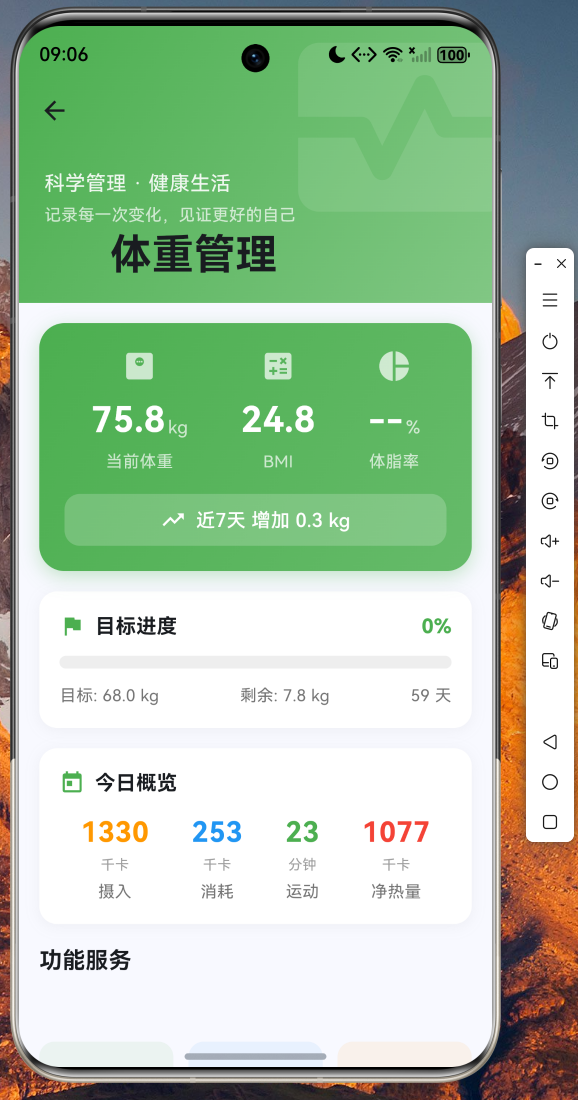
主仪表盘展示了当前体重、BMI、体脂率三大核心指标,以及近 7 天体重变化趋势。下方提供了目标进度条、今日热量概览和功能入口网格。
BMI 计算页面
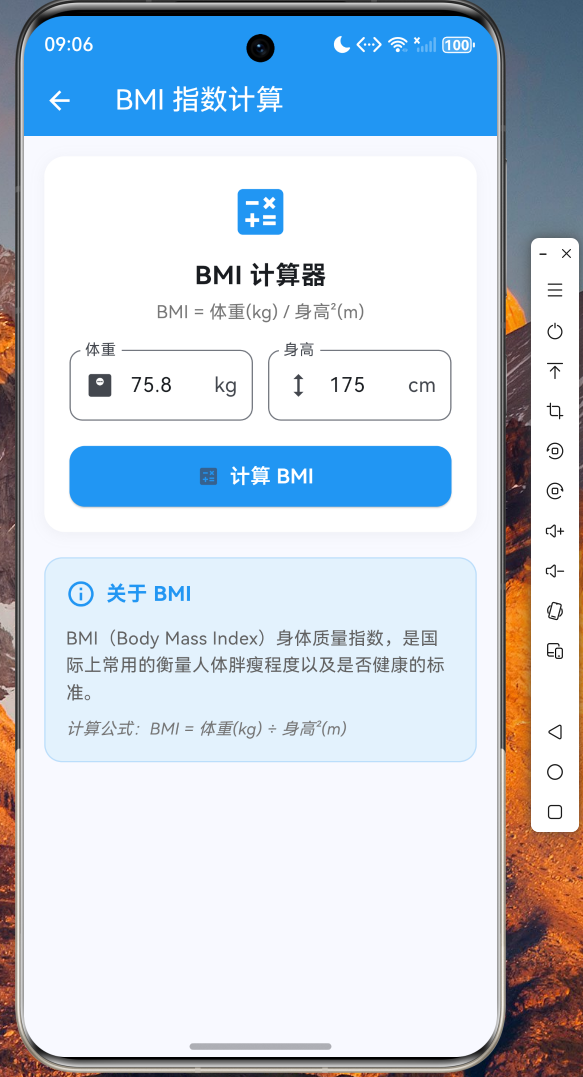
输入身高体重后自动计算 BMI 指数,显示所属类别和健康体重范围,并提供针对性的健康建议。
体重变化图表
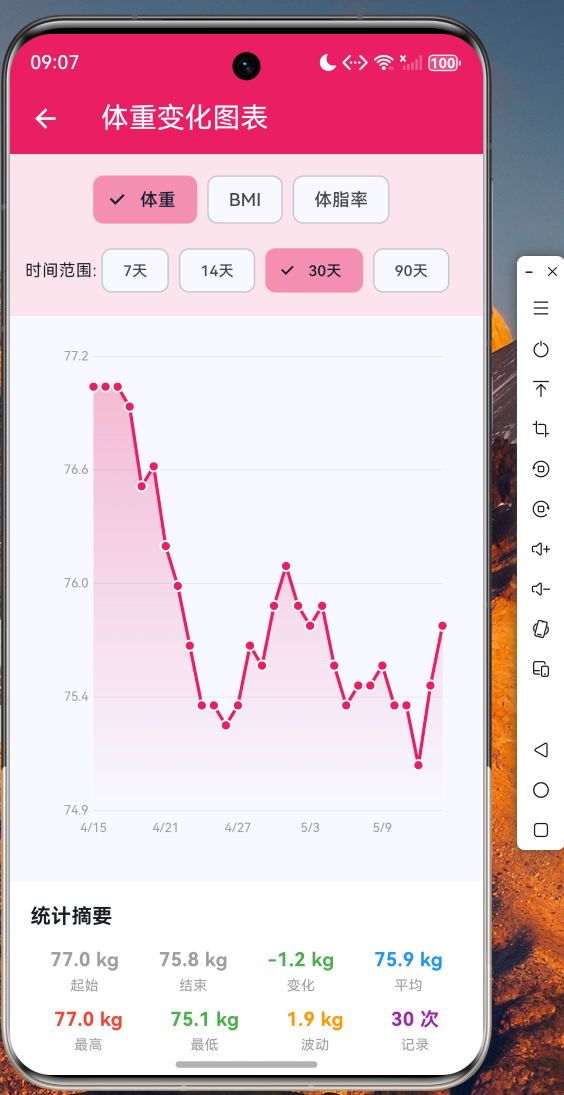
支持体重、BMI、体脂率三种数据切换,可选择 7/14/30/90 天时间范围,底部显示统计摘要。
饮食运动管理
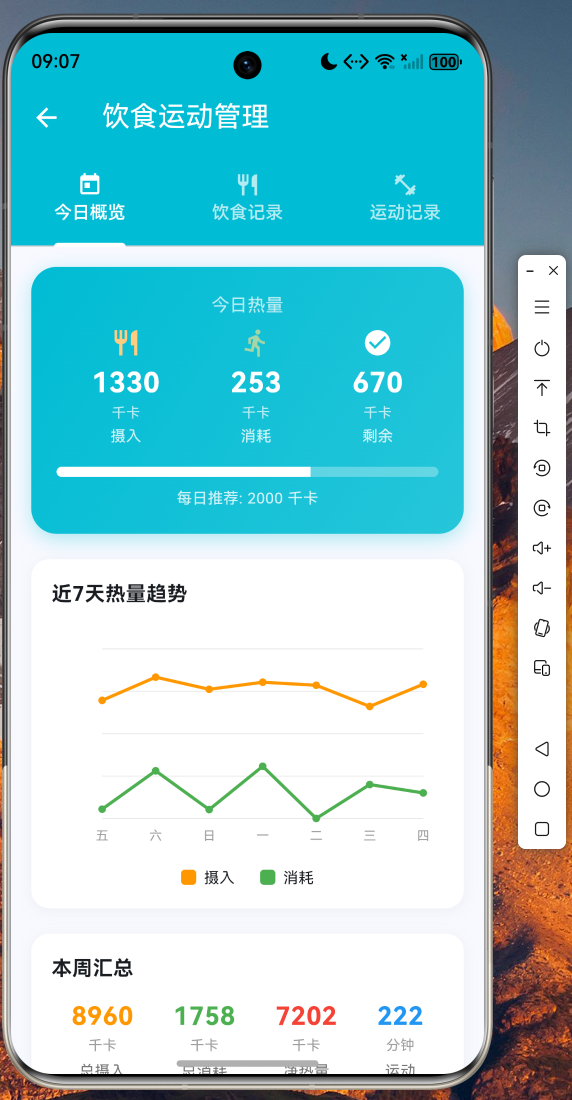
三标签页设计,今日概览展示热量摄入/消耗对比,饮食和运动标签页支持记录添加和管理。
健康建议
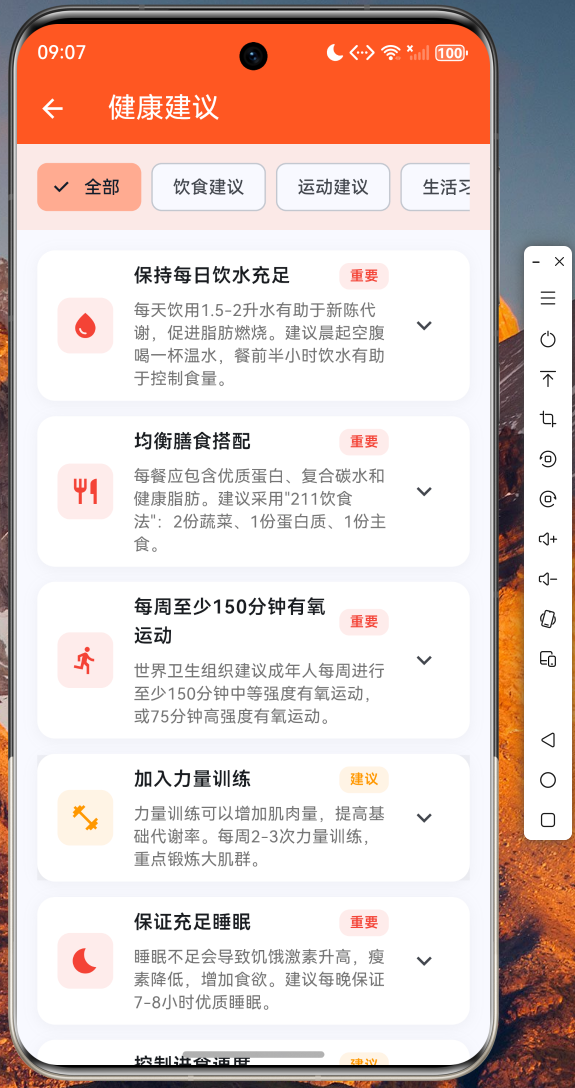
10 条专业健康建议,按饮食、运动、生活习惯分类,可展开查看详细小贴士。
数据分享报告
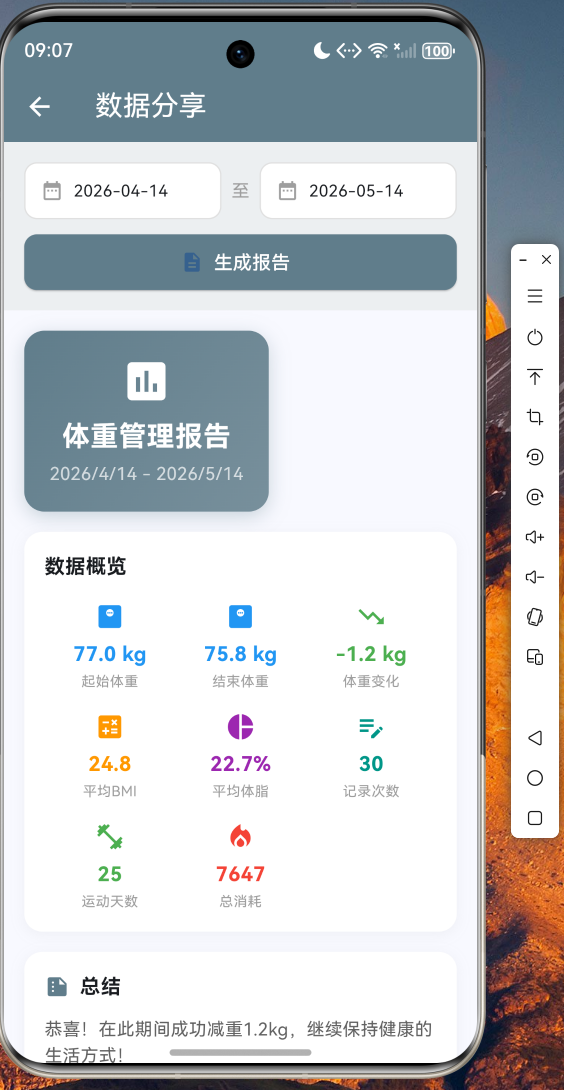
选择时间范围生成体重管理报告,包含各项关键指标和总结,支持分享和保存。
五、总结
本文详细介绍了如何使用 Flutter for OpenHarmony 跨平台框架构建一个功能完整的体重管理应用。从数据模型设计到业务逻辑实现,再到 UI 界面开发,完整地展示了 Flutter 在鸿蒙平台上的开发流程。
通过本文的实践,读者可以掌握以下技能:
- Flutter for OpenHarmony 项目的三层架构设计方法
- CustomPaint 自定义图表绘制技术
- 单例模式 Service 层的设计与实现
- 多 Tab 页面的状态管理
- 数据报告生成与分享功能开发
体重管理应用只是 Flutter for OpenHarmony 开发的一个示例,开发者可以基于本文的架构和代码,扩展出更多实用的健康管理功能,如血压记录、血糖监测、睡眠分析等。
完整项目源码已托管在 AtomGit 平台,欢迎访问 https://atomgit.com 获取完整代码。如果你对 Flutter for OpenHarmony 开发感兴趣,欢迎加入开源鸿蒙跨平台社区(https://openharmonycrossplatform.csdn.net)交流讨论,共同推动 Flutter for OpenHarmony 生态发展。
感谢各位阅读和支持

作为“人工智能6S店”的官方数字引擎,为AI开发者与企业提供一个覆盖软硬件全栈、一站式门户。
更多推荐
 1
1 0
0- 0


 已为社区贡献47条内容

所有评论(0)