
【Flutter for OpenHarmony 跨平台征文】第三方库 Flutter flutter_local_notifications 本地通知实战:血压测量提醒完全指南
·
【Flutter for OpenHarmony 跨平台征文】Flutter flutter_local_notifications 本地通知实战:血压测量提醒完全指南
🎯 写在前面
欢迎加入开源鸿蒙跨平台社区:https://openharmonycrossplatform.csdn.net
👋 自我介绍
嗨,大家好!我是 小 J,上海某高校大一计算机专业的学生 🚀。
今天来实现一个非常实用的功能:本地通知提醒!📢
血压监测需要坚持,但人总会忘记。这时候就需要一个定时提醒来帮助我们养成测量血压的好习惯!
一、flutter_local_notifications 简介
1.1 功能特性
| 特性 | 说明 |
|---|---|
| 定时通知 | 支持指定时间发送 |
| 重复通知 | 每日、每周、每月重复 |
| 周期性通知 | 间隔一定时间重复 |
| 本地通知 | 不需要网络连接 |
| 平台特定 | 支持 iOS/Android/鸿蒙 |
1.2 使用场景
| 场景 | 说明 |
|---|---|
| 定时提醒 | 每天早上8点提醒测量血压 |
| 间隔提醒 | 每4小时提醒一次 |
| 服药提醒 | 按时提醒服药 |
| 周报提醒 | 每周一生成健康周报 |
二、安装与配置
2.1 添加依赖
# pubspec.yaml
dependencies:
  flutter_local_notifications: ^18.0.1
  timezone: ^0.10.0
2.2 配置 Android
<!-- android/app/src/main/AndroidManifest.xml -->
<manifest ...>
  <!-- 添加权限 -->
  <uses-permission android:name="android.permission.RECEIVE_BOOT_COMPLETED"/>
  <uses-permission android:name="android.permission.VIBRATE"/>
  <uses-permission android:name="android.permission.SCHEDULE_EXACT_ALARM"/>
  <uses-permission android:name="android.permission.POST_NOTIFICATIONS"/>

  <application ...>
    <!-- 添加通知通道 -->
    <receiver android:exported="false" android:name="com.dexterous.flutterlocalnotifications.ScheduledNotificationReceiver"/>
    <receiver android:exported="false" android:name="com.dexterous.flutterlocalnotifications.ScheduledNotificationBootReceiver">
      <intent-filter>
        <action android:name="android.intent.action.BOOT_COMPLETED"/>
        <action android:name="android.intent.action.MY_PACKAGE_REPLACED"/>
        <action android:name="android.intent.action.QUICKBOOT_POWERON"/>
        <action android:name="com.htc.intent.action.QUICKBOOT_POWERON"/>
      </intent-filter>
    </receiver>
  </application>
</manifest>
2.3 配置 iOS
// ios/Runner/AppDelegate.swift
import flutter_local_notifications

if #available(iOS 10.0, *) {
  UNUserNotificationCenter.current().delegate = self as? UNUserNotificationCenterDelegate
}
三、通知服务实现
3.1 通知服务类
// lib/services/blood_pressure_notification_service.dart

import 'package:flutter_local_notifications/flutter_local_notifications.dart';
import 'package:timezone/timezone.dart' as tz;
import 'package:timezone/data/latest.dart' as tz;

class BloodPressureNotificationService {
  // 单例模式
  static final BloodPressureNotificationService _instance =
      BloodPressureNotificationService._internal();
  factory BloodPressureNotificationService() => _instance;
  BloodPressureNotificationService._internal();

  // Flutter Local Notifications 实例
  final FlutterLocalNotificationsPlugin _notifications =
      FlutterLocalNotificationsPlugin();

  // 通知渠道 ID
  static const String _channelId = 'blood_pressure_reminder';
  static const String _channelName = '血压测量提醒';
  static const String _channelDescription = '提醒您定期测量血压';

  /// 初始化通知服务
  Future<void> init() async {
    // 1. 初始化时区
    tz.initializeTimeZones();

    // 2. Android 配置
    const androidSettings = AndroidInitializationSettings('@mipmap/ic_launcher');

    // 3. iOS 配置
    const iosSettings = DarwinInitializationSettings(
      requestAlertPermission: true,
      requestBadgePermission: true,
      requestSoundPermission: true,
    );

    // 4. 初始化设置
    const initSettings = InitializationSettings(
      android: androidSettings,
      iOS: iosSettings,
    );

    // 5. 初始化插件
    await _notifications.initialize(
      initSettings,
      onDidReceiveNotificationResponse: _onNotificationTapped,
    );

    print('BloodPressureNotificationService 初始化成功');
  }

  /// 通知点击回调
  void _onNotificationTapped(NotificationResponse response) {
    // 处理通知点击
    // 可以跳转到血压记录页面
    print('通知被点击: ${response.payload}');
  }

  /// 请求通知权限
  Future<bool> requestPermissions() async {
    // Android 13+ 需要请求 POST_NOTIFICATIONS 权限
    final android = _notifications.resolvePlatformSpecificImplementation<
        AndroidFlutterLocalNotificationsPlugin>();

    if (android != null) {
      final granted = await android.requestNotificationsPermission();
      return granted ?? false;
    }

    return true;
  }

  /// 创建通知渠道(Android 8.0+)
  Future<void> createNotificationChannel() async {
    final android = _notifications.resolvePlatformSpecificImplementation<
        AndroidFlutterLocalNotificationsPlugin>();

    if (android != null) {
      await android.createNotificationChannel(
        const AndroidNotificationChannel(
          _channelId,
          _channelName,
          description: _channelDescription,
          importance: Importance.high,
          playSound: true,
          enableVibration: true,
        ),
      );
    }
  }
}
3.2 定时提醒功能
  /// 安排每日提醒
  Future<void> scheduleDailyReminder({
    required int hour,
    required int minute,
    required String title,
    required String body,
  }) async {
    // 计算提醒时间
    final now = tz.TZDateTime.now(tz.local);
    var scheduledDate = tz.TZDateTime(
      tz.local,
      now.year,
      now.month,
      now.day,
      hour,
      minute,
    );

    // 如果已过今天的提醒时间,则安排明天
    if (scheduledDate.isBefore(now)) {
      scheduledDate = scheduledDate.add(const Duration(days: 1));
    }

    // 创建通知详情
    const androidDetails = AndroidNotificationDetails(
      _channelId,
      _channelName,
      channelDescription: _channelDescription,
      importance: Importance.high,
      priority: Priority.high,
      icon: '@mipmap/ic_launcher',
    );

    const iosDetails = DarwinNotificationDetails(
      presentAlert: true,
      presentBadge: true,
      presentSound: true,
    );

    const details = NotificationDetails(
      android: androidDetails,
      iOS: iosDetails,
    );

    // 安排通知(每天重复)
    await _notifications.zonedSchedule(
      0, // 通知 ID
      title, // 标题
      body, // 内容
      scheduledDate, // 计划时间
      details,
      androidScheduleMode: AndroidScheduleMode.exactAllowWhileIdle,
      matchDateTimeComponents: DateTimeComponents.time, // 每天重复
      payload: 'daily_reminder', // 附加数据
    );

    print('已安排每日 ${hour}:${minute.toString().padLeft(2, '0')} 提醒');
  }

  /// 取消所有提醒
  Future<void> cancelAllReminders() async {
    await _notifications.cancelAll();
    print('已取消所有提醒');
  }

  /// 取消指定提醒
  Future<void> cancelReminder(int id) async {
    await _notifications.cancel(id);
    print('已取消提醒 $id');
  }
}
3.3 测量提醒功能
  /// 安排血压测量提醒
  Future<void> scheduleMeasurementReminder() async {
    // 默认每天早上8点提醒
    await scheduleDailyReminder(
      hour: 8,
      minute: 0,
      title: '🩸 血压测量提醒',
      body: '早上好!是时候测量您的血压了。保持健康,从记录开始!',
    );
  }

  /// 安排早晚提醒
  Future<void> scheduleMorningAndEveningReminder() async {
    // 早上8点
    await scheduleDailyReminder(
      hour: 8,
      minute: 0,
      title: '🩸 晨起血压测量',
      body: '早上好!建议您在起床后1小时内测量血压,记得测量前静坐5分钟。',
    );

    // 晚上8点
    await scheduleDailyReminder(
      hour: 20,
      minute: 0,
      title: '🩸 晚间血压记录',
      body: '晚上好!睡前记录一下今天的血压情况,帮助医生了解您的健康趋势。',
    );
  }
四、在应用中使用
4.1 创建服务实例
// lib/pages/health/blood_pressure_settings_page.dart
class BloodPressureSettingsPage extends StatefulWidget {
State<BloodPressureSettingsPage> createState() =>
_BloodPressureSettingsPageState();
}
class _BloodPressureSettingsPageState
extends State<BloodPressureSettingsPage> {
// 通知服务
final BloodPressureNotificationService _notificationService =
BloodPressureNotificationService();
// 提醒开关状态
bool _reminderEnabled = false;
bool _morningReminder = false;
bool _eveningReminder = false;
// 选择的提醒时间
TimeOfDay _selectedTime = const TimeOfDay(hour: 8, minute: 0);
void initState() {
super.initState();
_initNotifications();
}
Future<void> _initNotifications() async {
// 初始化通知服务
await _notificationService.init();
// 创建通知渠道
await _notificationService.createNotificationChannel();
}
}
4.2 提醒设置 UI
Widget _buildReminderSettings() {
  return Container(
    padding: const EdgeInsets.all(16),
    decoration: BoxDecoration(
      color: Colors.white,
      borderRadius: BorderRadius.circular(16),
    ),
    child: Column(
      crossAxisAlignment: CrossAxisAlignment.start,
      children: [
        const Text(
          '🔔 测量提醒',
          style: TextStyle(fontSize: 16, fontWeight: FontWeight.bold),
        ),
        const SizedBox(height: 16),

        // 总开关
        SwitchListTile(
          title: const Text('开启测量提醒'),
          subtitle: const Text('定时提醒您测量血压'),
          value: _reminderEnabled,
          onChanged: (value) {
            setState(() => _reminderEnabled = value);
            if (value) {
              _enableReminder();
            } else {
              _disableReminder();
            }
          },
        ),

        const Divider(),

        // 早间提醒
        SwitchListTile(
          title: const Text('早间提醒'),
          subtitle: const Text('08:00'),
          value: _morningReminder,
          onChanged: _reminderEnabled
              ? (value) {
                  setState(() => _morningReminder = value);
                  _updateMorningReminder();
                }
              : null,
          secondary: const Icon(Icons.wb_sunny, color: Colors.orange),
        ),

        // 晚间提醒
        SwitchListTile(
          title: const Text('晚间提醒'),
          subtitle: const Text('20:00'),
          value: _eveningReminder,
          onChanged: _reminderEnabled
              ? (value) {
                  setState(() => _eveningReminder = value);
                  _updateEveningReminder();
                }
              : null,
          secondary: const Icon(Icons.nightlight, color: Colors.indigo),
        ),

        const SizedBox(height: 16),

        // 自定义时间
        ListTile(
          leading: const Icon(Icons.access_time, color: Colors.blue),
          title: const Text('自定义提醒时间'),
          subtitle: Text(_selectedTime.format(context)),
          trailing: const Icon(Icons.chevron_right),
          enabled: _reminderEnabled,
          onTap: _reminderEnabled ? _selectTime : null,
        ),
      ],
    ),
  );
}
4.3 时间选择器
Future<void> _selectTime() async {
  final TimeOfDay? picked = await showTimePicker(
    context: context,
    initialTime: _selectedTime,
    builder: (context, child) {
      return MediaQuery(
        data: MediaQuery.of(context).copyWith(alwaysUse24HourFormat: true),
        child: child!,
      );
    },
  );

  if (picked != null && picked != _selectedTime) {
    setState(() => _selectedTime = picked);
    await _scheduleCustomReminder();
  }
}
4.4 启用/禁用提醒
Future<void> _enableReminder() async {
  // 请求通知权限
  final granted = await _notificationService.requestPermissions();
  if (!granted) {
    setState(() => _reminderEnabled = false);
    if (mounted) {
      ScaffoldMessenger.of(context).showSnackBar(
        const SnackBar(content: Text('请开启通知权限')),
      );
    }
    return;
  }

  // 根据设置安排提醒
  if (_morningReminder) {
    await _notificationService.scheduleDailyReminder(
      hour: 8,
      minute: 0,
      title: '🩸 晨起血压测量',
      body: '早上好!是时候测量您的血压了。',
    );
  }

  if (_eveningReminder) {
    await _notificationService.scheduleDailyReminder(
      hour: 20,
      minute: 0,
      title: '🩸 晚间血压记录',
      body: '晚上好!睡前记录一下今天的血压情况。',
    );
  }
}

Future<void> _disableReminder() async {
  await _notificationService.cancelAllReminders();
}

Future<void> _updateMorningReminder() async {
  if (_morningReminder) {
    await _notificationService.scheduleDailyReminder(
      hour: 8,
      minute: 0,
      title: '🩸 晨起血压测量',
      body: '早上好!是时候测量您的血压了。',
    );
  } else {
    await _notificationService.cancelReminder(0);
  }
}

Future<void> _updateEveningReminder() async {
  if (_eveningReminder) {
    await _notificationService.scheduleDailyReminder(
      hour: 20,
      minute: 0,
      title: '🩸 晚间血压记录',
      body: '晚上好!睡前记录一下今天的血压情况。',
    );
  } else {
    await _notificationService.cancelReminder(1);
  }
}
五、进阶功能
5.1 周期性提醒
/// 安排周期性提醒
Future<void> schedulePeriodicReminder() async {
  // 每4小时提醒一次
  await _notifications.periodicallyShow(
    0, // ID
    '🩸 血压测量提醒', // 标题
    '记得测量您的血压!', // 内容
    RepeatInterval.everyMinute, // 重复间隔(测试用,生产环境用4小时)
    const NotificationDetails(
      android: AndroidNotificationDetails(
        _channelId,
        _channelName,
        importance: Importance.high,
        priority: Priority.high,
      ),
    ),
    androidScheduleMode: AndroidScheduleMode.exactAllowWhileIdle,
  );
}
5.2 定时通知(指定日期)
/// 安排指定时间的通知
Future<void> scheduleSpecificTime() async {
  final scheduledDate = tz.TZDateTime(
    tz.local,
    DateTime.now().year,
    DateTime.now().month,
    DateTime.now().day,
    15, // 下午3点
    30, // 30分
  );

  await _notifications.zonedSchedule(
    2,
    '🩸 血压提醒',
    '是时候测量血压了!',
    scheduledDate,
    const NotificationDetails(
      android: AndroidNotificationDetails(
        _channelId,
        _channelName,
        importance: Importance.high,
        priority: Priority.high,
      ),
    ),
    androidScheduleMode: AndroidScheduleMode.exactAllowWhileIdle,
  );
}
六、开发踩坑与解决方案
6.1 踩坑一:通知不显示 😱
问题描述:
安排的通知没有显示。
排查过程:
- 检查权限是否授予
- 检查通知渠道是否创建
- 检查时区是否正确
解决方案:
// 确保创建通知渠道
await _notificationService.createNotificationChannel();

// 确保请求权限
final granted = await _notificationService.requestPermissions();
if (!granted) {
  // 处理权限被拒绝
}
6.2 踩坑二:时区问题 🤔
问题描述:
通知在错误的时间触发。
原因:
没有正确处理时区。
解决方案:
// 使用 timezone 包
import 'package:timezone/timezone.dart' as tz;
import 'package:timezone/data/latest.dart' as tz;

// 初始化时区
tz.initializeTimeZones();

// 创建时区感知的时间
var scheduledDate = tz.TZDateTime(
  tz.local,  // 使用本地时区
  now.year,
  now.month,
  now.day,
  hour,
  minute,
);
6.3 踩坑三:重复通知不生效 😅
问题描述:
每日重复的通知只在第一次生效。
解决方案:
await _notifications.zonedSchedule(
  0,
  title,
  body,
  scheduledDate,
  details,
  androidScheduleMode: AndroidScheduleMode.exactAllowWhileIdle,
  matchDateTimeComponents: DateTimeComponents.time, // 关键:设置为每天重复
);
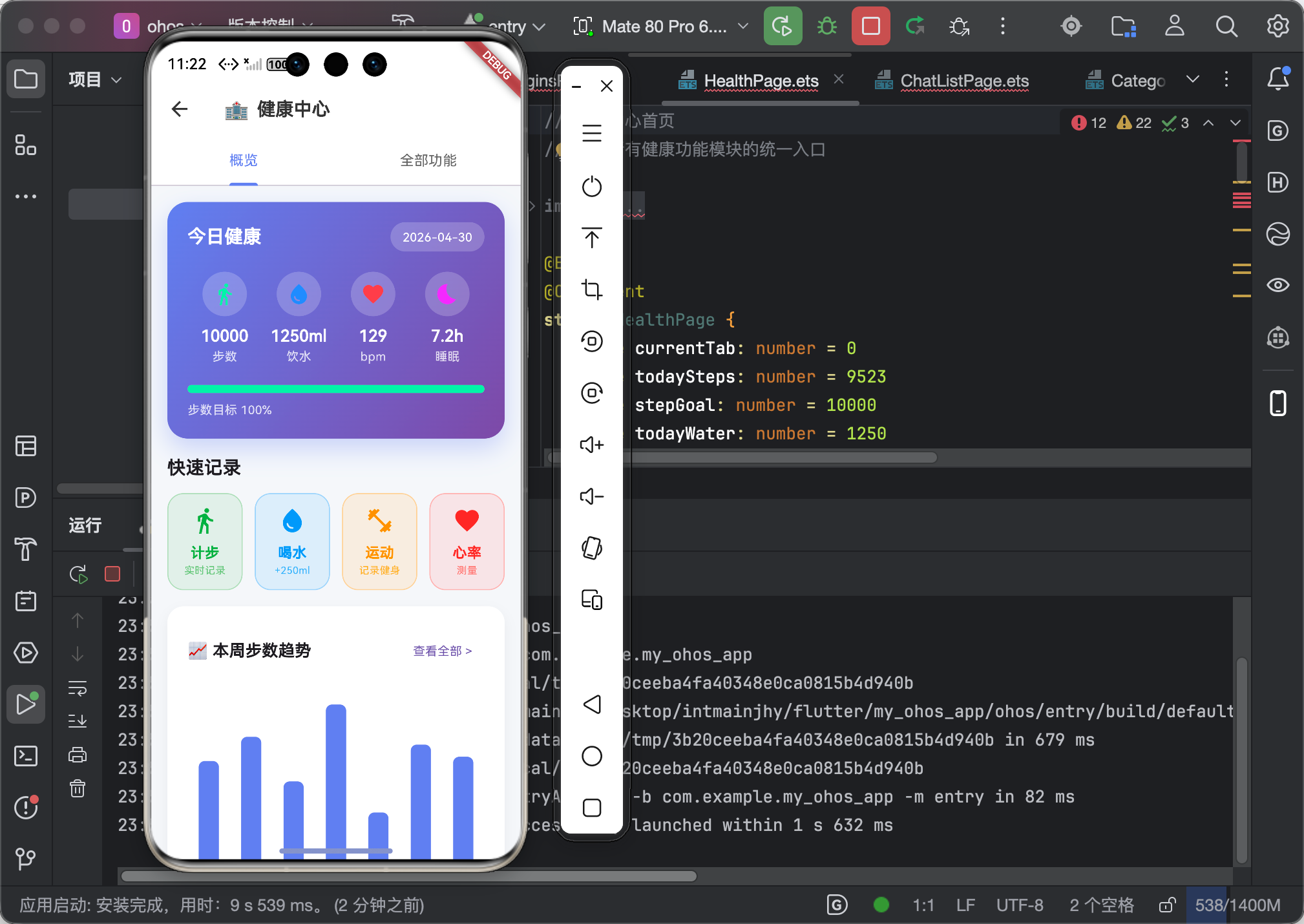
七、最终实现效果【仅供参考,通知功能无真机测试不了】
7.1 功能验证
| 功能 | 验证结果 |
|---|---|
| 通知权限 | ✅ 正确请求权限 |
| 定时提醒 | ✅ 按时发送通知 |
| 重复提醒 | ✅ 每日重复正常 |
| 点击通知 | ✅ 正确响应点击 |
| 取消提醒 | ✅ 正常取消 |
7.2 通知效果
| 元素 | 样式 |
|---|---|
| 图标 | 应用图标 |
| 标题 | 🩸 血压测量提醒 |
| 内容 | 自定义文本 |
| 声音 | 默认提示音 |
| 震动 | 开启 |
八、个人总结
8.1 学习心得
flutter_local_notifications 的配置确实比较繁琐,但功能非常实用 👍。
学到的关键点:
- 通知权限需要动态请求
- 时区处理是重点
- 重复通知需要设置 matchDateTimeComponents
8.2 核心要点
- 权限处理:先请求权限再安排通知
- 时区感知:使用 tz.TZDateTime 处理时间
- 重复通知:设置 DateTimeComponents
8.3 后续计划
本地通知完成了,接下来是:
- 📄 PDF 报告导出
- 📤 分享功能
敬请期待!
创作日期:2026 年 4 月
版权所有,转载须注明出处

作为“人工智能6S店”的官方数字引擎,为AI开发者与企业提供一个覆盖软硬件全栈、一站式门户。
更多推荐


 0
0 0
0- 0


 已为社区贡献76条内容

所有评论(0)