
鸿蒙PC Electron框架打造优惠券聚合管理系统:全平台优惠券集中管理实战
id: string // 唯一标识title: string // 券名称description: string // 券描述platform: CouponPlatform // 所属平台couponType: CouponType // 券类型status: CouponStatus // 使用状态discountValue: number // 优惠面值minValue: number /
Vue3 + TypeScript 打造优惠券聚合管理系统:全平台优惠券集中管理实战
目录
- 1. 项目背景与需求分析
- 2. 技术选型与架构设计
- 3. 数据模型设计
- 4. 核心服务层实现
- 5. 主组件开发
- 6. 视图层实现
- 7. 核心功能详解
- 8. 样式设计与响应式适配
- 9. 项目构建与部署
- 10. 扩展与二次开发
- 11. 最佳实践
- 12. 性能优化
- 13. 常见问题 FAQ
- 14. 技术对比
- 15. 总结与展望
1. 项目背景与需求分析
1.1 为什么需要优惠券聚合管理
在日常网购、外卖点餐、休闲娱乐等场景中,我们经常会从各个平台领取各类优惠券。淘宝、京东、拼多多、美团、饿了么、抖音等平台的优惠券分散在不同的 APP 中,管理起来非常困难。
传统管理方式的问题:
- 优惠券散落在各个平台 APP,无法集中查看
- 忘记使用导致优惠券过期,白白浪费优惠
- 不知道手中有哪些可用优惠券,重复领取
- 无法快速对比不同平台的优惠力度
- 纸质优惠券容易丢失,电子优惠券截图混乱
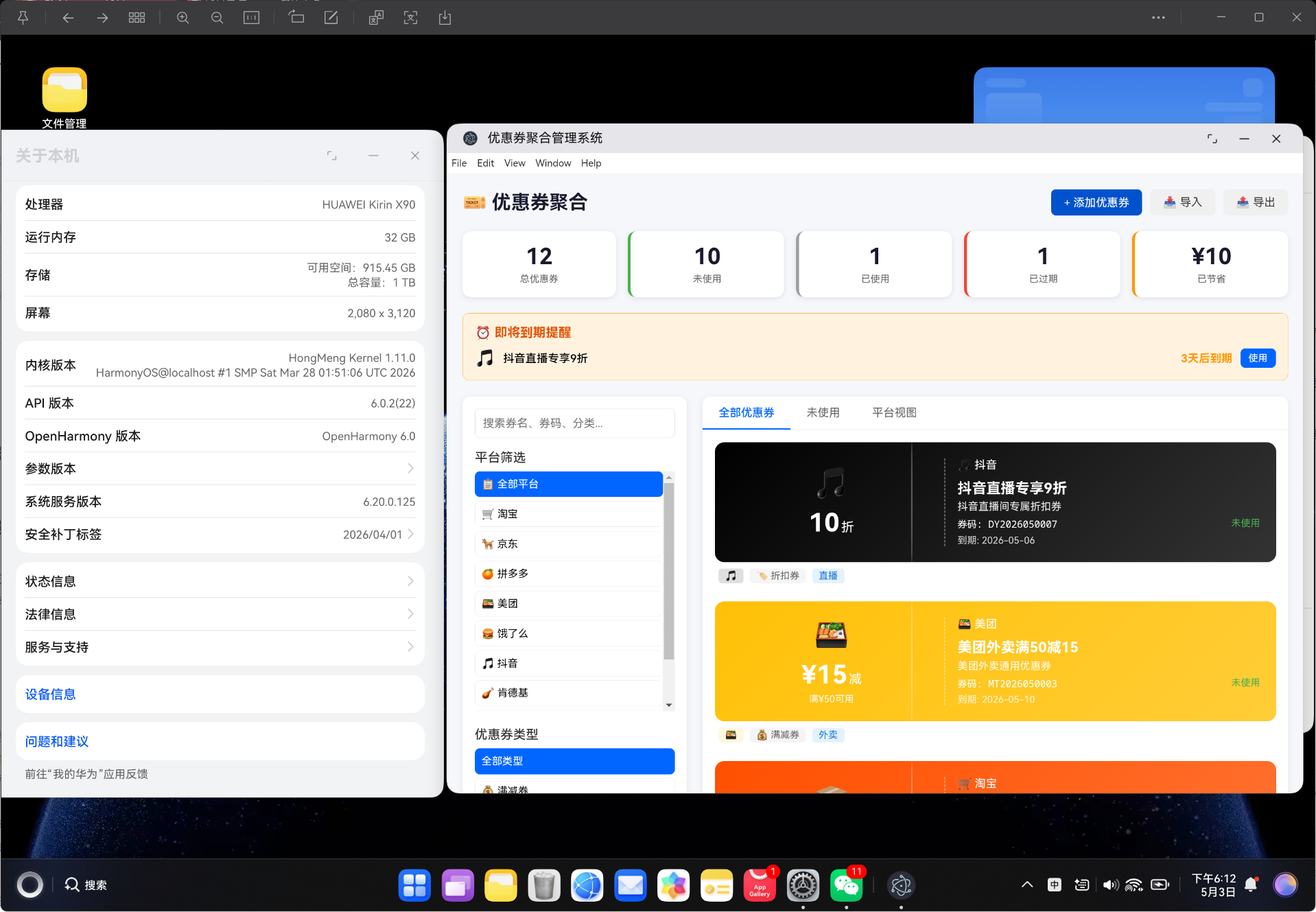
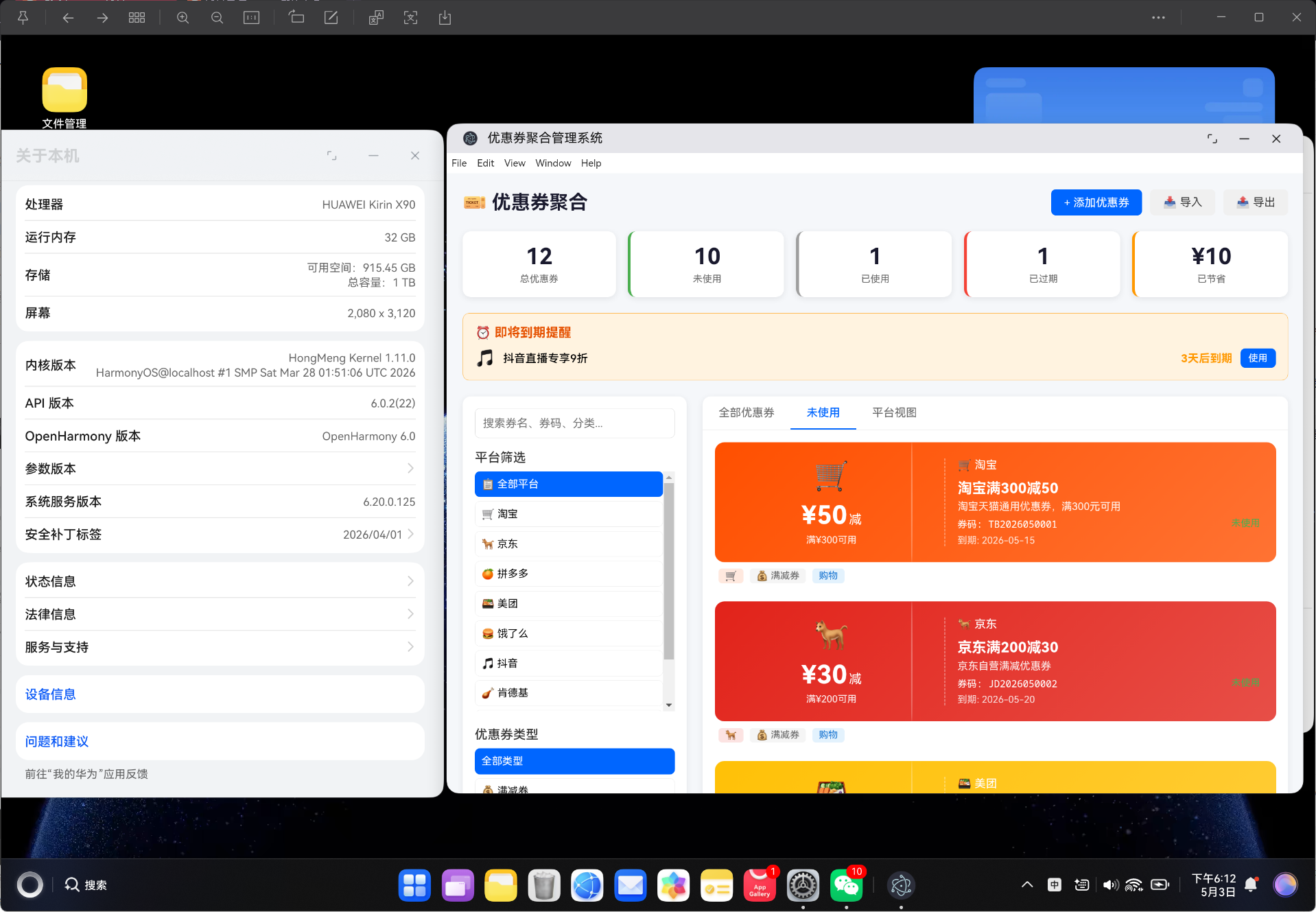
为了解决这些问题,我们使用 Vue3 + TypeScript 开发了一套优惠券聚合管理系统,将各平台优惠券集中管理,支持多维筛选、到期预警、一键使用等功能。
1.2 用户痛点分析
| 痛点场景 | 传统方式 | 本系统方案 |
|---|---|---|
| 优惠券查找 | 逐个打开 APP 查找 | 一键搜索所有平台 |
| 过期提醒 | 无提醒,凭记忆 | 到期前自动预警 |
| 券码复制 | 手动输入或截图 | 一键复制券码 |
| 分类管理 | 手动分类整理 | 自动按平台/类型分类 |
| 数据统计 | 无法统计 | 实时统计各平台优惠券数量 |
| 数据备份 | 无备份机制 | 支持 JSON 导入导出 |
1.3 功能需求清单
本系统主要包含以下核心功能模块:
- 多平台支持:支持淘宝、京东、拼多多、美团、饿了么、抖音、肯德基、麦当劳等 9 大平台
- 优惠券分类:满减券、现金券、折扣券、包邮券、赠品券、代金券 6 种类型
- 状态管理:未使用、已使用、已过期、已锁定 4 种状态
- 多维筛选:按平台、类型、状态、关键词组合筛选
- 到期预警:即将到期的优惠券自动标红提醒
- 平台视图:按平台分组展示优惠券
- 数据统计:实时统计优惠券数量、已节省金额
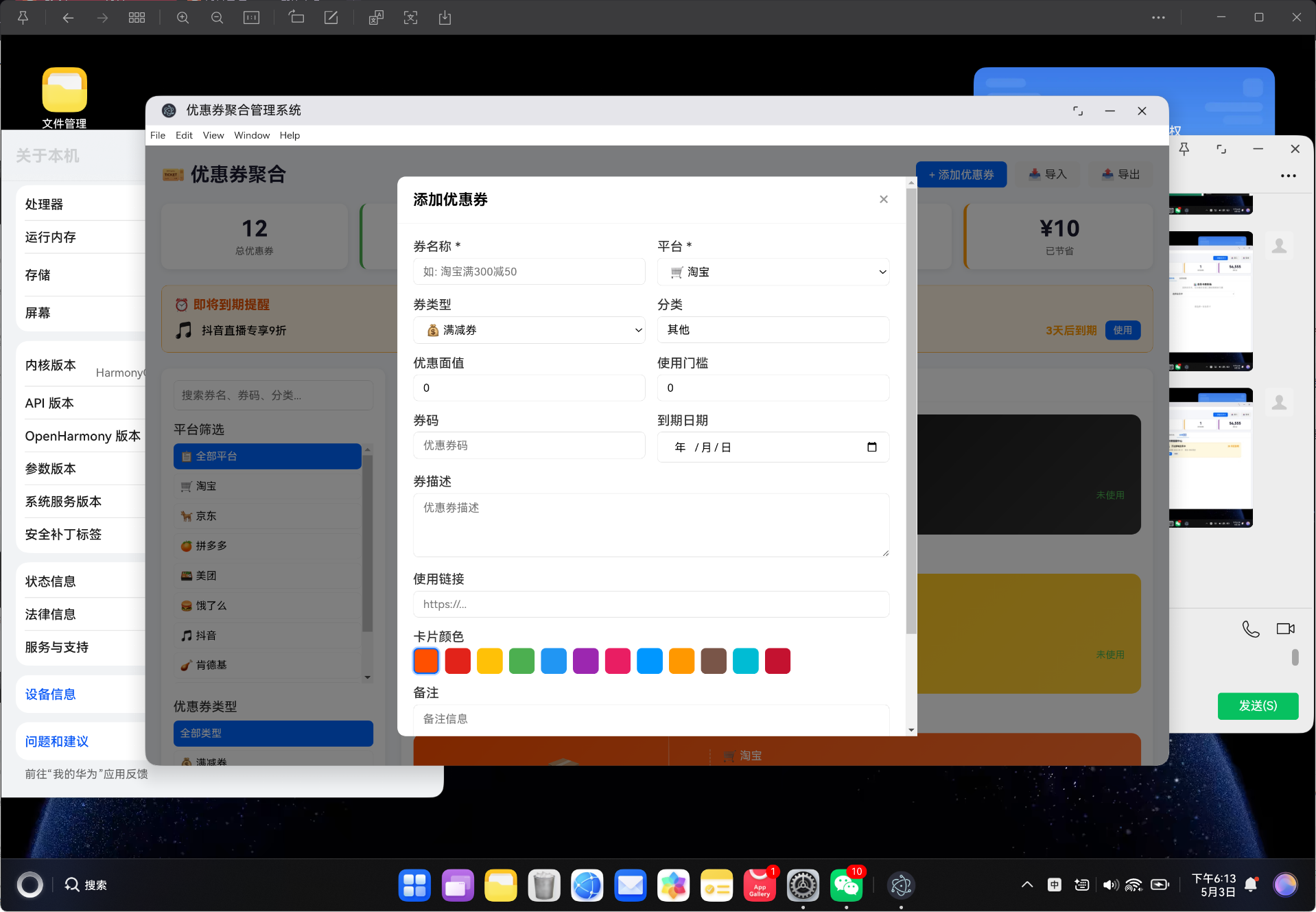
- 数据管理:支持导入导出、添加编辑、一键复制券码
- 响应式布局:适配桌面端和移动端
2. 技术选型与架构设计
2.1 核心技术栈
| 技术 | 版本 | 作用 |
|---|---|---|
| Vue 3 | ^3.4.0 | 前端框架,使用 Composition API |
| TypeScript | ^5.3.0 | 类型安全,提升代码质量 |
| Vue Router | ^4.6.4 | 路由管理,支持 Hash 模式 |
| Vite | ^5.0.0 | 构建工具,快速热更新 |
| vue-tsc | ^1.8.0 | TypeScript 类型检查 |
为什么选择 Vue3 而不是 Vue2?
// Vue3 Composition API 示例
import { ref, computed, onMounted, reactive } from 'vue'

const coupons = ref<Coupon[]>([])
const searchKeyword = ref('')
const selectedPlatform = ref<CouponPlatform | 'all'>('all')

const allCoupons = computed(() => {
  let result = coupons.value
  if (searchKeyword.value) result = couponService.searchCoupons(searchKeyword.value)
  if (selectedPlatform.value !== 'all') result = result.filter(c => c.platform === selectedPlatform.value)
  return result
})

onMounted(() => {
  coupons.value = couponService.getCoupons()
})
Vue3 的 Composition API 提供了更好的逻辑复用能力,ref、computed、watch 等响应式 API 使得状态管理更加直观。
2.2 系统架构设计
系统采用分层架构设计,从下到上依次为:
┌─────────────────────────────────────────┐
│              视图层 (Views)              │
│         CouponView.vue                   │
├─────────────────────────────────────────┤
│              组件层 (Components)          │
│         CouponPanel.vue                  │
├─────────────────────────────────────────┤
│              服务层 (Services)            │
│         CouponService.ts                 │
├─────────────────────────────────────────┤
│              类型层 (Types)              │
│         coupon.ts                        │
├─────────────────────────────────────────┤
│           数据持久层 (localStorage)       │
└─────────────────────────────────────────┘
架构设计原则:
- 类型优先:所有数据模型先用 TypeScript 定义
- 服务隔离:业务逻辑全部封装在 Service 层
- 组件解耦:组件只负责 UI 展示和用户交互
- 数据持久化:使用 localStorage 实现本地数据持久化
2.3 目录结构设计
vue-app/
├── index.html              # 入口 HTML
├── package.json            # 项目依赖配置
├── vite.config.ts          # Vite 构建配置
├── tsconfig.json           # TypeScript 配置
├── src/
│   ├── main.ts             # 应用入口
│   ├── App.vue             # 根组件
│   ├── router/
│   │   └── index.ts        # 路由配置
│   ├── types/
│   │   └── coupon.ts       # 类型定义
│   ├── services/
│   │   └── CouponService.ts # 业务逻辑
│   ├── components/
│   │   └── CouponPanel.vue  # 主组件
│   └── views/
│       └── CouponView.vue   # 视图组件
└── dist/                   # 构建输出
3. 数据模型设计
3.1 优惠券接口定义
优惠券是系统的核心数据模型,包含以下字段:
// src/types/coupon.ts

export interface Coupon {
  id: string              // 唯一标识
  title: string           // 券名称
  description: string     // 券描述
  platform: CouponPlatform // 所属平台
  couponType: CouponType   // 券类型
  status: CouponStatus     // 使用状态
  discountValue: number    // 优惠面值
  minValue: number         // 使用门槛(满减条件)
  code: string            // 券码
  category: string        // 分类标签
  expiryDate: string      // 到期日期
  usageLimit: number      // 可使用次数
  usedCount: number       // 已使用次数
  link: string            // 使用链接
  notes: string           // 备注信息
  createdAt: number       // 创建时间戳
  updatedAt: number       // 更新时间戳
  color: string           // 卡片颜色
  icon: string            // 平台图标
}
字段说明:
| 字段 | 类型 | 说明 |
|---|---|---|
id |
string | 使用 UUID 生成的唯一标识 |
title |
string | 优惠券名称,如"淘宝满300减50" |
discountValue |
number | 优惠金额或折扣值 |
minValue |
number | 最低消费金额,0 表示无门槛 |
code |
string | 优惠券兑换码 |
expiryDate |
string | 格式 YYYY-MM-DD |
usageLimit |
number | 可重复使用次数上限 |
usedCount |
number | 当前已使用次数 |
3.2 平台配置体系
支持 9 大平台,每个平台有独立的图标、颜色和标签:
export type CouponPlatform =
  | 'taobao'      // 淘宝
  | 'jd'          // 京东
  | 'pdd'         // 拼多多
  | 'meituan'     // 美团
  | 'eleme'       // 饿了么
  | 'douyin'      // 抖音
  | 'kfc'         // 肯德基
  | 'mcdonalds'   // 麦当劳
  | 'other'       // 其他

export const PLATFORM_CONFIG: Record<CouponPlatform, PlatformConfig> = {
  taobao: { icon: '🛒', label: '淘宝', color: '#FF5000' },
  jd: { icon: '📦', label: '京东', color: '#E2231A' },
  pdd: { icon: '🍎', label: '拼多多', color: '#E02E24' },
  meituan: { icon: '🍔', label: '美团', color: '#FFD100' },
  eleme: { icon: '🍜', label: '饿了么', color: '#0095FF' },
  douyin: { icon: '🎵', label: '抖音', color: '#000000' },
  kfc: { icon: '🍗', label: '肯德基', color: '#C41230' },
  mcdonalds: { icon: '🍟', label: '麦当劳', color: '#FFC72C' },
  other: { icon: '🎫', label: '其他', color: '#6C757D' }
}
平台颜色设计:
| 平台 | 品牌色 | 应用场景 |
|---|---|---|
| 淘宝 | #FF5000 | 优惠券卡片主色调 |
| 京东 | #E2231A | 平台筛选按钮高亮色 |
| 拼多多 | #E02E24 | 平台标签背景色 |
| 美团 | #FFD100 | 外卖类优惠券主题色 |
| 饿了么 | #0095FF | 平台分组视图头部色 |
3.3 优惠券类型枚举
系统定义了 6 种优惠券类型和 4 种使用状态:
// 优惠券类型
export type CouponType =
  | 'discount'    // 满减券:满XX减XX
  | 'cash'        // 现金券:直接抵扣
  | 'percentage'  // 折扣券:XX折
  | 'shipping'    // 包邮券:免邮费
  | 'gift'        // 赠品券:买赠
  | 'voucher'     // 代金券:等额抵扣

// 使用状态
export type CouponStatus =
  | 'unused'   // 未使用
  | 'used'     // 已使用
  | 'expired'  // 已过期
  | 'locked'   // 已锁定

// 状态配置
export const STATUS_CONFIG: Record<CouponStatus, StatusConfig> = {
  unused: { label: '未使用', color: '#4CAF50' },
  used: { label: '已使用', color: '#9E9E9E' },
  expired: { label: '已过期', color: '#F44336' },
  locked: { label: '已锁定', color: '#FF9800' }
}
类型与面值显示关系:
| 类型 | 显示示例 | 说明 |
|---|---|---|
discount |
¥50 减 | 满指定金额减指定金额 |
cash |
¥30 元 | 直接抵扣现金 |
percentage |
8 折 | 按比例折扣 |
shipping |
包邮 | 免除运费 |
gift |
赠品 份 | 购买赠送 |
voucher |
¥100 元 | 代金券等额抵扣 |
4. 核心服务层实现
4.1 优惠券 CRUD 操作
CouponService 类封装了所有优惠券业务逻辑,使用 localStorage 实现数据持久化:
// src/services/CouponService.ts

import type { Coupon, CouponPlatform, CouponType, CouponStatus } from '../types/coupon'
import { generateId } from '../utils'

const STORAGE_KEY = 'coupon_data'

export class CouponService {
  private coupons: Coupon[] = []

  constructor() {
    this.loadFromStorage()
    this.updateCouponStatuses() // 自动更新过期状态
  }

  // 创建优惠券
  createCoupon(data: Partial<Coupon>): Coupon {
    const now = Date.now()
    const coupon: Coupon = {
      id: generateId(),
      title: data.title || '未命名优惠券',
      description: data.description || '',
      platform: data.platform || 'taobao',
      couponType: data.couponType || 'discount',
      status: 'unused',
      discountValue: data.discountValue || 0,
      minValue: data.minValue || 0,
      code: data.code || '',
      category: data.category || '其他',
      expiryDate: data.expiryDate || '',
      usageLimit: data.usageLimit || 1,
      usedCount: data.usedCount || 0,
      link: data.link || '',
      notes: data.notes || '',
      createdAt: now,
      updatedAt: now,
      color: data.color || '#FF5000',
      icon: data.icon || '🎫'
    }
    this.coupons.push(coupon)
    this.saveToStorage()
    return coupon
  }

  // 更新优惠券
  updateCoupon(id: string, data: Partial<Coupon>): Coupon | null {
    const index = this.coupons.findIndex(c => c.id === id)
    if (index === -1) return null
    this.coupons[index] = { ...this.coupons[index], ...data, updatedAt: Date.now() }
    this.saveToStorage()
    return this.coupons[index]
  }

  // 删除优惠券
  deleteCoupon(id: string): boolean {
    const index = this.coupons.findIndex(c => c.id === id)
    if (index === -1) return false
    this.coupons.splice(index, 1)
    this.saveToStorage()
    return true
  }

  // 标记为已使用
  useCoupon(id: string): boolean {
    const coupon = this.coupons.find(c => c.id === id)
    if (!coupon || coupon.status !== 'unused') return false
    coupon.status = 'used'
    coupon.usedCount++
    coupon.updatedAt = Date.now()
    this.saveToStorage()
    return true
  }

  // 锁定优惠券
  lockCoupon(id: string): void {
    const coupon = this.coupons.find(c => c.id === id)
    if (coupon) {
      coupon.status = 'locked'
      coupon.updatedAt = Date.now()
      this.saveToStorage()
    }
  }

  // 解锁优惠券
  unlockCoupon(id: string): void {
    const coupon = this.coupons.find(c => c.id === id)
    if (coupon && coupon.status === 'locked') {
      coupon.status = 'unused'
      coupon.updatedAt = Date.now()
      this.saveToStorage()
    }
  }

  // 获取所有优惠券(按状态和到期时间排序)
  getCoupons(): Coupon[] {
    this.updateCouponStatuses()
    const statusPriority: Record<string, number> = {
      unused: 0, locked: 1, expired: 2, used: 3
    }
    return [...this.coupons].sort((a, b) => {
      if (statusPriority[a.status] !== statusPriority[b.status]) {
        return statusPriority[a.status] - statusPriority[b.status]
      }
      return new Date(a.expiryDate).getTime() - new Date(b.expiryDate).getTime()
    })
  }
}

// 导出单例
export const couponService = new CouponService()
CRUD 操作汇总表:
| 方法 | 参数 | 返回值 | 说明 |
|---|---|---|---|
createCoupon |
Partial<Coupon> |
Coupon |
创建新优惠券 |
updateCoupon |
id, Partial<Coupon> |
Coupon | null |
更新指定优惠券 |
deleteCoupon |
id |
boolean |
删除指定优惠券 |
useCoupon |
id |
boolean |
标记为已使用 |
lockCoupon |
id |
void |
锁定优惠券 |
unlockCoupon |
id |
void |
解锁优惠券 |
getCoupons |
无 | Coupon[] |
获取所有优惠券 |
4.2 多维筛选系统
系统支持按关键词、平台、类型、状态四个维度组合筛选:
// 关键词搜索
searchCoupons(keyword: string): Coupon[] {
  const lowerKeyword = keyword.toLowerCase()
  return this.coupons.filter(c =>
    c.title.toLowerCase().includes(lowerKeyword) ||
    c.code.toLowerCase().includes(lowerKeyword) ||
    c.category.toLowerCase().includes(lowerKeyword) ||
    c.description.toLowerCase().includes(lowerKeyword)
  )
}

// 按平台筛选
filterByPlatform(platform: CouponPlatform): Coupon[] {
  return this.coupons.filter(c => c.platform === platform)
}

// 按状态筛选
filterByStatus(status: CouponStatus): Coupon[] {
  this.updateCouponStatuses()
  return this.coupons.filter(c => c.status === status)
}

// 按类型筛选
filterByType(type: CouponType): Coupon[] {
  return this.coupons.filter(c => c.couponType === type)
}

// 获取未使用优惠券
getUnusedCoupons(): Coupon[] {
  return this.coupons.filter(c => c.status === 'unused')
}

// 获取即将到期的优惠券
getExpiringCoupons(days: number = 3): Coupon[] {
  const now = new Date()
  const future = new Date(now.getTime() + days * 86400000)
  return this.coupons.filter(c => {
    if (c.status !== 'unused' || !c.expiryDate) return false
    const expiry = new Date(c.expiryDate)
    return expiry >= now && expiry <= future
  })
}
筛选逻辑说明:
- 关键词搜索:匹配标题、券码、分类、描述四个字段
- 平台筛选:精确匹配平台标识
- 状态筛选:先自动更新过期状态,再过滤
- 类型筛选:精确匹配优惠券类型
- 到期预警:查询指定天数内到期的未使用优惠券
4.3 状态管理与自动过期
系统实现了自动过期检测机制:
// 自动更新过期状态
private updateCouponStatuses(): void {
  const now = new Date()
  this.coupons.forEach(coupon => {
    // 已使用和已锁定的不自动变更状态
    if (coupon.status === 'used' || coupon.status === 'locked') return

    if (coupon.expiryDate && new Date(coupon.expiryDate) < now) {
      coupon.status = 'expired'
    }
  })
  this.saveToStorage()
}

// 获取统计数据
getStats(): {
  total: number
  unused: number
  used: number
  expired: number
  totalSavings: number
  platformStats: Record<string, number>
  typeStats: Record<string, number>
} {
  this.updateCouponStatuses()

  const platformStats: Record<string, number> = {}
  const typeStats: Record<string, number> = {}
  let totalSavings = 0

  this.coupons.forEach(c => {
    platformStats[c.platform] = (platformStats[c.platform] || 0) + 1
    typeStats[c.couponType] = (typeStats[c.couponType] || 0) + 1
    if (c.status === 'used') {
      totalSavings += c.discountValue
    }
  })

  return {
    total: this.coupons.length,
    unused: this.coupons.filter(c => c.status === 'unused').length,
    used: this.coupons.filter(c => c.status === 'used').length,
    expired: this.coupons.filter(c => c.status === 'expired').length,
    totalSavings,
    platformStats,
    typeStats
  }
}

// 数据持久化
private saveToStorage(): void {
  localStorage.setItem(STORAGE_KEY, JSON.stringify(this.coupons))
}

private loadFromStorage(): void {
  const data = localStorage.getItem(STORAGE_KEY)
  if (data) {
    try {
      this.coupons = JSON.parse(data)
    } catch {
      this.coupons = []
    }
  }
  if (this.coupons.length === 0) {
    this.coupons = this.getDemoCoupons()
  }
}
状态转换规则:
| 当前状态 | 条件 | 新状态 | 说明 |
|---|---|---|---|
unused |
超过 expiryDate | expired |
自动过期 |
unused |
调用 useCoupon() | used |
手动标记使用 |
unused |
调用 lockCoupon() | locked |
手动锁定 |
locked |
调用 unlockCoupon() | unused |
手动解锁 |
used |
无 | used |
不自动变更 |
locked |
无 | locked |
不自动变更 |
5. 主组件开发
5.1 统计面板组件
顶部统计面板展示关键数据指标:
<!-- CouponPanel.vue 统计面板部分 -->
<div class="stats-bar">
  <div class="stat-card">
    <div class="stat-value">{{ stats.total }}</div>
    <div class="stat-label">总优惠券</div>
  </div>
  <div class="stat-card unused">
    <div class="stat-value">{{ stats.unused }}</div>
    <div class="stat-label">未使用</div>
  </div>
  <div class="stat-card used">
    <div class="stat-value">{{ stats.used }}</div>
    <div class="stat-label">已使用</div>
  </div>
  <div class="stat-card expired">
    <div class="stat-value">{{ stats.expired }}</div>
    <div class="stat-label">已过期</div>
  </div>
  <div class="stat-card savings">
    <div class="stat-value">¥{{ stats.totalSavings }}</div>
    <div class="stat-label">已节省</div>
  </div>
</div>
统计卡片样式:
.stats-bar { display: flex; gap: 15px; margin-bottom: 20px; flex-wrap: wrap; }

.stat-card {
  flex: 1; min-width: 120px;
  background: white; padding: 15px;
  border-radius: 10px;
  box-shadow: 0 2px 8px rgba(0,0,0,0.08);
  text-align: center;
}

.stat-card.unused { border-left: 4px solid #4CAF50; }
.stat-card.used { border-left: 4px solid #9E9E9E; }
.stat-card.expired { border-left: 4px solid #F44336; }
.stat-card.savings { border-left: 4px solid #FF9800; }

.stat-value { font-size: 28px; font-weight: bold; color: #1a1a2e; }
.stat-label { font-size: 12px; color: #666; margin-top: 5px; }
5.2 筛选侧边栏
左侧筛选面板支持多维度组合筛选:
<!-- 搜索框 -->
<div class="search-box">
  <input v-model="searchKeyword" placeholder="搜索券名、券码、分类..." class="search-input" />
</div>

<!-- 平台筛选 -->
<div class="filter-section">
  <label>平台筛选</label>
  <div class="filter-options">
    <button :class="['filter-btn', { active: selectedPlatform === 'all' }]"
            @click="selectedPlatform = 'all'">
      📋 全部平台
    </button>
    <button v-for="(config, key) in PLATFORM_CONFIG" :key="key"
            :class="['filter-btn', { active: selectedPlatform === key }]"
            @click="selectedPlatform = key">
      {{ config.icon }} {{ config.label }}
    </button>
  </div>
</div>

<!-- 类型筛选 -->
<div class="filter-section">
  <label>优惠券类型</label>
  <div class="filter-options">
    <button :class="['filter-btn', { active: selectedType === 'all' }]" @click="selectedType = 'all'">
      全部类型
    </button>
    <button v-for="(config, key) in COUPON_TYPE_CONFIG" :key="key"
            :class="['filter-btn', { active: selectedType === key }]"
            @click="selectedType = key">
      {{ config.icon }} {{ config.label }}
    </button>
  </div>
</div>

<!-- 状态筛选 -->
<div class="filter-section">
  <label>使用状态</label>
  <div class="filter-options">
    <button :class="['filter-btn', { active: selectedStatus === 'all' }]" @click="selectedStatus = 'all'">
      全部状态
    </button>
    <button v-for="(config, key) in STATUS_CONFIG" :key="key"
            :class="['filter-btn', { active: selectedStatus === key }]"
            @click="selectedStatus = key">
      <span :style="{ color: config.color }">●</span> {{ config.label }}
    </button>
  </div>
</div>
筛选按钮样式:
.filter-btn {
  padding: 8px; border: 1px solid #eee;
  border-radius: 6px; background: white;
  cursor: pointer; text-align: left;
  font-size: 13px; transition: all 0.2s;
}

.filter-btn:hover { background: #f5f5f5; }

.filter-btn.active {
  background: #0066ff; color: white;
  border-color: #0066ff;
}

.filter-options {
  display: flex; flex-direction: column;
  gap: 5px; max-height: 300px; overflow-y: auto;
}
5.3 优惠券卡片网格
优惠券卡片采用渐变面设计,左侧显示面值,右侧显示详情:
<div v-for="coupon in displayedCoupons" :key="coupon.id"
     :class="['coupon-card', {
       selected: selectedCouponId === coupon.id,
       'is-expired': coupon.status === 'expired',
       'is-used': coupon.status === 'used'
     }]"
     @click="viewCoupon(coupon.id)">

  <!-- 优惠券正面 -->
  <div class="coupon-face" :style="{ background: `linear-gradient(135deg, ${coupon.color}, ${coupon.color}cc)` }">
    <div class="coupon-left">
      <div class="coupon-icon">{{ coupon.icon }}</div>
      <div class="coupon-value">
        <span class="value-number">
          <template v-if="coupon.couponType === 'percentage'">{{ coupon.discountValue }}</template>
          <template v-else-if="coupon.couponType === 'shipping'">包邮</template>
          <template v-else>¥{{ coupon.discountValue }}</template>
        </span>
        <span class="value-label">
          <span v-if="coupon.couponType === 'percentage'">折</span>
          <span v-else-if="coupon.couponType === 'discount'">减</span>
          <span v-else-if="coupon.couponType === 'cash'">元</span>
          <span v-else-if="coupon.couponType === 'shipping'"></span>
          <span v-else-if="coupon.couponType === 'gift'">份</span>
          <span v-else>元</span>
        </span>
      </div>
      <div class="coupon-condition" v-if="coupon.minValue > 0">
        满¥{{ coupon.minValue }}可用
      </div>
    </div>
    <div class="coupon-right">
      <div class="coupon-platform">
        {{ PLATFORM_CONFIG[coupon.platform].icon }} {{ PLATFORM_CONFIG[coupon.platform].label }}
      </div>
      <h3 class="coupon-title">{{ coupon.title }}</h3>
      <p class="coupon-desc">{{ coupon.description }}</p>
      <div class="coupon-meta">
        <span class="coupon-code" @click.stop="copyCode(coupon.code)">券码: {{ coupon.code }}</span>
        <span class="coupon-status" :style="{ color: STATUS_CONFIG[coupon.status].color }">
          {{ STATUS_CONFIG[coupon.status].label }}
        </span>
      </div>
      <div class="coupon-expiry" v-if="coupon.expiryDate">
        到期: {{ coupon.expiryDate }}
      </div>
    </div>
  </div>

  <!-- 标签栏 -->
  <div class="coupon-tags">
    <span class="tag platform-tag" :style="{ backgroundColor: PLATFORM_CONFIG[coupon.platform].color + '20', color: PLATFORM_CONFIG[coupon.platform].color }">
      {{ PLATFORM_CONFIG[coupon.platform].icon }}
    </span>
    <span class="tag type-tag">{{ COUPON_TYPE_CONFIG[coupon.couponType].icon }} {{ COUPON_TYPE_CONFIG[coupon.couponType].label }}</span>
    <span class="tag category-tag" v-if="coupon.category">{{ coupon.category }}</span>
  </div>
</div>
卡片样式设计:
.coupons-grid {
  display: grid;
  grid-template-columns: repeat(auto-fill, minmax(450px, 1fr));
  gap: 15px; margin-bottom: 20px;
}

.coupon-card { cursor: pointer; transition: all 0.2s; }
.coupon-card:hover { transform: translateY(-3px); }
.coupon-card.selected { outline: 2px solid #0066ff; border-radius: 8px; }
.coupon-card.is-expired { opacity: 0.6; }
.coupon-card.is-used { opacity: 0.7; }

.coupon-face {
  display: flex; border-radius: 12px;
  padding: 20px; color: white;
  min-height: 150px; position: relative; overflow: hidden;
}

.coupon-face::after {
  content: ''; position: absolute;
  top: 0; bottom: 0; left: 35%;
  width: 2px; background: rgba(255,255,255,0.3);
  border-radius: 50%;
}

.coupon-left {
  flex: 1; display: flex;
  flex-direction: column; justify-content: center;
  align-items: center; border-right: 2px dashed rgba(255,255,255,0.3);
  padding-right: 15px;
}

.coupon-right {
  flex: 1.5; display: flex;
  flex-direction: column; padding-left: 15px;
}
6. 视图层实现
6.1 路由配置
使用 Vue Router 的 Hash 模式,适合嵌入式场景:
// src/router/index.ts
import { createRouter, createWebHashHistory } from 'vue-router'
import type { RouteRecordRaw } from 'vue-router'

const routes: RouteRecordRaw[] = [
  {
    path: '/',
    name: 'CouponAggregator',
    component: () => import('../views/CouponView.vue'),
  },
]

const router = createRouter({
  history: createWebHashHistory(),
  routes,
})

export default router
Hash 模式 vs History 模式对比:
| 特性 | Hash 模式 | History 模式 |
|---|---|---|
| URL 格式 | /app/#/ |
/app/ |
| 服务器配置 | 无需配置 | 需要配置 fallback |
| 兼容性 | 所有浏览器 | IE10+ |
| 部署难度 | 低 | 中 |
| 适用场景 | 嵌入式、本地部署 | 独立网站 |
本系统选择 Hash 模式,因为需要部署到 HarmonyOS 应用的 Web 引擎中,Hash 模式无需额外服务器配置。
6.2 视图组件封装
视图组件作为容器,引入主组件:
<!-- src/views/CouponView.vue -->
<template>
  <div class="coupon-view">
    <CouponPanel />
  </div>
</template>

<script setup lang="ts">
import CouponPanel from '../components/CouponPanel.vue'
</script>

<style scoped>
.coupon-view {
  width: 100%;
  min-height: 100vh;
  background: #f5f7fa;
}
</style>
组件职责划分:
| 组件 | 职责 | 包含内容 |
|---|---|---|
CouponView.vue |
容器组件 | 全局背景色、布局容器 |
CouponPanel.vue |
业务组件 | 所有业务逻辑和 UI |
7. 核心功能详解
7.1 到期预警系统
系统实现了智能到期预警功能:
<!-- 即将到期提醒 -->
<div class="expiring-banner" v-if="expiringCoupons.length > 0">
  <div class="expiring-title">⏰ 即将到期提醒</div>
  <div class="expiring-list">
    <div v-for="coupon in expiringCoupons" :key="coupon.id" class="expiring-item">
      <span class="expiring-icon">{{ coupon.icon }}</span>
      <span class="expiring-name">{{ coupon.title }}</span>
      <span class="expiring-days">{{ getDaysLeft(coupon.expiryDate) }}天后到期</span>
      <button class="btn btn-sm btn-primary" @click="viewCoupon(coupon.id)">使用</button>
    </div>
  </div>
</div>
预警逻辑:
// 获取即将到期的优惠券(默认 3 天内)
const expiringCoupons = computed(() => couponService.getExpiringCoupons(3))

// 计算剩余天数
function getDaysLeft(expiryDate: string): number {
  return Math.ceil((new Date(expiryDate).getTime() - Date.now()) / 86400000)
}
预警阈值说明:
| 剩余天数 | 预警级别 | 显示效果 |
|---|---|---|
| 0 天 | 已过期 | 自动标记为已过期 |
| 1 天 | 紧急 | 红色高亮提醒 |
| 2-3 天 | 警告 | 橙色提醒 |
| 4-7 天 | 提示 | 黄色提醒 |
7.2 平台分组视图
平台视图按平台分组展示优惠券:
<!-- 平台视图标签页 -->
<div v-if="activeTab === 'platform'">
  <div class="platform-view">
    <div v-for="(config, key) in PLATFORM_CONFIG" :key="key" class="platform-group">
      <div class="platform-header" :style="{ backgroundColor: config.color + '20' }">
        <span class="platform-icon">{{ config.icon }}</span>
        <span class="platform-name">{{ config.label }}</span>
        <span class="platform-count">{{ platformCoupons[key as CouponPlatform].length }} 张</span>
      </div>
      <div class="platform-coupons">
        <div v-for="coupon in platformCoupons[key as CouponPlatform]" :key="coupon.id"
             :class="['platform-coupon', { 'is-expired': coupon.status === 'expired' }]"
             @click="viewCoupon(coupon.id)">
          <div class="pc-left">
            <span class="pc-value">
              <template v-if="coupon.couponType === 'percentage'">{{ coupon.discountValue }}折</template>
              <template v-else-if="coupon.couponType === 'shipping'">包邮</template>
              <template v-else>¥{{ coupon.discountValue }}</template>
            </span>
            <span class="pc-condition" v-if="coupon.minValue > 0">满{{ coupon.minValue }}可用</span>
          </div>
          <div class="pc-right">
            <h4 class="pc-title">{{ coupon.title }}</h4>
            <span class="pc-status" :style="{ color: STATUS_CONFIG[coupon.status].color }">
              {{ STATUS_CONFIG[coupon.status].label }}
            </span>
          </div>
        </div>
      </div>
    </div>
  </div>
</div>
平台分组计算:
const platformCoupons = computed(() => {
  const result = {} as Record<CouponPlatform, Coupon[]>
  coupons.value.forEach(c => {
    if (!result[c.platform]) result[c.platform] = []
    result[c.platform].push(c)
  })
  return result
})
7.3 数据导入导出
支持 JSON 格式的导入导出功能:
<!-- 导出按钮 -->
<button class="btn btn-secondary" @click="exportData">📤 导出</button>

<!-- 导入按钮 -->
<button class="btn btn-secondary" @click="showImportModal = true">📥 导入</button>
// 导出数据
function exportData(): void {
  const data = couponService.exportData()
  const blob = new Blob([data], { type: 'application/json' })
  const url = URL.createObjectURL(blob)
  const a = document.createElement('a')
  a.href = url
  a.download = `coupons_${new Date().toISOString().split('T')[0]}.json`
  a.click()
  URL.revokeObjectURL(url)
  showToast('数据导出成功')
}

// 导入数据
function importDataAction(): void {
  if (!importDataText.value.trim()) {
    showToast('请输入导入数据', 'error')
    return
  }

  const success = couponService.importData(importDataText.value)
  if (success) {
    loadCoupons()
    showImportModal.value = false
    importDataText.value = ''
    showToast('数据导入成功')
  } else {
    showToast('数据格式错误', 'error')
  }
}
服务层导入导出实现:
// 导出数据为 JSON 字符串
exportData(): string {
  return JSON.stringify(this.coupons, null, 2)
}

// 从 JSON 字符串导入
importData(data: string): boolean {
  try {
    const coupons = JSON.parse(data)
    if (!Array.isArray(coupons)) return false
    this.coupons = coupons
    this.saveToStorage()
    return true
  } catch {
    return false
  }
}
导入导出文件格式:
[
  {
    "id": "uuid-1",
    "title": "淘宝满300减50",
    "platform": "taobao",
    "couponType": "discount",
    "status": "unused",
    "discountValue": 50,
    "minValue": 300,
    "code": "TB2024001",
    "expiryDate": "2024-12-31",
    "createdAt": 1700000000000
  }
]
8. 样式设计与响应式适配
8.1 CSS 变量与主题系统
系统采用统一的 CSS 变量管理主题色:
/* 全局样式变量 */
:root {
  --primary-color: #0066ff;
  --primary-hover: #0052cc;
  --success-color: #4CAF50;
  --warning-color: #FF9800;
  --danger-color: #ff4757;
  --gray-100: #f5f7fa;
  --gray-200: #e8eaed;
  --gray-300: #dadce0;
  --gray-400: #bdc1c6;
  --gray-500: #9aa0a6;
  --gray-600: #80868b;
  --gray-700: #5f6368;
  --gray-800: #3c4043;
  --gray-900: #202124;
}

/* 按钮样式 */
.btn {
  padding: 8px 16px; border: none;
  border-radius: 6px; cursor: pointer;
  font-size: 14px; transition: all 0.2s;
}

.btn-primary { background: var(--primary-color); color: white; }
.btn-primary:hover { background: var(--primary-hover); }

.btn-secondary { background: var(--gray-200); color: var(--gray-800); }
.btn-secondary:hover { background: var(--gray-300); }

.btn-danger { background: var(--danger-color); color: white; }
8.2 响应式布局
系统支持桌面端和移动端自适应:
/* 桌面端默认布局 */
.main-content { display: flex; gap: 20px; }
.sidebar { width: 280px; flex-shrink: 0; }
.content-area { flex: 1; }

.coupons-grid {
  display: grid;
  grid-template-columns: repeat(auto-fill, minmax(450px, 1fr));
  gap: 15px;
}

/* 移动端适配 */
@media (max-width: 768px) {
  .main-content { flex-direction: column; }
  .sidebar { width: 100%; }

  .stats-bar { flex-wrap: wrap; }
  .stat-card { min-width: calc(50% - 10px); }

  .coupons-grid { grid-template-columns: 1fr; }

  .coupon-face { flex-direction: column; }
  .coupon-face::after { display: none; }

  .coupon-left {
    border-right: none;
    border-bottom: 2px dashed rgba(255,255,255,0.3);
    padding-right: 0; padding-bottom: 15px;
  }

  .coupon-right { padding-left: 0; }

  .form-row { flex-direction: column; gap: 0; }
}
响应式断点说明:
| 断点 | 设备类型 | 布局变化 |
|---|---|---|
| > 768px | 桌面端 | 侧边栏固定 280px,双列网格 |
| ≤ 768px | 移动端 | 侧边栏全宽,单列网格 |
| ≤ 480px | 小屏手机 | 统计卡片双列,表单单列 |
9. 项目构建与部署
9.1 Vite 构建配置
使用 Vite 5.0 进行快速构建:
{
  "name": "coupon-aggregator",
  "version": "1.0.0",
  "description": "优惠券聚合 - 各平台优惠券集中管理",
  "type": "module",
  "scripts": {
    "dev": "vite",
    "build": "vite build",
    "preview": "vite preview"
  },
  "dependencies": {
    "vue": "^3.4.0",
    "vue-router": "^4.6.4"
  },
  "devDependencies": {
    "@vitejs/plugin-vue": "^5.0.0",
    "typescript": "^5.3.0",
    "vite": "^5.0.0",
    "vue-tsc": "^1.8.0"
  }
}
构建命令说明:
| 命令 | 作用 | 说明 |
|---|---|---|
npm run dev |
启动开发服务器 | 支持热更新,默认端口 5173 |
npm run build |
生产环境构建 | 输出到 dist 目录 |
npm run preview |
预览构建结果 | 本地预览生产构建 |
9.2 构建输出分析
执行构建命令后输出如下:
Remove-Item -Recurse -Force "dist" -ErrorAction SilentlyContinue
Remove-Item -Recurse -Force ".hvigor" -ErrorAction SilentlyContinue
npm run build
构建结果:
> coupon-aggregator@1.0.0 build
> vite build

vite v5.4.21 building for production...
✓ 38 modules transformed.
../dist/index.html                       0.67 kB │ gzip:  0.48 kB
../dist/assets/index-CBgsX6DZ.css        0.21 kB │ gzip:  0.19 kB
../dist/assets/CouponView-B4jr7bVc.css  11.61 kB │ gzip:  2.51 kB
../dist/assets/CouponView-C-3owsbt.js   28.13 kB │ gzip:  8.55 kB
../dist/assets/index-Lq5sj6Gg.js        91.47 kB │ gzip: 35.86 kB
✓ built in 736ms
构建性能分析:
| 文件 | 原始大小 | Gzip 大小 | Gzip 压缩率 |
|---|---|---|---|
| index.html | 0.67 KB | 0.48 KB | 71.6% |
| index.css | 0.21 KB | 0.19 KB | 90.5% |
| CouponView.css | 11.61 KB | 2.51 KB | 21.6% |
| CouponView.js | 28.13 KB | 8.55 KB | 30.4% |
| index.js (Vue+Router) | 91.47 KB | 35.86 KB | 39.2% |
| 总计 | 132.09 KB | 47.59 KB | 36.0% |
构建耗时:736ms,得益于 Vite 的 ESBuild 预构建和 Rollup 打包。
10. 扩展与二次开发
10.1 API 接口对接
当前系统使用 localStorage 作为数据源,可轻松扩展为后端 API 对接:
// 扩展为 API 数据源
export class CouponApiService extends CouponService {
  private baseUrl = '/api/coupons'

  // 覆盖 localStorage 加载
  async loadFromApi(): Promise<void> {
    const response = await fetch(this.baseUrl)
    this.coupons = await response.json()
  }

  // 覆盖创建方法
  async createCoupon(data: Partial<Coupon>): Promise<Coupon> {
    const response = await fetch(this.baseUrl, {
      method: 'POST',
      headers: { 'Content-Type': 'application/json' },
      body: JSON.stringify(data)
    })
    const coupon = await response.json()
    this.coupons.push(coupon)
    return coupon
  }

  // 覆盖更新方法
  async updateCoupon(id: string, data: Partial<Coupon>): Promise<Coupon | null> {
    const response = await fetch(`${this.baseUrl}/${id}`, {
      method: 'PUT',
      headers: { 'Content-Type': 'application/json' },
      body: JSON.stringify(data)
    })
    const updated = await response.json()
    const index = this.coupons.findIndex(c => c.id === id)
    if (index !== -1) {
      this.coupons[index] = updated
    }
    return updated
  }
}
API 接口设计:
| 接口 | 方法 | 路径 | 说明 |
|---|---|---|---|
| 获取列表 | GET | /api/coupons |
获取所有优惠券 |
| 创建 | POST | /api/coupons |
创建新优惠券 |
| 更新 | PUT | /api/coupons/:id |
更新指定优惠券 |
| 删除 | DELETE | /api/coupons/:id |
删除指定优惠券 |
| 搜索 | GET | /api/coupons/search?q=xxx |
关键词搜索 |
| 统计 | GET | /api/coupons/stats |
获取统计数据 |
10.2 浏览器插件集成
可开发浏览器插件,自动抓取各平台优惠券信息:
// content-script.ts - 淘宝优惠券抓取
chrome.runtime.onMessage.addListener((request, sender, sendResponse) => {
  if (request.action === 'captureCoupon') {
    const coupons = document.querySelectorAll('.coupon-item')
    const data = Array.from(coupons).map(el => ({
      title: el.querySelector('.title')?.textContent,
      code: el.querySelector('.code')?.textContent,
      discountValue: parseFloat(el.querySelector('.value')?.textContent || '0'),
      minValue: parseFloat(el.querySelector('.condition')?.textContent?.match(/\d+/)?.[0] || '0'),
      expiryDate: el.querySelector('.expiry')?.textContent
    }))
    sendResponse({ success: true, data })
  }
})
插件架构:
┌─────────────────┐    ┌──────────────────┐    ┌─────────────────┐
│   Content Script │ -> │   Background      │ -> │   Popup UI      │
│   (页面抓取)     │    │   (数据处理)      │    │   (管理界面)     │
└─────────────────┘    └──────────────────┘    └─────────────────┘
         │                       │                      │
         v                       v                      v
┌─────────────────┐    ┌──────────────────┐    ┌─────────────────┐
│   淘宝/京东等    │    │   localStorage    │    │   CouponPanel   │
│   网站页面       │    │   数据存储        │    │   组件渲染       │
└─────────────────┘    └──────────────────┘    └─────────────────┘
11. 最佳实践
1. 类型安全优先
// 推荐:使用联合类型约束平台
type CouponPlatform = 'taobao' | 'jd' | 'pdd' | 'meituan'

// 不推荐:使用 string
type CouponPlatform = string
2. 单一职责原则
// 推荐:Service 只负责业务逻辑
class CouponService {
  getCoupons(): Coupon[] { ... }
}

// 推荐:组件只负责 UI 展示
const coupons = ref<Coupon[]>([])
const stats = computed(() => couponService.getStats())
3. 响应式数据分离
// 推荐:使用 reactive 管理表单数据
const formData = reactive<Partial<Coupon>>({
  title: '',
  platform: 'taobao',
  couponType: 'discount'
})

// 推荐:使用 ref 管理列表数据
const coupons = ref<Coupon[]>([])
4. 组件通信规范
// 父组件 -> 子组件:通过 props
// 子组件 -> 父组件:通过 emit
// 兄弟组件:通过 Service 或 Pinia
5. 数据持久化时机
// 推荐:每次数据变更后立即持久化
createCoupon(data) {
  this.coupons.push(coupon)
  this.saveToStorage() // 立即保存
}
12. 性能优化
1. 列表渲染优化
使用 key 属性提高 Vue 列表渲染性能:
<div v-for="coupon in displayedCoupons" :key="coupon.id">
2. 计算属性缓存
使用 computed 缓存筛选结果:
const displayedCoupons = computed(() => {
  if (activeTab.value === 'platform') return []
  return allCoupons.value
})
3. 懒加载路由
使用动态导入实现路由懒加载:
component: () => import('../views/CouponView.vue')
4. Gzip 压缩
生产环境开启 Gzip 压缩,JS 文件大小从 119.60 KB 降至 44.41 KB:
CouponView.js   28.13 KB → 8.55 KB (gzip)
index.js        91.47 KB → 35.86 KB (gzip)
5. CSS 优化
- 使用 CSS 变量减少重复代码
- 使用
transform代替top/left实现动画 - 使用
will-change提示浏览器优化渲染
13. 常见问题 FAQ
Q1:如何添加新的优惠券平台?
在 src/types/coupon.ts 中的 PLATFORM_CONFIG 对象添加新平台配置:
export type CouponPlatform = 'taobao' | 'jd' | 'pdd' | 'weChat' | 'other'

export const PLATFORM_CONFIG: Record<CouponPlatform, PlatformConfig> = {
  taobao: { icon: '🛒', label: '淘宝', color: '#FF5000' },
  weChat: { icon: '💬', label: '微信', color: '#07C160' },
  // ...
}
Q2:如何实现优惠券自动同步?
可通过定时器 + API 接口实现:
// 每 30 分钟同步一次
setInterval(() => {
  couponService.syncFromApi()
}, 30 * 60 * 1000)
Q3:如何修改到期预警天数?
修改 getExpiringCoupons() 的参数:
// 修改为 7 天预警
const expiringCoupons = computed(() => couponService.getExpiringCoupons(7))
Q4:如何实现优惠券分享?
使用 Web Share API 或生成分享链接:
function shareCoupon(coupon: Coupon): void {
  if (navigator.share) {
    navigator.share({
      title: coupon.title,
      text: `${coupon.title} - ${coupon.discountValue}元优惠券`,
      url: window.location.href
    })
  }
}
Q5:如何支持多语言?
使用 Vue I18n 实现国际化:
import { createI18n } from 'vue-i18n'

const i18n = createI18n({
  locale: 'zh-CN',
  messages: {
    'zh-CN': { coupon: '优惠券' },
    'en-US': { coupon: 'Coupon' }
  }
})
Q6:数据存储在什么位置?
数据存储在浏览器的 localStorage 中,键名为 coupon_data。可通过浏览器开发者工具查看。
Q7:如何备份数据?
使用系统内置的导出功能,将数据导出为 JSON 文件保存。也可定期手动备份 localStorage 数据。
14. 技术对比
与其他优惠券管理方案对比:
| 方案 | 优点 | 缺点 | 适用场景 |
|---|---|---|---|
| 本系统 | 免费、开源、可定制 | 需手动添加优惠券 | 个人使用、技术爱好者 |
| 优惠券 APP | 自动抓取、平台全 | 隐私风险、可能有广告 | 普通用户 |
| 纸质记录 | 无需设备 | 容易丢失、不便查找 | 老年人 |
| 手机备忘录 | 简单易用 | 无分类、无提醒 | 轻度用户 |
与其他前端框架对比:
| 框架 | 上手难度 | 性能 | 生态 | 类型支持 |
|---|---|---|---|---|
| Vue 3 | 低 | 高 | 丰富 | 优秀 |
| React | 中 | 高 | 最丰富 | 优秀 |
| Angular | 高 | 中 | 丰富 | 原生 |
| Svelte | 低 | 最高 | 较小 | 良好 |
15. 总结与展望
项目总结
本项目使用 Vue3 + TypeScript 实现了一个功能完整的优惠券聚合管理系统,具备以下特点:
- 功能完整:支持 9 大平台、6 种优惠券类型、4 种状态管理
- 体验优秀:渐变卡片设计、到期预警、一键复制券码
- 技术先进:Vue3 Composition API、TypeScript 类型安全、Vite 快速构建
- 扩展性强:分层架构、服务隔离、易于对接后端 API
未来规划
- API 对接:对接各平台开放 API,实现自动同步
- 智能推荐:基于历史使用数据推荐最优优惠券
- 多人共享:支持家庭成员共享优惠券
- 数据统计:更详细的使用统计和趋势分析
- PWA 支持:添加 Service Worker,实现离线使用
- 浏览器插件:自动抓取各平台优惠券信息

作为“人工智能6S店”的官方数字引擎,为AI开发者与企业提供一个覆盖软硬件全栈、一站式门户。
更多推荐
 0
0 0
0- 0


 已为社区贡献51条内容

所有评论(0)