
鸿蒙6.0应用开发——人脸识别比对
·
适用场景
输入的两张比对图片是同一个人的照片时,系统返回的比对结果为"同一个人",置信分数比较高;当两张比对图片不是同一个人的照片时,系统返回的比对结果为"非同一个人",置信分数很低。可以用于APP中需要用到人脸比对功能的场景,比如娱乐类APP中比较两个人的相似度、与明星的相似度等。
效果如下图所示:
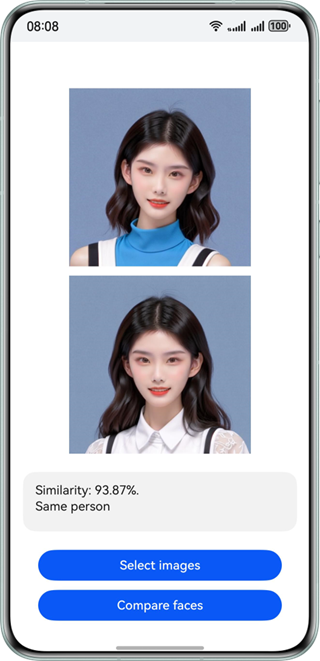
约束与限制
该能力当前不支持模拟器。
| AI能力 | 约束 |
|---|---|
| 人脸比对 | 当前功能只支持1v1人脸比对。输入的两张图像都需要合适的成像质量(建议720p以上),224px<高度<15210px,100px<宽度<10000px,高宽比例建议10:1以下(高度小于宽度的10倍),接近手机屏幕高宽比例为宜。 |
开发步骤
-
在使用人脸比对时,将实现人脸比对相关的类添加至工程。
import { faceComparator } from '@kit.CoreVisionKit'; import { image } from '@kit.ImageKit'; import { hilog } from '@kit.PerformanceAnalysisKit'; import { BusinessError } from '@kit.BasicServicesKit'; import { fileIo } from '@kit.CoreFileKit'; import { photoAccessHelper } from '@kit.MediaLibraryKit'; -
简单配置页面的布局,并在Button组件添加点击事件,拉起图库,选择图片。
Button('选择图片') .type(ButtonType.Capsule) .fontColor(Color.White) .alignSelf(ItemAlign.Center) .width('80%') .margin(10) .onClick(() => { // 拉起图库,获取图片资源 void this.selectImage(); }) -
通过图库获取图片资源,将图片转换为PixelMap,并添加初始化和释放方法。
async aboutToAppear(): Promise<void> { const initResult = await faceComparator.init(); hilog.info(0x0000, TAG, `Face comparator initialization result:${initResult}`); } async aboutToDisappear(): Promise<void> { await faceComparator.release(); hilog.info(0x0000, TAG, 'Face comparator released successfully'); } private async selectImage() { let uri = await this.openPhoto() if (uri === undefined) { hilog.error(0x0000, 'faceCompare', "Failed to get two image uris."); } this.loadImage(uri); } private async openPhoto(): Promise<string[]> { return new Promise<string[]>((resolve, reject) => { let photoPicker: photoAccessHelper.PhotoViewPicker = new photoAccessHelper.PhotoViewPicker(); photoPicker.select({ MIMEType: photoAccessHelper.PhotoViewMIMETypes.IMAGE_TYPE, maxSelectNumber: 2 }).then(res => { resolve(res.photoUris); }).catch((err: BusinessError) => { hilog.error(0x0000, TAG, `Failed to get photo image uris. code: ${err.code}, message: ${err.message}`); reject(); }); }); } private loadImage(names: string[]) { setTimeout(async () => { let imageSource: image.ImageSource | undefined = undefined; let fileSource = await fileIo.open(names[0], fileIo.OpenMode.READ_ONLY); imageSource = image.createImageSource(fileSource.fd); this.chooseImage = await imageSource.createPixelMap(); fileSource = await fileIo.open(names[1], fileIo.OpenMode.READ_ONLY); imageSource = image.createImageSource(fileSource.fd); this.chooseImage1 = await imageSource.createPixelMap(); }, 100 ) } -
实现人脸比对功能。实例化VisionInfo对象,传入两张图片的PixelMap,调用faceComparator.compareFaces方法进行人脸比对。
// 调用人脸比对接口 let visionInfo: faceComparator.VisionInfo = { pixelMap: this.chooseImage, }; let visionInfo1: faceComparator.VisionInfo = { pixelMap: this.chooseImage1, }; let data:faceComparator.FaceCompareResult = await faceComparator.compareFaces(visionInfo, visionInfo1); -
(可选)如果需要将结果展示在界面上,可以用下列代码。
let data:faceComparator.FaceCompareResult = await faceComparator.compareFaces(visionInfo, visionInfo1);
let faceString = "degree of similarity: "+ this.toPercentage(data.similarity)+((data.isSamePerson)?". is":". no")+ " same person";
hilog.info(0x0000, 'testTag', "faceString data is " + faceString);
this.dataValues = faceString;
开发实例
Index.ets
import { faceComparator } from '@kit.CoreVisionKit';
import { image } from '@kit.ImageKit';
import { hilog } from '@kit.PerformanceAnalysisKit';
import { BusinessError } from '@kit.BasicServicesKit';
import { fileIo } from '@kit.CoreFileKit';
import { photoAccessHelper } from '@kit.MediaLibraryKit';

const TAG: string = "FaceCompareSample";

@Entry
@Component
struct Index {
  @State chooseImage: PixelMap | undefined = undefined
  @State chooseImage1: PixelMap | undefined = undefined
  @State dataValues: string = ''

  async aboutToAppear(): Promise<void> {
    const initResult = await faceComparator.init();
    hilog.info(0x0000, TAG, `Face comparator initialization result:${initResult}`);
  }

  async aboutToDisappear(): Promise<void> {
    await faceComparator.release();
    hilog.info(0x0000, TAG, 'Face comparator released successfully');
  }

  build() {
    Column() {
      Image(this.chooseImage)
        .objectFit(ImageFit.Fill)
        .height('30%')
        .accessibilityDescription("默认图片1")
      Image(this.chooseImage1)
        .objectFit(ImageFit.Fill)
        .height('30%')
        .accessibilityDescription("默认图片2")
      Text(this.dataValues)
        .copyOption(CopyOptions.LocalDevice)
        .height('15%')
        .margin(10)
        .width('60%')
      Button('选择图片')
        .type(ButtonType.Capsule)
        .fontColor(Color.White)
        .alignSelf(ItemAlign.Center)
        .width('80%')
        .margin(10)
        .onClick(() => {
          // 拉起图库
          void this.selectImage()
        })
      Button('人脸比对')
        .type(ButtonType.Capsule)
        .fontColor(Color.White)
        .alignSelf(ItemAlign.Center)
        .width('80%')
        .margin(10)
        .onClick(() => {
          if(!this.chooseImage || !this.chooseImage1) {
            hilog.error(0x0000, TAG, "Failed to choose image");
            return;
          }
          // 调用人脸比对接口
          let visionInfo: faceComparator.VisionInfo = {
            pixelMap: this.chooseImage,
          };
          let visionInfo1: faceComparator.VisionInfo = {
            pixelMap: this.chooseImage1,
          };
          faceComparator.compareFaces(visionInfo, visionInfo1)
            .then((data: faceComparator.FaceCompareResult) => {
              let faceString = "degree of similarity: "+ this.toPercentage(data.similarity)+((data.isSamePerson)?". is":". no")+ " same person";
              hilog.info(0x0000, TAG, "faceString data is " + faceString);
              this.dataValues = faceString;
            })
            .catch((error: BusinessError) => {
              hilog.error(0x0000, TAG, `Face comparison failed. Code: ${error.code}, message: ${error.message}`);
              this.dataValues = `Error: ${error.message}`;
            });
        })
    }
    .width('100%')
    .height('100%')
    .justifyContent(FlexAlign.Center)
  }

  private toPercentage(num: number): string {
    return `${(num * 100).toFixed(2)}%`;
  }

  private async selectImage() {
    let uri = await this.openPhoto()
    if (uri === undefined) {
      hilog.error(0x0000, TAG, "Failed to get two image uris.");
    }
    this.loadImage(uri);
  }

  private async openPhoto(): Promise<string[]> {
    return new Promise<string[]>((resolve, reject) => {
      let photoPicker: photoAccessHelper.PhotoViewPicker = new photoAccessHelper.PhotoViewPicker();
      photoPicker.select({
        MIMEType: photoAccessHelper.PhotoViewMIMETypes.IMAGE_TYPE,
        maxSelectNumber: 2
      }).then(res => {
        resolve(res.photoUris);
      }).catch((err: BusinessError) => {
        hilog.error(0x0000, TAG, `Failed to get photo image uris. code: ${err.code}, message: ${err.message}`);
        reject();
      });
    });
  }

  private loadImage(names: string[]) {
    setTimeout(async () => {
      let imageSource: image.ImageSource | undefined = undefined;
      let fileSource: fileIo.File
      try {
        fileSource = await fileIo.open(names[0], fileIo.OpenMode.READ_ONLY);
        imageSource = image.createImageSource(fileSource.fd);
        this.chooseImage = await imageSource.createPixelMap();
      } catch (error) {
        hilog.error(0x0000, TAG, `Failed to open file. Error: ${error}`);
      }
      try {
        fileSource = await fileIo.open(names[1], fileIo.OpenMode.READ_ONLY);
        imageSource = image.createImageSource(fileSource.fd);
        this.chooseImage1 = await imageSource.createPixelMap();
        await fileIo.close(fileSource);
      } catch (error) {
        hilog.error(0x0000, TAG, `Failed to open the second file. Error: ${error}`);
      }
    }, 100
    )
  }
}
代码逻辑走读:
- 导入模块:
- 导入了多个模块,包括人脸比对模块、图像处理模块、日志模块、错误处理模块、文件操作模块和媒体库模块。
- 组件定义:
- 定义了一个名为
Index的组件,使用了@Entry和@Component装饰器,表示这是一个入口组件。
- 定义了一个名为
- 状态变量:
- 定义了三个状态变量:
chooseImage和chooseImage1用于存储用户选择的图片,dataValues用于存储比对结果。
- 定义了三个状态变量:
- 生命周期方法:
aboutToAppear:在组件即将显示时调用,初始化人脸比对模块。aboutToDisappear:在组件即将消失时调用,释放人脸比对模块。
- UI构建:
- 使用
Column布局,包含两个Image组件显示图片、一个Text组件显示比对结果、两个Button组件分别用于选择图片和进行人脸比对。
- 使用
- 按钮点击事件:
- 第一个按钮点击事件拉起图库,选择图片。
- 第二个按钮点击事件进行人脸比对,调用
faceComparator.compareFaces方法,并处理结果。
- 辅助功能:
toPercentage方法将相似度分数转换为百分比。selectImage方法处理图片选择逻辑。openPhoto方法打开图库并返回图片URI。loadImage方法根据URI加载图片到状态变量。

作为“人工智能6S店”的官方数字引擎,为AI开发者与企业提供一个覆盖软硬件全栈、一站式门户。
更多推荐



 59
59 0
0- 0


 已为社区贡献68条内容

所有评论(0)