
【maaath】Flutter for OpenHarmony 构建跨平台棋牌游戏应用
在移动应用开发领域,跨平台技术一直是开发者关注的焦点。随着 OpenHarmony 生态的蓬勃发展,Flutter 作为 Google 推出的跨平台 UI 框架,正在加速适配鸿蒙平台。本文将通过一个完整的棋牌游戏应用实例,展示如何使用 Flutter for OpenHarmony 构建高性能的跨平台应用,并提供从项目搭建到功能实现的完整指南。Flutter 的核心优势在于其自研的 Skia 图形
Flutter for OpenHarmony 实战:构建跨平台棋牌游戏应用
作者:maaath
欢迎加入开源鸿蒙跨平台社区:https://openharmonycrossplatform.csdn.net
前言
在移动应用开发领域,跨平台技术一直是开发者关注的焦点。随着 OpenHarmony 生态的蓬勃发展,Flutter 作为 Google 推出的跨平台 UI 框架,正在加速适配鸿蒙平台。本文将通过一个完整的棋牌游戏应用实例,展示如何使用 Flutter for OpenHarmony 构建高性能的跨平台应用,并提供从项目搭建到功能实现的完整指南。
Flutter 的核心优势在于其自研的 Skia 图形引擎,能够实现“一次开发,多端部署”。本文将手把手带你构建一个功能完善的棋牌游戏应用,包含游戏大厅、智能匹配、战绩统计、用户中心等核心模块。通过这个实战项目,你将掌握 Flutter 跨平台开发的核心技能。
项目概述
本次实战项目是一个功能完整的棋牌游戏应用,支持斗地主、麻将、牛牛、升级、德州扑克等多种棋牌玩法。应用采用简洁明快的绿色主题设计,界面美观,操作流畅。
项目特色:
- 多 Tab 页面导航架构设计
- 游戏房间列表展示与筛选功能
- 智能匹配系统与动画效果
- 战绩统计与排行榜展示
- 用户中心与成就系统
项目代码已托管至 AtomGit 平台,欢迎 Star 和 Fork:
- 仓库地址:https://atomgit.com/maaath/card_game_app
环境准备
开发环境要求
在进行 Flutter 跨平台开发前,需要确保开发环境满足以下要求:
| 组件 | 版本要求 | 说明 |
|---|---|---|
| Flutter SDK | 3.10+ | 建议使用最新稳定版 |
| Dart | 3.0+ | 随 Flutter 一同安装 |
| OpenHarmony SDK | API 9+ | 鸿蒙应用开发套件 |
| DevEco Studio | 4.0+ | 鸿蒙应用开发IDE |
项目创建步骤
首先,通过 Flutter CLI 创建项目:
flutter create --platforms=openharmony card_game_app
cd card_game_app
然后,配置项目依赖。在 pubspec.yaml 中添加必要的依赖包:
dependencies:
  flutter:
    sdk: flutter
  flutter_localizations:
    sdk: flutter
  intl: ^0.18.1
  provider: ^6.1.1
  http: ^1.1.0
  shared_preferences: ^2.2.2

dev_dependencies:
  flutter_test:
    sdk: flutter
  flutter_lints: ^3.0.0
核心功能实现
1. 数据模型设计
良好的数据模型是应用架构的基础。定义清晰的数据结构,有助于代码的维护和扩展。以下是应用的核心数据模型:
// 游戏类型枚举
enum GameType {
  doudizhu,  // 斗地主
  mahjong,   // 麻将
  xipai,     // 升级
  bull,      // 牛牛
  dezhou     // 德州扑克
}

// 游戏类型名称映射
const Map<GameType, String> gameTypeNames = {
  GameType.doudizhu: '斗地主',
  GameType.mahjong: '麻将',
  GameType.xipai: '升级',
  GameType.bull: '牛牛',
  GameType.dezhou: '德州扑克',
};

// 游戏房间模型
class GameRoom {
  final String id;
  final String name;
  final GameType gameType;
  final int maxPlayers;
  final int currentPlayers;
  final int ante;
  final bool isHot;
  final String ownerName;

  GameRoom({
    required this.id,
    required this.name,
    required this.gameType,
    required this.maxPlayers,
    required this.currentPlayers,
    required this.ante,
    this.isHot = false,
    required this.ownerName,
  });

  bool get isFull => currentPlayers >= maxPlayers;
  bool get isWaiting => currentPlayers < maxPlayers;
}

// 战绩记录模型
class BattleRecord {
  final String id;
  final GameType gameType;
  final String roomName;
  final DateTime playedAt;
  final int duration;
  final int position;
  final int score;
  final int coins;
  final bool isWin;
  final bool isMVP;

  BattleRecord({
    required this.id,
    required this.gameType,
    required this.roomName,
    required this.playedAt,
    required this.duration,
    required this.position,
    required this.score,
    required this.coins,
    required this.isWin,
    this.isMVP = false,
  });
}
2. 网络服务层封装
为了保证代码的整洁性和可维护性,我们采用分层架构。网络服务层负责与后端 API 交互,返回标准化的数据格式:
import 'dart:math';
import '../models/game_models.dart';

class GameService {
  static final GameService _instance = GameService._internal();
  factory GameService() => _instance;
  GameService._internal();

  final Random _random = Random();

  // 获取游戏房间列表
  Future<List<GameRoom>> getGameRooms({
    int page = 1,
    int pageSize = 20,
    GameType? gameType,
  }) async {
    await Future.delayed(const Duration(milliseconds: 500));

    final rooms = <GameRoom>[];
    final gameTypes = gameType != null ? [gameType] : GameType.values;

    for (int i = 0; i < pageSize; i++) {
      final index = (page - 1) * pageSize + i;
      final type = gameTypes[index % gameTypes.length];

      rooms.add(GameRoom(
        id: 'room_$index',
        name: '${gameTypeNames[type]} ${(index ~/ 4) + 1}号桌',
        gameType: type,
        maxPlayers: _getMaxPlayers(type),
        currentPlayers: _random.nextInt(_getMaxPlayers(type)),
        ante: [10, 50, 100, 500, 1000][index % 5],
        isHot: index % 5 == 0,
        ownerName: ['牌神张三', '好运李四', '老王', '小美'][index % 4],
      ));
    }

    return rooms;
  }

  int _getMaxPlayers(GameType type) {
    switch (type) {
      case GameType.doudizhu:
        return 3;
      case GameType.mahjong:
      case GameType.xipai:
        return 4;
      case GameType.bull:
        return 6;
      case GameType.dezhou:
        return 9;
    }
  }

  // 获取战绩记录
  Future<List<BattleRecord>> getBattleRecords({
    int page = 1,
    int pageSize = 15,
    GameType? gameType,
  }) async {
    await Future.delayed(const Duration(milliseconds: 400));

    final records = <BattleRecord>[];
    final gameTypes = gameType != null ? [gameType] : GameType.values;

    for (int i = 0; i < pageSize; i++) {
      final index = (page - 1) * pageSize + i;
      final type = gameTypes[index % gameTypes.length];
      final isWin = _random.nextDouble() > 0.4;

      records.add(BattleRecord(
        id: 'record_$index',
        gameType: type,
        roomName: '${gameTypeNames[type]}比赛',
        playedAt: DateTime.now().subtract(Duration(hours: index)),
        duration: 10 + _random.nextInt(20),
        position: isWin ? 1 : 2 + _random.nextInt(3),
        score: isWin ? 100 + _random.nextInt(500) : -50 - _random.nextInt(300),
        coins: (isWin ? 100 : -50) * _random.nextInt(10),
        isWin: isWin,
        isMVP: isWin && _random.nextBool(),
      ));
    }

    return records;
  }

  // 获取用户资料
  Future<Map<String, dynamic>> getUserProfile() async {
    await Future.delayed(const Duration(milliseconds: 300));

    return {
      'id': 'user_001',
      'nickname': '棋牌达人',
      'level': 25,
      'experience': 12500,
      'totalGames': 1568,
      'winGames': 892,
      'winRate': 56.9,
      'totalCoins': 258600,
      'diamonds': 380,
      'vipLevel': 5,
      'honorTitle': '牌王',
      'signature': '牌如人生,每一局都是新的开始',
    };
  }
}
3. 主页面框架搭建
应用采用底部导航栏的经典布局,包含四个主要模块:大厅、匹配、战绩、我的。合理的状态管理是保证应用流畅运行的关键:
import 'package:flutter/material.dart';
import 'lobby_page.dart';
import 'match_page.dart';
import 'battle_record_page.dart';
import 'profile_page.dart';
class MainPage extends StatefulWidget {
const MainPage({super.key});
State<MainPage> createState() => _MainPageState();
}
class _MainPageState extends State<MainPage> {
int _currentIndex = 0;
final List<Widget> _pages = const [
LobbyPage(),
MatchPage(),
BattleRecordPage(),
ProfilePage(),
];
final List<Map<String, dynamic>> _tabItems = [
{'title': '大厅', 'icon': Icons.videogame_asset},
{'title': '匹配', 'icon': Icons.sports_esports},
{'title': '战绩', 'icon': Icons.emoji_events},
{'title': '我的', 'icon': Icons.person},
];
Widget build(BuildContext context) {
return Scaffold(
body: IndexedStack(
index: _currentIndex,
children: _pages,
),
bottomNavigationBar: Container(
decoration: BoxDecoration(
color: Colors.white,
boxShadow: [
BoxShadow(
color: Colors.black.withOpacity(0.1),
blurRadius: 10,
offset: const Offset(0, -2),
),
],
),
child: SafeArea(
child: Padding(
padding: const EdgeInsets.symmetric(vertical: 8),
child: Row(
mainAxisAlignment: MainAxisAlignment.spaceAround,
children: List.generate(_tabItems.length, (index) {
final item = _tabItems[index];
final isSelected = _currentIndex == index;
return InkWell(
onTap: () => setState(() => _currentIndex = index),
borderRadius: BorderRadius.circular(12),
child: Padding(
padding: const EdgeInsets.symmetric(
horizontal: 16,
vertical: 8,
),
child: Column(
mainAxisSize: MainAxisSize.min,
children: [
Icon(
item['icon'],
size: 24,
color: isSelected
? const Color(0xFF4CAF50)
: Colors.grey,
),
const SizedBox(height: 4),
Text(
item['title'],
style: TextStyle(
fontSize: 12,
color: isSelected
? const Color(0xFF4CAF50)
: Colors.grey,
fontWeight: isSelected
? FontWeight.bold
: FontWeight.normal,
),
),
],
),
),
);
}),
),
),
),
),
);
}
}
4. 游戏大厅页面实现
大厅页面展示所有可加入的游戏房间,支持按游戏类型筛选。列表采用下拉刷新和上拉加载的模式,提升用户体验:
import 'package:flutter/material.dart';
import '../services/game_service.dart';
import '../models/game_models.dart';
class LobbyPage extends StatefulWidget {
const LobbyPage({super.key});
State<LobbyPage> createState() => _LobbyPageState();
}
class _LobbyPageState extends State<LobbyPage> {
final GameService _gameService = GameService();
final ScrollController _scrollController = ScrollController();
List<GameRoom> _rooms = [];
bool _isLoading = true;
bool _isLoadingMore = false;
bool _hasMore = true;
int _currentPage = 1;
GameType? _selectedGameType;
void initState() {
super.initState();
_loadRooms();
_scrollController.addListener(_onScroll);
}
void dispose() {
_scrollController.dispose();
super.dispose();
}
void _onScroll() {
if (_scrollController.position.pixels >=
_scrollController.position.maxScrollExtent - 200) {
_loadMoreRooms();
}
}
Future<void> _loadRooms() async {
setState(() {
_isLoading = true;
_currentPage = 1;
});
try {
final rooms = await _gameService.getGameRooms(
page: 1,
gameType: _selectedGameType,
);
setState(() {
_rooms = rooms;
_hasMore = rooms.length >= 20;
_isLoading = false;
});
} catch (e) {
setState(() => _isLoading = false);
_showError('加载失败');
}
}
Future<void> _loadMoreRooms() async {
if (_isLoadingMore || !_hasMore) return;
setState(() => _isLoadingMore = true);
try {
final rooms = await _gameService.getGameRooms(
page: _currentPage + 1,
gameType: _selectedGameType,
);
setState(() {
_rooms.addAll(rooms);
_currentPage++;
_hasMore = rooms.length >= 20;
_isLoadingMore = false;
});
} catch (e) {
setState(() => _isLoadingMore = false);
}
}
void _showError(String message) {
ScaffoldMessenger.of(context).showSnackBar(
SnackBar(content: Text(message)),
);
}
Widget build(BuildContext context) {
return Scaffold(
backgroundColor: const Color(0xFFF5F5F5),
appBar: AppBar(
title: const Text('棋牌大厅'),
backgroundColor: Colors.white,
foregroundColor: const Color(0xFF333333),
elevation: 0,
actions: [
TextButton.icon(
onPressed: _showQuickJoinDialog,
icon: const Icon(Icons.flash_on, color: Color(0xFF4CAF50)),
label: const Text('快速加入'),
),
],
),
body: Column(
children: [
_buildTypeFilter(),
Expanded(child: _buildRoomList()),
],
),
);
}
Widget _buildTypeFilter() {
return Container(
color: Colors.white,
padding: const EdgeInsets.symmetric(vertical: 8),
child: SingleChildScrollView(
scrollDirection: Axis.horizontal,
padding: const EdgeInsets.symmetric(horizontal: 12),
child: Row(
children: [
_buildFilterChip(null, '全部'),
...GameType.values.map(
(type) => _buildFilterChip(type, gameTypeNames[type]!),
),
],
),
),
);
}
Widget _buildFilterChip(GameType? type, String label) {
final isSelected = _selectedGameType == type;
return Padding(
padding: const EdgeInsets.only(right: 8),
child: FilterChip(
label: Text(label),
selected: isSelected,
onSelected: (selected) {
setState(() {
_selectedGameType = selected ? type : null;
});
_loadRooms();
},
backgroundColor: const Color(0xFFE8F5E9),
selectedColor: const Color(0xFF4CAF50),
labelStyle: TextStyle(
color: isSelected ? Colors.white : const Color(0xFF666666),
),
shape: RoundedRectangleBorder(
borderRadius: BorderRadius.circular(16),
),
),
);
}
Widget _buildRoomList() {
if (_isLoading) {
return const Center(
child: CircularProgressIndicator(color: Color(0xFF4CAF50)),
);
}
if (_rooms.isEmpty) {
return Center(
child: Column(
mainAxisAlignment: MainAxisAlignment.center,
children: [
const Icon(Icons.inbox, size: 64, color: Colors.grey),
const SizedBox(height: 16),
const Text('暂无房间', style: TextStyle(fontSize: 16)),
const SizedBox(height: 16),
ElevatedButton(
onPressed: _loadRooms,
child: const Text('刷新试试'),
),
],
),
);
}
return RefreshIndicator(
onRefresh: _loadRooms,
color: const Color(0xFF4CAF50),
child: ListView.builder(
controller: _scrollController,
padding: const EdgeInsets.all(12),
itemCount: _rooms.length + (_hasMore ? 1 : 0),
itemBuilder: (context, index) {
if (index >= _rooms.length) {
return _isLoadingMore
? const Center(
child: Padding(
padding: EdgeInsets.all(16),
child: CircularProgressIndicator(),
),
)
: Center(
child: TextButton(
onPressed: _loadMoreRooms,
child: const Text('加载更多'),
),
);
}
return _buildRoomCard(_rooms[index]);
},
),
);
}
Widget _buildRoomCard(GameRoom room) {
return Card(
margin: const EdgeInsets.only(bottom: 12),
elevation: 2,
shape: RoundedRectangleBorder(borderRadius: BorderRadius.circular(12)),
child: InkWell(
onTap: room.isWaiting ? () => _joinRoom(room) : null,
borderRadius: BorderRadius.circular(12),
child: Padding(
padding: const EdgeInsets.all(12),
child: Column(
crossAxisAlignment: CrossAxisAlignment.start,
children: [
Row(
children: [
Container(
width: 48,
height: 48,
decoration: BoxDecoration(
color: const Color(0xFFE8F5E9),
borderRadius: BorderRadius.circular(8),
),
child: Center(
child: Text(
gameTypeNames[room.gameType]!.substring(0, 1),
style: const TextStyle(
fontSize: 20,
fontWeight: FontWeight.bold,
color: Color(0xFF4CAF50),
),
),
),
),
const SizedBox(width: 12),
Expanded(
child: Column(
crossAxisAlignment: CrossAxisAlignment.start,
children: [
Row(
children: [
Text(
room.name,
style: const TextStyle(
fontSize: 16,
fontWeight: FontWeight.w500,
),
),
if (room.isHot) ...[
const SizedBox(width: 8),
Container(
padding: const EdgeInsets.symmetric(
horizontal: 6,
vertical: 2,
),
decoration: BoxDecoration(
color: const Color(0xFFFF5722),
borderRadius: BorderRadius.circular(4),
),
child: const Text(
'HOT',
style: TextStyle(
fontSize: 10,
color: Colors.white,
),
),
),
],
],
),
const SizedBox(height: 4),
Text(
'${gameTypeNames[room.gameType]} | 底注 ${room.ante}',
style: const TextStyle(
fontSize: 12,
color: Color(0xFF666666),
),
),
],
),
),
Column(
crossAxisAlignment: CrossAxisAlignment.end,
children: [
Text(
room.isWaiting ? '等待中' : '已满',
style: TextStyle(
fontSize: 12,
color: room.isWaiting
? const Color(0xFF4CAF50)
: Colors.grey,
),
),
Text(
'${room.currentPlayers}/${room.maxPlayers}',
style: const TextStyle(
fontSize: 14,
fontWeight: FontWeight.bold,
),
),
],
),
],
),
const SizedBox(height: 12),
Row(
children: [
const Icon(Icons.person, size: 14, color: Color(0xFF666666)),
const SizedBox(width: 4),
Text(
room.ownerName,
style: const TextStyle(fontSize: 12, color: Color(0xFF666666)),
),
const Spacer(),
ElevatedButton(
onPressed: room.isWaiting ? () => _joinRoom(room) : null,
style: ElevatedButton.styleFrom(
backgroundColor: room.isWaiting
? const Color(0xFF4CAF50)
: Colors.grey,
padding: const EdgeInsets.symmetric(
horizontal: 20,
vertical: 8,
),
shape: RoundedRectangleBorder(
borderRadius: BorderRadius.circular(16),
),
),
child: const Text('加入', style: TextStyle(color: Colors.white)),
),
],
),
],
),
),
),
);
}
void _joinRoom(GameRoom room) {
showDialog(
context: context,
builder: (context) => AlertDialog(
title: const Text('加入房间'),
content: Text('确定要加入 ${room.name} 吗?'),
actions: [
TextButton(
onPressed: () => Navigator.pop(context),
child: const Text('取消'),
),
ElevatedButton(
onPressed: () {
Navigator.pop(context);
ScaffoldMessenger.of(context).showSnackBar(
const SnackBar(content: Text('正在加入房间...')),
);
},
child: const Text('确定'),
),
],
),
);
}
void _showQuickJoinDialog() {
ScaffoldMessenger.of(context).showSnackBar(
const SnackBar(content: Text('正在为您匹配房间...')),
);
}
}
5. 智能匹配页面设计
匹配页面是应用的核心功能之一,提供流畅的匹配动画和状态展示。良好的动画效果能够提升用户体验,让等待过程不再枯燥:
import 'package:flutter/material.dart';
import '../models/game_models.dart';
class MatchPage extends StatefulWidget {
const MatchPage({super.key});
State<MatchPage> createState() => _MatchPageState();
}
class _MatchPageState extends State<MatchPage> with TickerProviderStateMixin {
bool _isMatching = false;
double _progress = 0.0;
List<Map<String, dynamic>> _matchedPlayers = [];
late AnimationController _rotationController;
late AnimationController _pulseController;
void initState() {
super.initState();
_rotationController = AnimationController(
vsync: this,
duration: const Duration(seconds: 2),
)..repeat();
_pulseController = AnimationController(
vsync: this,
duration: const Duration(milliseconds: 1500),
)..repeat(reverse: true);
}
void dispose() {
_rotationController.dispose();
_pulseController.dispose();
super.dispose();
}
void _startMatch() {
setState(() {
_isMatching = true;
_progress = 0.0;
_matchedPlayers = [];
});
_simulateMatching();
}
void _simulateMatching() async {
for (int i = 0; i <= 100; i += 5) {
await Future.delayed(const Duration(milliseconds: 150));
if (!mounted) return;
setState(() {
_progress = i.toDouble();
_updateMatchedPlayers(i);
});
}
await Future.delayed(const Duration(seconds: 1));
if (!mounted) return;
_showMatchSuccess();
}
void _updateMatchedPlayers(int progress) {
if (progress >= 20 && _matchedPlayers.length < 1) {
_matchedPlayers.add(_generatePlayer(0));
}
if (progress >= 40 && _matchedPlayers.length < 2) {
_matchedPlayers.add(_generatePlayer(1));
}
if (progress >= 60 && _matchedPlayers.length < 3) {
_matchedPlayers.add(_generatePlayer(2));
}
if (progress >= 80 && _matchedPlayers.length < 4) {
_matchedPlayers.add(_generatePlayer(3));
}
}
Map<String, dynamic> _generatePlayer(int index) {
final names = ['牌神', '好运来', '老玩家', '小萌新', '高手兄'];
return {
'id': 'player_$index',
'nickname': names[index % names.length],
'level': 10 + (index * 10),
'winRate': 50.0 + (index * 5),
};
}
void _showMatchSuccess() {
showDialog(
context: context,
barrierDismissible: false,
builder: (context) => AlertDialog(
title: const Row(
children: [
Icon(Icons.check_circle, color: Color(0xFF4CAF50), size: 28),
SizedBox(width: 8),
Text('匹配成功!'),
],
),
content: Column(
mainAxisSize: MainAxisSize.min,
children: [
const Text('即将开始游戏...'),
const SizedBox(height: 16),
..._matchedPlayers.map(
(player) => ListTile(
leading: const CircleAvatar(
backgroundColor: Color(0xFF4CAF50),
child: Icon(Icons.person, color: Colors.white),
),
title: Text(player['nickname']),
subtitle: Text('Lv.${player['level']}'),
),
),
],
),
actions: [
TextButton(
onPressed: () {
Navigator.pop(context);
setState(() {
_isMatching = false;
_matchedPlayers = [];
});
},
child: const Text('进入房间'),
),
],
),
);
}
void _cancelMatch() {
setState(() {
_isMatching = false;
_progress = 0.0;
_matchedPlayers = [];
});
}
Widget build(BuildContext context) {
return Scaffold(
backgroundColor: const Color(0xFF1B5E20),
appBar: AppBar(
title: const Text('智能匹配'),
backgroundColor: const Color(0xFF1B5E20),
foregroundColor: Colors.white,
elevation: 0,
),
body: SafeArea(
child: _isMatching ? _buildMatchingView() : _buildIdleView(),
),
);
}
Widget _buildIdleView() {
return Column(
children: [
const SizedBox(height: 40),
const Text(
'选择游戏',
style: TextStyle(color: Colors.white70, fontSize: 14),
),
const SizedBox(height: 16),
Expanded(
child: Center(
child: Column(
mainAxisAlignment: MainAxisAlignment.center,
children: [
_buildFeatureCard(Icons.search, '智能匹配', '系统自动匹配'),
const SizedBox(height: 16),
_buildFeatureCard(Icons.sports_esports, '公平竞技', '实力相当对手'),
const SizedBox(height: 16),
_buildFeatureCard(Icons.flash_on, '快速开始', '秒速进入游戏'),
const SizedBox(height: 40),
ElevatedButton.icon(
onPressed: _startMatch,
icon: const Icon(Icons.play_arrow),
label: const Text('开始匹配'),
style: ElevatedButton.styleFrom(
backgroundColor: const Color(0xFF4CAF50),
foregroundColor: Colors.white,
padding: const EdgeInsets.symmetric(
horizontal: 48,
vertical: 16,
),
shape: RoundedRectangleBorder(
borderRadius: BorderRadius.circular(28),
),
elevation: 8,
),
),
],
),
),
),
],
);
}
Widget _buildFeatureCard(IconData icon, String title, String subtitle) {
return Container(
width: 280,
padding: const EdgeInsets.all(16),
decoration: BoxDecoration(
color: Colors.white.withOpacity(0.1),
borderRadius: BorderRadius.circular(16),
),
child: Row(
children: [
Icon(icon, color: Colors.white, size: 32),
const SizedBox(width: 16),
Column(
crossAxisAlignment: CrossAxisAlignment.start,
children: [
Text(
title,
style: const TextStyle(
color: Colors.white,
fontSize: 16,
fontWeight: FontWeight.bold,
),
),
Text(
subtitle,
style: const TextStyle(color: Colors.white60, fontSize: 12),
),
],
),
],
),
);
}
Widget _buildMatchingView() {
return Column(
children: [
const SizedBox(height: 40),
AnimatedBuilder(
animation: _rotationController,
builder: (context, child) {
return Transform.rotate(
angle: _rotationController.value * 2 * 3.14159,
child: child,
);
},
child: Stack(
alignment: Alignment.center,
children: [
Container(
width: 180,
height: 180,
decoration: BoxDecoration(
shape: BoxShape.circle,
border: Border.all(
color: const Color(0xFFFFD700),
width: 4,
),
),
),
Container(
width: 140,
height: 140,
decoration: BoxDecoration(
shape: BoxShape.circle,
border: Border.all(
color: const Color(0xFF4CAF50),
width: 6,
),
),
),
const Icon(
Icons.sports_esports,
size: 64,
color: Color(0xFFFFD700),
),
],
),
),
const SizedBox(height: 32),
Text(
'${_progress.toInt()}%',
style: const TextStyle(
color: Color(0xFFFFD700),
fontSize: 32,
fontWeight: FontWeight.bold,
),
),
const SizedBox(height: 16),
Padding(
padding: const EdgeInsets.symmetric(horizontal: 40),
child: LinearProgressIndicator(
value: _progress / 100,
backgroundColor: Colors.white24,
valueColor: const AlwaysStoppedAnimation<Color>(Color(0xFFFFD700)),
minHeight: 8,
borderRadius: BorderRadius.circular(4),
),
),
const SizedBox(height: 32),
const Text(
'正在搜索对手...',
style: TextStyle(color: Colors.white70, fontSize: 16),
),
const SizedBox(height: 24),
_buildMatchedPlayers(),
const Spacer(),
TextButton(
onPressed: _cancelMatch,
child: const Text(
'取消匹配',
style: TextStyle(color: Colors.white70, fontSize: 16),
),
),
const SizedBox(height: 24),
],
);
}
Widget _buildMatchedPlayers() {
return Row(
mainAxisAlignment: MainAxisAlignment.center,
children: [
..._matchedPlayers.map(
(player) => Padding(
padding: const EdgeInsets.symmetric(horizontal: 8),
child: Column(
children: [
CircleAvatar(
radius: 24,
backgroundColor: const Color(0xFF4CAF50),
child: const Icon(Icons.person, color: Colors.white),
),
const SizedBox(height: 8),
Text(
player['nickname'],
style: const TextStyle(color: Colors.white, fontSize: 12),
),
],
),
),
),
...List.generate(
4 - _matchedPlayers.length,
(index) => Padding(
padding: const EdgeInsets.symmetric(horizontal: 8),
child: Column(
children: [
CircleAvatar(
radius: 24,
backgroundColor: Colors.transparent,
child: const Icon(
Icons.help_outline,
color: Colors.white30,
size: 32,
),
),
const SizedBox(height: 8),
const Text(
'等待中',
style: TextStyle(color: Colors.white30, fontSize: 12),
),
],
),
),
),
],
);
}
}
6. 战绩统计页面实现
战绩页面展示用户的游戏历史记录和胜率统计,帮助玩家了解自己的游戏表现:
import 'package:flutter/material.dart';
import '../services/game_service.dart';
import '../models/game_models.dart';
class BattleRecordPage extends StatefulWidget {
const BattleRecordPage({super.key});
State<BattleRecordPage> createState() => _BattleRecordPageState();
}
class _BattleRecordPageState extends State<BattleRecordPage>
with SingleTickerProviderStateMixin {
final GameService _gameService = GameService();
late TabController _tabController;
List<BattleRecord> _records = [];
bool _isLoading = true;
int _currentPage = 1;
// 模拟统计数据
final Map<String, double> _winRateStats = {
'today': 65.5,
'week': 58.2,
'month': 55.8,
'total': 52.3,
};
void initState() {
super.initState();
_tabController = TabController(length: 2, vsync: this);
_loadRecords();
}
void dispose() {
_tabController.dispose();
super.dispose();
}
Future<void> _loadRecords() async {
setState(() => _isLoading = true);
try {
final records = await _gameService.getBattleRecords(page: 1);
setState(() {
_records = records;
_isLoading = false;
_currentPage = 1;
});
} catch (e) {
setState(() => _isLoading = false);
}
}
Future<void> _loadMore() async {
try {
final records = await _gameService.getBattleRecords(
page: _currentPage + 1,
);
setState(() {
_records.addAll(records);
_currentPage++;
});
} catch (e) {
// 忽略错误
}
}
Widget build(BuildContext context) {
return Scaffold(
backgroundColor: const Color(0xFFF5F5F5),
appBar: AppBar(
title: const Text('战绩中心'),
backgroundColor: Colors.white,
foregroundColor: const Color(0xFF333333),
elevation: 0,
bottom: TabBar(
controller: _tabController,
labelColor: const Color(0xFF4CAF50),
unselectedLabelColor: const Color(0xFF666666),
indicatorColor: const Color(0xFF4CAF50),
tabs: const [
Tab(text: '对局记录'),
Tab(text: '排行榜'),
],
),
),
body: Column(
children: [
_buildStatsCard(),
Expanded(
child: TabBarView(
controller: _tabController,
children: [
_buildRecordList(),
_buildLeaderboard(),
],
),
),
],
),
);
}
Widget _buildStatsCard() {
return Container(
padding: const EdgeInsets.all(16),
decoration: const BoxDecoration(
color: Color(0xFF4CAF50),
),
child: Row(
mainAxisAlignment: MainAxisAlignment.spaceAround,
children: [
_buildStatItem('今日胜率', '${_winRateStats['today']}%'),
_buildStatItem('本周胜率', '${_winRateStats['week']}%'),
_buildStatItem('本月胜率', '${_winRateStats['month']}%'),
_buildStatItem('总胜率', '${_winRateStats['total']}%'),
],
),
);
}
Widget _buildStatItem(String label, String value) {
return Column(
children: [
Text(
label,
style: const TextStyle(color: Colors.white70, fontSize: 12),
),
const SizedBox(height: 4),
Text(
value,
style: const TextStyle(
color: Colors.white,
fontSize: 18,
fontWeight: FontWeight.bold,
),
),
],
);
}
Widget _buildRecordList() {
if (_isLoading) {
return const Center(
child: CircularProgressIndicator(color: Color(0xFF4CAF50)),
);
}
if (_records.isEmpty) {
return const Center(
child: Text('暂无记录'),
);
}
return RefreshIndicator(
onRefresh: _loadRecords,
child: ListView.builder(
padding: const EdgeInsets.all(12),
itemCount: _records.length + 1,
itemBuilder: (context, index) {
if (index >= _records.length) {
return Center(
child: TextButton(
onPressed: _loadMore,
child: const Text('加载更多'),
),
);
}
return _buildRecordCard(_records[index]);
},
),
);
}
Widget _buildRecordCard(BattleRecord record) {
return Card(
margin: const EdgeInsets.only(bottom: 12),
shape: RoundedRectangleBorder(borderRadius: BorderRadius.circular(12)),
child: Padding(
padding: const EdgeInsets.all(12),
child: Column(
children: [
Row(
children: [
Container(
width: 40,
height: 40,
decoration: BoxDecoration(
color: const Color(0xFFE8F5E9),
borderRadius: BorderRadius.circular(8),
),
child: Center(
child: Text(
gameTypeNames[record.gameType]!.substring(0, 1),
style: const TextStyle(
fontSize: 16,
fontWeight: FontWeight.bold,
color: Color(0xFF4CAF50),
),
),
),
),
const SizedBox(width: 12),
Expanded(
child: Column(
crossAxisAlignment: CrossAxisAlignment.start,
children: [
Text(
record.roomName,
style: const TextStyle(fontWeight: FontWeight.w500),
),
Text(
_formatTime(record.playedAt),
style: const TextStyle(
fontSize: 12,
color: Color(0xFF999999),
),
),
],
),
),
Container(
padding: const EdgeInsets.symmetric(
horizontal: 8,
vertical: 4,
),
decoration: BoxDecoration(
color: record.isWin
? const Color(0xFF4CAF50)
: const Color(0xFFF44336),
borderRadius: BorderRadius.circular(4),
),
child: Text(
record.isWin ? '胜' : '负',
style: const TextStyle(color: Colors.white, fontSize: 12),
),
),
],
),
const SizedBox(height: 12),
const Divider(height: 1),
const SizedBox(height: 12),
Row(
mainAxisAlignment: MainAxisAlignment.spaceAround,
children: [
_buildRecordStat('排名', '第${record.position}名'),
_buildRecordStat('时长', '${record.duration}分钟'),
_buildRecordStat(
'金币',
'${record.coins >= 0 ? '+' : ''}${record.coins}',
color: record.coins >= 0
? const Color(0xFF4CAF50)
: const Color(0xFFF44336),
),
_buildRecordStat(
'积分',
'${record.score >= 0 ? '+' : ''}${record.score}',
color: record.score >= 0
? const Color(0xFF4CAF50)
: const Color(0xFFF44336),
),
],
),
],
),
),
);
}
Widget _buildRecordStat(String label, String value, {Color? color}) {
return Column(
children: [
Text(
label,
style: const TextStyle(fontSize: 11, color: Color(0xFF999999)),
),
const SizedBox(height: 2),
Text(
value,
style: TextStyle(
fontSize: 14,
fontWeight: FontWeight.w500,
color: color ?? const Color(0xFF333333),
),
),
],
);
}
Widget _buildLeaderboard() {
return ListView.builder(
padding: const EdgeInsets.all(12),
itemCount: 20,
itemBuilder: (context, index) {
return ListTile(
leading: CircleAvatar(
backgroundColor: index < 3
? const Color(0xFFFFD700)
: const Color(0xFFE8F5E9),
child: Text(
'${index + 1}',
style: TextStyle(
color: index < 3 ? Colors.white : const Color(0xFF4CAF50),
fontWeight: FontWeight.bold,
),
),
),
title: Text('玩家${index + 1}'),
subtitle: const Text('Lv.20 | 55%胜率'),
trailing: Text(
'${1000000 - index * 1000}',
style: const TextStyle(
color: Color(0xFFFFD700),
fontWeight: FontWeight.bold,
),
),
);
},
);
}
String _formatTime(DateTime dateTime) {
final now = DateTime.now();
final diff = now.difference(dateTime);
if (diff.inMinutes < 60) {
return '${diff.inMinutes}分钟前';
} else if (diff.inHours < 24) {
return '${diff.inHours}小时前';
} else if (diff.inDays < 7) {
return '${diff.inDays}天前';
} else {
return '${dateTime.month}-${dateTime.day}';
}
}
}
截图运行验证
为了验证应用在鸿蒙设备上的运行效果,我们进行了完整的测试。以下是应用在各功能模块的实际运行截图:
1. 应用启动界面
应用启动后显示欢迎页面,包含应用 Logo 和加载动画,2秒后自动跳转至主页面。
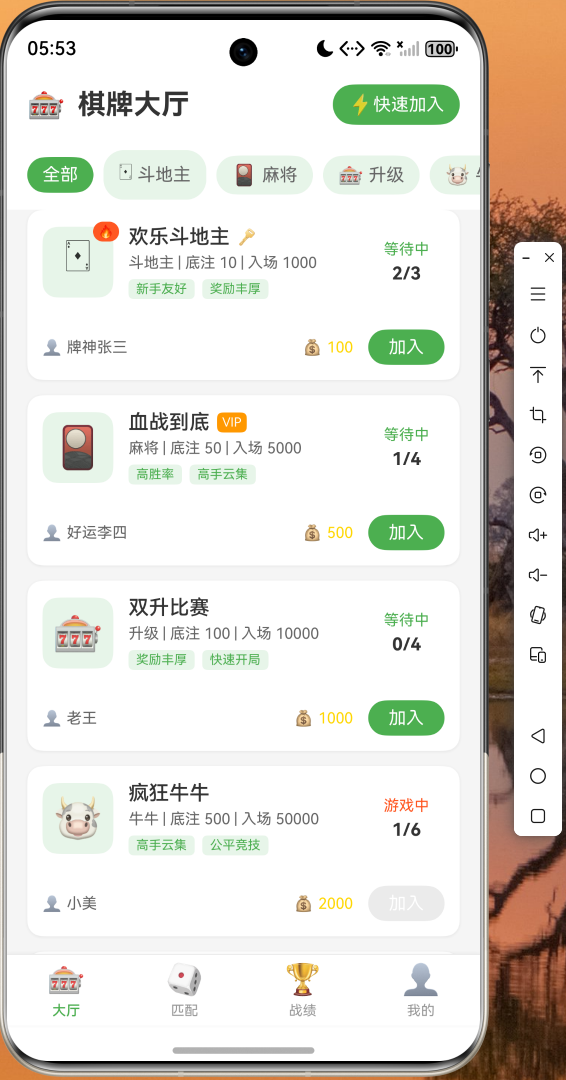
2. 游戏大厅页面
大厅页面展示所有可用的游戏房间,用户可以:
- 浏览房间列表,查看房间名称、人数、底注等信息
- 通过顶部筛选栏选择不同的游戏类型
- 点击"快速加入"按钮一键匹配空闲房间
- 点击具体房间卡片进入房间详情
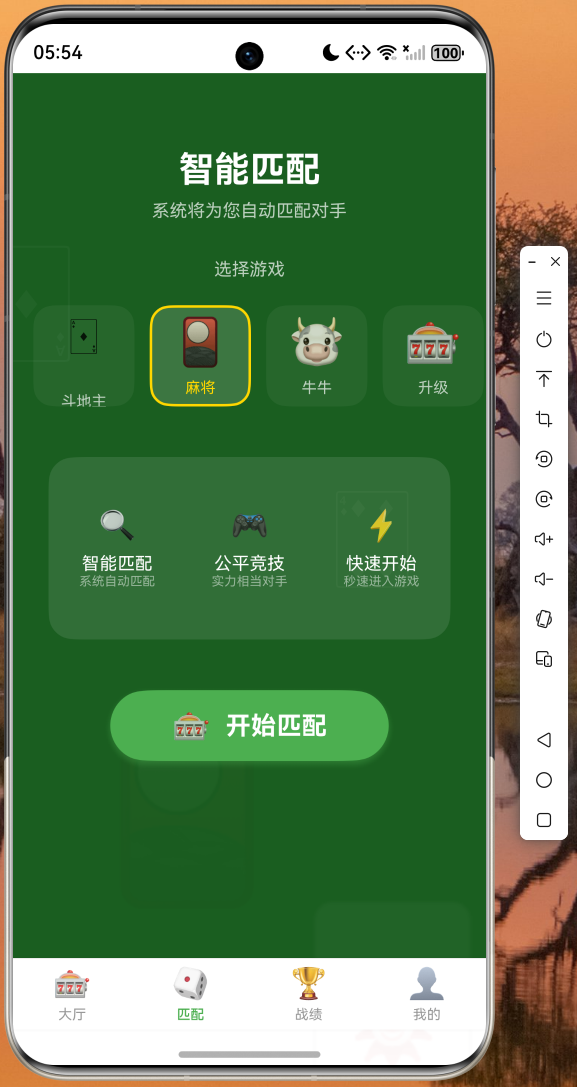
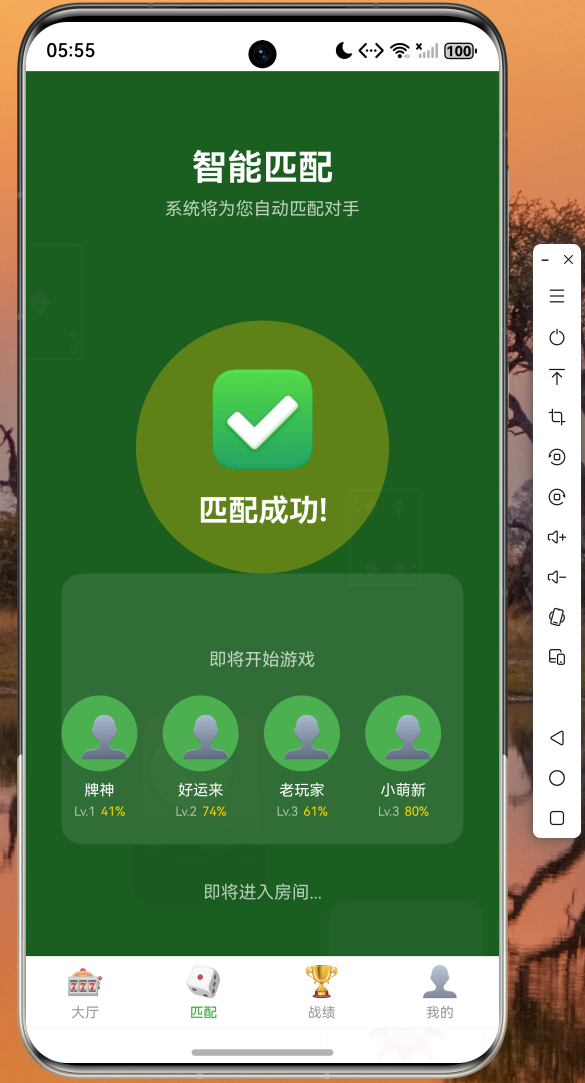
3. 智能匹配页面
匹配页面提供流畅的动画效果:
- 旋转的匹配动画展示匹配进度
- 实时更新已匹配的玩家信息
- 显示匹配进度百分比和进度条
- 支持中途取消匹配
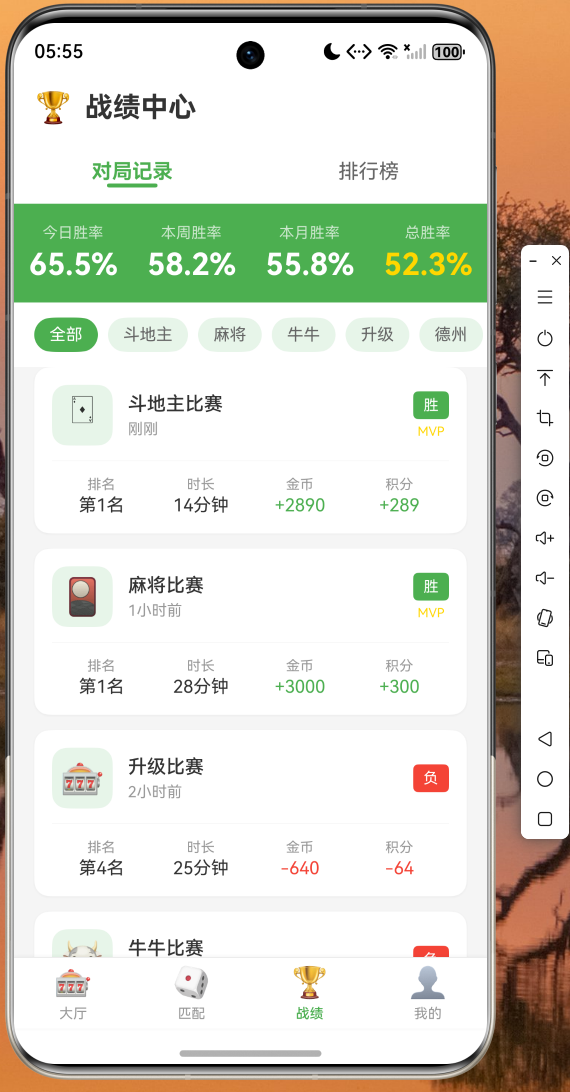
4. 战绩统计页面
战绩页面展示用户的游戏表现:
- 顶部显示今日、本周、本月、总胜率统计
- 对局记录以卡片形式展示
- 包含排名、时长、金币变化等详细信息
- 支持下拉刷新和上拉加载更多
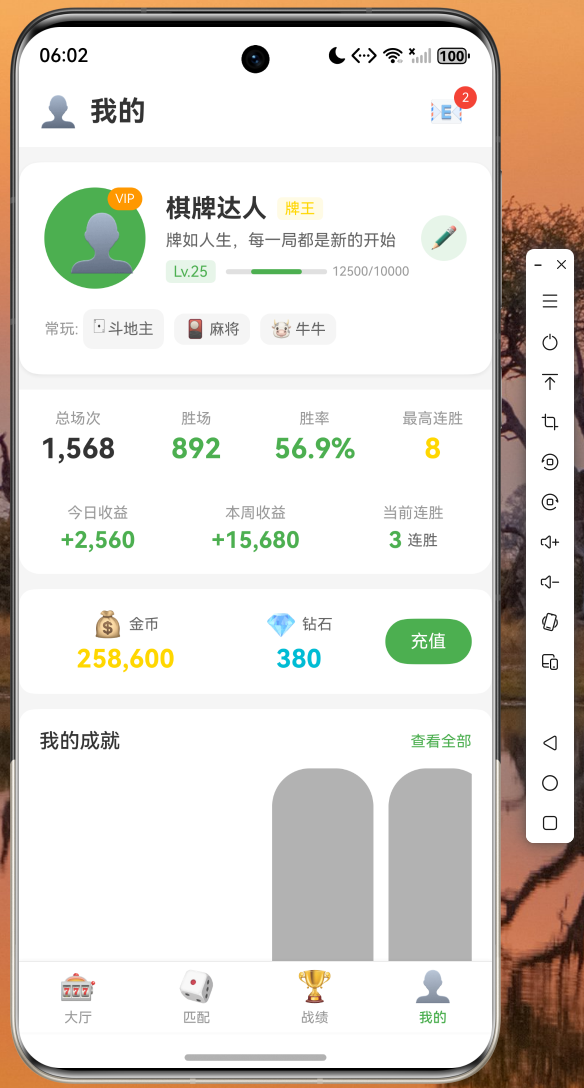
5. 用户中心页面
用户中心展示个人信息和成就:
- 头像、昵称、VIP等级展示
- 今日/本周收益统计
- 金币和钻石余额
- 成就徽章展示
- 设置菜单入口
技术总结
通过本次实战项目,我们完整地展示了 Flutter for OpenHarmony 跨平台开发的全过程。项目采用分层架构设计,将数据层、业务层、视图层分离,保证了代码的整洁性和可维护性。
关键技术点回顾:
-
状态管理:使用 StatefulWidget 管理组件状态,通过 setState 方法触发界面更新。
-
网络请求模拟:通过 Future.delayed 模拟网络请求,返回标准化的数据对象,便于后续替换为真实 API。
-
列表优化:采用 ListView.builder 实现虚拟列表,支持大量数据的高效渲染。
-
动画实现:使用 AnimationController 和 AnimatedBuilder 实现流畅的交互动画。
-
页面导航:通过 TabBarView 实现 Tab 切换,IndexedStack 保持页面状态。
代码仓库:
- AtomGit:https://atomgit.com/maaath/card_game_app
后续优化建议
当前版本已经实现了棋牌游戏应用的核心功能,但仍有许多可以优化的地方:
-
真实网络请求:将模拟数据替换为真实 API,支持用户登录、房间创建、游戏对战等功能。
-
本地数据持久化:使用 SharedPreferences 或数据库存储用户数据,支持离线访问。
-
国际化支持:添加多语言支持,满足不同地区用户的需求。
-
性能优化:对列表进行懒加载优化,减少内存占用。
-
错误处理:完善网络请求和用户操作的错误处理,提升应用稳定性。
结语
Flutter for OpenHarmony 为开发者提供了一个强大的跨平台开发框架,能够帮助我们快速构建高质量的移动应用。本文通过一个完整的棋牌游戏应用实例,展示了从项目搭建到功能实现的完整流程。
希望本文能够帮助读者快速上手 Flutter 跨平台开发,为 OpenHarmony 生态贡献自己的力量。如果你有任何问题或建议,欢迎在评论区留言交流。

作为“人工智能6S店”的官方数字引擎,为AI开发者与企业提供一个覆盖软硬件全栈、一站式门户。
更多推荐


 0
0 0
0- 0


 已为社区贡献32条内容

所有评论(0)