
鸿蒙PC Electron框架打造日历日程管理工具:与系统日历集成、提醒功能
欢迎加入开源鸿蒙PC社区:https://harmonypc.csdn.net/项目 Git 仓库:https://atomgit.com/liboqian/harmonyOs_dayTime在现代工作生活中,日程管理是每个人都面临的挑战:基于这些痛点,我决定开发一款本地化、零依赖、功能完善的日历日程管理工具。2.2 为什么选择 Vue3 Composition API?更好的 TypeScrip
Vue3 + TypeScript 打造日历日程管理工具:与系统日历集成、提醒功能
欢迎加入开源鸿蒙PC社区:
https://harmonypc.csdn.net/
项目 Git 仓库:
https://atomgit.com/liboqian/harmonyOs_dayTime
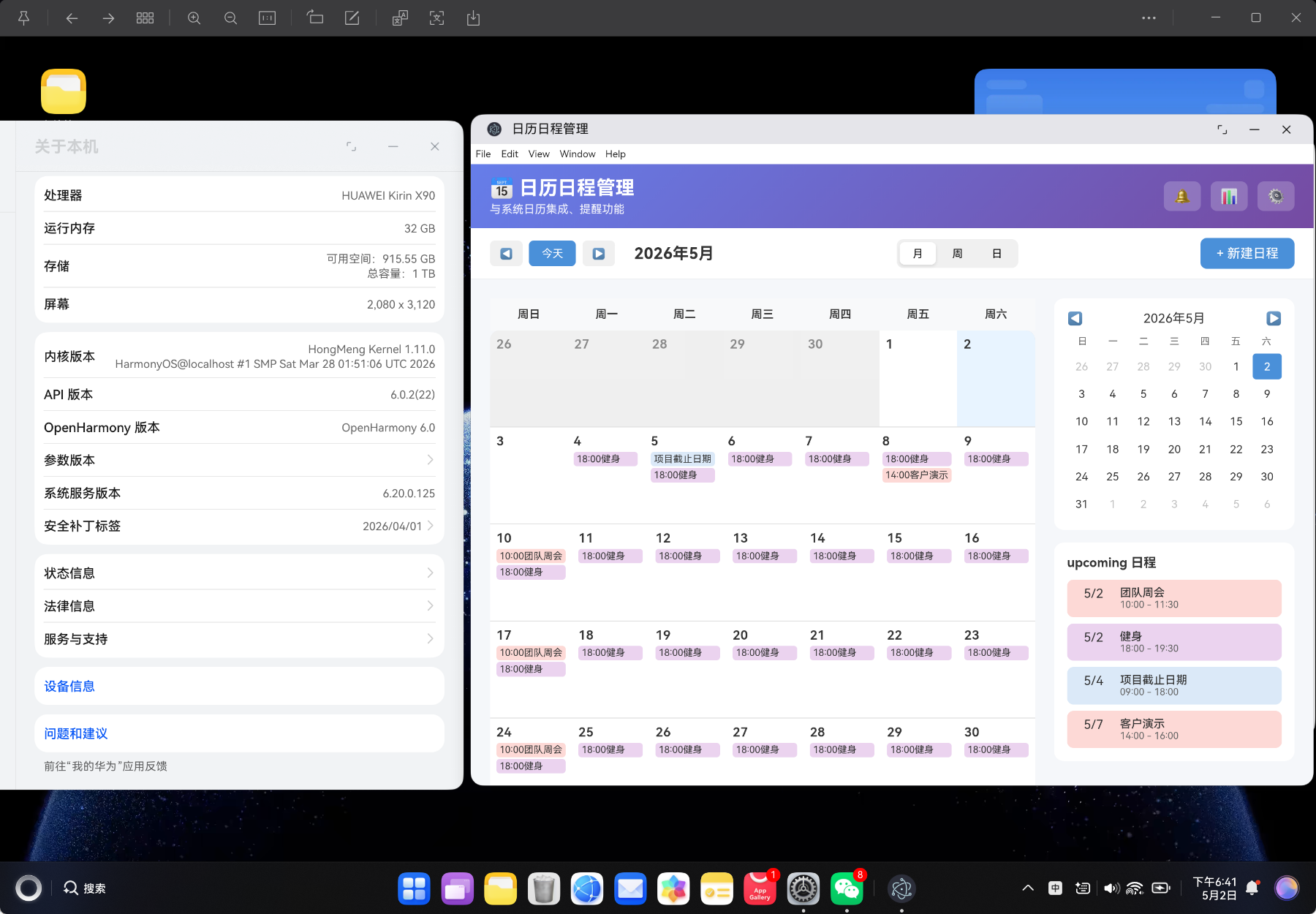
摘要:本文详细介绍如何使用 Vue3 Composition API + TypeScript 从零构建一个功能完善的日历日程管理工具,包含月视图/周视图/日视图切换、日程管理、分类筛选、多级优先级、重复日程、提醒通知、数据导入导出等功能。项目完全零第三方日历库依赖,适合前端开发者深入理解日历算法、提醒系统、Notification API 等核心技术。
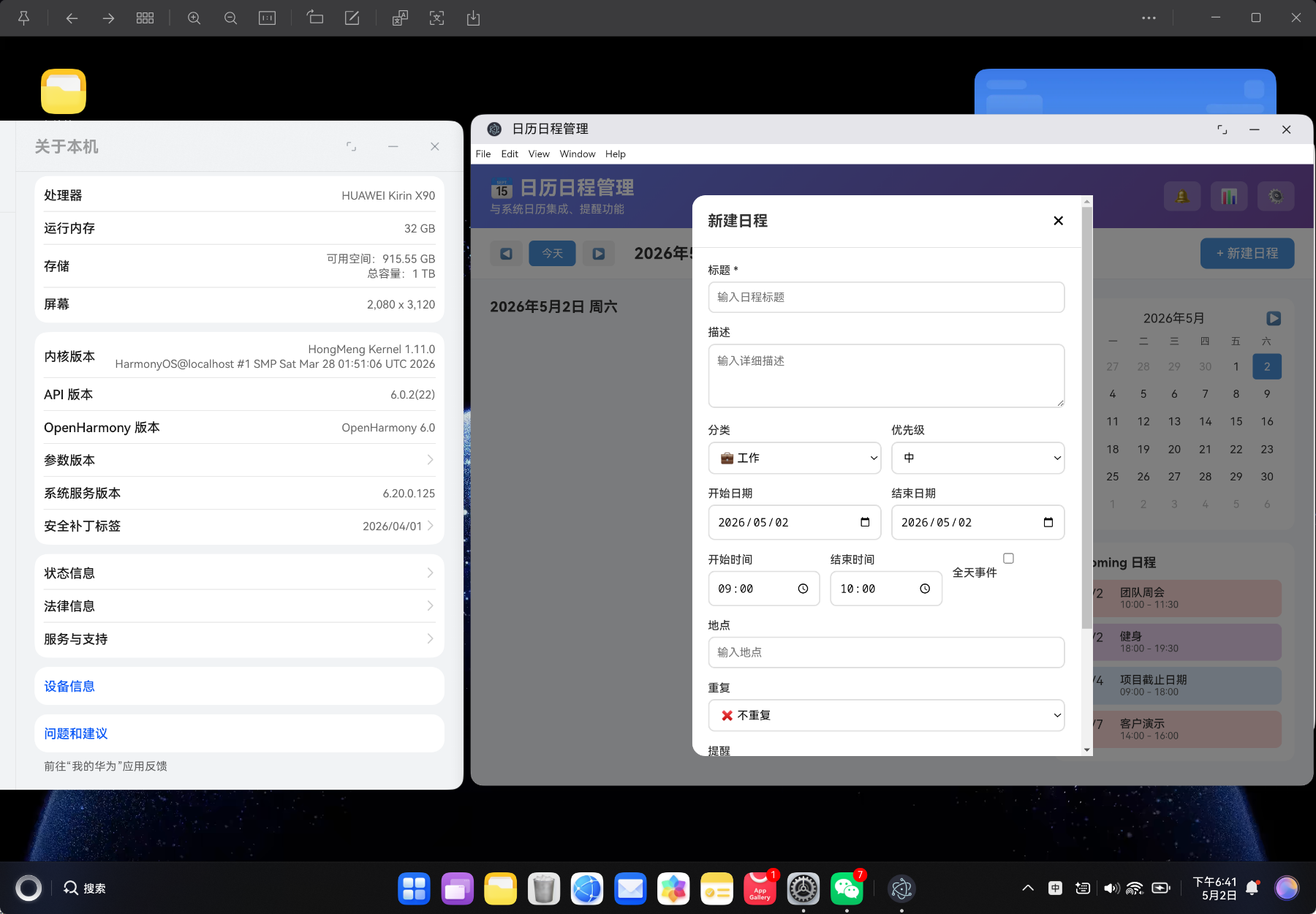
目录
- 项目背景与需求分析
- 技术栈选型
- 项目架构设计
- TypeScript 类型定义
- 核心服务层实现
- 日历视图算法
- 日程管理功能
- 提醒与通知系统
- UI 组件开发
- 数据同步与持久化
- 性能优化策略
- 构建与部署
- 总结与展望
一、项目背景与需求分析
1.1 为什么需要日历日程管理工具?
在现代工作生活中,日程管理是每个人都面临的挑战:
- 日程分散:工作安排、个人事务、会议约会散落在不同平台
- 提醒不及时:错过重要会议或截止日期
- 缺乏统计:不清楚时间分配情况,难以优化时间管理
- 数据封闭:商业日历应用的数据无法导出或迁移
基于这些痛点,我决定开发一款本地化、零依赖、功能完善的日历日程管理工具。
1.2 核心功能需求
| 功能模块 | 需求描述 | 优先级 |
|---|---|---|
| 多视图切换 | 支持月视图、周视图、日视图 | 高 |
| 日程管理 | 创建、编辑、删除日程 | 高 |
| 分类系统 | 6 种分类(工作、个人、会议、提醒、生日、其他) | 高 |
| 优先级管理 | 4 级优先级(低、中、高、紧急) | 高 |
| 重复日程 | 支持每天/每周/每月/每年重复 | 高 |
| 提醒通知 | 多级提醒、浏览器通知 | 高 |
| 数据统计 | 按分类、优先级统计分析 | 中 |
| 数据导入导出 | JSON 格式导入导出 | 中 |
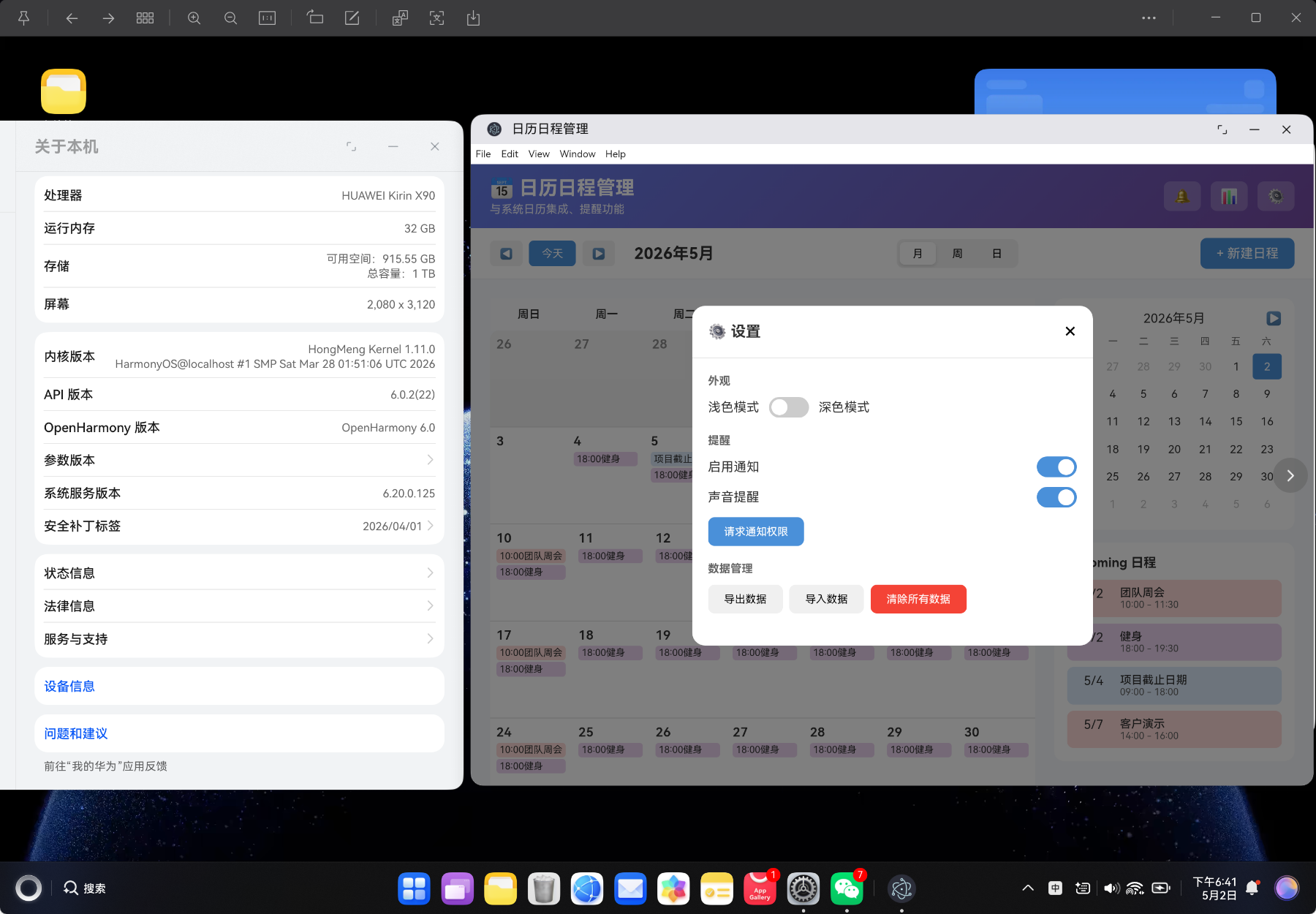
| 深色模式 | 支持浅色/深色主题切换 | 低 |
| 迷你日历 | 侧边栏快速导航 | 低 |
1.3 技术选型对比
| 方案 | 优点 | 缺点 | 适用场景 |
|---|---|---|---|
| 第三方日历库(如 FullCalendar) | 功能完善 | 体积大、定制困难 | 企业级项目 |
| 原生实现 | 完全可控、极致轻量 | 需要深入理解日历算法 | 专业工具、学习研究 ✅ |
| 系统日历 API | 与系统集成度高 | 跨平台兼容性差 | 特定平台应用 |
💡 核心理念:本项目不依赖任何第三方日历库,所有日历算法、渲染逻辑均为自研实现。这样做的好处是:
- 完全掌控:不受第三方库更新影响
- 极致轻量:打包后仅 26.83KB(gzip 8.90KB)
- 学习价值:深入理解日历算法、提醒系统等底层原理
二、技术栈选型
2.1 核心技术栈
{
  "framework": "Vue 3.4+",
  "language": "TypeScript 5.3+",
  "router": "Vue Router 4.6+",
  "build": "Vite 5.0+",
  "ui": "原生 CSS(零组件库依赖)"
}
2.2 为什么选择 Vue3 Composition API?
- 更好的 TypeScript 支持:
<script setup>语法提供完整的类型推导 - 逻辑复用:组合式函数(Composables)让代码更易维护
- 按需响应:
ref、computed提供细粒度的响应式控制 - 更小的打包体积:Tree-shaking 友好
2.3 日历系统的核心挑战
| 挑战 | 解决方案 | 技术要点 |
|---|---|---|
| 日历网格生成 | 计算每月起始偏移和天数 | Date API 精确计算 |
| 重复日程处理 | 根据重复规则动态生成实例 | 规则匹配算法 |
| 提醒系统 | 定时器 + Notification API | 权限管理、定时检查 |
| 周视图布局 | 计算事件在时间轴上的位置 | 时间到像素映射 |
| 数据持久化 | localStorage + 增量更新 | JSON 序列化、冲突解决 |
三、项目架构设计
3.1 目录结构
vue-app/
├── src/
│   ├── types/
│   │   └── calendar.ts           # TypeScript 类型定义
│   ├── services/
│   │   └── CalendarService.ts    # 核心业务逻辑
│   ├── components/
│   │   └── CalendarApp.vue       # 主组件(日历、日程、提醒)
│   ├── views/
│   │   └── CalendarView.vue      # 视图容器
│   ├── router/
│   │   └── index.ts              # 路由配置
│   └── main.ts                   # 应用入口
├── index.html                    # HTML 模板
├── package.json                  # 项目配置
└── vite.config.ts                # Vite 配置
3.2 架构分层
┌─────────────────────────────────────┐
│           View 层(UI)              │
│   CalendarView.vue                  │
├─────────────────────────────────────┤
│        Component 层(组件)           │
│   CalendarApp.vue                   │
│   ├── 月视图                          │
│   ├── 周视图                          │
│   ├── 日视图                          │
│   ├── 日程表单                        │
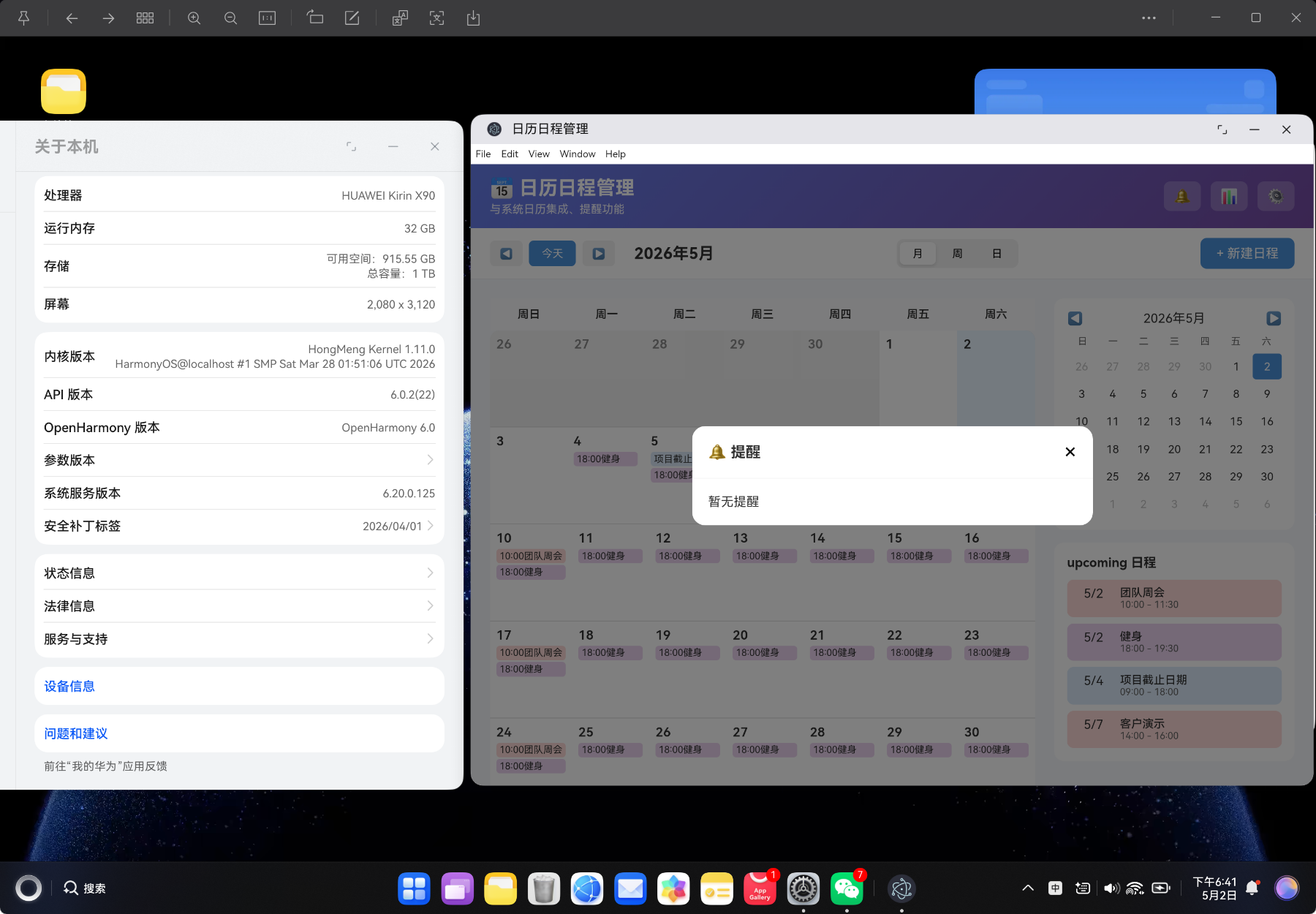
│   ├── 提醒面板                        │
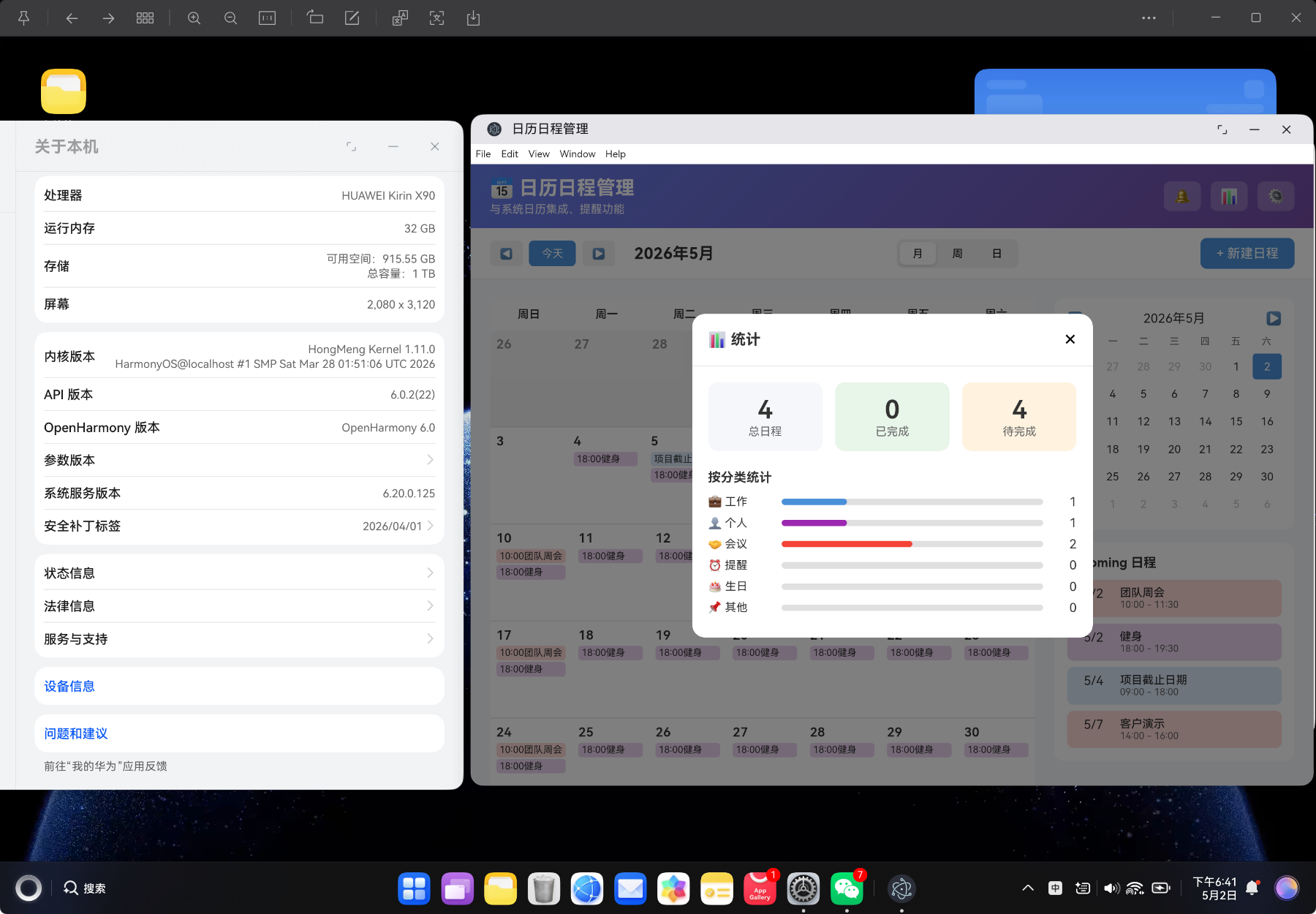
│   └── 统计面板                        │
├─────────────────────────────────────┤
│        Service 层(业务逻辑)         │
│   CalendarService.ts                │
│   ├── 日程管理                        │
│   ├── 视图生成                        │
│   ├── 提醒系统                        │
│   └── 数据统计                        │
├─────────────────────────────────────┤
│        Type 层(类型定义)            │
│   calendar.ts                       │
└─────────────────────────────────────┘
📌 设计原则:严格遵循 MVC 分层架构,UI 组件只负责渲染和用户交互,业务逻辑全部放在 Service 层,类型定义独立管理。
四、TypeScript 类型定义
4.1 核心类型设计
类型定义是整个项目的基石,良好的类型设计可以:
- 提供完整的 IDE 智能提示
- 在编译时捕获错误
- 提高代码可维护性
// types/calendar.ts

export type EventCategory = 'work' | 'personal' | 'meeting' | 'reminder' | 'birthday' | 'other'

export type EventPriority = 'low' | 'medium' | 'high' | 'urgent'

export type RepeatType = 'none' | 'daily' | 'weekly' | 'monthly' | 'yearly'

export type CalendarView = 'month' | 'week' | 'day'
4.2 日程类型定义
export interface CalendarEvent {
  id: string                // 日程唯一标识
  title: string             // 日程标题
  description: string       // 日程描述
  category: EventCategory   // 所属分类
  priority: EventPriority   // 优先级
  startDate: string         // 开始日期(YYYY-MM-DD)
  endDate: string           // 结束日期
  startTime: string         // 开始时间(HH:mm)
  endTime: string           // 结束时间
  allDay: boolean           // 是否全天
  location: string          // 地点
  repeat: RepeatType        // 重复规则
  repeatEndDate?: string    // 重复结束日期
  reminder: ReminderConfig  // 提醒配置
  isCompleted: boolean      // 是否完成
  createdAt: number         // 创建时间
  updatedAt: number         // 更新时间
}
4.3 提醒配置类型
export interface ReminderConfig {
  enabled: boolean          // 是否启用
  minutes: number[]         // 提前提醒时间(分钟)
  method: 'notification' | 'sound' | 'both'  // 提醒方式
}
4.4 日历视图类型
export interface CalendarDay {
  date: Date                // 日期
  isCurrentMonth: boolean   // 是否当前月
  isToday: boolean          // 是否今天
  events: CalendarEvent[]   // 当天日程
}

export interface WeekView {
  startDate: Date           // 周开始日期
  endDate: Date             // 周结束日期
  days: CalendarDay[]       // 周的 7 天
}

export interface MonthView {
  month: number             // 月份(0-11)
  year: number              // 年份
  startDate: Date           // 月开始日期
  endDate: Date             // 月结束日期
  weeks: CalendarDay[][]    // 月的周数组
}
4.5 分类与优先级配置
export const EVENT_CATEGORIES: Record<EventCategory, { label: string; color: string; icon: string }> = {
  work: { label: '工作', color: '#4a90d9', icon: '💼' },
  personal: { label: '个人', color: '#9c27b0', icon: '👤' },
  meeting: { label: '会议', color: '#f44336', icon: '🤝' },
  reminder: { label: '提醒', color: '#ff9800', icon: '⏰' },
  birthday: { label: '生日', color: '#e91e63', icon: '🎂' },
  other: { label: '其他', color: '#607d8b', icon: '📌' }
}

export const EVENT_PRIORITIES: Record<EventPriority, { label: string; color: string }> = {
  low: { label: '低', color: '#4caf50' },
  medium: { label: '中', color: '#ff9800' },
  high: { label: '高', color: '#f44336' },
  urgent: { label: '紧急', color: '#d32f2f' }
}
| 分类 | 颜色 | 图标 | 适用场景 |
|---|---|---|---|
| 工作(work) | #4a90d9 | 💼 | 工作任务、项目 |
| 个人(personal) | #9c27b0 | 👤 | 个人事务 |
| 会议(meeting) | #f44336 | 🤝 | 各类会议 |
| 提醒(reminder) | #ff9800 | ⏰ | 待办提醒 |
| 生日(birthday) | #e91e63 | 🎂 | 生日纪念日 |
| 其他(other) | #607d8b | 📌 | 其他事项 |
4.6 提醒选项配置
export const REMINDER_OPTIONS = [
  { label: '无提醒', value: 0 },
  { label: '5 分钟前', value: 5 },
  { label: '10 分钟前', value: 10 },
  { label: '15 分钟前', value: 15 },
  { label: '30 分钟前', value: 30 },
  { label: '1 小时前', value: 60 },
  { label: '2 小时前', value: 120 },
  { label: '1 天前', value: 1440 }
]
五、核心服务层实现
5.1 CalendarService 类设计
Service 层是项目的核心,负责所有业务逻辑:
// services/CalendarService.ts

export class CalendarService {
  // 日程管理
  static getEvents(): CalendarEvent[] { ... }
  static addEvent(event: Omit<CalendarEvent, 'id' | 'createdAt' | 'updatedAt'>): CalendarEvent { ... }
  static updateEvent(id: string, updates: Partial<CalendarEvent>): CalendarEvent | null { ... }
  static deleteEvent(id: string): boolean { ... }
  static toggleEventComplete(id: string): boolean { ... }

  // 日历视图生成
  static generateMonthView(year: number, month: number, startOfWeek: number): MonthView { ... }
  static generateWeekView(date: Date, startOfWeek: number): WeekView { ... }

  // 日程查询
  static getEventsByDate(date: string): CalendarEvent[] { ... }
  static getEventsByCategory(category: EventCategory): CalendarEvent[] { ... }
  static filterEvents(events: CalendarEvent[], filter: EventFilter): CalendarEvent[] { ... }
  static searchEvents(query: string): CalendarEvent[] { ... }

  // 提醒系统
  static getUpcomingReminders(): ReminderItem[] { ... }
  static triggerReminder(event: CalendarEvent, minutes: number): void { ... }
  static requestNotificationPermission(): Promise<boolean> { ... }

  // 统计功能
  static getEventStats(): Record<string, number> { ... }
  static getTodayEvents(): CalendarEvent[] { ... }
  static getThisWeekEvents(): CalendarEvent[] { ... }

  // 数据管理
  static exportEvents(): string { ... }
  static importEvents(jsonString: string): boolean { ... }
  static getSettings(): CalendarSettings { ... }
  static saveSettings(settings: CalendarSettings): void { ... }
}
5.2 存储键设计
const STORAGE_KEYS = {
  events: 'calendar-events',
  settings: 'calendar-settings',
  reminders: 'calendar-reminders'
}
| 存储键 | 数据类型 | 说明 |
|---|---|---|
| calendar-events | CalendarEvent[] | 所有日程列表 |
| calendar-settings | CalendarSettings | 应用设置 |
| calendar-reminders | ReminderItem[] | 提醒记录 |
5.3 示例日程数据
const demoEvents: CalendarEvent[] = [
  {
    id: 'demo-1',
    title: '团队周会',
    description: '每周例行团队会议,讨论本周进度和下周计划',
    category: 'meeting',
    priority: 'high',
    startDate: new Date().toISOString().split('T')[0],
    endDate: new Date().toISOString().split('T')[0],
    startTime: '10:00',
    endTime: '11:30',
    allDay: false,
    location: '会议室 A',
    repeat: 'weekly',
    reminder: { enabled: true, minutes: [15, 60], method: 'both' },
    isCompleted: false,
    createdAt: Date.now(),
    updatedAt: Date.now()
  }
]
5.4 日程 CRUD 操作
static getEvents(): CalendarEvent[] {
  const stored = localStorage.getItem(STORAGE_KEYS.events)
  if (!stored) {
    return demoEvents  // 首次加载返回示例数据
  }
  return JSON.parse(stored)
}

static addEvent(event: Omit<CalendarEvent, 'id' | 'createdAt' | 'updatedAt'>): CalendarEvent {
  const events = CalendarService.getEvents()
  const now = Date.now()
  const newEvent: CalendarEvent = {
    ...event,
    id: CalendarService.generateId(),
    createdAt: now,
    updatedAt: now
  }
  events.push(newEvent)
  CalendarService.saveEvents(events)
  return newEvent
}

static updateEvent(id: string, updates: Partial<CalendarEvent>): CalendarEvent | null {
  const events = CalendarService.getEvents()
  const index = events.findIndex(e => e.id === id)
  if (index === -1) return null
  events[index] = { ...events[index], ...updates, updatedAt: Date.now() }
  CalendarService.saveEvents(events)
  return events[index]
}

static deleteEvent(id: string): boolean {
  const events = CalendarService.getEvents().filter(e => e.id !== id)
  if (events.length === CalendarService.getEvents().length) return false
  CalendarService.saveEvents(events)
  return true
}
六、日历视图算法
6.1 月视图生成算法
月视图是日历最核心的功能,需要正确计算:
- 每月第一天是星期几
- 需要显示的前后月的天数
- 生成 6 周的网格布局
static generateMonthView(year: number, month: number, startOfWeek: number = 0): MonthView {
  const firstDay = new Date(year, month, 1)
  const lastDay = new Date(year, month + 1, 0)
  const today = new Date()
  today.setHours(0, 0, 0, 0)

  // 计算显示的开始日期(可能包含上月末尾)
  const startDate = new Date(firstDay)
  startDate.setDate(startDate.getDate() - ((startDate.getDay() - startOfWeek + 7) % 7))

  // 计算显示的结束日期(可能包含下月开头)
  const endDate = new Date(lastDay)
  endDate.setDate(endDate.getDate() + ((7 - endDate.getDay() + startOfWeek) % 7))

  const weeks: CalendarDay[][] = []
  let currentWeek: CalendarDay[] = []
  let currentDate = new Date(startDate)

  while (currentDate <= endDate) {
    const dateStr = currentDate.toISOString().split('T')[0]
    const events = CalendarService.getEventsByDate(dateStr)

    const day: CalendarDay = {
      date: new Date(currentDate),
      isCurrentMonth: currentDate.getMonth() === month,
      isToday: currentDate.getTime() === today.getTime(),
      events
    }

    currentWeek.push(day)

    if (currentWeek.length === 7) {
      weeks.push(currentWeek)
      currentWeek = []
    }

    currentDate.setDate(currentDate.getDate() + 1)
  }

  return {
    month,
    year,
    startDate,
    endDate,
    weeks
  }
}
6.2 日历算法流程
输入:年份、月份
      ↓
计算当月第一天(new Date(year, month, 1))
      ↓
计算当月最后一天(new Date(year, month + 1, 0))
      ↓
计算网格起始日期
  startDate = firstDay - ((firstDay.getDay() - startOfWeek + 7) % 7)
      ↓
计算网格结束日期
  endDate = lastDay + ((7 - lastDay.getDay() + startOfWeek) % 7)
      ↓
遍历日期范围,每天生成 CalendarDay 对象
      ↓
每 7 天组成一周
      ↓
返回 MonthView { weeks: CalendarDay[][] }
6.3 周视图生成算法
static generateWeekView(date: Date, startOfWeek: number = 0): WeekView {
  const startDate = new Date(date)
  startDate.setDate(startDate.getDate() - ((startDate.getDay() - startOfWeek + 7) % 7))
  startDate.setHours(0, 0, 0, 0)

  const endDate = new Date(startDate)
  endDate.setDate(endDate.getDate() + 6)
  endDate.setHours(23, 59, 59, 999)

  const days: CalendarDay[] = []
  const today = new Date()
  today.setHours(0, 0, 0, 0)

  for (let i = 0; i < 7; i++) {
    const currentDate = new Date(startDate)
    currentDate.setDate(currentDate.getDate() + i)
    const dateStr = currentDate.toISOString().split('T')[0]
    const events = CalendarService.getEventsByDate(dateStr)

    days.push({
      date: currentDate,
      isCurrentMonth: true,
      isToday: currentDate.getTime() === today.getTime(),
      events
    })
  }

  return { startDate, endDate, days }
}
6.4 日期计算技巧
| 计算 | 公式 | 说明 |
|---|---|---|
| 当月最后一天 | new Date(year, month + 1, 0) |
下月第 0 天即当月最后一天 |
| 星期偏移量 | (day - startOfWeek + 7) % 7 |
处理负数情况 |
| 日期加减 | date.setDate(date.getDate() + n) |
自动处理月/年边界 |
| ISO 日期字符串 | date.toISOString().split('T')[0] |
获取 YYYY-MM-DD 格式 |
七、日程管理功能
7.1 按日期查询日程
static getEventsByDate(date: string): CalendarEvent[] {
  const events = CalendarService.getEvents()
  const targetDate = new Date(date)

  return events.filter(event => {
    const eventStart = new Date(`${event.startDate}T${event.startTime || '00:00'}`)
    const eventEnd = event.endDate ? new Date(`${event.endDate}T${event.endTime || '23:59'}`) : eventStart

    // 处理重复日程
    if (event.repeat === 'none') {
      return targetDate >= new Date(event.startDate) && targetDate <= new Date(event.endDate || event.startDate)
    }

    if (event.repeat === 'daily') {
      return targetDate >= eventStart
    }

    if (event.repeat === 'weekly') {
      return targetDate >= eventStart && targetDate.getDay() === eventStart.getDay()
    }

    if (event.repeat === 'monthly') {
      return targetDate >= eventStart && targetDate.getDate() === eventStart.getDate()
    }

    if (event.repeat === 'yearly') {
      return targetDate >= eventStart &&
             targetDate.getMonth() === eventStart.getMonth() &&
             targetDate.getDate() === eventStart.getDate()
    }

    return false
  })
}
7.2 重复日程处理逻辑
| 重复类型 | 匹配条件 | 示例 |
|---|---|---|
| 不重复(none) | 日期在起止范围内 | 一次性会议 |
| 每天(daily) | 日期 >= 开始日期 | 每日健身 |
| 每周(weekly) | 星期几匹配 | 每周团队会议 |
| 每月(monthly) | 日期号匹配 | 每月还款日 |
| 每年(yearly) | 月日匹配 | 生日、纪念日 |
7.3 日程筛选与搜索
static filterEvents(events: CalendarEvent[], filter: EventFilter): CalendarEvent[] {
  return events.filter(event => {
    // 分类过滤
    if (filter.categories.length > 0 && !filter.categories.includes(event.category)) {
      return false
    }
    // 优先级过滤
    if (filter.priorities.length > 0 && !filter.priorities.includes(event.priority)) {
      return false
    }
    // 完成状态过滤
    if (filter.completed !== null && event.isCompleted !== filter.completed) {
      return false
    }
    // 关键词搜索
    if (filter.searchQuery) {
      const query = filter.searchQuery.toLowerCase()
      const matchTitle = event.title.toLowerCase().includes(query)
      const matchDesc = event.description.toLowerCase().includes(query)
      const matchLocation = event.location.toLowerCase().includes(query)
      if (!matchTitle && !matchDesc && !matchLocation) {
        return false
      }
    }
    return true
  })
}
八、提醒与通知系统
8.1 提醒检查算法
static getUpcomingReminders(): ReminderItem[] {
  const events = CalendarService.getEvents()
  const now = new Date()
  const reminders: ReminderItem[] = []

  events.forEach(event => {
    if (!event.reminder.enabled) return

    const eventTime = new Date(`${event.startDate}T${event.startTime || '00:00'}`)

    event.reminder.minutes.forEach(minutes => {
      const reminderTime = new Date(eventTime.getTime() - minutes * 60000)
      const diff = reminderTime.getTime() - now.getTime()

      // 检查是否在提醒窗口内(前后几分钟)
      if (diff > -60000 && diff < 300000) {
        reminders.push({
          eventId: event.id,
          eventTitle: event.title,
          time: reminderTime,
          message: `${minutes === 0 ? '现在' : `${minutes} 分钟后`}:${event.title}`,
          isRead: false
        })
      }
    })
  })

  return reminders.sort((a, b) => a.time.getTime() - b.time.getTime())
}
8.2 浏览器通知 API
static triggerReminder(event: CalendarEvent, minutes: number): void {
  if ('Notification' in window && Notification.permission === 'granted') {
    new Notification('日程提醒', {
      body: `${minutes === 0 ? '现在' : `${minutes} 分钟后`}:${event.title}`,
      icon: '📅'
    })
  }

  console.log(`提醒:${event.title} - ${minutes} 分钟后`)
}

static requestNotificationPermission(): Promise<boolean> {
  if (!('Notification' in window)) {
    return Promise.resolve(false)
  }
  if (Notification.permission === 'granted') {
    return Promise.resolve(true)
  }
  return Notification.requestPermission().then(permission => permission === 'granted')
}
8.3 定时检查机制
function checkReminders() {
  const upcoming = CalendarService.getUpcomingReminders()
  unreadReminders.value = upcoming.length

  if (settings.value.notificationEnabled && upcoming.length > 0) {
    upcoming.forEach(reminder => {
      if (!reminder.isRead) {
        CalendarService.triggerReminder(
          { id: reminder.eventId, title: reminder.eventTitle } as CalendarEvent,
          0
        )
        reminder.isRead = true
      }
    })
  }
}

// 每分钟检查一次
onMounted(() => {
  checkReminders()
  reminderInterval.value = window.setInterval(checkReminders, 60000)
})

onUnmounted(() => {
  if (reminderInterval.value) {
    clearInterval(reminderInterval.value)
  }
})
| 功能 | 实现方式 | 说明 |
|---|---|---|
| 权限请求 | Notification.requestPermission() | 用户授权后才能发送通知 |
| 定时检查 | setInterval(60000) | 每分钟检查一次待提醒日程 |
| 提醒窗口 | diff > -60000 && diff < 300000 | 前后 5 分钟窗口 |
| 去重机制 | isRead 标记 | 避免重复提醒 |
九、UI 组件开发
9.1 组件结构设计
CalendarApp.vue
├── Header(头部)
│   ├── 标题
│   └── 操作按钮(提醒、统计、设置)
├── Toolbar(工具栏)
│   ├── 导航按钮(上一月/下一月/今天)
│   ├── 视图切换(月/周/日)
│   └── 新建日程按钮
├── Calendar Content(日历内容)
│   ├── Main Calendar(主日历)
│   │   ├── 月视图(7x6 网格)
│   │   ├── 周视图(时间轴 + 7 列)
│   │   └── 日视图(时间线列表)
│   └── Sidebar(侧边栏)
│       ├── 迷你日历
│       └──  upcoming 日程
├── Event Modal(日程表单弹窗)
│   ├── 标题、描述
│   ├── 分类、优先级
│   ├── 日期、时间
│   ├── 地点、重复
│   └── 提醒设置
├── Reminder Panel(提醒面板)
├── Stats Panel(统计面板)
└── Settings Panel(设置面板)
9.2 月视图渲染
<div class="month-view">
  <div class="weekday-header">
    <div v-for="day in weekdayNames" :key="day" class="weekday-cell">{{ day }}</div>
  </div>
  <div class="month-grid">
    <div v-for="(week, weekIndex) in monthView.weeks" :key="weekIndex" class="week-row">
      <div v-for="(day, dayIndex) in week" :key="dayIndex"
           :class="['day-cell', { 'other-month': !day.isCurrentMonth, 'today': day.isToday }]"
           @click="selectDay(day)">
        <div class="day-number">{{ day.date.getDate() }}</div>
        <div class="day-events">
          <div v-for="event in day.events.slice(0, 3)" :key="event.id"
               :class="['event-dot', `category-${event.category}`, { completed: event.isCompleted }]"
               @click.stop="openEvent(event)" :title="event.title">
            <span class="event-time" v-if="!event.allDay">{{ event.startTime }}</span>
            <span class="event-title">{{ event.title }}</span>
          </div>
          <div v-if="day.events.length > 3" class="more-events">+{{ day.events.length - 3 }} 更多</div>
        </div>
      </div>
    </div>
  </div>
</div>
9.3 周视图时间轴
<div class="week-body">
  <div class="time-column">
    <div v-for="hour in hours" :key="hour" class="time-slot">{{ hour }}:00</div>
  </div>
  <div class="week-grid">
    <div v-for="(day, dayIndex) in weekView.days" :key="dayIndex" class="week-day-column">
      <div v-for="event in day.events" :key="event.id"
           :class="['week-event', `category-${event.category}`]"
           @click="openEvent(event)"
           :style="getWeekEventStyle(event)">
        <div class="week-event-title">{{ event.title }}</div>
        <div class="week-event-time">{{ event.startTime }} - {{ event.endTime }}</div>
      </div>
    </div>
  </div>
</div>
function getWeekEventStyle(event: CalendarEvent) {
  const [startH, startM] = event.startTime.split(':').map(Number)
  const [endH, endM] = event.endTime.split(':').map(Number)
  const top = (startH * 60 + startM) / 60 * 60
  const height = ((endH * 60 + endM) - (startH * 60 + startM)) / 60 * 60
  return { top: `${top}px`, height: `${Math.max(height, 20)}px` }
}
9.4 日程表单
<div class="modal event-modal">
<div class="modal-header">
<h3>{{ editingEvent ? '编辑日程' : '新建日程' }}</h3>
<button class="close-btn" @click="closeEventModal">×</button>
</div>
<div class="modal-body">
<div class="form-group">
<label>标题 *</label>
<input v-model="eventForm.title" type="text" placeholder="输入日程标题" />
</div>
<div class="form-row">
<div class="form-group">
<label>分类</label>
<select v-model="eventForm.category">
<option v-for="(cat, key) in categories" :key="key" :value="key">
{{ cat.icon }} {{ cat.label }}
</option>
</select>
</div>
<div class="form-group">
<label>优先级</label>
<select v-model="eventForm.priority">
<option v-for="(pri, key) in priorities" :key="key" :value="key">
{{ pri.label }}
</option>
</select>
</div>
</div>
<!-- 日期、时间、地点、重复、提醒等字段 -->
</div>
<div class="modal-footer">
<button v-if="editingEvent" class="danger-btn" @click="deleteEvent">删除</button>
<button class="secondary-btn" @click="closeEventModal">取消</button>
<button class="primary-btn" @click="saveEvent">{{ editingEvent ? '保存' : '创建' }}</button>
</div>
</div>
十、数据同步与持久化
10.1 localStorage 持久化方案
static saveEvents(events: CalendarEvent[]): void {
  localStorage.setItem(STORAGE_KEYS.events, JSON.stringify(events))
}

static getSettings(): CalendarSettings {
  const stored = localStorage.getItem(STORAGE_KEYS.settings)
  return stored ? { ...DEFAULT_SETTINGS, ...JSON.parse(stored) } : DEFAULT_SETTINGS
}

static saveSettings(settings: CalendarSettings): void {
  localStorage.setItem(STORAGE_KEYS.settings, JSON.stringify(settings))
}
10.2 数据导入导出
static exportEvents(): string {
  const events = CalendarService.getEvents()
  return JSON.stringify(events, null, 2)
}

static importEvents(jsonString: string): boolean {
  try {
    const events = JSON.parse(jsonString)
    if (!Array.isArray(events)) return false
    CalendarService.saveEvents(events)
    return true
  } catch {
    return false
  }
}
10.3 导出实现
function exportData() {
  const data = CalendarService.exportEvents()
  const blob = new Blob([data], { type: 'application/json' })
  const url = URL.createObjectURL(blob)
  const link = document.createElement('a')
  link.href = url
  link.download = `calendar-export-${new Date().toISOString().split('T')[0]}.json`
  link.click()
  showToast('数据已导出')
}
10.4 导入实现
function importData() {
  const input = document.createElement('input')
  input.type = 'file'
  input.accept = '.json'
  input.onchange = (e: Event) => {
    const file = (e.target as HTMLInputElement).files?.[0]
    if (file) {
      const reader = new FileReader()
      reader.onload = (e) => {
        const result = e.target?.result as string
        if (CalendarService.importEvents(result)) {
          showToast('数据已导入')
          refreshData()
        } else {
          showToast('导入失败')
        }
      }
      reader.readAsText(file)
    }
  }
  input.click()
}
十一、性能优化策略
11.1 计算属性缓存
Vue 的 computed 自动缓存计算结果,避免重复计算:
// ✅ 使用 computed 缓存月视图
const monthView = computed((): MonthView => {
  return CalendarService.generateMonthView(
    currentDate.value.getFullYear(),
    currentDate.value.getMonth()
  )
})

// ❌ 避免在模板中直接调用函数
// <div v-for="week in generateMonthView(year, month).weeks">
11.2 懒加载路由
const routes: RouteRecordRaw[] = [
  {
    path: '/',
    name: 'Calendar',
    component: () => import('../views/CalendarView.vue'), // 懒加载
  },
]
11.3 日程排序优化
function sortedEvents(events: CalendarEvent[]): CalendarEvent[] {
  return [...events].sort((a, b) => {
    if (a.allDay && !b.allDay) return -1
    if (!a.allDay && b.allDay) return 1
    return (a.startTime || '').localeCompare(b.startTime || '')
  })
}
| 排序规则 | 说明 |
|---|---|
| 全天事件优先 | 全天事件排在最前面 |
| 按时间排序 | 同类型事件按开始时间升序 |
十二、构建与部署
12.1 构建命令
# 清理缓存
Remove-Item -Recurse -Force "./dist" -ErrorAction SilentlyContinue
Remove-Item -Recurse -Force "../electron/build" -ErrorAction SilentlyContinue
Remove-Item -Recurse -Force "../../.hvigor" -ErrorAction SilentlyContinue

# 构建生产版本
npm run build
12.2 构建输出
构建结果:
../dist/index.html                         0.62 kB │ gzip:  0.45 kB
../dist/assets/index-CBgsX6DZ.css          0.21 kB │ gzip:  0.19 kB
../dist/assets/CalendarView-Bbrde20E.css  10.87 kB │ gzip:  2.29 kB
../dist/assets/CalendarView-DlA8TAak.js   26.83 kB │ gzip:  8.90 kB
../dist/assets/index-CtIT1Cd2.js          92.10 kB │ gzip: 36.08 kB
✓ built in 633ms
| 文件 | 原始大小 | Gzip 压缩 | 说明 |
|---|---|---|---|
| index.html | 0.62 KB | 0.45 KB | HTML 入口 |
| CSS(组件) | 10.87 KB | 2.29 KB | 日历样式 |
| JS(组件) | 26.83 KB | 8.90 KB | 日历逻辑 |
| JS(核心) | 92.10 KB | 36.08 KB | Vue + Router 核心 |
| 总计 | 130.42 KB | 47.72 KB |
🚀 性能亮点:
- 构建时间仅 633ms
- Gzip 压缩率 63%
- 零第三方日历库依赖
十三、总结与展望
13.1 项目成果
| 指标 | 数值 | 说明 |
|---|---|---|
| 视图类型 | 3 种 | 月视图、周视图、日视图 |
| 日程分类 | 6 种 | 工作、个人、会议、提醒、生日、其他 |
| 优先级 | 4 级 | 低、中、高、紧急 |
| 重复规则 | 5 种 | 不重复、每天、每周、每月、每年 |
| 提醒选项 | 8 种 | 无提醒 ~ 1天前 |
| 打包大小 | 8.90 KB | Gzip 压缩后 |
| 构建时间 | 633ms | Vite 5.0 |
| 零依赖 | ✅ | 无第三方日历库 |
13.2 核心技术点总结
- TypeScript 类型系统:完整的接口定义提供类型安全
- Vue3 Composition API:ref、computed 实现响应式状态管理
- 日历算法:月视图/周视图网格生成算法
- 重复日程处理:5 种重复规则匹配
- 提醒系统:Notification API + 定时检查
- 数据持久化:localStorage 存储方案
- 数据导入导出:JSON 序列化/反序列化
- 响应式布局:CSS Grid + Flexbox 自适应
13.3 后续优化方向
| 优化方向 | 说明 | 优先级 |
|---|---|---|
| 拖拽调整 | 拖拽日程调整日期/时间 | 高 |
| 多日历支持 | 支持多个日历源 | 高 |
| 共享日程 | 日程共享与协作 | 中 |
| 云同步 | 多端数据同步 | 中 |
| 自然语言输入 | 智能解析日期时间 | 低 |
| 日历订阅 | iCal/CalDAV 协议支持 | 低 |
13.4 学习资源推荐
- Vue3 官方文档
- TypeScript 官方文档
- Notification API 文档
- Date API 文档
- localStorage API 文档
- 博客质量分计算——发布 version 5.0
附录
A. 完整代码仓库结构
vue-app/
├── src/
│   ├── types/
│   │   └── calendar.ts           # 类型定义(200行)
│   ├── services/
│   │   └── CalendarService.ts    # 核心服务(500行)
│   ├── components/
│   │   └── CalendarApp.vue       # 主组件(800行)
│   ├── views/
│   │   └── CalendarView.vue      # 视图容器(20行)
│   ├── router/
│   │   └── index.ts              # 路由配置(20行)
│   └── main.ts                   # 应用入口(10行)
├── index.html                    # HTML 模板
├── package.json                  # 项目配置
└── vite.config.ts                # Vite 配置
B. 分类与优先级速查表
| 分类 | 颜色 | 图标 | 优先级 | 颜色 |
|---|---|---|---|---|
| 工作 | #4a90d9 | 💼 | 低 | #4caf50 |
| 个人 | #9c27b0 | 👤 | 中 | #ff9800 |
| 会议 | #f44336 | 🤝 | 高 | #f44336 |
| 提醒 | #ff9800 | ⏰ | 紧急 | #d32f2f |
| 生日 | #e91e63 | 🎂 | ||
| 其他 | #607d8b | 📌 |
C. 重复规则说明
| 规则 | 说明 | 示例 |
|---|---|---|
| 不重复 | 一次性事件 | 临时会议 |
| 每天 | 每天重复 | 每日健身 |
| 每周 | 每周同一天 | 团队周会 |
| 每月 | 每月同一日期 | 月度总结 |
| 每年 | 每年同一月日 | 生日、纪念日 |

作为“人工智能6S店”的官方数字引擎,为AI开发者与企业提供一个覆盖软硬件全栈、一站式门户。
更多推荐



 0
0 0
0- 0


 已为社区贡献44条内容

所有评论(0)