
Flutter 鸿蒙文件下载功能实现:断点续传与进度显示
Flutter鸿蒙文件下载功能实现摘要 本文介绍了如何在Flutter中实现支持断点续传的文件下载功能,适用于鸿蒙系统开发。主要内容包括: 核心功能: 实现文件下载、暂停、继续和取消操作 支持断点续传功能 实时显示下载进度 关键技术: 使用Dio库处理HTTP请求 通过Range头实现断点续传 采用状态管理跟踪下载任务 UI展示: 进度条显示下载百分比 不同状态显示对应图标和颜色 提供完整的下载任
·
Flutter 鸿蒙文件下载功能实现:断点续传与进度显示
欢迎加入开源鸿蒙跨平台社区! https://openharmonycrossplatform.csdn.net
效果展示
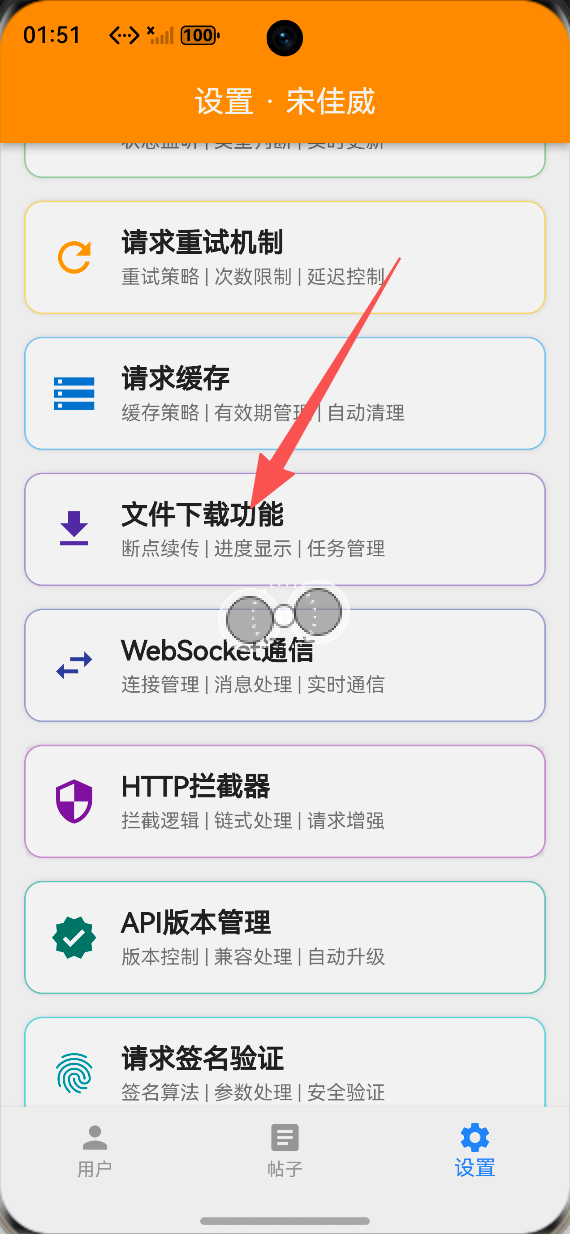
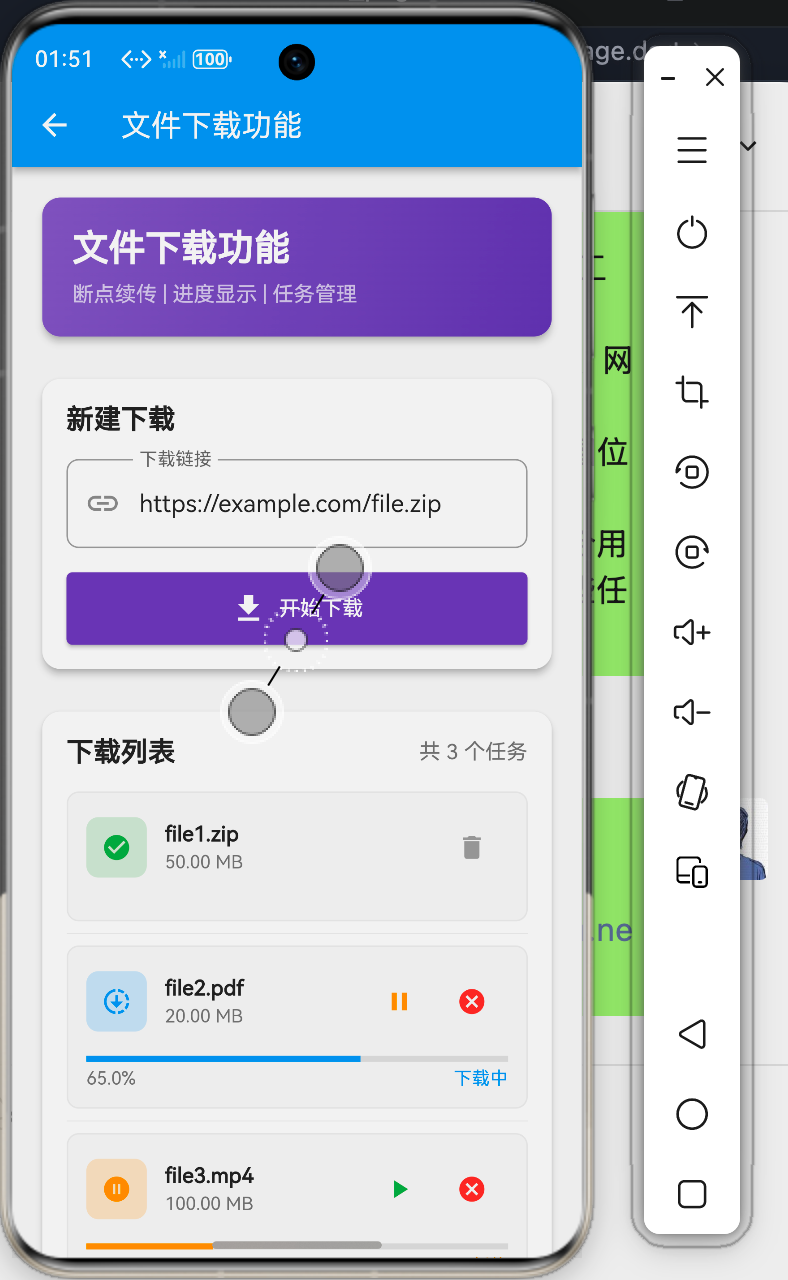
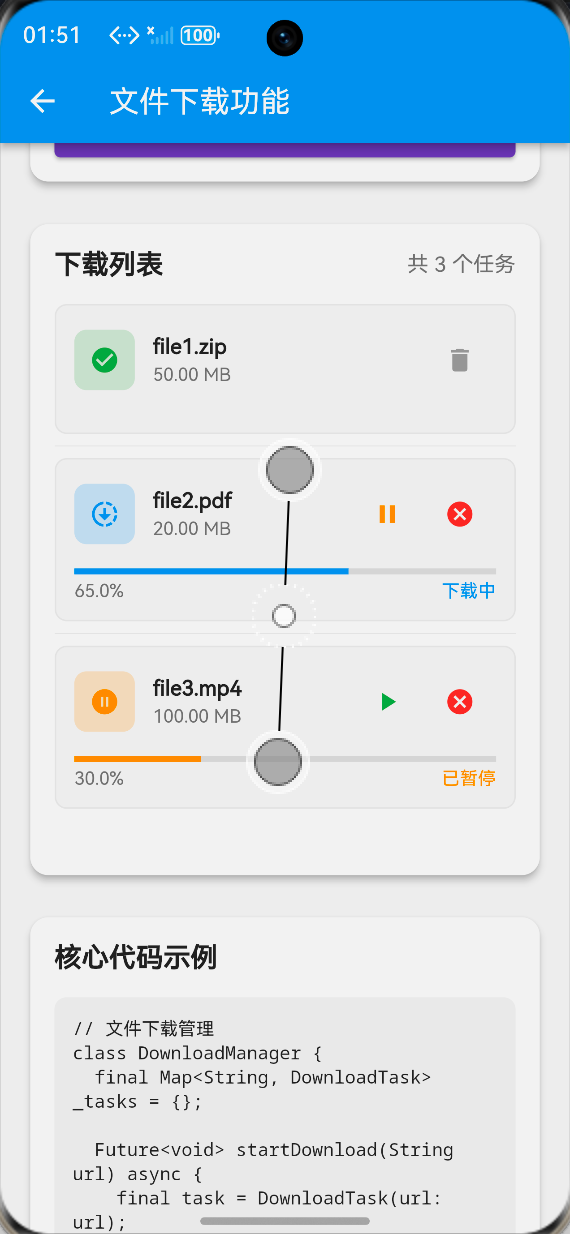
文件下载演示
正常下载流程
- 输入下载链接
- 点击开始下载
- 实时显示下载进度
- 下载完成提示
断点续传演示
- 下载过程中暂停
- 显示已下载进度
- 点击继续下载
- 从断点处恢复下载
下载任务管理
任务列表
- 显示所有下载任务
- 显示文件名和大小
- 显示下载状态
- 显示下载进度
任务操作
- 暂停下载
- 继续下载
- 取消下载
- 删除任务
实现步骤
1. 下载管理器实现
核心类设计
class DownloadManager {
  final Map<String, DownloadTask> _tasks = {};

  Future<void> startDownload(String url) async {
    final task = DownloadTask(
      id: DateTime.now().millisecondsSinceEpoch.toString(),
      url: url,
      fileName: url.split('/').last,
      fileSize: await _getFileSize(url),
      status: DownloadStatus.downloading,
      progress: 0.0,
    );

    _tasks[task.id] = task;

    try {
      final response = await Dio().get(
        url,
        options: Options(responseType: ResponseType.bytes),
        onReceiveProgress: (received, total) {
          task.progress = received / total;
          notifyListeners();
        },
      );

      final file = File(task.fileName);
      await file.writeAsBytes(response.data);

      task.status = DownloadStatus.completed;
    } catch (e) {
      task.status = DownloadStatus.failed;
    }
  }

  void pauseDownload(String taskId) {
    _tasks[taskId]?.status = DownloadStatus.paused;
  }

  void resumeDownload(String taskId) {
    _tasks[taskId]?.status = DownloadStatus.downloading;
  }
}
2. 下载任务设计
任务数据结构
class DownloadTask {
  final String id;
  final String url;
  final String fileName;
  final int fileSize;
  DownloadStatus status;
  double progress;
  int downloadedBytes;

  DownloadTask({
    required this.id,
    required this.url,
    required this.fileName,
    required this.fileSize,
    required this.status,
    required this.progress,
    this.downloadedBytes = 0,
  });
}

enum DownloadStatus {
  downloading,
  paused,
  completed,
  cancelled,
  failed,
}
3. 断点续传实现
续传核心逻辑
Future<void> downloadWithResume(String url, String savePath) async {
  final file = File(savePath);
  int downloadedBytes = 0;

  if (await file.exists()) {
    downloadedBytes = await file.length();
  }

  final response = await Dio().download(
    url,
    savePath,
    options: Options(
      headers: {
        'Range': 'bytes=$downloadedBytes-',
      },
    ),
    onReceiveProgress: (received, total) {
      final progress = (downloadedBytes + received) / (downloadedBytes + total);
      updateProgress(progress);
    },
  );
}
4. 进度显示实现
进度条UI
LinearProgressIndicator(
  value: task.progress,
  backgroundColor: Colors.grey.shade300,
  color: getStatusColor(task.status),
)
进度文本
Text(
  '${(task.progress * 100).toStringAsFixed(1)}%',
  style: TextStyle(fontSize: 12),
)
功能特性
1. 下载配置
URL输入
TextField(
  controller: urlController,
  decoration: InputDecoration(
    labelText: '下载链接',
    prefixIcon: Icon(Icons.link),
    border: OutlineInputBorder(
      borderRadius: BorderRadius.circular(8),
    ),
  ),
)
开始下载
ElevatedButton.icon(
  onPressed: isDownloading ? null : startDownload,
  icon: isDownloading
      ? SizedBox(
          width: 16,
          height: 16,
          child: CircularProgressIndicator(strokeWidth: 2),
        )
      : Icon(Icons.download),
  label: Text(isDownloading ? '下载中...' : '开始下载'),
  style: ElevatedButton.styleFrom(
    backgroundColor: Colors.deepPurple,
  ),
)
2. 任务管理
暂停/继续
Row(
  children: [
    IconButton(
      icon: Icon(Icons.pause),
      onPressed: () => pauseDownload(task),
    ),
    IconButton(
      icon: Icon(Icons.cancel),
      onPressed: () => cancelDownload(task),
    ),
  ],
)
任务删除
IconButton(
  icon: Icon(Icons.delete, color: Colors.red),
  onPressed: () => deleteTask(task),
)
3. 状态显示
状态图标
Icon(
  getStatusIcon(task.status),
  color: getStatusColor(task.status),
)

IconData getStatusIcon(DownloadStatus status) {
  switch (status) {
    case DownloadStatus.downloading:
      return Icons.downloading;
    case DownloadStatus.paused:
      return Icons.pause_circle;
    case DownloadStatus.completed:
      return Icons.check_circle;
    case DownloadStatus.cancelled:
      return Icons.cancel;
    case DownloadStatus.failed:
      return Icons.error;
  }
}
状态颜色
Color getStatusColor(DownloadStatus status) {
  switch (status) {
    case DownloadStatus.downloading:
      return Colors.blue;
    case DownloadStatus.paused:
      return Colors.orange;
    case DownloadStatus.completed:
      return Colors.green;
    case DownloadStatus.cancelled:
      return Colors.red;
    case DownloadStatus.failed:
      return Colors.red;
  }
}
使用说明
基本使用
-
新建下载
- 输入文件下载链接
- 点击"开始下载"按钮
- 观察下载进度
-
管理任务
- 查看任务列表
- 暂停/继续下载
- 取消/删除任务
-
查看进度
- 实时进度条
- 百分比显示
- 状态提示
高级功能
断点续传
Future<void> resumeDownload(DownloadTask task) async {
  task.status = DownloadStatus.downloading;

  final startProgress = task.progress;
  for (int i = (startProgress * 100).round(); i <= 100; i++) {
    await Future.delayed(Duration(milliseconds: 50));
    setState(() {
      task.progress = i / 100;
      if (i == 100) {
        task.status = DownloadStatus.completed;
      }
    });
  }
}
文件大小格式化
String formatFileSize(int bytes) {
  if (bytes < 1024) return '$bytes B';
  if (bytes < 1024 * 1024) return '${(bytes / 1024).toStringAsFixed(2)} KB';
  if (bytes < 1024 * 1024 * 1024) {
    return '${(bytes / (1024 * 1024)).toStringAsFixed(2)} MB';
  }
  return '${(bytes / (1024 * 1024 * 1024)).toStringAsFixed(2)} GB';
}
技术要点
1. 断点续传原理
HTTP Range请求
headers: {
  'Range': 'bytes=$start-$end',
}
文件追加写入
final file = File(savePath);
final raf = await file.open(mode: FileMode.append);
await raf.writeFrom(data);
await raf.close();
2. 并发下载
多线程下载
Future<void> multiThreadDownload(String url, int threads) async {
  final fileSize = await getFileSize(url);
  final chunkSize = fileSize ~/ threads;

  final futures = <Future>[];
  for (int i = 0; i < threads; i++) {
    final start = i * chunkSize;
    final end = i == threads - 1 ? fileSize : start + chunkSize - 1;
    futures.add(downloadChunk(url, start, end, i));
  }

  await Future.wait(futures);
  await mergeChunks(threads);
}
3. 错误处理
网络错误
try {
  await downloadFile(url);
} on SocketException {
  showError('网络连接失败');
} on HttpException catch (e) {
  showError('HTTP错误: ${e.message}');
} on TimeoutException {
  showError('下载超时');
} catch (e) {
  showError('下载失败: $e');
}
最佳实践
1. 下载优化
速度优化
- 使用多线程下载
- 选择最快的CDN节点
- 压缩传输数据
- 复用HTTP连接
稳定性优化
- 实现断点续传
- 自动重试机制
- 网络状态检测
- 错误恢复策略
2. 存储管理
文件命名
String generateFileName(String url) {
  final uri = Uri.parse(url);
  final name = uri.pathSegments.last;
  final timestamp = DateTime.now().millisecondsSinceEpoch;
  return '${timestamp}_$name';
}
存储路径
Future<String> getDownloadPath() async {
  if (Platform.isAndroid) {
    return '/storage/emulated/0/Download';
  } else {
    final directory = await getApplicationDocumentsDirectory();
    return directory.path;
  }
}
3. 用户体验
通知提示
void showDownloadNotification(DownloadTask task) {
  flutterLocalNotificationsPlugin.show(
    task.id,
    '下载${task.status == DownloadStatus.completed ? '完成' : '中'}',
    task.fileName,
    NotificationDetails(
      android: AndroidNotificationDetails(
        'download_channel',
        '下载通知',
        importance: Importance.defaultImportance,
      ),
    ),
  );
}
应用场景
1. 应用更新
APK下载
Future<void> downloadUpdate(String url) async {
  await downloadManager.startDownload(url);
  // 下载完成后提示安装
}
2. 文件下载
文档下载
Future<void> downloadDocument(String url) async {
  final path = await downloadManager.download(url);
  await openFile(path);
}
3. 媒体下载
视频下载
Future<void> downloadVideo(String url) async {
  await downloadManager.download(
    url,
    onProgress: (progress) {
      updateUI(progress);
    },
  );
}
总结
Flutter鸿蒙文件下载功能实现了完整的下载解决方案,包括:
- ✅ 断点续传功能
- ✅ 实时进度显示
- ✅ 任务管理功能
- ✅ 多种下载状态
- ✅ 错误处理机制
该功能为Flutter for OpenHarmony应用提供了可靠的文件下载能力,适用于各种文件下载场景。

作为“人工智能6S店”的官方数字引擎,为AI开发者与企业提供一个覆盖软硬件全栈、一站式门户。
更多推荐


 5
5 0
0- 0


 已为社区贡献106条内容

所有评论(0)