
【flutter for open harmony】第三方库Flutter 鸿蒙版 文字计数器 实战指南(适配 1.0.0)✨
文字计数器是写作、编辑中常用的工具,用于统计文章字数、控制内容长度。本文将带领大家使用Flutter开发一个功能完善的文字计数器应用。本文详细介绍了Flutter鸿蒙文字计数器的实现,包括字符统计、词数统计等核心技术。通过本实例,掌握了TextEditingController和正则表达式的使用方法。
·
【flutter for open harmony】第三方库Flutter 鸿蒙版 文字计数器 实战指南(适配 1.0.0)✨
Flutter 三方库 cached_network_image 的鸿蒙化适配与实战指南
欢迎加入开源鸿蒙跨平台社区: https://openharmonycrossplatform.csdn.net
本文详细介绍如何在Flutter鸿蒙应用中实现文字计数器功能,支持统计字数、词数、段落数等。
一、前言
文字计数器是写作、编辑中常用的工具,用于统计文章字数、控制内容长度。本文将带领大家使用Flutter开发一个功能完善的文字计数器应用。
二、效果展示
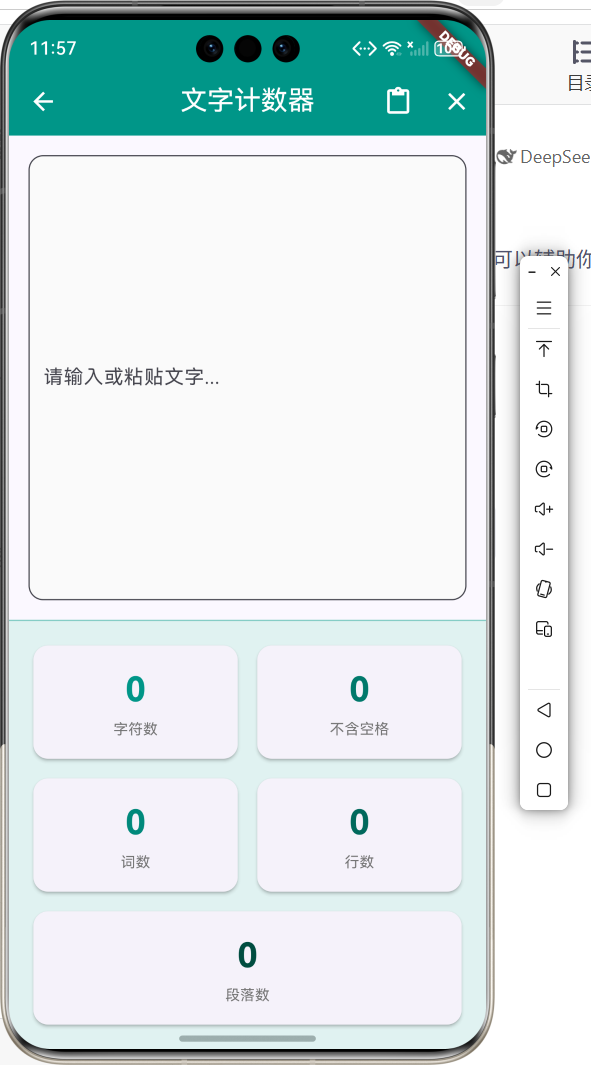
2.1 功能特性
| 功能 | 描述 |
|---|---|
| 字符统计 | 统计总字符数 |
| 不含空格 | 统计不含空格的字符数 |
| 词数统计 | 统计单词/词语数量 |
| 行数统计 | 统计总行数 |
| 段落统计 | 统计段落数量 |
三、项目背景与目标
3.1 项目背景
在写作、论文、社交媒体等场景中,需要控制文字数量。
3.2 项目目标
- 实现多维度文字统计
- 支持实时更新
- 提供粘贴功能
四、技术架构设计
4.1 核心技术
- TextEditingController: 文本控制
- 正则表达式: 文本分析
- Clipboard: 剪贴板操作
4.2 实现原理
通过TextEditingController监听文本变化,使用正则表达式分析文本结构。
五、详细实现
5.1 Flutter端实现
import 'package:flutter/material.dart';
class TextCounterPage extends StatefulWidget {
const TextCounterPage({super.key});
State<TextCounterPage> createState() => _TextCounterPageState();
}
class _TextCounterPageState extends State<TextCounterPage> {
final TextEditingController _controller = TextEditingController();
int _charCount = 0;
int _charNoSpaceCount = 0;
int _wordCount = 0;
int _lineCount = 0;
int _paragraphCount = 0;
void _updateCounts() {
final text = _controller.text;
setState(() {
_charCount = text.length;
_charNoSpaceCount = text.replaceAll(RegExp(r'\s'), '').length;
_wordCount = text.trim().isEmpty ? 0 : text.trim().split(RegExp(r'\s+')).length;
_lineCount = text.isEmpty ? 0 : text.split('\n').length;
_paragraphCount = text.trim().isEmpty ? 0 : text.trim().split(RegExp(r'\n\s*\n')).where((p) => p.trim().isNotEmpty).length;
});
}
Widget build(BuildContext context) {
return Scaffold(
appBar: AppBar(
title: const Text('文字计数器'),
centerTitle: true,
backgroundColor: Colors.teal,
foregroundColor: Colors.white,
),
body: Column(
children: [
Expanded(
child: Padding(
padding: const EdgeInsets.all(16),
child: TextField(
controller: _controller,
maxLines: null,
expands: true,
decoration: InputDecoration(
hintText: '请输入或粘贴文字...',
border: OutlineInputBorder(borderRadius: BorderRadius.circular(12)),
),
onChanged: (_) => _updateCounts(),
),
),
),
Container(
padding: const EdgeInsets.all(16),
child: Row(
children: [
_buildStatCard('字符数', _charCount),
_buildStatCard('词数', _wordCount),
_buildStatCard('段落数', _paragraphCount),
],
),
),
],
),
);
}
Widget _buildStatCard(String label, int count) {
return Expanded(
child: Card(
child: Padding(
padding: const EdgeInsets.all(12),
child: Column(
children: [
Text('$count', style: const TextStyle(fontSize: 24, fontWeight: FontWeight.bold)),
Text(label, style: const TextStyle(fontSize: 12)),
],
),
),
),
);
}
}
5.2 UI界面实现
UI采用Material Design 3风格,上方为输入区域,下方显示统计数据卡片。
六、核心功能解析
6.1 字符统计
统计所有字符:
_charCount = text.length;
6.2 词数统计
使用正则表达式分词:
_wordCount = text.trim().split(RegExp(r'\s+')).length;
6.3 段落统计
通过双换行符分隔段落:
_paragraphCount = text.trim().split(RegExp(r'\n\s*\n')).length;
七、实际应用场景
- 写作统计:统计文章字数
- 社交媒体:控制内容长度
- 论文编辑:满足字数要求
八、优化建议
- 中英文区分:区分中文字符和英文单词
- 阅读时间:估算阅读时间
- 关键词提取:提取高频词汇
九、常见问题与解决方案
9.1 中英文统计
问题:中英文统计方式不同
解决方案:使用不同的正则表达式处理
9.2 性能优化
问题:大量文本时卡顿
解决方案:使用防抖处理更新
十、总结
本文详细介绍了Flutter鸿蒙文字计数器的实现,包括字符统计、词数统计等核心技术。通过本实例,掌握了TextEditingController和正则表达式的使用方法。
十一、参考资料

作为“人工智能6S店”的官方数字引擎,为AI开发者与企业提供一个覆盖软硬件全栈、一站式门户。
更多推荐
 0
0 0
0- 0


 已为社区贡献12条内容

所有评论(0)