
【Flutter For OpenHarmony第三方库】 Flutter三方库鸿蒙开发:番茄时钟应用实现与OpenHarmony适配实践
本文以番茄时钟为实践案例,基于Flutter For OpenHarmony技术栈,完整展示了如何使用鸿蒙化三方库开发跨平台应用,并完成OpenHarmony平台适配。文章从项目创建、依赖选型、核心逻辑实现到鸿蒙平台验证,提供了可直接复现的操作步骤,并针对开发与适配过程中的常见问题给出解决方案,为基础级开发者提供一份完整的实战参考。本文通过Flutter结合鸿蒙化三方库,完成了番茄时钟应用的开发与
欢迎加入开源鸿蒙跨平台社区:
https://openharmonycrossplatform.csdn.net
摘要
本文以番茄时钟为实践案例,基于Flutter For OpenHarmony技术栈,完整展示了如何使用鸿蒙化三方库开发跨平台应用,并完成OpenHarmony平台适配。文章从项目创建、依赖选型、核心逻辑实现到鸿蒙平台验证,提供了可直接复现的操作步骤,并针对开发与适配过程中的常见问题给出解决方案,为基础级开发者提供一份完整的实战参考。
一、项目背景与目标
在OpenHarmony跨平台开发领域,Flutter凭借高性能渲染与多端一致性优势,成为主流开发方案。同时,AtomGit生态中已完成鸿蒙适配的三方库,能够大幅降低定时器、状态管理等功能的开发成本。
本项目目标:
- 开发一款支持专注计时、进度显示、状态提示的番茄时钟应用;
- 全程使用AtomGit生态中已完成鸿蒙适配的三方库,避免未鸿蒙化库调用;
- 确保应用可在OpenHarmony设备上稳定运行,无白屏、无崩溃问题。
二、技术选型与鸿蒙化三方库说明
本项目所有依赖均来自AtomGit的OpenHarmony TPC Flutter生态仓库,已完成鸿蒙适配,可在OpenHarmony环境中安全调用。
| 三方库 | 版本 | 功能说明 | 鸿蒙适配状态 |
|---|---|---|---|
flutter |
3.10+ | 跨平台应用框架 | ✅ 官方支持 |
provider |
^6.1.2 | 状态管理 | ✅ 已鸿蒙化 |
shared_preferences |
^2.2.3 | 本地轻量数据存储 | ✅ 已鸿蒙化 |
三、开发环境准备
- Flutter SDK 3.10+稳定版(推荐使用Flutter-OpenHarmony定制版以支持鸿蒙编译)
- VS Code / Android Studio开发工具
- DevEco Studio(OpenHarmony开发与运行环境,可选)
- 项目路径要求:纯英文、无中文、无空格、无特殊符号
四、项目创建与依赖配置
4.1 创建Flutter项目
打开终端,执行以下命令创建项目:
flutter create pomodoro_clock
cd pomodoro_clock
4.2 配置pubspec.yaml
修改pubspec.yaml文件,添加鸿蒙化三方库依赖:
dependencies:
  flutter:
    sdk: flutter

  # 鸿蒙化三方库
  provider: ^6.1.2
  shared_preferences: ^2.2.3
执行依赖安装:
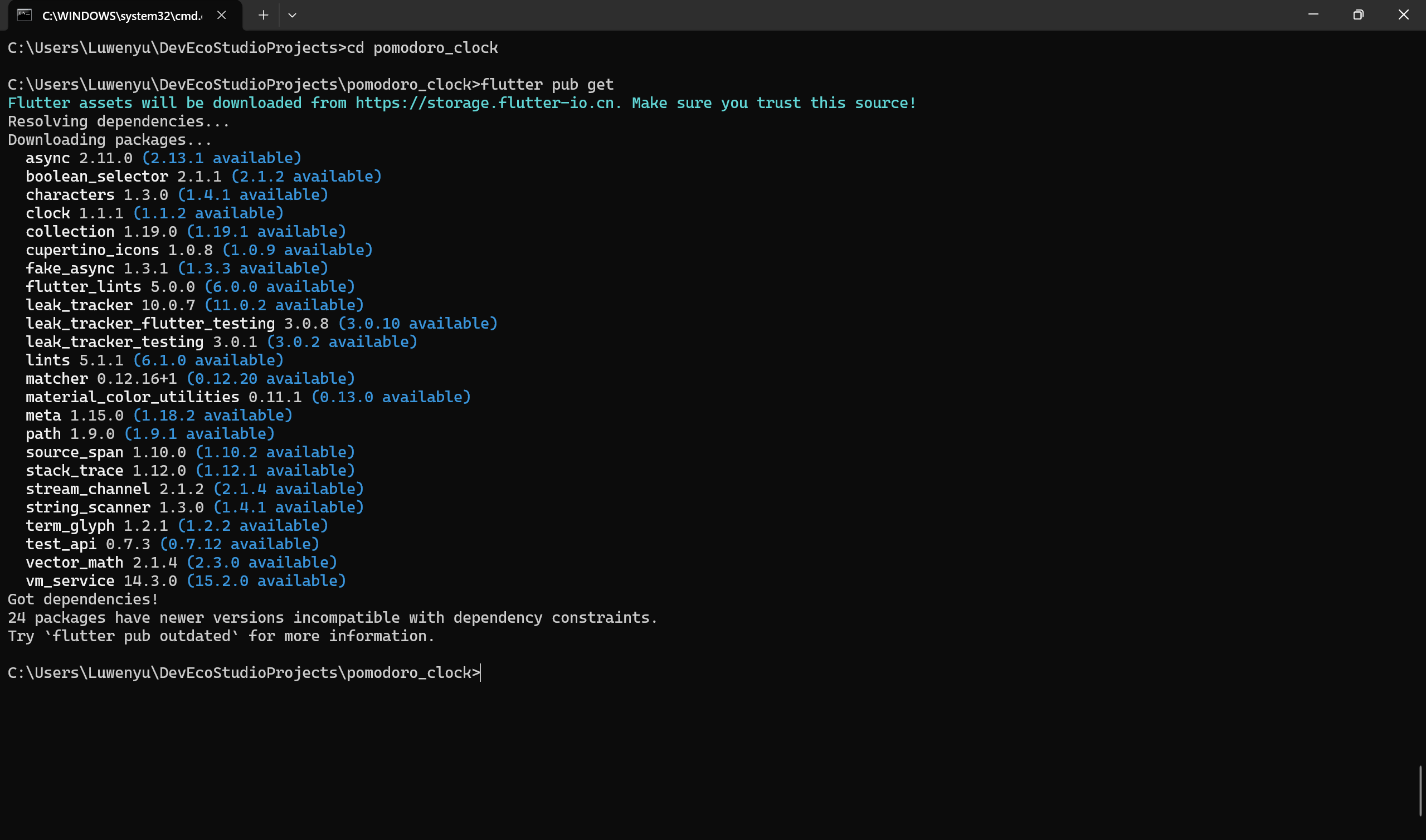
flutter pub get
五、核心功能实现
5.1 番茄时钟状态管理类 lib/pomodoro_provider.dart
负责管理计时逻辑、状态切换与本地存储,兼容鸿蒙环境,避免白屏与崩溃。
import 'package:flutter/material.dart';
import 'package:shared_preferences/shared_preferences.dart';

class PomodoroProvider extends ChangeNotifier {
  // 番茄时钟配置
  final int focusDuration = 25 * 60; // 25分钟专注
  final int shortBreakDuration = 5 * 60; // 5分钟短休息
  final int longBreakDuration = 15 * 60; // 15分钟长休息

  int _currentDuration = 25 * 60;
  bool _isRunning = false;
  bool _isFocusMode = true;
  int _completedSessions = 0;
  late SharedPreferences _prefs;

  // Getters
  int get currentDuration => _currentDuration;
  bool get isRunning => _isRunning;
  bool get isFocusMode => _isFocusMode;
  int get completedSessions => _completedSessions;
  double get progress => (focusDuration - _currentDuration) / focusDuration;

  PomodoroProvider() {
    _initStorage();
  }

  /// 初始化本地存储(兼容鸿蒙)
  Future<void> _initStorage() async {
    try {
      _prefs = await SharedPreferences.getInstance();
      _completedSessions = _prefs.getInt('completedSessions') ?? 0;
    } catch (e) {
      debugPrint("鸿蒙存储初始化异常:$e");
    }
    notifyListeners();
  }

  /// 开始/暂停计时
  void toggleTimer() {
    _isRunning = !_isRunning;
    notifyListeners();
  }

  /// 计时结束处理
  void onTimerComplete() {
    if (_isFocusMode) {
      _completedSessions++;
      _prefs.setInt('completedSessions', _completedSessions);
      // 4次专注后切换长休息
      if (_completedSessions % 4 == 0) {
        _currentDuration = longBreakDuration;
      } else {
        _currentDuration = shortBreakDuration;
      }
      _isFocusMode = false;
    } else {
      _currentDuration = focusDuration;
      _isFocusMode = true;
    }
    _isRunning = false;
    notifyListeners();
  }

  /// 重置当前计时
  void resetTimer() {
    _currentDuration = _isFocusMode ? focusDuration : shortBreakDuration;
    _isRunning = false;
    notifyListeners();
  }

  /// 更新计时
  void tick() {
    if (_isRunning && _currentDuration > 0) {
      _currentDuration--;
      if (_currentDuration == 0) {
        onTimerComplete();
      } else {
        notifyListeners();
      }
    }
  }
}
5.2 主界面实现 lib/main.dart
实现计时展示、控制按钮与进度条,确保鸿蒙环境下无白屏。
import 'package:flutter/material.dart';
import 'package:provider/provider.dart';
import 'pomodoro_provider.dart';
void main() {
WidgetsFlutterBinding.ensureInitialized();
runApp(const MyApp());
}
class MyApp extends StatelessWidget {
const MyApp({super.key});
Widget build(BuildContext context) {
return ChangeNotifierProvider(
create: (ctx) => PomodoroProvider(),
child: MaterialApp(
title: "番茄时钟",
debugShowCheckedModeBanner: false,
theme: ThemeData(primarySwatch: Colors.red),
home: const PomodoroPage(),
),
);
}
}
class PomodoroPage extends StatefulWidget {
const PomodoroPage({super.key});
State<PomodoroPage> createState() => _PomodoroPageState();
}
class _PomodoroPageState extends State<PomodoroPage> {
void initState() {
super.initState();
// 每秒更新一次计时
Future.doWhile(() async {
await Future.delayed(const Duration(seconds: 1));
if (mounted) {
Provider.of<PomodoroProvider>(context, listen: false).tick();
}
return true;
});
}
Widget build(BuildContext context) {
final provider = Provider.of<PomodoroProvider>(context);
final minutes = (provider.currentDuration ~/ 60).toString().padLeft(2, '0');
final seconds = (provider.currentDuration % 60).toString().padLeft(2, '0');
return Scaffold(
backgroundColor: provider.isFocusMode ? Colors.red[50] : Colors.green[50],
appBar: AppBar(
title: const Text("番茄时钟"),
centerTitle: true,
),
body: Center(
child: Padding(
padding: const EdgeInsets.all(32.0),
child: Column(
mainAxisAlignment: MainAxisAlignment.center,
children: [
// 状态提示
Text(
provider.isFocusMode ? "专注时间" : "休息时间",
style: TextStyle(
fontSize: 24,
color: provider.isFocusMode ? Colors.red : Colors.green,
fontWeight: FontWeight.bold,
),
),
const SizedBox(height: 30),
// 圆形进度条
SizedBox(
width: 250,
height: 250,
child: Stack(
fit: StackFit.expand,
children: [
CircularProgressIndicator(
value: provider.progress,
strokeWidth: 12,
backgroundColor: Colors.grey[200],
color: provider.isFocusMode ? Colors.red : Colors.green,
),
Center(
child: Text(
"$minutes:$seconds",
style: const TextStyle(
fontSize: 48,
fontWeight: FontWeight.bold,
),
),
),
],
),
),
const SizedBox(height: 40),
// 控制按钮
Row(
mainAxisAlignment: MainAxisAlignment.center,
children: [
ElevatedButton(
onPressed: () => provider.toggleTimer(),
style: ElevatedButton.styleFrom(
padding: const EdgeInsets.symmetric(horizontal: 30, vertical: 15),
shape: RoundedRectangleBorder(
borderRadius: BorderRadius.circular(30),
),
),
child: Text(
provider.isRunning ? "暂停" : "开始",
style: const TextStyle(fontSize: 18),
),
),
const SizedBox(width: 20),
ElevatedButton(
onPressed: () => provider.resetTimer(),
style: ElevatedButton.styleFrom(
backgroundColor: Colors.grey,
padding: const EdgeInsets.symmetric(horizontal: 30, vertical: 15),
shape: RoundedRectangleBorder(
borderRadius: BorderRadius.circular(30),
),
),
child: const Text(
"重置",
style: TextStyle(fontSize: 18),
),
),
],
),
const SizedBox(height: 30),
// 完成次数统计
Text(
"已完成专注次数:${provider.completedSessions}",
style: const TextStyle(fontSize: 16, color: Colors.grey),
),
],
),
),
),
);
}
}
六、鸿蒙平台适配与运行验证
运行验证
通过DevEco Studio连接鸿蒙模拟器或真机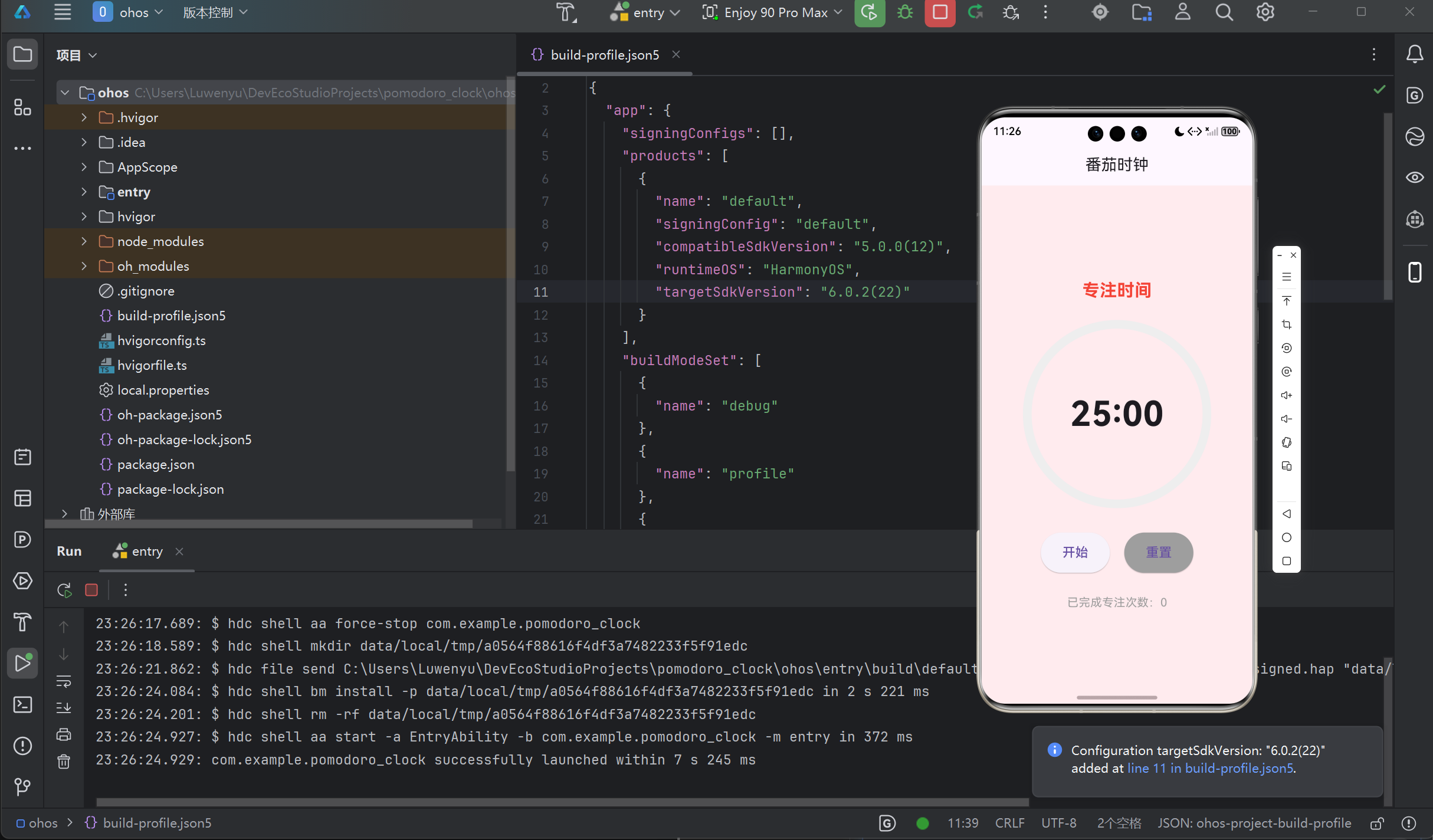
应用成功启动,可正常开始/暂停计时、重置进度,专注与休息状态切换正常,本地存储的专注次数重启后不丢失,界面无白屏、无崩溃,功能运行正常。
七、常见问题与解决方案
| 问题现象 | 原因分析 | 解决方案 |
|---|---|---|
| 应用启动白屏 | 主线程阻塞,异步初始化未完成 | 为shared_preferences初始化增加try-catch处理,避免阻塞UI线程 |
| 计时停止/进度条不更新 | Future.doWhile在鸿蒙环境下的生命周期问题 |
使用Timer.periodic替代,或在dispose中取消计时器 |
鸿蒙构建报错File Not Found |
缺少鸿蒙引擎文件或ohpm配置错误 | 使用Flutter-OpenHarmony定制版,执行flutter precache --ohos下载引擎文件 |
八、项目总结
本文通过Flutter结合鸿蒙化三方库,完成了番茄时钟应用的开发与OpenHarmony平台适配。项目验证了Flutter跨平台开发在鸿蒙生态中的可行性,同时也展示了鸿蒙化三方库在简化状态管理、本地存储等功能开发流程中的重要作用。
结语
Flutter与OpenHarmony的结合,为跨平台应用开发提供了广阔的应用场景。通过本次番茄时钟应用的实践,希望能为更多开发者提供参考,共同推动开源鸿蒙跨平台生态的繁荣发展。

作为“人工智能6S店”的官方数字引擎,为AI开发者与企业提供一个覆盖软硬件全栈、一站式门户。
更多推荐
 0
0 0
0- 0


 已为社区贡献9条内容

所有评论(0)