
【flutter for open harmony】第三方库Flutter 鸿蒙版 节日倒计时 实战指南(适配 1.0.0)✨
本文介绍了如何在Flutter鸿蒙应用中实现节日倒计时功能。通过DateTime计算日期差,展示传统节日列表和倒计时天数,并使用颜色区分不同时间段的节日(如红色表示当天,橙色表示7天内)。文章详细讲解了核心功能实现,包括日期计算、节日排序和颜色指示,并提供了优化建议(支持农历、自定义节日等)和常见问题解决方案。该功能可帮助用户提前规划节日活动,适用于生活规划、礼物准备等场景。项目代码已开源,适合F
【flutter for open harmony】第三方库Flutter 鸿蒙版 节日倒计时 实战指南(适配 1.0.0)✨
Flutter 三方库 cached_network_image 的鸿蒙化适配与实战指南
欢迎加入开源鸿蒙跨平台社区: https://openharmonycrossplatform.csdn.net
本文详细介绍如何在Flutter鸿蒙应用中实现节日倒计时功能,包括节日日期计算、倒计时显示和列表管理。
一、前言
节日倒计时可以帮助用户了解距离传统节日还有多少天,是实用的生活工具。本文将介绍如何在Flutter鸿蒙应用中实现节日倒计时功能。
二、效果展示
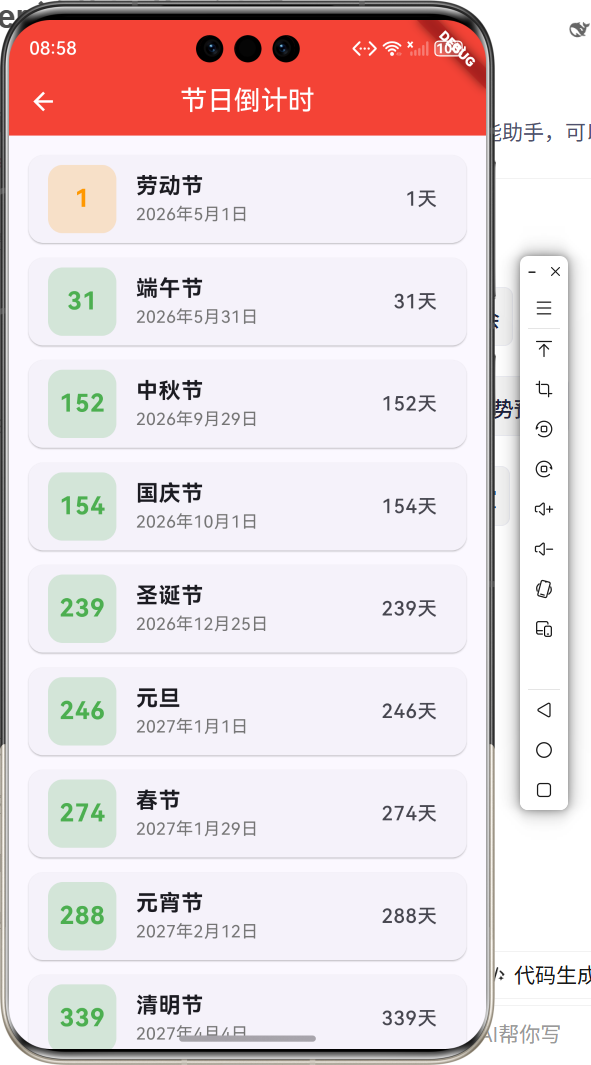
2.1 功能特性
| 功能 | 描述 |
|---|---|
| 节日列表 | 显示传统节日列表 |
| 倒计时显示 | 显示距离节日的天数 |
| 颜色指示 | 根据天数显示不同颜色 |
| 今日提醒 | 节日当天特殊显示 |
三、项目背景与目标
3.1 项目背景
传统节日是中华文化的重要组成部分,节日倒计时帮助用户提前准备和规划。
3.2 项目目标
- 实现节日列表显示
- 实现倒计时计算
- 实现颜色指示
- 实现今日提醒
四、技术架构设计
4.1 架构概述
节日倒计时使用DateTime计算日期差,通过List管理节日数据。
4.2 日期计算
使用DateTime.difference计算两个日期之间的天数差。
五、详细实现
5.1 Flutter端实现
import 'package:flutter/material.dart';
class FestivalCountdownPage extends StatefulWidget {
const FestivalCountdownPage({super.key});
State<FestivalCountdownPage> createState() => _FestivalCountdownPageState();
}
class _FestivalCountdownPageState extends State<FestivalCountdownPage> {
final List<Festival> _festivals = [];
int _currentYear = DateTime.now().year;
void initState() {
super.initState();
_loadFestivals();
}
void _loadFestivals() {
_festivals.clear();
final now = DateTime.now();
final festivalDates = [
('元旦', DateTime(_currentYear + 1, 1, 1)),
('春节', DateTime(_currentYear, 1, 29)),
('元宵节', DateTime(_currentYear, 2, 12)),
('清明节', DateTime(_currentYear, 4, 4)),
('劳动节', DateTime(_currentYear, 5, 1)),
('端午节', DateTime(_currentYear, 5, 31)),
('中秋节', DateTime(_currentYear, 9, 29)),
('国庆节', DateTime(_currentYear, 10, 1)),
('圣诞节', DateTime(_currentYear, 12, 25)),
];
for (var item in festivalDates) {
var date = item.$2;
if (date.isBefore(now)) {
date = DateTime(_currentYear + 1, date.month, date.day);
}
_festivals.add(Festival(name: item.$1, date: date));
}
_festivals.sort((a, b) => a.date.compareTo(b.date));
}
int _getDaysUntil(DateTime date) {
final now = DateTime.now();
return date.difference(now).inDays;
}
Widget build(BuildContext context) {
return Scaffold(
appBar: AppBar(
title: const Text('节日倒计时'),
centerTitle: true,
backgroundColor: Colors.red,
foregroundColor: Colors.white,
),
body: ListView.builder(
padding: const EdgeInsets.all(16),
itemCount: _festivals.length,
itemBuilder: (context, index) {
final festival = _festivals[index];
final days = _getDaysUntil(festival.date);
return Card(
margin: const EdgeInsets.only(bottom: 12),
child: ListTile(
leading: Container(
width: 56,
height: 56,
decoration: BoxDecoration(
color: _getColorForDays(days).withOpacity(0.2),
borderRadius: BorderRadius.circular(12),
),
child: Center(
child: Text(
'$days',
style: TextStyle(
fontSize: 20,
fontWeight: FontWeight.bold,
color: _getColorForDays(days),
),
),
),
),
title: Text(festival.name, style: const TextStyle(fontSize: 18, fontWeight: FontWeight.bold)),
subtitle: Text('${festival.date.year}年${festival.date.month}月${festival.date.day}日'),
trailing: days == 0
? Container(
padding: const EdgeInsets.symmetric(horizontal: 12, vertical: 6),
decoration: BoxDecoration(color: Colors.red, borderRadius: BorderRadius.circular(20)),
child: const Text('今天', style: TextStyle(color: Colors.white)),
)
: Text('$days天'),
),
);
},
),
);
}
Color _getColorForDays(int days) {
if (days == 0) return Colors.red;
if (days <= 7) return Colors.orange;
if (days <= 30) return Colors.blue;
return Colors.green;
}
}
class Festival {
final String name;
final DateTime date;
Festival({required this.name, required this.date});
}
5.2 核心功能解析
日期计算
使用DateTime.difference计算天数差。
节日排序
根据日期对节日进行排序,最近的节日排在前面。
颜色指示
根据剩余天数显示不同颜色,提醒用户节日临近。
六、实际应用场景
6.1 生活规划
提前规划节日活动。
6.2 礼物准备
提前准备节日礼物。
6.3 节日提醒
提醒用户重要节日。
七、优化建议
7.1 农历支持
支持农历节日计算。
7.2 自定义节日
支持用户添加自定义节日。
7.3 提醒功能
添加节日提醒通知。
八、常见问题与解决方案
8.1 日期计算错误
确保使用正确的时区和日期格式。
8.2 节日日期变化
某些节日日期每年不同,需要动态计算。
8.3 跨年处理
处理跨年节日的日期计算。
九、总结
本文详细介绍了Flutter鸿蒙节日倒计时功能的实现过程,包括节日日期计算、倒计时显示和列表管理。通过本实例,开发者可以掌握Flutter日期处理、列表排序等关键技术点。
十、参考资料
- Flutter官方文档:https://flutter.dev
- HarmonyOS开发者文档:https://developer.harmonyos.com
- Flutter中国社区:https://flutter-io.cn

作为“人工智能6S店”的官方数字引擎,为AI开发者与企业提供一个覆盖软硬件全栈、一站式门户。
更多推荐
 1
1 0
0- 0


 已为社区贡献12条内容

所有评论(0)