
【flutter for open harmony】第三方库Flutter 鸿蒙版 签到打卡 实战指南(适配 1.0.0)✨
签到打卡是培养习惯的有效方式,广泛应用于健身、学习等场景。本文将介绍如何在Flutter鸿蒙应用中实现签到打卡功能。签到打卡使用Set存储签到日期,通过日期计算统计连续签到天数。本文详细介绍了Flutter鸿蒙签到打卡功能的实现过程,包括签到记录、连续统计和日历展示。通过本实例,开发者可以掌握Flutter日期处理、集合操作、日历布局等关键技术点。
【flutter for open harmony】第三方库Flutter 鸿蒙版 签到打卡 实战指南(适配 1.0.0)✨
Flutter 三方库 cached_network_image 的鸿蒙化适配与实战指南
欢迎加入开源鸿蒙跨平台社区: https://openharmonycrossplatform.csdn.net
本文详细介绍如何在Flutter鸿蒙应用中实现签到打卡功能,包括签到记录、连续统计和日历展示。
一、前言
签到打卡是培养习惯的有效方式,广泛应用于健身、学习等场景。本文将介绍如何在Flutter鸿蒙应用中实现签到打卡功能。
二、效果展示
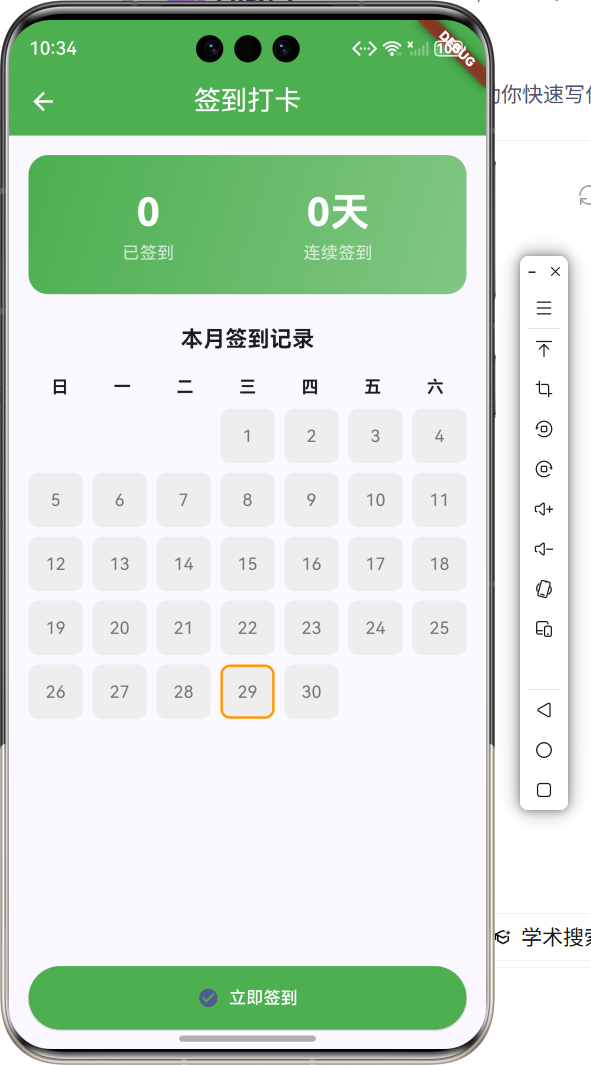
2.1 功能特性
| 功能 | 描述 |
|---|---|
| 每日签到 | 每天可签到一次 |
| 连续统计 | 统计连续签到天数 |
| 日历展示 | 展示本月签到记录 |
| 状态显示 | 显示签到状态 |
三、项目背景与目标
3.1 项目背景
签到打卡是习惯养成类应用的核心功能,通过签到记录激励用户坚持。
3.2 项目目标
- 实现签到功能
- 实现连续统计
- 实现日历展示
- 实现状态管理
四、技术架构设计
4.1 架构概述
签到打卡使用Set存储签到日期,通过日期计算统计连续签到天数。
4.2 数据存储
使用日期字符串作为唯一标识存储签到记录。
五、详细实现
5.1 Flutter端实现
import 'package:flutter/material.dart';
class DailyCheckInPage extends StatefulWidget {
const DailyCheckInPage({super.key});
State<DailyCheckInPage> createState() => _DailyCheckInPageState();
}
class _DailyCheckInPageState extends State<DailyCheckInPage> {
final Set<String> _checkedDates = {};
int _streak = 0;
void initState() {
super.initState();
_calculateStreak();
}
void _calculateStreak() {
_streak = 0;
var date = DateTime.now();
while (_checkedDates.contains(_formatDate(date))) {
_streak++;
date = date.subtract(const Duration(days: 1));
}
}
String _formatDate(DateTime date) {
return '${date.year}-${date.month}-${date.day}';
}
bool _isCheckedToday() {
return _checkedDates.contains(_formatDate(DateTime.now()));
}
void _checkIn() {
if (_isCheckedToday()) return;
setState(() {
_checkedDates.add(_formatDate(DateTime.now()));
_calculateStreak();
});
ScaffoldMessenger.of(context).showSnackBar(
SnackBar(content: Text('签到成功!已连续签到$_streak天'), backgroundColor: Colors.green),
);
}
Widget build(BuildContext context) {
final now = DateTime.now();
final firstDayOfMonth = DateTime(now.year, now.month, 1);
final lastDayOfMonth = DateTime(now.year, now.month + 1, 0);
final startWeekday = firstDayOfMonth.weekday % 7;
return Scaffold(
appBar: AppBar(
title: const Text('签到打卡'),
centerTitle: true,
backgroundColor: Colors.green,
foregroundColor: Colors.white,
),
body: Padding(
padding: const EdgeInsets.all(16),
child: Column(
children: [
Container(
padding: const EdgeInsets.all(24),
decoration: BoxDecoration(
gradient: LinearGradient(colors: [Colors.green, Colors.green[300]!]),
borderRadius: BorderRadius.circular(16),
),
child: Row(
mainAxisAlignment: MainAxisAlignment.spaceAround,
children: [
_buildStat('已签到', _checkedDates.length.toString()),
_buildStat('连续签到', '$_streak天'),
],
),
),
const SizedBox(height: 24),
Expanded(
child: GridView.builder(
gridDelegate: const SliverGridDelegateWithFixedCrossAxisCount(
crossAxisCount: 7,
mainAxisSpacing: 8,
crossAxisSpacing: 8,
),
itemCount: lastDayOfMonth.day + startWeekday,
itemBuilder: (context, index) {
if (index < startWeekday) return const SizedBox();
final day = index - startWeekday + 1;
final isChecked = _checkedDates.contains('${now.year}-${now.month}-$day');
final isToday = day == now.day;
return Container(
decoration: BoxDecoration(
color: isChecked ? Colors.green : Colors.grey[200],
borderRadius: BorderRadius.circular(8),
border: isToday ? Border.all(color: Colors.orange, width: 2) : null,
),
child: Center(
child: isChecked
? const Icon(Icons.check, color: Colors.white)
: Text('$day'),
),
);
},
),
),
SizedBox(
width: double.infinity,
child: ElevatedButton.icon(
onPressed: _isCheckedToday() ? null : _checkIn,
icon: const Icon(Icons.check_circle),
label: Text(_isCheckedToday() ? '今日已签到' : '立即签到'),
style: ElevatedButton.styleFrom(backgroundColor: Colors.green),
),
),
],
),
),
);
}
Widget _buildStat(String label, String value) {
return Column(
children: [
Text(value, style: const TextStyle(fontSize: 32, fontWeight: FontWeight.bold, color: Colors.white)),
Text(label, style: const TextStyle(color: Colors.white70)),
],
);
}
}
5.2 核心功能解析
签到记录
使用Set存储签到日期字符串。
连续统计
从今天开始向前遍历计算连续签到天数。
日历展示
使用GridView展示日历,标记已签到日期。
六、实际应用场景
6.1 习惯养成
培养每日习惯。
6.2 积分系统
签到获得积分奖励。
6.3 活动参与
活动签到记录。
七、优化建议
7.1 数据持久化
使用本地存储保存签到记录。
7.2 补签功能
支持补签漏签日期。
7.3 奖励机制
添加连续签到奖励。
八、常见问题与解决方案
8.1 时区问题
确保使用正确的时区计算日期。
8.2 数据丢失
实现数据持久化存储。
8.3 连续计算
正确处理跨月连续签到。
九、总结
本文详细介绍了Flutter鸿蒙签到打卡功能的实现过程,包括签到记录、连续统计和日历展示。通过本实例,开发者可以掌握Flutter日期处理、集合操作、日历布局等关键技术点。
十、参考资料
- Flutter官方文档:https://flutter.dev
- HarmonyOS开发者文档:https://developer.harmonyos.com
- Flutter中国社区:https://flutter-io.cn

作为“人工智能6S店”的官方数字引擎,为AI开发者与企业提供一个覆盖软硬件全栈、一站式门户。
更多推荐
 1
1 0
0- 0


 已为社区贡献2条内容

所有评论(0)