
【flutter for open harmony】第三方库Flutter 鸿蒙版 计算器 实战指南(适配 1.0.0)✨
计算器是移动设备上最基础的应用之一。在Flutter鸿蒙开发中,我们可以利用纯Dart实现一个功能完善的计算器,无需依赖任何原生API,实现真正的跨平台一致性。四则运算(加、减、乘、除)小数点支持退格和清除功能连续运算支持本文介绍了如何在Flutter鸿蒙应用中实现计算器功能。跨平台一致性:无需针对不同平台编写原生代码代码简洁:核心逻辑清晰易懂易于维护:所有逻辑集中在Dart层功能完善:支持完整的
【flutter for open harmony】第三方库Flutter 鸿蒙版 计算器 实战指南(适配 1.0.0)✨
Flutter 三方库 cached_network_image 的鸿蒙化适配与实战指南
欢迎加入开源鸿蒙跨平台社区: https://openharmonycrossplatform.csdn.net
本文详细介绍如何在Flutter鸿蒙应用中实现一个功能完整的计算器,支持四则运算、退格、清除等操作。
一、前言
计算器是移动设备上最基础的应用之一。在Flutter鸿蒙开发中,我们可以利用纯Dart实现一个功能完善的计算器,无需依赖任何原生API,实现真正的跨平台一致性。
本文将介绍如何实现:
- 四则运算(加、减、乘、除)
- 小数点支持
- 退格和清除功能
- 连续运算支持
二、效果展示
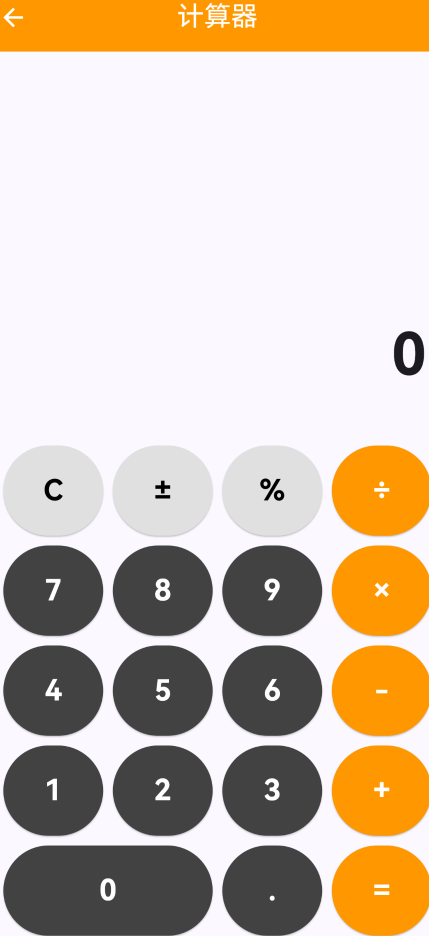
2.1 功能特性
| 功能 | 描述 |
|---|---|
| 四则运算 | 支持加、减、乘、除基本运算 |
| 小数运算 | 支持小数点输入和运算 |
| 退格功能 | 删除最后一位数字 |
| 清除功能 | 一键清空所有输入 |
| 连续运算 | 支持连续进行多次运算 |
| 除零检测 | 自动检测除零错误 |
三、核心实现
3.1 状态管理
计算器需要管理以下状态:
class _CalculatorPageState extends State<CalculatorPage> {
  String _display = '0';           // 当前显示的数字
  String _previousValue = '';      // 上一个数值
  String _operation = '';          // 当前运算符
  bool _shouldResetDisplay = false; // 是否需要重置显示
}
3.2 数字输入处理
void _onNumberPressed(String number) {
  setState(() {
    if (_shouldResetDisplay) {
      _display = number;
      _shouldResetDisplay = false;
    } else {
      _display = _display == '0' ? number : _display + number;
    }
  });
}
3.3 运算符处理
void _onOperationPressed(String op) {
  setState(() {
    if (_previousValue.isNotEmpty && _operation.isNotEmpty && !_shouldResetDisplay) {
      _calculate();
    }
    _previousValue = _display;
    _operation = op;
    _shouldResetDisplay = true;
  });
}
3.4 计算逻辑
void _calculate() {
  if (_previousValue.isEmpty || _operation.isEmpty) return;

  double prev = double.parse(_previousValue);
  double current = double.parse(_display);
  double result = 0;

  switch (_operation) {
    case '+':
      result = prev + current;
      break;
    case '-':
      result = prev - current;
      break;
    case '×':
      result = prev * current;
      break;
    case '÷':
      if (current != 0) {
        result = prev / current;
      } else {
        setState(() {
          _display = '错误';
          _previousValue = '';
          _operation = '';
          _shouldResetDisplay = true;
        });
        return;
      }
      break;
  }

  setState(() {
    _display = result == result.toInt()
        ? result.toInt().toString()
        : result.toStringAsFixed(2);
    _previousValue = '';
    _operation = '';
    _shouldResetDisplay = true;
  });
}
四、UI布局实现
4.1 显示区域
Container(
  width: double.infinity,
  padding: const EdgeInsets.all(24),
  color: Colors.grey[100],
  child: Column(
    crossAxisAlignment: CrossAxisAlignment.end,
    children: [
      Text(
        _previousValue.isNotEmpty ? '$_previousValue $_operation' : '',
        style: TextStyle(fontSize: 18, color: Colors.grey[600]),
      ),
      const SizedBox(height: 8),
      Text(
        _display,
        style: const TextStyle(fontSize: 48, fontWeight: FontWeight.bold),
      ),
    ],
  ),
)
4.2 按钮布局
Widget _buildButton(String text, {Color? color, VoidCallback? onTap}) {
  return Expanded(
    child: Padding(
      padding: const EdgeInsets.all(4),
      child: ElevatedButton(
        onPressed: onTap ?? () => _onNumberPressed(text),
        style: ElevatedButton.styleFrom(
          backgroundColor: color ?? Colors.grey[200],
          foregroundColor: color != null ? Colors.white : Colors.black87,
          padding: const EdgeInsets.symmetric(vertical: 20),
          shape: RoundedRectangleBorder(borderRadius: BorderRadius.circular(12)),
        ),
        child: Text(text, style: const TextStyle(fontSize: 24, fontWeight: FontWeight.w500)),
      ),
    ),
  );
}
五、关键实现要点
5.1 除零处理
计算器需要正确处理除零错误:
case '÷':
  if (current != 0) {
    result = prev / current;
  } else {
    setState(() {
      _display = '错误';
    });
    return;
  }
5.2 整数与小数显示
智能判断结果显示格式:
_display = result == result.toInt()
    ? result.toInt().toString()
    : result.toStringAsFixed(2);
5.3 退格功能
void _onBackspace() {
  setState(() {
    if (_display.length > 1) {
      _display = _display.substring(0, _display.length - 1);
    } else {
      _display = '0';
    }
  });
}
六、在鸿蒙平台运行
由于计算器功能完全由Dart实现,无需任何原生代码适配:
- 确保Flutter环境已配置鸿蒙支持
- 在DevEco Studio中打开项目
- 连接鸿蒙设备或模拟器
- 运行应用即可使用计算器功能
七、扩展功能建议
可以进一步扩展的功能:
- 科学计算:添加三角函数、对数等高级运算
- 历史记录:保存计算历史
- 主题切换:支持明暗主题
- 语音播报:播报计算结果
- 表达式计算:支持复杂表达式输入
八、总结
本文介绍了如何在Flutter鸿蒙应用中实现计算器功能。通过纯Dart实现,我们获得了以下优势:
- 跨平台一致性:无需针对不同平台编写原生代码
- 代码简洁:核心逻辑清晰易懂
- 易于维护:所有逻辑集中在Dart层
- 功能完善:支持完整的四则运算
计算器是学习Flutter UI开发的绝佳案例,涵盖了状态管理、事件处理、布局设计等核心知识点。
本文为Flutter鸿蒙开发系列文章之一,更多实战内容请关注后续更新。
CSDN社区: https://bbs.csdn.net/forums/4f54ff014fbd4d42b72d3c5c1d3c5a4e

作为“人工智能6S店”的官方数字引擎,为AI开发者与企业提供一个覆盖软硬件全栈、一站式门户。
更多推荐


 9
9 0
0- 0


 已为社区贡献3条内容

所有评论(0)