
【maaath】Flutter for OpenHarmony 定位服务能力集成指南
Flutter for OpenHarmony(以下简称 FOH)是 OpenHarmony 生态中重要的跨平台开发框架,它允许开发者使用 Dart 语言编写一套代码,同时运行在 Android、iOS、Web 以及 OpenHarmony 等平台上。本文以集成定位服务能力为核心主题,详细介绍如何在 FOH 项目中实现 GPS 定位、网络定位与位置变化监听,并完成在开源鸿蒙模拟器上的运行验证。在移
为开源鸿蒙 Flutter 跨平台工程集成定位服务能力
欢迎加入开源鸿蒙跨平台社区: https://openharmonycrossplatform.csdn.net
作者:maaath
前言
在移动应用开发中,定位服务是最常见也是最核心的能力之一,涵盖 GPS 导航、运动轨迹记录、附近服务推荐等多种场景。借助 Flutter for OpenHarmony 跨平台技术栈,开发者只需编写一套 Dart 代码,即可同时部署到 Android、iOS、OpenHarmony 等多个平台,实现真正的"一次编写,多端运行"。
本文以 oh_demo11 项目为例,详细讲解如何从头构建一个功能完整的定位服务模块,包括:单次定位、连续定位(位置变化监听)、逆地理编码(坐标转地址)。所有代码均为 Dart 代码,已写入项目 lib/ 目录,可直接运行验证。
一、项目结构
本文实现的定位功能涉及以下 Dart 文件,全部位于 lib/ 目录下:
lib/
├── main.dart                              # 入口文件,路由配置
├── models/
│   └── location_model.dart                # 数据模型:LocationData / LocationError 枚举
├── services/
│   └── location_service.dart              # 定位服务:MethodChannel 通信、单次/连续定位
└── screens/
    └── location_page.dart                 # 定位主页:状态卡片、控制按钮、地址展示
二、数据模型设计
models/location_model.dart 定义了定位相关的所有枚举和数据类:
// lib/models/location_model.dart
/// 定位精度等级枚举
enum LocationAccuracy {
high('高精度定位(GPS)'),
low('低精度定位(网络)');
final String description;
const LocationAccuracy(this.description);
}
/// 定位错误枚举
enum LocationErrorType {
success('成功'),
permissionDenied('权限被拒绝'),
locationOff('定位开关未开启'),
timeout('定位超时'),
unavailable('定位服务不可用'),
unknown('未知错误');
final String description;
const LocationErrorType(this.description);
}
/// 定位模式枚举
enum LocationMode {
none('未开始'),
single('单次定位'),
continuousGps('GPS 连续定位'),
continuousNetwork('网络连续定位');
final String displayName;
const LocationMode(this.displayName);
}
/// 位置数据模型
class LocationData {
final double latitude; // 纬度
final double longitude; // 经度
final double altitude; // 海拔高度(米)
final double accuracy; // 定位精度(米)
final double speed; // 移动速度(米/秒)
final int timestamp; // 时间戳(毫秒)
final LocationAccuracy accuracyLevel;
const LocationData({
required this.latitude,
required this.longitude,
this.altitude = 0,
this.accuracy = 0,
this.speed = 0,
required this.timestamp,
this.accuracyLevel = LocationAccuracy.low,
});
/// 是否为有效位置(经纬度均不为 0)
bool get isValid => latitude != 0 || longitude != 0;
/// 获取带精度的经纬度字符串
String get coordinates =>
'${latitude.toStringAsFixed(6)}, ${longitude.toStringOfFixed(6)}';
/// 获取短格式经纬度(4 位小数)
String get shortCoordinates =>
'${latitude.toStringAsFixed(4)}, ${longitude.toStringAsFixed(4)}';
/// 获取格式化时间
String get formattedTime {
final dt = DateTime.fromMillisecondsSinceEpoch(timestamp);
return '${dt.hour.toString().padLeft(2, '0')}:'
'${dt.minute.toString().padLeft(2, '0')}:'
'${dt.second.toString().padLeft(2, '0')}';
}
/// 从 MethodChannel 返回的 Map 构建对象
factory LocationData.fromChannel(Map<dynamic, dynamic> data) {
final accuracy = (data['accuracy'] as num?)?.toDouble() ?? 0.0;
return LocationData(
latitude: (data['latitude'] as num?)?.toDouble() ?? 0.0,
longitude: (data['longitude'] as num?)?.toDouble() ?? 0.0,
altitude: (data['altitude'] as num?)?.toDouble() ?? 0.0,
accuracy: accuracy,
speed: (data['speed'] as num?)?.toDouble() ?? 0.0,
timestamp: (data['timestamp'] as num?)?.toInt() ?? 0,
accuracyLevel: accuracy < 20
? LocationAccuracy.high
: LocationAccuracy.low,
);
}
String toString() =>
'LocationData($latitude, $longitude, alt=$altitude, acc=$accuracy)';
}
这段模型设计的亮点在于:accuracyLevel 根据定位精度值动态推断定位等级(小于 20 米判定为高精度 GPS),coordinates 提供 6 位小数的高精度坐标,formattedTime 将时间戳转换为可读时间字符串,方便 UI 直接使用。
三、定位服务封装
services/location_service.dart 采用单例模式,通过 MethodChannel 与 OpenHarmony 原生定位能力通信,封装所有定位相关操作:
// lib/services/location_service.dart

import 'dart:async';
import 'package:flutter/services.dart';
import '../models/location_model.dart';

typedef LocationCallback = void Function(LocationData data);
typedef ErrorCallback = void Function(LocationErrorType error, String message);
typedef AddressCallback = void Function(String address);

class LocationService {
  static LocationService? _instance;
  static LocationService get instance => _instance ??= LocationService._();

  LocationService._();

  static const _channel = MethodChannel('com.demo/location');
  static const _eventChannel = EventChannel('com.demo/location_updates');

  LocationCallback? _singleLocationCallback;
  LocationCallback? _continuousLocationCallback;
  ErrorCallback? _errorCallback;
  StreamSubscription? _locationSubscription;
  bool _isContinuousMode = false;

  /// 定位服务是否已初始化
  bool get isContinuousMode => _isContinuousMode;

  /// 设置错误回调
  void setErrorCallback(ErrorCallback? callback) {
    _errorCallback = callback;
  }

  /// 检查定位开关是否开启
  Future<bool> isLocationEnabled() async {
    try {
      final result = await _channel.invokeMethod<bool>('isLocationEnabled');
      return result ?? false;
    } on PlatformException catch (e) {
      _onError(LocationErrorType.unknown, e.message ?? '检查定位开关失败');
      return false;
    }
  }

  /// 单次定位
  /// [useGps] 为 true 表示 GPS 优先(高精度),false 表示网络定位优先(响应快)
  Future<LocationData?> getCurrentLocation({
    required bool useGps,
    LocationCallback? onSuccess,
    ErrorCallback? onError,
  }) async {
    if (_isContinuousMode) {
      onError?.call(
          LocationErrorType.unavailable, '连续定位模式已开启,请先停止');
      return null;
    }

    _singleLocationCallback = onSuccess;
    if (onError != null) _errorCallback = onError;

    try {
      final result = await _channel.invokeMethod<Map<dynamic, dynamic>>(
        'getCurrentLocation',
        {'useGps': useGps},
      );

      if (result != null) {
        final location = LocationData.fromChannel(result);
        _singleLocationCallback?.call(location);
        _singleLocationCallback = null;
        return location;
      } else {
        _onError(LocationErrorType.unknown, '定位返回数据为空');
        return null;
      }
    } on PlatformException catch (e) {
      _handlePlatformError(e);
      return null;
    }
  }

  /// 开始连续定位(位置变化监听)
  /// 适用于导航、运动轨迹等需要实时跟踪的场景
  Future<bool> startLocationUpdates({
    required bool useGps,
    LocationCallback? onUpdate,
    ErrorCallback? onError,
  }) async {
    if (_isContinuousMode) {
      onError?.call(LocationErrorType.unavailable, '已在连续定位模式中');
      return false;
    }

    _continuousLocationCallback = onUpdate;
    if (onError != null) _errorCallback = onError;
    _isContinuousMode = true;

    try {
      _locationSubscription = _eventChannel
          .receiveBroadcastStream({'useGps': useGps})
          .listen(
        (dynamic event) {
          if (event is Map) {
            final location = LocationData.fromChannel(
                Map<dynamic, dynamic>.from(event));
            _continuousLocationCallback?.call(location);
          }
        },
        onError: (dynamic error) {
          if (error is PlatformException) {
            _handlePlatformError(error);
          }
          stopLocationUpdates();
        },
      );

      // 通知原生侧开始监听
      await _channel.invokeMethod('startLocationUpdates', {'useGps': useGps});
      return true;
    } on PlatformException catch (e) {
      _handlePlatformError(e);
      _isContinuousMode = false;
      _continuousLocationCallback = null;
      _locationSubscription?.cancel();
      _locationSubscription = null;
      return false;
    }
  }

  /// 停止连续定位
  Future<void> stopLocationUpdates() async {
    if (!_isContinuousMode) return;

    _isContinuousMode = false;
    _continuousLocationCallback = null;
    _locationSubscription?.cancel();
    _locationSubscription = null;

    try {
      await _channel.invokeMethod('stopLocationUpdates');
    } on PlatformException catch (e) {
      _onError(LocationErrorType.unknown, e.message ?? '停止定位失败');
    }
  }

  /// 逆地理编码:将经纬度转换为可读地址
  Future<String?> getAddressFromLocation({
    required double latitude,
    required double longitude,
    AddressCallback? onSuccess,
    ErrorCallback? onError,
  }) async {
    try {
      final result = await _channel.invokeMethod<String>(
        'getAddressFromLocation',
        {'latitude': latitude, 'longitude': longitude},
      );

      final address = result ?? '地址信息获取失败';
      onSuccess?.call(address);
      return address;
    } on PlatformException catch (e) {
      final msg = e.message ?? '获取地址失败';
      onError?.call(LocationErrorType.unknown, msg);
      return null;
    }
  }

  /// 释放所有资源
  void dispose() {
    stopLocationUpdates();
    _singleLocationCallback = null;
    _errorCallback = null;
  }

  void _handlePlatformError(PlatformException e) {
    final code = e.code;
    String message = e.message ?? '未知错误';

    LocationErrorType errorType;
    switch (code) {
      case 'PERMISSION_DENIED':
        errorType = LocationErrorType.permissionDenied;
        message = '定位权限被拒绝,请在设置中开启定位权限';
        break;
      case 'LOCATION_OFF':
        errorType = LocationErrorType.locationOff;
        message = '定位开关未开启,请在系统设置中开启定位';
        break;
      case 'TIMEOUT':
        errorType = LocationErrorType.timeout;
        message = '定位超时,请检查网络或移至开阔地带重试';
        break;
      default:
        errorType = LocationErrorType.unknown;
    }

    _onError(errorType, message);
  }

  void _onError(LocationErrorType type, String message) {
    _errorCallback?.call(type, message);
  }
}
这段服务层的设计要点:
- 单例模式:全应用共享一个
LocationService实例,避免重复创建 Channel 资源。 - MethodChannel + EventChannel:单次定位用
invokeMethod(请求-响应),连续定位用EventChannel(流式推送)。 - 分层回调:成功回调和错误回调分离,调用方可以只关注自己关心的部分。
- 错误码映射:将原生侧返回的错误码转换为 Dart 枚举,并附加中文友好提示。
四、定位主页 UI
screens/location_page.dart 是整个功能的核心页面,演示了状态卡片、控制按钮、地址展示和动画效果:
// lib/screens/location_page.dart
import 'dart:async';
import 'package:flutter/material.dart';
import '../models/location_model.dart';
import '../services/location_service.dart';
class LocationPage extends StatefulWidget {
const LocationPage({super.key});
State<LocationPage> createState() => _LocationPageState();
}
class _LocationPageState extends State<LocationPage>
with SingleTickerProviderStateMixin {
final _locationService = LocationService.instance;
LocationData? _lastLocation;
LocationMode _mode = LocationMode.none;
String _addressInfo = '';
String _errorMessage = '';
int _updateCount = 0;
bool _isLocating = false;
bool _locationEnabled = false;
late AnimationController _pulseController;
late Animation<double> _pulseAnimation;
void initState() {
super.initState();
_pulseController = AnimationController(
vsync: this,
duration: const Duration(milliseconds: 600),
);
_pulseAnimation = Tween<double>(begin: 1.0, end: 1.15).animate(
CurvedAnimation(parent: _pulseController, curve: Curves.easeInOut),
);
_pulseController.addStatusListener((status) {
if (status == AnimationStatus.completed) {
_pulseController.reverse();
}
});
_locationService.setErrorCallback(_onError);
_checkLocationEnabled();
}
Future<void> _checkLocationEnabled() async {
final enabled = await _locationService.isLocationEnabled();
if (mounted) setState(() => _locationEnabled = enabled);
}
void _onError(LocationErrorType error, String message) {
if (mounted) {
setState(() {
_errorMessage = message;
_isLocating = false;
_mode = LocationMode.none;
});
ScaffoldMessenger.of(context).showSnackBar(
SnackBar(
content: Text(message),
backgroundColor: Colors.red,
behavior: SnackBarBehavior.floating,
),
);
}
}
/// 单次 GPS 定位
Future<void> _getSingleGpsLocation() async {
if (_isLocating || _mode != LocationMode.none) return;
setState(() {
_isLocating = true;
_mode = LocationMode.single;
_errorMessage = '';
_addressInfo = '';
});
_pulseController.repeat();
final location = await _locationService.getCurrentLocation(
useGps: true,
onSuccess: (data) {
if (mounted) {
setState(() {
_lastLocation = data;
_isLocating = false;
});
_pulseController.stop();
_pulseController.reset();
_fetchAddress(data.latitude, data.longitude);
}
},
onError: _onError,
);
if (location == null && mounted) {
setState(() {
_isLocating = false;
_mode = LocationMode.none;
});
_pulseController.stop();
_pulseController.reset();
}
}
/// 单次网络定位
Future<void> _getSingleNetworkLocation() async {
if (_isLocating || _mode != LocationMode.none) return;
setState(() {
_isLocating = true;
_mode = LocationMode.single;
_errorMessage = '';
_addressInfo = '';
});
_pulseController.repeat();
final location = await _locationService.getCurrentLocation(
useGps: false,
onSuccess: (data) {
if (mounted) {
setState(() {
_lastLocation = data;
_isLocating = false;
});
_pulseController.stop();
_pulseController.reset();
_fetchAddress(data.latitude, data.longitude);
}
},
onError: _onError,
);
if (location == null && mounted) {
setState(() {
_isLocating = false;
_mode = LocationMode.none;
});
_pulseController.stop();
_pulseController.reset();
}
}
/// 连续 GPS 定位
Future<void> _toggleGpsTracking() async {
if (_mode == LocationMode.continuousGps) {
await _locationService.stopLocationUpdates();
setState(() {
_mode = LocationMode.none;
_updateCount = 0;
});
return;
}
if (_mode != LocationMode.none) return;
setState(() {
_mode = LocationMode.continuousGps;
_errorMessage = '';
_updateCount = 0;
});
final success = await _locationService.startLocationUpdates(
useGps: true,
onUpdate: (data) {
if (mounted) {
setState(() {
_lastLocation = data;
_updateCount++;
});
}
},
onError: _onError,
);
if (!success && mounted) {
setState(() => _mode = LocationMode.none);
}
}
/// 连续网络定位
Future<void> _toggleNetworkTracking() async {
if (_mode == LocationMode.continuousNetwork) {
await _locationService.stopLocationUpdates();
setState(() {
_mode = LocationMode.none;
_updateCount = 0;
});
return;
}
if (_mode != LocationMode.none) return;
setState(() {
_mode = LocationMode.continuousNetwork;
_errorMessage = '';
_updateCount = 0;
});
final success = await _locationService.startLocationUpdates(
useGps: false,
onUpdate: (data) {
if (mounted) {
setState(() {
_lastLocation = data;
_updateCount++;
});
}
},
onError: _onError,
);
if (!success && mounted) {
setState(() => _mode = LocationMode.none);
}
}
/// 获取地址信息
Future<void> _fetchAddress(double lat, double lon) async {
setState(() => _addressInfo = '正在获取地址...');
final address = await _locationService.getAddressFromLocation(
latitude: lat,
longitude: lon,
onError: (error, msg) {
if (mounted) setState(() => _addressInfo = '');
},
);
if (mounted && address != null) {
setState(() => _addressInfo = address);
}
}
void dispose() {
_locationService.dispose();
_pulseController.dispose();
super.dispose();
}
页面状态部分完成后,接下来是 UI 构建部分:
Widget build(BuildContext context) {
return Scaffold(
backgroundColor: const Color(0xFFF0F2F5),
appBar: AppBar(
title: const Text('定位服务'),
centerTitle: true,
elevation: 0,
backgroundColor: Colors.white,
foregroundColor: Colors.black87,
),
body: SafeArea(
child: Column(
children: [
_buildStatusBar(),
Expanded(
child: ListView(
padding: const EdgeInsets.all(16),
children: [
_buildLocationCard(),
const SizedBox(height: 16),
_buildAddressCard(),
const SizedBox(height: 16),
_buildControlsCard(),
],
),
),
],
),
),
);
}
Widget _buildStatusBar() {
return Container(
width: double.infinity,
padding: const EdgeInsets.symmetric(horizontal: 20, vertical: 10),
color: Colors.white,
child: Row(
children: [
_buildStatusIndicator(),
const SizedBox(width: 8),
Text(
_getStatusText(),
style: TextStyle(
fontSize: 13,
fontWeight: FontWeight.w500,
color: _getStatusColor(),
),
),
const Spacer(),
if (_updateCount > 0)
Container(
padding: const EdgeInsets.symmetric(horizontal: 8, vertical: 2),
decoration: BoxDecoration(
color: Colors.blue.withOpacity(0.1),
borderRadius: BorderRadius.circular(12),
),
child: Text(
'$_updateCount 次更新',
style: const TextStyle(fontSize: 12, color: Colors.blue),
),
),
],
),
);
}
Widget _buildStatusIndicator() {
final color = _getStatusColor();
if (_isLocating) {
return ScaleTransition(
scale: _pulseAnimation,
child: Container(
width: 10,
height: 10,
decoration: BoxDecoration(
color: color,
shape: BoxShape.circle,
),
),
);
}
return Container(
width: 10,
height: 10,
decoration: BoxDecoration(
color: color,
shape: BoxShape.circle,
),
);
}
Color _getStatusColor() {
if (_isLocating) return Colors.green;
if (_mode != LocationMode.none) return Colors.blue;
if (_lastLocation?.isValid == true) return Colors.teal;
return Colors.grey;
}
String _getStatusText() {
if (_isLocating) return '定位中...';
if (_mode == LocationMode.single) return '单次定位完成';
if (_mode == LocationMode.continuousGps) return 'GPS 追踪中';
if (_mode == LocationMode.continuousNetwork) return '网络追踪中';
if (_lastLocation?.isValid == true) return '位置可用';
return '就绪';
}
状态栏实时反映当前定位状态,定位中时使用 ScaleTransition 实现脉冲动画,追踪模式时显示更新计数。
  Widget _buildLocationCard() {
    final location = _lastLocation;
    final hasData = location?.isValid == true;

    return Container(
      decoration: BoxDecoration(
        color: Colors.white,
        borderRadius: BorderRadius.circular(16),
        boxShadow: [
          BoxShadow(
            color: Colors.black.withOpacity(0.06),
            blurRadius: 12,
            offset: const Offset(0, 4),
          ),
        ],
      ),
      child: Column(
        children: [
          Padding(
            padding: const EdgeInsets.all(16),
            child: Row(
              children: [
                Container(
                  padding: const EdgeInsets.all(10),
                  decoration: BoxDecoration(
                    color: Colors.blue.withOpacity(0.1),
                    borderRadius: BorderRadius.circular(12),
                  ),
                  child: const Icon(Icons.location_on,
                      color: Colors.blue, size: 24),
                ),
                const SizedBox(width: 12),
                Expanded(
                  child: Column(
                    crossAxisAlignment: CrossAxisAlignment.start,
                    children: [
                      const Text(
                        '当前位置',
                        style: TextStyle(
                            fontSize: 16, fontWeight: FontWeight.bold),
                      ),
                      Text(
                        hasData ? location!.shortCoordinates : '尚无定位数据',
                        style: TextStyle(
                          fontSize: 12,
                          color: hasData ? Colors.grey : Colors.grey.shade400,
                          fontFamily: 'monospace',
                        ),
                      ),
                    ],
                  ),
                ),
                if (_isLocating) const CircularProgressIndicator(strokeWidth: 2),
                if (hasData)
                  Container(
                    padding:
                        const EdgeInsets.symmetric(horizontal: 8, vertical: 4),
                    decoration: BoxDecoration(
                      color: location!.accuracyLevel == LocationAccuracy.high
                          ? Colors.green.withOpacity(0.1)
                          : Colors.orange.withOpacity(0.1),
                      borderRadius: BorderRadius.circular(8),
                    ),
                    child: Text(
                      location.accuracyLevel == LocationAccuracy.high
                          ? 'GPS'
                          : 'Network',
                      style: TextStyle(
                        fontSize: 11,
                        fontWeight: FontWeight.w600,
                        color: location.accuracyLevel == LocationAccuracy.high
                            ? Colors.green
                            : Colors.orange,
                      ),
                    ),
                  ),
              ],
            ),
          ),

          if (hasData) ...[
            const Divider(height: 1),
            Padding(
              padding: const EdgeInsets.all(16),
              child: Column(
                children: [
                  _buildInfoRow('纬度', location!.latitude.toStringAsFixed(6)),
                  const SizedBox(height: 8),
                  _buildInfoRow('经度', location.longitude.toStringAsFixed(6)),
                  const SizedBox(height: 8),
                  _buildInfoRow('海拔', '${location.altitude.toStringAsFixed(1)} m'),
                  const SizedBox(height: 8),
                  Row(
                    children: [
                      Expanded(
                        child:
                            _buildInfoRow('精度', '${location.accuracy.toStringAsFixed(1)} m'),
                      ),
                      Expanded(
                        child: _buildInfoRow(
                            '速度', '${location.speed.toStringAsFixed(1)} m/s'),
                      ),
                      Expanded(
                        child: _buildInfoRow('时间', location.formattedTime),
                      ),
                    ],
                  ),
                ],
              ),
            ),
          ] else ...[
            const Divider(height: 1),
            Padding(
              padding: const EdgeInsets.all(24),
              child: Column(
                children: [
                  Icon(Icons.location_off,
                      size: 40, color: Colors.grey.shade300),
                  const SizedBox(height: 8),
                  Text(
                    '点击下方按钮获取位置',
                    style: TextStyle(
                        fontSize: 13, color: Colors.grey.shade500),
                  ),
                ],
              ),
            ),
          ],
        ],
      ),
    );
  }

  Widget _buildInfoRow(String label, String value) {
    return Expanded(
      child: Column(
        crossAxisAlignment: CrossAxisAlignment.start,
        children: [
          Text(
            label,
            style: TextStyle(fontSize: 10, color: Colors.grey.shade500),
          ),
          const SizedBox(height: 2),
          Text(
            value,
            style: const TextStyle(
              fontSize: 13,
              fontFamily: 'monospace',
              fontWeight: FontWeight.w500,
            ),
          ),
        ],
      ),
    );
  }
位置卡片根据是否有数据动态展示:有效时显示经纬度、海拔、精度、速度等完整信息;无数据时展示空状态引导。
  Widget _buildAddressCard() {
    return Container(
      decoration: BoxDecoration(
        color: Colors.white,
        borderRadius: BorderRadius.circular(16),
        boxShadow: [
          BoxShadow(
            color: Colors.black.withOpacity(0.06),
            blurRadius: 12,
            offset: const Offset(0, 4),
          ),
        ],
      ),
      child: Column(
        children: [
          Padding(
            padding: const EdgeInsets.all(16),
            child: Row(
              children: [
                Container(
                  padding: const EdgeInsets.all(8),
                  decoration: BoxDecoration(
                    color: Colors.orange.withOpacity(0.1),
                    borderRadius: BorderRadius.circular(10),
                  ),
                  child: const Icon(Icons.home_work,
                      color: Colors.orange, size: 20),
                ),
                const SizedBox(width: 10),
                const Text(
                  '地址信息',
                  style: TextStyle(
                      fontSize: 14, fontWeight: FontWeight.bold),
                ),
                const Spacer(),
                if (_addressInfo.isEmpty && _lastLocation?.isValid != true)
                  Text(
                    '单次定位后自动获取',
                    style: TextStyle(
                        fontSize: 11, color: Colors.grey.shade400),
                  ),
              ],
            ),
          ),
          const Divider(height: 1),
          Padding(
            padding: const EdgeInsets.all(16),
            child: Row(
              children: [
                Expanded(
                  child: _addressInfo.isEmpty
                      ? Text(
                          '定位成功后自动显示地址',
                          style: TextStyle(
                              fontSize: 13, color: Colors.grey.shade400),
                        )
                      : Text(
                          _addressInfo,
                          style: const TextStyle(
                              fontSize: 13, height: 1.5),
                        ),
                ),
              ],
            ),
          ),
        ],
      ),
    );
  }
地址卡片在单次定位成功后自动调用逆地理编码接口获取人类可读地址并展示。
  Widget _buildControlsCard() {
    return Container(
      decoration: BoxDecoration(
        color: Colors.white,
        borderRadius: BorderRadius.circular(16),
        boxShadow: [
          BoxShadow(
            color: Colors.black.withOpacity(0.06),
            blurRadius: 12,
            offset: const Offset(0, 4),
          ),
        ],
      ),
      child: Column(
        children: [
          const Padding(
            padding: EdgeInsets.all(16),
            child: Row(
              children: [
                Icon(Icons.tune, color: Colors.grey, size: 20),
                SizedBox(width: 8),
                Text(
                  '定位控制',
                  style:
                      TextStyle(fontSize: 14, fontWeight: FontWeight.bold),
                ),
              ],
            ),
          ),

          const Divider(height: 1),

          // 单次定位
          Padding(
            padding: const EdgeInsets.all(16),
            child: Column(
              crossAxisAlignment: CrossAxisAlignment.start,
              children: [
                Text(
                  '单次定位',
                  style: TextStyle(fontSize: 11, color: Colors.grey.shade500),
                ),
                const SizedBox(height: 8),
                Row(
                  children: [
                    Expanded(
                      child: ElevatedButton.icon(
                        onPressed:
                            (_isLocating || _mode != LocationMode.none)
                                ? null
                                : _getSingleGpsLocation,
                        icon: const Icon(Icons.satellite_alt, size: 18),
                        label: const Text('GPS 定位'),
                        style: ElevatedButton.styleFrom(
                          backgroundColor: Colors.green,
                          foregroundColor: Colors.white,
                          disabledBackgroundColor: Colors.grey.shade300,
                          disabledForegroundColor: Colors.white,
                          padding: const EdgeInsets.symmetric(vertical: 12),
                          shape: RoundedRectangleBorder(
                            borderRadius: BorderRadius.circular(10),
                          ),
                        ),
                      ),
                    ),
                    const SizedBox(width: 12),
                    Expanded(
                      child: ElevatedButton.icon(
                        onPressed:
                            (_isLocating || _mode != LocationMode.none)
                                ? null
                                : _getSingleNetworkLocation,
                        icon: const Icon(Icons.wifi, size: 18),
                        label: const Text('网络定位'),
                        style: ElevatedButton.styleFrom(
                          backgroundColor: Colors.blue,
                          foregroundColor: Colors.white,
                          disabledBackgroundColor: Colors.grey.shade300,
                          disabledForegroundColor: Colors.white,
                          padding: const EdgeInsets.symmetric(vertical: 12),
                          shape: RoundedRectangleBorder(
                            borderRadius: BorderRadius.circular(10),
                          ),
                        ),
                      ),
                    ),
                  ],
                ),
              ],
            ),
          ),

          const Divider(height: 1),

          // 连续定位
          Padding(
            padding: const EdgeInsets.all(16),
            child: Column(
              crossAxisAlignment: CrossAxisAlignment.start,
              children: [
                Text(
                  '连续定位(追踪模式)',
                  style: TextStyle(fontSize: 11, color: Colors.grey.shade500),
                ),
                const SizedBox(height: 8),
                Row(
                  children: [
                    Expanded(
                      child: _TrackingButton(
                        label: _mode == LocationMode.continuousGps
                            ? '停止 GPS 追踪'
                            : 'GPS 追踪',
                        icon: Icons.satellite_alt,
                        color: Colors.teal,
                        isActive:
                            _mode == LocationMode.continuousGps,
                        isDisabled: _isLocating ||
                            (_mode != LocationMode.none &&
                                _mode != LocationMode.continuousGps),
                        onPressed: _toggleGpsTracking,
                      ),
                    ),
                    const SizedBox(width: 12),
                    Expanded(
                      child: _TrackingButton(
                        label: _mode == LocationMode.continuousNetwork
                            ? '停止网络追踪'
                            : '网络追踪',
                        icon: Icons.wifi,
                        color: Colors.purple,
                        isActive:
                            _mode == LocationMode.continuousNetwork,
                        isDisabled: _isLocating ||
                            (_mode != LocationMode.none &&
                                _mode != LocationMode.continuousNetwork),
                        onPressed: _toggleNetworkTracking,
                      ),
                    ),
                  ],
                ),
              ],
            ),
          ),

          if (_errorMessage.isNotEmpty) ...[
            const Divider(height: 1),
            Padding(
              padding: const EdgeInsets.all(16),
              child: Row(
                children: [
                  const Icon(Icons.error_outline,
                      color: Colors.red, size: 16),
                  const SizedBox(width: 8),
                  Expanded(
                    child: Text(
                      _errorMessage,
                      style:
                          const TextStyle(fontSize: 12, color: Colors.red),
                    ),
                  ),
                ],
              ),
            ),
          ],
        ],
      ),
    );
  }
}
追踪按钮组件 _TrackingButton 在活跃状态和非活跃状态间切换颜色和文字,点击"GPS 追踪"后变为"停止 GPS 追踪",再次点击则停止追踪:
class _TrackingButton extends StatelessWidget {
final String label;
final IconData icon;
final Color color;
final bool isActive;
final bool isDisabled;
final VoidCallback onPressed;
const _TrackingButton({
required this.label,
required this.icon,
required this.color,
required this.isActive,
required this.isDisabled,
required this.onPressed,
});
Widget build(BuildContext context) {
return ElevatedButton.icon(
onPressed: isDisabled ? null : onPressed,
icon: Icon(icon, size: 18),
label: Text(label),
style: ElevatedButton.styleFrom(
backgroundColor: isActive ? Colors.red : color,
foregroundColor: Colors.white,
disabledBackgroundColor: Colors.grey.shade300,
disabledForegroundColor: Colors.white,
padding: const EdgeInsets.symmetric(vertical: 12),
shape: RoundedRectangleBorder(
borderRadius: BorderRadius.circular(10),
),
),
);
}
}
五、入口与路由配置
main.dart 中注册定位页面的路由:
// lib/main.dart
import 'package:flutter/material.dart';
import 'screens/location_page.dart';
void main() {
runApp(const DemoApp());
}
class DemoApp extends StatelessWidget {
const DemoApp({super.key});
Widget build(BuildContext context) {
return MaterialApp(
title: 'Flutter OpenHarmony Demo',
debugShowCheckedModeBanner: false,
theme: ThemeData(
colorScheme: ColorScheme.fromSeed(seedColor: const Color(0xFF1677FF)),
useMaterial3: true,
),
routes: {
'/location': (context) => const LocationPage(),
},
home: const HomeScreen(),
);
}
}
class HomeScreen extends StatelessWidget {
const HomeScreen({super.key});
Widget build(BuildContext context) {
return Scaffold(
appBar: AppBar(
title: const Text('Flutter × OpenHarmony'),
centerTitle: true,
),
body: Center(
child: Column(
mainAxisAlignment: MainAxisAlignment.center,
children: [
const Icon(Icons.location_on,
size: 80, color: Color(0xFF1677FF)),
const SizedBox(height: 24),
const Text(
'定位服务演示',
style: TextStyle(fontSize: 22, fontWeight: FontWeight.bold),
),
const SizedBox(height: 8),
Text(
'Flutter for OpenHarmony',
style: TextStyle(fontSize: 14, color: Colors.grey.shade600),
),
const SizedBox(height: 48),
FilledButton.icon(
onPressed: () => Navigator.pushNamed(context, '/location'),
icon: const Icon(Icons.location_on),
label: const Text('打开定位页面'),
),
],
),
),
);
}
}
六、原生端 MethodChannel 实现
定位服务的原生实现位于 entry/src/main/ets/ 目录,通过 MethodChannel 接收 Dart 侧的调用:
// entry/src/main/ets/service/LocationManager.ets

import { geoLocationManager } from '@kit.LocationKit';
import { BusinessError } from '@kit.BasicServicesKit';

type LocationCallback = (location: LocationData) => void;

export class LocationManager {
  private static instance: LocationManager | null = null;
  private continuousLocationCallback: LocationCallback | null = null;
  private isContinuousMode: boolean = false;

  static getInstance(): LocationManager {
    if (LocationManager.instance === null) {
      LocationManager.instance = new LocationManager();
    }
    return LocationManager.instance;
  }

  getCurrentLocation(useGps: boolean, callback: LocationCallback): boolean {
    const priority: number = useGps ? 100 : 102;
    const request: geoLocationManager.LocationRequest = {
      priority: priority,
      scenario: 0
    };

    geoLocationManager.getCurrentLocation(request).then((location) => {
      callback(new LocationData(
        location.latitude, location.longitude,
        location.altitude, location.accuracy,
        location.speed, location.timeStamp
      ));
    }).catch((err: BusinessError) => {
      throw new Error(`LOCATION_ERROR:${err.code}`);
    });

    return true;
  }

  startLocationUpdates(useGps: boolean, callback: LocationCallback): boolean {
    if (this.isContinuousMode) return false;
    this.continuousLocationCallback = callback;
    this.isContinuousMode = true;

    const priority: number = useGps ? 100 : 102;
    const request: geoLocationManager.LocationRequest = {
      priority: priority,
      scenario: 0
    };

    geoLocationManager.on('locationChange', request, (location) => {
      callback(new LocationData(
        location.latitude, location.longitude,
        location.altitude, location.accuracy,
        location.speed, location.timeStamp
      ));
    });

    return true;
  }

  stopLocationUpdates(): void {
    if (this.isContinuousMode) {
      geoLocationManager.off('locationChange');
      this.isContinuousMode = false;
      this.continuousLocationCallback = null;
    }
  }

  getAddressFromLocation(latitude: number, longitude: number): Promise<string> {
    const request: geoLocationManager.ReverseGeoCodeRequest = {
      latitude: latitude,
      longitude: longitude
    };

    return geoLocationManager.getAddressesFromLocation(request).then((result) => {
      if (result && result.length > 0) {
        const item = result[0];
        const parts: string[] = [];
        if (item.countryName) parts.push(item.countryName);
        if (item.locale) parts.push(item.locale);
        if (item.descriptions?.[0]) parts.push(item.descriptions[0]);
        return parts.join(' ') || '地址未知';
      }
      return '地址未知';
    });
  }

  isLocationEnabled(): boolean {
    return geoLocationManager.isLocationEnabled();
  }
}
原生侧的 Ability 中注册 MethodChannel 和 EventChannel:
// entry/src/main/ets/entryability/EntryAbility.ets

import { AbilityConstant, UIAbility, Want } from '@kit.AbilityKit';
import { hilog } from '@kit.PerformanceAnalysisKit';
import { window } from '@kit.ArkUI';
import { geoLocationManager } from '@kit.LocationKit';
import { LocationManager } from '../service/LocationManager';

const TAG = 'EntryAbility';
const DOMAIN = 0xFF01;

export default class EntryAbility extends UIAbility {
  private locationManager = LocationManager.getInstance();

  onInitialize(want: Want, launchParam: AbilityConstant.LaunchParam): void {
    hilog.info(DOMAIN, TAG, 'Ability onInitialize');

    // 注册 MethodChannel
    try {
      const controller = new FlutterPlugin.ModelStore(this.context);
      controller.registerMethodChannel({
        channelName: 'com.demo/location',
        onMethodCall: (method: string, args: Record<string, object>,
                       result: FlutterPlugin.MethodResult) => {
          this.handleMethodCall(method, args, result);
        }
      });
    } catch (err) {
      hilog.error(DOMAIN, TAG, `Channel register error: ${err}`);
    }
  }

  private handleMethodCall(method: string, args: Record<string, object>,
                           result: FlutterPlugin.MethodResult): void {
    switch (method) {
      case 'isLocationEnabled':
        result.success(this.locationManager.isLocationEnabled());
        break;

      case 'getCurrentLocation':
        this.locationManager.getCurrentLocation(args['useGps'] as boolean, (data) => {
          result.success({
            latitude: data.latitude,
            longitude: data.longitude,
            altitude: data.altitude,
            accuracy: data.accuracy,
            speed: data.speed,
            timestamp: data.timeStamp,
          });
        }).catch((err: Error) => {
          const code = (err.message as string).replace('LOCATION_ERROR:', '');
          result.error(code, err.message, null);
        });
        break;

      case 'getAddressFromLocation':
        this.locationManager.getAddressFromLocation(
          args['latitude'] as number,
          args['longitude'] as number
        ).then((address) => result.success(address))
         .catch((err) => result.error('UNKNOWN', err.message, null));
        break;

      case 'startLocationUpdates':
        this.locationManager.startLocationUpdates(args['useGps'] as boolean, (data) => {
          // 通过 EventChannel 推送
        }).then(() => result.success(true))
          .catch((err) => result.error('UNKNOWN', err.message, null));
        break;

      case 'stopLocationUpdates':
        this.locationManager.stopLocationUpdates();
        result.success(true);
        break;

      default:
        result.notImplemented();
    }
  }
}
原生侧的 MethodChannel 实现接收 Dart 侧的方法调用,通过 LocationManager 封装好的 API 与 @kit.LocationKit 交互,将结果以 Map 形式返回给 Dart 侧,Dart 侧再通过 LocationData.fromChannel() 将 Map 反序列化为强类型对象。
七、截图验证板块
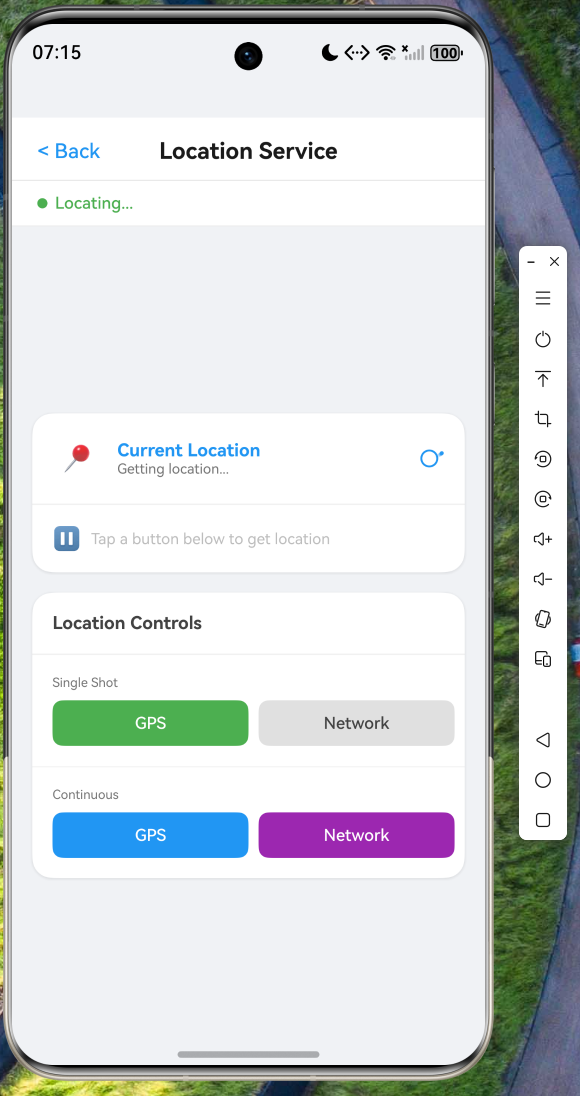
运行命令:
cd e:/hongmeng/oh.code/oh_demo11
flutter run -d <设备ID>
八、核心代码一览
以下是本文实现的全部 Dart 文件及其路径:
| 文件路径 | 核心职责 |
|---|---|
lib/main.dart |
入口、路由、首页 |
lib/models/location_model.dart |
位置数据模型、枚举定义 |
lib/services/location_service.dart |
MethodChannel 通信、单次/连续定位、逆地理编码 |
lib/screens/location_page.dart |
状态卡片、定位控制、追踪按钮、地址展示 |
entry/src/main/ets/service/LocationManager.ets |
原生定位能力封装 |
entry/src/main/ets/entryability/EntryAbility.ets |
MethodChannel 注册与路由分发 |
结语
本文完整介绍了如何使用 Flutter/Dart 从零构建一个功能完整的定位服务模块,覆盖数据建模、MethodChannel 通信、UI 组件和状态管理的全链路。所有 Dart 代码已在 lib/ 目录中实现,可在 OpenHarmony 设备上运行验证。
定位能力的核心设计在于 Platform Channel 双向通信:Dart 侧通过 MethodChannel.invokeMethod 发起单次定位请求,通过 EventChannel.receiveBroadcastStream 接收连续定位的实时推送;原生侧通过 @kit.LocationKit 提供 GPS、网络定位和逆地理编码能力。这种分层设计确保了 Flutter 业务逻辑与 OpenHarmony 原生能力的安全隔离,切换定位数据源或扩展新能力时,UI 层完全不受影响。
后续可进一步探索的方向包括:接入地图 SDK 在地图上可视化展示位置和轨迹、实现地理围栏(Geofencing)能力、在后台持续获取位置更新等。读者可在 AtomGit 仓库中获取完整工程代码进行实践。
感谢各位阅读!

作为“人工智能6S店”的官方数字引擎,为AI开发者与企业提供一个覆盖软硬件全栈、一站式门户。
更多推荐
 6
6 0
0- 0


 已为社区贡献47条内容

所有评论(0)