
【flutter for open harmony】第三方库Flutter 鸿蒙版 密码生成器 实战指南(适配 1.0.0)✨
在数字化时代,密码安全至关重要。一个强密码生成器可以帮助用户创建复杂、安全的密码,保护账户安全。本文将介绍如何在Flutter鸿蒙应用中实现一个支持自定义长度、多种字符类型的密码生成器组件。本文详细介绍了如何在Flutter鸿蒙应用中实现一个功能完善的密码生成器组件。通过合理的架构设计和清晰的代码实现,我们成功创建了一个支持自定义长度、多种字符类型、一键复制的实用工具组件。
·
Flutter实战:开源鸿蒙密码生成器组件
Flutter 三方库 cached_network_image 的鸿蒙化适配与实战指南
欢迎加入开源鸿蒙跨平台社区: https://openharmonycrossplatform.csdn.net
本文详细介绍如何在Flutter鸿蒙应用中实现一个功能完善的密码生成器,支持自定义长度、字符类型选择和一键复制功能。
一、前言
在数字化时代,密码安全至关重要。一个强密码生成器可以帮助用户创建复杂、安全的密码,保护账户安全。本文将介绍如何在Flutter鸿蒙应用中实现一个支持自定义长度、多种字符类型的密码生成器组件。
二、效果展示
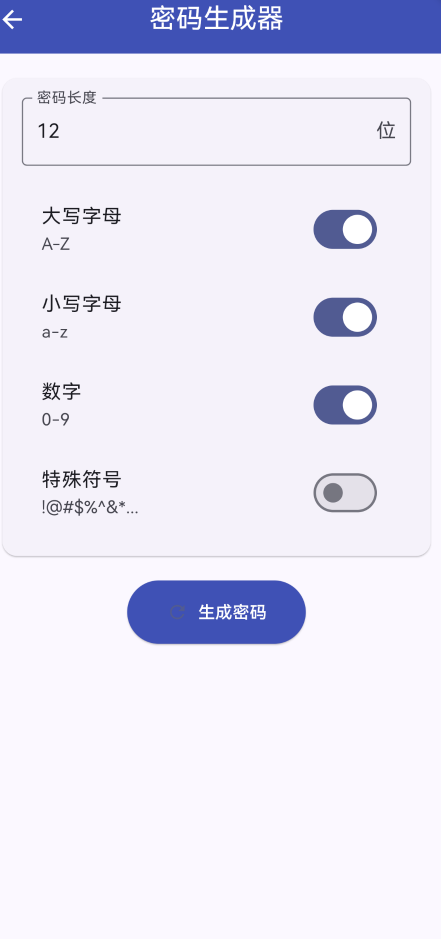
2.1 功能特性
| 功能 | 描述 |
|---|---|
| 长度设置 | 支持4-32位密码长度 |
| 大写字母 | 可选A-Z字符 |
| 小写字母 | 可选a-z字符 |
| 数字字符 | 可选0-9字符 |
| 特殊符号 | 可选!@#$%^&*等符号 |
| 一键复制 | 复制密码到剪贴板 |
三、项目背景与目标
3.1 项目背景
随着网络安全威胁的增加,使用强密码变得越来越重要。一个随机密码生成器可以帮助用户创建难以破解的密码,提高账户安全性。
3.2 项目目标
- 实现随机密码生成功能
- 支持多种字符类型选择
- 提供密码复制功能
- 支持鸿蒙平台运行
四、技术架构设计
4.1 整体架构
┌─────────────────────────────────────┐
│           UI Layer (Widgets)         │
│  ┌──────────┐  ┌──────────┐         │
│  │ TextField│  │SwitchList│         │
│  └──────────┘  └──────────┘         │
├─────────────────────────────────────┤
│        State Management              │
│  ┌──────────────────────────────┐   │
│  │    StatefulWidget + State    │   │
│  └──────────────────────────────┘   │
├─────────────────────────────────────┤
│         Business Logic              │
│  ┌────────────┐  ┌───────────────┐  │
│  │   Random   │  │   Clipboard   │  │
│  │  Generator │  │    Service    │  │
│  └────────────┘  └───────────────┘  │
└─────────────────────────────────────┘
4.2 核心数据结构
final _lengthController = TextEditingController(text: '12');
String _generatedPassword = '';
bool _includeUppercase = true;
bool _includeLowercase = true;
bool _includeNumbers = true;
bool _includeSymbols = false;
final Random _random = Random();
五、详细实现
5.1 Flutter端实现
import 'dart:math';
import 'package:flutter/material.dart';
import 'package:flutter/services.dart';
class PasswordGeneratorPage extends StatefulWidget {
const PasswordGeneratorPage({super.key});
State<PasswordGeneratorPage> createState() => _PasswordGeneratorPageState();
}
class _PasswordGeneratorPageState extends State<PasswordGeneratorPage> {
final _lengthController = TextEditingController(text: '12');
String _generatedPassword = '';
bool _includeUppercase = true;
bool _includeLowercase = true;
bool _includeNumbers = true;
bool _includeSymbols = false;
final Random _random = Random();
void _generatePassword() {
final length = int.tryParse(_lengthController.text) ?? 12;
if (length < 4 || length > 32) {
ScaffoldMessenger.of(context).showSnackBar(
const SnackBar(content: Text('密码长度应在4-32之间')),
);
return;
}
String chars = '';
if (_includeUppercase) chars += 'ABCDEFGHIJKLMNOPQRSTUVWXYZ';
if (_includeLowercase) chars += 'abcdefghijklmnopqrstuvwxyz';
if (_includeNumbers) chars += '0123456789';
if (_includeSymbols) chars += '!@#\$%^&*()_+-=[]{}|;:,.<>?';
if (chars.isEmpty) {
ScaffoldMessenger.of(context).showSnackBar(
const SnackBar(content: Text('请至少选择一种字符类型')),
);
return;
}
setState(() {
_generatedPassword = List.generate(length, (_) => chars[_random.nextInt(chars.length)]).join();
});
}
void _copyToClipboard() {
if (_generatedPassword.isEmpty) return;
Clipboard.setData(ClipboardData(text: _generatedPassword));
ScaffoldMessenger.of(context).showSnackBar(
const SnackBar(content: Text('密码已复制到剪贴板')),
);
}
Widget build(BuildContext context) {
return Scaffold(
appBar: AppBar(
title: const Text('密码生成器'),
centerTitle: true,
backgroundColor: Colors.indigo,
foregroundColor: Colors.white,
),
body: SingleChildScrollView(
padding: const EdgeInsets.all(16),
child: Column(
children: [
Card(
child: Padding(
padding: const EdgeInsets.all(16),
child: Column(
children: [
TextField(
controller: _lengthController,
decoration: const InputDecoration(
labelText: '密码长度',
border: OutlineInputBorder(),
suffixText: '位',
),
keyboardType: TextInputType.number,
),
const SizedBox(height: 16),
SwitchListTile(
title: const Text('大写字母'),
subtitle: const Text('A-Z'),
value: _includeUppercase,
onChanged: (value) => setState(() => _includeUppercase = value),
),
SwitchListTile(
title: const Text('小写字母'),
subtitle: const Text('a-z'),
value: _includeLowercase,
onChanged: (value) => setState(() => _includeLowercase = value),
),
SwitchListTile(
title: const Text('数字'),
subtitle: const Text('0-9'),
value: _includeNumbers,
onChanged: (value) => setState(() => _includeNumbers = value),
),
SwitchListTile(
title: const Text('特殊符号'),
subtitle: const Text('!@#\$%^&*...'),
value: _includeSymbols,
onChanged: (value) => setState(() => _includeSymbols = value),
),
],
),
),
),
const SizedBox(height: 16),
ElevatedButton.icon(
onPressed: _generatePassword,
icon: const Icon(Icons.refresh),
label: const Text('生成密码'),
style: ElevatedButton.styleFrom(
backgroundColor: Colors.indigo,
foregroundColor: Colors.white,
padding: const EdgeInsets.symmetric(horizontal: 32, vertical: 16),
),
),
const SizedBox(height: 24),
if (_generatedPassword.isNotEmpty)
Card(
color: Colors.indigo.withOpacity(0.1),
child: Padding(
padding: const EdgeInsets.all(16),
child: Column(
children: [
const Text('生成的密码', style: TextStyle(fontSize: 16)),
const SizedBox(height: 12),
SelectableText(
_generatedPassword,
style: const TextStyle(
fontSize: 24,
fontWeight: FontWeight.bold,
letterSpacing: 2,
color: Colors.indigo,
),
),
const SizedBox(height: 16),
ElevatedButton.icon(
onPressed: _copyToClipboard,
icon: const Icon(Icons.copy),
label: const Text('复制密码'),
style: ElevatedButton.styleFrom(
backgroundColor: Colors.indigo,
foregroundColor: Colors.white,
),
),
],
),
),
),
],
),
),
);
}
}
六、核心功能解析
6.1 密码生成算法
根据用户选择的字符类型构建字符池,然后随机选取:
String chars = '';
if (_includeUppercase) chars += 'ABCDEFGHIJKLMNOPQRSTUVWXYZ';
if (_includeLowercase) chars += 'abcdefghijklmnopqrstuvwxyz';
if (_includeNumbers) chars += '0123456789';
if (_includeSymbols) chars += '!@#\$%^&*()_+-=[]{}|;:,.<>?';

_generatedPassword = List.generate(length, (_) => chars[_random.nextInt(chars.length)]).join();
6.2 输入验证
验证密码长度和字符类型选择:
if (length < 4 || length > 32) {
  ScaffoldMessenger.of(context).showSnackBar(
    const SnackBar(content: Text('密码长度应在4-32之间')),
  );
  return;
}

if (chars.isEmpty) {
  ScaffoldMessenger.of(context).showSnackBar(
    const SnackBar(content: Text('请至少选择一种字符类型')),
  );
  return;
}
七、实际应用场景
7.1 账户注册
为新账户生成强密码。
7.2 密码重置
重置忘记的密码时生成临时密码。
7.3 安全设置
定期更换密码以提高安全性。
八、优化建议
8.1 功能扩展
- 添加密码强度指示器
- 支持密码历史记录
- 添加密码排除字符功能
- 支持密码模板
8.2 安全优化
- 使用加密随机数生成器
- 添加密码安全提示
- 支持密码过期提醒
九、总结
本文详细介绍了如何在Flutter鸿蒙应用中实现一个功能完善的密码生成器组件。通过合理的架构设计和清晰的代码实现,我们成功创建了一个支持自定义长度、多种字符类型、一键复制的实用工具组件。
十、参考资料

作为“人工智能6S店”的官方数字引擎,为AI开发者与企业提供一个覆盖软硬件全栈、一站式门户。
更多推荐

 0
0 0
0- 0


 已为社区贡献2条内容

所有评论(0)