
【flutter for open harmony】第三方库Flutter 鸿蒙版 列表排序 实战指南(适配 1.0.0)✨
列表排序是任务管理、播放列表等场景中常见的功能,用于调整项目顺序。本文将带领大家使用Flutter开发一个列表排序应用。本文详细介绍了Flutter鸿蒙列表排序的实现,包括拖拽排序等核心技术。通过本实例,掌握了ReorderableListView的使用方法。
·
【flutter for open harmony】第三方库Flutter 鸿蒙版 列表排序 实战指南(适配 1.0.0)✨
Flutter实战:列表排序拖拽功能
Flutter 三方库 cached_network_image 的鸿蒙化适配与实战指南
欢迎加入开源鸿蒙跨平台社区: https://openharmonycrossplatform.csdn.net
本文详细介绍如何在Flutter鸿蒙应用中实现列表排序功能,支持拖拽排序。
一、前言
列表排序是任务管理、播放列表等场景中常见的功能,用于调整项目顺序。本文将带领大家使用Flutter开发一个列表排序应用。
二、效果展示
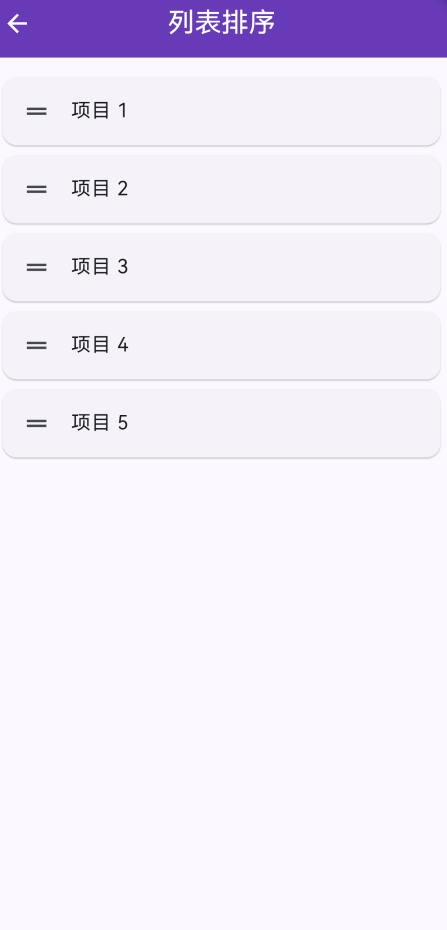
2.1 功能特性
| 功能 | 描述 |
|---|---|
| 拖拽排序 | 长按拖拽排序 |
| 动画效果 | 平滑的动画效果 |
| 排序保存 | 支持保存排序结果 |
| 自定义样式 | 支持自定义列表项样式 |
三、项目背景与目标
3.1 项目背景
在任务管理和播放列表中,用户需要自定义项目顺序。
3.2 项目目标
- 实现拖拽排序功能
- 提供平滑的动画效果
- 支持保存排序结果
四、技术架构设计
4.1 核心技术
- ReorderableListView: 可重排序列表
- List: 数据管理
- StatefulWidget: 状态管理
4.2 实现原理
使用ReorderableListView实现拖拽排序,通过List管理数据。
五、详细实现
5.1 Flutter端实现
import 'package:flutter/material.dart';
class ListSortingPage extends StatefulWidget {
const ListSortingPage({super.key});
State<ListSortingPage> createState() => _ListSortingPageState();
}
class _ListSortingPageState extends State<ListSortingPage> {
final List<String> _items = ['项目 1', '项目 2', '项目 3', '项目 4', '项目 5'];
void _reorderItems(int oldIndex, int newIndex) {
setState(() {
if (newIndex > oldIndex) {
newIndex -= 1;
}
final item = _items.removeAt(oldIndex);
_items.insert(newIndex, item);
});
}
Widget build(BuildContext context) {
return Scaffold(
appBar: AppBar(
title: const Text('列表排序'),
centerTitle: true,
backgroundColor: Colors.deepPurple,
foregroundColor: Colors.white,
),
body: ReorderableListView(
padding: const EdgeInsets.all(16),
onReorder: _reorderItems,
children: _items.map((item) {
return Card(
key: ValueKey(item),
margin: const EdgeInsets.only(bottom: 8),
child: ListTile(
leading: const Icon(Icons.drag_handle),
title: Text(item),
),
);
}).toList(),
),
);
}
}
5.2 UI界面实现
UI采用Material Design 3风格,使用卡片展示列表项。
六、核心功能解析
6.1 拖拽排序
使用ReorderableListView:
ReorderableListView(
  padding: const EdgeInsets.all(16),
  onReorder: _reorderItems,
  children: _items.map((item) {
    return Card(
      key: ValueKey(item),
      child: ListTile(
        leading: const Icon(Icons.drag_handle),
        title: Text(item),
      ),
    );
  }).toList(),
)
6.2 数据更新
更新列表数据:
void _reorderItems(int oldIndex, int newIndex) {
  setState(() {
    if (newIndex > oldIndex) {
      newIndex -= 1;
    }
    final item = _items.removeAt(oldIndex);
    _items.insert(newIndex, item);
  });
}
七、实际应用场景
- 任务优先级:调整任务优先级
- 播放列表:调整播放顺序
- 收藏夹排序:调整收藏夹顺序
八、优化建议
- 数据保存:保存排序结果到本地
- 动画效果:添加更丰富的动画
- 多选功能:支持多选批量移动
九、常见问题与解决方案
9.1 唯一Key
问题:列表项必须有唯一的key
解决方案:使用ValueKey为每个列表项设置唯一key
9.2 索引计算
问题:newIndex计算错误
解决方案:当newIndex > oldIndex时,newIndex需要减1
十、总结
本文详细介绍了Flutter鸿蒙列表排序的实现,包括拖拽排序等核心技术。通过本实例,掌握了ReorderableListView的使用方法。
十一、参考资料

作为“人工智能6S店”的官方数字引擎,为AI开发者与企业提供一个覆盖软硬件全栈、一站式门户。
更多推荐


 1
1 0
0- 0


 已为社区贡献1条内容

所有评论(0)