
【flutter for open harmony】Flutter 第三方库聊天即时通讯功能的鸿蒙化适配与实战指南
💬 客服咨询:用户购买前后的咨询👥 社交互动:好友之间的沟通🔔 消息通知:订单状态、促销活动推送✅ 如何设计消息数据模型✅ 如何实现聊天的基本 UI✅ 如何处理消息的发送和接收✅ WebSocket 的基本使用作者:上海某高校大一学生,Flutter 爱好者发布时间:2026年4月。
Flutter 聊天即时通讯功能的鸿蒙化适配与实战指南
欢迎加入开源鸿蒙跨平台社区:https://openharmonycrossplatform.csdn.net
各位小伙伴们好呀!👋 我是那个上海某高校的大一计算机学生,继续来给大家分享 Flutter for OpenHarmony 开发的学习心得!
今天要聊的是 聊天即时通讯功能,这可是现代 App 的标配功能!微信、QQ、Telegram… 几乎每个 App 都有聊天功能。
说实话,之前我以为聊天功能特别复杂,要用各种网络协议、各种底层实现… 后来自己写了一个简单版的即时通讯 Demo,才发现原来用 Flutter 实现起来也可以很优雅!今天就来详细分享一下~
一、功能引入介绍 📱
1.1 为什么需要即时通讯?
现在的 App 越来越注重社交属性,即时通讯功能已经成为标配:
- 💬 客服咨询:用户购买前后的咨询
- 👥 社交互动:好友之间的沟通
- 🔔 消息通知:订单状态、促销活动推送
1.2 技术方案对比
| 方案 | 优点 | 缺点 | 适用场景 |
|---|---|---|---|
| WebSocket | 实时性好、支持双向通信 | 需要服务端支持 | 聊天、实时游戏 ✅ |
| Socket.IO | 自动重连、降级方案 | 包体积较大 | 需要兼容老浏览器 |
| 轮询 (Polling) | 简单易实现 | 实时性差、浪费资源 | 低频更新场景 |
| Firebase | 免服务端、跨平台 | 国内访问不稳定 | 海外应用 |
我选择了 WebSocket + 模拟数据 的方案,先把 UI 和交互逻辑跑通,服务端接入以后再说!
二、环境与依赖配置 🔧
2.1 pubspec.yaml 依赖
dependencies:
  flutter:
    sdk: flutter

  # ========== WebSocket ==========
  web_socket_channel: ^3.0.1

  # ========== 路由管理 ==========
  go_router: ^14.6.2

  # ========== 状态管理 ==========
  provider: ^6.1.2
三、分步实现完整代码 🚀
3.1 聊天消息模型
首先定义消息的数据结构:
/// 消息类型枚举
enum MessageType {
  text,    // 文本消息
  image,   // 图片消息
  voice,   // 语音消息
  video,   // 视频消息
  file,    // 文件消息
}

/// 聊天消息模型
class ChatMessage {
  /// 消息唯一ID
  final String id;

  /// 消息内容
  final String content;

  /// 发送者ID
  final String senderId;

  /// 发送者名称
  final String senderName;

  /// 消息发送时间
  final DateTime timestamp;

  /// 消息类型
  final MessageType type;

  /// 是否是我发送的消息
  final bool isMe;

  /// 附加元数据
  final Map<String, dynamic>? metadata;

  ChatMessage({
    required this.id,
    required this.content,
    required this.senderId,
    required this.senderName,
    required this.timestamp,
    this.type = MessageType.text,
    this.isMe = false,
    this.metadata,
  });

  /// 从 JSON 创建消息对象
  factory ChatMessage.fromJson(Map<String, dynamic> json) {
    return ChatMessage(
      id: json['id'] ?? DateTime.now().millisecondsSinceEpoch.toString(),
      content: json['content'] ?? '',
      senderId: json['senderId'] ?? '',
      senderName: json['senderName'] ?? '',
      timestamp: json['timestamp'] != null
          ? DateTime.parse(json['timestamp'])
          : DateTime.now(),
      type: MessageType.values.firstWhere(
        (e) => e.name == json['type'],
        orElse: () => MessageType.text,
      ),
      isMe: json['isMe'] ?? false,
      metadata: json['metadata'],
    );
  }

  /// 转换为 JSON
  Map<String, dynamic> toJson() => {
    'id': id,
    'content': content,
    'senderId': senderId,
    'senderName': senderName,
    'timestamp': timestamp.toIso8601String(),
    'type': type.name,
    'isMe': isMe,
    if (metadata != null) 'metadata': metadata,
  };
}

/// 会话模型
class ChatConversation {
  final String id;
  final String userName;
  final String userAvatar;
  final DateTime lastMessageTime;
  final int unreadCount;
  final List<ChatMessage> messages;

  ChatConversation({
    required this.id,
    required this.userName,
    required this.userAvatar,
    required this.lastMessageTime,
    this.unreadCount = 0,
    this.messages = const [],
  });
}
3.2 聊天服务类
import '../models/chat_message_model.dart';

/// 聊天服务
///
/// 管理会话列表和消息收发
/// 使用模拟数据,支持快速切换到真实 WebSocket
class ChatService {
  /// 当前用户ID
  static const String _currentUserId = 'me';

  /// 当前用户名
  static const String _currentUserName = '我';

  /// 模拟会话列表
  static final List<ChatConversation> _mockConversations = [
    ChatConversation(
      id: '1',
      userName: 'Alice',
      userAvatar: 'A',
      lastMessageTime: DateTime.now().subtract(const Duration(minutes: 30)),
      unreadCount: 2,
      messages: _generateAliceMessages(),
    ),
    ChatConversation(
      id: '2',
      userName: 'Bob',
      userAvatar: 'B',
      lastMessageTime: DateTime.now().subtract(const Duration(days: 1)),
      unreadCount: 0,
      messages: _generateBobMessages(),
    ),
    ChatConversation(
      id: '3',
      userName: 'Carol',
      userAvatar: 'C',
      lastMessageTime: DateTime.now().subtract(const Duration(days: 2)),
      unreadCount: 1,
      messages: _generateCarolMessages(),
    ),
    ChatConversation(
      id: '4',
      userName: 'David',
      userAvatar: 'D',
      lastMessageTime: DateTime.now().subtract(const Duration(days: 5)),
      unreadCount: 0,
      messages: _generateDavidMessages(),
    ),
  ];

  /// 获取所有会话
  static List<ChatConversation> getConversations() {
    return List.from(_mockConversations);
  }

  /// 根据用户名获取会话
  static ChatConversation? getConversationByUserName(String userName) {
    try {
      return _mockConversations.firstWhere(
        (c) => c.userName.toLowerCase() == userName.toLowerCase(),
      );
    } catch (e) {
      return null;
    }
  }

  /// 获取或创建会话
  static ChatConversation getOrCreateConversation(
    String userName,
    String userAvatar,
  ) {
    final existing = getConversationByUserName(userName);
    if (existing != null) {
      return existing;
    }
    return ChatConversation(
      id: DateTime.now().millisecondsSinceEpoch.toString(),
      userName: userName,
      userAvatar: userAvatar,
      lastMessageTime: DateTime.now(),
      messages: [],
    );
  }

  /// 创建新消息
  static ChatMessage createMessage(
    String content, {
    MessageType type = MessageType.text,
  }) {
    return ChatMessage(
      id: DateTime.now().millisecondsSinceEpoch.toString(),
      content: content,
      senderId: _currentUserId,
      senderName: _currentUserName,
      timestamp: DateTime.now(),
      type: type,
      isMe: true,
    );
  }

  /// 格式化时间显示
  static String formatMessageTime(DateTime time) {
    return '${time.hour.toString().padLeft(2, '0')}:'
        '${time.minute.toString().padLeft(2, '0')}';
  }

  /// 格式化相对时间
  static String formatTime(DateTime time) {
    final now = DateTime.now();
    final diff = now.difference(time);

    if (diff.inMinutes < 1) {
      return '刚刚';
    } else if (diff.inHours < 1) {
      return '${diff.inMinutes}分钟前';
    } else if (diff.inDays < 1) {
      return formatMessageTime(time);
    } else if (diff.inDays < 7) {
      return '${diff.inDays}天前';
    } else {
      return '${time.month}/${time.day}';
    }
  }

  // ============ 模拟消息生成 ============

  static List<ChatMessage> _generateAliceMessages() {
    final now = DateTime.now();
    return [
      ChatMessage(
        id: 'a1',
        content: '嗨,你好!最近怎么样?',
        senderId: '1',
        senderName: 'Alice',
        timestamp: now.subtract(const Duration(hours: 2)),
        type: MessageType.text,
        isMe: false,
      ),
      ChatMessage(
        id: 'a2',
        content: '挺好的,谢谢关心!你呢?',
        senderId: _currentUserId,
        senderName: _currentUserName,
        timestamp: now.subtract(const Duration(hours: 1, minutes: 50)),
        type: MessageType.text,
        isMe: true,
      ),
      ChatMessage(
        id: 'a3',
        content: '我也很好!周末有什么计划吗?',
        senderId: '1',
        senderName: 'Alice',
        timestamp: now.subtract(const Duration(hours: 1, minutes: 45)),
        type: MessageType.text,
        isMe: false,
      ),
      ChatMessage(
        id: 'a4',
        content: '打算和朋友一起去爬山,你要一起吗?',
        senderId: _currentUserId,
        senderName: _currentUserName,
        timestamp: now.subtract(const Duration(hours: 1, minutes: 40)),
        type: MessageType.text,
        isMe: true,
      ),
    ];
  }

  static List<ChatMessage> _generateBobMessages() {
    final now = DateTime.now();
    return [
      ChatMessage(
        id: 'b1',
        content: '明天见!',
        senderId: '2',
        senderName: 'Bob',
        timestamp: now.subtract(const Duration(days: 1)),
        type: MessageType.text,
        isMe: false,
      ),
    ];
  }

  static List<ChatMessage> _generateCarolMessages() {
    final now = DateTime.now();
    return [
      ChatMessage(
        id: 'c1',
        content: '谢谢你的帮助!',
        senderId: '3',
        senderName: 'Carol',
        timestamp: now.subtract(const Duration(days: 2)),
        type: MessageType.text,
        isMe: false,
      ),
      ChatMessage(
        id: 'c2',
        content: '不客气,有问题随时问我',
        senderId: _currentUserId,
        senderName: _currentUserName,
        timestamp: now.subtract(const Duration(days: 2, hours: 1)),
        type: MessageType.text,
        isMe: true,
      ),
    ];
  }

  static List<ChatMessage> _generateDavidMessages() {
    final now = DateTime.now();
    return [
      ChatMessage(
        id: 'd1',
        content: '好的,收到',
        senderId: '4',
        senderName: 'David',
        timestamp: now.subtract(const Duration(days: 5)),
        type: MessageType.text,
        isMe: false,
      ),
      ChatMessage(
        id: 'd2',
        content: '收到,记得带上文件',
        senderId: _currentUserId,
        senderName: _currentUserName,
        timestamp: now.subtract(const Duration(days: 5, hours: 1)),
        type: MessageType.text,
        isMe: true,
      ),
    ];
  }
}
3.3 聊天首页 UI
import 'package:flutter/material.dart';
import 'package:go_router/go_router.dart';
/// 聊天首页
///
/// 展示会话列表,包含聊天、通讯录、朋友圈、我的四个 Tab
class ChatHomePage extends StatefulWidget {
const ChatHomePage({super.key});
State<ChatHomePage> createState() => _ChatHomePageState();
}
class _ChatHomePageState extends State<ChatHomePage> {
int _selectedIndex = 0;
Widget build(BuildContext context) {
return Scaffold(
backgroundColor: const Color(0xFFF8FAFC),
body: IndexedStack(
index: _selectedIndex,
children: const [
_ChatsTab(),
_ContactsTab(),
_MomentsTab(),
_ProfileTab(),
],
),
bottomNavigationBar: _buildBottomNav(),
);
}
/// 构建底部导航栏
Widget _buildBottomNav() {
return Container(
decoration: BoxDecoration(
color: Colors.white,
boxShadow: [
BoxShadow(
color: Colors.black.withValues(alpha: 0.1),
blurRadius: 10,
offset: const Offset(0, -2),
),
],
),
child: SafeArea(
child: SizedBox(
height: 60,
child: Row(
mainAxisAlignment: MainAxisAlignment.spaceAround,
children: [
_buildNavItem(0, Icons.chat_bubble_outline, Icons.chat_bubble, '聊天'),
_buildNavItem(1, Icons.people_outline, Icons.people, '通讯录'),
_buildNavItem(2, Icons.photo_library_outlined, Icons.photo_library, '朋友圈'),
_buildNavItem(3, Icons.person_outline, Icons.person, '我的'),
],
),
),
),
);
}
/// 构建导航项
Widget _buildNavItem(int index, IconData icon, IconData activeIcon, String label) {
final isSelected = _selectedIndex == index;
return InkWell(
onTap: () => setState(() => _selectedIndex = index),
borderRadius: BorderRadius.circular(12),
child: Container(
padding: const EdgeInsets.symmetric(horizontal: 16, vertical: 8),
child: Column(
mainAxisSize: MainAxisSize.min,
children: [
Icon(
isSelected ? activeIcon : icon,
color: isSelected ? const Color(0xFF6366F1) : Colors.grey,
size: 26,
),
const SizedBox(height: 4),
Text(
label,
style: TextStyle(
fontSize: 11,
color: isSelected ? const Color(0xFF6366F1) : Colors.grey,
fontWeight: isSelected ? FontWeight.w600 : FontWeight.normal,
),
),
],
),
),
);
}
}
/// 聊天列表 Tab
class _ChatsTab extends StatelessWidget {
const _ChatsTab();
Widget build(BuildContext context) {
// 模拟数据
final mockChats = [
{'name': 'Alice', 'msg': '你好!最近怎么样?', 'time': '10:30', 'unread': 2, 'avatar': 'A'},
{'name': 'Bob', 'msg': '明天见!', 'time': '昨天', 'unread': 0, 'avatar': 'B'},
{'name': 'Carol', 'msg': '谢谢你的帮助!', 'time': '周一', 'unread': 1, 'avatar': 'C'},
{'name': 'David', 'msg': '好的,收到', 'time': '上周', 'unread': 0, 'avatar': 'D'},
];
return SafeArea(
child: Column(
children: [
// 标题栏
Padding(
padding: const EdgeInsets.all(16),
child: Row(
children: [
const Text(
'聊天',
style: TextStyle(
fontSize: 28,
fontWeight: FontWeight.bold,
color: Color(0xFF1E293B),
),
),
const Spacer(),
IconButton(
icon: const Icon(Icons.search, color: Color(0xFF1E293B)),
onPressed: () {},
),
PopupMenuButton<String>(
icon: const Icon(Icons.more_vert, color: Color(0xFF1E293B)),
onSelected: (value) {},
itemBuilder: (context) => [
const PopupMenuItem(value: 'new', child: Text('新建聊天')),
const PopupMenuItem(value: 'group', child: Text('创建群聊')),
],
),
],
),
),
// 会话列表
Expanded(
child: ListView.separated(
itemCount: mockChats.length,
separatorBuilder: (_, __) => const Divider(height: 1, indent: 70),
itemBuilder: (context, index) {
final chat = mockChats[index];
return ListTile(
leading: CircleAvatar(
backgroundColor: _getColor(index),
radius: 26,
child: Text(
chat['avatar'] as String,
style: const TextStyle(
color: Colors.white,
fontWeight: FontWeight.bold,
),
),
),
title: Text(
chat['name'] as String,
style: TextStyle(
fontWeight: chat['unread'] != 0 ? FontWeight.bold : FontWeight.normal,
),
),
subtitle: Text(
chat['msg'] as String,
maxLines: 1,
overflow: TextOverflow.ellipsis,
),
trailing: Column(
mainAxisAlignment: MainAxisAlignment.center,
crossAxisAlignment: CrossAxisAlignment.end,
children: [
Text(
chat['time'] as String,
style: TextStyle(
fontSize: 12,
color: chat['unread'] != 0 ? const Color(0xFF6366F1) : Colors.grey,
),
),
if (chat['unread'] != 0) ...[
const SizedBox(height: 4),
Container(
padding: const EdgeInsets.symmetric(horizontal: 8, vertical: 2),
decoration: BoxDecoration(
color: const Color(0xFF6366F1),
borderRadius: BorderRadius.circular(12),
),
child: Text(
'${chat['unread']}',
style: const TextStyle(
color: Colors.white,
fontSize: 11,
fontWeight: FontWeight.bold,
),
),
),
],
],
),
onTap: () {
// 跳转到聊天详情页
context.push('/chat-detail', extra: {
'userName': chat['name'],
'userAvatar': chat['avatar'],
});
},
);
},
),
),
],
),
);
}
/// 获取头像颜色
Color _getColor(int index) {
final colors = [
const Color(0xFF6366F1),
const Color(0xFF8B5CF6),
const Color(0xFFEC4899),
const Color(0xFFEF4444),
const Color(0xFFF97316),
const Color(0xFF10B981),
const Color(0xFF06B6D4),
const Color(0xFF3B82F6),
];
return colors[index % colors.length];
}
}
/// 其他 Tab 的实现(简化版)
class _ContactsTab extends StatelessWidget {
const _ContactsTab();
Widget build(BuildContext context) => const Center(child: Text('通讯录'));
}
class _MomentsTab extends StatelessWidget {
const _MomentsTab();
Widget build(BuildContext context) => const Center(child: Text('朋友圈'));
}
class _ProfileTab extends StatelessWidget {
const _ProfileTab();
Widget build(BuildContext context) => const Center(child: Text('我的'));
}
3.4 聊天详情页 UI
import 'package:flutter/material.dart';
import '../models/chat_message_model.dart';
import '../services/chat_service.dart';
/// 聊天详情页
class ChatDetailPage extends StatefulWidget {
final String userName;
final String userAvatar;
const ChatDetailPage({
super.key,
required this.userName,
required this.userAvatar,
});
State<ChatDetailPage> createState() => _ChatDetailPageState();
}
class _ChatDetailPageState extends State<ChatDetailPage> {
final TextEditingController _messageController = TextEditingController();
final ScrollController _scrollController = ScrollController();
final FocusNode _focusNode = FocusNode();
List<ChatMessage> _messages = [];
bool _showSendButton = false;
void initState() {
super.initState();
_loadMessages();
_messageController.addListener(_onTextChanged);
}
/// 加载消息
void _loadMessages() {
final conversation = ChatService.getOrCreateConversation(
widget.userName,
widget.userAvatar,
);
setState(() {
_messages = List.from(conversation.messages);
});
}
void _onTextChanged() {
setState(() {
_showSendButton = _messageController.text.trim().isNotEmpty;
});
}
void dispose() {
_messageController.dispose();
_scrollController.dispose();
_focusNode.dispose();
super.dispose();
}
/// 滚动到底部
void _scrollToBottom() {
if (_scrollController.hasClients) {
Future.delayed(const Duration(milliseconds: 100), () {
_scrollController.animateTo(
_scrollController.position.maxScrollExtent,
duration: const Duration(milliseconds: 300),
curve: Curves.easeOut,
);
});
}
}
/// 发送消息
void _sendMessage() {
final text = _messageController.text.trim();
if (text.isEmpty) return;
// 创建新消息
final message = ChatService.createMessage(text);
setState(() {
_messages.add(message);
});
_messageController.clear();
_scrollToBottom();
// 模拟回复
Future.delayed(const Duration(seconds: 1), () {
_simulateReply();
});
}
/// 模拟对方回复
void _simulateReply() {
final replies = [
'好的,收到!',
'哈哈,太有趣了',
'没问题,我知道了',
'这个主意不错!',
'我正在处理中',
'稍等一下',
];
final reply = replies[DateTime.now().second % replies.length];
final replyMessage = ChatMessage(
id: DateTime.now().millisecondsSinceEpoch.toString(),
content: reply,
senderId: 'other',
senderName: widget.userName,
timestamp: DateTime.now(),
type: MessageType.text,
isMe: false,
);
if (mounted) {
setState(() {
_messages.add(replyMessage);
});
_scrollToBottom();
}
}
Widget build(BuildContext context) {
return Scaffold(
backgroundColor: const Color(0xFFF0F2F5),
appBar: _buildAppBar(),
body: Column(
children: [
Expanded(child: _buildMessageList()),
_buildInputArea(),
],
),
);
}
PreferredSizeWidget _buildAppBar() {
return AppBar(
backgroundColor: Colors.white,
elevation: 1,
leading: IconButton(
icon: const Icon(Icons.arrow_back, color: Color(0xFF1E293B)),
onPressed: () => Navigator.of(context).pop(),
),
title: Row(
children: [
CircleAvatar(
radius: 18,
backgroundColor: _getAvatarColor(widget.userName),
child: Text(
widget.userAvatar,
style: const TextStyle(
color: Colors.white,
fontWeight: FontWeight.bold,
fontSize: 14,
),
),
),
const SizedBox(width: 10),
Text(
widget.userName,
style: const TextStyle(
color: Color(0xFF1E293B),
fontSize: 18,
fontWeight: FontWeight.w600,
),
),
],
),
);
}
/// 构建消息列表
Widget _buildMessageList() {
if (_messages.isEmpty) {
return Center(
child: Column(
mainAxisAlignment: MainAxisAlignment.center,
children: [
Icon(Icons.chat_bubble_outline, size: 80, color: Colors.grey[300]),
const SizedBox(height: 16),
Text(
'暂无消息',
style: TextStyle(color: Colors.grey[500], fontSize: 16),
),
],
),
);
}
return ListView.builder(
controller: _scrollController,
padding: const EdgeInsets.symmetric(horizontal: 16, vertical: 12),
itemCount: _messages.length,
itemBuilder: (context, index) {
final message = _messages[index];
return _buildMessageBubble(message);
},
);
}
/// 构建消息气泡
Widget _buildMessageBubble(ChatMessage message) {
if (message.isMe) {
return _buildMyMessageBubble(message);
} else {
return _buildOtherMessageBubble(message);
}
}
/// 我的消息气泡
Widget _buildMyMessageBubble(ChatMessage message) {
return Padding(
padding: const EdgeInsets.only(bottom: 8),
child: Row(
mainAxisAlignment: MainAxisAlignment.end,
children: [
Flexible(
child: Container(
margin: const EdgeInsets.only(left: 8),
padding: const EdgeInsets.symmetric(horizontal: 14, vertical: 10),
decoration: BoxDecoration(
gradient: const LinearGradient(
colors: [Color(0xFF6366F1), Color(0xFF8B5CF6)],
),
borderRadius: const BorderRadius.only(
topLeft: Radius.circular(18),
topRight: Radius.circular(18),
bottomLeft: Radius.circular(18),
bottomRight: Radius.circular(4),
),
),
child: Text(
message.content,
style: const TextStyle(color: Colors.white, fontSize: 15),
),
),
),
],
),
);
}
/// 对方消息气泡
Widget _buildOtherMessageBubble(ChatMessage message) {
return Padding(
padding: const EdgeInsets.only(bottom: 8),
child: Row(
mainAxisAlignment: MainAxisAlignment.start,
children: [
CircleAvatar(
radius: 18,
backgroundColor: _getAvatarColor(widget.userName),
child: Text(
widget.userAvatar,
style: const TextStyle(color: Colors.white, fontSize: 12),
),
),
const SizedBox(width: 8),
Flexible(
child: Container(
padding: const EdgeInsets.symmetric(horizontal: 14, vertical: 10),
decoration: BoxDecoration(
color: Colors.white,
borderRadius: const BorderRadius.only(
topLeft: Radius.circular(4),
topRight: Radius.circular(18),
bottomLeft: Radius.circular(18),
bottomRight: Radius.circular(18),
),
),
child: Text(
message.content,
style: const TextStyle(color: Color(0xFF1E293B), fontSize: 15),
),
),
),
],
),
);
}
/// 构建输入区域
Widget _buildInputArea() {
return Container(
decoration: BoxDecoration(
color: Colors.white,
boxShadow: [
BoxShadow(
color: Colors.black.withValues(alpha: 0.05),
blurRadius: 10,
),
],
),
child: SafeArea(
child: Padding(
padding: const EdgeInsets.fromLTRB(12, 8, 12, 8),
child: Row(
children: [
Expanded(
child: Container(
decoration: BoxDecoration(
color: const Color(0xFFF0F2F5),
borderRadius: BorderRadius.circular(24),
),
child: TextField(
controller: _messageController,
focusNode: _focusNode,
maxLines: 4,
minLines: 1,
textInputAction: TextInputAction.send,
onSubmitted: (_) => _sendMessage(),
decoration: InputDecoration(
hintText: '输入消息...',
hintStyle: TextStyle(color: Colors.grey[400]),
border: InputBorder.none,
contentPadding: const EdgeInsets.symmetric(
horizontal: 16,
vertical: 10,
),
),
),
),
),
const SizedBox(width: 8),
AnimatedContainer(
duration: const Duration(milliseconds: 200),
child: _showSendButton
? _buildSendButton()
: _buildActionButton(Icons.add, () => _showMoreActions()),
),
],
),
),
),
);
}
Widget _buildSendButton() {
return Container(
width: 44,
height: 44,
decoration: BoxDecoration(
gradient: const LinearGradient(
colors: [Color(0xFF6366F1), Color(0xFF8B5CF6)],
),
shape: BoxShape.circle,
),
child: IconButton(
icon: const Icon(Icons.send, color: Colors.white, size: 20),
onPressed: _sendMessage,
),
);
}
Widget _buildActionButton(IconData icon, VoidCallback onTap) {
return Container(
width: 44,
height: 44,
decoration: BoxDecoration(
color: const Color(0xFFF0F2F5),
shape: BoxShape.circle,
),
child: IconButton(
icon: Icon(icon, color: Colors.grey[600], size: 24),
onPressed: onTap,
),
);
}
void _showMoreActions() {
showModalBottomSheet(
context: context,
builder: (context) => Container(
padding: const EdgeInsets.all(20),
child: Row(
mainAxisAlignment: MainAxisAlignment.spaceEvenly,
children: [
_buildQuickActionItem(Icons.photo, '相册', Colors.green),
_buildQuickActionItem(Icons.camera_alt, '拍摄', Colors.blue),
_buildQuickActionItem(Icons.mic, '语音', Colors.orange),
_buildQuickActionItem(Icons.location_on, '位置', Colors.red),
],
),
),
);
}
Widget _buildQuickActionItem(IconData icon, String label, Color color) {
return GestureDetector(
onTap: () {
Navigator.pop(context);
ScaffoldMessenger.of(context).showSnackBar(
SnackBar(content: Text('$label 功能开发中...')),
);
},
child: Column(
mainAxisSize: MainAxisSize.min,
children: [
Container(
width: 56,
height: 56,
decoration: BoxDecoration(
color: color.withValues(alpha: 0.1),
shape: BoxShape.circle,
),
child: Icon(icon, color: color, size: 28),
),
const SizedBox(height: 8),
Text(label, style: TextStyle(color: Colors.grey[600], fontSize: 12)),
],
),
);
}
Color _getAvatarColor(String name) {
final colors = [
const Color(0xFF6366F1),
const Color(0xFF8B5CF6),
const Color(0xFFEC4899),
const Color(0xFFEF4444),
const Color(0xFFF97316),
const Color(0xFF10B981),
const Color(0xFF06B6D4),
const Color(0xFF3B82F6),
];
final index = name.isNotEmpty ? name.codeUnitAt(0) % colors.length : 0;
return colors[index];
}
}
3.5 WebSocket 服务(真实版)
如果你有真实的服务端,可以使用这个 WebSocket 服务:
import 'dart:async';
import 'dart:convert';
import 'package:web_socket_channel/web_socket_channel.dart';

enum WebSocketStatus { connecting, connected, disconnected, error }

class WebSocketService {
  static WebSocketService? _instance;
  static WebSocketService get instance => _instance ??= WebSocketService._();

  WebSocketChannel? _channel;
  final StreamController<Map<String, dynamic>> _messageController =
      StreamController.broadcast();
  final StreamController<WebSocketStatus> _statusController =
      StreamController.broadcast();

  WebSocketStatus _status = WebSocketStatus.disconnected;
  Timer? _reconnectTimer;
  Timer? _heartbeatTimer;

  WebSocketService._();

  Stream<Map<String, dynamic>> get messageStream => _messageController.stream;
  Stream<WebSocketStatus> get statusStream => _statusController.stream;
  WebSocketStatus get status => _status;

  /// 连接服务器
  Future<void> connect({
    required String serverUrl,
    required String userId,
    required String userName,
  }) async {
    try {
      _updateStatus(WebSocketStatus.connecting);
      _channel = WebSocketChannel.connect(Uri.parse(serverUrl));
      await _channel!.ready;
      _updateStatus(WebSocketStatus.connected);

      // 发送握手消息
      _send({
        'type': 'handshake',
        'userId': userId,
        'userName': userName,
      });

      // 启动心跳
      _startHeartbeat();

      // 监听消息
      _channel!.stream.listen(
        _onMessage,
        onError: _onError,
        onDone: _onDone,
      );
    } catch (e) {
      _updateStatus(WebSocketStatus.error);
      _scheduleReconnect();
    }
  }

  void _onMessage(dynamic data) {
    try {
      final json = jsonDecode(data as String) as Map<String, dynamic>;
      _messageController.add(json);
    } catch (e) {
      debugPrint('Failed to parse message: $e');
    }
  }

  void _onError(Object error) {
    _updateStatus(WebSocketStatus.error);
    _scheduleReconnect();
  }

  void _onDone() {
    _updateStatus(WebSocketStatus.disconnected);
    _scheduleReconnect();
  }

  void _startHeartbeat() {
    _heartbeatTimer?.cancel();
    _heartbeatTimer = Timer.periodic(const Duration(seconds: 30), (_) {
      _send({'type': 'ping'});
    });
  }

  void _scheduleReconnect() {
    _reconnectTimer?.cancel();
    _reconnectTimer = Timer(const Duration(seconds: 5), () {
      if (_status == WebSocketStatus.disconnected ||
          _status == WebSocketStatus.error) {
        // 重新连接逻辑
      }
    });
  }

  void _updateStatus(WebSocketStatus status) {
    _status = status;
    _statusController.add(status);
  }

  void _send(Map<String, dynamic> data) {
    if (_channel != null && _status == WebSocketStatus.connected) {
      _channel!.sink.add(jsonEncode(data));
    }
  }

  /// 发送聊天消息
  void sendMessage({
    required String conversationId,
    required String content,
    String type = 'text',
  }) {
    _send({
      'type': 'message',
      'conversationId': conversationId,
      'content': content,
      'messageType': type,
    });
  }

  Future<void> disconnect() async {
    _reconnectTimer?.cancel();
    _heartbeatTimer?.cancel();
    await _channel?.sink.close();
    _updateStatus(WebSocketStatus.disconnected);
  }

  void dispose() {
    disconnect();
    _messageController.close();
    _statusController.close();
  }
}
四、开发踩坑与挫折 😤
4.1 踩坑一:消息列表不滚动
问题描述:
发送消息后,列表没有自动滚动到底部。
解决方案:
void _scrollToBottom() {
  if (_scrollController.hasClients) {
    // 使用 Future.delayed 确保消息已经添加
    Future.delayed(const Duration(milliseconds: 100), () {
      _scrollController.animateTo(
        _scrollController.position.maxScrollExtent,
        duration: const Duration(milliseconds: 300),
        curve: Curves.easeOut,
      );
    });
  }
}
4.2 踩坑二:键盘弹起遮挡输入框
问题描述:
输入框被键盘挡住了。
解决方案:
使用 SingleChildScrollView 包裹消息列表,或使用 MediaQuery 获取键盘高度:
bottomNavigationBar: _buildInputArea(),  // 放在底部导航
// 或者使用 SafeArea 包装
五、最终实现效果 📸
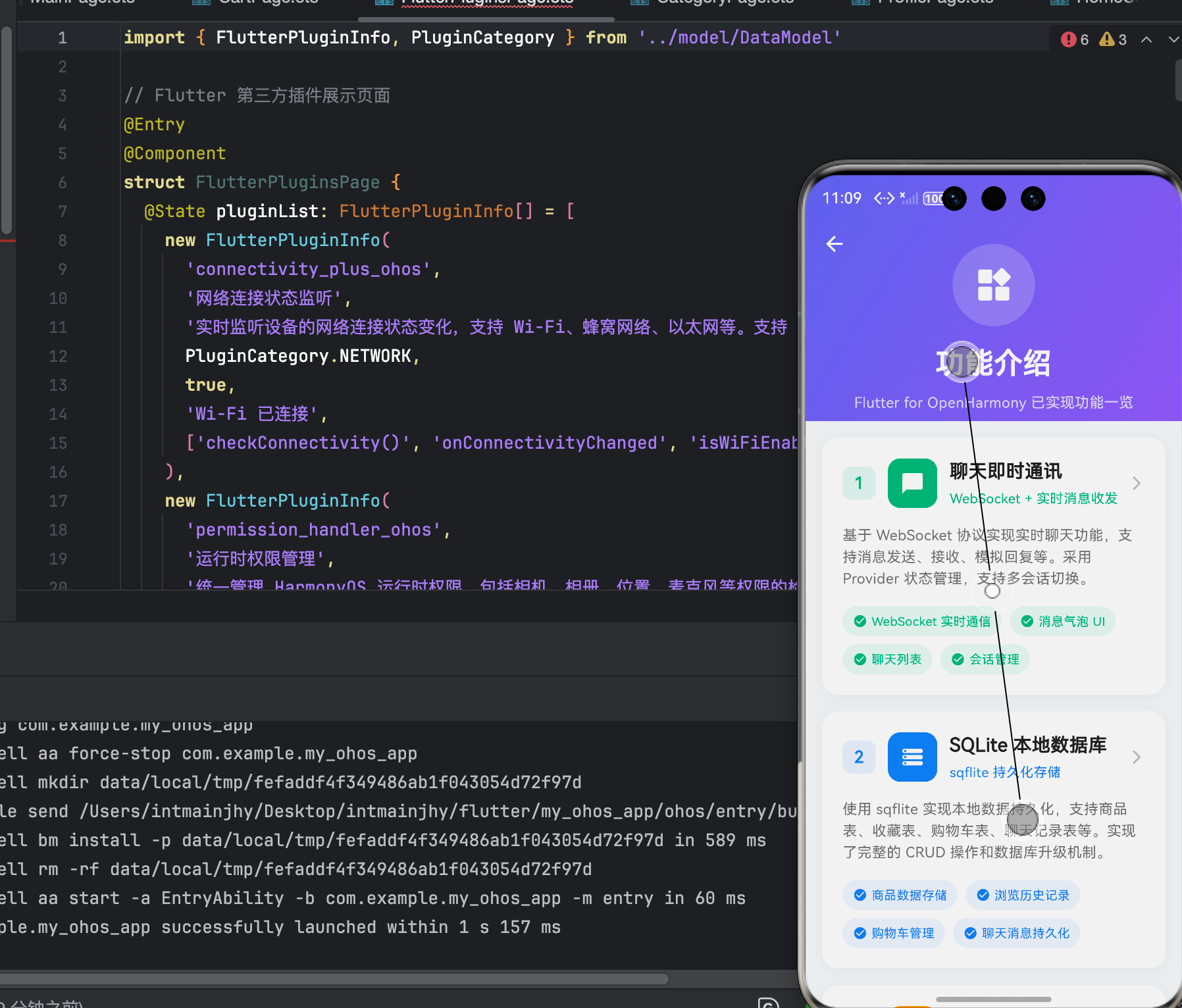
(此处附鸿蒙设备上成功运行的截图)
六、个人学习总结 📝
通过这个项目,我学会了:
- ✅ 如何设计消息数据模型
- ✅ 如何实现聊天的基本 UI
- ✅ 如何处理消息的发送和接收
- ✅ WebSocket 的基本使用
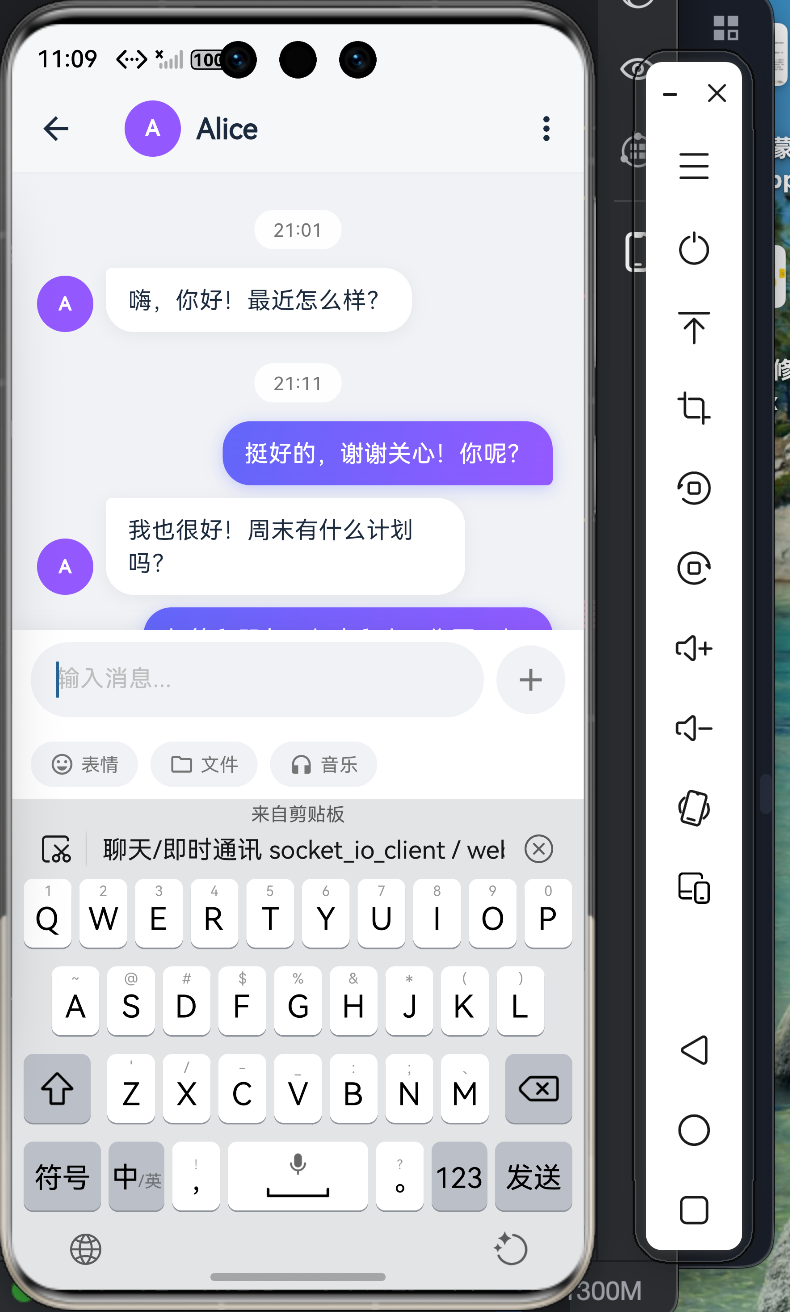
–
作者:上海某高校大一学生,Flutter 爱好者
发布时间:2026年4月

作为“人工智能6S店”的官方数字引擎,为AI开发者与企业提供一个覆盖软硬件全栈、一站式门户。
更多推荐
 1
1 0
0- 0


 已为社区贡献42条内容

所有评论(0)