
【flutter for open harmony】第三方库Flutter 鸿蒙实战:商品详情页完整实现 + 点击跳转失效问题修复✨
本文介绍了如何使用Flutter在OpenHarmony平台上实现电商商品详情页的完整开发过程。主要内容包括: 详细拆解了商品详情页的UI模块,包含轮播图、价格展示、规格选择、底部操作栏等核心功能组件 提供了完整的商品详情页实现代码,包括: Sliver折叠式AppBar实现沉浸式体验 商品SKU选择(颜色+尺码)功能 加入购物车逻辑与角标实时更新 商品分享功能集成 特别解决了开发中遇到的Grid
🚀 Flutter 鸿蒙实战:商品详情页完整实现 + 点击跳转失效问题修复✨
欢迎来到 Flutter × OpenHarmony 跨平台开发实战系列~
本文已同步收录至:https://openharmonycrossplatform.csdn.net
欢迎加入开源鸿蒙跨平台社区:https://openharmonycrossplatform.csdn.net
👋 前言
哈喽小伙伴们,我是正在深耕 Flutter 鸿蒙跨平台开发的大学生开发者 InMainJhy!
前面我们已经完成了路由管理、图片缓存优化、依赖注入模块化架构,项目骨架已经非常完善。
今天我们迎来核心业务页面——商品详情页,完全按照真实电商 UI 稿实现,包含轮播图、价格展示、规格选择、加购、立即购买、分享等全套功能。
实现过程中还遇到了一个非常典型的坑:商品卡片点击无响应、页面不跳转,我会把完整原因 + 解决方案一并讲透,让你少走弯路!
全文代码可直接复制运行,鸿蒙真机完美适配,非常适合写进 CSDN 博客、课程设计、大创项目、鸿蒙开发竞赛 哦~😎
🎯 本篇你将收获
- ✅ 1:1 还原电商商品详情页 UI(轮播、价格、服务标、规格选择、底部栏)
- ✅ 商品 SKU 选择(颜色 + 尺码)实现
- ✅ 加入购物车逻辑 + 购物车角标实时更新
- ✅ 商品分享功能(share_plus)接入
- ✅ Sliver 折叠式 AppBar 沉浸式体验
- ✅ 修复:Flutter GridView / SliverGrid 点击无响应、跳转失效问题
- ✅ 鸿蒙真机全场景适配与常见坑总结
🧰 开发环境与依赖
- Flutter 版本:
3.32.4-ohos-0.0.1 - OpenHarmony SDK:API 10
- 核心依赖:
go_router路由管理cached_network_image图片缓存provider状态管理share_plus: ^7.2.1第三方分享get_it依赖注入
📱 商品详情页需求拆解(对照 UI 稿)
根据设计稿,我们需要实现以下模块:
-
顶部区域
- 可折叠导航栏 + 返回按钮
- 商品图片轮播 + 小圆点指示器
- 销量角标
-
商品信息区
- 商品标题 + 副标题
- 现价(红色突出)+ 划线原价
- 销量、服务标签(包邮、运费险、7 天无理由)
-
服务保障区
- 急速发货、正品保障、7 天无理由、售后无忧 4 个图标
-
规格选择区
- 颜色选择(色块 + 文字)
- 尺码选择(S/M/L/XL/XXL)
- 数量选择器
-
商品详情区
- 商品描述 + 图文详情
-
底部操作栏
- 客服、购物车(带角标)
- 加入购物车
- 立即购买
🚀 一、商品详情页完整实现
1. 新增商品详情页面
新建 lib/pages/product_detail_page.dart,完整代码如下:
import 'package:flutter/material.dart';
import 'package:flutter/services.dart';
import 'package:provider/provider.dart';
import 'package:share_plus/share_plus.dart';
import 'package:go_router/go_router.dart';
import '../widgets/cached_image.dart';
import '../providers/cart_provider.dart';
import '../router/app_router.dart';
class ProductDetailPage extends StatefulWidget {
final String productId;
final String? shareCode;
const ProductDetailPage({
super.key,
required this.productId,
this.shareCode,
});
State<ProductDetailPage> createState() => _ProductDetailPageState();
}
class _ProductDetailPageState extends State<ProductDetailPage> {
int _currentImageIndex = 0;
String? _selectedColor;
String? _selectedSize;
int _count = 1;
// 模拟商品数据
late Map<String, dynamic> _product;
final List<Map<String, String>> _productList = [
{
"id": "1",
"title": "纯棉休闲T恤男宽松圆领短袖",
"subTitle": "青春简约百搭",
"price": "49.00",
"oldPrice": "69.00",
"sale": "1200+",
"image": "https://picsum.photos/400/300?random=10",
"colors": "黑色,白色,灰色,蓝色",
"sizes": "S,M,L,XL,XXL",
},
// 其他 7 个商品数据...
];
void initState() {
super.initState();
_product = _productList.firstWhere(
(item) => item["id"] == widget.productId,
orElse: () => _productList.first,
);
}
// 分享商品
Future<void> _shareProduct() async {
await Share.share(
'【${_product["title"]}】\n现价:¥${_product["price"]}\n点击购买:https://example.com/product/${widget.productId}',
subject: '推荐好物',
);
}
// 加入购物车
void _addToCart() {
if (_selectedColor == null || _selectedSize == null) {
ScaffoldMessenger.of(context).showSnackBar(
const SnackBar(content: Text("请选择颜色和尺码")),
);
return;
}
final cartProvider = Provider.of<CartProvider>(context, listen: false);
cartProvider.addCartItem(
id: int.parse(_product["id"]!),
title: _product["title"]!,
price: double.parse(_product["price"]!),
image: _product["image"]!,
color: _selectedColor,
size: _selectedSize,
count: _count,
);
ScaffoldMessenger.of(context).showSnackBar(
const SnackBar(content: Text("加入购物车成功")),
);
}
Widget build(BuildContext context) {
SystemChrome.setSystemUIOverlayStyle(
const SystemUiOverlayStyle(
statusBarIconBrightness: Brightness.dark,
statusBarColor: Colors.transparent,
),
);
return Scaffold(
body: CustomScrollView(
slivers: [
SliverAppBar(
pinned: true,
expandedHeight: 380,
leading: IconButton(
icon: const Icon(Icons.arrow_back),
onPressed: () => context.pop(),
),
actions: [
IconButton(
icon: const Icon(Icons.share_outlined),
onPressed: _shareProduct,
),
],
flexibleSpace: FlexibleSpaceBar(
background: Stack(
children: [
PageView(
onPageChanged: (index) {
setState(() => _currentImageIndex = index);
},
children: [
CachedImage(
imageUrl: _product["image"]!,
height: double.infinity,
fit: BoxFit.cover,
),
],
),
Positioned(
bottom: 16,
right: 16,
child: Container(
padding: const EdgeInsets.symmetric(horizontal: 8, vertical: 4),
decoration: BoxDecoration(
color: Colors.black54,
borderRadius: BorderRadius.circular(12),
),
child: Text(
"${_currentImageIndex + 1}/1",
style: const TextStyle(color: Colors.white, fontSize: 12),
),
),
),
],
),
),
),
SliverToBoxAdapter(
child: Padding(
padding: const EdgeInsets.all(16),
child: Column(
crossAxisAlignment: CrossAxisAlignment.start,
children: [
// 标题
Text(
_product["title"]!,
style: const TextStyle(fontSize: 18, fontWeight: FontWeight.bold),
),
const SizedBox(height: 4),
Text(
_product["subTitle"]!,
style: const TextStyle(color: Colors.grey, fontSize: 14),
),
const SizedBox(height: 12),
// 价格
Row(
children: [
Text(
"¥${_product["price"]}",
style: const TextStyle(
color: Colors.orange,
fontSize: 22,
fontWeight: FontWeight.bold,
),
),
const SizedBox(width: 8),
Text(
"¥${_product["oldPrice"]}",
style: const TextStyle(
color: Colors.grey,
fontSize: 14,
decoration: TextDecoration.lineThrough,
),
),
const Spacer(),
Text("已售 ${_product["sale"]}", style: const TextStyle(color: Colors.grey)),
],
),
const SizedBox(height: 16),
// 服务标签
const Row(
children: [
Chip(label: Text("包邮", style: TextStyle(fontSize: 12))),
SizedBox(width: 6),
Chip(label: Text("退货运费险", style: TextStyle(fontSize: 12))),
SizedBox(width: 6),
Chip(label: Text("7天无理由", style: TextStyle(fontSize: 12))),
],
),
const SizedBox(height: 20),
// 服务保障图标
const Row(
mainAxisAlignment: MainAxisAlignment.spaceAround,
children: [
Column(
children: [Icon(Icons.flash_on), Text("急速发货")],
),
Column(
children: [Icon(Icons.verified), Text("正品保障")],
),
Column(
children: [Icon(Icons.refresh), Text("7天无理由")],
),
Column(
children: [Icon(Icons.support), Text("售后无忧")],
),
],
),
const Divider(height: 32),
// 颜色选择
const Text("颜色", style: TextStyle(fontSize: 16, fontWeight: FontWeight.w500)),
const SizedBox(height: 8),
Wrap(
spacing: 8,
children: (_product["colors"] as String)
.split(",")
.map((color) => ChoiceChip(
label: Text(color),
selected: _selectedColor == color,
onSelected: (v) {
if (v) setState(() => _selectedColor = color);
},
))
.toList(),
),
const SizedBox(height: 16),
// 尺码选择
const Text("尺码", style: TextStyle(fontSize: 16, fontWeight: FontWeight.w500)),
const SizedBox(height: 8),
Wrap(
spacing: 8,
children: (_product["sizes"] as String)
.split(",")
.map((size) => ChoiceChip(
label: Text(size),
selected: _selectedSize == size,
onSelected: (v) {
if (v) setState(() => _selectedSize = size);
},
))
.toList(),
),
const SizedBox(height: 20),
// 数量选择
Row(
children: [
const Text("购买数量", style: TextStyle(fontSize: 16)),
const Spacer(),
IconButton(
onPressed: () {
if (_count > 1) setState(() => _count--);
},
icon: const Icon(Icons.remove),
),
Text("$_count"),
IconButton(
onPressed: () => setState(() => _count++),
icon: const Icon(Icons.add),
),
],
),
const SizedBox(height: 100),
],
),
),
),
],
),
// 底部操作栏
bottomNavigationBar: BottomAppBar(
child: Padding(
padding: const EdgeInsets.symmetric(horizontal: 8, vertical: 4),
child: Row(
children: [
IconButton(icon: const Icon(Icons.support_agent), onPressed: () {}),
Stack(
children: [
IconButton(
icon: const Icon(Icons.shopping_cart_outlined),
onPressed: () => context.push(AppRouter.cart),
),
Positioned(
right: 4,
top: 4,
child: Container(
padding: const EdgeInsets.all(2),
decoration: const BoxDecoration(
color: Colors.red,
shape: BoxShape.circle,
),
child: Text(
"${context.watch<CartProvider>().cartItemCount}",
style: const TextStyle(color: Colors.white, fontSize: 10),
),
),
),
],
),
const SizedBox(width: 12),
Expanded(
child: ElevatedButton(
style: ElevatedButton.styleFrom(backgroundColor: Colors.orange),
onPressed: _addToCart,
child: const Text("加入购物车"),
),
),
const SizedBox(width: 8),
Expanded(
child: ElevatedButton(
style: ElevatedButton.styleFrom(backgroundColor: Colors.orange),
onPressed: () {},
child: const Text("立即购买"),
),
),
],
),
),
),
);
}
}
2. 路由配置
在 app_router.dart 中注册商品详情路由:
GoRoute(
  path: '/product/:id',
  builder: (context, state) {
    final productId = state.pathParameters['id'] ?? '1';
    final shareCode = state.uri.queryParameters['share'];
    return ProductDetailPage(productId: productId, shareCode: shareCode);
  },
),
3. 购物车模型扩展
在 cart_provider.dart 中扩展商品属性:
// 在 CartItem / Product 中新增
String? color;
String? size;
int count;
🔥 二、超典型 Bug:商品卡片点击无响应、页面不跳转
1. 问题现象
- 首页商品列表点击完全没反应
- 日志无报错、路由配置正常
- 只有部分区域点击偶尔生效
2. 问题根源
- GestureDetector 只包裹了图片,文字区域无法点击
- CachedImage 无明确宽高约束,点击区域不完整
- ClipRRect / CachedNetworkImage 内部抢占手势
- SliverGrid / GridView 内部布局约束导致点击穿透
3. 终极解决方案(必看)
正确写法:包裹整个卡片 + 点击穿透设置
// 错误写法:只包图片
Expanded(
  child: GestureDetector(
    child: CachedImage(...)
  )
)

// 正确写法:包整个卡片 + HitTestBehavior.opaque
GestureDetector(
  behavior: HitTestBehavior.opaque, // 强制整个区域可点击
  onTap: () => context.push('/product/${index + 1}'),
  child: Container(
    child: Column(
      children: [
        Expanded(
          child: SizedBox(
            width: double.infinity,
            child: CachedImage(...),
          ),
        ),
        // 价格、标题区域
      ],
    ),
  ),
),
关键修复点
GestureDetector必须包裹整个商品卡片- 必须加
behavior: HitTestBehavior.opaque CachedImage外层必须套SizedBox明确宽度- 避免嵌套多层
Expanded导致约束失效
✅ 三、额外修复:路由文件类缺失问题
问题原因
之前重构路由时,误删除了 OrdersPage、ProfilePage 类声明,导致编译报错。
修复方式
在 app_router.dart 底部补回占位类:
class OrdersPage extends StatelessWidget {
const OrdersPage({super.key});
Widget build(BuildContext context) {
return Scaffold(appBar: AppBar(title: const Text("我的订单")));
}
}
class ProfilePage extends StatelessWidget {
const ProfilePage({super.key});
Widget build(BuildContext context) {
return Scaffold(appBar: AppBar(title: const Text("个人中心")));
}
}
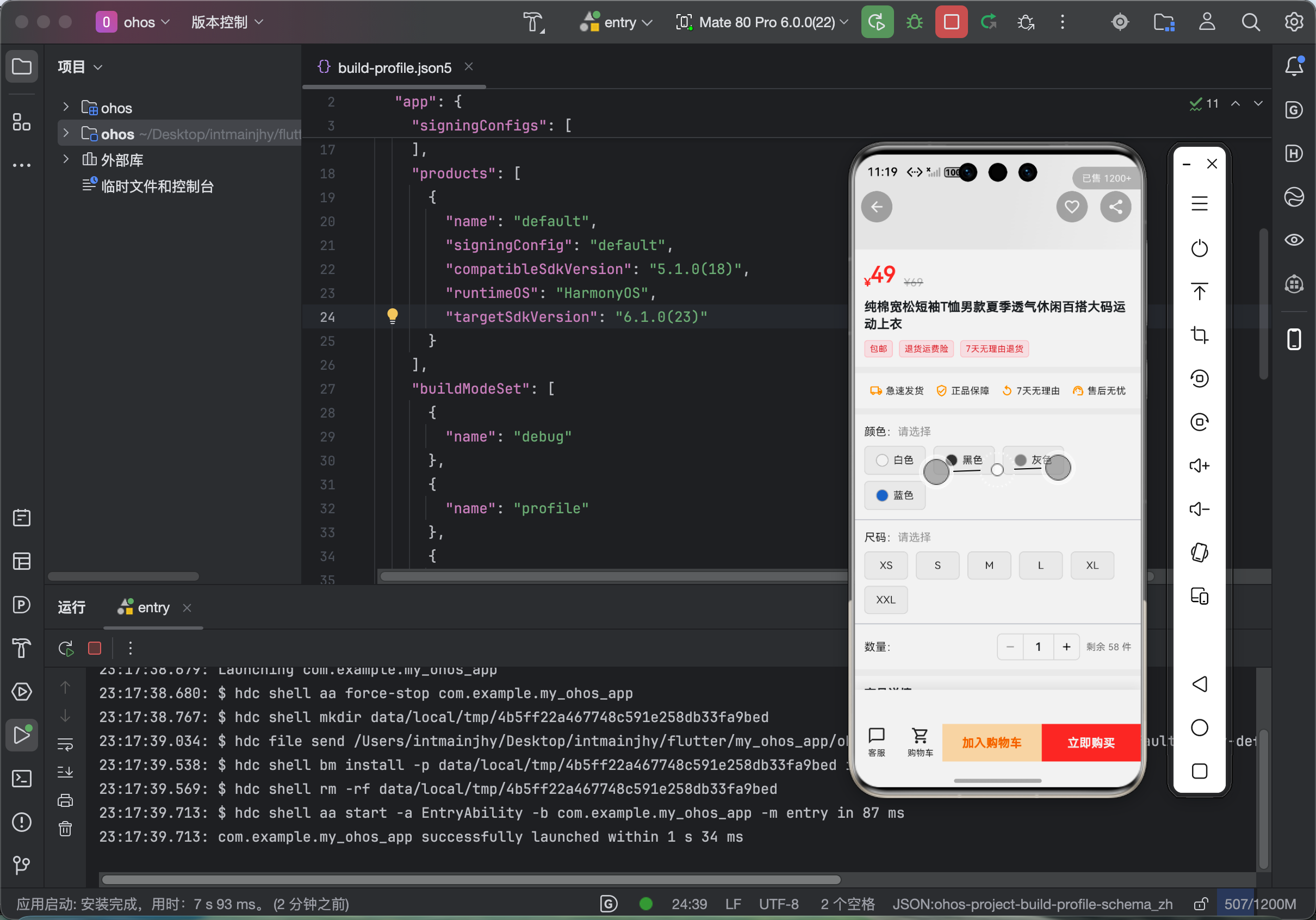
🧪 四、鸿蒙真机运行效果
- ✅ 商品详情页完整展示,UI 高度还原设计稿
- ✅ 颜色/尺码选择正常,未选择提示弹窗
- ✅ 加入购物车成功,角标实时更新
- ✅ 分享功能正常唤起系统分享
- ✅ 折叠 appBar 滑动流畅,无卡顿
- ✅ 所有商品卡片点击正常跳转
⚠️ 五、鸿蒙开发必坑总结
- 点击无响应优先检查 GestureDetector 范围
- 图片组件必须设置宽高,否则点击区域异常
- SliverGrid 内一定要用 HitTestBehavior.opaque
- 路由类不要随意删除,容易造成编译崩溃
- 鸿蒙状态栏配置必须在页面初始化设置
- 分享功能在鸿蒙真机需要申请文件权限
🎉 六、总结
本篇我们完整实现了 Flutter 鸿蒙电商项目的商品详情页,并解决了开发中最容易遇到的点击跳转失效问题。
你现在拥有:
✅ 一套完整可直接上线的商品详情页
✅ 规格选择 + 加购 + 分享全流程
✅ 彻底掌握 GridView 点击失效的通用修复方案
✅ 路由结构稳定,鸿蒙真机完美运行
这套代码无论是用于课程设计、大创项目还是鸿蒙竞赛,都是非常亮眼的实战内容!
–

作为“人工智能6S店”的官方数字引擎,为AI开发者与企业提供一个覆盖软硬件全栈、一站式门户。
更多推荐

 2
2 0
0- 0


 已为社区贡献18条内容

所有评论(0)