
Flutter鸿蒙三方库适配指南
·
Flutter 三方库 OpenHarmony 适配指南
概述
随着 OpenHarmony 生态的快速发展,越来越多的 Flutter 开发者希望将现有的应用和插件迁移至这一新兴平台。然而,由于平台差异和架构不同,Flutter 三方库在 OpenHarmony 上的适配工作面临诸多挑战。本文将系统性地介绍 Flutter 三方库 OpenHarmony 适配的核心要点。
1. 版本兼容性
OpenHarmony 社区已对多个 Flutter 版本进行了系统性的适配工作,目前主要支持的版本包括:
| Flutter 版本 | 状态 | 说明 |
|---|---|---|
| Flutter 3.35.7 | 推荐 | 当前推荐使用的适配版本 |
| Flutter 3.22.x | 兼容 | 社区长期支持版本 |
官方适配仓库:https://gitcode.com/openharmony-tpc/flutter_flutter
2. 开发基础
在开始 Flutter 三方库的 OpenHarmony 适配前,必须对鸿蒙原生开发有基本的了解:
| Flutter 概念 | OpenHarmony 对应概念 |
|---|---|
| Android SDK | OpenHarmony SDK |
| Kotlin/Java | ArkTS/ETS |
| Gradle | hvigor |
2.1 环境配置
- 下载DevEco Studio和模拟器
访问:华为开发者联盟官网
根据自身操作系统下载对应最新版 DevEco Studio: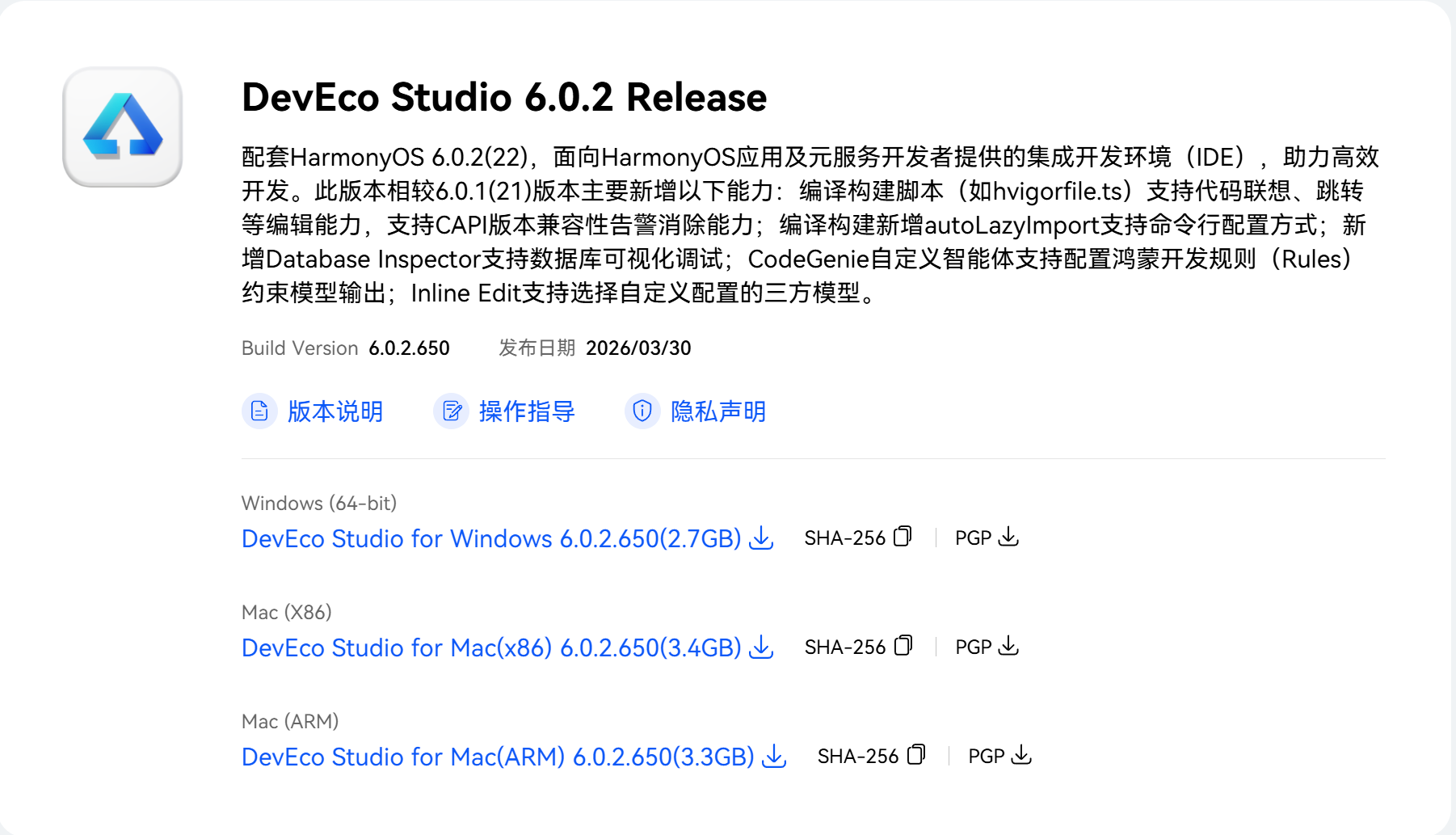
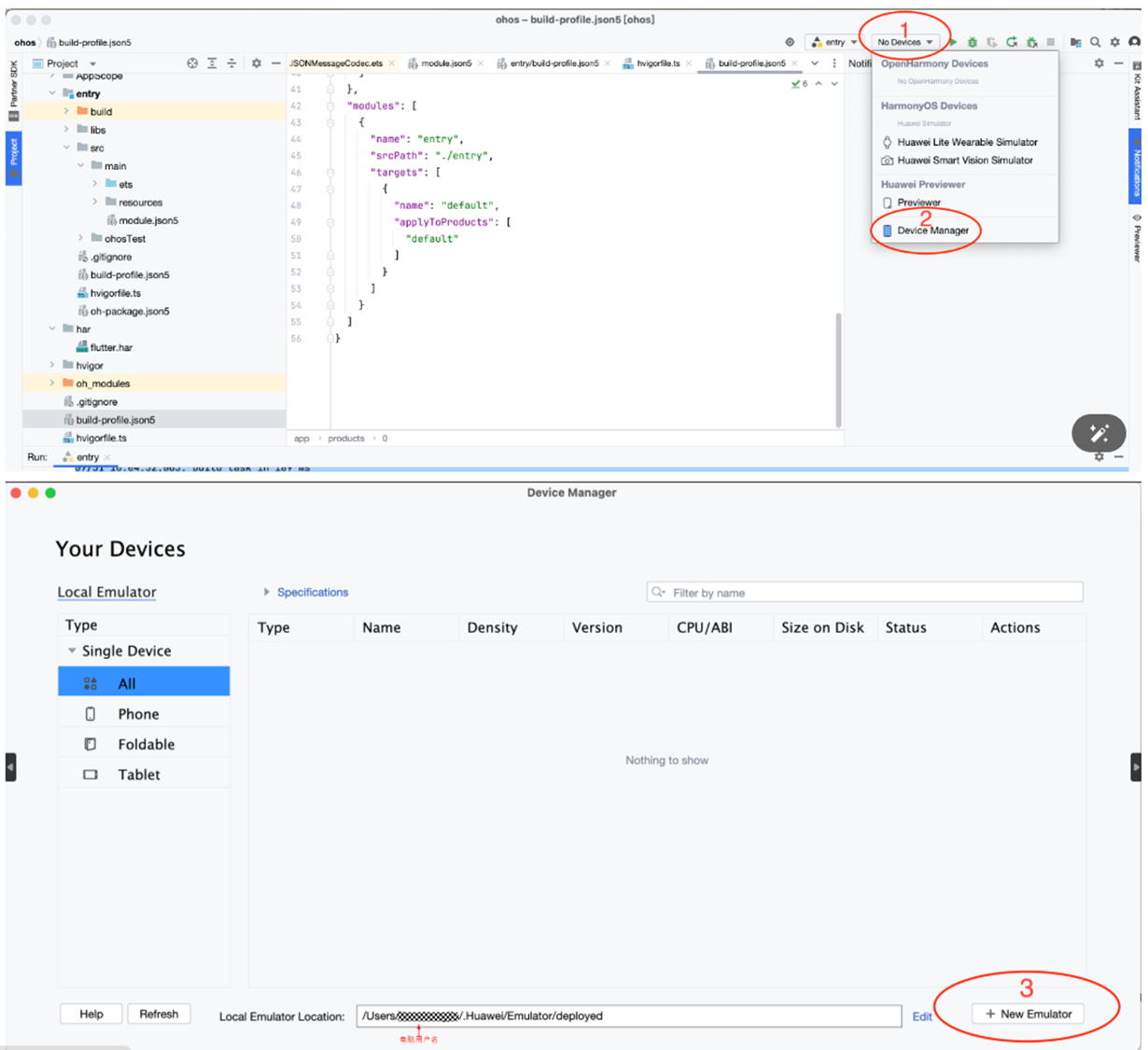
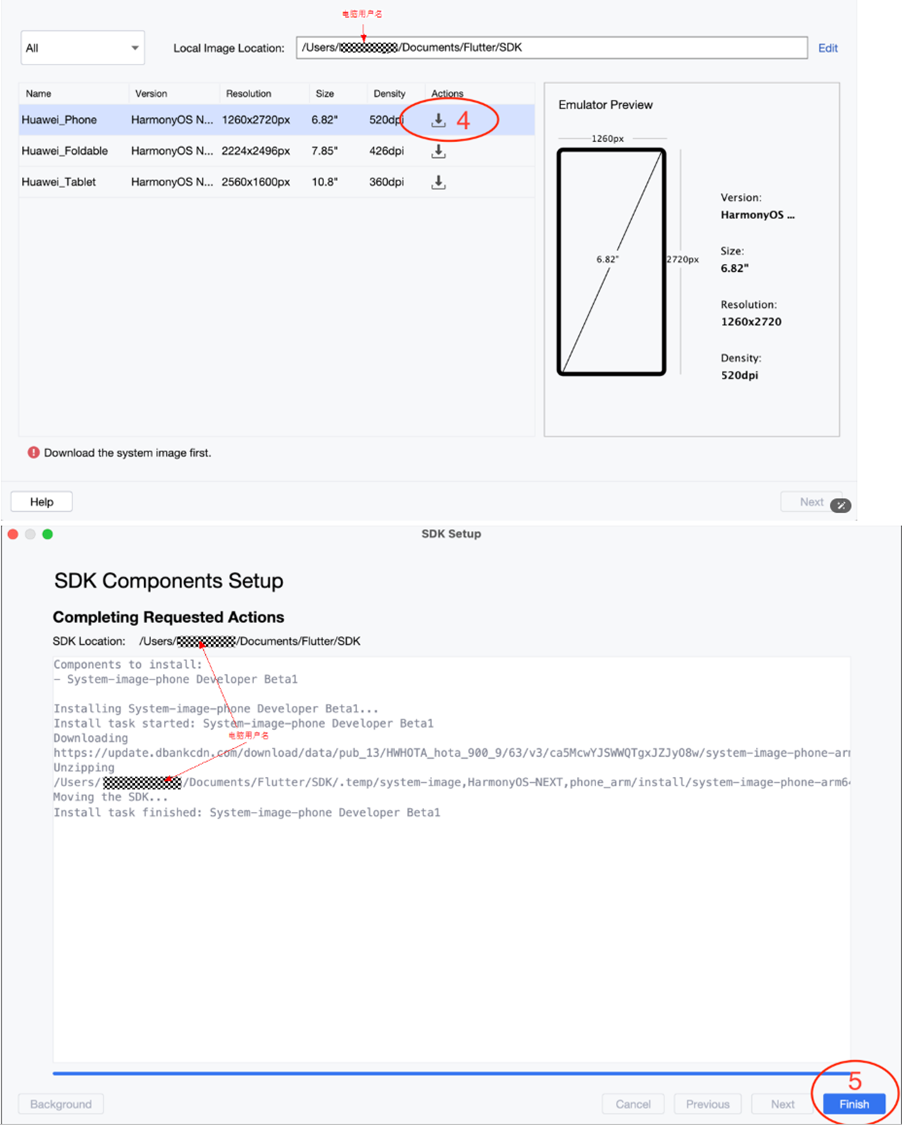
- 下载JDK 17
鸿蒙开发需Java 17环境:Oracle官网
请依据自身操作系统选择最新版本: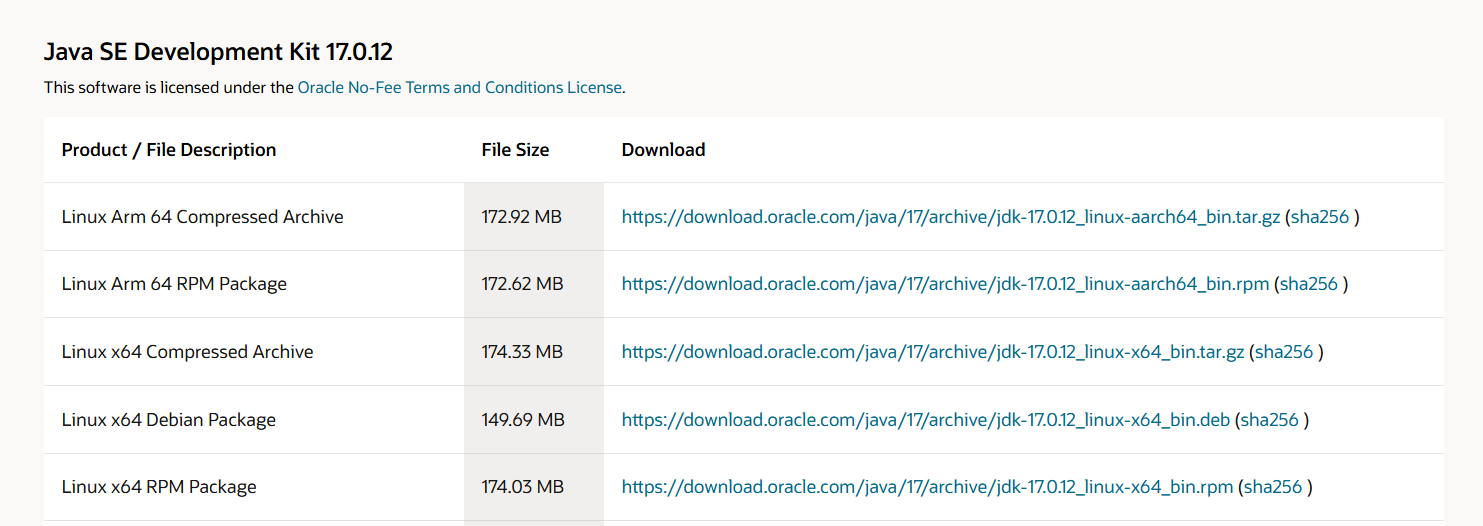
- 下载OpenHarmony版Flutter
鸿蒙定制版Flutter SDK需从特定仓库获取。
打开window的终端,输入以下两行:
git clone https://gitcode.com/openharmony-tpc/flutter_flutter.git
git checkout -b dev origin/dev
flutter --version
# 应该看到 Flutter 3.35.7 或类似版本
使用git指令前要先下载Git:Git官网
- 环境配置:
最困难的一步:
此电脑(右键)→ 属性 → 高级系统设置 → 高级 选项卡 → 环境变量
| 变量 | 值 | 作用域 |
|---|---|---|
JAVA_HOME |
你电脑的 Java 源文件存放的路径 | 系统变量 |
Path |
%JAVA_HOME%\bin |
追加到现有值 |
TOOL_HOME |
你电脑的 DevEco Studio 源文件存放的路径 | 新建系统变量 |
DEVECO_SDK_HOME |
%TOOL_HOME%\sdk |
新建系统变量 |
Path |
%TOOL_HOME%\tools\ohpm\bin |
追加到现有值 |
Path |
%TOOL_HOME%\tools\hvigor\bin |
追加到现有值 |
Path |
%TOOL_HOME%\tools\node\bin |
追加到现有值 |
Path |
\bin |
追加到现有值 |
PUB_CACHE |
你电脑的pub源文件存放的路径,pub是需要你新建 | 新建系统变量 |
PUB_HOSTED_URL |
https://pub.flutter-io.cn |
新建系统变量 |
FLUTTER_STORAGE_BASE_URL |
https://storage.flutter-io.cn |
新建系统变量 |
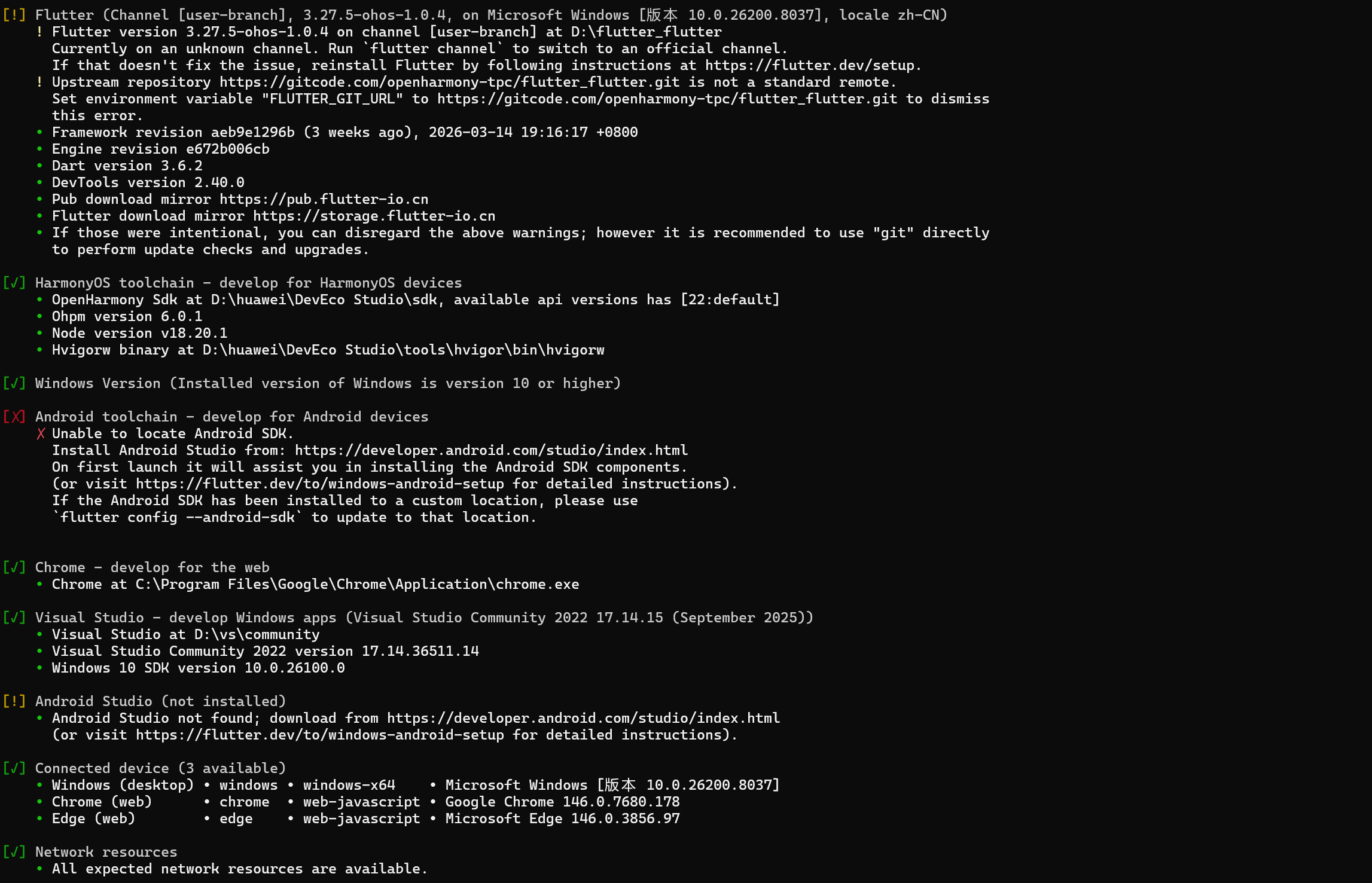
- 检查环境
在命令行中输入以下代码:
flutter doctor -v
需确保输出包含:
3.创建适配项目(以 xxx_plugin 为例)
假设你要适配的插件叫 xxx_plugin
3.1 克隆你的插件
git clone https://github.com/xxx/xxx_plugin.git
cd xxx_plugin
3.2 创建适配分支
git checkout -b ohos/adapter-xxx_plugin
4.创建 OpenHarmony 代码(核心!)
在你的插件根目录下,创建以下文件:
4.1 创建目录结构
xxx_plugin/
├── ohos/                                    # 👈 新建这个文件夹
│   └── src/main/
│       ├── ets/                             # 👈 新建
│       │   └── xxx_plugin/                  # 👈 用你的插件名
│       │       └── XxxPlugin.ets            # 👈 新建
│       └── resources/                       # 👈 新建
├── lib/
│   └── xxx_plugin.dart
└── pubspec.yaml
4.2 编写插件代码
新建文件:ohos/src/main/ets/xxx_plugin/XxxPlugin.ets
import { FlutterPlugin, FlutterPluginContext } from '@ohos/flutter';

class XxxPlugin implements FlutterPlugin {
    constructor(context: FlutterPluginContext) {
        // 不要动这里
    }

    onAttached(context: any): void {
        // 插件被注册时调用
        // 如果需要初始化,在这里做
    }

    onDetached(context: any): void {
        // 插件被移除时调用
    }
}

export default XxxPlugin;
4.3 在 pubspec.yaml 添加 ohos 支持
打开 pubspec.yaml,找到 flutter 部分,添加:
flutter:
  plugin:
    platforms:
      android: ...
      ios: ...
      ohos:                          # 👈 添加这个
        pluginClass: XxxPlugin       # 👈 替换成你的插件类名
5.写适配说明文档
5.1 新建 README.OpenHarmony.md(英文)
# XxxPlugin OpenHarmony Support

## Status

**Compatible with Flutter 3.35.7+ and OpenHarmony 6.0.0+**

## Setup

1. Add dependency in `pubspec.yaml`:
```yaml
dependencies:
  xxx_plugin: ^x.x.x
- Run:
flutter pub get
Supported Features
- ✅ Feature 1
- ✅ Feature 2
- ⚠️ Feature 3 (coming soon)
Unsupported
- ❌ Feature A
- ❌ Feature B
5.2 新建 README.OpenHarmony_CN.md(中文)
# XxxPlugin OpenHarmony 适配说明

## 状态

**已兼容 Flutter 3.35.7+ 和 OpenHarmony 6.0.0+**

## 使用方法

1. 在 `pubspec.yaml` 中添加依赖:
```yaml
dependencies:
  xxx_plugin: ^x.x.x
- 运行:
flutter pub get
已适配功能
- ✅ 功能 1
- ✅ 功能 2
- ⚠️ 功能 3(即将支持)
未适配功能
- ❌ 功能 A
- ❌ 功能 B
6.测试你的适配
6.1 在空项目测试
# 创建测试项目
cd ..
flutter create --platforms=ohos test_ohos_app
cd test_ohos_app

# 添加你的插件
flutter pub add xxx_plugin --path ../xxx_plugin

# 运行到模拟器
flutter run -d ohos
6.2 检查是否报错
| 如果看到… | 说明 |
|---|---|
| ✅ 成功运行 | 适配成功! |
| ❌ 报错 “cannot find module” | 检查 ohos 目录结构 |
| ❌ 报错 “method not implemented” | 你没实现某些方法,需要看原版 Android/iOS 代码 |
7.提交你的适配
7.1 提交到你的仓库
cd xxx_plugin

# 添加所有文件
git add ohos/ pubspec.yaml README.OpenHarmony.md README.OpenHarmony_CN.md

# 提交
git commit -m "feat(ohos): add OpenHarmony platform support for xxx_plugin"

# 推送
git push origin ohos/adapter-xxx_plugin
8. 提交流程
适配完成后,请按以下步骤提交:
8.1 Git 提交步骤
# 添加适配文件
git add ohos/ example/ohos/ pubspec.yaml README.OpenHarmony.md README.OpenHarmony_CN.md

# 提交更改
git commit -m "feat(ohos): add OpenHarmony platform support"

# 推送到远程仓库
git push origin your-branch-name
8.2 提交流程规范
| 步骤 | 说明 |
|---|---|
| 1. Fork 官方仓库 | 从上游仓库 fork 到个人空间 |
| 2. 创建适配分支 | 建议命名:ohos/adapter-{plugin_name} |
| 3. 完成适配开发 | 按照本文档要求实现 |
| 4. 提交 Pull Request | 注明兼容的 Flutter 和 OpenHarmony 版本 |
9. 注意事项
| 类别 | 注意事项 |
|---|---|
| 纯 Dart 库 | 无需单独适配,直接使用 |
| 含原生代码 | 需按本指南进行 OpenHarmony 适配 |
| 版本兼容性 | 需注明支持的 Flutter 和 OpenHarmony 版本 |
| API 差异 | 注意 OpenHarmony 与 Android/iOS 的 API 差异 |
10. 常见问题
| 问题 | 解决方案 |
|---|---|
| 找不到 flutter-hvigor-plugin | 执行 flutter pub get 安装插件 |
| SDK 版本不兼容 | 统一修改 build-profile.json5 的 API 版本 |
| 模拟器无法运行 | 检查设备连接状态,确保 DevEco Studio 工具链已配置 |
Cannot find module '@ohos/flutter' |
确保 ohpm 安装了 flutter 依赖 |
flutter pub get 失败 |
检查网络,或加镜像 |
| 构建失败 | 看报错信息,一般是 API 版本不对 |
| 插件不生效 | 确保 pubspec.yaml 的 platform 配置正确 |
结语
Flutter 三方库的 OpenHarmony 适配是一个系统性的工程,需要开发者:
- 熟悉 OpenHarmony 开发基础
- 理解 Platform Channel 通信机制
- 按照规范完成核心文件适配
- 遵循社区提交流程
通过本文的指南,开发者可以更有条理地进行适配工作,为 Flutter 生态在 OpenHarmony 平台的发展贡献力量。随着社区适配的插件越来越多,Flutter 在 OpenHarmony 上的开发体验将更加流畅和完善。

作为“人工智能6S店”的官方数字引擎,为AI开发者与企业提供一个覆盖软硬件全栈、一站式门户。
更多推荐


 2
2 0
0- 0


 已为社区贡献2条内容

所有评论(0)