
鸿蒙NEXT原生AI智能家庭助手开发方案
本方案基于鸿蒙NEXT开发一款全场景智能家庭助手,实现以用户为中心的多设备协同交互。应用集成华为盘古大模型能力,通过鸿蒙智能体框架(HMAF)实现设备间的智能联动与任务调度,支持手机、智能手表、智慧屏、车载设备等多终端无缝协同,为用户提供自然、高效、智能的家庭生活体验。核心功能:语音交互、设备控制、场景管理、多设备协同技术亮点:鸿蒙智能体框架(HMAF)、盘古大模型端云协同、分布式软总线通信用户体
·
一、应用概述
本方案基于鸿蒙NEXT开发一款全场景智能家庭助手,实现以用户为中心的多设备协同交互。应用集成华为盘古大模型能力,通过鸿蒙智能体框架(HMAF)实现设备间的智能联动与任务调度,支持手机、智能手表、智慧屏、车载设备等多终端无缝协同,为用户提供自然、高效、智能的家庭生活体验。
二、系统架构设计
2.1 整体架构
应用采用“端云协同+分布式智能”的架构设计,实现AI能力的分层部署与高效协同:
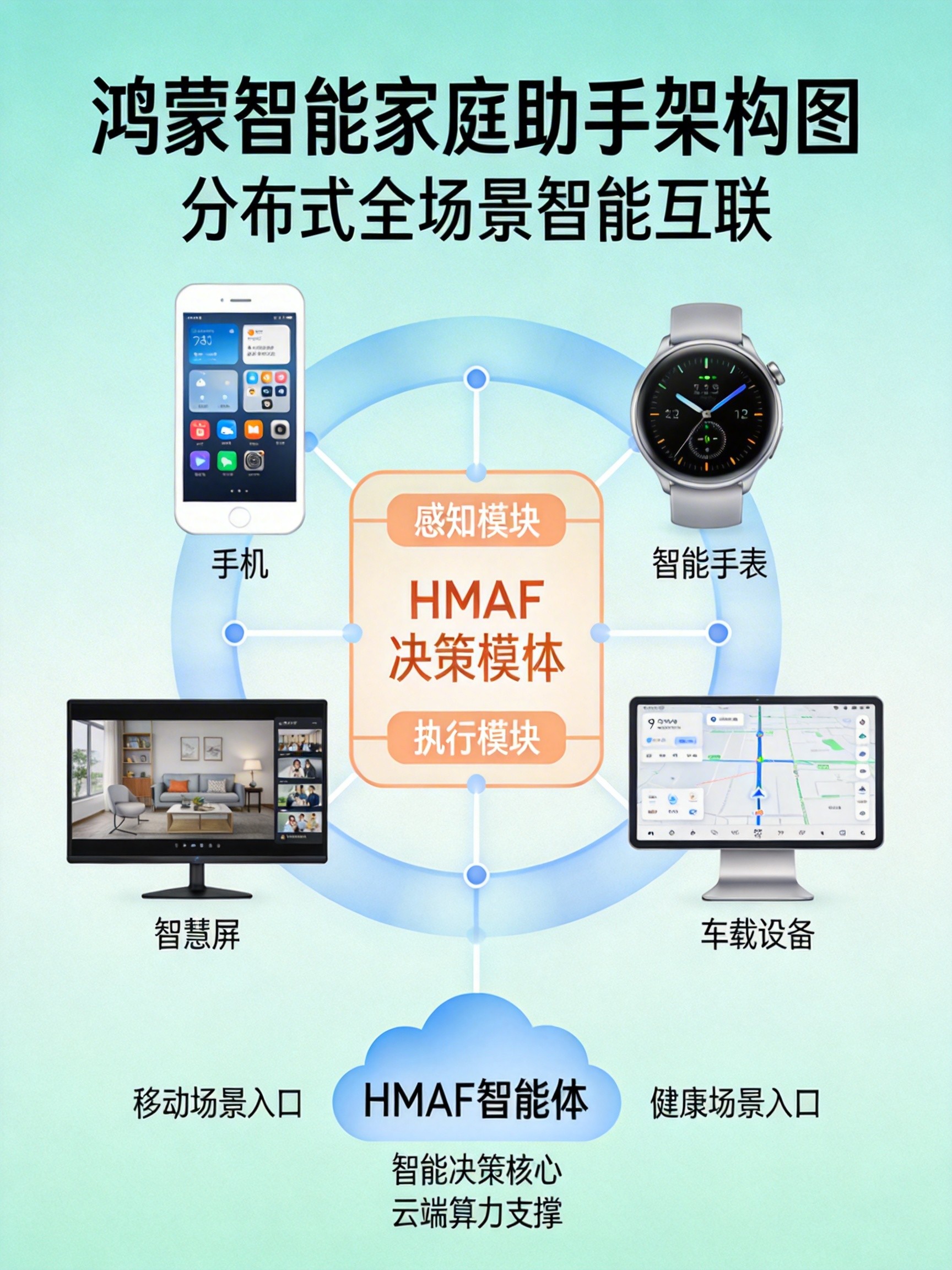
- 设备层:包括手机、智能手表、智慧屏、车载设备等终端,负责用户交互与设备控制
- 分布式软总线:实现设备间的低时延通信与能力共享
- 智能体框架层:基于鸿蒙智能体框架(HMAF),提供意图理解、任务规划与服务调用能力
- AI大模型层:集成华为盘古大模型,提供自然语言理解、知识推理与内容生成能力
- 服务层:包括设备控制、场景执行、信息查询等核心服务
2.2 技术选型
- 开发语言:ArkTS 12+
- UI框架:ArkUI 3.0+
- 分布式能力:分布式软总线、分布式数据管理、分布式任务调度
- AI框架:鸿蒙智能体框架(HMAF)、盘古大模型端侧SDK
- 语音交互:Core Speech Kit、自然语言处理(NLP)库
- 设备控制:HarmonyOS Connect SDK、分布式设备管理
三、核心功能实现
3.1 应用工程结构
entry/src/main/ets/
├── common/                 # 公共资源和工具类
│   ├── constants/          # 常量定义
│   ├── utils/              # 工具函数
│   └── model/              # 数据模型
├── pages/                  # 页面组件
│   ├── phone/              # 手机端页面
│   │   ├── HomeAssistant.ets
│   │   └── SceneEditor.ets
│   ├── watch/              # 手表端页面
│   │   └── QuickControl.ets
│   └── tv/                 # 智慧屏端页面
│       └── Dashboard.ets
├── services/               # 服务类
│   ├── assistantService.ets # 智能助手服务
│   ├── deviceService.ets   # 设备管理服务
│   └── sceneService.ets    # 场景管理服务
├── abilities/              # 能力组件
│   └── VoiceAbility.ets    # 语音交互能力
└── entryability/           # 应用入口
3.2 数据模型设计
// common/model/SmartHome.ts
export interface DeviceInfo {
  deviceId: string;          // 设备ID
  name: string;             // 设备名称
  type: string;             // 设备类型
  status: 'online' | 'offline'; // 在线状态
  capabilities: DeviceCapability[]; // 设备能力
  properties: Record<string, any>; // 设备属性
}

export interface DeviceCapability {
  name: string;             // 能力名称
  type: 'action' | 'state'; // 能力类型
  parameters?: Record<string, any>; // 参数定义
}

export interface Scene {
  sceneId: string;          // 场景ID
  name: string;             // 场景名称
  description: string;      // 场景描述
  triggers: Trigger[];      // 触发条件
  actions: SceneAction[];   // 执行动作
  enabled: boolean;         // 是否启用
}

export interface Trigger {
  type: 'time' | 'device' | 'location' | 'voice'; // 触发类型
  condition: string;        // 触发条件
}

export interface SceneAction {
  deviceId: string;         // 目标设备ID
  action: string;           // 动作名称
  parameters: Record<string, any>; // 动作参数
}

export interface VoiceCommand {
  text: string;             // 语音文本
  intent: string;           // 意图类型
  entities: Record<string, any>; // 实体信息
  confidence: number;       // 置信度
}
3.3 智能助手服务实现
// services/assistantService.ets
import hmaf from '@ohos.hmaf.core';
import { VoiceCommand, Scene, DeviceInfo } from '../common/model/SmartHome';
import { deviceService } from './deviceService';
import { sceneService } from './sceneService';

export class AssistantService {
  private agent: hmaf.Agent | null = null;
  private deviceList: DeviceInfo[] = [];
  private sceneList: Scene[] = [];

  async initialize() {
    try {
      // 初始化HMAF智能体
      this.agent = await hmaf.createAgent({
        agentId: 'smart_home_assistant',
        capabilities: ['device_control', 'scene_management', 'information_query'],
        intentConfig: {
          customIntents: [
            {
              intentName: 'TurnOnDevice',
              patterns: ['打开{device}', '开启{device}', '{device}打开']
            },
            {
              intentName: 'TurnOffDevice',
              patterns: ['关闭{device}', '关掉{device}', '{device}关闭']
            },
            {
              intentName: 'ExecuteScene',
              patterns: ['执行{scene}', '启动{scene}', '{scene}场景']
            }
          ]
        }
      });

      // 注册服务调用器
      this.registerServices();

      // 加载设备和场景信息
      this.deviceList = await deviceService.getDeviceList();
      this.sceneList = await sceneService.getSceneList();

      console.log('Smart home assistant initialized successfully');
    } catch (err) {
      console.error(`Assistant initialization failed: ${JSON.stringify(err)}`);
    }
  }

  // 注册自定义服务
  private registerServices() {
    if (!this.agent) return;

    // 设备控制服务
    this.agent.registerService({
      serviceId: 'DeviceControlService',
      execute: async (params: any) => {
        const { deviceName, action } = params;
        const device = this.findDeviceByName(deviceName);

        if (device) {
          await deviceService.executeDeviceAction(device.deviceId, action);
          return { success: true, message: `${action} ${deviceName}成功` };
        } else {
          return { success: false, message: `未找到设备: ${deviceName}` };
        }
      }
    });

    // 场景执行服务
    this.agent.registerService({
      serviceId: 'SceneExecutionService',
      execute: async (params: any) => {
        const { sceneName } = params;
        const scene = this.findSceneByName(sceneName);

        if (scene) {
          await sceneService.executeScene(scene.sceneId);
          return { success: true, message: `执行${sceneName}场景成功` };
        } else {
          return { success: false, message: `未找到场景: ${sceneName}` };
        }
      }
    });
  }

  // 处理语音命令
  async processVoiceCommand(command: VoiceCommand): Promise<string> {
    if (!this.agent) return '智能助手未初始化';

    try {
      // 使用HMAF处理意图
      const result = await this.agent.processIntent({
        text: command.text,
        intent: command.intent,
        entities: command.entities
      });

      return result.response || '已执行相应操作';
    } catch (err) {
      console.error(`Intent processing failed: ${JSON.stringify(err)}`);
      return '抱歉,我没听懂您的意思';
    }
  }

  // 根据设备名称查找设备
  private findDeviceByName(deviceName: string): DeviceInfo | undefined {
    return this.deviceList.find(device =>
      device.name.includes(deviceName) ||
      this.getDeviceAlias(device.type).includes(deviceName)
    );
  }

  // 根据场景名称查找场景
  private findSceneByName(sceneName: string): Scene | undefined {
    return this.sceneList.find(scene =>
      scene.name.includes(sceneName) ||
      scene.description.includes(sceneName)
    );
  }

  // 获取设备别名
  private getDeviceAlias(deviceType: string): string[] {
    const aliases: Record<string, string[]> = {
      'light': ['灯', '灯光', '照明'],
      'air_conditioner': ['空调', '冷气', '空调机'],
      'tv': ['电视', '电视机', '大屏'],
      'curtain': ['窗帘', '帘子', '窗纱']
    };
    return aliases[deviceType] || [];
  }
}

// 全局实例
export const assistantService = new AssistantService();
3.4 语音交互能力实现
// abilities/VoiceAbility.ets
import { Ability } from '@ohos.app.ability';
import { speechRecognizer } from '@kit.CoreSpeechKit';
import { BusinessError } from '@kit.BasicServicesKit';
import { assistantService } from '../services/assistantService';

export default class VoiceAbility extends Ability {
  private asrEngine: speechRecognizer.SpeechRecognitionEngine | null = null;
  private sessionId: string = 'voice_assistant_session';

  onCreate(want, launchParam) {
    super.onCreate(want, launchParam);
    this.initializeSpeechRecognizer();
  }

  // 初始化语音识别引擎
  private async initializeSpeechRecognizer() {
    try {
      const extraParam: Record<string, Object> = {
        "locate": "CN",
        "recognizerMode": "long",
        "enablePartialResult": true
      };

      const initParams: speechRecognizer.CreateEngineParams = {
        language: 'zh-CN',
        online: 1,
        extraParams: extraParam
      };

      this.asrEngine = await speechRecognizer.createEngine(initParams);

      // 设置识别监听器
      this.setRecognitionListener();

      console.log('Speech recognizer initialized successfully');
    } catch (err) {
      console.error(`Speech recognizer initialization failed: ${JSON.stringify(err)}`);
    }
  }

  // 设置语音识别监听器
  private setRecognitionListener() {
    if (!this.asrEngine) return;

    this.asrEngine.setListener({
      onStart: (sessionId: string, eventMessage: string) => {
        console.info(`Voice recognition started: ${sessionId}`);
      },

      onResult: (sessionId: string, result: speechRecognizer.SpeechRecognitionResult) => {
        if (result.isFinal) {
          console.info(`Final recognition result: ${result.result}`);
          this.processVoiceResult(result.result);
        } else {
          console.info(`Partial recognition result: ${result.result}`);
        }
      },

      onComplete: (sessionId: string, eventMessage: string) => {
        console.info(`Voice recognition completed: ${sessionId}`);
      },

      onError: (sessionId: string, errorCode: number, errorMessage: string) => {
        console.error(`Voice recognition error: ${errorCode} - ${errorMessage}`);
      }
    });
  }

  // 处理语音识别结果
  private async processVoiceResult(text: string) {
    try {
      // 调用智能助手服务处理命令
      const response = await assistantService.processVoiceCommand({
        text: text,
        intent: '',
        entities: {},
        confidence: 1.0
      });

      // 使用TTS播放响应
      await this.speakResponse(response);
    } catch (err) {
      console.error(`Voice command processing failed: ${JSON.stringify(err)}`);
      await this.speakResponse('抱歉,处理失败,请重试');
    }
  }

  // 使用TTS播放响应
  private async speakResponse(text: string) {
    // 这里可以集成鸿蒙的TTS能力
    console.log(`Speaking response: ${text}`);
    // 实际项目中需要调用TextToSpeech API
  }

  // 启动语音识别
  async startListening() {
    if (!this.asrEngine) return;

    try {
      const audioParam: speechRecognizer.AudioInfo = {
        audioType: 'pcm',
        sampleRate: 16000,
        soundChannel: 1,
        sampleBit: 16
      };

      const startParams: speechRecognizer.StartParams = {
        sessionId: this.sessionId,
        audioInfo: audioParam,
        extraParams: {}
      };

      await this.asrEngine.startListening(startParams);
      console.log('Started voice listening');
    } catch (err) {
      console.error(`Failed to start listening: ${JSON.stringify(err)}`);
    }
  }

  // 停止语音识别
  async stopListening() {
    if (!this.asrEngine) return;

    try {
      await this.asrEngine.stopListening();
      console.log('Stopped voice listening');
    } catch (err) {
      console.error(`Failed to stop listening: ${JSON.stringify(err)}`);
    }
  }
}
3.5 设备管理服务实现
// services/deviceService.ets
import deviceManager from '@ohos.distributedDeviceManager';
import { DeviceInfo, DeviceCapability } from '../common/model/SmartHome';

export class DeviceService {
  private deviceManager: deviceManager.DeviceManager | null = null;
  private devices: DeviceInfo[] = [];

  async initialize() {
    try {
      // 初始化分布式设备管理器
      this.deviceManager = await deviceManager.createDeviceManager('com.example.smarthome');

      // 监听设备变化
      this.deviceManager.on('deviceOnline', (deviceInfo) => {
        this.handleDeviceOnline(deviceInfo);
      });

      this.deviceManager.on('deviceOffline', (deviceId) => {
        this.handleDeviceOffline(deviceId);
      });

      // 发现周边设备
      await this.discoverDevices();

      console.log('Device service initialized successfully');
    } catch (err) {
      console.error(`Device service initialization failed: ${JSON.stringify(err)}`);
    }
  }

  // 发现周边设备
  private async discoverDevices() {
    if (!this.deviceManager) return;

    try {
      const deviceList = await this.deviceManager.getAvailableDeviceList({
        filter: {
          deviceTypes: ['smart_home', 'light', 'air_conditioner', 'tv']
        }
      });

      this.devices = await Promise.all(
        deviceList.map(async device => await this.getDeviceInfo(device.deviceId))
      );

      console.log(`Discovered ${this.devices.length} devices`);
    } catch (err) {
      console.error(`Device discovery failed: ${JSON.stringify(err)}`);
    }
  }

  // 获取设备详细信息
  private async getDeviceInfo(deviceId: string): Promise<DeviceInfo> {
    // 实际项目中需要调用设备能力接口获取详细信息
    return {
      deviceId: deviceId,
      name: this.getDeviceName(deviceId),
      type: this.getDeviceType(deviceId),
      status: 'online',
      capabilities: this.getDeviceCapabilities(deviceId),
      properties: {}
    };
  }

  // 处理设备上线
  private async handleDeviceOnline(deviceInfo: deviceManager.DeviceInfo) {
    const device = await this.getDeviceInfo(deviceInfo.deviceId);
    const existingDevice = this.devices.find(d => d.deviceId === device.deviceId);

    if (!existingDevice) {
      this.devices.push(device);
      console.log(`Device online: ${device.name}`);
      // 发送设备上线事件
      eventHub.emit('device_online', device);
    }
  }

  // 处理设备下线
  private handleDeviceOffline(deviceId: string) {
    const index = this.devices.findIndex(d => d.deviceId === deviceId);

    if (index !== -1) {
      const device = this.devices[index];
      this.devices.splice(index, 1);
      console.log(`Device offline: ${device.name}`);
      // 发送设备下线事件
      eventHub.emit('device_offline', device);
    }
  }

  // 获取设备列表
  async getDeviceList(): Promise<DeviceInfo[]> {
    return [...this.devices];
  }

  // 执行设备动作
  async executeDeviceAction(deviceId: string, action: string, parameters?: Record<string, any>): Promise<void> {
    try {
      // 实际项目中需要调用HarmonyOS Connect SDK控制设备
      console.log(`Executing action '${action}' on device '${deviceId}'`);

      // 模拟设备控制延迟
      await new Promise(resolve => setTimeout(resolve, 500));

      console.log(`Action '${action}' executed successfully`);
    } catch (err) {
      console.error(`Failed to execute action: ${JSON.stringify(err)}`);
      throw err;
    }
  }

  // 获取设备名称(模拟)
  private getDeviceName(deviceId: string): string {
    const deviceNames: Record<string, string> = {
      'device_001': '客厅主灯',
      'device_002': '卧室空调',
      'device_003': '客厅电视',
      'device_004': '主卧窗帘'
    };
    return deviceNames[deviceId] || `未知设备(${deviceId})`;
  }

  // 获取设备类型(模拟)
  private getDeviceType(deviceId: string): string {
    const deviceTypes: Record<string, string> = {
      'device_001': 'light',
      'device_002': 'air_conditioner',
      'device_003': 'tv',
      'device_004': 'curtain'
    };
    return deviceTypes[deviceId] || 'unknown';
  }

  // 获取设备能力(模拟)
  private getDeviceCapabilities(deviceId: string): DeviceCapability[] {
    const capabilities: Record<string, DeviceCapability[]> = {
      'device_001': [
        { name: 'turn_on', type: 'action' },
        { name: 'turn_off', type: 'action' },
        { name: 'adjust_brightness', type: 'action', parameters: { level: 0-100 } }
      ],
      'device_002': [
        { name: 'turn_on', type: 'action' },
        { name: 'turn_off', type: 'action' },
        { name: 'adjust_temperature', type: 'action', parameters: { temperature: 16-30 } },
        { name: 'set_mode', type: 'action', parameters: { mode: 'cool' | 'heat' | 'auto' } }
      ]
    };
    return capabilities[deviceId] || [];
  }
}

// 全局实例
export const deviceService = new DeviceService();
3.6 场景管理服务实现
// services/sceneService.ets
import preferences from '@ohos.data.preferences';
import { Scene, Trigger, SceneAction } from '../common/model/SmartHome';
import { deviceService } from './deviceService';

export class SceneService {
  private cache: preferences.Preferences | null = null;
  private scenes: Scene[] = [];
  private readonly SCENE_CACHE_KEY = 'smart_home_scenes';

  async initialize() {
    try {
      this.cache = await preferences.getPreferences(getContext(), 'smart_home_scenes');
      await this.loadScenes();

      console.log('Scene service initialized successfully');
    } catch (err) {
      console.error(`Scene service initialization failed: ${JSON.stringify(err)}`);
    }
  }

  // 加载场景数据
  private async loadScenes() {
    if (!this.cache) return;

    try {
      const scenesJson = await this.cache.get(this.SCENE_CACHE_KEY, '[]');
      this.scenes = JSON.parse(scenesJson as string);

      // 如果没有场景,创建默认场景
      if (this.scenes.length === 0) {
        this.scenes = this.createDefaultScenes();
        await this.saveScenes();
      }

      console.log(`Loaded ${this.scenes.length} scenes`);
    } catch (err) {
      console.error(`Failed to load scenes: ${JSON.stringify(err)}`);
      this.scenes = this.createDefaultScenes();
    }
  }

  // 保存场景数据
  private async saveScenes() {
    if (!this.cache) return;

    try {
      await this.cache.put(this.SCENE_CACHE_KEY, JSON.stringify(this.scenes));
      await this.cache.flush();
    } catch (err) {
      console.error(`Failed to save scenes: ${JSON.stringify(err)}`);
    }
  }

  // 创建默认场景
  private createDefaultScenes(): Scene[] {
    return [
      {
        sceneId: 'scene_001',
        name: '回家模式',
        description: '打开灯光、空调,拉上窗帘',
        triggers: [
          { type: 'location', condition: 'home' },
          { type: 'voice', condition: '我回来了' }
        ],
        actions: [
          { deviceId: 'device_001', action: 'turn_on', parameters: {} },
          { deviceId: 'device_002', action: 'turn_on', parameters: { temperature: 26 } },
          { deviceId: 'device_004', action: 'close', parameters: {} }
        ],
        enabled: true
      },
      {
        sceneId: 'scene_002',
        name: '离家模式',
        description: '关闭所有设备,打开安防系统',
        triggers: [
          { type: 'location', condition: 'away' },
          { type: 'voice', condition: '我出门了' }
        ],
        actions: [
          { deviceId: 'device_001', action: 'turn_off', parameters: {} },
          { deviceId: 'device_002', action: 'turn_off', parameters: {} },
          { deviceId: 'device_003', action: 'turn_off', parameters: {} },
          { deviceId: 'device_004', action: 'open', parameters: {} }
        ],
        enabled: true
      },
      {
        sceneId: 'scene_003',
        name: '睡眠模式',
        description: '调暗灯光、设置空调睡眠模式',
        triggers: [
          { type: 'time', condition: '22:00' },
          { type: 'voice', condition: '我要睡觉了' }
        ],
        actions: [
          { deviceId: 'device_001', action: 'adjust_brightness', parameters: { level: 10 } },
          { deviceId: 'device_002', action: 'set_mode', parameters: { mode: 'sleep' } },
          { deviceId: 'device_004', action: 'close', parameters: {} }
        ],
        enabled: true
      }
    ];
  }

  // 获取场景列表
  async getSceneList(): Promise<Scene[]> {
    return [...this.scenes];
  }

  // 执行场景
  async executeScene(sceneId: string): Promise<void> {
    const scene = this.scenes.find(s => s.sceneId === sceneId);

    if (!scene) {
      throw new Error(`Scene ${sceneId} not found`);
    }

    console.log(`Executing scene: ${scene.name}`);

    // 并发执行场景中的所有动作
    const actionPromises = scene.actions.map(async action => {
      await deviceService.executeDeviceAction(
        action.deviceId,
        action.action,
        action.parameters
      );
    });

    await Promise.all(actionPromises);

    console.log(`Scene ${scene.name} executed successfully`);
  }

  // 创建场景
  async createScene(scene: Omit<Scene, 'sceneId'>): Promise<Scene> {
    const newScene: Scene = {
      ...scene,
      sceneId: `scene_${Date.now()}`,
      enabled: true
    };

    this.scenes.push(newScene);
    await this.saveScenes();

    console.log(`Scene created: ${newScene.name}`);
    return newScene;
  }

  // 更新场景
  async updateScene(sceneId: string, updates: Partial<Scene>): Promise<Scene> {
    const sceneIndex = this.scenes.findIndex(s => s.sceneId === sceneId);

    if (sceneIndex === -1) {
      throw new Error(`Scene ${sceneId} not found`);
    }

    this.scenes[sceneIndex] = { ...this.scenes[sceneIndex], ...updates };
    await this.saveScenes();

    console.log(`Scene updated: ${this.scenes[sceneIndex].name}`);
    return this.scenes[sceneIndex];
  }

  // 删除场景
  async deleteScene(sceneId: string): Promise<void> {
    const sceneIndex = this.scenes.findIndex(s => s.sceneId === sceneId);

    if (sceneIndex === -1) {
      throw new Error(`Scene ${sceneId} not found`);
    }

    const deletedScene = this.scenes.splice(sceneIndex, 1)[0];
    await this.saveScenes();

    console.log(`Scene deleted: ${deletedScene.name}`);
  }
}

// 全局实例
export const sceneService = new SceneService();
3.7 手机端主界面实现
// pages/phone/HomeAssistant.ets
import { Component, State, onPageShow } from '@ohos:arkui';
import { DeviceInfo, Scene } from '../../common/model/SmartHome';
import { assistantService } from '../../services/assistantService';
import { deviceService } from '../../services/deviceService';
import { sceneService } from '../../services/sceneService';
import router from '@ohos.router';

@Entry
@Component
struct HomeAssistantPage {
  @State devices: DeviceInfo[] = [];
  @State scenes: Scene[] = [];
  @State isListening: boolean = false;
  @State voiceInput: string = '';
  @State assistantResponse: string = '';

  async aboutToAppear() {
    // 初始化服务
    await assistantService.initialize();
    await deviceService.initialize();
    await sceneService.initialize();

    // 加载设备和场景数据
    await this.loadData();

    // 监听设备变化
    this.setupDeviceListeners();
  }

  async onPageShow() {
    // 页面显示时刷新数据
    await this.loadData();
  }

  // 加载设备和场景数据
  private async loadData() {
    this.devices = await deviceService.getDeviceList();
    this.scenes = await sceneService.getSceneList();
  }

  // 设置设备变化监听器
  private setupDeviceListeners() {
    eventHub.on('device_online', (device: DeviceInfo) => {
      this.devices = [...this.devices, device];
    });

    eventHub.on('device_offline', (device: DeviceInfo) => {
      this.devices = this.devices.filter(d => d.deviceId !== device.deviceId);
    });
  }

  // 启动语音交互
  private async startVoiceInteraction() {
    this.isListening = true;
    this.voiceInput = '';
    this.assistantResponse = '';

    try {
      // 启动语音识别
      const voiceAbility = this.context.abilityWant;
      // 实际项目中需要调用VoiceAbility的startListening方法

      // 模拟语音输入
      setTimeout(() => {
        this.voiceInput = '打开客厅灯';
        this.processVoiceCommand();
      }, 2000);
    } catch (err) {
      console.error(`Voice interaction failed: ${JSON.stringify(err)}`);
      this.isListening = false;
      this.assistantResponse = '语音交互失败,请重试';
    }
  }

  // 处理语音命令
  private async processVoiceCommand() {
    if (!this.voiceInput) return;

    try {
      this.assistantResponse = '正在处理...';

      // 调用智能助手服务处理命令
      const response = await assistantService.processVoiceCommand({
        text: this.voiceInput,
        intent: '',
        entities: {},
        confidence: 1.0
      });

      this.assistantResponse = response;
    } catch (err) {
      console.error(`Voice command processing failed: ${JSON.stringify(err)}`);
      this.assistantResponse = '抱歉,处理失败,请重试';
    } finally {
      this.isListening = false;
    }
  }

  // 获取设备状态图标
  private getDeviceStatusIcon(status: 'online' | 'offline'): string {
    return status === 'online' ? '🟢' : '🔴';
  }

  // 获取设备类型图标
  private getDeviceTypeIcon(deviceType: string): string {
    const icons: Record<string, string> = {
      'light': '💡',
      'air_conditioner': '❄️',
      'tv': '📺',
      'curtain': '🧵',
      'unknown': '🔌'
    };
    return icons[deviceType] || icons['unknown'];
  }

  build() {
    Column() {
      // 顶部导航栏
      Row() {
        Text('智能家庭助手')
          .fontSize(24)
          .fontWeight(FontWeight.Bold)
          .layoutWeight(1)

        Button('场景编辑')
          .onClick(() => {
            router.pushUrl({ url: 'pages/phone/SceneEditor' });
          })
          .padding(10)
          .backgroundColor('#007DFF')
          .fontColor(Color.White)
          .borderRadius(8)
      }
      .padding(15)
      .width('100%')

      // 语音交互区域
      Column() {
        Button(this.isListening ? '正在听...' : '语音助手')
          .onClick(() => this.startVoiceInteraction())
          .width('100%')
          .height(60)
          .backgroundColor(this.isListening ? '#FF6B6B' : '#4ECDC4')
          .fontColor(Color.White)
          .borderRadius(30)
          .margin({ bottom: 10 })

        if (this.voiceInput) {
          Text(`你说: ${this.voiceInput}`)
            .fontSize(16)
            .padding(10)
            .backgroundColor('#F8F9FA')
            .borderRadius(8)
            .alignSelf(ItemAlign.Start)
        }

        if (this.assistantResponse) {
          Text(`助手: ${this.assistantResponse}`)
            .fontSize(16)
            .padding(10)
            .backgroundColor('#E3F2FD')
            .borderRadius(8)
            .alignSelf(ItemAlign.End)
            .layoutWeight(1)
        }
      }
      .padding(15)
      .width('100%')

      // 场景快捷入口
      Text('常用场景')
        .fontSize(20)
        .fontWeight(FontWeight.Bold)
        .padding({ left: 15, bottom: 10 })
        .alignSelf(ItemAlign.Start)

      List() {
        LazyForEach(this.scenes, (scene: Scene) => {
          ListItem() {
            Row() {
              Text(this.getSceneIcon(scene.name))
                .fontSize(32)
                .padding(10)

              Column() {
                Text(scene.name)
                  .fontSize(18)
                  .fontWeight(FontWeight.Bold)

                Text(scene.description)
                  .fontSize(14)
                  .opacity(0.7)
              }
              .layoutWeight(1)
              .padding(10)

              Button('执行')
                .onClick(() => this.executeScene(scene.sceneId))
                .padding(8)
                .backgroundColor('#007DFF')
                .fontColor(Color.White)
                .borderRadius(6)
            }
            .padding(10)
            .width('100%')
            .backgroundColor(Color.White)
            .borderRadius(12)
            .shadow({ radius: 2, color: '#00000010', offsetX: 0, offsetY: 2 })
          }
        }, (scene) => scene.sceneId)
      }
      .spacing(10)
      .padding({ left: 15, right: 15, bottom: 15 })
      .width('100%')

      // 设备列表
      Text('设备控制')
        .fontSize(20)
        .fontWeight(FontWeight.Bold)
        .padding({ left: 15, bottom: 10 })
        .alignSelf(ItemAlign.Start)

      List() {
        LazyForEach(this.devices, (device: DeviceInfo) => {
          ListItem() {
            Row() {
              Text(this.getDeviceStatusIcon(device.status))
                .fontSize(16)
                .padding(10)

              Text(this.getDeviceTypeIcon(device.type))
                .fontSize(24)
                .padding(10)

              Column() {
                Text(device.name)
                  .fontSize(16)
                  .fontWeight(FontWeight.Bold)

                Text(device.type)
                  .fontSize(12)
                  .opacity(0.7)
              }
              .layoutWeight(1)
              .padding(10)

              Button(device.status === 'online' ? '控制' : '离线')
                .onClick(() => this.controlDevice(device))
                .padding(8)
                .backgroundColor(device.status === 'online' ? '#4CAF50' : '#9E9E9E')
                .fontColor(Color.White)
                .borderRadius(6)
                .enabled(device.status === 'online')
            }
            .padding(10)
            .width('100%')
            .backgroundColor(Color.White)
            .borderRadius(12)
            .shadow({ radius: 2, color: '#00000010', offsetX: 0, offsetY: 2 })
          }
        }, (device) => device.deviceId)
      }
      .spacing(10)
      .padding({ left: 15, right: 15, bottom: 15 })
      .width('100%')
    }
    .height('100%')
    .backgroundColor('#F5F7FA')
  }

  // 执行场景
  private async executeScene(sceneId: string) {
    try {
      await sceneService.executeScene(sceneId);
      this.assistantResponse = '场景执行成功';
    } catch (err) {
      console.error(`Scene execution failed: ${JSON.stringify(err)}`);
      this.assistantResponse = '场景执行失败,请重试';
    }
  }

  // 控制设备
  private controlDevice(device: DeviceInfo) {
    // 实际项目中需要跳转到设备控制页面
    router.pushUrl({
      url: 'pages/phone/DeviceControl',
      params: { deviceId: device.deviceId }
    });
  }

  // 获取场景图标
  private getSceneIcon(sceneName: string): string {
    const icons: Record<string, string> = {
      '回家模式': '🏠',
      '离家模式': '🚪',
      '睡眠模式': '😴',
      '影院模式': '🎬',
      '阅读模式': '📖'
    };
    return icons[sceneName] || '⚙️';
  }
}
四、性能优化策略
4.1 端云协同优化
// common/utils/aiUtil.ets
import ai from '@ohos.ai';
import { VoiceCommand } from '../model/SmartHome';

export async function processVoiceCommandWithEdgeCloudBalance(command: VoiceCommand): Promise<string> {
  try {
    const request = {
      modelId: 'smart_home_assistant_v2',
      input: command.text,
      privacyLevel: ai.PrivacyLevel.HIGH,
      maxLatencyMs: 800,
      edgeThreshold: 0.7 // 端侧置信度阈值
    };

    // 系统自动选择最优执行路径(端侧或云端)
    const result = await ai.infer(request);

    console.log(`推理完成,端侧耗时: ${result.edgeTime}ms, 云侧: ${result.cloudTime}ms`);

    return result.response;
  } catch (err) {
    console.error(`AI inference failed: ${JSON.stringify(err)}`);
    throw err;
  }
}
4.2 分布式数据同步优化
// common/utils/syncUtil.ets
import distributedData from '@ohos.data.distributedData';

export class DistributedSyncManager {
  private kvStore: distributedData.SingleKVStore | null = null;

  async initialize() {
    try {
      const kvManager = distributedData.createKVManager({
        context: getContext(),
        bundleName: 'com.example.smarthome'
      });

      this.kvStore = await kvManager.getKVStore('smart_home_sync', {
        createIfMissing: true,
        encrypt: true,
        autoSync: true,
        kvStoreType: distributedData.KVStoreType.SINGLE_VERSION
      });

      console.log('Distributed sync manager initialized successfully');
    } catch (err) {
      console.error(`Distributed sync manager initialization failed: ${JSON.stringify(err)}`);
    }
  }

  // 同步设备状态
  async syncDeviceState(deviceId: string, state: Record<string, any>) {
    if (!this.kvStore) return;

    try {
      await this.kvStore.put(`device_${deviceId}_state`, JSON.stringify({
        state,
        timestamp: Date.now(),
        deviceId: deviceId
      }));

      // 主动同步到其他设备
      await this.kvStore.sync({
        deviceIds: ['all'],
        mode: distributedData.SyncMode.PUSH
      });

      console.log(`Device state synced: ${deviceId}`);
    } catch (err) {
      console.error(`Device state sync failed: ${JSON.stringify(err)}`);
    }
  }

  // 监听设备状态变化
  async subscribeDeviceStateChanges(callback: (deviceId: string, state: Record<string, any>) => void) {
    if (!this.kvStore) return;

    try {
      this.kvStore.on('dataChange', distributedData.SubscribeType.SUBSCRIBE_TYPE_ALL, (data) => {
        if (data.updateData) {
          data.updateData.forEach(item => {
            if (item.key.startsWith('device_') && item.key.endsWith('_state')) {
              const deviceId = item.key.replace('device_', '').replace('_state', '');
              const stateData = JSON.parse(item.value as string);
              callback(deviceId, stateData.state);
            }
          });
        }
      });

      console.log('Device state change listener setup successfully');
    } catch (err) {
      console.error(`Failed to setup device state listener: ${JSON.stringify(err)}`);
    }
  }
}

// 全局实例
export const syncManager = new DistributedSyncManager();
五、总结
本方案基于鸿蒙NEXT开发了一款功能完备的智能家庭助手应用,实现了全场景设备协同与AI智能交互:
- 核心功能:语音交互、设备控制、场景管理、多设备协同
- 技术亮点:鸿蒙智能体框架(HMAF)、盘古大模型端云协同、分布式软总线通信
- 用户体验:自然语言交互、多设备无缝协同、个性化场景定制
- 性能优化:端云协同推理、分布式数据同步、低时延设备控制
应用充分利用鸿蒙系统的分布式能力和AI原生特性,为用户提供了一个智能、高效、便捷的家庭生活助手。通过本方案的实施,开发者可以快速构建具备先进AI能力和全场景协同能力的鸿蒙应用,为用户带来更加智能的生活体验。

作为“人工智能6S店”的官方数字引擎,为AI开发者与企业提供一个覆盖软硬件全栈、一站式门户。
更多推荐
 9
9 0
0- 0


 已为社区贡献23条内容

所有评论(0)