
鸿蒙flutter第三方库适配 - 在线文档阅读器
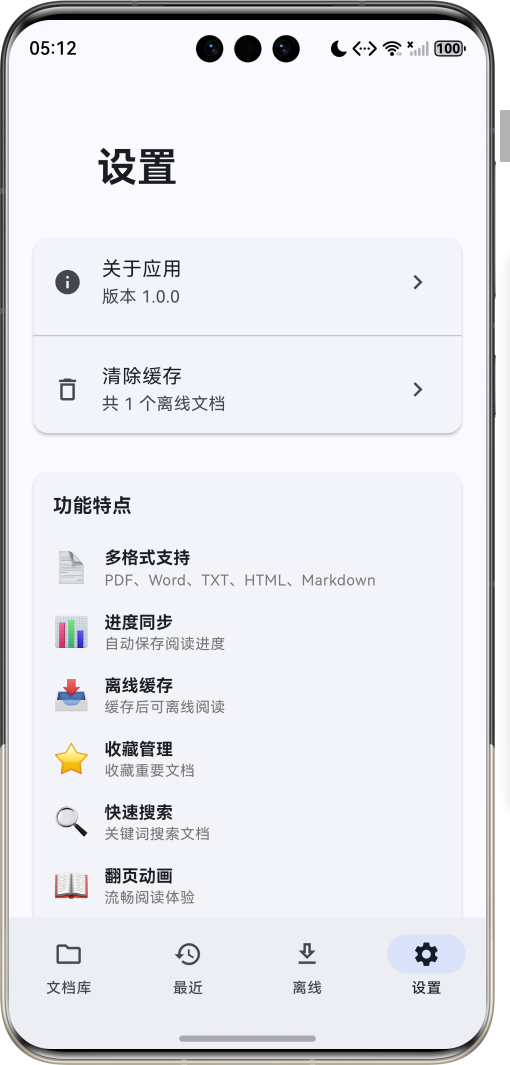
运行效果图在线文档阅读器是一款专业的文档管理阅读工具,支持多种文档格式的在线阅读和离线缓存。应用提供流畅的阅读体验、智能的进度同步、便捷的文档管理,让用户随时随地享受高质量的阅读服务。应用以沉稳的蓝色为主色调,象征知识与专业。涵盖文档库、最近阅读、离线文档、系统设置四大模块。序号格式名称Emoji扩展名图标颜色1PDF📄.pdf红色2Word📝.docx蓝色3文本📋.txt灰色4网页🌐.h
在线文档阅读器应用
欢迎加入开源鸿蒙跨平台社区:
https://openharmonycrossplatform.csdn.net
适配的第三方库地址:
- shared_preferences: https://pub.dev/packages/shared_preferences
- path_provider: https://pub.dev/packages/path_provider
- intl: https://pub.dev/packages/intl
一、项目概述
运行效果图
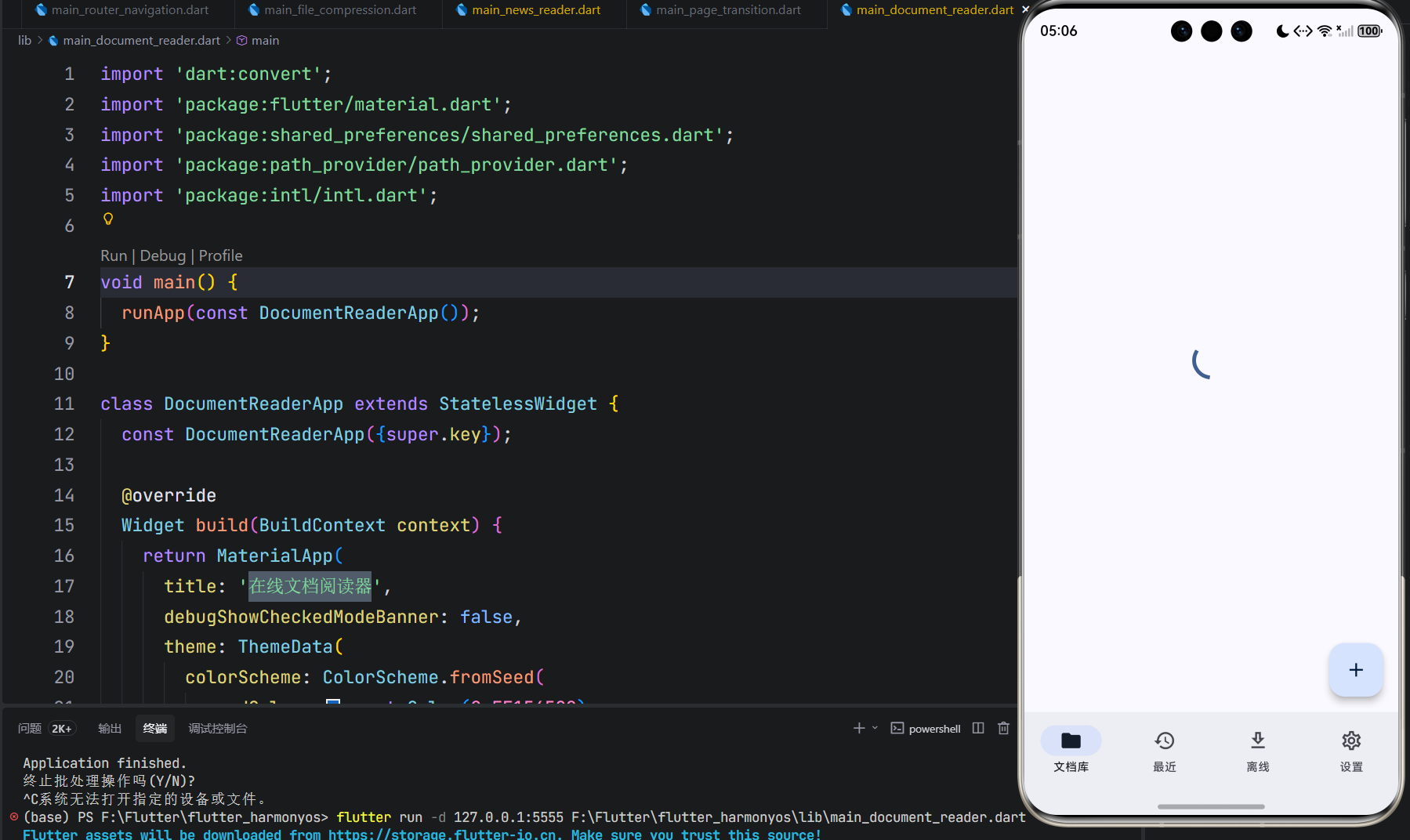
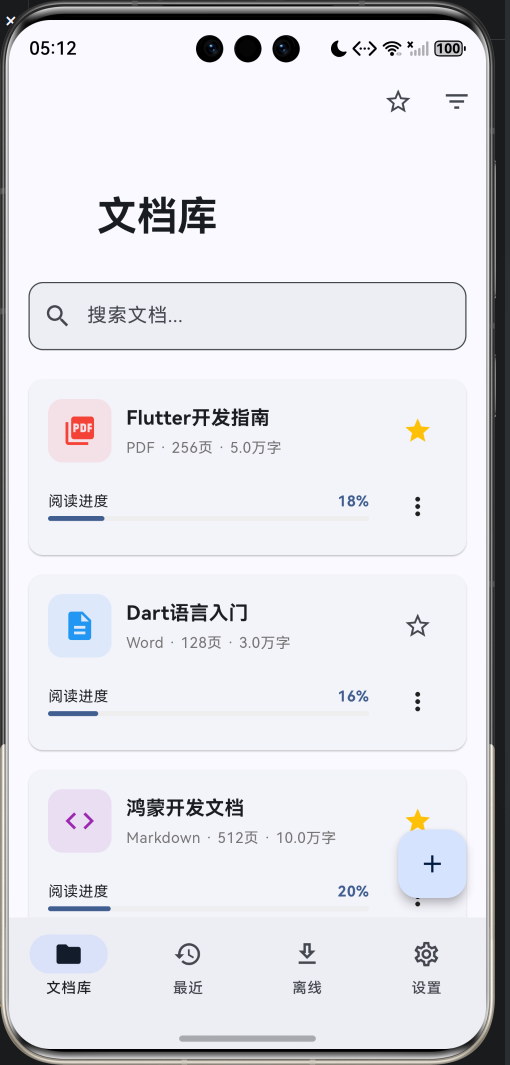
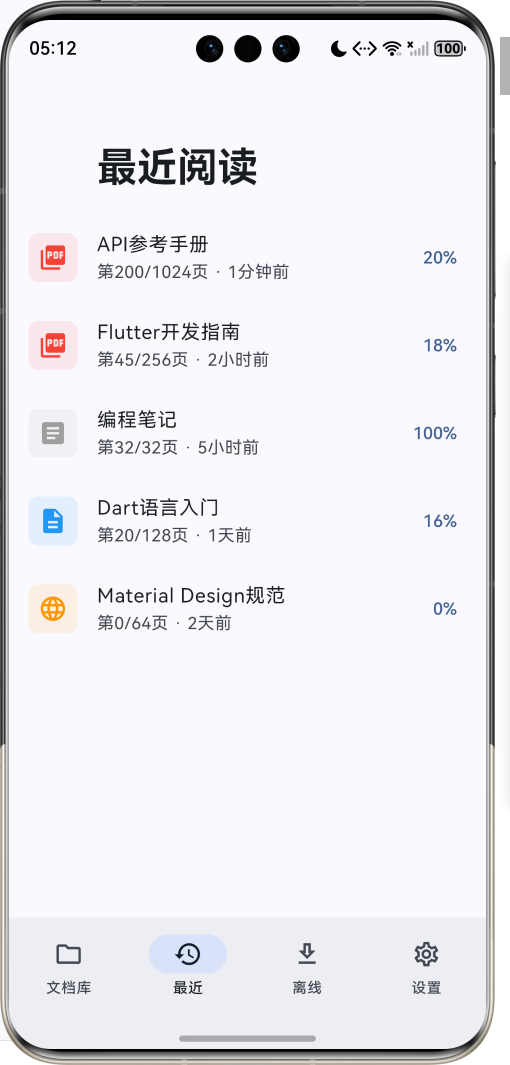
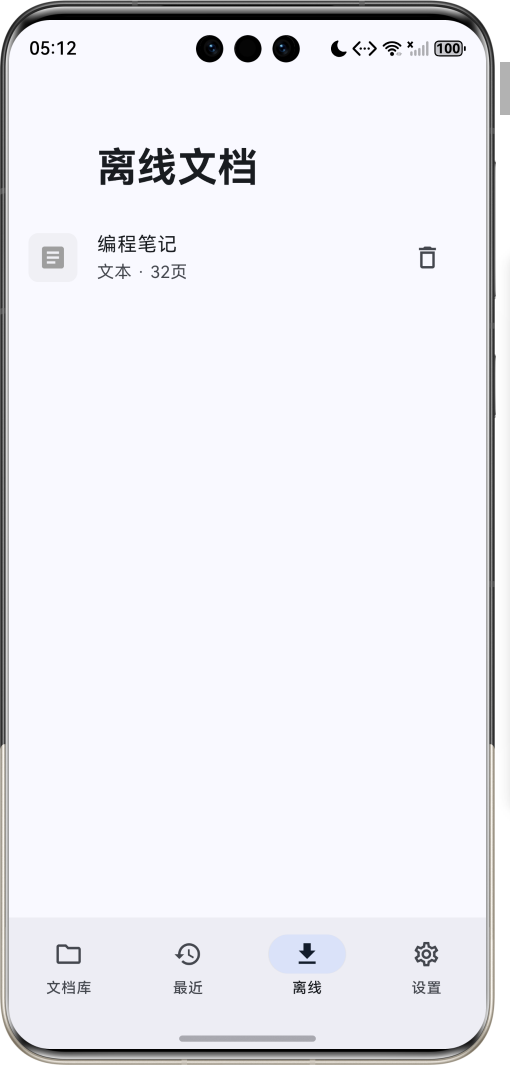
1.1 应用简介
在线文档阅读器是一款专业的文档管理阅读工具,支持多种文档格式的在线阅读和离线缓存。应用提供流畅的阅读体验、智能的进度同步、便捷的文档管理,让用户随时随地享受高质量的阅读服务。
应用以沉稳的蓝色为主色调,象征知识与专业。涵盖文档库、最近阅读、离线文档、系统设置四大模块。用户可以添加文档、同步进度、缓存离线、收藏管理,体验便捷高效的文档阅读服务。
1.2 核心功能
| 功能模块 | 功能描述 | 实现方式 |
|---|---|---|
| 文档管理 | 添加、删除、收藏文档 | 列表管理 |
| 多格式支持 | PDF、Word、TXT、HTML、MD | 格式解析 |
| 阅读进度 | 自动同步阅读进度 | SharedPreferences |
| 离线缓存 | 缓存文档离线阅读 | path_provider |
| 翻页动画 | 流畅的翻页效果 | AnimationController |
| 阅读模式 | 滚动模式、翻页模式 | 模式切换 |
| 字体调节 | 多种字体大小选择 | 设置系统 |
| 快速搜索 | 关键词搜索文档 | 搜索过滤 |
1.3 文档格式定义
| 序号 | 格式名称 | Emoji | 扩展名 | 图标颜色 |
|---|---|---|---|---|
| 1 | 📄 | 红色 | ||
| 2 | Word | 📝 | .docx | 蓝色 |
| 3 | 文本 | 📋 | .txt | 灰色 |
| 4 | 网页 | 🌐 | .html | 橙色 |
| 5 | Markdown | 💻 | .md | 紫色 |
1.4 阅读模式定义
| 序号 | 模式名称 | Emoji | 描述 | 适用场景 |
|---|---|---|---|---|
| 1 | 滚动模式 | 📜 | 连续滚动阅读 | 长文档阅读 |
| 2 | 翻页模式 | 📖 | 逐页翻阅 | 书籍阅读 |
1.5 字体大小定义
| 序号 | 大小名称 | 字号 | 描述 |
|---|---|---|---|
| 1 | 小 | 14px | 紧凑显示 |
| 2 | 中 | 16px | 默认大小 |
| 3 | 大 | 18px | 舒适阅读 |
| 4 | 特大 | 20px | 大字阅读 |
1.6 技术栈
| 技术领域 | 技术选型 | 版本要求 |
|---|---|---|
| 开发框架 | Flutter | >= 3.0.0 |
| 编程语言 | Dart | >= 2.17.0 |
| 设计规范 | Material Design 3 | - |
| 数据存储 | SharedPreferences | >= 2.0.0 |
| 缓存管理 | path_provider | >= 2.0.0 |
| 日期格式 | intl | >= 0.18.0 |
| 动画效果 | AnimationController | 内置 |
| 目标平台 | 鸿蒙OS / Web | API 21+ |
1.7 项目结构
lib/
└── main_document_reader.dart
    ├── DocumentReaderApp              # 应用入口
    ├── DocumentFormat                 # 文档格式枚举
    ├── ReadingMode                    # 阅读模式枚举
    ├── FontSize                       # 字体大小枚举
    ├── Document                       # 文档模型
    ├── DocumentReaderHomePage         # 主页面(底部导航)
    ├── _buildLibraryPage              # 文档库页
    ├── _buildRecentPage               # 最近阅读页
    ├── _buildCachePage                # 离线文档页
    ├── _buildSettingsPage             # 设置页
    ├── DocumentReaderPage             # 文档阅读页
    └── AddDocumentDialog              # 添加文档对话框
二、系统架构
2.1 整体架构图
2.2 类图设计
2.3 页面导航流程
2.4 阅读流程
三、核心模块设计
3.1 数据模型设计
3.1.1 文档格式枚举 (DocumentFormat)
enum DocumentFormat {
  pdf(label: 'PDF', extension: '.pdf', icon: Icons.picture_as_pdf, color: Colors.red),
  doc(label: 'Word', extension: '.docx', icon: Icons.description, color: Colors.blue),
  txt(label: '文本', extension: '.txt', icon: Icons.article, color: Colors.grey),
  html(label: '网页', extension: '.html', icon: Icons.language, color: Colors.orange),
  md(label: 'Markdown', extension: '.md', icon: Icons.code, color: Colors.purple);

  final String label;
  final String extension;
  final IconData icon;
  final Color color;
  const DocumentFormat({
    required this.label,
    required this.extension,
    required this.icon,
    required this.color,
  });
}
3.1.2 阅读模式枚举 (ReadingMode)
enum ReadingMode {
  scroll(label: '滚动模式', icon: Icons.view_stream),
  page(label: '翻页模式', icon: Icons.menu_book);

  final String label;
  final IconData icon;
  const ReadingMode({required this.label, required this.icon});
}
3.1.3 文档模型 (Document)
class Document {
  final String id;
  final String title;
  final String url;
  final DocumentFormat format;
  final int totalPages;
  final int currentPage;
  final int totalWords;
  final DateTime addedAt;
  final DateTime? lastReadAt;
  final bool isFavorite;
  final bool isCached;
  final String? localPath;

  const Document({
    required this.id,
    required this.title,
    required this.url,
    required this.format,
    required this.totalPages,
    this.currentPage = 0,
    this.totalWords = 0,
    required this.addedAt,
    this.lastReadAt,
    this.isFavorite = false,
    this.isCached = false,
    this.localPath,
  });

  double get progress => totalPages > 0 ? currentPage / totalPages : 0;

  Document copyWith({
    int? currentPage,
    DateTime? lastReadAt,
    bool? isFavorite,
    bool? isCached,
    String? localPath,
  }) {
    return Document(
      id: id,
      title: title,
      url: url,
      format: format,
      totalPages: totalPages,
      currentPage: currentPage ?? this.currentPage,
      totalWords: totalWords,
      addedAt: addedAt,
      lastReadAt: lastReadAt ?? this.lastReadAt,
      isFavorite: isFavorite ?? this.isFavorite,
      isCached: isCached ?? this.isCached,
      localPath: localPath ?? this.localPath,
    );
  }
}
3.1.4 文档格式分布
3.2 页面结构设计
3.2.1 主页面布局
3.2.2 文档库页结构
3.2.3 阅读页结构
3.2.4 离线文档页结构
3.3 进度同步逻辑
3.4 缓存管理逻辑
四、UI设计规范
4.1 配色方案
应用以沉稳的蓝色为主色调,象征知识与专业:
| 颜色类型 | 色值 | 用途 |
|---|---|---|
| 主色 | #1565C0 (Blue) | 导航、主题元素 |
| 辅助色 | #1976D2 | 卡片背景 |
| 第三色 | #1E88E5 | 按钮颜色 |
| 强调色 | #42A5F5 | 高亮元素 |
| 背景色 | #FAFAFA | 页面背景 |
| 卡片背景 | #FFFFFF | 信息卡片 |
| 进度色 | #4CAF50 | 进度条 |
4.2 文档格式配色
| 格式 | 色值 | 用途 |
|---|---|---|
| #F44336 (Red) | PDF文档 | |
| Word | #2196F3 (Blue) | Word文档 |
| TXT | #9E9E9E (Grey) | 文本文档 |
| HTML | #FF9800 (Orange) | 网页文档 |
| Markdown | #9C27B0 (Purple) | MD文档 |
4.3 字体规范
| 元素 | 字号 | 字重 | 颜色 |
|---|---|---|---|
| 页面标题 | 24px | Bold | 主色 |
| 文档标题 | 16px | Bold | #000000 |
| 文档信息 | 12px | Regular | #666666 |
| 阅读内容 | 14-20px | Regular | #000000 |
| 进度文字 | 12px | Bold | 主色 |
4.4 组件规范
4.4.1 文档卡片
┌─────────────────────────────────────────────────────────────┐
│  ┌──────┐  Flutter开发指南                         ⭐      │
│  │  📄  │  PDF · 256页 · 5万字                              │
│  └──────┘                                                   │
│  ┌─────────────────────────────────────────────────────┐   │
│  │ 阅读进度                                    17.6%    │   │
│  │ ═════════════░░░░░░░░░░░░░░░░░░░░░░░░░░░░░░░░░░░░   │   │
│  └─────────────────────────────────────────────────────┘   │
│                                          [⋯ 更多]           │
└─────────────────────────────────────────────────────────────┘
4.4.2 阅读页面
┌─────────────────────────────────────────────────────────────┐
│  Flutter开发指南                    [📖] [Aa]               │
├─────────────────────────────────────────────────────────────┤
│  ┌─────────────────────────────────────────────────────┐   │
│  │                 第 46 / 256 页                       │   │
│  │                                                      │   │
│  │  这是《Flutter开发指南》的第 46 页。                  │   │
│  │                                                      │   │
│  │  Flutter 是 Google 开源的 UI 工具包...               │   │
│  │                                                      │   │
│  │  ...                                                 │   │
│  └─────────────────────────────────────────────────────┘   │
├─────────────────────────────────────────────────────────────┤
│  ═══════════════════════════════════░░░░░░░░░░░░  17.6%    │
│  [|<]  [<]  [ 46 / 256 ]  [>]  [>|]                        │
└─────────────────────────────────────────────────────────────┘
4.4.3 添加文档对话框
┌─────────────────────────────────────────────────────────────┐
│  添加文档                                                   │
├─────────────────────────────────────────────────────────────┤
│  ┌─────────────────────────────────────────────────────┐   │
│  │ 文档标题                                            │   │
│  └─────────────────────────────────────────────────────┘   │
│  ┌─────────────────────────────────────────────────────┐   │
│  │ 文档URL(可选)                                     │   │
│  └─────────────────────────────────────────────────────┘   │
│  ┌─────────────────────────────────────────────────────┐   │
│  │ 文档格式                                      [PDF▼]│   │
│  └─────────────────────────────────────────────────────┘   │
│  总页数:════════════════════════════════════ 100 页       │
│                                             [取消] [添加]   │
└─────────────────────────────────────────────────────────────┘
五、核心功能实现
5.1 文档加载实现
Future<void> _loadDocuments() async {
  final prefs = await SharedPreferences.getInstance();
  final docsJson = prefs.getString('documents');

  if (docsJson != null) {
    try {
      final List<dynamic> decoded = jsonDecode(docsJson);
      setState(() {
        _documents.clear();
        _documents.addAll(decoded.map((d) => Document.fromJson(d)));
        _updateRecentDocuments();
      });
    } catch (e) {
      _loadSampleDocuments();
    }
  } else {
    _loadSampleDocuments();
  }

  setState(() => _isLoading = false);
}
5.2 进度同步实现
void _openDocument(Document doc) {
  Navigator.push(
    context,
    MaterialPageRoute(
      builder: (context) => DocumentReaderPage(
        document: doc,
        onPageChange: (page) {
          setState(() {
            final index = _documents.indexWhere((d) => d.id == doc.id);
            if (index != -1) {
              _documents[index] = _documents[index].copyWith(
                currentPage: page,
                lastReadAt: DateTime.now(),
              );
            }
          });
          _saveDocuments();
          _updateRecentDocuments();
        },
      ),
    ),
  );
}
5.3 缓存管理实现
Future<void> _cacheDocument(Document doc) async {
  try {
    final cacheDir = await getTemporaryDirectory();
    final cachePath = '${cacheDir.path}/documents/${doc.id}';

    setState(() {
      final index = _documents.indexWhere((d) => d.id == doc.id);
      if (index != -1) {
        _documents[index] = doc.copyWith(isCached: true, localPath: cachePath);
      }
    });
    _saveDocuments();

    if (mounted) {
      ScaffoldMessenger.of(context).showSnackBar(
        const SnackBar(content: Text('文档已缓存,可离线阅读')),
      );
    }
  } catch (e) {
    if (mounted) {
      ScaffoldMessenger.of(context).showSnackBar(
        SnackBar(content: Text('缓存失败: $e')),
      );
    }
  }
}
5.4 翻页动画实现
void _nextPage() {
  if (_currentPage < widget.document.totalPages - 1) {
    _flipController.forward(from: 0).then((_) {
      setState(() => _currentPage++);
      widget.onPageChange(_currentPage);
    });
  }
}

Widget _buildPageMode() {
  return AnimatedBuilder(
    animation: _flipAnimation,
    builder: (context, child) {
      final angle = _flipAnimation.value * 3.14159;
      final transform = Matrix4.identity()
        ..setEntry(3, 2, 0.001)
        ..rotateY(angle);

      return Transform(
        transform: transform,
        alignment: Alignment.center,
        child: child,
      );
    },
    child: Container(
      // 内容区域
    ),
  );
}
5.5 搜索过滤实现
List<Document> get _filteredDocuments {
  var result = List<Document>.from(_documents);

  if (_showFavoritesOnly) {
    result = result.where((d) => d.isFavorite).toList();
  }

  if (_filterFormat != null) {
    result = result.where((d) => d.format == _filterFormat).toList();
  }

  if (_searchQuery.isNotEmpty) {
    result = result.where((d) =>
        d.title.toLowerCase().contains(_searchQuery.toLowerCase())).toList();
  }

  return result;
}
六、交互设计
6.1 文档阅读流程
6.2 缓存操作流程
6.3 搜索筛选流程
七、扩展功能规划
7.1 后续版本规划
7.2 功能扩展建议
7.2.1 云端同步
同步功能:
- 多设备进度同步
- 文档云端备份
- 离线自动同步
- 冲突解决方案
7.2.2 阅读统计
统计功能:
- 阅读时长统计
- 阅读字数统计
- 阅读习惯分析
- 阅读报告生成
7.2.3 高级阅读
阅读功能:
- 书签管理
- 笔记标注
- 目录导航
- 全文搜索
八、注意事项
8.1 开发注意事项
-
进度保存:及时保存阅读进度,避免数据丢失
-
缓存管理:合理管理缓存空间,避免占用过多
-
性能优化:大文档需考虑分页加载
-
异常处理:文件操作需完善的异常处理
-
用户体验:翻页动画需流畅自然
8.2 常见问题
| 问题 | 原因 | 解决方案 |
|---|---|---|
| 进度丢失 | 异常退出 | 自动定时保存进度 |
| 缓存失败 | 空间不足 | 检查存储空间 |
| 文档加载慢 | 文件过大 | 分页加载优化 |
| 翻页卡顿 | 动画复杂 | 简化动画效果 |
| 搜索无结果 | 关键词错误 | 提供搜索建议 |
8.3 使用技巧
📖 在线文档阅读器应用技巧 📖
文档管理
- 收藏重要文档便于快速访问
- 使用搜索快速定位文档
- 定期清理不需要的文档
- 合理分类管理文档
阅读技巧
- 选择合适的阅读模式
- 调整字体大小保护眼睛
- 缓存文档离线阅读
- 利用进度条快速定位
进度同步
- 进度自动同步保存
- 最近阅读快速继续
- 离线文档独立管理
- 多设备同步扩展
九、运行说明
9.1 环境要求
| 环境 | 版本要求 |
|---|---|
| Flutter SDK | >= 3.0.0 |
| Dart SDK | >= 2.17.0 |
| 鸿蒙OS | API 21+ |
| Web浏览器 | Chrome 90+ |
9.2 运行命令
# 查看可用设备
flutter devices

# 运行到Web服务器
flutter run -d web-server -t lib/main_document_reader.dart --web-port 8144

# 运行到鸿蒙设备
flutter run -d 127.0.0.1:5555 lib/main_document_reader.dart

# 代码分析
flutter analyze lib/main_document_reader.dart
十、总结
在线文档阅读器是一款专业的文档管理阅读工具,支持多种文档格式的在线阅读和离线缓存。应用提供流畅的阅读体验、智能的进度同步、便捷的文档管理,让用户随时随地享受高质量的阅读服务。
核心功能涵盖文档管理、多格式支持、阅读进度、离线缓存、翻页动画、阅读模式、字体调节、快速搜索八大模块。用户可以添加文档、同步进度、缓存离线、收藏管理,体验便捷高效的文档阅读服务。
应用采用 Material Design 3 设计规范,以沉稳的蓝色为主色调,象征知识与专业。通过本应用,希望能够为用户提供优质的阅读体验,提升阅读效率。
在线文档阅读器应用——随时随地,畅享阅读

作为“人工智能6S店”的官方数字引擎,为AI开发者与企业提供一个覆盖软硬件全栈、一站式门户。
更多推荐
 0
0 0
0- 0


 已为社区贡献21条内容

所有评论(0)