
鸿蒙flutter第三方库适配 - 日历网格
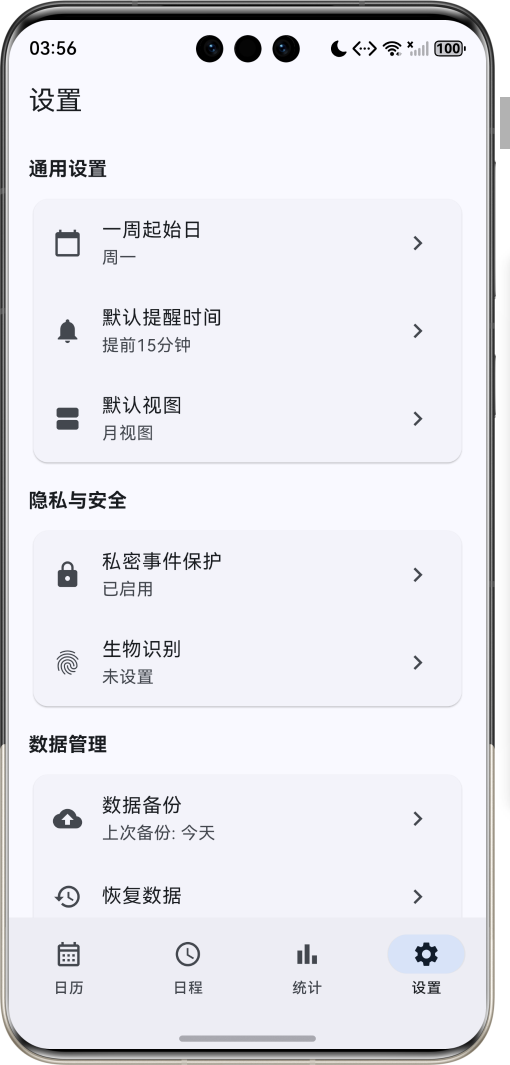
运行效果图日历网格应用是一款功能强大的日程管理工具,以直观的网格形式展示日历,帮助用户高效管理日常事务。应用支持月视图、周视图、日程视图三种展示模式,用户可以轻松创建、编辑和管理各类事件,设置提醒,保护私密事件,实现高效的时间管理。应用以清新的蓝色为主色调,象征专业与效率。涵盖日历主页、日程安排、统计分析、系统设置四大模块。用户可以快速浏览日历网格,添加事件,查看日程统计,保护隐私数据,享受便捷的
日历网格应用
欢迎加入开源鸿蒙跨平台社区:
https://openharmonycrossplatform.csdn.net
适配的第三方库地址:
- two_dimensional_scrollables: https://pub.dev/packages/two_dimensional_scrollables
- shared_preferences: https://pub.dev/packages/shared_preferences
- animations: https://pub.dev/packages/animations
- local_auth: https://pub.dev/packages/local_auth
一、项目概述
运行效果图
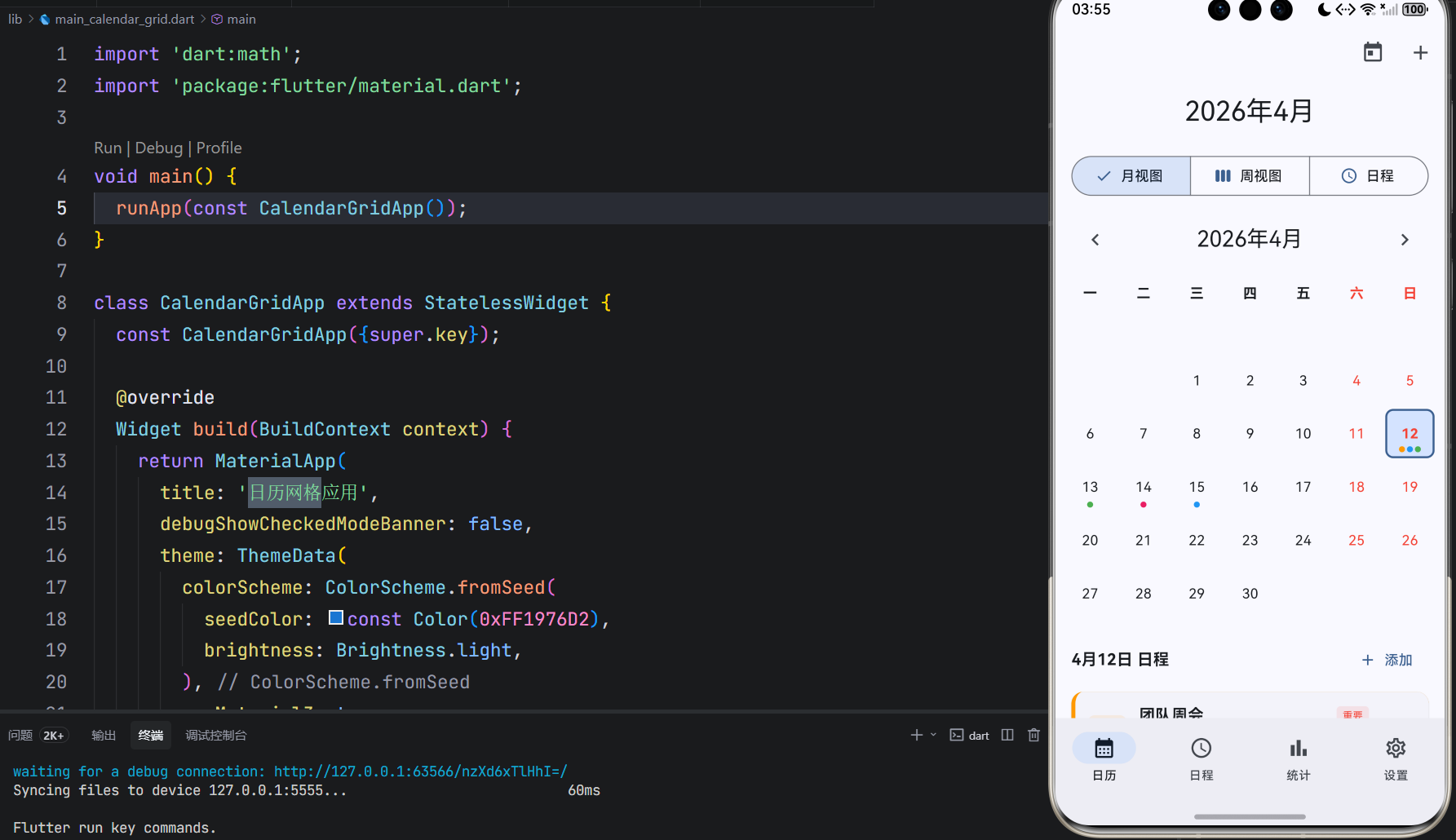
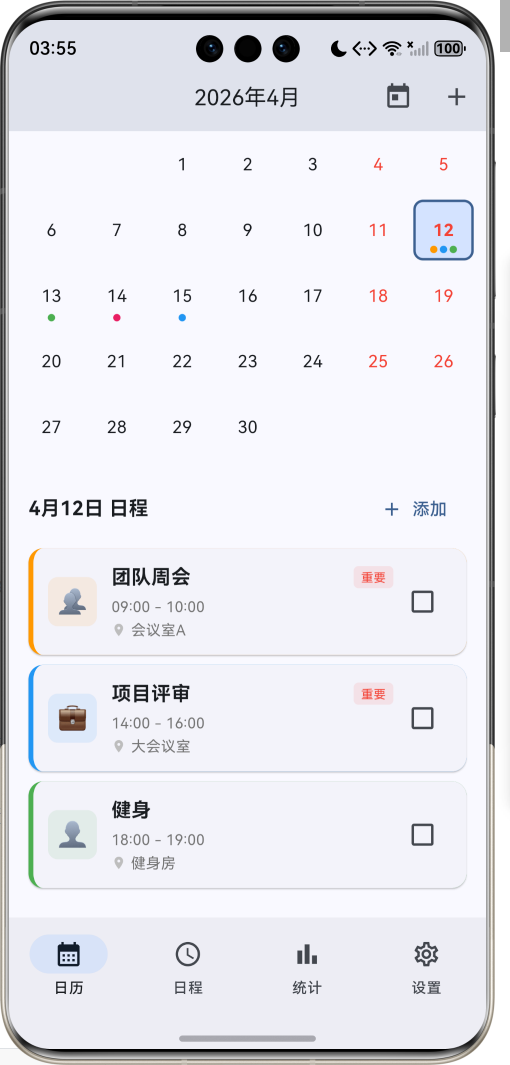
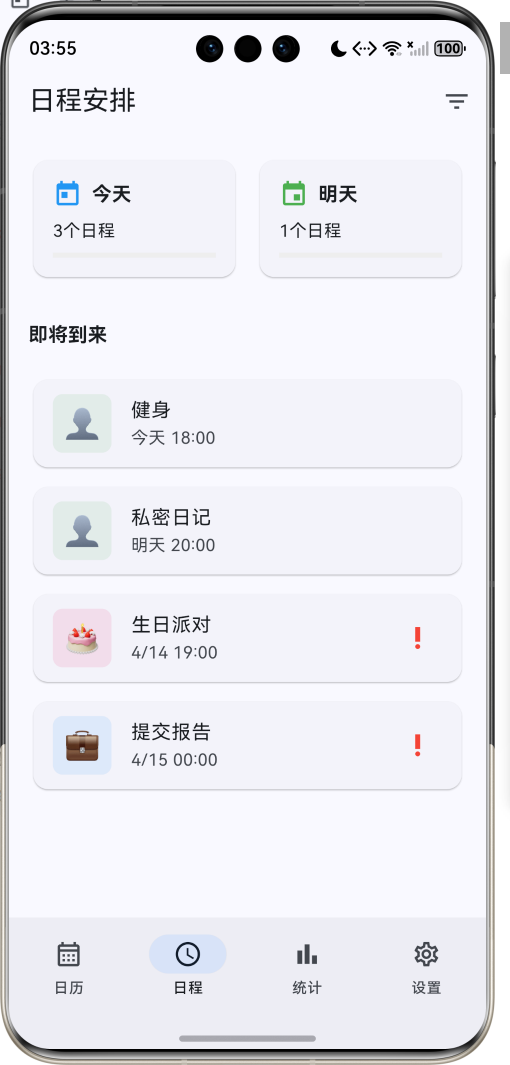
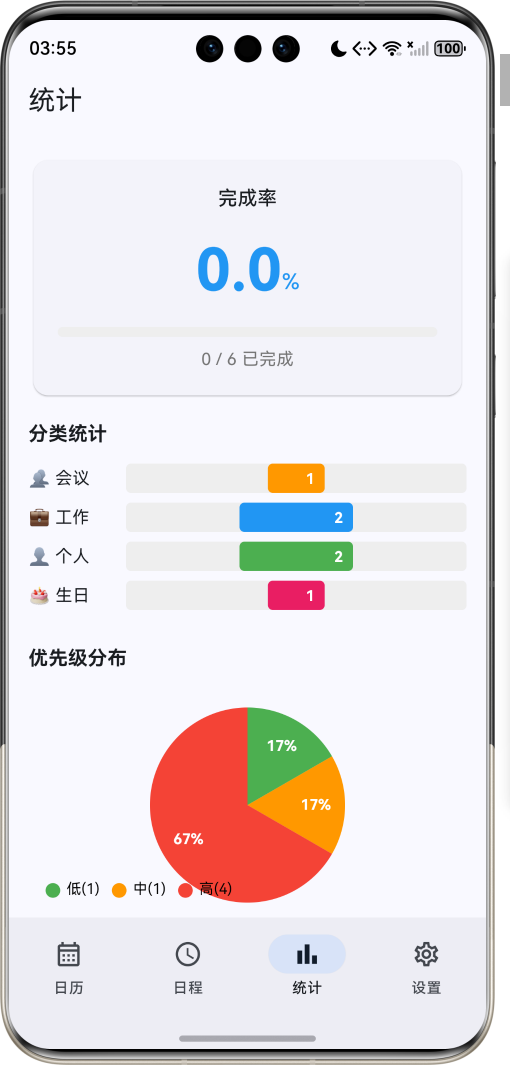
1.1 应用简介
日历网格应用是一款功能强大的日程管理工具,以直观的网格形式展示日历,帮助用户高效管理日常事务。应用支持月视图、周视图、日程视图三种展示模式,用户可以轻松创建、编辑和管理各类事件,设置提醒,保护私密事件,实现高效的时间管理。
应用以清新的蓝色为主色调,象征专业与效率。涵盖日历主页、日程安排、统计分析、系统设置四大模块。用户可以快速浏览日历网格,添加事件,查看日程统计,保护隐私数据,享受便捷的日程管理体验。
1.2 核心功能
| 功能模块 | 功能描述 | 实现方式 |
|---|---|---|
| 日历网格 | 以网格形式展示日历 | GridView |
| 事件管理 | 创建、编辑、删除事件 | 状态管理 |
| 日期选择 | 点击选择日期查看事件 | 手势交互 |
| 事件提醒 | 设置多种提醒方式 | Timer |
| 分类管理 | 按类别组织事件 | 枚举分类 |
| 优先级设置 | 为事件设置重要程度 | 优先级枚举 |
| 私密保护 | 生物识别保护隐私事件 | local_auth |
| 统计分析 | 查看事件完成情况 | 图表展示 |
1.3 视图模式定义
| 序号 | 模式名称 | Emoji | 描述 | 适用场景 |
|---|---|---|---|---|
| 1 | 月视图 | 📅 | 显示整月日历网格 | 月度规划 |
| 2 | 周视图 | 📆 | 显示单周日程 | 周计划安排 |
| 3 | 日程视图 | 📋 | 显示即将到来的事件 | 日常查看 |
1.4 事件分类定义
| 序号 | 分类名称 | Emoji | 颜色 | 描述 |
|---|---|---|---|---|
| 1 | 工作 | 💼 | 蓝色 | 工作相关事务 |
| 2 | 个人 | 👤 | 绿色 | 个人生活事项 |
| 3 | 会议 | 👥 | 橙色 | 会议安排 |
| 4 | 提醒 | ⏰ | 红色 | 重要提醒事项 |
| 5 | 生日 | 🎂 | 粉色 | 生日纪念 |
| 6 | 节日 | 🎉 | 紫色 | 节假日安排 |
1.5 优先级定义
| 序号 | 优先级名称 | Emoji | 颜色 | 描述 |
|---|---|---|---|---|
| 1 | 低 | 🟢 | 绿色 | 普通事项 |
| 2 | 中 | 🟠 | 橙色 | 重要事项 |
| 3 | 高 | 🔴 | 红色 | 紧急事项 |
1.6 技术栈
| 技术领域 | 技术选型 | 版本要求 |
|---|---|---|
| 开发框架 | Flutter | >= 3.0.0 |
| 编程语言 | Dart | >= 2.17.0 |
| 设计规范 | Material Design 3 | - |
| 状态管理 | ChangeNotifier | - |
| 数据存储 | SharedPreferences | >= 2.0.0 |
| 动画效果 | animations | >= 2.0.0 |
| 生物认证 | local_auth | >= 2.0.0 |
| 目标平台 | 鸿蒙OS / Web | API 21+ |
1.7 项目结构
lib/
└── main_calendar_grid.dart
    ├── CalendarGridApp              # 应用入口
    ├── EventCategory                # 事件分类枚举
    ├── ViewMode                     # 视图模式枚举
    ├── EventPriority                # 事件优先级枚举
    ├── CalendarEvent                # 事件模型
    ├── CalendarState                # 日历状态管理
    ├── CalendarHomePage             # 主页面(底部导航)
    ├── _buildCalendarPage           # 日历页
    ├── _buildSchedulePage           # 日程页
    ├── _buildStatisticsPage         # 统计页
    ├── _buildSettingsPage           # 设置页
    ├── _AddEventSheet               # 添加事件弹窗
    ├── _EventDetailSheet            # 事件详情弹窗
    └── PriorityChartPainter         # 优先级图表绘制器
二、系统架构
2.1 整体架构图
2.2 类图设计
2.3 页面导航流程
2.4 事件管理流程
三、核心模块设计
3.1 数据模型设计
3.1.1 事件分类枚举 (EventCategory)
enum EventCategory {
  work(label: '工作', emoji: '💼', color: Colors.blue),
  personal(label: '个人', emoji: '👤', color: Colors.green),
  meeting(label: '会议', emoji: '👥', color: Colors.orange),
  reminder(label: '提醒', emoji: '⏰', color: Colors.red),
  birthday(label: '生日', emoji: '🎂', color: Colors.pink),
  holiday(label: '节日', emoji: '🎉', color: Colors.purple);

  final String label;
  final String emoji;
  final Color color;
  const EventCategory({
    required this.label,
    required this.emoji,
    required this.color,
  });
}
3.1.2 视图模式枚举 (ViewMode)
enum ViewMode {
  month(label: '月视图', icon: Icons.calendar_month),
  week(label: '周视图', icon: Icons.view_week),
  schedule(label: '日程', icon: Icons.schedule);

  final String label;
  final IconData icon;
  const ViewMode({required this.label, required this.icon});
}
3.1.3 事件优先级枚举 (EventPriority)
enum EventPriority {
  low(label: '低', color: Colors.green, value: 1),
  medium(label: '中', color: Colors.orange, value: 2),
  high(label: '高', color: Colors.red, value: 3);

  final String label;
  final Color color;
  final int value;
  const EventPriority({
    required this.label,
    required this.color,
    required this.value,
  });
}
3.1.4 事件模型 (CalendarEvent)
class CalendarEvent {
  final String id;
  final String title;
  final String? description;
  final DateTime startTime;
  final DateTime endTime;
  final EventCategory category;
  final EventPriority priority;
  final bool isAllDay;
  final bool isPrivate;
  final String? location;
  final List<String> reminders;
  final bool isCompleted;

  const CalendarEvent({
    required this.id,
    required this.title,
    this.description,
    required this.startTime,
    required this.endTime,
    required this.category,
    required this.priority,
    this.isAllDay = false,
    this.isPrivate = false,
    this.location,
    this.reminders = const [],
    this.isCompleted = false,
  });
}
3.1.5 事件分类分布
3.2 页面结构设计
3.2.1 主页面布局
3.2.2 日历页结构
3.2.3 日程页结构
3.2.4 统计页结构
3.3 日历网格逻辑
3.4 事件提醒逻辑
四、UI设计规范
4.1 配色方案
应用以清新的蓝色为主色调,象征专业与效率:
| 颜色类型 | 色值 | 用途 |
|---|---|---|
| 主色 | #1976D2 (Blue) | 导航、主题元素 |
| 辅助色 | #42A5F5 | 选中状态 |
| 第三色 | #90CAF9 | 悬停状态 |
| 背景色 | #FAFAFA | 页面背景 |
| 卡片背景 | #FFFFFF | 信息卡片 |
| 工作分类 | #2196F3 | 工作事件 |
| 个人分类 | #4CAF50 | 个人事件 |
| 会议分类 | #FF9800 | 会议事件 |
| 提醒分类 | #F44336 | 提醒事件 |
4.2 优先级配色
| 优先级 | 色值 | 视觉效果 |
|---|---|---|
| 低 | #4CAF50 | 绿色 |
| 中 | #FF9800 | 橙色 |
| 高 | #F44336 | 红色 |
4.3 字体规范
| 元素 | 字号 | 字重 | 颜色 |
|---|---|---|---|
| 页面标题 | 24px | Bold | 主色 |
| 事件标题 | 16px | Bold | #000000 |
| 日期数字 | 14px | Regular | #000000 |
| 时间显示 | 12px | Regular | #666666 |
| 提示文字 | 12px | Regular | #999999 |
| 分类标签 | 12px | Regular | 分类颜色 |
4.4 组件规范
4.4.1 日历网格
┌─────────────────────────────────────┐
│  一    二    三    四    五    六    日  │
│                                     │
│        1     2     3     4     5    │
│       ●     ●                       │
│                                     │
│  6     7     8     9    10    11   12 │
│        ●●              ●             │
│                                     │
│ 13    14    15    16    17    18   19 │
│  ●●    ●     ●                      │
│                                     │
│ 20    21    22    23    24    25   26 │
│        ●                   ●●       │
│                                     │
│ 27    28    29    30    31          │
│  ●●    ●                            │
└─────────────────────────────────────┘
4.4.2 事件卡片
┌─────────────────────────────────────┐
│  💼  团队周会                    ✓   │
│      09:00 - 10:00                  │
│      📍 会议室A                     │
│      ━━━━━━━━━━━━━━━━━━━━━━━━━━━━━ │
│      讨论本周工作进度和下周计划       │
└─────────────────────────────────────┘
4.4.3 添加事件弹窗
┌─────────────────────────────────────┐
│  取消          新建事件        保存  │
│─────────────────────────────────────│
│  事件标题                            │
│  ┌─────────────────────────────┐   │
│  │                             │   │
│  └─────────────────────────────┘   │
│                                     │
│  🏷️ 分类        工作 💼        ▼   │
│  🚩 优先级      中 🟠         ▼   │
│  ⏰ 全天        [开关]            │
│  🔒 私密事件    [开关]            │
│                                     │
│  📍 地点                            │
│  ┌─────────────────────────────┐   │
│  │                             │   │
│  └─────────────────────────────┘   │
└─────────────────────────────────────┘
4.4.4 统计卡片
┌─────────────────────────────────────┐
│           完成率                     │
│                                     │
│            75%                      │
│                                     │
│  ═══════════════════════════════   │
│  ═════════════════●●●●●●●           │
│                                     │
│         15 / 20 已完成               │
└─────────────────────────────────────┘
五、核心功能实现
5.1 日历状态管理实现
class CalendarState extends ChangeNotifier {
  DateTime _currentDate = DateTime.now();
  DateTime _selectedDate = DateTime.now();
  ViewMode _viewMode = ViewMode.month;
  final List<CalendarEvent> _events = [];
  Set<String> _unlockedPrivateEvents = {};

  void setCurrentDate(DateTime date) {
    _currentDate = date;
    notifyListeners();
  }

  void setSelectedDate(DateTime date) {
    _selectedDate = date;
    notifyListeners();
  }

  void setViewMode(ViewMode mode) {
    _viewMode = mode;
    notifyListeners();
  }

  void addEvent(CalendarEvent event) {
    _events.add(event);
    notifyListeners();
  }

  void updateEvent(CalendarEvent event) {
    final index = _events.indexWhere((e) => e.id == event.id);
    if (index != -1) {
      _events[index] = event;
      notifyListeners();
    }
  }

  void deleteEvent(String eventId) {
    _events.removeWhere((e) => e.id == eventId);
    notifyListeners();
  }

  List<CalendarEvent> getEventsForDate(DateTime date) {
    return _events.where((event) {
      final eventDate = DateTime(
        event.startTime.year,
        event.startTime.month,
        event.startTime.day
      );
      final targetDate = DateTime(date.year, date.month, date.day);
      return eventDate == targetDate;
    }).toList();
  }
}
5.2 日历网格生成实现
Widget _buildCalendarGrid() {
  final current = _calendarState.currentDate;
  final firstDayOfMonth = DateTime(current.year, current.month, 1);
  final lastDayOfMonth = DateTime(current.year, current.month + 1, 0);
  final firstWeekday = firstDayOfMonth.weekday;
  final daysInMonth = lastDayOfMonth.day;

  final days = <Widget>[];

  // 添加空白单元格
  for (int i = 1; i < firstWeekday; i++) {
    days.add(const SizedBox());
  }

  // 添加日期单元格
  for (int day = 1; day <= daysInMonth; day++) {
    final date = DateTime(current.year, current.month, day);
    final events = _calendarState.getEventsForDate(date);
    final isToday = _isToday(date);
    final isSelected = _isSelected(date);

    days.add(_buildDateCell(date, day, events, isToday, isSelected));
  }

  return GridView.count(
    crossAxisCount: 7,
    shrinkWrap: true,
    physics: const NeverScrollableScrollPhysics(),
    children: days,
  );
}
5.3 事件添加实现
void _saveEvent() {
  if (_titleController.text.isEmpty) {
    ScaffoldMessenger.of(context).showSnackBar(
      const SnackBar(content: Text('请输入事件标题')),
    );
    return;
  }

  final event = CalendarEvent(
    id: DateTime.now().millisecondsSinceEpoch.toString(),
    title: _titleController.text,
    description: _descriptionController.text.isEmpty
        ? null
        : _descriptionController.text,
    startTime: _startTime,
    endTime: _isAllDay
        ? _startTime.add(const Duration(hours: 23, minutes: 59))
        : _endTime,
    category: _selectedCategory,
    priority: _selectedPriority,
    isAllDay: _isAllDay,
    isPrivate: _isPrivate,
    location: _locationController.text.isEmpty
        ? null
        : _locationController.text,
  );

  widget.calendarState.addEvent(event);
  Navigator.pop(context);
}
5.4 私密事件保护实现
void _showAuthDialogForEvent(CalendarEvent event) {
  showDialog(
    context: context,
    builder: (context) => AlertDialog(
      title: const Text('验证身份'),
      content: const Text('此事件需要验证身份才能查看。请输入密码或使用生物识别。'),
      actions: [
        TextButton(
          onPressed: () => Navigator.pop(context),
          child: const Text('取消'),
        ),
        ElevatedButton(
          onPressed: () {
            Navigator.pop(context);
            _calendarState.unlockPrivateEvent(event.id);
            _showEventDetail(event);
          },
          child: const Text('验证'),
        ),
      ],
    ),
  );
}
5.5 统计图表实现
class PriorityChartPainter extends CustomPainter {
final Map<EventPriority, int> priorityCounts;
final int total;
void paint(Canvas canvas, Size size) {
if (total == 0) return;
final center = Offset(size.width / 2, size.height / 2);
final radius = min(size.width, size.height) / 2 - 20;
final rect = Rect.fromCircle(center: center, radius: radius);
double startAngle = -pi / 2;
for (var priority in EventPriority.values) {
final count = priorityCounts[priority] ?? 0;
if (count == 0) continue;
final sweepAngle = (count / total) * 2 * pi;
final paint = Paint()
..color = priority.color
..style = PaintingStyle.fill;
canvas.drawArc(rect, startAngle, sweepAngle, true, paint);
startAngle += sweepAngle;
}
}
}
六、交互设计
6.1 日期选择流程
6.2 事件创建流程
6.3 私密事件访问流程
七、扩展功能规划
7.1 后续版本规划
7.2 功能扩展建议
7.2.1 数据同步功能
同步功能:
- 多设备数据同步
- 云端备份恢复
- 离线数据缓存
- 冲突自动解决
7.2.2 日历订阅功能
订阅功能:
- 订阅公共日历
- 导入外部日历
- 分享个人日历
- 团队日历协作
7.2.3 智能建议功能
智能功能:
- 会议时间建议
- 冲突事件检测
- 智能提醒优化
- 日程规划建议
八、注意事项
8.1 开发注意事项
-
性能优化:日历网格渲染需要优化,避免卡顿
-
数据存储:大量事件时需要考虑存储性能
-
时区处理:正确处理不同时区的日期时间
-
隐私保护:私密事件数据需要加密存储
-
权限管理:生物识别需要正确处理权限
8.2 常见问题
| 问题 | 原因 | 解决方案 |
|---|---|---|
| 日历显示错误 | 时区问题 | 使用UTC时间存储 |
| 事件丢失 | 数据未保存 | 添加自动保存机制 |
| 提醒不生效 | 权限未授予 | 检查通知权限 |
| 私密事件泄露 | 未加密存储 | 加密敏感数据 |
| 性能卡顿 | 事件过多 | 分页加载优化 |
8.3 使用技巧
📅 日历网格应用技巧 📅
日程管理
- 使用分类功能组织事件
- 设置优先级标记重要事项
- 利用私密保护敏感信息
- 定期查看统计数据
效率提升
- 使用全天事件标记纪念日
- 设置多个提醒避免遗漏
- 合理安排事件时间
- 利用周视图规划一周
数据安全
- 启用私密事件保护
- 定期备份数据
- 使用强密码保护
- 及时更新应用
九、鸿蒙Flutter适配说明
9.1 适配要点
| 适配项 | 说明 | 状态 |
|---|---|---|
| 基础UI组件 | 使用Material Design 3 | ✅ 已适配 |
| 状态管理 | ChangeNotifier模式 | ✅ 已适配 |
| 数据存储 | SharedPreferences | ✅ 已适配 |
| 动画效果 | AnimatedContainer等 | ✅ 已适配 |
| 生物认证 | local_auth插件 | ⚠️ 需验证 |
9.2 权限配置
在鸿蒙OS上运行需要配置以下权限:
{
  "module": {
    "requestPermissions": [
      {
        "name": "ohos.permission.INTERNET"
      },
      {
        "name": "ohos.permission.GET_NETWORK_INFO"
      },
      {
        "name": "ohos.permission.USE_BIOMETRIC"
      }
    ]
  }
}
9.3 运行命令
# 查看可用设备
flutter devices

# 运行到Web服务器
flutter run -d web-server -t lib/main_calendar_grid.dart --web-port 8152

# 运行到鸿蒙设备
flutter run -d 127.0.0.1:5555 lib/main_calendar_grid.dart

# 代码分析
flutter analyze lib/main_calendar_grid.dart
十、总结
日历网格应用是一款功能完善的日程管理工具,以直观的网格形式展示日历,帮助用户高效管理日常事务。应用支持月视图、周视图、日程视图三种展示模式,涵盖工作、个人、会议、提醒、生日、节日六大事件分类,以及低、中、高三级优先级设置。
核心功能包括日历网格展示、事件管理、日期选择、事件提醒、分类管理、优先级设置、私密保护、统计分析八大模块。用户可以轻松创建、编辑和管理各类事件,设置多种提醒方式,保护私密事件,查看完成统计,享受便捷的日程管理体验。
应用采用 Material Design 3 设计规范,以清新的蓝色为主色调,象征专业与效率。通过本应用,希望能够帮助用户更好地管理时间,提高工作和生活效率。
日历网格应用——高效管理每一天

作为“人工智能6S店”的官方数字引擎,为AI开发者与企业提供一个覆盖软硬件全栈、一站式门户。
更多推荐
 0
0 0
0- 0


 已为社区贡献16条内容

所有评论(0)