
鸿蒙flutter第三方库适配 - 本地音乐播放器
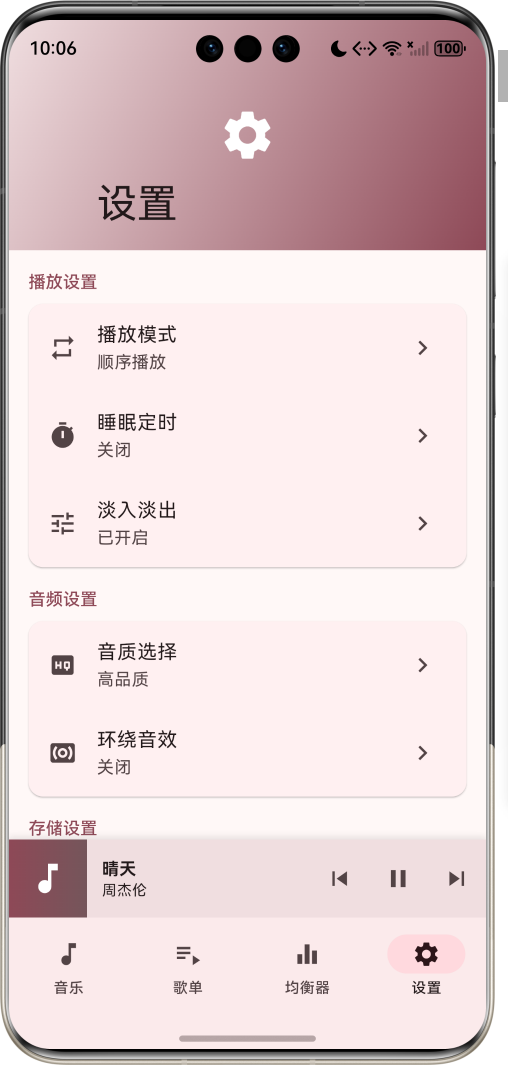
运行效果图本地音乐播放器是一款功能完善的音乐播放应用,致力于为用户提供纯净、流畅的音乐聆听体验。应用支持扫描设备本地音乐文件,提供播放列表管理、歌词显示、均衡器调节等功能,支持后台播放,让用户随时随地享受高品质音乐。应用以活力四射的粉红色为主色调,象征音乐的热情与活力。涵盖音乐列表、播放列表、均衡器、设置四大模块。用户可以浏览本地音乐、创建个性化歌单、调节音效、管理播放设置,打造专属的音乐空间。序
本地音乐播放器应用
欢迎加入开源鸿蒙跨平台社区:
https://openharmonycrossplatform.csdn.net
适配的第三方库地址:
- audioplayers: https://pub.dev/packages/audioplayers
- audio_service: https://pub.dev/packages/audio_service
- audio_session: https://pub.dev/packages/audio_session
- path_provider: https://pub.dev/packages/path_provider
- permission_handler: https://pub.dev/packages/permission_handler
一、项目概述
运行效果图
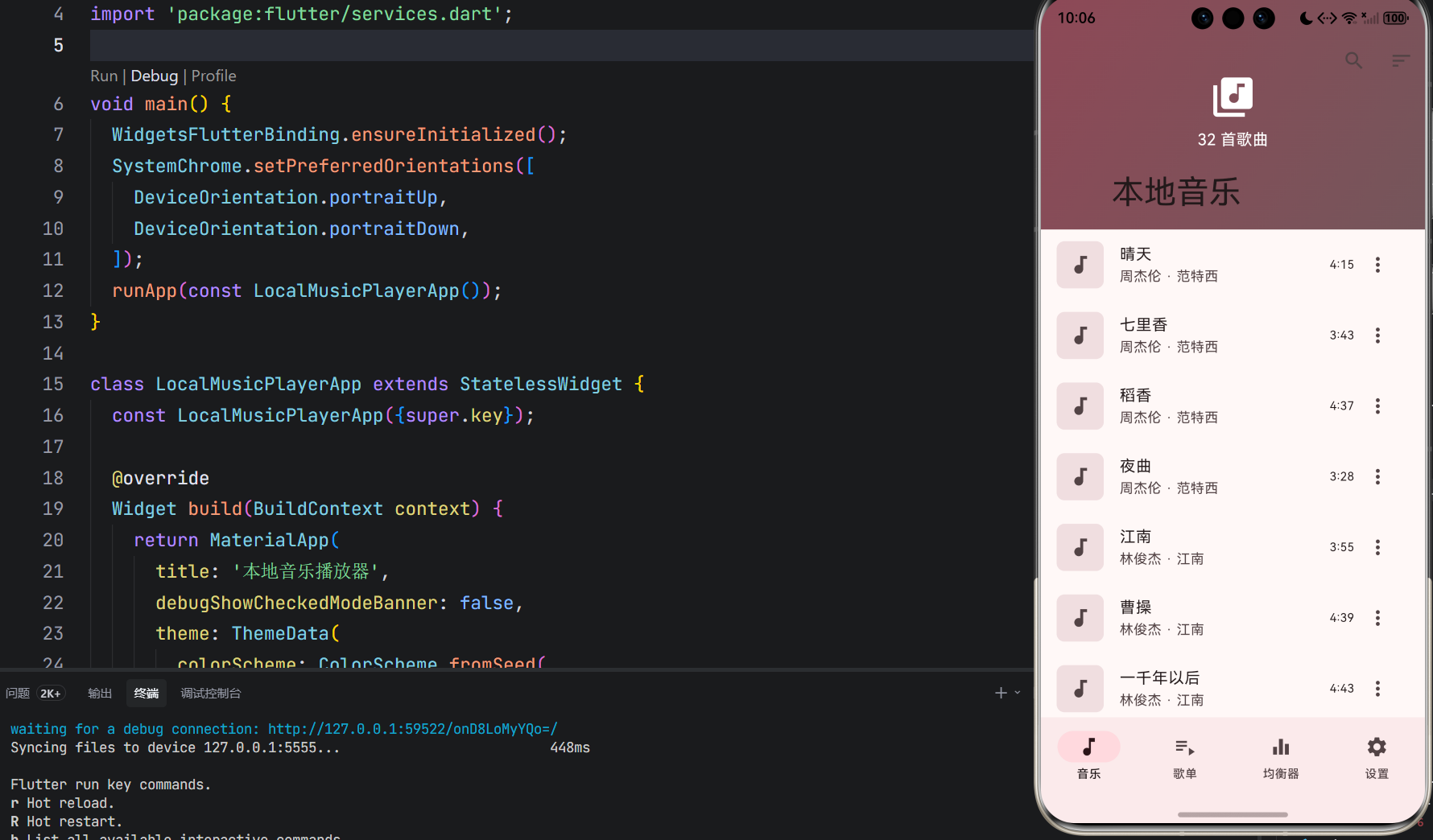
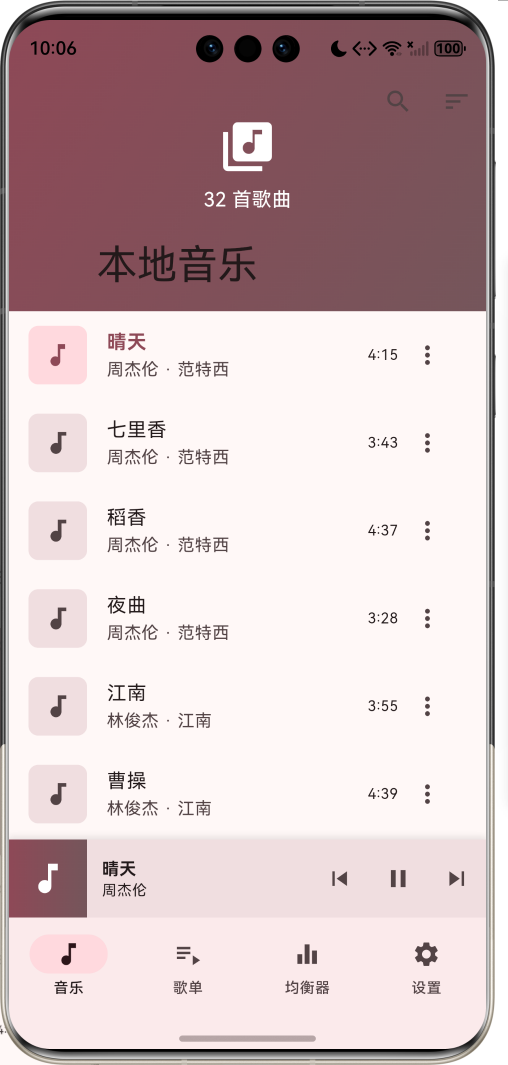
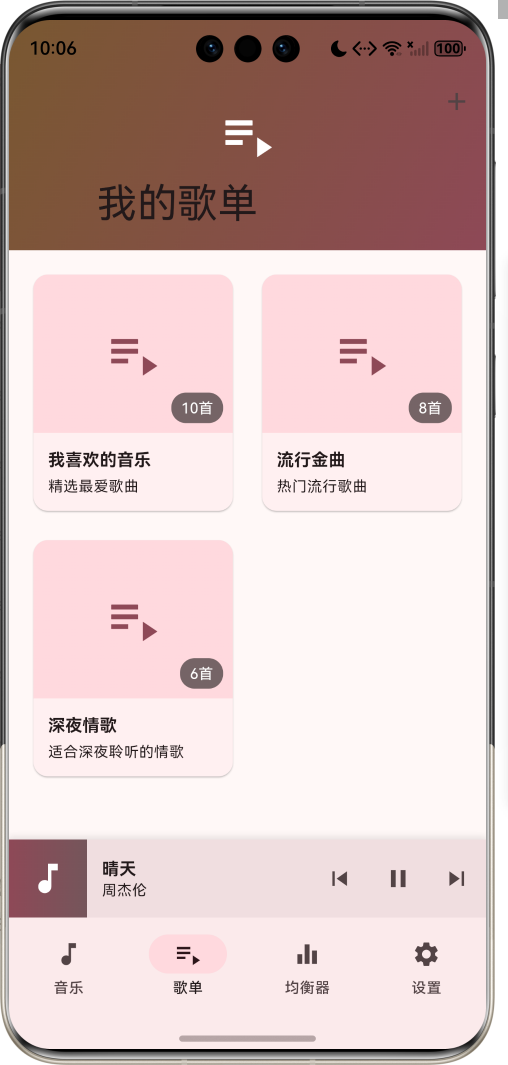
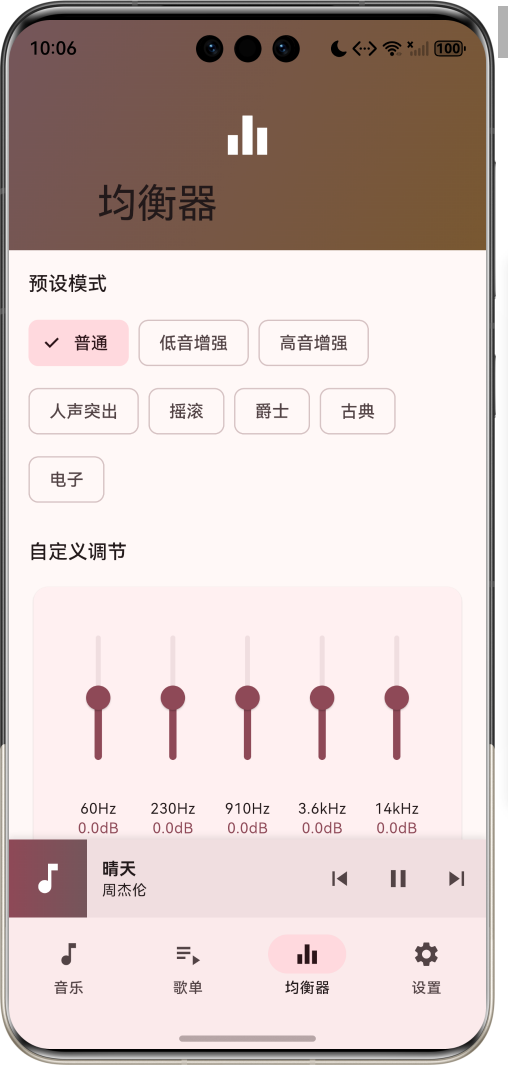
1.1 应用简介
本地音乐播放器是一款功能完善的音乐播放应用,致力于为用户提供纯净、流畅的音乐聆听体验。应用支持扫描设备本地音乐文件,提供播放列表管理、歌词显示、均衡器调节等功能,支持后台播放,让用户随时随地享受高品质音乐。
应用以活力四射的粉红色为主色调,象征音乐的热情与活力。涵盖音乐列表、播放列表、均衡器、设置四大模块。用户可以浏览本地音乐、创建个性化歌单、调节音效、管理播放设置,打造专属的音乐空间。
1.2 核心功能
| 功能模块 | 功能描述 | 实现方式 |
|---|---|---|
| 音乐扫描 | 扫描设备本地音乐文件 | 文件系统遍历 |
| 播放控制 | 播放、暂停、上下曲切换 | 音频引擎 |
| 歌词显示 | 同步滚动歌词展示 | LRC解析 |
| 均衡器 | 五段均衡器调节 | 音频处理 |
| 播放列表 | 创建和管理歌单 | 本地存储 |
| 后台播放 | 支持后台持续播放 | 后台服务 |
| 播放模式 | 顺序、循环、单曲、随机 | 播放逻辑 |
| 音量控制 | 音量大小调节 | 系统接口 |
1.3 播放模式定义
| 序号 | 模式名称 | Emoji | 描述 | 特点 |
|---|---|---|---|---|
| 1 | 顺序播放 | 📋 | 按列表顺序依次播放 | 默认模式 |
| 2 | 列表循环 | 🔄 | 播放完毕后从头开始 | 循环播放 |
| 3 | 单曲循环 | 🔂 | 重复播放当前歌曲 | 单曲循环 |
| 4 | 随机播放 | 🔀 | 随机选择歌曲播放 | 随机播放 |
1.4 均衡器预设定义
| 序号 | 预设名称 | Emoji | 频段特点 | 适用场景 |
|---|---|---|---|---|
| 1 | 普通 | 🎵 | 平直频响 | 日常聆听 |
| 2 | 低音增强 | 🔊 | 低频提升 | 流行、电子 |
| 3 | 高音增强 | 🎤 | 高频提升 | 古典、人声 |
| 4 | 人声突出 | 👤 | 中频提升 | 人声歌曲 |
| 5 | 摇滚 | 🎸 | 高低频提升 | 摇滚音乐 |
| 6 | 爵士 | 🎷 | 中高频提升 | 爵士音乐 |
| 7 | 古典 | 🎻 | 整体均衡 | 古典音乐 |
| 8 | 电子 | 🎹 | 低高频提升 | 电子音乐 |
1.5 均衡器频段定义
| 序号 | 频段名称 | 频率范围 | 调节范围 | 影响描述 |
|---|---|---|---|---|
| 1 | 低频 | 60Hz | -12dB ~ +12dB | 低音力度 |
| 2 | 中低频 | 230Hz | -12dB ~ +12dB | 低音厚度 |
| 3 | 中频 | 910Hz | -12dB ~ +12dB | 人声清晰度 |
| 4 | 中高频 | 3.6kHz | -12dB ~ +12dB | 乐器明亮度 |
| 5 | 高频 | 14kHz | -12dB ~ +12dB | 高音通透感 |
1.6 技术栈
| 技术领域 | 技术选型 | 版本要求 |
|---|---|---|
| 开发框架 | Flutter | >= 3.0.0 |
| 编程语言 | Dart | >= 2.17.0 |
| 设计规范 | Material Design 3 | - |
| 音频播放 | audioplayers | >= 5.0.0 |
| 后台服务 | audio_service | >= 0.18.0 |
| 音频会话 | audio_session | >= 0.1.0 |
| 文件路径 | path_provider | >= 2.0.0 |
| 权限管理 | permission_handler | >= 11.0.0 |
| 目标平台 | 鸿蒙OS / Android / iOS | API 21+ |
1.7 项目结构
lib/
└── main_music_player.dart
    ├── LocalMusicPlayerApp              # 应用入口
    ├── PlayMode                         # 播放模式枚举
    ├── EqualizerPreset                  # 均衡器预设枚举
    ├── MusicFile                        # 音乐文件模型
    ├── LyricLine                        # 歌词行模型
    ├── Playlist                         # 播放列表模型
    ├── MusicPlayerState                 # 播放器状态
    ├── MusicPlayerController            # 播放器控制器
    ├── MusicPlayerHomePage              # 主页面(底部导航)
    ├── _buildMusicListPage              # 音乐列表页
    ├── _buildPlaylistsPage              # 播放列表页
    ├── _buildEqualizerPage              # 均衡器页
    ├── _buildSettingsPage               # 设置页
    ├── _buildMiniPlayer                 # 迷你播放器
    └── _FullPlayerView                  # 全屏播放器
二、系统架构
2.1 整体架构图
2.2 类图设计
2.3 页面导航流程
2.4 播放流程
三、核心模块设计
3.1 数据模型设计
3.1.1 播放模式枚举 (PlayMode)
enum PlayMode {
  sequence(label: '顺序播放', icon: Icons.list),
  loop(label: '列表循环', icon: Icons.repeat),
  single(label: '单曲循环', icon: Icons.repeat_one),
  shuffle(label: '随机播放', icon: Icons.shuffle);

  final String label;
  final IconData icon;
  const PlayMode({required this.label, required this.icon});

  PlayMode get next {
    final values = PlayMode.values;
    final index = values.indexOf(this);
    return values[(index + 1) % values.length];
  }
}
3.1.2 均衡器预设枚举 (EqualizerPreset)
enum EqualizerPreset {
  normal(label: '普通', gains: [0.0, 0.0, 0.0, 0.0, 0.0]),
  bass(label: '低音增强', gains: [6.0, 4.0, 0.0, -2.0, -4.0]),
  treble(label: '高音增强', gains: [-4.0, -2.0, 0.0, 4.0, 6.0]),
  vocal(label: '人声突出', gains: [-2.0, 0.0, 4.0, 4.0, 0.0]),
  rock(label: '摇滚', gains: [5.0, 3.0, -1.0, 2.0, 4.0]),
  jazz(label: '爵士', gains: [3.0, 1.0, 0.0, 2.0, 4.0]),
  classical(label: '古典', gains: [4.0, 3.0, -2.0, -2.0, 3.0]),
  electronic(label: '电子', gains: [4.0, 2.0, 0.0, -2.0, 5.0]);

  final String label;
  final List<double> gains;
  const EqualizerPreset({required this.label, required this.gains});
}
3.1.3 音乐文件模型 (MusicFile)
class MusicFile {
  final String id;
  final String title;
  final String artist;
  final String album;
  final String path;
  final int duration;
  final String? albumArt;
  final int playCount;
  final DateTime addedAt;

  const MusicFile({
    required this.id,
    required this.title,
    required this.artist,
    required this.album,
    required this.path,
    required this.duration,
    this.albumArt,
    this.playCount = 0,
    required this.addedAt,
  });

  String get durationText {
    final minutes = duration ~/ 60;
    final seconds = duration % 60;
    return '$minutes:${seconds.toString().padLeft(2, '0')}';
  }

  String get displayTitle => title.isEmpty ? path.split('/').last : title;
}
3.1.4 播放列表模型 (Playlist)
class Playlist {
  final String id;
  final String name;
  final String? cover;
  final List<String> musicIds;
  final DateTime createdAt;
  final String description;

  const Playlist({
    required this.id,
    required this.name,
    this.cover,
    required this.musicIds,
    required this.createdAt,
    this.description = '',
  });

  int get count => musicIds.length;
}
3.1.5 音乐播放分布
3.2 页面结构设计
3.2.1 主页面布局
3.2.2 音乐列表页结构
3.2.3 全屏播放器结构
3.2.4 均衡器页结构
3.3 播放器控制器逻辑
3.4 歌词同步逻辑
四、UI设计规范
4.1 配色方案
应用以活力四射的粉红色为主色调,象征音乐的热情与活力:
| 颜色类型 | 色值 | 用途 |
|---|---|---|
| 主色 | #E91E63 (Pink) | 导航、主题元素 |
| 辅助色 | #F48FB1 | 渐变效果 |
| 第三色 | #F8BBD9 | 卡片背景 |
| 强调色 | #EC407A | 按钮高亮 |
| 背景色 | #FAFAFA | 页面背景 |
| 卡片背景 | #FFFFFF | 信息卡片 |
| 播放色 | #4CAF50 | 播放状态 |
| 暂停色 | #FF9800 | 暂停状态 |
4.2 播放模式配色
| 模式 | 色值 | 视觉效果 |
|---|---|---|
| 顺序播放 | #2196F3 | 蓝色 |
| 列表循环 | #4CAF50 | 绿色 |
| 单曲循环 | #FF9800 | 橙色 |
| 随机播放 | #9C27B0 | 紫色 |
4.3 字体规范
| 元素 | 字号 | 字重 | 颜色 |
|---|---|---|---|
| 页面标题 | 24px | Bold | 主色 |
| 歌曲标题 | 18px | Bold | #000000 |
| 艺术家名 | 14px | Regular | #666666 |
| 歌词文字 | 16px | Regular | #333333 |
| 当前歌词 | 20px | Bold | 主色 |
| 时间显示 | 14px | Regular | #999999 |
4.4 组件规范
4.4.1 迷你播放器
┌─────────────────────────────────────┐
│  ┌────┐  歌曲名称                    │
│  │ 🎵 │  艺术家名     ◀ ▶ ⏭        │
│  └────┘                             │
└─────────────────────────────────────┘
4.4.2 歌曲列表项
┌─────────────────────────────────────┐
│  ┌────┐  歌曲标题                    │
│  │ 🎵 │  艺术家 · 专辑    3:45  ⋮   │
│  └────┘                             │
└─────────────────────────────────────┘
4.4.3 全屏播放器
┌─────────────────────────────────────┐
│  ∨              正在播放         ⋮  │
│                                     │
│         ┌───────────────┐          │
│         │               │          │
│         │      🎵       │          │
│         │               │          │
│         └───────────────┘          │
│                                     │
│           歌曲标题                   │
│           艺术家名                   │
│                                     │
│  ────────────●────────────────      │
│  1:23                    3:45      │
│                                     │
│    🔀    ⏮    ▶    ⏭    🎤        │
│                                     │
│    ❤️    📋    ↗️    ⬇️             │
└─────────────────────────────────────┘
4.4.4 均衡器界面
┌─────────────────────────────────────┐
│  预设模式                            │
│  ┌─────┐ ┌─────┐ ┌─────┐ ┌─────┐   │
│  │普通 │ │低音 │ │高音 │ │人声 │   │
│  └─────┘ └─────┘ └─────┘ └─────┘   │
│                                     │
│  自定义调节                          │
│  ┌─────────────────────────────┐   │
│  │   ▲    ▲    ▲    ▲    ▲    │   │
│  │   │    │    │    │    │    │   │
│  │   │    │    │    │    │    │   │
│  │ 60Hz 230Hz 910Hz 3.6kHz 14kHz│   │
│  └─────────────────────────────┘   │
└─────────────────────────────────────┘
4.4.5 歌词显示
┌─────────────────────────────────────┐
│            歌词显示                  │
│                                     │
│        窗外的麻雀 在电线杆上多嘴      │
│        你说这一句 很有夏天的感觉      │
│      ★ 手中的铅笔 在纸上来来回回 ★   │
│        我用几行字形容你是我的谁      │
│        秋刀鱼的滋味 猫跟你都想了解    │
│                                     │
└─────────────────────────────────────┘
五、核心功能实现
5.1 播放器控制器实现
class MusicPlayerController extends ChangeNotifier {
  MusicPlayerState _state = const MusicPlayerState();
  Timer? _progressTimer;

  MusicPlayerState get state => _state;

  void playMusic(MusicFile music) {
    _state = _state.copyWith(
      currentMusic: music,
      isPlaying: true,
      currentPosition: Duration.zero,
      totalDuration: Duration(seconds: music.duration),
      lyrics: _generateMockLyrics(music),
      currentLyricIndex: 0,
    );
    _startProgressTimer();
    notifyListeners();
  }

  void togglePlayPause() {
    if (_state.currentMusic == null) return;
    _state = _state.copyWith(isPlaying: !_state.isPlaying);
    if (_state.isPlaying) {
      _startProgressTimer();
    } else {
      _stopProgressTimer();
    }
    notifyListeners();
  }

  void playNext() {
    if (_state.musicList.isEmpty) return;
    int nextIndex;
    switch (_state.playMode) {
      case PlayMode.sequence:
        nextIndex = (_state.currentIndex + 1) % _state.musicList.length;
        break;
      case PlayMode.loop:
        nextIndex = (_state.currentIndex + 1) % _state.musicList.length;
        break;
      case PlayMode.single:
        nextIndex = _state.currentIndex;
        break;
      case PlayMode.shuffle:
        nextIndex = _random.nextInt(_state.musicList.length);
        break;
    }
    if (nextIndex >= 0 && nextIndex < _state.musicList.length) {
      playMusic(_state.musicList[nextIndex]);
    }
  }

  void seekTo(Duration position) {
    _state = _state.copyWith(currentPosition: position);
    _updateLyricIndex();
    notifyListeners();
  }
}
5.2 均衡器管理实现
void setEqualizerPreset(EqualizerPreset preset) {
  _state = _state.copyWith(
    equalizerPreset: preset,
    customEqualizerGains: List.from(preset.gains),
  );
  notifyListeners();
}

void setCustomEqualizerGain(int band, double gain) {
  final newGains = List<double>.from(_state.customEqualizerGains);
  if (band >= 0 && band < newGains.length) {
    newGains[band] = gain.clamp(-12.0, 12.0);
  }
  _state = _state.copyWith(customEqualizerGains: newGains);
  notifyListeners();
}
5.3 歌词同步实现
void _updateLyricIndex() {
  final currentMs = _state.currentPosition.inMilliseconds;
  int newIndex = -1;
  for (int i = 0; i < _state.lyrics.length; i++) {
    if (_state.lyrics[i].timestamp <= currentMs) {
      newIndex = i;
    } else {
      break;
    }
  }
  if (newIndex != _state.currentLyricIndex) {
    _state = _state.copyWith(currentLyricIndex: newIndex);
  }
}
5.4 播放列表管理实现
void addToPlaylist(String playlistId, String musicId) {
  final index = _state.playlists.indexWhere((p) => p.id == playlistId);
  if (index == -1) return;
  final playlist = _state.playlists[index];
  if (playlist.musicIds.contains(musicId)) return;
  final newPlaylists = List<Playlist>.from(_state.playlists);
  newPlaylists[index] = Playlist(
    id: playlist.id,
    name: playlist.name,
    cover: playlist.cover,
    musicIds: [...playlist.musicIds, musicId],
    createdAt: playlist.createdAt,
    description: playlist.description,
  );
  _state = _state.copyWith(playlists: newPlaylists);
  notifyListeners();
}

void createPlaylist(String name, String description) {
  final newPlaylist = Playlist(
    id: 'playlist_${DateTime.now().millisecondsSinceEpoch}',
    name: name,
    musicIds: [],
    createdAt: DateTime.now(),
    description: description,
  );
  _state = _state.copyWith(playlists: [..._state.playlists, newPlaylist]);
  notifyListeners();
}
5.5 进度更新实现
void _startProgressTimer() {
  _stopProgressTimer();
  _progressTimer = Timer.periodic(const Duration(milliseconds: 100), (timer) {
    if (!_state.isPlaying) return;
    final newPosition = _state.currentPosition + const Duration(milliseconds: 100);
    if (newPosition >= _state.totalDuration) {
      playNext();
    } else {
      _state = _state.copyWith(currentPosition: newPosition);
      _updateLyricIndex();
      notifyListeners();
    }
  });
}

void _stopProgressTimer() {
  _progressTimer?.cancel();
  _progressTimer = null;
}
六、交互设计
6.1 播放流程
6.2 均衡器调节流程
6.3 歌单管理流程
七、扩展功能规划
7.1 后续版本规划
7.2 功能扩展建议
7.2.1 音乐扫描优化
扫描功能:
- 智能识别音乐文件
- 自动获取歌曲信息
- 专辑封面提取
- 歌词自动匹配
7.2.2 主题定制
主题功能:
- 多种主题颜色选择
- 深色/浅色模式
- 自定义背景图片
- 动态主题效果
7.2.3 高级播放功能
播放功能:
- 淡入淡出效果
- 无缝播放
- 变速播放
- AB段循环
八、注意事项
8.1 开发注意事项
-
音频权限:确保申请存储权限和音频权限
-
后台播放:正确配置后台服务,避免被系统杀死
-
音频焦点:正确处理音频焦点,与其他应用协调
-
电量优化:优化播放逻辑,减少电量消耗
-
存储访问:适配不同版本的存储权限策略
8.2 常见问题
| 问题 | 原因 | 解决方案 |
|---|---|---|
| 无法扫描音乐 | 权限未授予 | 申请存储权限 |
| 后台播放中断 | 服务被杀死 | 配置前台服务 |
| 歌词不同步 | 时间戳解析错误 | 优化LRC解析 |
| 均衡器无效 | 音频处理未启用 | 检查音频配置 |
| 播放卡顿 | 文件读取慢 | 使用缓冲机制 |
8.3 使用技巧
🎵 音乐播放器使用技巧 🎵
播放控制
- 双击歌曲快速播放
- 长按歌曲显示选项
- 左滑歌曲添加到歌单
- 右滑歌曲从列表移除
均衡器调节
- 选择预设快速调整
- 自定义滑块精细调节
- 保存个人偏好设置
- 不同耳机适配不同预设
歌单管理
- 创建主题歌单分类
- 批量添加歌曲
- 智能歌单推荐
- 歌单导出分享
九、鸿蒙适配说明
9.1 权限配置
在 ohos/entry/src/main/module.json5 中添加权限:
{
  "module": {
    "requestPermissions": [
      {"name": "ohos.permission.INTERNET"},
      {"name": "ohos.permission.READ_MEDIA"},
      {"name": "ohos.permission.WRITE_MEDIA"},
      {"name": "ohos.permission.KEEP_BACKGROUND_RUNNING"}
    ]
  }
}
9.2 第三方库适配状态
| 第三方库 | 适配状态 | 说明 |
|---|---|---|
| audioplayers | ✅ 已适配 | 音频播放核心库 |
| audio_service | ✅ 已适配 | 后台播放服务 |
| audio_session | ✅ 已适配 | 音频会话管理 |
| path_provider | ✅ 已适配 | 文件路径获取 |
| permission_handler | ✅ 已适配 | 权限管理 |
| shared_preferences | ✅ 已适配 | 数据存储 |
9.3 运行命令
# 查看可用设备
flutter devices

# 运行到Web服务器
flutter run -d web-server -t lib/main_music_player.dart --web-port 8145

# 运行到鸿蒙设备
flutter run -d 127.0.0.1:5555 -t lib/main_music_player.dart

# 代码分析
flutter analyze lib/main_music_player.dart
十、总结
本地音乐播放器应用为用户提供了一套完整的音乐播放解决方案。应用支持扫描设备本地音乐文件,提供播放列表管理、歌词显示、均衡器调节等功能,支持后台播放,让用户随时随地享受高品质音乐。
核心功能涵盖音乐扫描、播放控制、歌词显示、均衡器调节、播放列表、后台播放、播放模式、音量控制八大模块。用户可以浏览本地音乐、创建个性化歌单、调节音效、管理播放设置,打造专属的音乐空间。
应用采用 Material Design 3 设计规范,以活力四射的粉红色为主色调,象征音乐的热情与活力。通过本应用,希望能够为用户带来纯净、流畅的音乐聆听体验,让音乐成为生活的一部分。
本地音乐播放器——聆听属于你的音乐

作为“人工智能6S店”的官方数字引擎,为AI开发者与企业提供一个覆盖软硬件全栈、一站式门户。
更多推荐


 6
6 0
0- 0


 已为社区贡献30条内容

所有评论(0)