实时天气查询应用
欢迎加入开源鸿蒙跨平台社区:
https://openharmonycrossplatform.csdn.net
适配的第三方库地址:
- http: https://pub.dev/packages/http
- shared_preferences: https://pub.dev/packages/shared_preferences
一、项目概述
运行效果图
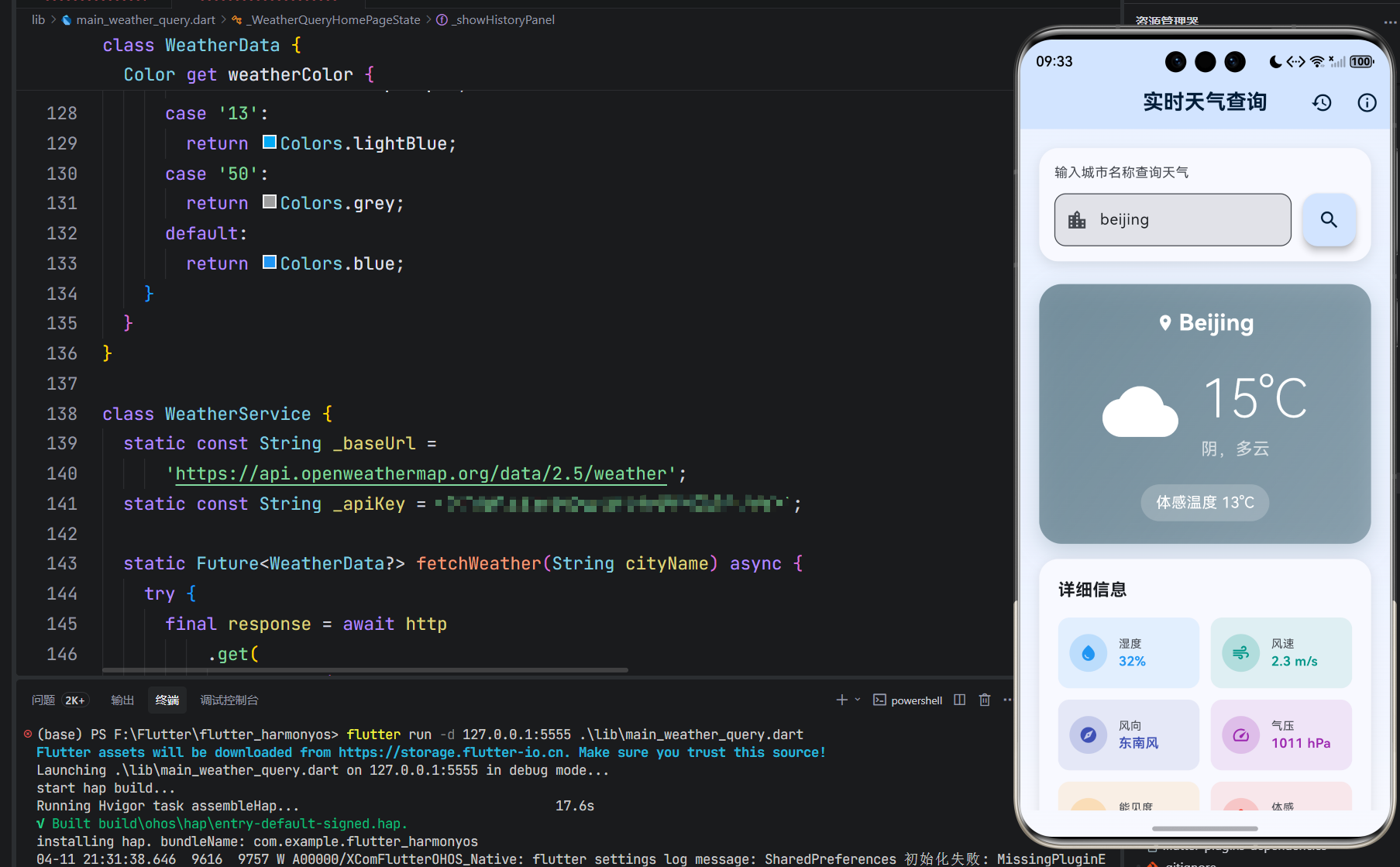
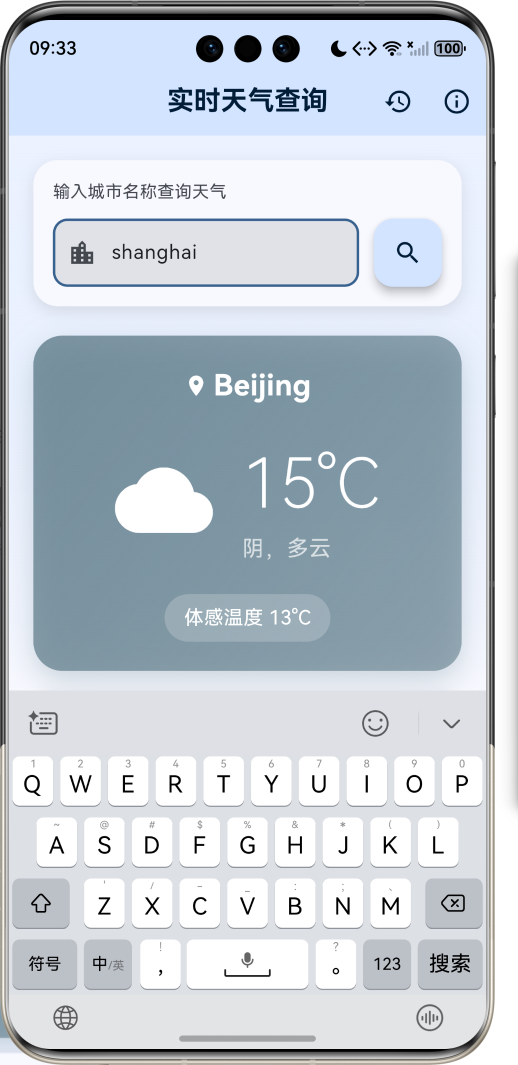
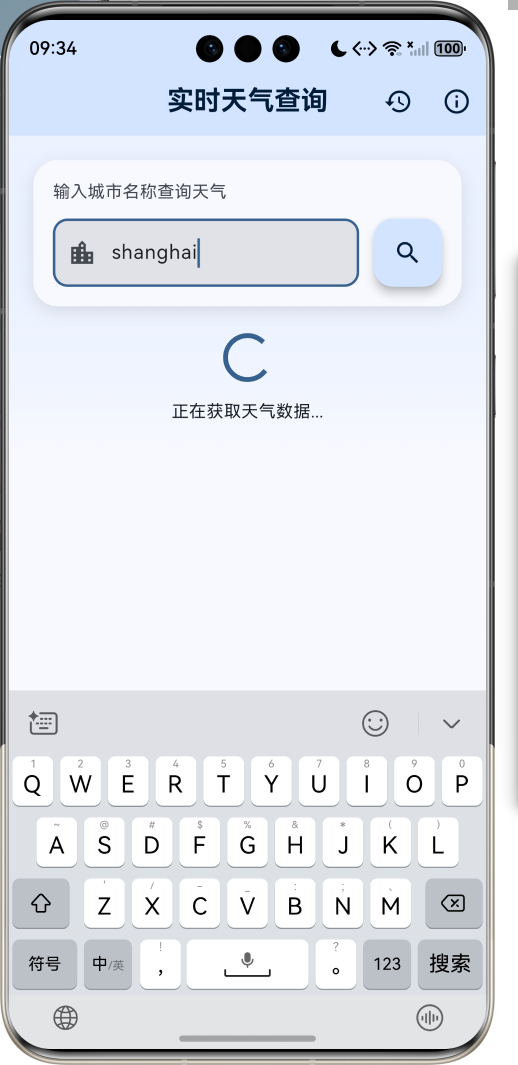
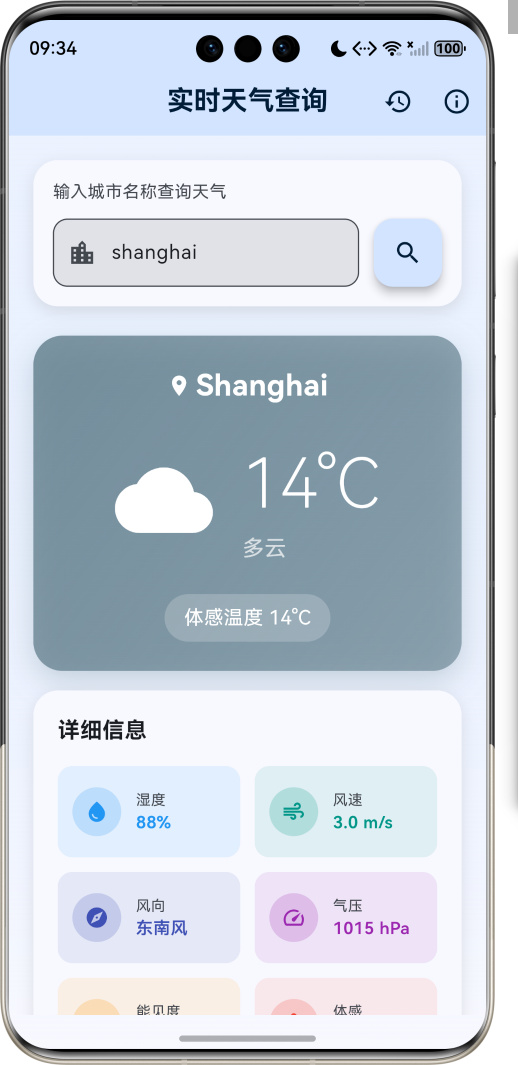
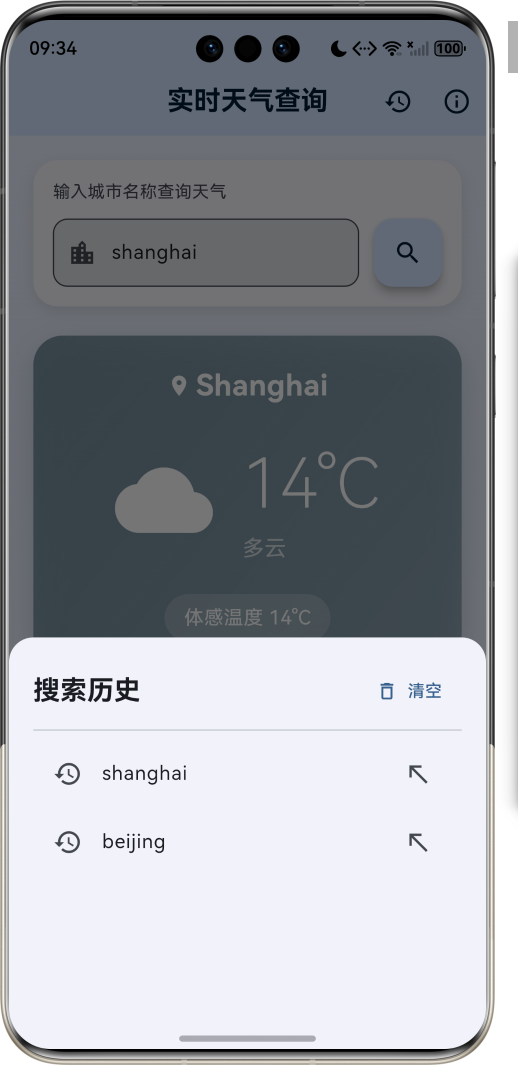
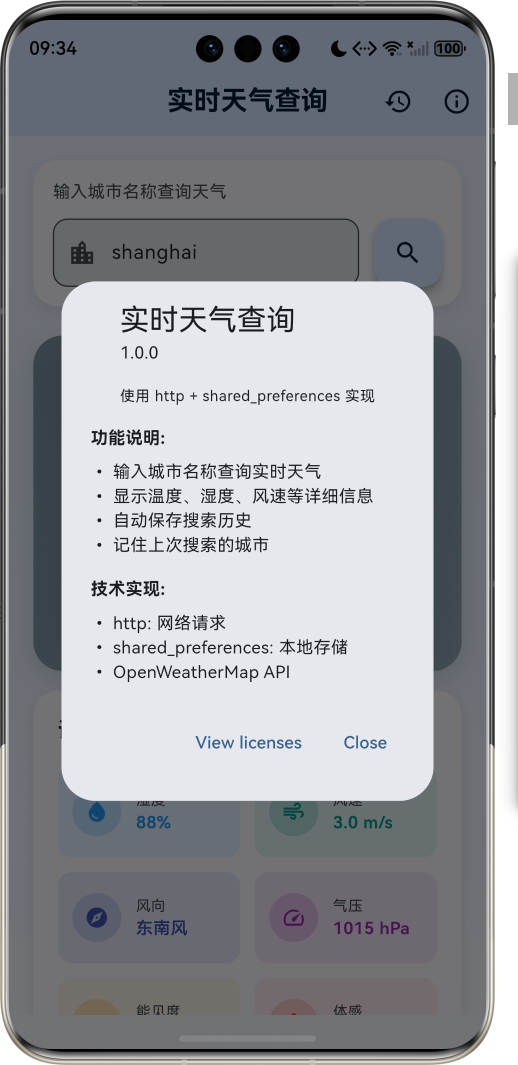
1.1 应用简介
实时天气查询是一款简洁实用的天气信息获取应用,用户只需输入城市名称,即可快速获取该城市的实时天气数据。应用采用清新的蓝色调设计,界面简洁直观,操作便捷流畅。支持全球主要城市的天气查询,数据来源可靠,更新及时准确。
应用以天空蓝为主色调,象征晴朗与清新。涵盖城市搜索、天气展示、搜索历史三大核心模块。用户可以快速查询任意城市的温度、湿度、风速、气压等详细信息,同时应用会自动保存搜索记录,方便下次快速访问。无论是出行规划还是日常关注天气变化,这款应用都能为用户提供及时准确的天气信息。
1.2 核心功能
| 功能模块 |
功能描述 |
实现方式 |
优先级 |
| 城市搜索 |
输入城市名称查询天气 |
http网络请求 |
高 |
| 实时天气 |
显示当前温度、天气状况 |
OpenWeatherMap API |
高 |
| 详细信息 |
湿度、风速、气压、能见度等 |
数据解析展示 |
高 |
| 搜索历史 |
保存最近搜索的城市列表 |
SharedPreferences |
中 |
| 自动记忆 |
记住上次搜索的城市 |
本地持久化存储 |
中 |
| 错误处理 |
网络异常、城市不存在提示 |
异常捕获机制 |
高 |
| 历史管理 |
清空搜索历史记录 |
SharedPreferences |
低 |
1.3 天气类型定义
| 序号 |
天气类型 |
Emoji |
图标 |
Icon Code |
描述 |
| 1 |
晴天 |
☀️ |
wb_sunny |
01d/01n |
天空晴朗无云 |
| 2 |
少云 |
🌤️ |
cloud |
02d/02n |
云量较少 |
| 3 |
多云 |
⛅ |
cloud |
03d/03n |
云层较多 |
| 4 |
阴天 |
☁️ |
cloud |
04d/04n |
云层密布 |
| 5 |
小雨 |
🌧️ |
grain |
09d/09n |
细雨绵绵 |
| 6 |
中雨 |
🌧️ |
grain |
10d/10n |
雨势适中 |
| 7 |
雷阵雨 |
⛈️ |
flash_on |
11d/11n |
雷电交加 |
| 8 |
雪 |
🌨️ |
ac_unit |
13d/13n |
银装素裹 |
| 9 |
雾 |
🌫️ |
blur_on |
50d/50n |
雾气弥漫 |
1.4 风向角度对照表
| 角度范围 |
风向 |
角度范围 |
风向 |
| 337.5° - 22.5° |
北风 |
157.5° - 202.5° |
南风 |
| 22.5° - 67.5° |
东北风 |
202.5° - 247.5° |
西南风 |
| 67.5° - 112.5° |
东风 |
247.5° - 292.5° |
西风 |
| 112.5° - 157.5° |
东南风 |
292.5° - 337.5° |
西北风 |
1.5 技术栈
| 技术领域 |
技术选型 |
版本要求 |
用途说明 |
| 开发框架 |
Flutter |
>= 3.0.0 |
跨平台UI框架 |
| 编程语言 |
Dart |
>= 2.17.0 |
应用开发语言 |
| 设计规范 |
Material Design 3 |
- |
UI设计规范 |
| 网络请求 |
http |
>= 1.2.2 |
HTTP客户端库 |
| 本地存储 |
SharedPreferences |
>= 2.5.3 |
轻量级键值存储 |
| 天气API |
OpenWeatherMap |
- |
天气数据源 |
| 目标平台 |
鸿蒙OS / Web / Android / iOS |
API 21+ |
多平台支持 |
1.6 项目结构
lib/
└── main_weather_query.dart
    ├── WeatherQueryApp              # 应用入口 Widget
    ├── WeatherData                  # 天气数据模型
    │   ├── cityName                 # 城市名称
    │   ├── temperature              # 当前温度
    │   ├── feelsLike                # 体感温度
    │   ├── humidity                 # 湿度
    │   ├── windSpeed                # 风速
    │   ├── windDirection            # 风向
    │   ├── description              # 天气描述
    │   ├── iconCode                 # 图标代码
    │   ├── pressure                 # 气压
    │   ├── visibility               # 能见度
    │   └── updateTime               # 更新时间
    ├── WeatherService               # 天气服务类
    │   ├── fetchWeather()           # 按城市名获取天气
    │   └── fetchWeatherByLocation() # 按坐标获取天气
    └── WeatherQueryHomePage         # 主页面
        ├── _searchController        # 搜索输入控制器
        ├── _weatherData             # 当前天气数据
        ├── _isLoading               # 加载状态
        ├── _errorMessage            # 错误信息
        ├── _prefs                   # SharedPreferences实例
        ├── _searchHistory           # 搜索历史列表
        ├── _buildSearchSection()    # 构建搜索区域
        ├── _buildMainWeatherCard()  # 构建主天气卡片
        ├── _buildWeatherDetails()   # 构建详细信息
        ├── _buildEmptyState()       # 构建空状态
        ├── _buildErrorWidget()      # 构建错误提示
        ├── _showHistoryPanel()      # 显示历史面板
        ├── _searchWeather()         # 执行搜索
        ├── _saveSearchHistory()     # 保存搜索历史
        └── _clearSearchHistory()    # 清空搜索历史
二、系统架构
2.1 整体架构图
2.2 类图设计
2.3 页面导航流程
2.4 网络请求时序图
三、核心模块设计
3.1 数据模型设计
3.1.1 天气数据模型 (WeatherData)
class WeatherData {
  final String cityName;
  final double temperature;
  final double feelsLike;
  final int humidity;
  final double windSpeed;
  final String windDirection;
  final String description;
  final String iconCode;
  final int pressure;
  final int visibility;
  final DateTime updateTime;

  WeatherData({
    required this.cityName,
    required this.temperature,
    required this.feelsLike,
    required this.humidity,
    required this.windSpeed,
    required this.windDirection,
    required this.description,
    required this.iconCode,
    required this.pressure,
    required this.visibility,
    required this.updateTime,
  });

  factory WeatherData.fromJson(Map<String, dynamic> json) {
    return WeatherData(
      cityName: json['name'] ?? '未知城市',
      temperature: (json['main']['temp'] as num?)?.toDouble() ?? 0.0,
      feelsLike: (json['main']['feels_like'] as num?)?.toDouble() ?? 0.0,
      humidity: json['main']['humidity'] ?? 0,
      windSpeed: (json['wind']['speed'] as num?)?.toDouble() ?? 0.0,
      windDirection: _getWindDirection(json['wind']['deg']),
      description: _capitalizeFirst(json['weather'][0]['description'] ?? '未知'),
      iconCode: json['weather'][0]['icon'] ?? '01d',
      pressure: json['main']['pressure'] ?? 1013,
      visibility: (json['visibility'] as int?) ?? 10000,
      updateTime: DateTime.now(),
    );
  }

  static String _getWindDirection(int? deg) {
    if (deg == null) return '未知';
    const directions = ['北', '东北', '东', '东南', '南', '西南', '西', '西北'];
    final index = ((deg + 22.5) ~/ 45) % 8;
    return '${directions[index]}风';
  }

  static String _capitalizeFirst(String text) {
    if (text.isEmpty) return text;
    return text[0].toUpperCase() + text.substring(1);
  }

  IconData get weatherIcon {
    switch (iconCode.substring(0, 2)) {
      case '01': return Icons.wb_sunny;
      case '02': case '03': case '04': return Icons.cloud;
      case '09': case '10': return Icons.grain;
      case '11': return Icons.flash_on;
      case '13': return Icons.ac_unit;
      case '50': return Icons.blur_on;
      default: return Icons.wb_cloudy;
    }
  }

  Color get weatherColor {
    switch (iconCode.substring(0, 2)) {
      case '01': return Colors.orange;
      case '02': case '03': case '04': return Colors.blueGrey;
      case '09': case '10': return Colors.indigo;
      case '11': return Colors.deepPurple;
      case '13': return Colors.lightBlue;
      case '50': return Colors.grey;
      default: return Colors.blue;
    }
  }
}
3.1.2 字段说明表
| 字段名 |
类型 |
来源 |
说明 |
| cityName |
String |
json[‘name’] |
城市名称 |
| temperature |
double |
json[‘main’][‘temp’] |
当前温度(摄氏度) |
| feelsLike |
double |
json[‘main’][‘feels_like’] |
体感温度 |
| humidity |
int |
json[‘main’][‘humidity’] |
相对湿度(%) |
| windSpeed |
double |
json[‘wind’][‘speed’] |
风速(m/s) |
| windDirection |
String |
json[‘wind’][‘deg’] |
风向(计算得出) |
| description |
String |
json[‘weather’][0][‘description’] |
天气描述 |
| iconCode |
String |
json[‘weather’][0][‘icon’] |
天气图标代码 |
| pressure |
int |
json[‘main’][‘pressure’] |
大气压强(hPa) |
| visibility |
int |
json[‘visibility’] |
能见度(米) |
| updateTime |
DateTime |
DateTime.now() |
数据更新时间 |
3.2 天气服务类设计
3.2.1 WeatherService 完整实现
class WeatherService {
  static const String _baseUrl = 'https://api.openweathermap.org/data/2.5/weather';
  static const String _apiKey = 'YOUR_API_KEY';

  static Future<WeatherData?> fetchWeather(String cityName) async {
    if (cityName.trim().isEmpty) {
      debugPrint('城市名称不能为空');
      return null;
    }

    try {
      final uri = Uri.parse(
        '$_baseUrl?q=${Uri.encodeComponent(cityName)}&appid=$_apiKey&units=metric&lang=zh_cn'
      );

      debugPrint('请求URL: $uri');

      final response = await http.get(uri).timeout(
        const Duration(seconds: 10),
        onTimeout: () {
          throw TimeoutException('请求超时,请检查网络连接');
        },
      );

      debugPrint('响应状态码: ${response.statusCode}');
      debugPrint('响应内容: ${response.body}');

      if (response.statusCode == 200) {
        final jsonData = json.decode(response.body);
        return WeatherData.fromJson(jsonData);
      } else if (response.statusCode == 404) {
        debugPrint('未找到城市: $cityName');
        return null;
      } else if (response.statusCode == 401) {
        debugPrint('API密钥无效');
        return null;
      } else {
        debugPrint('API错误: ${response.statusCode}');
        return null;
      }
    } on http.ClientException catch (e) {
      debugPrint('网络请求异常: $e');
      return null;
    } on TimeoutException catch (e) {
      debugPrint('请求超时: $e');
      return null;
    } on FormatException catch (e) {
      debugPrint('JSON解析错误: $e');
      return null;
    } catch (e) {
      debugPrint('未知错误: $e');
      return null;
    }
  }

  static Future<WeatherData?> fetchWeatherByLocation(double lat, double lon) async {
    try {
      final uri = Uri.parse(
        '$_baseUrl?lat=$lat&lon=$lon&appid=$_apiKey&units=metric&lang=zh_cn'
      );

      final response = await http.get(uri).timeout(
        const Duration(seconds: 10),
      );

      if (response.statusCode == 200) {
        return WeatherData.fromJson(json.decode(response.body));
      }
      return null;
    } catch (e) {
      debugPrint('按位置获取天气失败: $e');
      return null;
    }
  }
}
3.2.2 错误处理策略
| 异常类型 |
处理方式 |
用户提示 |
| ClientException |
返回null |
“网络连接失败,请检查网络” |
| TimeoutException |
返回null |
“请求超时,请稍后重试” |
| FormatException |
返回null |
“数据解析错误” |
| HTTP 404 |
返回null |
“未找到该城市” |
| HTTP 401 |
返回null |
“API密钥无效” |
| HTTP 5xx |
返回null |
“服务器错误,请稍后重试” |
3.3 本地存储设计
3.3.1 SharedPreferences 完整实现
class _WeatherQueryHomePageState extends State<WeatherQueryHomePage> {
  SharedPreferences? _prefs;
  List<String> _searchHistory = [];
  static const int _maxHistoryCount = 10;
  static const String _historyKey = 'search_history';
  static const String _lastCityKey = 'last_city';

  Future<void> _initPrefs() async {
    try {
      _prefs = await SharedPreferences.getInstance().timeout(
        const Duration(seconds: 3),
        onTimeout: () => throw TimeoutException('SharedPreferences 初始化超时'),
      );
      _loadSearchHistory();
      _loadLastSearchedCity();
    } on TimeoutException catch (e) {
      debugPrint('SharedPreferences 初始化超时: $e');
    } catch (e) {
      debugPrint('SharedPreferences 初始化失败: $e');
    }
  }

  void _loadSearchHistory() {
    _searchHistory = _prefs?.getStringList(_historyKey) ?? [];
    setState(() {});
  }

  void _loadLastSearchedCity() {
    final lastCity = _prefs?.getString(_lastCityKey);
    if (lastCity != null && lastCity.isNotEmpty) {
      _searchController.text = lastCity;
      _searchWeather(lastCity);
    }
  }

  Future<void> _saveSearchHistory(String city) async {
    if (city.trim().isEmpty) return;

    _searchHistory.remove(city);
    _searchHistory.insert(0, city);

    if (_searchHistory.length > _maxHistoryCount) {
      _searchHistory = _searchHistory.sublist(0, _maxHistoryCount);
    }

    await _prefs?.setStringList(_historyKey, _searchHistory);
    await _prefs?.setString(_lastCityKey, city);

    setState(() {});
  }

  Future<void> _clearSearchHistory() async {
    await _prefs?.remove(_historyKey);
    setState(() {
      _searchHistory = [];
    });
  }
}
3.3.2 存储键值定义
| 键名常量 |
值 |
类型 |
说明 |
| _historyKey |
‘search_history’ |
String |
搜索历史列表的键 |
| _lastCityKey |
‘last_city’ |
String |
上次搜索城市的键 |
| _maxHistoryCount |
10 |
int |
最大历史记录数量 |
四、API 接口详解
4.1 OpenWeatherMap API
4.1.1 接口基础信息
| 项目 |
内容 |
| 接口地址 |
https://api.openweathermap.org/data/2.5/weather |
| 请求方式 |
GET |
| 返回格式 |
JSON |
| 编码方式 |
UTF-8 |
4.1.2 请求参数详解
| 参数名 |
类型 |
必填 |
默认值 |
说明 |
| q |
String |
二选一 |
- |
城市名称,支持中文和英文 |
| lat |
double |
二选一 |
- |
纬度,与lon配合使用 |
| lon |
double |
二选一 |
- |
经度,与lat配合使用 |
| appid |
String |
是 |
- |
API密钥 |
| units |
String |
否 |
standard |
温度单位:metric(摄氏度)、imperial(华氏度) |
| lang |
String |
否 |
en |
语言:zh_cn(中文)、en(英文)等 |
| mode |
String |
否 |
json |
返回格式:json、xml |
4.1.3 完整响应示例
{
  "coord": {
    "lon": 116.3972,
    "lat": 39.9075
  },
  "weather": [
    {
      "id": 800,
      "main": "Clear",
      "description": "晴",
      "icon": "01d"
    }
  ],
  "base": "stations",
  "main": {
    "temp": 25.5,
    "feels_like": 26.2,
    "temp_min": 23.0,
    "temp_max": 28.0,
    "pressure": 1013,
    "humidity": 65,
    "sea_level": 1013,
    "grnd_level": 1008
  },
  "visibility": 10000,
  "wind": {
    "speed": 3.5,
    "deg": 180,
    "gust": 5.2
  },
  "clouds": {
    "all": 0
  },
  "dt": 1705312800,
  "sys": {
    "type": 2,
    "id": 2036468,
    "country": "CN",
    "sunrise": 1705286400,
    "sunset": 1705321200
  },
  "timezone": 28800,
  "id": 1816670,
  "name": "Beijing",
  "cod": 200
}
4.1.4 响应字段说明
| 字段路径 |
类型 |
说明 |
| name |
String |
城市名称 |
| coord.lon |
double |
经度 |
| coord.lat |
double |
纬度 |
| weather[0].id |
int |
天气状况ID |
| weather[0].main |
String |
天气主分类 |
| weather[0].description |
String |
天气详细描述 |
| weather[0].icon |
String |
天气图标代码 |
| main.temp |
double |
当前温度 |
| main.feels_like |
double |
体感温度 |
| main.temp_min |
double |
最低温度 |
| main.temp_max |
double |
最高温度 |
| main.pressure |
int |
大气压强(hPa) |
| main.humidity |
int |
相对湿度(%) |
| visibility |
int |
能见度(米) |
| wind.speed |
double |
风速(m/s) |
| wind.deg |
int |
风向角度 |
| wind.gust |
double |
阵风速度 |
| clouds.all |
int |
云量(%) |
| sys.country |
String |
国家代码 |
| sys.sunrise |
int |
日出时间戳 |
| sys.sunset |
int |
日落时间戳 |
| timezone |
int |
时区偏移(秒) |
| dt |
int |
数据计算时间戳 |
4.2 获取API密钥
4.2.1 注册步骤
4.2.2 免费套餐限制
| 项目 |
限制 |
| 每日请求次数 |
1000次 |
| 每分钟请求次数 |
60次 |
| 支持的API |
Current Weather, 5 Day Forecast等 |
| 数据更新频率 |
每10分钟 |
五、UI 组件设计
5.1 搜索区域组件
Widget _buildSearchSection(ColorScheme colorScheme) {
  return Container(
    padding: const EdgeInsets.all(16),
    decoration: BoxDecoration(
      color: colorScheme.surface,
      borderRadius: BorderRadius.circular(20),
      boxShadow: [
        BoxShadow(
          color: colorScheme.shadow.withValues(alpha: 0.1),
          blurRadius: 10,
          offset: const Offset(0, 4),
        ),
      ],
    ),
    child: Column(
      crossAxisAlignment: CrossAxisAlignment.stretch,
      children: [
        Text(
          '输入城市名称查询天气',
          style: TextStyle(
            fontSize: 14,
            color: colorScheme.onSurfaceVariant,
          ),
        ),
        const SizedBox(height: 12),
        Row(
          children: [
            Expanded(
              child: TextField(
                controller: _searchController,
                decoration: InputDecoration(
                  hintText: '例如:北京、上海、广州',
                  prefixIcon: const Icon(Icons.location_city),
                  border: OutlineInputBorder(
                    borderRadius: BorderRadius.circular(12),
                  ),
                  filled: true,
                  fillColor: colorScheme.surfaceContainerHighest,
                ),
                onSubmitted: _searchWeather,
                textInputAction: TextInputAction.search,
              ),
            ),
            const SizedBox(width: 12),
            FloatingActionButton(
              onPressed: () => _searchWeather(_searchController.text),
              child: const Icon(Icons.search),
            ),
          ],
        ),
      ],
    ),
  );
}
5.2 主天气卡片组件
Widget _buildMainWeatherCard(ColorScheme colorScheme) {
  return Container(
    padding: const EdgeInsets.all(24),
    decoration: BoxDecoration(
      gradient: LinearGradient(
        begin: Alignment.topLeft,
        end: Alignment.bottomRight,
        colors: [
          _weatherData!.weatherColor.withValues(alpha: 0.8),
          _weatherData!.weatherColor.withValues(alpha: 0.6),
        ],
      ),
      borderRadius: BorderRadius.circular(24),
      boxShadow: [
        BoxShadow(
          color: _weatherData!.weatherColor.withValues(alpha: 0.3),
          blurRadius: 20,
          offset: const Offset(0, 8),
        ),
      ],
    ),
    child: Column(
      children: [
        Row(
          mainAxisAlignment: MainAxisAlignment.center,
          children: [
            const Icon(Icons.location_on, color: Colors.white, size: 20),
            const SizedBox(width: 4),
            Text(
              _weatherData!.cityName,
              style: const TextStyle(
                fontSize: 24,
                fontWeight: FontWeight.bold,
                color: Colors.white,
              ),
            ),
          ],
        ),
        const SizedBox(height: 24),
        Row(
          mainAxisAlignment: MainAxisAlignment.center,
          children: [
            Icon(_weatherData!.weatherIcon, size: 80, color: Colors.white),
            const SizedBox(width: 24),
            Column(
              crossAxisAlignment: CrossAxisAlignment.start,
              children: [
                Text(
                  '${_weatherData!.temperature.round()}°C',
                  style: const TextStyle(
                    fontSize: 56,
                    fontWeight: FontWeight.w200,
                    color: Colors.white,
                  ),
                ),
                Text(
                  _weatherData!.description,
                  style: const TextStyle(fontSize: 18, color: Colors.white70),
                ),
              ],
            ),
          ],
        ),
        const SizedBox(height: 24),
        Container(
          padding: const EdgeInsets.symmetric(horizontal: 16, vertical: 8),
          decoration: BoxDecoration(
            color: Colors.white.withValues(alpha: 0.2),
            borderRadius: BorderRadius.circular(20),
          ),
          child: Text(
            '体感温度 ${_weatherData!.feelsLike.round()}°C',
            style: const TextStyle(fontSize: 16, color: Colors.white),
          ),
        ),
      ],
    ),
  );
}
5.3 详细信息网格组件
Widget _buildWeatherDetails(ColorScheme colorScheme) {
  return Container(
    padding: const EdgeInsets.all(20),
    decoration: BoxDecoration(
      color: colorScheme.surface,
      borderRadius: BorderRadius.circular(20),
      boxShadow: [
        BoxShadow(
          color: colorScheme.shadow.withValues(alpha: 0.1),
          blurRadius: 10,
          offset: const Offset(0, 4),
        ),
      ],
    ),
    child: Column(
      crossAxisAlignment: CrossAxisAlignment.start,
      children: [
        Text(
          '详细信息',
          style: TextStyle(
            fontSize: 18,
            fontWeight: FontWeight.bold,
            color: colorScheme.onSurface,
          ),
        ),
        const SizedBox(height: 16),
        GridView.count(
          shrinkWrap: true,
          physics: const NeverScrollableScrollPhysics(),
          crossAxisCount: 2,
          childAspectRatio: 2.0,
          crossAxisSpacing: 12,
          mainAxisSpacing: 12,
          children: [
            _buildDetailItem(Icons.water_drop, '湿度', '${_weatherData!.humidity}%', Colors.blue),
            _buildDetailItem(Icons.air, '风速', '${_weatherData!.windSpeed.toStringAsFixed(1)} m/s', Colors.teal),
            _buildDetailItem(Icons.explore, '风向', _weatherData!.windDirection, Colors.indigo),
            _buildDetailItem(Icons.speed, '气压', '${_weatherData!.pressure} hPa', Colors.purple),
            _buildDetailItem(Icons.visibility, '能见度', '${(_weatherData!.visibility / 1000).toStringAsFixed(1)} km', Colors.orange),
            _buildDetailItem(Icons.thermostat, '体感', '${_weatherData!.feelsLike.round()}°C', Colors.red),
          ],
        ),
      ],
    ),
  );
}
5.4 历史面板组件
void _showHistoryPanel() {
  showModalBottomSheet(
    context: context,
    isScrollControlled: true,
    shape: const RoundedRectangleBorder(
      borderRadius: BorderRadius.vertical(top: Radius.circular(20)),
    ),
    builder: (context) => DraggableScrollableSheet(
      initialChildSize: 0.4,
      minChildSize: 0.2,
      maxChildSize: 0.6,
      expand: false,
      builder: (context, scrollController) => Container(
        padding: const EdgeInsets.all(20),
        child: Column(
          crossAxisAlignment: CrossAxisAlignment.start,
          children: [
            Row(
              mainAxisAlignment: MainAxisAlignment.spaceBetween,
              children: [
                Text('搜索历史', style: Theme.of(context).textTheme.titleLarge),
                if (_searchHistory.isNotEmpty)
                  TextButton.icon(
                    onPressed: () {
                      Navigator.pop(context);
                      _clearSearchHistory();
                    },
                    icon: const Icon(Icons.delete_outline, size: 18),
                    label: const Text('清空'),
                  ),
              ],
            ),
            const Divider(),
            Expanded(
              child: _searchHistory.isEmpty
                  ? _buildEmptyHistory()
                  : _buildHistoryList(scrollController),
            ),
          ],
        ),
      ),
    ),
  );
}
5.5 颜色方案
| 元素 |
颜色值 |
用途 |
| 主色 |
#4A90D9 |
应用主色调 |
| 晴天 |
Orange (#FF9800) |
晴天天气卡片背景 |
| 多云 |
BlueGrey (#607D8B) |
多云天气卡片背景 |
| 雨天 |
Indigo (#3F51B5) |
雨天天气卡片背景 |
| 雷暴 |
DeepPurple (#673AB7) |
雷暴天气卡片背景 |
| 雪天 |
LightBlue (#03A9F4) |
雪天天气卡片背景 |
| 雾天 |
Grey (#9E9E9E) |
雾天天气卡片背景 |
六、状态管理
6.1 状态变量定义
| 变量名 |
类型 |
初始值 |
说明 |
| _searchController |
TextEditingController |
new |
搜索输入控制器 |
| _weatherData |
WeatherData? |
null |
当前天气数据 |
| _isLoading |
bool |
false |
是否正在加载 |
| _errorMessage |
String? |
null |
错误信息 |
| _prefs |
SharedPreferences? |
null |
本地存储实例 |
| _searchHistory |
List |
[] |
搜索历史列表 |
6.2 状态流转图
七、性能优化
7.1 网络请求优化
| 优化项 |
实现方式 |
效果 |
| 请求超时 |
设置10秒超时 |
避免长时间等待 |
| URL编码 |
Uri.encodeComponent |
支持中文城市名 |
| 异常捕获 |
try-catch多层级 |
防止应用崩溃 |
| 调试日志 |
debugPrint |
便于问题排查 |
7.2 UI 渲染优化
| 优化项 |
实现方式 |
效果 |
| 条件渲染 |
if-else判断 |
避免不必要的Widget构建 |
| const构造 |
const Widget |
减少重复创建 |
| GridView收缩 |
shrinkWrap: true |
避免嵌套滚动冲突 |
| 物理滚动 |
BouncingScrollPhysics |
提升滚动体验 |
7.3 内存优化
| 优化项 |
实现方式 |
效果 |
| 控制器释放 |
dispose()中释放 |
防止内存泄漏 |
| 历史限制 |
最多10条 |
控制存储大小 |
| 图片缓存 |
使用IconData |
避免图片加载 |
八、错误处理
8.1 错误类型及处理
try {
  final response = await http.get(uri).timeout(const Duration(seconds: 10));

  if (response.statusCode == 200) {
    return WeatherData.fromJson(json.decode(response.body));
  } else if (response.statusCode == 404) {
    _errorMessage = '未找到该城市,请检查城市名称';
  } else if (response.statusCode == 401) {
    _errorMessage = 'API密钥无效,请检查配置';
  } else {
    _errorMessage = '服务器错误 (${response.statusCode})';
  }
} on http.ClientException {
  _errorMessage = '网络连接失败,请检查网络设置';
} on TimeoutException {
  _errorMessage = '请求超时,请稍后重试';
} on FormatException {
  _errorMessage = '数据解析错误,请稍后重试';
} catch (e) {
  _errorMessage = '未知错误: $e';
}
8.2 错误提示设计
| 错误类型 |
图标 |
颜色 |
提示文案 |
| 网络错误 |
error_outline |
error |
网络连接失败,请检查网络设置 |
| 超时错误 |
hourglass_empty |
error |
请求超时,请稍后重试 |
| 城市不存在 |
location_off |
error |
未找到该城市,请检查城市名称 |
| API错误 |
key_off |
error |
API密钥无效,请检查配置 |
| 解析错误 |
data_object |
error |
数据解析错误,请稍后重试 |
九、运行指南
9.1 环境准备
| 项目 |
要求 |
| Flutter SDK |
>= 3.0.0 |
| Dart SDK |
>= 2.17.0 |
| 开发工具 |
VS Code / Android Studio |
| 目标平台 |
Web / Android / iOS / 鸿蒙OS |
9.2 安装步骤
cd flutter_harmonyos
flutter pub get
flutter run -d web-server -t lib/main_weather_query.dart --web-port=8080
flutter run -d android -t lib/main_weather_query.dart
flutter run -d ohos -t lib/main_weather_query.dart
9.3 配置API密钥
在 lib/main_weather_query.dart 文件中找到以下代码:
static const String _apiKey = 'YOUR_API_KEY';
替换为你的OpenWeatherMap API密钥:
static const String _apiKey = '你的实际API密钥';
十、测试用例
10.1 功能测试
| 测试项 |
测试步骤 |
预期结果 |
| 搜索北京 |
输入"北京",点击搜索 |
显示北京天气数据 |
| 搜索上海 |
输入"上海",点击搜索 |
显示上海天气数据 |
| 搜索英文城市 |
输入"Tokyo",点击搜索 |
显示东京天气数据 |
| 空输入 |
清空输入框,点击搜索 |
提示"请输入城市名称" |
| 不存在的城市 |
输入"不存在的城市名",点击搜索 |
提示"未找到该城市" |
| 查看历史 |
点击历史按钮 |
显示搜索历史列表 |
| 清空历史 |
点击清空按钮 |
历史记录被清空 |
| 重启应用 |
关闭应用后重新打开 |
自动加载上次搜索的城市 |
10.2 异常测试
| 测试项 |
测试步骤 |
预期结果 |
| 断网测试 |
断开网络,搜索城市 |
提示"网络连接失败" |
| 超时测试 |
设置短超时,搜索城市 |
提示"请求超时" |
| 无效API密钥 |
使用错误密钥 |
提示"API密钥无效" |
十一、扩展功能建议
| 功能 |
描述 |
技术方案 |
优先级 |
| 多日预报 |
显示未来3-7天天气预报 |
OpenWeatherMap Forecast API |
高 |
| 定位功能 |
自动获取当前位置天气 |
geolocator插件 |
高 |
| 天气预警 |
极端天气提醒通知 |
flutter_local_notifications |
中 |
| 城市收藏 |
收藏常用城市快速切换 |
SharedPreferences |
中 |
| 主题切换 |
支持多种主题颜色 |
ThemeProvider |
低 |
| 小组件 |
桌面天气小组件 |
home_widget插件 |
低 |
| 空气质量 |
显示空气质量指数 |
OpenWeatherMap Air Pollution API |
中 |


 0
0 0
0


 已为社区贡献12条内容

所有评论(0)