
Flutter 框架跨平台鸿蒙开发 - 本地生活服务预约
运行效果图本地生活服务预约是一款专为本地生活设计的综合服务预约平台,涵盖家政服务、维修服务、美容美发、健康护理等多种生活服务预约。应用内置服务分类、商家展示、在线预约、订单管理,让用户轻松预约各类生活服务。应用以温馨的紫色为主色调,象征品质与信赖。涵盖服务首页、服务分类、预约管理、个人中心四大模块。用户可以浏览服务类型、查看商家信息、在线预约服务、管理预约订单。序号类型名称Emoji描述1家政服务
本地生活服务预约应用
欢迎加入开源鸿蒙跨平台社区:
https://openharmonycrossplatform.csdn.net
一、项目概述
运行效果图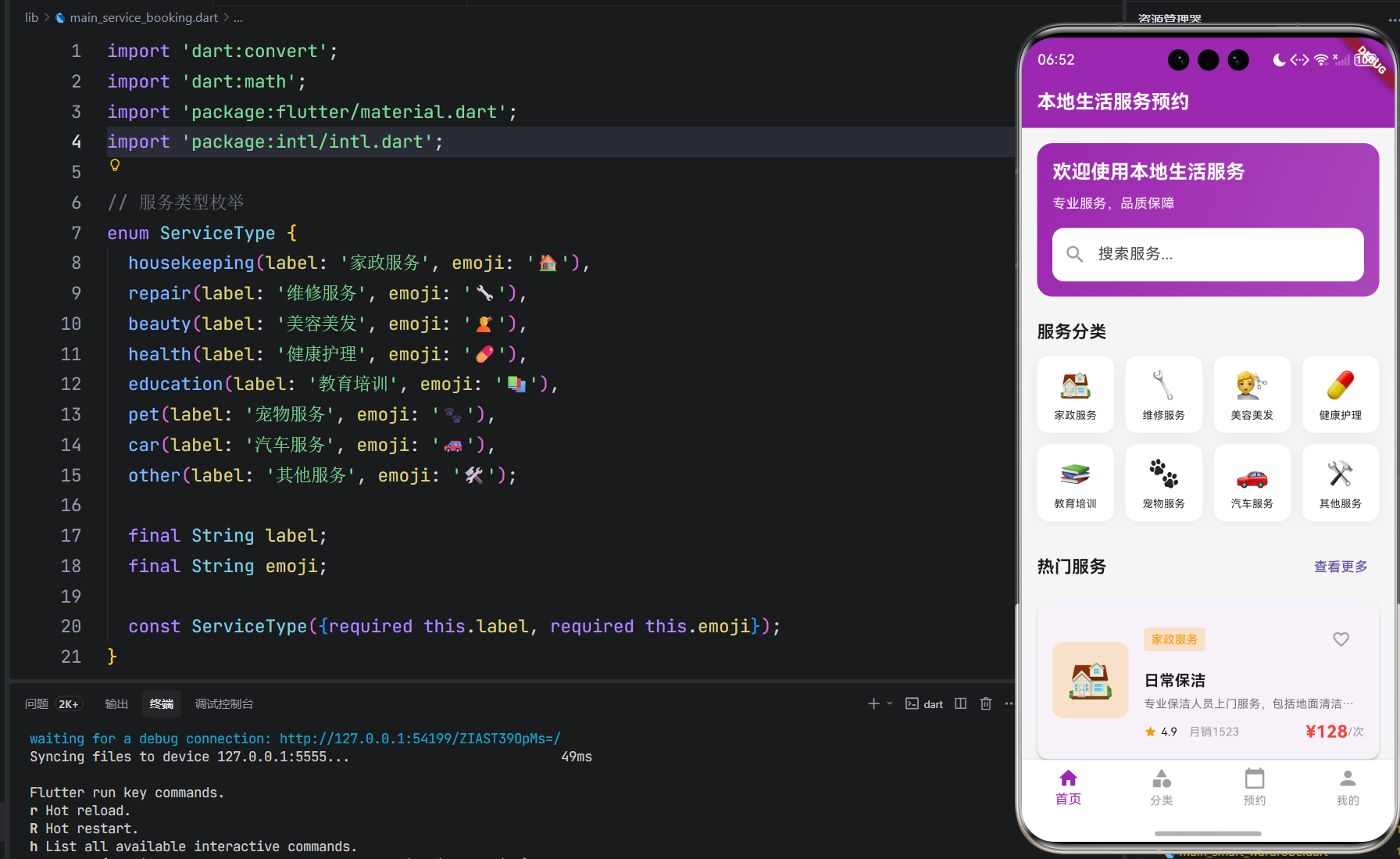
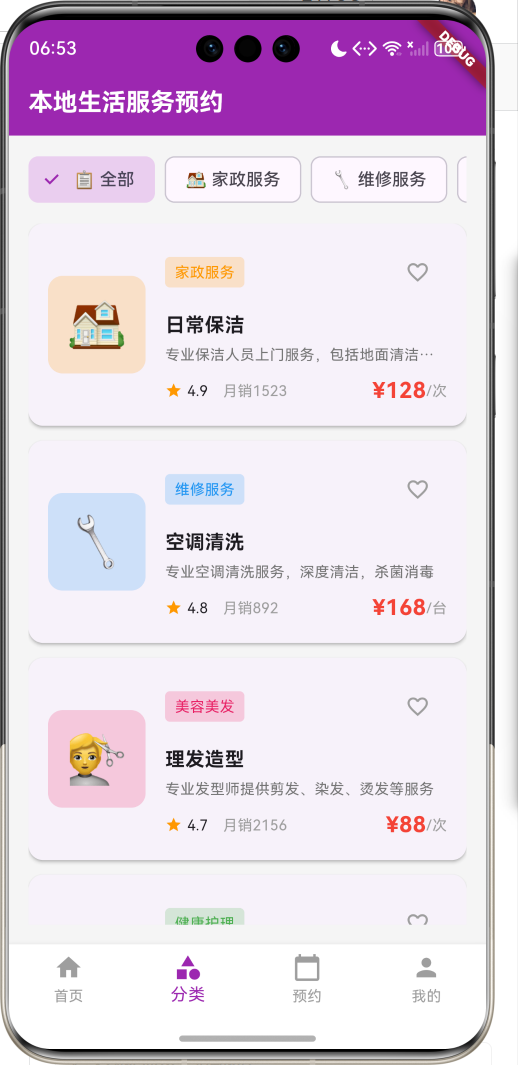
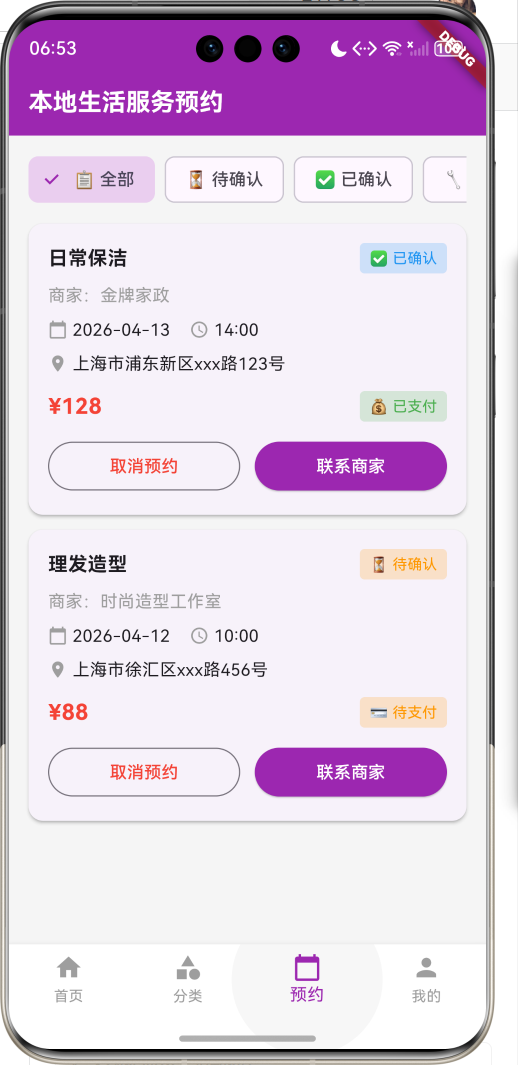
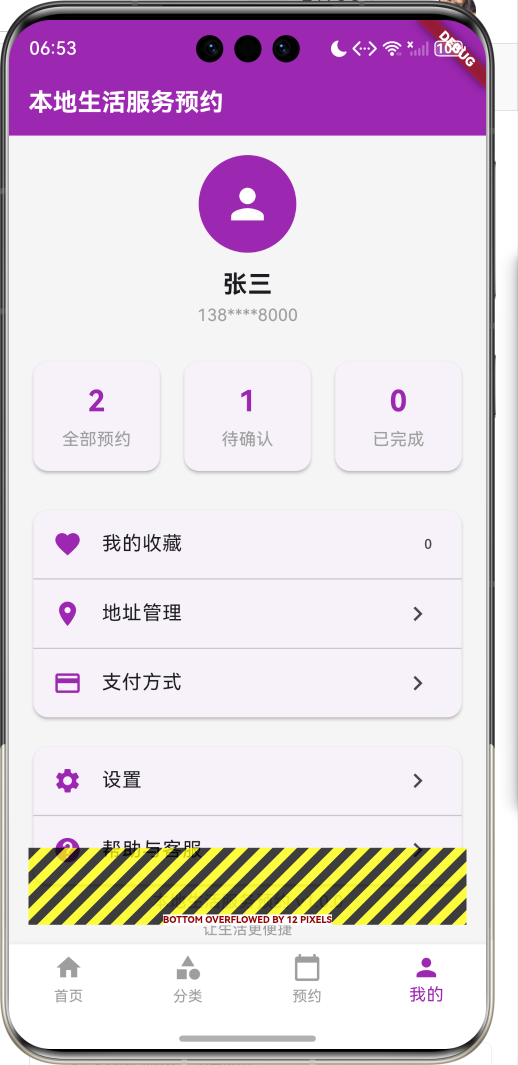
1.1 应用简介
本地生活服务预约是一款专为本地生活设计的综合服务预约平台,涵盖家政服务、维修服务、美容美发、健康护理等多种生活服务预约。应用内置服务分类、商家展示、在线预约、订单管理,让用户轻松预约各类生活服务。
应用以温馨的紫色为主色调,象征品质与信赖。涵盖服务首页、服务分类、预约管理、个人中心四大模块。用户可以浏览服务类型、查看商家信息、在线预约服务、管理预约订单。
1.2 核心功能
| 功能模块 | 功能描述 | 实现方式 |
|---|---|---|
| 服务首页 | 展示热门服务 | 推荐展示 |
| 服务分类 | 按类别浏览服务 | 分类筛选 |
| 商家展示 | 查看商家详情 | 详情页面 |
| 在线预约 | 预约服务时间 | 预约系统 |
| 订单管理 | 管理预约订单 | 订单系统 |
1.3 服务类型定义
| 序号 | 类型名称 | Emoji | 描述 |
|---|---|---|---|
| 1 | 家政服务 | 🏠 | 保洁、保姆、月嫂 |
| 2 | 维修服务 | 🔧 | 家电维修、水电维修 |
| 3 | 美容美发 | 💇 | 理发、美容、美甲 |
| 4 | 健康护理 | 💊 | 按摩、理疗、护理 |
| 5 | 教育培训 | 📚 | 家教、培训、辅导 |
| 6 | 宠物服务 | 🐾 | 宠物美容、寄养 |
| 7 | 汽车服务 | 🚗 | 洗车、保养、维修 |
| 8 | 其他服务 | 🛠️ | 其他生活服务 |
1.4 预约状态定义
| 序号 | 状态名称 | Emoji | 描述 |
|---|---|---|---|
| 1 | 待确认 | ⏳ | 等待商家确认 |
| 2 | 已确认 | ✅ | 商家已确认 |
| 3 | 服务中 | 🔧 | 服务进行中 |
| 4 | 已完成 | ✔️ | 服务已完成 |
| 5 | 已取消 | ❌ | 预约已取消 |
1.5 订单状态定义
| 序号 | 状态名称 | Emoji | 描述 |
|---|---|---|---|
| 1 | 待支付 | 💳 | 等待支付 |
| 2 | 已支付 | 💰 | 支付完成 |
| 3 | 退款中 | ↩️ | 退款处理中 |
| 4 | 已退款 | ✓️ | 退款完成 |
1.6 技术栈
| 技术领域 | 技术选型 | 版本要求 |
|---|---|---|
| 开发框架 | Flutter | >= 3.0.0 |
| 编程语言 | Dart | >= 2.17.0 |
| 设计规范 | Material Design 3 | - |
| 本地存储 | shared_preferences | - |
| 日历组件 | table_calendar | - |
| 目标平台 | 鸿蒙OS / Web | API 21+ |
1.7 项目结构
lib/
└── main_service_booking.dart
    ├── ServiceBookingApp         # 应用入口
    ├── Service                   # 服务模型
    ├── Provider                  # 服务商模型
    ├── Booking                   # 预约模型
    ├── ServiceType               # 服务类型枚举
    ├── BookingStatus             # 预约状态枚举
    ├── PaymentStatus             # 支付状态枚举
    ├── BookingService            # 预约服务
    ├── BookingController         # 预约控制器
    ├── ServiceBookingHomePage    # 主页面
    ├── _buildHomePage            # 服务首页
    ├── _buildCategoryPage        # 服务分类页面
    ├── _buildBookingsPage        # 预约管理页面
    └── _buildProfilePage         # 个人中心页面
二、系统架构
2.1 整体架构图
2.2 类图设计
2.3 页面导航流程
2.4 预约流程
三、核心模块设计
3.1 数据模型设计
3.1.1 服务模型 (Service)
class Service {
  final String id;
  final String name;
  final ServiceType type;
  final String description;
  final double basePrice;
  final String unit;
  final int duration;
  final String image;
  final List<String> tags;
  final double rating;
  final int bookingCount;

  Service({
    required this.id,
    required this.name,
    required this.type,
    required this.description,
    required this.basePrice,
    required this.unit,
    required this.duration,
    required this.image,
    required this.tags,
    required this.rating,
    required this.bookingCount,
  });
}
3.1.2 服务商模型 (Provider)
class Provider {
  final String id;
  final String name;
  final String avatar;
  final double rating;
  final int reviewCount;
  final String address;
  final String phone;
  final double latitude;
  final double longitude;
  final List<String> businessHours;
  final List<String> services;
  final List<String> images;
  final String introduction;

  Provider({
    required this.id,
    required this.name,
    required this.avatar,
    required this.rating,
    required this.reviewCount,
    required this.address,
    required this.phone,
    required this.latitude,
    required this.longitude,
    required this.businessHours,
    required this.services,
    required this.images,
    required this.introduction,
  });
}
3.1.3 预约模型 (Booking)
class Booking {
  final String id;
  final String serviceId;
  final String serviceName;
  final String providerId;
  final String providerName;
  final String userId;
  final DateTime bookingDate;
  final String bookingTime;
  final String address;
  final String contactName;
  final String contactPhone;
  final String remark;
  BookingStatus status;
  PaymentStatus paymentStatus;
  final double totalPrice;
  final DateTime createdAt;

  Booking({
    required this.id,
    required this.serviceId,
    required this.serviceName,
    required this.providerId,
    required this.providerName,
    required this.userId,
    required this.bookingDate,
    required this.bookingTime,
    required this.address,
    required this.contactName,
    required this.contactPhone,
    required this.remark,
    required this.status,
    required this.paymentStatus,
    required this.totalPrice,
    required this.createdAt,
  });
}
3.1.4 服务类型枚举 (ServiceType)
enum ServiceType {
  housekeeping(label: '家政服务', emoji: '🏠'),
  repair(label: '维修服务', emoji: '🔧'),
  beauty(label: '美容美发', emoji: '💇'),
  health(label: '健康护理', emoji: '💊'),
  education(label: '教育培训', emoji: '📚'),
  pet(label: '宠物服务', emoji: '🐾'),
  car(label: '汽车服务', emoji: '🚗'),
  other(label: '其他服务', emoji: '🛠️');

  final String label;
  final String emoji;

  const ServiceType({required this.label, required this.emoji});
}
3.1.5 预约状态枚举 (BookingStatus)
enum BookingStatus {
  pending(label: '待确认', emoji: '⏳'),
  confirmed(label: '已确认', emoji: '✅'),
  inProgress(label: '服务中', emoji: '🔧'),
  completed(label: '已完成', emoji: '✔️'),
  cancelled(label: '已取消', emoji: '❌');

  final String label;
  final String emoji;

  const BookingStatus({required this.label, required this.emoji});
}
3.1.6 支付状态枚举 (PaymentStatus)
enum PaymentStatus {
  unpaid(label: '待支付', emoji: '💳'),
  paid(label: '已支付', emoji: '💰'),
  refunding(label: '退款中', emoji: '↩️'),
  refunded(label: '已退款', emoji: '✓️');

  final String label;
  final String emoji;

  const PaymentStatus({required this.label, required this.emoji});
}
3.2 页面结构设计
3.2.1 主页面布局
3.2.2 服务首页结构
3.2.3 预约管理页面结构
3.3 预约创建逻辑
3.4 订单管理逻辑
四、UI设计规范
4.1 配色方案
应用以温馨的紫色为主色调,象征品质与信赖:
| 颜色类型 | 色值 | 用途 |
|---|---|---|
| 主色 | #9C27B0 (Purple) | 导航、主题元素 |
| 辅助色 | #AB47BC | 按钮、强调 |
| 第三色 | #CE93D8 | 背景、卡片 |
| 背景色 | #F5F5F5 | 页面背景 |
| 卡片背景 | #FFFFFF | 信息卡片 |
4.2 服务类型色彩映射
| 类型 | 色值 | 视觉效果 |
|---|---|---|
| 家政服务 | #FF9800 | 橙色 |
| 维修服务 | #2196F3 | 蓝色 |
| 美容美发 | #E91E63 | 粉色 |
| 健康护理 | #4CAF50 | 绿色 |
| 教育培训 | #FF5722 | 深橙色 |
| 宠物服务 | #795548 | 棕色 |
| 汽车服务 | #607D8B | 蓝灰色 |
| 其他服务 | #9E9E9E | 灰色 |
4.3 预约状态色彩映射
| 状态 | 色值 | 视觉效果 |
|---|---|---|
| 待确认 | #FF9800 | 橙色 |
| 已确认 | #2196F3 | 蓝色 |
| 服务中 | #9C27B0 | 紫色 |
| 已完成 | #4CAF50 | 绿色 |
| 已取消 | #F44336 | 红色 |
4.4 字体规范
| 元素 | 字号 | 字重 | 颜色 |
|---|---|---|---|
| 页面标题 | 24px | Bold | 主色 |
| 服务名称 | 16px | Medium | #333333 |
| 商家名称 | 14px | Medium | #666666 |
| 价格信息 | 20px | Bold | #F44336 |
| 时间信息 | 14px | Regular | #999999 |
| 状态标签 | 12px | Regular | 对应状态色 |
4.5 组件规范
4.5.1 服务卡片
┌─────────────────────────────────────┐
│  ┌──────────┐                       │
│  │          │  日常保洁             │
│  │  服务图片 │  ⭐ 4.9分  月销1000+  │
│  │          │                       │
│  └──────────┘  ¥128/次             │
│                🏠 家政服务          │
│                                     │
│  [立即预约]                         │
└─────────────────────────────────────┘
4.5.2 商家卡片
┌─────────────────────────────────────┐
│  ┌──────────┐  金牌家政            │
│  │          │  ⭐ 4.9分 | 286条评价 │
│  │  商家头像 │                       │
│  │          │  📍 距离1.2km         │
│  └──────────┘  🕐 营业时间 8:00-20:00│
│                                     │
│  [查看详情] [立即预约]              │
└─────────────────────────────────────┘
4.5.3 预约卡片
┌─────────────────────────────────────┐
│  日常保洁                           │
│  ─────────────────────────────────  │
│  服务商:金牌家政                    │
│  时间:2024-01-15 14:00             │
│  地址:上海市浦东新区xxx路123号      │
│  价格:¥128                         │
│                                     │
│  ⏳ 待确认                          │
│                                     │
│  [取消预约] [联系商家]              │
└─────────────────────────────────────┘
五、核心功能实现
5.1 预约服务实现
class BookingService {
  final List<Service> _services = [];
  final List<Provider> _providers = [];
  final List<Booking> _bookings = [];

  List<Service> getAllServices() {
    return _services;
  }

  List<Service> getServicesByType(ServiceType type) {
    return _services.where((s) => s.type == type).toList();
  }

  List<Provider> getProvidersByService(String serviceId) {
    return _providers.where((p) => p.services.contains(serviceId)).toList();
  }

  List<Provider> getNearbyProviders(double lat, double lng, {double radius = 5000}) {
    return _providers.where((provider) {
      final distance = calculateDistance(lat, lng, provider.latitude, provider.longitude);
      return distance <= radius;
    }).toList();
  }

  void createBooking(Booking booking) {
    _bookings.add(booking);
  }

  void cancelBooking(String id) {
    final booking = _bookings.firstWhere((b) => b.id == id);
    booking.status = BookingStatus.cancelled;
  }

  List<Booking> getUserBookings(String userId) {
    return _bookings.where((b) => b.userId == userId).toList();
  }

  void updateBookingStatus(String id, BookingStatus status) {
    final booking = _bookings.firstWhere((b) => b.id == id);
    booking.status = status;
  }
}
5.2 预约控制器实现
class BookingController {
  final BookingService _bookingService;
  final DataManager _dataManager;
  List<Service> services = [];
  List<Provider> providers = [];
  List<Booking> bookings = [];
  String currentUserId = 'user_001';

  BookingController(this._bookingService, this._dataManager);

  Future<void> initialize() async {
    await loadServices();
    await loadBookings();
  }

  Future<void> loadServices() async {
    services = _bookingService.getAllServices();
  }

  Future<void> loadBookings() async {
    bookings = _bookingService.getUserBookings(currentUserId);
  }

  void filterByType(ServiceType type) {
    services = _bookingService.getServicesByType(type);
  }

  void loadProvidersByService(String serviceId) {
    providers = _bookingService.getProvidersByService(serviceId);
  }

  void createBooking(Booking booking) {
    _bookingService.createBooking(booking);
    bookings.insert(0, booking);
    _dataManager.saveBookings(bookings);
  }

  void cancelBooking(String id) {
    _bookingService.cancelBooking(id);
    final index = bookings.indexWhere((b) => b.id == id);
    if (index != -1) {
      bookings[index].status = BookingStatus.cancelled;
      _dataManager.saveBookings(bookings);
    }
  }

  List<Booking> getBookingsByStatus(BookingStatus status) {
    return bookings.where((b) => b.status == status).toList();
  }
}
5.3 数据管理实现
class DataManager {
  static const String _bookingsKey = 'bookings';
  static const String _favoritesKey = 'favorites';
  static const String _addressesKey = 'addresses';

  static Map<String, String> _storage = {};

  Future<List<Booking>> loadBookings() async {
    final jsonString = _storage[_bookingsKey];
    if (jsonString == null) return [];

    final jsonList = json.decode(jsonString) as List;
    return jsonList.map((data) => Booking.fromJson(data)).toList();
  }

  Future<void> saveBookings(List<Booking> bookings) async {
    final jsonList = bookings.map((b) => b.toJson()).toList();
    _storage[_bookingsKey] = json.encode(jsonList);
  }

  Future<List<String>> loadFavorites() async {
    final jsonString = _storage[_favoritesKey];
    if (jsonString == null) return [];

    final jsonList = json.decode(jsonString) as List;
    return jsonList.map((item) => item.toString()).toList();
  }

  Future<void> saveFavorites(List<String> favorites) async {
    _storage[_favoritesKey] = json.encode(favorites);
  }
}
六、交互设计
6.1 服务浏览交互流程
6.2 预约创建交互流程
6.3 订单管理交互流程
七、扩展功能规划
7.1 后续版本规划
7.2 功能扩展建议
7.2.1 会员系统
会员功能:
- 会员等级制度
- 会员专享优惠
- 会员积分累积
- 会员专属客服
7.2.2 优惠券功能
优惠券功能:
- 领取优惠券
- 使用优惠券
- 分享优惠券
- 优惠券到期提醒
7.2.3 评价系统
评价功能:
- 服务评价
- 商家评分
- 评价展示
- 评价回复
八、注意事项
8.1 开发注意事项
-
时间管理:预约时间需要合理管理
-
冲突检测:避免预约时间冲突
-
数据同步:多设备间数据同步
-
用户体验:预约流程需要简洁
-
数据安全:用户信息需要安全存储
8.2 常见问题
| 问题 | 原因 | 解决方案 |
|---|---|---|
| 预约失败 | 时间冲突 | 选择其他时间 |
| 支付失败 | 网络问题 | 检查网络连接 |
| 订单不显示 | 数据未刷新 | 手动刷新数据 |
| 取消失败 | 服务已开始 | 联系客服处理 |
| 应用崩溃 | 空指针异常 | 增加空值检查 |
8.3 使用技巧
🏠 本地生活服务预约使用技巧 🏠
服务选择
- 查看商家评分和评价
- 比较不同商家价格
- 关注商家营业时间
- 了解服务详细内容
预约技巧
- 提前预约避免排队
- 选择合适的预约时间
- 准确填写联系信息
- 备注特殊需求
订单管理
- 及时查看订单状态
- 如需取消尽早操作
- 服务完成及时评价
- 保存好服务凭证
个人中心
- 完善个人信息
- 管理常用地址
- 查看历史订单
- 关注优惠活动
九、运行说明
9.1 环境要求
| 环境 | 版本要求 |
|---|---|
| Flutter SDK | >= 3.0.0 |
| Dart SDK | >= 2.17.0 |
| 鸿蒙OS | API 21+ |
| Web浏览器 | Chrome 90+ |
9.2 运行命令
# 查看可用设备
flutter devices

# 运行到Web服务器
flutter run -d web-server -t lib/main_service_booking.dart --web-port 8163

# 运行到鸿蒙设备
flutter run -d 127.0.0.1:5555 lib/main_service_booking.dart

# 代码分析
flutter analyze lib/main_service_booking.dart
十、总结
本地生活服务预约应用通过服务首页、服务分类、预约管理、个人中心四大模块,为用户提供了一个便捷的本地生活服务预约平台。用户可以浏览服务类型、查看商家信息、在线预约服务、管理预约订单。
核心功能包括服务浏览、商家筛选、在线预约、订单管理等。应用采用温馨的紫色为主色调,象征品质与信赖,界面简洁美观,交互流畅自然。
通过本应用,希望能够帮助用户轻松预约各类生活服务,享受更便捷的生活方式。
本地生活服务预约——让生活更便捷

作为“人工智能6S店”的官方数字引擎,为AI开发者与企业提供一个覆盖软硬件全栈、一站式门户。
更多推荐
 1
1 0
0- 0


 已为社区贡献30条内容

所有评论(0)