
Flutter 框架跨平台鸿蒙开发 - 校园拼车出行
运行效果图校园拼车出行平台是一款校园出行服务应用,帮助校园师生便捷拼车出行,降低出行成本,提高出行效率。应用支持发布拼车信息、查找拼车、智能匹配、费用分摊等功能,连接车主和乘客,实现绿色出行。用户可以发布拼车行程、查找匹配行程、在线沟通、费用结算,享受便捷的校园出行服务。应用以清新的绿色为主色调,象征环保与便捷。涵盖发布行程、查找拼车、我的行程、个人中心四大模块。用户可以发布行程、查找拼车、管理行
校园拼车出行平台应用
欢迎加入开源鸿蒙跨平台社区:
https://openharmonycrossplatform.csdn.net
一、项目概述
运行效果图
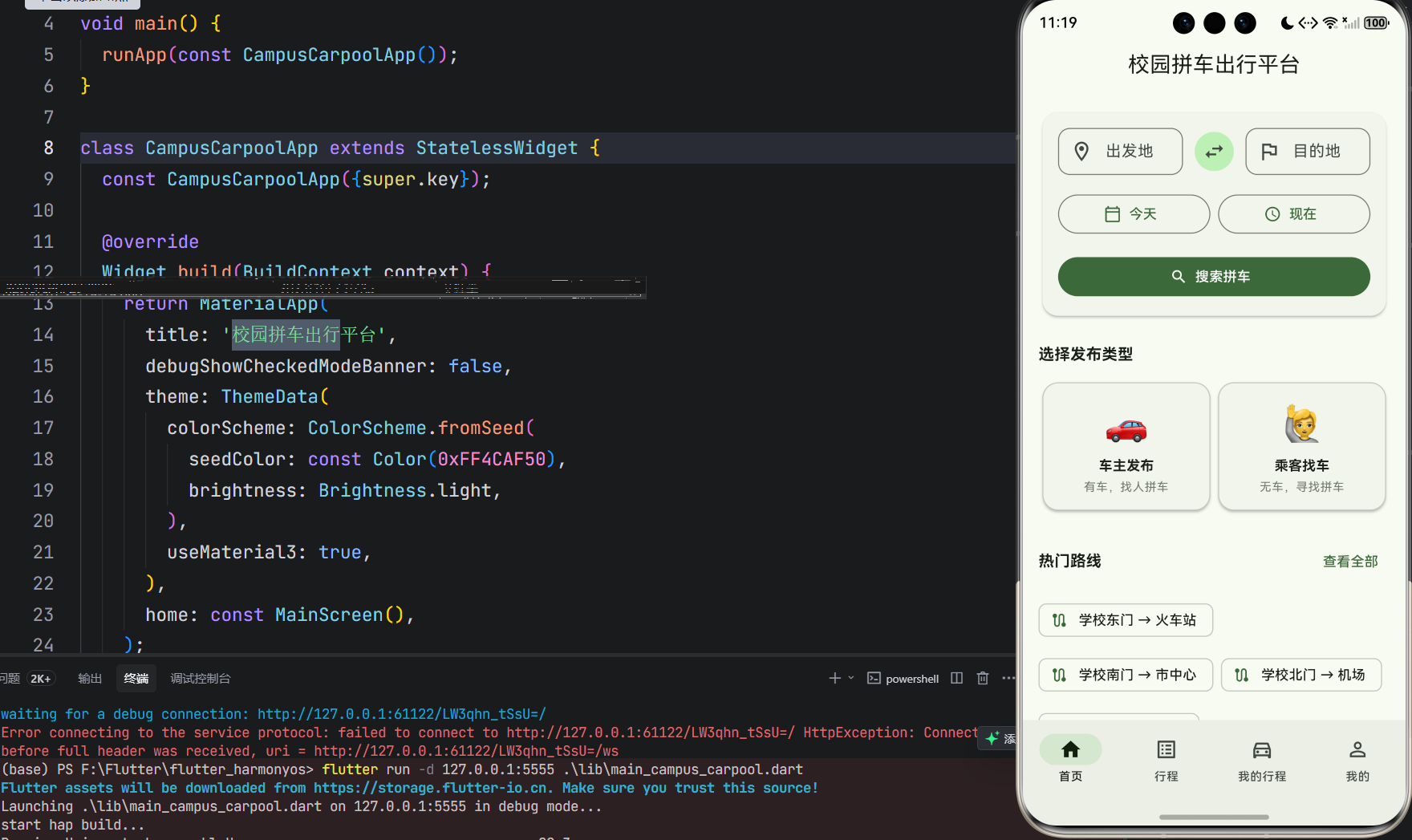
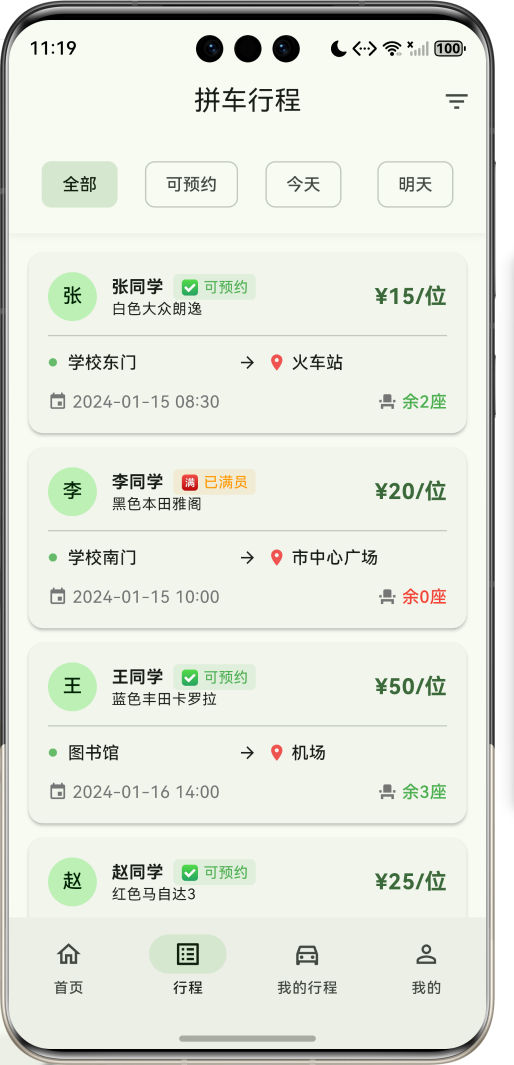
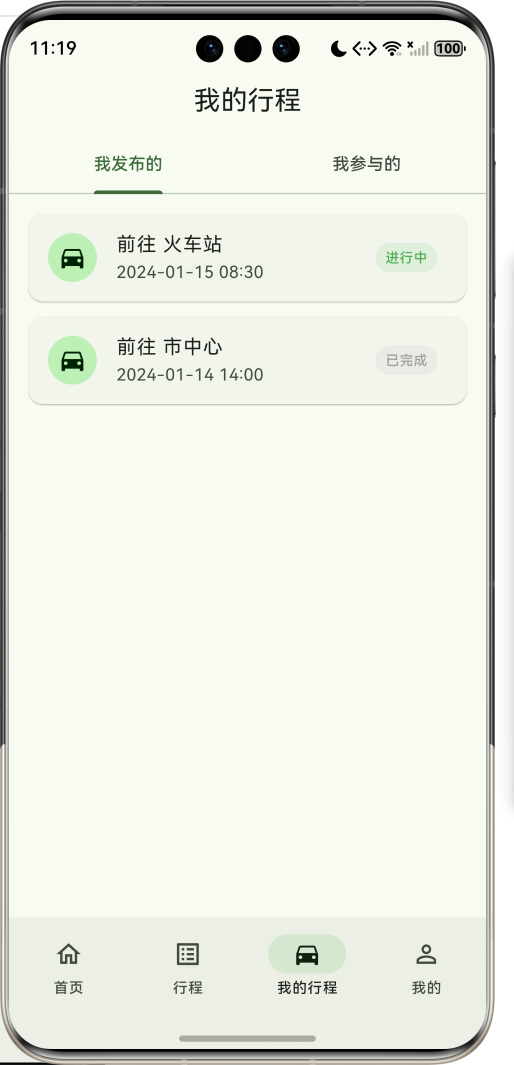
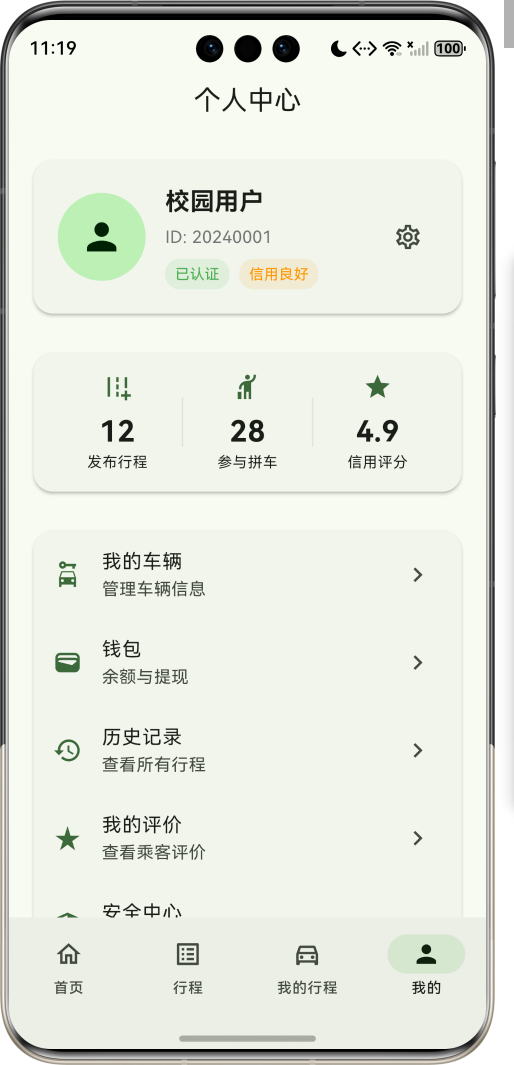
1.1 应用简介
校园拼车出行平台是一款校园出行服务应用,帮助校园师生便捷拼车出行,降低出行成本,提高出行效率。应用支持发布拼车信息、查找拼车、智能匹配、费用分摊等功能,连接车主和乘客,实现绿色出行。用户可以发布拼车行程、查找匹配行程、在线沟通、费用结算,享受便捷的校园出行服务。
应用以清新的绿色为主色调,象征环保与便捷。涵盖发布行程、查找拼车、我的行程、个人中心四大模块。用户可以发布行程、查找拼车、管理行程、查看统计,实现高效便捷的校园出行。
1.2 核心功能
| 功能模块 | 功能描述 | 实现方式 |
|---|---|---|
| 发布行程 | 发布拼车行程信息 | 表单提交 |
| 查找拼车 | 查找匹配的拼车信息 | 搜索匹配 |
| 智能匹配 | 自动匹配相似行程 | 匹配算法 |
| 在线沟通 | 车主乘客沟通 | 消息系统 |
| 费用分摊 | 计算分摊费用 | 费用计算 |
| 行程管理 | 管理发布和参与的行程 | 列表管理 |
| 评价系统 | 行程结束后评价 | 评分系统 |
| 出行统计 | 统计出行数据 | 数据分析 |
1.3 出行类型定义
| 序号 | 类型名称 | Emoji | 描述 |
|---|---|---|---|
| 1 | 上下课 | 🎓 | 日常上下课出行 |
| 2 | 周末回家 | 🏠 | 周末往返家乡 |
| 3 | 购物娱乐 | 🛍️ | 商场购物娱乐 |
| 4 | 实习兼职 | 💼 | 实习兼职出行 |
| 5 | 旅游出行 | 🎒 | 旅游度假出行 |
| 6 | 其他 | 🚗 | 其他出行需求 |
1.4 行程状态定义
| 序号 | 状态名称 | Emoji | 描述 |
|---|---|---|---|
| 1 | 招募中 | 📢 | 正在招募乘客 |
| 2 | 已满员 | ✅ | 乘客已满 |
| 3 | 进行中 | 🚗 | 行程进行中 |
| 4 | 已完成 | ✅ | 行程已完成 |
| 5 | 已取消 | ❌ | 行程已取消 |
1.5 座位数量定义
| 序号 | 座位数 | Emoji | 描述 |
|---|---|---|---|
| 1 | 1座 | 1️⃣ | 单人座 |
| 2 | 2座 | 2️⃣ | 双人座 |
| 3 | 3座 | 3️⃣ | 三人座 |
| 4 | 4座及以上 | 4️⃣ | 四座及以上 |
1.6 技术栈
| 技术领域 | 技术选型 | 版本要求 |
|---|---|---|
| 开发框架 | Flutter | >= 3.0.0 |
| 编程语言 | Dart | >= 2.17.0 |
| 设计规范 | Material Design 3 | - |
| 状态管理 | setState | - |
| 数据存储 | SharedPreferences | >= 2.0.0 |
| 目标平台 | 鸿蒙OS / Web | API 21+ |
1.7 项目结构
lib/
└── main_campus_carpool.dart
    ├── CampusCarpoolApp                 # 应用入口
    ├── TripType                         # 出行类型枚举
    ├── TripStatus                       # 行程状态枚举
    ├── SeatCount                        # 座位数量枚举
    ├── Trip                             # 行程模型
    ├── User                             # 用户模型
    ├── CampusCarpoolHomePage           # 主页面(底部导航)
    ├── _buildPublishPage                # 发布页面
    ├── _buildSearchPage                 # 搜索页面
    ├── _buildMyTripsPage                # 我的行程页面
    ├── _buildProfilePage                # 个人页面
    └── TripDetailPage                   # 行程详情页
二、系统架构
2.1 整体架构图
2.2 类图设计
2.3 页面导航流程
2.4 匹配流程
三、核心模块设计
3.1 数据模型设计
3.1.1 出行类型枚举
enum TripType {
  commute(label: '上下课', emoji: '🎓'),
  weekend(label: '周末回家', emoji: '🏠'),
  shopping(label: '购物娱乐', emoji: '🛍️'),
  internship(label: '实习兼职', emoji: '💼'),
  travel(label: '旅游出行', emoji: '🎒'),
  other(label: '其他', emoji: '🚗');

  final String label;
  final String emoji;
  const TripType({
    required this.label,
    required this.emoji,
  });
}
3.1.2 行程状态枚举
enum TripStatus {
  recruiting(label: '招募中', emoji: '📢'),
  full(label: '已满员', emoji: '✅'),
  ongoing(label: '进行中', emoji: '🚗'),
  completed(label: '已完成', emoji: '✅'),
  cancelled(label: '已取消', emoji: '❌');

  final String label;
  final String emoji;
  const TripStatus({
    required this.label,
    required this.emoji,
  });
}
3.1.3 行程模型
class Trip {
  final String id;              // 行程ID
  final String driverId;        // 车主ID
  final String driverName;      // 车主姓名
  final String origin;          // 出发地
  final String destination;     // 目的地
  final DateTime departureTime; // 出发时间
  final TripType type;          // 出行类型
  final SeatCount seats;        // 座位数
  final int availableSeats;     // 剩余座位
  final double price;           // 费用
  final TripStatus status;      // 状态
  final List<String> passengers;// 乘客列表
  final String description;     // 描述
  final DateTime publishTime;   // 发布时间

  const Trip({
    required this.id,
    required this.driverId,
    required this.driverName,
    required this.origin,
    required this.destination,
    required this.departureTime,
    required this.type,
    required this.seats,
    required this.availableSeats,
    required this.price,
    required this.status,
    required this.passengers,
    required this.description,
    required this.publishTime,
  });
}
3.1.4 用户模型
class User {
  final String id;              // 用户ID
  final String name;            // 姓名
  final String phone;           // 电话
  final double rating;          // 评分
  final int totalTrips;         // 总行程数
  final int completedTrips;     // 完成行程数

  const User({
    required this.id,
    required this.name,
    required this.phone,
    required this.rating,
    required this.totalTrips,
    required this.completedTrips,
  });
}
3.1.5 出行类型分布
3.2 页面结构设计
3.2.1 主页面布局
3.2.2 发布页结构
3.2.3 搜索页结构
3.3 匹配逻辑
3.4 费用计算逻辑
四、UI设计规范
4.1 配色方案
应用以清新的绿色为主色调,象征环保与便捷:
| 颜色类型 | 色值 | 用途 |
|---|---|---|
| 主色 | #4CAF50 (Green) | 导航、主题元素 |
| 辅助色 | #66BB6A | 发布页面 |
| 第三色 | #81C784 | 搜索页面 |
| 强调色 | #A5D6A7 | 我的行程页面 |
| 背景色 | #FAFAFA | 页面背景 |
| 卡片背景 | #FFFFFF | 信息卡片 |
| 成功色 | #4CAF50 | 完成状态 |
| 警告色 | #FF9800 | 进行中状态 |
4.2 状态配色
| 状态 | 色值 | 视觉效果 |
|---|---|---|
| 招募中 | #4CAF50 | 绿色 |
| 已满员 | #FF9800 | 橙色 |
| 进行中 | #2196F3 | 蓝色 |
| 已完成 | #9E9E9E | 灰色 |
| 已取消 | #F44336 | 红色 |
4.3 字体规范
| 元素 | 字号 | 字重 | 颜色 |
|---|---|---|---|
| 页面标题 | 24px | Bold | 主色 |
| 行程标题 | 16px | Bold | #000000 |
| 路线信息 | 14px | Regular | #333333 |
| 时间信息 | 12px | Regular | #666666 |
| 费用信息 | 16px | Bold | #4CAF50 |
| 描述文字 | 14px | Regular | #666666 |
4.4 组件规范
4.4.1 行程卡片
┌─────────────────────────────────────┐
│  🎓 上下课拼车                        │
│                                     │
│  📍 校园东门 → 市中心                 │
│  🕐 今天 18:00                       │
│                                     │
│  💺 剩余2座    💰 ¥15/人             │
│                                     │
│  📢 招募中        张三 ⭐4.8         │
└─────────────────────────────────────┘
4.4.2 发布表单
┌─────────────────────────────────────┐
│  发布拼车行程                          │
│                                     │
│  📍 出发地: [___________________]     │
│  📍 目的地: [___________________]     │
│                                     │
│  🕐 出发时间: [2024-01-15 ▼]         │
│            [18:00 ▼]                │
│                                     │
│  🎒 出行类型: [🎓 上下课 ▼]           │
│  💺 座位数量: [2️⃣ 2座 ▼]             │
│                                     │
│  💰 费用: [____] 元/人               │
│                                     │
│  📝 备注: [___________________]     │
│                                     │
│  [发布行程]                           │
└─────────────────────────────────────┘
4.4.3 搜索结果卡片
┌─────────────────────────────────────┐
│  🎯 匹配度: 90%                       │
│                                     │
│  🎓 上下课拼车                        │
│  📍 校园东门 → 市中心                 │
│  🕐 今天 18:00                       │
│                                     │
│  💺 剩余2座    💰 ¥15/人             │
│                                     │
│  [查看详情] [立即报名]                 │
└─────────────────────────────────────┘
五、核心功能实现
5.1 行程发布实现
void _publishTrip() {
  final trip = Trip(
    id: 'trip_${DateTime.now().millisecondsSinceEpoch}',
    driverId: 'user_001',
    driverName: '张三',
    origin: _originController.text,
    destination: _destinationController.text,
    departureTime: _selectedTime,
    type: _selectedType,
    seats: _selectedSeats,
    availableSeats: _selectedSeats.count,
    price: double.parse(_priceController.text),
    status: TripStatus.recruiting,
    passengers: [],
    description: _descriptionController.text,
    publishTime: DateTime.now(),
  );

  setState(() {
    _trips.insert(0, trip);
  });
}
5.2 匹配算法实现
class MatchEngine {
  static double calculateMatchScore(Trip trip, String origin, String destination, DateTime time) {
    double score = 0;

    // 出发地匹配 (35%)
    if (trip.origin.toLowerCase().contains(origin.toLowerCase()) ||
        origin.toLowerCase().contains(trip.origin.toLowerCase())) {
      score += 35;
    }

    // 目的地匹配 (35%)
    if (trip.destination.toLowerCase().contains(destination.toLowerCase()) ||
        destination.toLowerCase().contains(trip.destination.toLowerCase())) {
      score += 35;
    }

    // 时间匹配 (20%)
    if ((trip.departureTime.difference(time).inHours.abs()) <= 2) {
      score += 20;
    }

    // 座位匹配 (10%)
    if (trip.availableSeats > 0) {
      score += 10;
    }

    return score;
  }
}
5.3 费用计算实现
class FeeCalculator {
  static double calculateFeePerPerson(double totalFee, int passengerCount) {
    if (passengerCount == 0) return totalFee;
    return totalFee / passengerCount;
  }

  static double calculateTotalFee(double feePerPerson, int passengerCount) {
    return feePerPerson * passengerCount;
  }
}
5.4 报名功能实现
void _joinTrip(String tripId, String userId) {
  setState(() {
    final index = _trips.indexWhere((t) => t.id == tripId);
    if (index != -1) {
      final trip = _trips[index];
      if (trip.availableSeats > 0) {
        _trips[index] = Trip(
          id: trip.id,
          driverId: trip.driverId,
          driverName: trip.driverName,
          origin: trip.origin,
          destination: trip.destination,
          departureTime: trip.departureTime,
          type: trip.type,
          seats: trip.seats,
          availableSeats: trip.availableSeats - 1,
          price: trip.price,
          status: trip.availableSeats - 1 == 0 ? TripStatus.full : trip.status,
          passengers: [...trip.passengers, userId],
          description: trip.description,
          publishTime: trip.publishTime,
        );
      }
    }
  });
}
六、交互设计
6.1 发布流程
6.2 搜索流程
6.3 行程管理流程
七、扩展功能规划
7.1 后续版本规划
7.2 功能扩展建议
7.2.1 地图导航
导航功能:
- 地图显示路线
- 实时导航
- 位置共享
- 到达提醒
7.2.2 实名认证
认证功能:
- 学生认证
- 驾驶证认证
- 信用评分
- 安全保障
7.2.3 消息通知
通知功能:
- 报名成功通知
- 行程提醒
- 评价提醒
- 系统公告
八、注意事项
8.1 开发注意事项
-
安全保障:确保用户信息安全,防止信息泄露
-
身份验证:验证车主和乘客身份,确保安全
-
费用透明:费用计算清晰透明,避免纠纷
-
行程管理:及时更新行程状态,保证信息准确
-
用户隐私:保护用户隐私信息,合理使用数据
8.2 常见问题
| 问题 | 原因 | 解决方案 |
|---|---|---|
| 匹配不准确 | 算法不够完善 | 优化匹配算法 |
| 座位计算错误 | 并发问题 | 增加锁定机制 |
| 费用纠纷 | 计算不清晰 | 明确费用明细 |
| 行程取消 | 用户临时变更 | 增加取消机制 |
| 联系不上 | 联系方式错误 | 验证联系方式 |
8.3 使用技巧
🚗 校园拼车使用技巧 🚗
发布技巧
- 详细描述行程路线
- 准确设置出发时间
- 合理设置费用
- 保持联系方式畅通
搜索技巧
- 明确出发地和目的地
- 选择合适的时间范围
- 查看车主评分
- 及时确认报名
安全提示
- 核实对方身份
- 选择公共场所上车
- 分享行程给朋友
- 及时评价反馈
九、运行说明
9.1 环境要求
| 环境 | 版本要求 |
|---|---|
| Flutter SDK | >= 3.0.0 |
| Dart SDK | >= 2.17.0 |
| 鸿蒙OS | API 21+ |
| Web浏览器 | Chrome 90+ |
9.2 运行命令
# 查看可用设备
flutter devices

# 运行到Web服务器
flutter run -d web-server -t lib/main_campus_carpool.dart --web-port 8156

# 运行到鸿蒙设备
flutter run -d 127.0.0.1:5555 lib/main_campus_carpool.dart

# 代码分析
flutter analyze lib/main_campus_carpool.dart
十、总结
校园拼车出行平台应用通过发布行程、查找拼车、我的行程、个人中心四大模块,为校园师生提供了一个便捷的拼车出行平台。应用支持发布拼车信息、查找匹配行程、在线沟通、费用分摊等功能,连接车主和乘客,实现绿色出行。
核心功能涵盖行程发布、智能匹配、费用计算、行程管理四大模块。行程发布支持详细描述路线和设置费用;智能匹配自动匹配相似行程;费用计算清晰透明;行程管理方便用户管理发布和参与的行程。
应用采用 Material Design 3 设计规范,以清新的绿色为主色调,象征环保与便捷。通过本应用,希望能够帮助校园师生便捷出行,降低出行成本,实现绿色环保的校园出行方式。
校园拼车出行平台——绿色出行,便捷校园

作为“人工智能6S店”的官方数字引擎,为AI开发者与企业提供一个覆盖软硬件全栈、一站式门户。
更多推荐

 7
7 0
0- 0


 已为社区贡献22条内容

所有评论(0)