
开源鸿蒙跨平台Flutter开发:BMI计算器应用
摘要: 开源鸿蒙跨平台社区推出了一款BMI计算器应用,帮助用户科学评估体重健康。该应用基于Flutter开发,支持BMI计算、健康评估、历史记录、趋势分析等功能,提供个性化健康建议和目标管理。应用采用Material Design 3规范,包含四大模块:计算页(输入身高/体重)、历史页(数据可视化)、目标页(进度追踪)和设置页(个性化配置)。技术栈包括Dart语言、SharedPreference
欢迎加入开源鸿蒙跨平台社区:
https://openharmonycrossplatform.csdn.net
一、项目概述
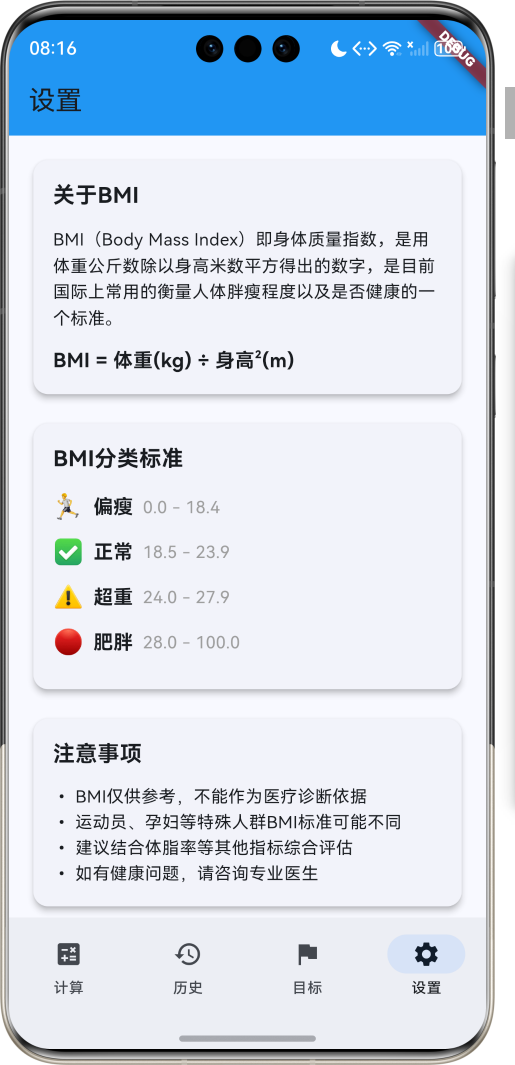
运行效果图
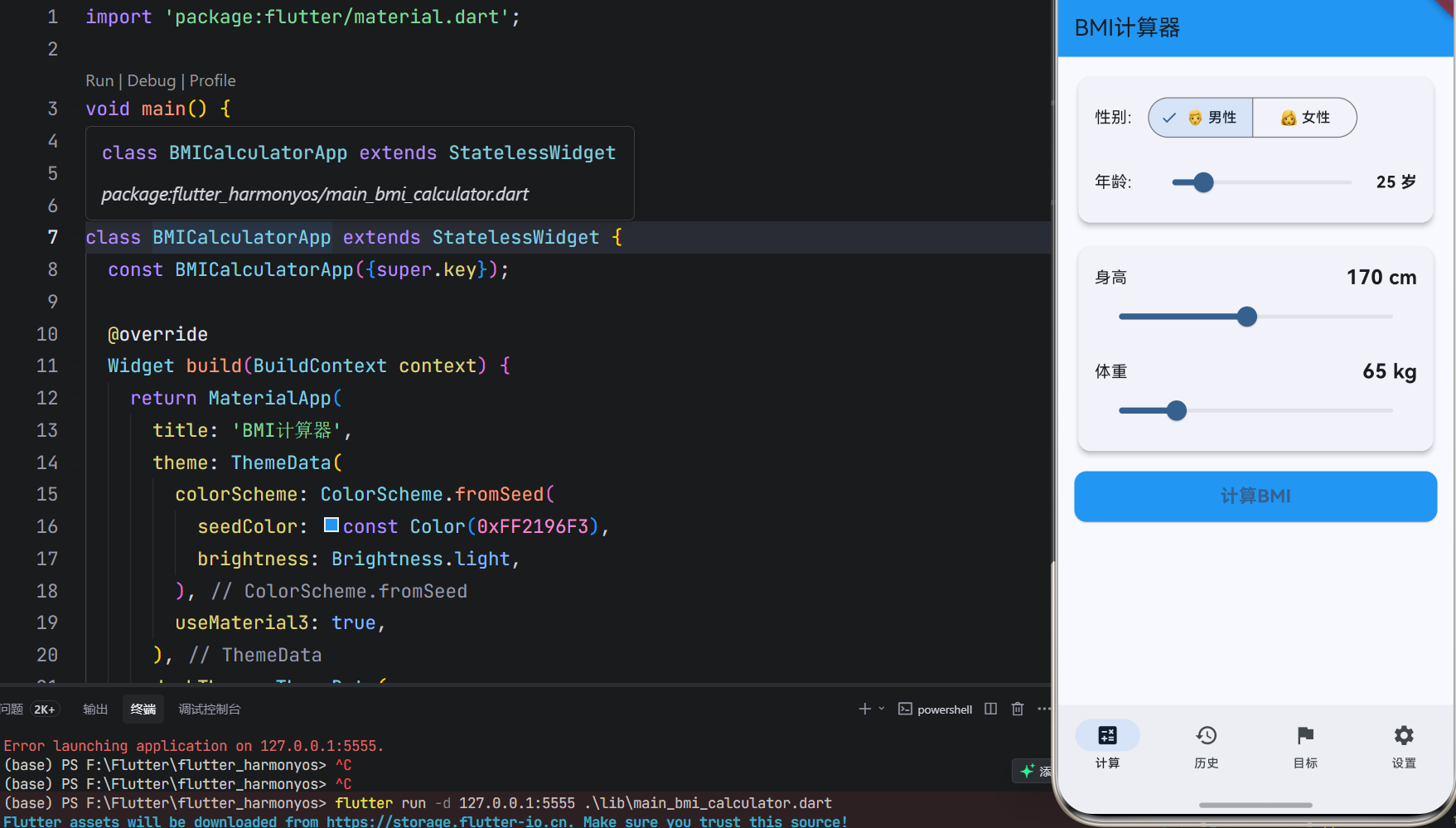
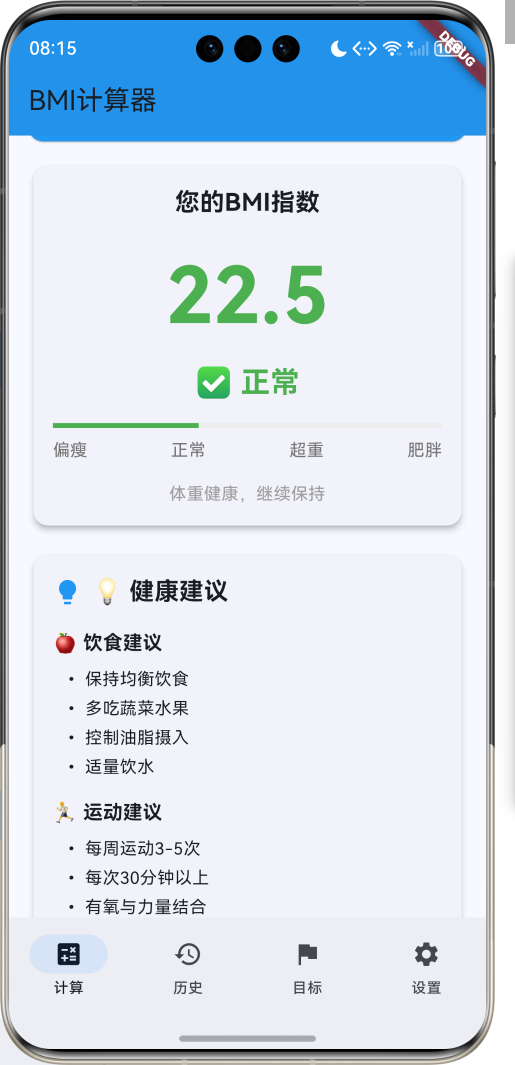
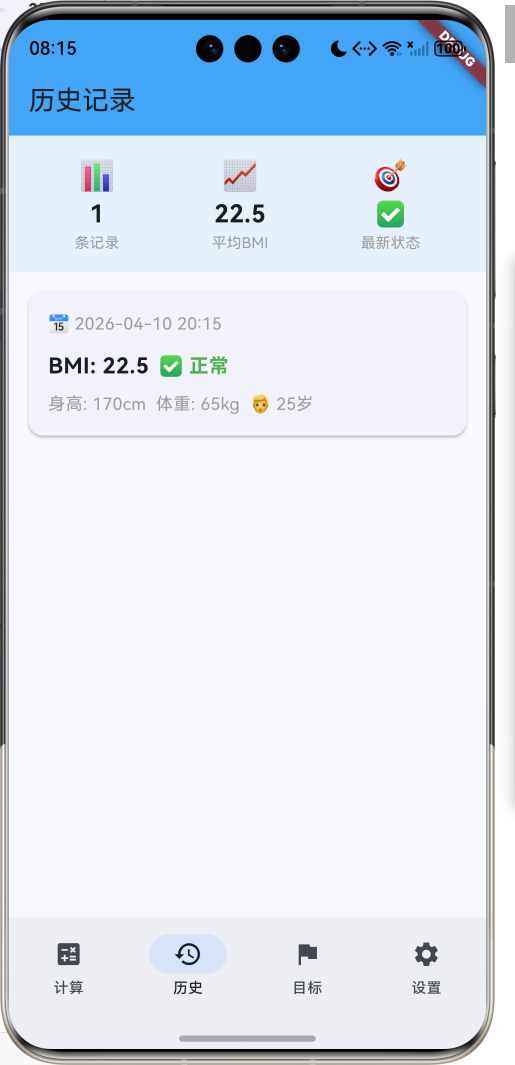
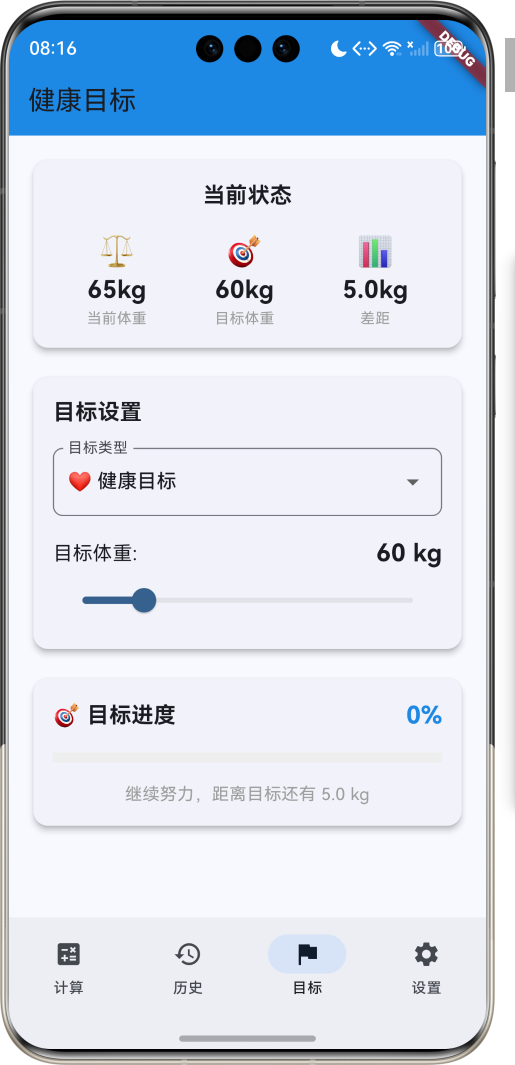
1.1 应用简介
BMI计算器是一款健康评估工具应用,帮助用户快速计算身体质量指数(BMI),判断体重是否健康。应用支持输入身高、体重、年龄、性别等信息,自动计算BMI值,并根据国际标准给出健康评估和个性化建议。同时提供历史记录、趋势分析、健康目标等功能,帮助用户科学管理体重。
应用以清新的蓝色为主色调,象征健康与活力。涵盖BMI计算、历史记录、健康建议、个人设置四大模块。用户可以快速计算BMI、查看历史数据、获取健康建议、设置个人目标,科学管理身体健康。
1.2 核心功能
| 功能模块 | 功能描述 | 实现方式 |
|---|---|---|
| BMI计算 | 输入身高体重计算BMI | 数学公式 |
| 健康评估 | 根据BMI值判断体重状态 | 分类判断 |
| 健康建议 | 提供个性化健康建议 | 规则引擎 |
| 历史记录 | 记录每次测量数据 | 数据存储 |
| 趋势分析 | 分析BMI变化趋势 | 图表展示 |
| 目标设置 | 设置体重目标 | 目标管理 |
| 数据导出 | 导出历史数据 | 文件导出 |
| 健康提醒 | 定期测量提醒 | 通知系统 |
1.3 BMI分类定义
| 序号 | 分类名称 | Emoji | BMI范围 | 描述 |
|---|---|---|---|---|
| 1 | 偏瘦 | 🏃 | < 18.5 | 体重过轻 |
| 2 | 正常 | ✅ | 18.5-23.9 | 体重健康 |
| 3 | 超重 | ⚠️ | 24.0-27.9 | 体重超标 |
| 4 | 肥胖 | 🔴 | ≥ 28.0 | 需要减重 |
1.4 性别定义
| 序号 | 性别名称 | Emoji | 描述 |
|---|---|---|---|
| 1 | 男性 | 👨 | 男性用户 |
| 2 | 女性 | 👩 | 女性用户 |
1.5 年龄分组定义
| 序号 | 年龄组 | Emoji | 年龄范围 | 特点 |
|---|---|---|---|---|
| 1 | 青少年 | 🎒 | 10-17岁 | 生长发育期 |
| 2 | 青年 | 💼 | 18-35岁 | 成年人标准 |
| 3 | 中年 | 👔 | 36-55岁 | 代谢减缓 |
| 4 | 老年 | 👴 | > 55岁 | 特殊标准 |
1.6 健康目标定义
| 序号 | 目标名称 | Emoji | 描述 | 达成条件 |
|---|---|---|---|---|
| 1 | 减重目标 | 🎯 | 减轻体重 | 达到目标体重 |
| 2 | 增重目标 | 💪 | 增加体重 | 达到目标体重 |
| 3 | 维持目标 | ⚖️ | 维持体重 | BMI保持正常 |
| 4 | 健康目标 | ❤️ | 整体健康 | BMI正常+良好习惯 |
1.7 技术栈
| 技术领域 | 技术选型 | 版本要求 |
|---|---|---|
| 开发框架 | Flutter | >= 3.0.0 |
| 编程语言 | Dart | >= 2.17.0 |
| 设计规范 | Material Design 3 | - |
| 状态管理 | setState | - |
| 数据存储 | SharedPreferences | >= 2.0.0 |
| 图表库 | FL Chart | >= 0.55.0 |
| 目标平台 | 鸿蒙OS / Web | API 21+ |
1.8 项目结构
lib/
└── main_bmi_calculator.dart
    ├── BMICalculatorApp                 # 应用入口
    ├── BMICategory                     # BMI分类枚举
    ├── Gender                          # 性别枚举
    ├── AgeGroup                        # 年龄分组枚举
    ├── HealthGoal                      # 健康目标枚举
    ├── BMIRecord                       # BMI记录模型
    ├── UserProfile                     # 用户档案模型
    ├── BMICalculatorHomePage           # 主页面(底部导航)
    ├── _buildCalculatorPage            # 计算页面
    ├── _buildHistoryPage               # 历史页面
    ├── _buildGoalsPage                 # 目标页面
    ├── _buildSettingsPage              # 设置页面
    └── BMICalculator                   # BMI计算器
二、系统架构
2.1 整体架构图
2.2 类图设计
2.3 页面导航流程
2.4 BMI计算流程
三、核心模块设计
3.1 数据模型设计
3.1.1 BMI分类枚举
enum BMICategory {
  underweight(
    label: '偏瘦',
    emoji: '🏃',
    minBMI: 0,
    maxBMI: 18.4,
    color: Color(0xFF2196F3),
    description: '体重过轻,建议增加营养摄入',
  ),
  normal(
    label: '正常',
    emoji: '✅',
    minBMI: 18.5,
    maxBMI: 23.9,
    color: Color(0xFF4CAF50),
    description: '体重健康,继续保持',
  ),
  overweight(
    label: '超重',
    emoji: '⚠️',
    minBMI: 24.0,
    maxBMI: 27.9,
    color: Color(0xFFFF9800),
    description: '体重超标,建议适当运动',
  ),
  obese(
    label: '肥胖',
    emoji: '🔴',
    minBMI: 28.0,
    maxBMI: 100,
    color: Color(0xFFF44336),
    description: '需要减重,建议咨询医生',
  );

  final String label;
  final String emoji;
  final double minBMI;
  final double maxBMI;
  final Color color;
  final String description;
}
3.1.2 性别枚举
enum Gender {
  male(label: '男性', emoji: '👨'),
  female(label: '女性', emoji: '👩');

  final String label;
  final String emoji;
}
3.1.3 BMI记录模型
class BMIRecord {
  final String id;              // 记录ID
  final double height;          // 身高(cm)
  final double weight;          // 体重(kg)
  final double bmi;             // BMI值
  final BMICategory category;   // BMI分类
  final DateTime recordTime;    // 记录时间
  final int age;                // 年龄
  final Gender gender;          // 性别

  const BMIRecord({
    required this.id,
    required this.height,
    required this.weight,
    required this.bmi,
    required this.category,
    required this.recordTime,
    required this.age,
    required this.gender,
  });
}
3.1.4 用户档案模型
class UserProfile {
  final String id;              // 用户ID
  final String name;            // 姓名
  final int age;                // 年龄
  final Gender gender;          // 性别
  final double targetWeight;    // 目标体重
  final double targetBMI;       // 目标BMI
  final HealthGoal goal;        // 健康目标

  const UserProfile({
    required this.id,
    required this.name,
    required this.age,
    required this.gender,
    required this.targetWeight,
    required this.targetBMI,
    required this.goal,
  });
}
3.1.5 BMI分类分布
3.2 页面结构设计
3.2.1 主页面布局
3.2.2 计算页结构
3.2.3 历史页结构
3.2.4 目标页结构
3.3 BMI计算逻辑
3.4 健康建议生成逻辑
四、UI设计规范
4.1 配色方案
应用以清新的蓝色为主色调,象征健康与活力:
| 颜色类型 | 色值 | 用途 |
|---|---|---|
| 主色 | #2196F3 (Blue) | 导航、主题元素 |
| 辅助色 | #64B5F6 | 计算页面 |
| 第三色 | #42A5F5 | 历史页面 |
| 强调色 | #1E88E5 | 目标页面 |
| 背景色 | #FAFAFA | 页面背景 |
| 卡片背景 | #FFFFFF | 信息卡片 |
| 成功色 | #4CAF50 | 正常状态 |
| 警告色 | #FF9800 | 超重状态 |
| 危险色 | #F44336 | 肥胖状态 |
4.2 BMI分类配色
| 分类 | 色值 | 视觉效果 |
|---|---|---|
| 偏瘦 | #2196F3 | 蓝色 |
| 正常 | #4CAF50 | 绿色 |
| 超重 | #FF9800 | 橙色 |
| 肥胖 | #F44336 | 红色 |
4.3 字体规范
| 元素 | 字号 | 字重 | 颜色 |
|---|---|---|---|
| 页面标题 | 24px | Bold | 主色 |
| BMI数值 | 64px | Bold | 分类色 |
| 分类标签 | 20px | Bold | 分类色 |
| 建议标题 | 16px | Bold | #000000 |
| 建议内容 | 14px | Regular | #666666 |
| 统计数字 | 20px | Bold | 白色 |
4.4 组件规范
4.4.1 BMI计算卡片
┌─────────────────────────────────────┐
│  BMI计算器                            │
│                                     │
│  身高: 175 cm                        │
│  ━━━━━━━━━━━━━━━━━━━━━━━━━━━━━━━━  │
│                                     │
│  体重: 70 kg                         │
│  ━━━━━━━━━━━━━━━━━━━━━━━━━━━━━━━━  │
│                                     │
│  年龄: 25  性别: 👨 男性              │
│                                     │
│  [计算BMI]                           │
└─────────────────────────────────────┘
4.4.2 结果显示卡片
┌─────────────────────────────────────┐
│  您的BMI指数                          │
│                                     │
│  ┌─────────────────────────────┐   │
│  │         22.9                │   │
│  │      ✅ 正常                 │   │
│  │  ━━━━━━━━━━━━━━━━━━━━━━    │   │
│  │  偏瘦  正常  超重  肥胖       │   │
│  └─────────────────────────────┘   │
└─────────────────────────────────────┘
4.4.3 健康建议卡片
┌─────────────────────────────────────┐
│  💡 健康建议                          │
│                                     │
│  🍎 饮食建议                          │
│  • 保持均衡饮食                       │
│  • 多吃蔬菜水果                       │
│                                     │
│  🏃 运动建议                          │
│  • 每周运动3-5次                      │
│  • 每次30分钟以上                     │
│                                     │
│  💤 生活建议                          │
│  • 保证充足睡眠                       │
│  • 规律作息时间                       │
└─────────────────────────────────────┘
4.4.4 历史记录卡片
┌─────────────────────────────────────┐
│  📅 2024-01-15 10:30                 │
│                                     │
│  BMI: 22.9  ✅ 正常                  │
│  身高: 175cm  体重: 70kg             │
│                                     │
│  较上次: ↓ 0.5                       │
└─────────────────────────────────────┘
4.4.5 目标进度卡片
┌─────────────────────────────────────┐
│  🎯 目标进度                          │
│                                     │
│  当前: 70kg  目标: 65kg              │
│  差距: 5kg                           │
│                                     │
│  ━━━━━━━━━●━━━━━━━━━━━━━  50%      │
│                                     │
│  预计达成: 30天后                     │
└─────────────────────────────────────┘
五、核心功能实现
5.1 BMI计算实现
class BMICalculator {
  static double calculateBMI(double height, double weight) {
    // 身高从厘米转换为米
    final heightInMeters = height / 100;
    // BMI = 体重(kg) / 身高²(m)
    return weight / (heightInMeters * heightInMeters);
  }

  static BMICategory getBMICategory(double bmi) {
    if (bmi < 18.5) {
      return BMICategory.underweight;
    } else if (bmi < 24.0) {
      return BMICategory.normal;
    } else if (bmi < 28.0) {
      return BMICategory.overweight;
    } else {
      return BMICategory.obese;
    }
  }

  static String getBMIDescription(double bmi) {
    final category = getBMICategory(bmi);
    return '${category.emoji} ${category.label} (${bmi.toStringAsFixed(1)})';
  }
}
5.2 健康建议生成实现
class HealthAdvisor {
  static List<String> getDietAdvice(BMICategory category) {
    switch (category) {
      case BMICategory.underweight:
        return [
          '增加蛋白质摄入',
          '多吃坚果和奶制品',
          '增加餐次,少食多餐',
          '选择高营养密度食物',
        ];
      case BMICategory.normal:
        return [
          '保持均衡饮食',
          '多吃蔬菜水果',
          '控制油脂摄入',
          '适量饮水',
        ];
      case BMICategory.overweight:
        return [
          '控制总热量摄入',
          '减少高糖高脂食物',
          '增加膳食纤维',
          '细嚼慢咽',
        ];
      case BMICategory.obese:
        return [
          '咨询营养师',
          '制定饮食计划',
          '严格控制热量',
          '避免暴饮暴食',
        ];
    }
  }

  static List<String> getExerciseAdvice(BMICategory category) {
    switch (category) {
      case BMICategory.underweight:
        return [
          '进行力量训练',
          '增加肌肉量',
          '适度有氧运动',
          '保证充足休息',
        ];
      case BMICategory.normal:
        return [
          '每周运动3-5次',
          '每次30分钟以上',
          '有氧与力量结合',
          '保持运动习惯',
        ];
      case BMICategory.overweight:
        return [
          '增加有氧运动',
          '每天运动1小时',
          '选择喜欢的运动',
          '循序渐进',
        ];
      case BMICategory.obese:
        return [
          '咨询医生建议',
          '从低强度开始',
          '游泳或快走',
          '避免剧烈运动',
        ];
    }
  }
}
5.3 记录保存实现
void _saveBMIRecord() {
  final bmi = BMICalculator.calculateBMI(_height, _weight);
  final category = BMICalculator.getBMICategory(bmi);

  final record = BMIRecord(
    id: 'record_${DateTime.now().millisecondsSinceEpoch}',
    height: _height,
    weight: _weight,
    bmi: bmi,
    category: category,
    recordTime: DateTime.now(),
    age: _age,
    gender: _gender,
  );

  setState(() {
    _records.insert(0, record);
    _currentBMI = bmi;
    _currentCategory = category;
  });
}
5.4 趋势分析实现
class TrendAnalyzer {
  static double calculateAverageBMI(List<BMIRecord> records) {
    if (records.isEmpty) return 0;
    final totalBMI = records.fold(0.0, (sum, record) => sum + record.bmi);
    return totalBMI / records.length;
  }

  static String getTrend(List<BMIRecord> records) {
    if (records.length < 2) return '数据不足';

    final recent = records.take(5).toList();
    final firstBMI = recent.last.bmi;
    final lastBMI = recent.first.bmi;
    final difference = lastBMI - firstBMI;

    if (difference.abs() < 0.5) {
      return '保持稳定';
    } else if (difference > 0) {
      return '上升趋势 ↑';
    } else {
      return '下降趋势 ↓';
    }
  }
}
5.5 目标追踪实现
class GoalTracker {
  static double calculateProgress(double current, double target, double initial) {
    if (target == initial) return 1.0;
    return ((initial - current) / (initial - target)).clamp(0.0, 1.0);
  }

  static int estimateDaysToGoal(double currentWeight, double targetWeight, double weeklyLoss) {
    if (weeklyLoss <= 0) return -1;
    final weightToLose = (currentWeight - targetWeight).abs();
    final weeksNeeded = weightToLose / weeklyLoss;
    return (weeksNeeded * 7).round();
  }
}
六、交互设计
6.1 计算流程
6.2 历史查看流程
6.3 目标设置流程
七、扩展功能规划
7.1 后续版本规划
7.2 功能扩展建议
7.2.1 数据导出
导出功能:
- 导出为PDF报告
- 导出为Excel表格
- 导出为CSV文件
- 分享到社交平台
7.2.2 健康提醒
提醒功能:
- 定期测量提醒
- 目标达成提醒
- 健康建议推送
- 运动提醒
7.2.3 云端同步
同步功能:
- 多设备数据同步
- 数据备份恢复
- 云端存储
- 隐私保护
八、注意事项
8.1 开发注意事项
-
数据验证:确保输入的身高体重在合理范围内
-
计算精度:BMI计算需保持足够精度
-
单位转换:注意公制和英制单位转换
-
隐私保护:用户健康数据需妥善保护
-
医疗免责:明确应用仅供参考,不作为医疗诊断依据
8.2 常见问题
| 问题 | 原因 | 解决方案 |
|---|---|---|
| 计算结果异常 | 输入数据错误 | 添加数据验证 |
| 单位显示错误 | 单位转换问题 | 统一单位系统 |
| 历史记录丢失 | 未保存数据 | 及时持久化 |
| 图表显示异常 | 数据格式错误 | 数据格式验证 |
| 建议不准确 | 规则不完善 | 优化建议规则 |
8.3 使用技巧
💪 BMI健康管理技巧 💪
测量建议
- 每周固定时间测量
- 早晨空腹测量更准确
- 穿着轻便衣物
- 使用同一台秤
目标设定
- 设定合理目标
- 分阶段达成
- 记录每一点进步
- 适时调整计划
健康生活
- 均衡饮食
- 规律运动
- 充足睡眠
- 保持良好心态
九、运行说明
9.1 环境要求
| 环境 | 版本要求 |
|---|---|
| Flutter SDK | >= 3.0.0 |
| Dart SDK | >= 2.17.0 |
| 鸿蒙OS | API 21+ |
| Web浏览器 | Chrome 90+ |
9.2 运行命令
# 查看可用设备
flutter devices

# 运行到Web服务器
flutter run -d web-server -t lib/main_bmi_calculator.dart --web-port 8153

# 运行到鸿蒙设备
flutter run -d 127.0.0.1:5555 lib/main_bmi_calculator.dart

# 代码分析
flutter analyze lib/main_bmi_calculator.dart
十、总结
BMI计算器应用通过BMI计算、历史记录、健康建议、个人设置四大模块,为用户提供了一个便捷的健康管理平台。应用支持快速计算BMI值、查看历史数据、获取健康建议、设置个人目标,帮助用户科学管理体重。
核心功能涵盖BMI计算、健康评估、历史记录、目标追踪四大模块。BMI计算采用国际标准公式,健康评估根据BMI值分类判断,历史记录保存每次测量数据,目标追踪帮助用户达成健康目标。
应用采用 Material Design 3 设计规范,以清新的蓝色为主色调,象征健康与活力。通过本应用,希望能够帮助用户科学管理体重,养成健康生活习惯,提升整体健康水平。
BMI计算器——科学管理,健康生活

作为“人工智能6S店”的官方数字引擎,为AI开发者与企业提供一个覆盖软硬件全栈、一站式门户。
更多推荐
 16
16 0
0- 0


 已为社区贡献10条内容

所有评论(0)