
开源鸿蒙跨平台Flutter开发:全年级数学公式查询应用
摘要: 数学公式查询是一款跨平台教育应用,提供从小学到大学的数学公式查询服务。应用涵盖代数、几何、微积分等8大数学分支,支持按学段、难度和类型分类检索,集成公式搜索、收藏管理、学习记录等功能。采用Flutter框架开发,遵循Material Design 3规范,支持鸿蒙OS、iOS和Android平台。技术栈包括Dart语言、Provider状态管理和数学公式渲染库,架构分层清晰,包含表现层、业
欢迎加入开源鸿蒙跨平台社区:
https://openharmonycrossplatform.csdn.net
一、项目概述
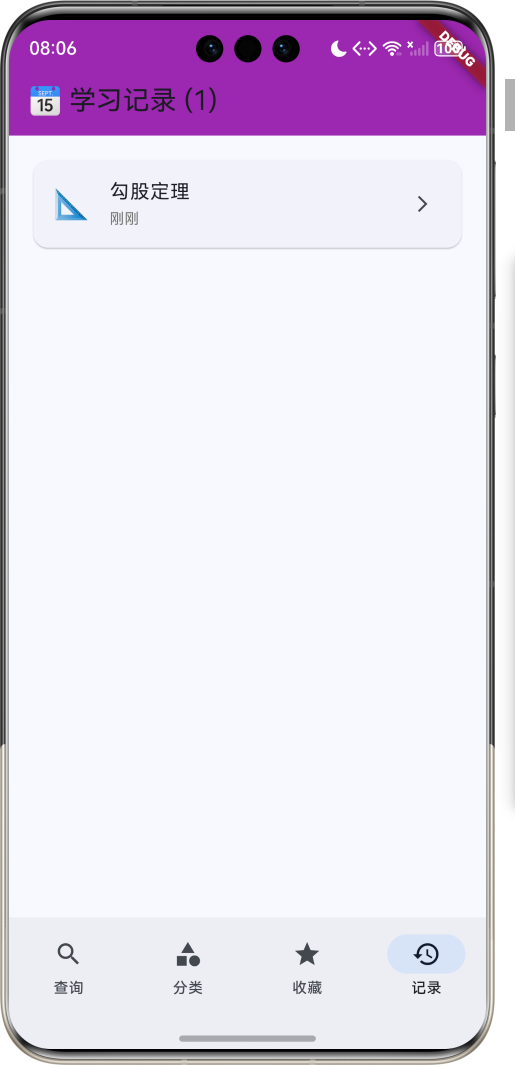
运行效果图
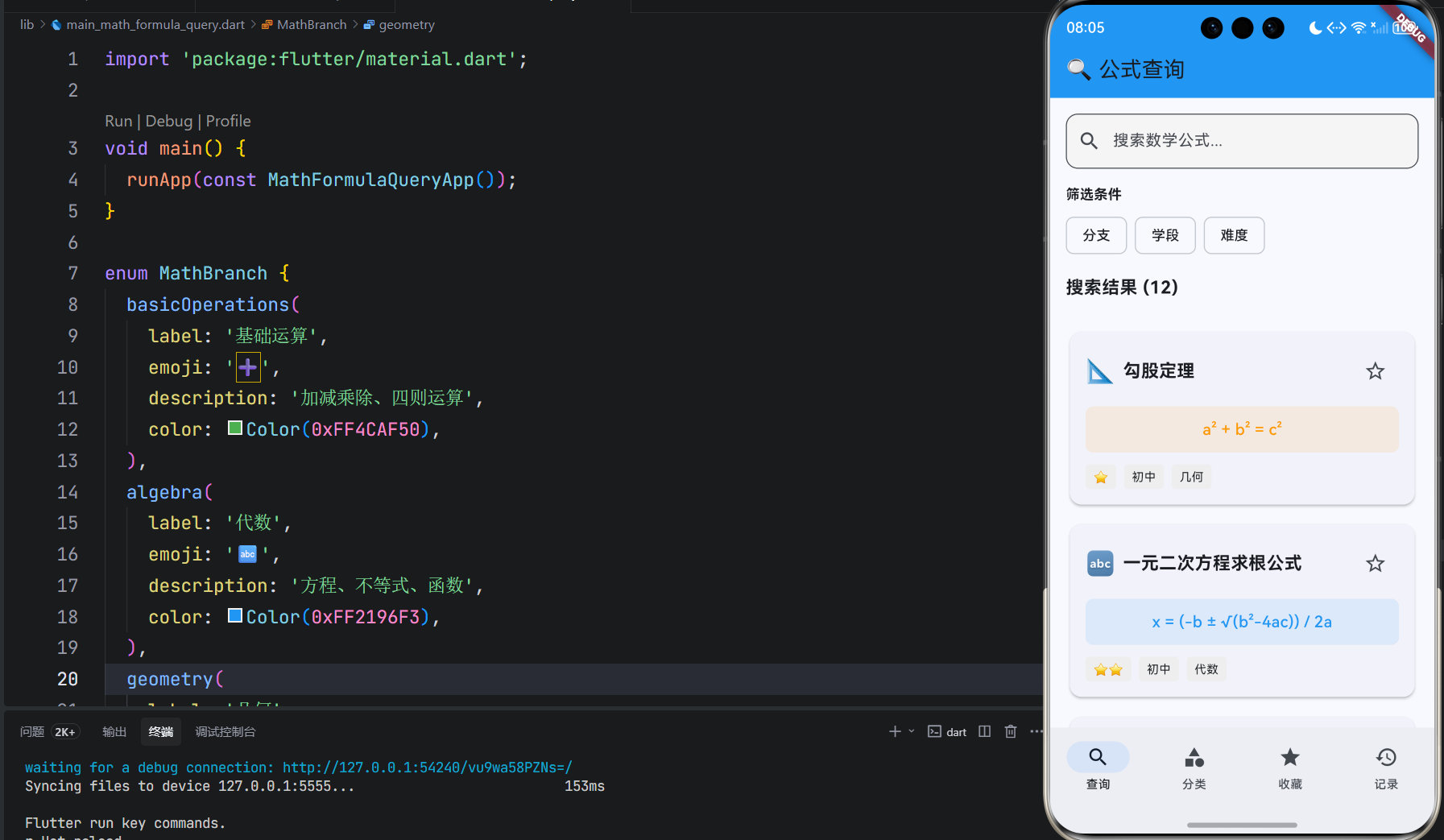
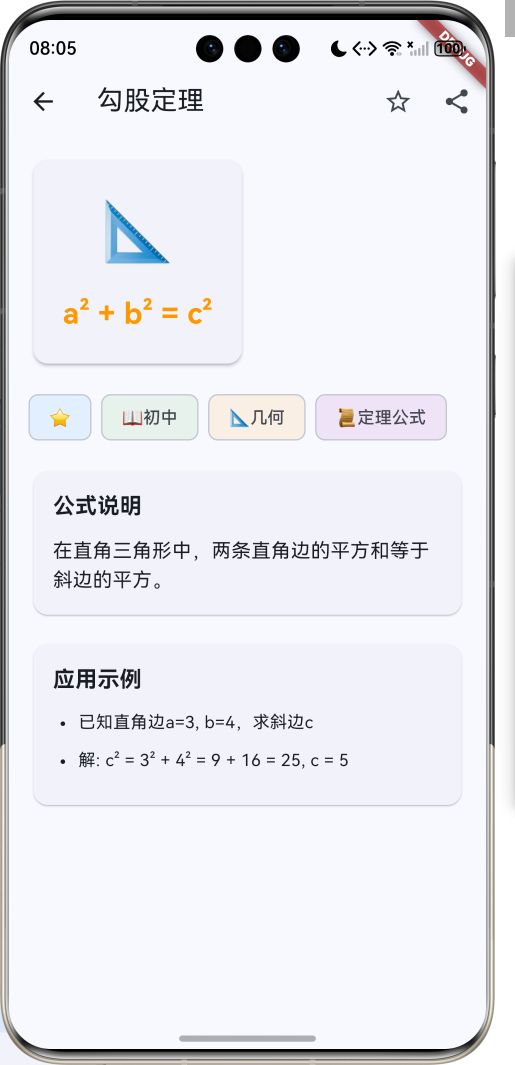
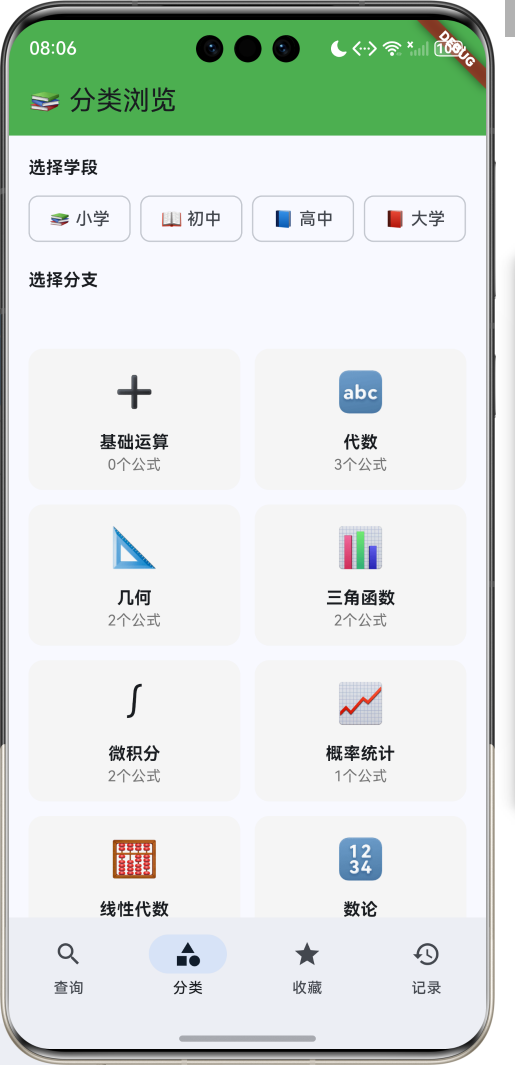
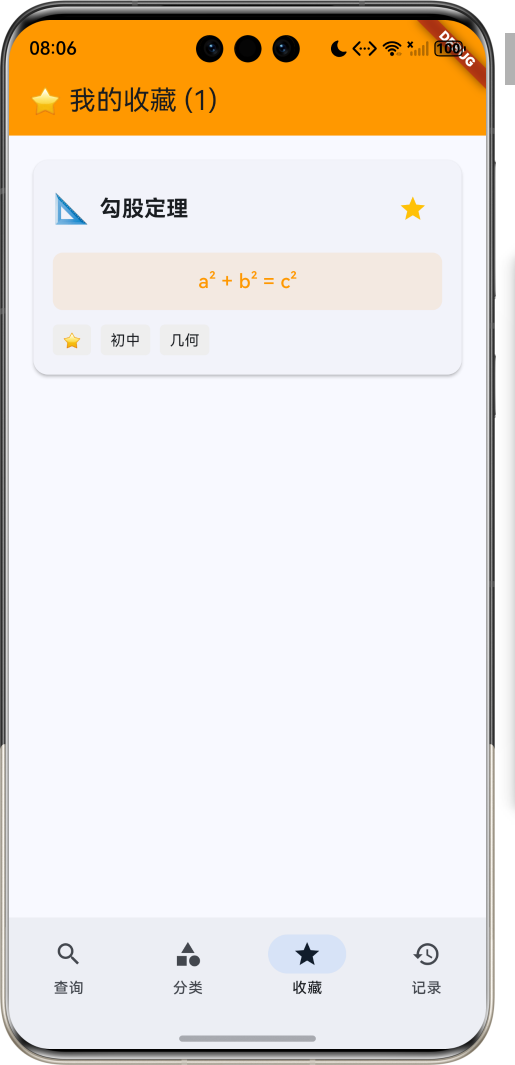
1.1 应用简介
数学公式查询是一款教育学习应用,为用户提供从小学到大学的常用数学公式查询服务。应用涵盖代数、几何、三角函数、微积分、概率统计等多个数学分支,分类清晰,检索便捷,是学习数学的必备工具。
应用以理性的蓝色为主色调,象征数学的严谨与逻辑。涵盖公式查询、分类浏览、收藏管理、学习记录四大模块。用户可以快速查找公式、浏览分类、收藏常用公式、查看学习历史,提升数学学习效率。
1.2 核心功能
| 功能模块 | 功能描述 | 实现方式 |
|---|---|---|
| 公式查询 | 关键词搜索、分类筛选 | 搜索算法 |
| 分类浏览 | 按学段、学科分类 | 树形结构 |
| 公式详情 | 公式展示、说明、示例 | 详情页面 |
| 收藏管理 | 收藏常用公式 | 本地存储 |
| 学习记录 | 查看历史记录 | 时间轴 |
| 公式笔记 | 添加个人笔记 | 文本编辑 |
1.3 数学分支定义
| 序号 | 分支名称 | Emoji | 描述 |
|---|---|---|---|
| 1 | 基础运算 | ➕ | 加减乘除、四则运算 |
| 2 | 代数 | 🔤 | 方程、不等式、函数 |
| 3 | 几何 | 📐 | 平面几何、立体几何 |
| 4 | 三角函数 | 📊 | 正弦、余弦、正切 |
| 5 | 微积分 | ∫ | 导数、积分、极限 |
| 6 | 概率统计 | 📈 | 概率、统计、分布 |
| 7 | 线性代数 | 🧮 | 矩阵、向量、行列式 |
| 8 | 数论 | 🔢 | 质数、因数、同余 |
1.4 学段分类定义
| 序号 | 学段名称 | Emoji | 包含内容 |
|---|---|---|---|
| 1 | 小学 | 📚 | 基础运算、简单几何 |
| 2 | 初中 | 📖 | 代数基础、平面几何 |
| 3 | 高中 | 📘 | 函数、三角、解析几何 |
| 4 | 大学 | 📕 | 微积分、线性代数、概率 |
1.5 公式难度定义
| 序号 | 难度等级 | Emoji | 描述 |
|---|---|---|---|
| 1 | 基础 | ⭐ | 基本公式,容易理解 |
| 2 | 中等 | ⭐⭐ | 需要一定基础 |
| 3 | 进阶 | ⭐⭐⭐ | 需要深入学习 |
| 4 | 高级 | ⭐⭐⭐⭐ | 专业级别 |
1.6 公式类型定义
| 序号 | 类型名称 | Emoji | 示例 |
|---|---|---|---|
| 1 | 定义公式 | 📝 | 圆的面积公式 |
| 2 | 定理公式 | 📜 | 勾股定理 |
| 3 | 法则公式 | ⚖️ | 分配律 |
| 4 | 恒等式 | ≡ | 三角恒等式 |
| 5 | 不等式 | ≠ | 均值不等式 |
1.7 技术栈
| 技术领域 | 技术选型 | 版本要求 |
|---|---|---|
| 开发框架 | Flutter | >= 3.0.0 |
| 编程语言 | Dart | >= 2.17.0 |
| 状态管理 | Provider | >= 6.0.0 |
| 数据持久化 | shared_preferences | >= 2.0.0 |
| 数学渲染 | flutter_math_fork | >= 0.6.0 |
| 设计规范 | Material Design 3 | - |
| 目标平台 | 鸿蒙OS / iOS / Android | API 21+ |
1.8 项目结构
lib/
└── main_math_formula_query.dart
    ├── MathFormulaQueryApp           # 应用入口
    ├── MathBranch                    # 数学分支枚举
    ├── EducationLevel                # 学段分类枚举
    ├── DifficultyLevel               # 难度等级枚举
    ├── FormulaType                   # 公式类型枚举
    ├── MathFormula                   # 数学公式模型
    ├── FormulaCategory               # 公式分类模型
    ├── MathFormulaQueryHomePage      # 主页面(底部导航)
    ├── _buildQueryPage               # 查询页面
    ├── _buildCategoryPage            # 分类页面
    ├── _buildFavoritesPage           # 收藏页面
    ├── _buildHistoryPage             # 记录页面
    ├── FormulaDetailPage             # 公式详情页
    └── FormulaCard                   # 公式卡片组件
二、系统架构
2.1 整体架构图
2.2 类图设计
2.3 页面导航流程
2.4 公式查询流程
三、核心模块设计
3.1 数据模型设计
3.1.1 数学分支枚举 (MathBranch)
enum MathBranch {
  basicOperations(
    label: '基础运算',
    emoji: '➕',
    description: '加减乘除、四则运算',
    color: Color(0xFF4CAF50),
  ),
  algebra(
    label: '代数',
    emoji: '🔤',
    description: '方程、不等式、函数',
    color: Color(0xFF2196F3),
  ),
  geometry(
    label: '几何',
    emoji: '📐',
    description: '平面几何、立体几何',
    color: Color(0xFFFF9800),
  ),
  trigonometry(
    label: '三角函数',
    emoji: '📊',
    description: '正弦、余弦、正切',
    color: Color(0xFF9C27B0),
  ),
  calculus(
    label: '微积分',
    emoji: '∫',
    description: '导数、积分、极限',
    color: Color(0xFFF44336),
  ),
  probability(
    label: '概率统计',
    emoji: '📈',
    description: '概率、统计、分布',
    color: Color(0xFF00BCD4),
  ),
  linearAlgebra(
    label: '线性代数',
    emoji: '🧮',
    description: '矩阵、向量、行列式',
    color: Color(0xFF607D8B),
  ),
  numberTheory(
    label: '数论',
    emoji: '🔢',
    description: '质数、因数、同余',
    color: Color(0xFF795548),
  );

  final String label;
  final String emoji;
  final String description;
  final Color color;
}
3.1.2 学段分类枚举 (EducationLevel)
enum EducationLevel {
  primary(label: '小学', emoji: '📚'),
  junior(label: '初中', emoji: '📖'),
  senior(label: '高中', emoji: '📘'),
  university(label: '大学', emoji: '📕');

  final String label;
  final String emoji;
}
3.1.3 数学公式模型 (MathFormula)
class MathFormula {
  final String id;              // 公式ID
  final String name;            // 公式名称
  final String formula;         // 公式表达式
  final MathBranch branch;      // 数学分支
  final EducationLevel level;   // 学段
  final DifficultyLevel difficulty; // 难度
  final FormulaType type;       // 公式类型
  final String description;     // 公式说明
  final List<String> examples;  // 应用示例
  final List<String> tags;      // 标签
  bool isFavorite;              // 是否收藏
  int viewCount;                // 查看次数
  final DateTime createdAt;     // 创建时间

  MathFormula({
    required this.id,
    required this.name,
    required this.formula,
    required this.branch,
    required this.level,
    required this.difficulty,
    required this.type,
    required this.description,
    required this.examples,
    required this.tags,
    this.isFavorite = false,
    this.viewCount = 0,
    required this.createdAt,
  });
}
3.1.4 公式分类模型 (FormulaCategory)
class FormulaCategory {
  final String id;              // 分类ID
  final String name;            // 分类名称
  final MathBranch branch;      // 数学分支
  final EducationLevel level;   // 学段
  final List<MathFormula> formulas; // 公式列表
  final int formulaCount;       // 公式数量

  FormulaCategory({
    required this.id,
    required this.name,
    required this.branch,
    required this.level,
    required this.formulas,
    required this.formulaCount,
  });
}
3.1.5 公式分布统计
3.2 页面结构设计
3.2.1 主页面布局
3.2.2 查询页结构
3.2.3 分类页结构
3.2.4 公式详情页结构
3.3 搜索引擎设计
3.4 收藏管理设计
四、UI设计规范
4.1 配色方案
应用以理性的蓝色为主色调,象征数学的严谨与逻辑:
| 颜色类型 | 色值 | 用途 |
|---|---|---|
| 主色 | #2196F3 (Blue) | 导航、主题元素 |
| 辅助色 | #64B5F6 | 查询页面 |
| 第三色 | #81C784 | 分类页面 |
| 强调色 | #FFB74D | 收藏页面 |
| 背景色 | #FAFAFA | 页面背景 |
| 卡片背景 | #FFFFFF | 公式卡片 |
4.2 数学分支颜色
| 分支 | 色值 | 视觉效果 |
|---|---|---|
| 基础运算 | #4CAF50 | 清新绿色 |
| 代数 | #2196F3 | 理性蓝色 |
| 几何 | #FF9800 | 活力橙色 |
| 三角函数 | #9C27B0 | 优雅紫色 |
| 微积分 | #F44336 | 热情红色 |
| 概率统计 | #00BCD4 | 清爽青色 |
4.3 字体规范
| 元素 | 字号 | 字重 | 颜色 |
|---|---|---|---|
| 页面标题 | 24px | Bold | 主色 |
| 公式名称 | 18px | Bold | #000000 |
| 公式表达式 | 16px | Medium | 主色 |
| 分类标签 | 12px | Regular | 白色 |
| 难度标签 | 12px | Regular | 灰色 |
4.4 组件规范
4.4.1 搜索框设计
┌─────────────────────────────────────┐
│  🔍 搜索数学公式...                  │
└─────────────────────────────────────┘
4.4.2 筛选条件设计
┌─────────────────────────────────────┐
│  学段: [小学] [初中] [高中] [大学]   │
│  分支: [代数] [几何] [三角] [微积分] │
│  难度: [基础] [中等] [进阶] [高级]   │
└─────────────────────────────────────┘
4.4.3 公式卡片设计
┌─────────────────────────────────────┐
│  📐 勾股定理                         │
│                                     │
│  a² + b² = c²                       │
│                                     │
│  难度: ⭐⭐  学段: 初中  分支: 几何  │
│                                     │
│  [收藏] [详情]                       │
└─────────────────────────────────────┘
4.4.4 分类卡片设计
┌─────────────────────────────────────┐
│  🔤 代数                             │
│                                     │
│  方程、不等式、函数                  │
│                                     │
│  公式数量: 35个                      │
└─────────────────────────────────────┘
4.4.5 详情页设计
┌─────────────────────────────────────┐
│  勾股定理                            │
│                                     │
│  ┌─────────────────────────────┐   │
│  │     a² + b² = c²            │   │
│  └─────────────────────────────┘   │
│                                     │
│  难度: ⭐⭐  学段: 初中              │
│                                     │
│  公式说明:                           │
│  在直角三角形中,两条直角边的平方    │
│  和等于斜边的平方。                 │
│                                     │
│  应用示例:                           │
│  已知直角边a=3, b=4,求斜边c        │
│  解: c² = 3² + 4² = 9 + 16 = 25    │
│      c = 5                          │
│                                     │
│  [⭐ 收藏] [📝 笔记] [📤 分享]      │
└─────────────────────────────────────┘
五、核心功能实现
5.1 公式搜索实现
class FormulaSearchEngine {
  final List<MathFormula> formulas;

  FormulaSearchEngine(this.formulas);

  List<MathFormula> search(String keyword, {
    MathBranch? branch,
    EducationLevel? level,
    DifficultyLevel? difficulty,
  }) {
    var results = formulas.where((formula) {
      final matchesKeyword = keyword.isEmpty ||
          formula.name.toLowerCase().contains(keyword.toLowerCase()) ||
          formula.tags.any((tag) => tag.toLowerCase().contains(keyword.toLowerCase())) ||
          formula.description.toLowerCase().contains(keyword.toLowerCase());

      final matchesBranch = branch == null || formula.branch == branch;
      final matchesLevel = level == null || formula.level == level;
      final matchesDifficulty = difficulty == null || formula.difficulty == difficulty;

      return matchesKeyword && matchesBranch && matchesLevel && matchesDifficulty;
    }).toList();

    results.sort((a, b) => b.viewCount.compareTo(a.viewCount));

    return results;
  }
}
5.2 分类管理实现
class CategoryManager {
  final List<MathFormula> formulas;

  CategoryManager(this.formulas);

  Map<MathBranch, List<MathFormula>> groupByBranch() {
    final map = <MathBranch, List<MathFormula>>{};
    for (final formula in formulas) {
      map.putIfAbsent(formula.branch, () => []).add(formula);
    }
    return map;
  }

  Map<EducationLevel, List<MathFormula>> groupByLevel() {
    final map = <EducationLevel, List<MathFormula>>{};
    for (final formula in formulas) {
      map.putIfAbsent(formula.level, () => []).add(formula);
    }
    return map;
  }

  List<MathFormula> getByBranchAndLevel(MathBranch branch, EducationLevel level) {
    return formulas.where((formula) =>
        formula.branch == branch && formula.level == level).toList();
  }
}
5.3 收藏管理实现
class FavoriteManager {
  final List<String> _favoriteIds = [];

  List<String> get favoriteIds => List.unmodifiable(_favoriteIds);

  void addFavorite(String formulaId) {
    if (!_favoriteIds.contains(formulaId)) {
      _favoriteIds.add(formulaId);
    }
  }

  void removeFavorite(String formulaId) {
    _favoriteIds.remove(formulaId);
  }

  bool isFavorite(String formulaId) {
    return _favoriteIds.contains(formulaId);
  }

  void toggleFavorite(String formulaId) {
    if (isFavorite(formulaId)) {
      removeFavorite(formulaId);
    } else {
      addFavorite(formulaId);
    }
  }
}
5.4 历史记录实现
class HistoryManager {
  final List<ViewHistory> _histories = [];

  List<ViewHistory> get histories => List.unmodifiable(_histories);

  void addHistory(MathFormula formula) {
    _histories.insert(0, ViewHistory(
      formulaId: formula.id,
      formulaName: formula.name,
      viewedAt: DateTime.now(),
    ));

    if (_histories.length > 100) {
      _histories.removeLast();
    }
  }

  List<ViewHistory> getRecentHistory({int limit = 20}) {
    return _histories.take(limit).toList();
  }

  void clearHistory() {
    _histories.clear();
  }
}

class ViewHistory {
  final String formulaId;
  final String formulaName;
  final DateTime viewedAt;

  ViewHistory({
    required this.formulaId,
    required this.formulaName,
    required this.viewedAt,
  });
}
5.5 公式详情展示实现
class FormulaDetailPage extends StatelessWidget {
final MathFormula formula;
const FormulaDetailPage({super.key, required this.formula});
Widget build(BuildContext context) {
return Scaffold(
appBar: AppBar(
title: Text(formula.name),
actions: [
IconButton(
icon: Icon(
formula.isFavorite ? Icons.star : Icons.star_border,
color: formula.isFavorite ? Colors.amber : null,
),
onPressed: () {
// Toggle favorite
},
),
IconButton(
icon: const Icon(Icons.share),
onPressed: () {
// Share formula
},
),
],
),
body: SingleChildScrollView(
padding: const EdgeInsets.all(16),
child: Column(
crossAxisAlignment: CrossAxisAlignment.start,
children: [
_buildFormulaCard(),
const SizedBox(height: 16),
_buildTags(),
const SizedBox(height: 16),
_buildDescription(),
const SizedBox(height: 16),
_buildExamples(),
],
),
),
);
}
Widget _buildFormulaCard() {
return Card(
elevation: 2,
child: Padding(
padding: const EdgeInsets.all(24),
child: Center(
child: Text(
formula.formula,
style: const TextStyle(
fontSize: 24,
fontWeight: FontWeight.bold,
),
),
),
),
);
}
}
六、交互设计
6.1 查询流程
6.2 分类浏览流程
6.3 收藏管理流程
七、扩展功能规划
7.1 后续版本规划
7.2 功能扩展建议
7.2.1 公式渲染
渲染功能:
- LaTeX公式渲染
- 数学符号美化
- 公式动画展示
- 手写公式识别
7.2.2 学习辅助
辅助功能:
- 公式推导过程
- 相关知识点
- 练习题推荐
- 学习路径规划
7.2.3 社交功能
社交功能:
- 公式分享
- 学习笔记分享
- 知识问答
- 学习小组
八、注意事项
8.1 开发注意事项
-
公式渲染:确保数学公式正确显示
-
搜索性能:大量公式需优化搜索算法
-
数据管理:公式数据需分类清晰
-
用户体验:操作流程需简洁直观
-
数据安全:用户数据需保护
8.2 常见问题
| 问题 | 原因 | 解决方案 |
|---|---|---|
| 公式显示异常 | 渲染问题 | 使用专业渲染库 |
| 搜索结果不准确 | 算法问题 | 优化搜索算法 |
| 分类混乱 | 数据问题 | 规范分类标准 |
| 加载缓慢 | 数据量大 | 分页加载优化 |
| 收藏丢失 | 存储问题 | 本地持久化 |
8.3 使用技巧
📐 数学公式查询技巧 📐
搜索技巧
- 使用关键词快速定位公式
- 结合筛选条件精确查找
- 利用标签缩小搜索范围
- 查看热门推荐发现新公式
学习技巧
- 收藏常用公式便于复习
- 添加个人笔记加深理解
- 查看应用示例掌握用法
- 定期复习历史记录
分类浏览技巧
- 按学段查找适合的公式
- 按分支系统学习知识点
- 按难度循序渐进学习
- 关注相关公式拓展知识
九、运行说明
9.1 环境要求
| 环境 | 版本要求 |
|---|---|
| Flutter SDK | >= 3.0.0 |
| Dart SDK | >= 2.17.0 |
| 存储空间 | 建议50MB以上 |
| 鸿蒙OS | API 21+ |
9.2 运行命令
# 查看可用设备
flutter devices

# 运行到iOS设备
flutter run -t lib/main_math_formula_query.dart

# 运行到Android设备
flutter run -t lib/main_math_formula_query.dart

# 运行到Web服务器
flutter run -d web-server -t lib/main_math_formula_query.dart --web-port 8145

# 运行到鸿蒙设备
flutter run -d 127.0.0.1:5555 lib/main_math_formula_query.dart

# 代码分析
flutter analyze lib/main_math_formula_query.dart
十、总结
数学公式查询应用通过公式查询、分类浏览、收藏管理、学习记录四大模块,为用户提供了一个便捷的数学公式查询平台。应用涵盖从小学到大学的常用数学公式,分类清晰,检索便捷,是学习数学的必备工具。
核心功能涵盖公式查询、分类浏览、收藏管理、学习记录四大模块。公式查询支持关键词搜索和多种筛选条件;分类浏览按学段和分支系统组织;收藏管理方便用户保存常用公式;学习记录帮助用户回顾学习历程。
应用采用 Material Design 3 设计规范,以理性的蓝色为主色调,象征数学的严谨与逻辑。通过本应用,希望能够帮助用户快速查找数学公式,提升学习效率,掌握数学知识。
数学公式查询——学习数学的必备工具

作为“人工智能6S店”的官方数字引擎,为AI开发者与企业提供一个覆盖软硬件全栈、一站式门户。
更多推荐


 5
5 0
0- 0


 已为社区贡献10条内容

所有评论(0)