
Flutter 框架跨平台鸿蒙开发 - 天气生活指数应用
运行效果图天气生活指数是一款智能天气应用,不仅提供天气预报,还提供穿衣、运动、出行等生活指数建议。应用内置多种生活指数,根据天气情况智能推荐,帮助用户合理安排日常生活。应用以清新的蓝色为主色调,象征天空与清新。涵盖天气预报、生活指数、城市管理、设置中心四大模块。用户可以查看实时天气、获取生活建议、管理关注城市、设置提醒功能。序号指数名称Emoji描述1穿衣指数👔根据温度推荐穿着2运动指数🏃是否
天气生活指数应用
欢迎加入开源鸿蒙跨平台社区:
https://openharmonycrossplatform.csdn.net
一、项目概述
运行效果图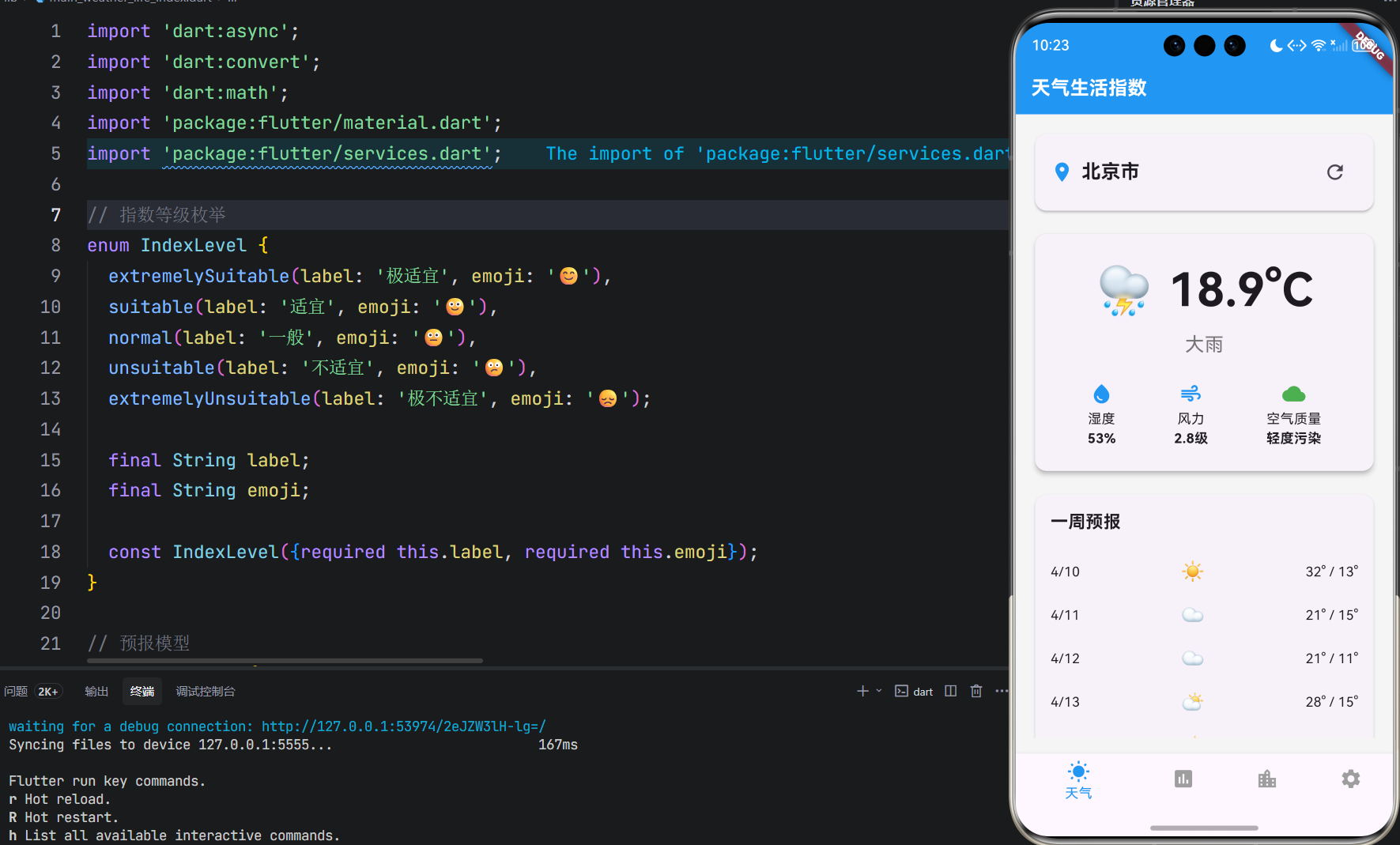
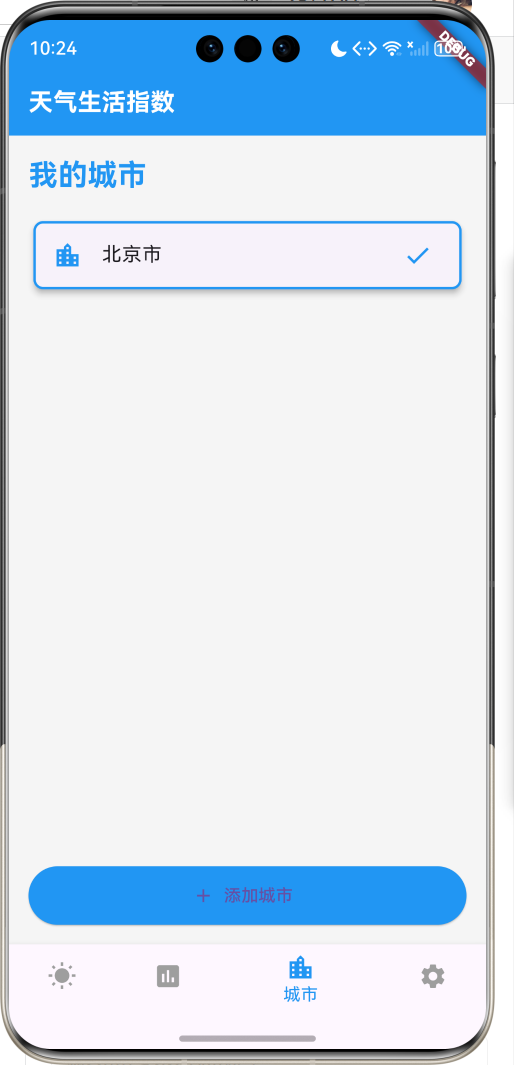
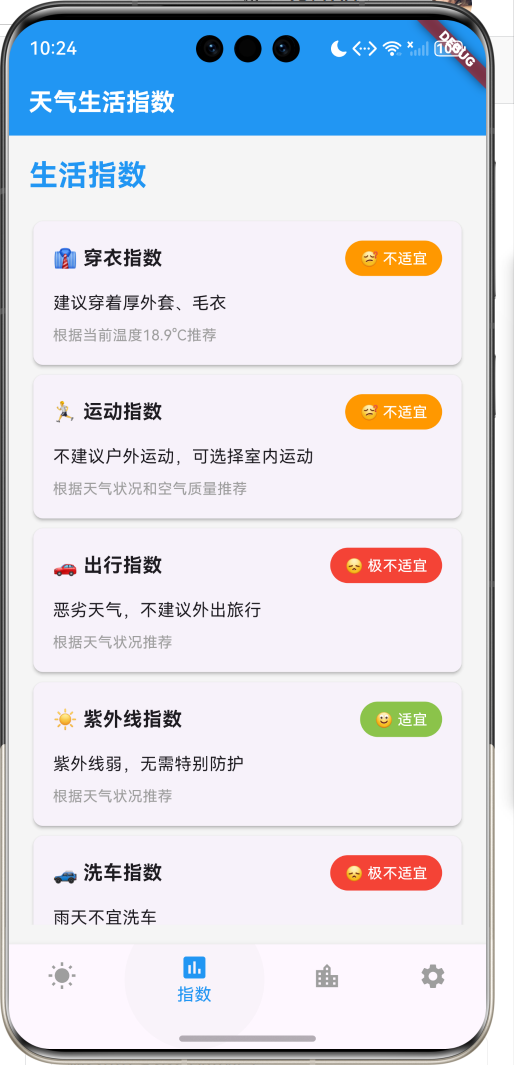
1.1 应用简介
天气生活指数是一款智能天气应用,不仅提供天气预报,还提供穿衣、运动、出行等生活指数建议。应用内置多种生活指数,根据天气情况智能推荐,帮助用户合理安排日常生活。
应用以清新的蓝色为主色调,象征天空与清新。涵盖天气预报、生活指数、城市管理、设置中心四大模块。用户可以查看实时天气、获取生活建议、管理关注城市、设置提醒功能。
1.2 核心功能
| 功能模块 | 功能描述 | 实现方式 |
|---|---|---|
| 天气预报 | 实时天气和预报 | API调用 |
| 生活指数 | 穿衣、运动等建议 | 智能推荐 |
| 城市管理 | 管理关注城市 | 本地存储 |
| 天气预警 | 恶劣天气提醒 | 推送通知 |
1.3 生活指数定义
| 序号 | 指数名称 | Emoji | 描述 |
|---|---|---|---|
| 1 | 穿衣指数 | 👔 | 根据温度推荐穿着 |
| 2 | 运动指数 | 🏃 | 是否适合户外运动 |
| 3 | 出行指数 | 🚗 | 是否适合外出旅行 |
| 4 | 紫外线指数 | ☀️ | 紫外线强度提醒 |
| 5 | 洗车指数 | 🚙 | 是否适合洗车 |
| 6 | 感冒指数 | 🤧 | 感冒风险提醒 |
| 7 | 空气质量 | 🌬️ | 空气质量指数 |
| 8 | 过敏指数 | 🤧 | 过敏风险提醒 |
1.4 指数等级定义
| 序号 | 等级名称 | Emoji | 描述 |
|---|---|---|---|
| 1 | 极适宜 | 😊 | 非常适合 |
| 2 | 适宜 | 🙂 | 比较适合 |
| 3 | 一般 | 😐 | 一般般 |
| 4 | 不适宜 | 😕 | 不太适合 |
| 5 | 极不适宜 | 😞 | 非常不适合 |
1.5 技术栈
| 技术领域 | 技术选型 | 版本要求 |
|---|---|---|
| 开发框架 | Flutter | >= 3.0.0 |
| 编程语言 | Dart | >= 2.17.0 |
| 设计规范 | Material Design 3 | - |
| 网络请求 | http | - |
| 本地存储 | shared_preferences | - |
| 目标平台 | 鸿蒙OS / Web | API 21+ |
1.6 项目结构
lib/
└── main_weather_life_index.dart
    ├── WeatherLifeIndexApp     # 应用入口
    ├── Weather                # 天气模型
    ├── LifeIndex              # 生活指数模型
    ├── IndexLevel             # 指数等级枚举
    ├── WeatherService         # 天气服务
    ├── WeatherController      # 天气控制器
    ├── WeatherHomePage        # 主页面
    ├── _buildWeatherPage      # 天气页面
    ├── _buildIndexPage        # 指数页面
    ├── _buildCitiesPage       # 城市页面
    └── _buildSettingsPage     # 设置页面
二、系统架构
2.1 整体架构图
2.2 类图设计
2.3 页面导航流程
2.4 天气获取流程
三、核心模块设计
3.1 数据模型设计
3.1.1 天气模型 (Weather)
class Weather {
  final String city;
  final double temperature;
  final String condition;
  final int humidity;
  final double windSpeed;
  final int aqi;
  final List<Forecast> forecasts;

  Weather({
    required this.city,
    required this.temperature,
    required this.condition,
    required this.humidity,
    required this.windSpeed,
    required this.aqi,
    required this.forecasts,
  });
}
3.1.2 生活指数模型 (LifeIndex)
class LifeIndex {
  final String name;
  final String emoji;
  final IndexLevel level;
  final String suggestion;
  final String detail;

  LifeIndex({
    required this.name,
    required this.emoji,
    required this.level,
    required this.suggestion,
    required this.detail,
  });
}
3.1.3 指数等级枚举 (IndexLevel)
enum IndexLevel {
  extremelySuitable(label: '极适宜', emoji: '😊'),
  suitable(label: '适宜', emoji: '🙂'),
  normal(label: '一般', emoji: '😐'),
  unsuitable(label: '不适宜', emoji: '😕'),
  extremelyUnsuitable(label: '极不适宜', emoji: '😞');

  final String label;
  final String emoji;

  const IndexLevel({required this.label, required this.emoji});
}
3.2 页面结构设计
3.2.1 主页面布局
3.2.2 天气页面结构
3.2.3 指数页面结构
3.3 生活指数计算逻辑
3.4 天气预警逻辑
四、UI设计规范
4.1 配色方案
应用以清新的蓝色为主色调,象征天空与清新:
| 颜色类型 | 色值 | 用途 |
|---|---|---|
| 主色 | #2196F3 (Blue) | 导航、主题元素 |
| 辅助色 | #64B5F6 | 按钮、强调 |
| 第三色 | #BBDEFB | 背景、卡片 |
| 背景色 | #F5F5F5 | 页面背景 |
| 卡片背景 | #FFFFFF | 信息卡片 |
4.2 天气状况色彩映射
| 天气状况 | 色值 | 视觉效果 |
|---|---|---|
| 晴天 | #FFD700 | 金色 |
| 多云 | #87CEEB | 天蓝色 |
| 阴天 | #A9A9A9 | 灰色 |
| 雨天 | #4682B4 | 深蓝色 |
| 雪天 | #FFFFFF | 白色 |
4.3 指数等级色彩映射
| 等级 | 色值 | 视觉效果 |
|---|---|---|
| 极适宜 | #4CAF50 | 绿色 |
| 适宜 | #8BC34A | 浅绿色 |
| 一般 | #FFC107 | 黄色 |
| 不适宜 | #FF9800 | 橙色 |
| 极不适宜 | #F44336 | 红色 |
4.4 字体规范
| 元素 | 字号 | 字重 | 颜色 |
|---|---|---|---|
| 页面标题 | 24px | Bold | 主色 |
| 温度数字 | 48px | Bold | #333333 |
| 天气状况 | 20px | Medium | #666666 |
| 指数名称 | 16px | Medium | #333333 |
| 建议文本 | 14px | Regular | #666666 |
4.5 组件规范
4.5.1 天气卡片
┌─────────────────────────────────────┐
│  北京市                              │
│                                     │
│         ☀️ 晴                       │
│         25°C                        │
│                                     │
│  湿度: 45%    风力: 3级             │
│  空气质量: 优                        │
└─────────────────────────────────────┘
4.5.2 生活指数卡片
┌─────────────────────────────────────┐
│  👔 穿衣指数                        │
│  ─────────────────────────────────  │
│  😊 极适宜                          │
│                                     │
│  建议穿着短袖、短裤等夏季服装        │
└─────────────────────────────────────┘
4.5.3 预报卡片
┌─────────────────────────────────────┐
│  今日预报                            │
│  ─────────────────────────────────  │
│  ☀️ 晴      25°C / 18°C             │
│  湿度: 45%   风力: 3级              │
└─────────────────────────────────────┘
4.5.4 城市列表
┌─────────────────────────────────────┐
│  我的城市                            │
│  ─────────────────────────────────  │
│  📍 北京市      ☀️ 25°C             │
│  上海市        ☁️ 23°C              │
│  广州市        🌧️ 28°C              │
│                                     │
│  [添加城市]                         │
└─────────────────────────────────────┘
五、核心功能实现
5.1 天气服务实现
class WeatherService {
  Future<Weather> getWeather(String city) async {
    // 模拟API调用
    await Future.delayed(Duration(seconds: 1));

    final random = Random();
    final conditions = ['晴', '多云', '阴', '小雨', '大雨'];

    return Weather(
      city: city,
      temperature: 20 + random.nextDouble() * 15,
      condition: conditions[random.nextInt(conditions.length)],
      humidity: 40 + random.nextInt(40),
      windSpeed: 1 + random.nextDouble() * 5,
      aqi: 20 + random.nextInt(100),
      forecasts: _generateForecasts(),
    );
  }

  Future<List<LifeIndex>> getLifeIndices(String city) async {
    // 模拟获取生活指数
    await Future.delayed(Duration(seconds: 1));

    return [
      LifeIndex(
        name: '穿衣指数',
        emoji: '👔',
        level: IndexLevel.extremelySuitable,
        suggestion: '建议穿着短袖、短裤等夏季服装',
        detail: '天气炎热,穿着轻薄透气的衣物',
      ),
      LifeIndex(
        name: '运动指数',
        emoji: '🏃',
        level: IndexLevel.suitable,
        suggestion: '适合户外运动,注意防晒',
        detail: '天气较好,适合进行户外运动',
      ),
      // 更多指数...
    ];
  }
}
5.2 天气控制器实现
class WeatherController {
  final WeatherService _weatherService;
  final DataManager _dataManager;
  Weather? currentWeather;
  List<LifeIndex> lifeIndices = [];
  List<String> cities = ['北京市'];

  WeatherController(this._weatherService, this._dataManager);

  Future<void> initialize() async {
    await loadCities();
    if (cities.isNotEmpty) {
      await loadWeather(cities[0]);
      await loadLifeIndices(cities[0]);
    }
  }

  Future<void> loadWeather(String city) async {
    currentWeather = await _weatherService.getWeather(city);
  }

  Future<void> loadLifeIndices(String city) async {
    lifeIndices = await _weatherService.getLifeIndices(city);
  }

  Future<void> addCity(String city) async {
    if (!cities.contains(city)) {
      cities.add(city);
      await _dataManager.saveCities(cities);
    }
  }

  void removeCity(String city) {
    cities.remove(city);
    _dataManager.saveCities(cities);
  }

  Future<void> loadCities() async {
    final savedCities = await _dataManager.loadCities();
    if (savedCities.isNotEmpty) {
      cities = savedCities;
    }
  }
}
5.3 数据管理实现
class DataManager {
  static const String _citiesKey = 'cities';

  // 模拟本地存储
  static Map<String, String> _storage = {};

  Future<List<String>> loadCities() async {
    final jsonString = _storage[_citiesKey];
    if (jsonString == null) return [];

    final jsonList = json.decode(jsonString) as List;
    return jsonList.map((json) => json.toString()).toList();
  }

  Future<void> saveCities(List<String> cities) async {
    _storage[_citiesKey] = json.encode(cities);
  }
}
5.4 生活指数计算实现
class LifeIndexCalculator {
  static LifeIndex calculateDressingIndex(Weather weather) {
    IndexLevel level;
    String suggestion;

    if (weather.temperature > 30) {
      level = IndexLevel.extremelySuitable;
      suggestion = '建议穿着短袖、短裤等夏季服装';
    } else if (weather.temperature > 25) {
      level = IndexLevel.suitable;
      suggestion = '建议穿着轻薄的长袖衬衫';
    } else if (weather.temperature > 20) {
      level = IndexLevel.normal;
      suggestion = '建议穿着长袖、薄外套';
    } else if (weather.temperature > 15) {
      level = IndexLevel.unsuitable;
      suggestion = '建议穿着厚外套、毛衣';
    } else {
      level = IndexLevel.extremelyUnsuitable;
      suggestion = '建议穿着羽绒服、保暖衣物';
    }

    return LifeIndex(
      name: '穿衣指数',
      emoji: '👔',
      level: level,
      suggestion: suggestion,
      detail: '根据当前温度${weather.temperature.toStringAsFixed(1)}°C推荐',
    );
  }

  static LifeIndex calculateExerciseIndex(Weather weather) {
    IndexLevel level;
    String suggestion;

    if (weather.condition.contains('雨')) {
      level = IndexLevel.unsuitable;
      suggestion = '不建议户外运动,可选择室内运动';
    } else if (weather.temperature > 35 || weather.temperature < 5) {
      level = IndexLevel.extremelyUnsuitable;
      suggestion = '极端天气,不建议户外运动';
    } else if (weather.aqi > 150) {
      level = IndexLevel.unsuitable;
      suggestion = '空气质量较差,不建议户外运动';
    } else {
      level = IndexLevel.suitable;
      suggestion = '适合户外运动,注意防晒补水';
    }

    return LifeIndex(
      name: '运动指数',
      emoji: '🏃',
      level: level,
      suggestion: suggestion,
      detail: '根据天气状况和空气质量推荐',
    );
  }
}
六、交互设计
6.1 天气查看交互流程
6.2 指数查看交互流程
6.3 城市管理交互流程
七、扩展功能规划
7.1 后续版本规划
7.2 功能扩展建议
7.2.1 天气地图
地图功能:
- 实时天气地图
- 降水雷达图
- 气温分布图
- 空气质量地图
7.2.2 语音播报
播报功能:
- 天气语音播报
- 生活指数播报
- 天气预警播报
- 自定义播报时间
7.2.3 桌面小组件
小组件功能:
- 实时天气小组件
- 一周预报小组件
- 生活指数小组件
- 自定义样式
八、注意事项
8.1 开发注意事项
-
API限制:天气API可能有调用频率限制
-
数据缓存:天气数据需要合理缓存,避免频繁请求
-
位置权限:获取当前位置需要申请权限
-
网络依赖:天气查询需要网络连接,需处理离线情况
-
兼容性:确保在不同设备上的显示效果一致
8.2 常见问题
| 问题 | 原因 | 解决方案 |
|---|---|---|
| 天气数据不准确 | API数据延迟 | 增加数据更新频率 |
| 定位失败 | 权限未开启 | 引导用户开启权限 |
| 城市搜索失败 | 城市名称错误 | 增加模糊搜索 |
| 指数计算错误 | 算法逻辑问题 | 优化计算逻辑 |
| 应用崩溃 | 空指针异常 | 增加空值检查 |
8.3 使用技巧
🌤️ 天气生活指数使用技巧 🌤️
天气查看
- 添加常用城市方便切换
- 关注天气预警信息
- 查看一周预报规划行程
- 注意空气质量变化
生活指数
- 根据穿衣指数选择服装
- 参考运动指数安排锻炼
- 关注出行指数规划行程
- 注意紫外线防护
城市管理
- 添加家乡和工作城市
- 定期清理不常用城市
- 关注出差目的地天气
- 设置默认城市
设置优化
- 开启天气预警通知
- 设置温度单位偏好
- 选择更新频率
- 开启自动定位
九、运行说明
9.1 环境要求
| 环境 | 版本要求 |
|---|---|
| Flutter SDK | >= 3.0.0 |
| Dart SDK | >= 2.17.0 |
| 鸿蒙OS | API 21+ |
| Web浏览器 | Chrome 90+ |
| 网络连接 | 必需 |
9.2 运行命令
# 查看可用设备
flutter devices

# 运行到Web服务器
flutter run -d web-server -t lib/main_weather_life_index.dart --web-port 8155

# 运行到鸿蒙设备
flutter run -d 127.0.0.1:5555 lib/main_weather_life_index.dart

# 代码分析
flutter analyze lib/main_weather_life_index.dart
十、总结
天气生活指数应用通过天气预报、生活指数、城市管理、设置中心四大模块,为用户提供了一个全面的天气服务平台。用户不仅可以查看实时天气和预报,还能获取穿衣、运动、出行等生活指数建议,帮助合理安排日常生活。
核心功能包括天气查询、生活指数、城市管理、天气预警等。应用采用清新的蓝色为主色调,象征天空与清新,界面简洁美观,交互流畅自然。
通过本应用,希望能够帮助用户更好地了解天气情况,根据生活指数合理安排活动,提升生活质量。
天气生活指数——智能天气,智慧生活

作为“人工智能6S店”的官方数字引擎,为AI开发者与企业提供一个覆盖软硬件全栈、一站式门户。
更多推荐


 7
7 0
0- 0


 已为社区贡献30条内容

所有评论(0)